").attr(n.scriptAttrs||{}).prop({charset:n.scriptCharset,src:n.url}).on("load error",i=function(e){r.remove(),i=null,e&&t("error"===e.type?404:200,e.type)}),C.head.appendChild(r[0])},abort:function(){i&&i()}}});var Jt,Kt=[],Zt=/(=)\?(?=&|$)|\?\?/;ce.ajaxSetup({jsonp:"callback",jsonpCallback:function(){var e=Kt.pop()||ce.expando+"_"+jt.guid++;return this[e]=!0,e}}),ce.ajaxPrefilter("json jsonp",function(e,t,n){var r,i,o,a=!1!==e.jsonp&&(Zt.test(e.url)?"url":"string"==typeof e.data&&0===(e.contentType||"").indexOf("application/x-www-form-urlencoded")&&Zt.test(e.data)&&"data");if(a||"jsonp"===e.dataTypes[0])return r=e.jsonpCallback=v(e.jsonpCallback)?e.jsonpCallback():e.jsonpCallback,a?e[a]=e[a].replace(Zt,"$1"+r):!1!==e.jsonp&&(e.url+=(At.test(e.url)?"&":"?")+e.jsonp+"="+r),e.converters["script json"]=function(){return o||ce.error(r+" was not called"),o[0]},e.dataTypes[0]="json",i=ie[r],ie[r]=function(){o=arguments},n.always(function(){void 0===i?ce(ie).removeProp(r):ie[r]=i,e[r]&&(e.jsonpCallback=t.jsonpCallback,Kt.push(r)),o&&v(i)&&i(o[0]),o=i=void 0}),"script"}),le.createHTMLDocument=((Jt=C.implementation.createHTMLDocument("").body).innerHTML="
",2===Jt.childNodes.length),ce.parseHTML=function(e,t,n){return"string"!=typeof e?[]:("boolean"==typeof t&&(n=t,t=!1),t||(le.createHTMLDocument?((r=(t=C.implementation.createHTMLDocument("")).createElement("base")).href=C.location.href,t.head.appendChild(r)):t=C),o=!n&&[],(i=w.exec(e))?[t.createElement(i[1])]:(i=Ae([e],t,o),o&&o.length&&ce(o).remove(),ce.merge([],i.childNodes)));var r,i,o},ce.fn.load=function(e,t,n){var r,i,o,a=this,s=e.indexOf(" ");return-1").append(ce.parseHTML(e)).find(r):e)}).always(n&&function(e,t){a.each(function(){n.apply(this,o||[e.responseText,t,e])})}),this},ce.expr.pseudos.animated=function(t){return ce.grep(ce.timers,function(e){return t===e.elem}).length},ce.offset={setOffset:function(e,t,n){var r,i,o,a,s,u,l=ce.css(e,"position"),c=ce(e),f={};"static"===l&&(e.style.position="relative"),s=c.offset(),o=ce.css(e,"top"),u=ce.css(e,"left"),("absolute"===l||"fixed"===l)&&-1<(o+u).indexOf("auto")?(a=(r=c.position()).top,i=r.left):(a=parseFloat(o)||0,i=parseFloat(u)||0),v(t)&&(t=t.call(e,n,ce.extend({},s))),null!=t.top&&(f.top=t.top-s.top+a),null!=t.left&&(f.left=t.left-s.left+i),"using"in t?t.using.call(e,f):c.css(f)}},ce.fn.extend({offset:function(t){if(arguments.length)return void 0===t?this:this.each(function(e){ce.offset.setOffset(this,t,e)});var e,n,r=this[0];return r?r.getClientRects().length?(e=r.getBoundingClientRect(),n=r.ownerDocument.defaultView,{top:e.top+n.pageYOffset,left:e.left+n.pageXOffset}):{top:0,left:0}:void 0},position:function(){if(this[0]){var e,t,n,r=this[0],i={top:0,left:0};if("fixed"===ce.css(r,"position"))t=r.getBoundingClientRect();else{t=this.offset(),n=r.ownerDocument,e=r.offsetParent||n.documentElement;while(e&&(e===n.body||e===n.documentElement)&&"static"===ce.css(e,"position"))e=e.parentNode;e&&e!==r&&1===e.nodeType&&((i=ce(e).offset()).top+=ce.css(e,"borderTopWidth",!0),i.left+=ce.css(e,"borderLeftWidth",!0))}return{top:t.top-i.top-ce.css(r,"marginTop",!0),left:t.left-i.left-ce.css(r,"marginLeft",!0)}}},offsetParent:function(){return this.map(function(){var e=this.offsetParent;while(e&&"static"===ce.css(e,"position"))e=e.offsetParent;return e||J})}}),ce.each({scrollLeft:"pageXOffset",scrollTop:"pageYOffset"},function(t,i){var o="pageYOffset"===i;ce.fn[t]=function(e){return M(this,function(e,t,n){var r;if(y(e)?r=e:9===e.nodeType&&(r=e.defaultView),void 0===n)return r?r[i]:e[t];r?r.scrollTo(o?r.pageXOffset:n,o?n:r.pageYOffset):e[t]=n},t,e,arguments.length)}}),ce.each(["top","left"],function(e,n){ce.cssHooks[n]=Ye(le.pixelPosition,function(e,t){if(t)return t=Ge(e,n),_e.test(t)?ce(e).position()[n]+"px":t})}),ce.each({Height:"height",Width:"width"},function(a,s){ce.each({padding:"inner"+a,content:s,"":"outer"+a},function(r,o){ce.fn[o]=function(e,t){var n=arguments.length&&(r||"boolean"!=typeof e),i=r||(!0===e||!0===t?"margin":"border");return M(this,function(e,t,n){var r;return y(e)?0===o.indexOf("outer")?e["inner"+a]:e.document.documentElement["client"+a]:9===e.nodeType?(r=e.documentElement,Math.max(e.body["scroll"+a],r["scroll"+a],e.body["offset"+a],r["offset"+a],r["client"+a])):void 0===n?ce.css(e,t,i):ce.style(e,t,n,i)},s,n?e:void 0,n)}})}),ce.each(["ajaxStart","ajaxStop","ajaxComplete","ajaxError","ajaxSuccess","ajaxSend"],function(e,t){ce.fn[t]=function(e){return this.on(t,e)}}),ce.fn.extend({bind:function(e,t,n){return this.on(e,null,t,n)},unbind:function(e,t){return this.off(e,null,t)},delegate:function(e,t,n,r){return this.on(t,e,n,r)},undelegate:function(e,t,n){return 1===arguments.length?this.off(e,"**"):this.off(t,e||"**",n)},hover:function(e,t){return this.on("mouseenter",e).on("mouseleave",t||e)}}),ce.each("blur focus focusin focusout resize scroll click dblclick mousedown mouseup mousemove mouseover mouseout mouseenter mouseleave change select submit keydown keypress keyup contextmenu".split(" "),function(e,n){ce.fn[n]=function(e,t){return 0
TCPView 4.19
ネットワーク
2021/04/03 15:18
説明機能仕様ダウンロード画像使い方
TCP および UDP 接続の状況をリアルタイムで監視
システム上のすべての TCP および UDP 接続の状態をモニタリングできる Windows プログラム。接続状態のリストを表示するほかに、接続の切断やプロセスの終了を行うことが可能で、すべての接続の詳細なリストをファイルに保存することができます。
TCPView の概要
TCPView は、システム上のすべての TCP および UDP エンドポイントの詳細なリストを表示し、プロセス名、リモートアドレス、TCP 接続の状態などの詳細情報を表示する Windows プログラムです。
TCPView の機能
TCPView の主な機能です。
| 機能 |
概要 |
| メイン機能 |
TCP と UDP の通信状態を監視/確認 |
| 機能詳細 |
プロセス名/プロセス ID/プロトコル/状態/ローカルアドレス/ローカルポート/リモートアドレス/リモートポート/作成日時/モジュール名/送信パケット数/受信パケット数/送信バイト数/受信バイト数、を表示 |
| オプション機能 |
・一時停止/再開
・接続を切断
・プロセスを終了
・CSV ファイルに保存
・Whois 検索
・アドレスを名前解決 |
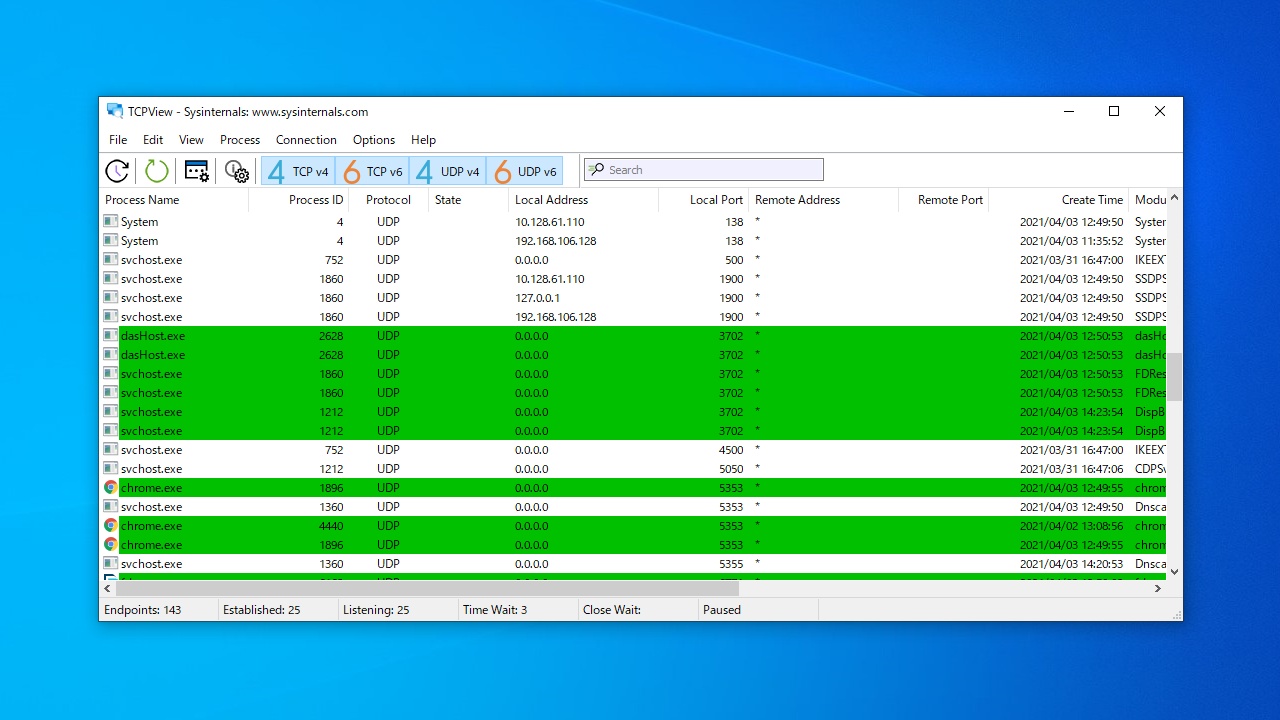
アクティブな TCP および UDP 接続をモニタリングできます
TCPView を使用すると、すべてのアクティブな TCP および UDP 接続(IPv4 および IPv6)の状態をリアルタイムで確認することができます。
接続先の IP アドレスをドメイン名に変換したり、Whois 検索を行ったて接続先を調べたり、検索して表示を絞り込んだり、接続の切断やプロセスの終了を行うことができます。
使いやすい TCP 接続監視ツール
TCPView は、TCP および UDP の接続に何が起こっているのかを今すぐ確認することができる、トラブルシューティングに役立つアプリケーションです。表示を一時停止したり、表示されている内容をテキストファイルに保存してあとで調べることもできます。
機能
- 安全な SFTP、SSL、TLS、FTPS 接続
- 国際化ドメインのサポート
- 高速で安全なクライアント転送
- キープアライブ機能
- リモートファイル検索
- ファイルパーミッション(CHMOD)
- 高度なディレクトリリスト
- .htaccess と .htpasswd の編集
- 自動 S / キーサポート
- お気に入り
- コマンドラインサポート
- FTP / HTTPプロキシ、Socks 4&5のサポート
- 後で再開するために FTP 転送を保存するセッション
- 再帰的なアップロード、ダウンロード、および削除
- コマンドラインサポート
- FTP / HTTP プロキシ、Socks 4&5 のサポート
価格:無料
動作環境:Windows 7|8|8.1|10|11
使用言語:英語
最終更新日:
3年前 (2023/04/12)
ダウンロード数:869
使い方
インストール
1.インストール方法
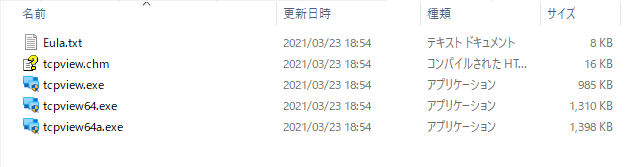
TCPView はインストール不要で使用できます。
- ダウンロードした ZIP ファイルを解凍し、EXE ファイルを実行するとアプリケーションを起動できます。
基本的な使い方
1.通信状態をモニタリングする
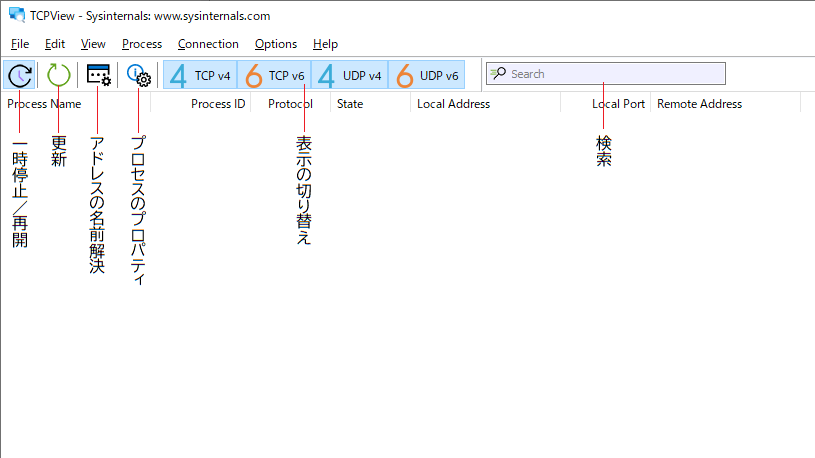
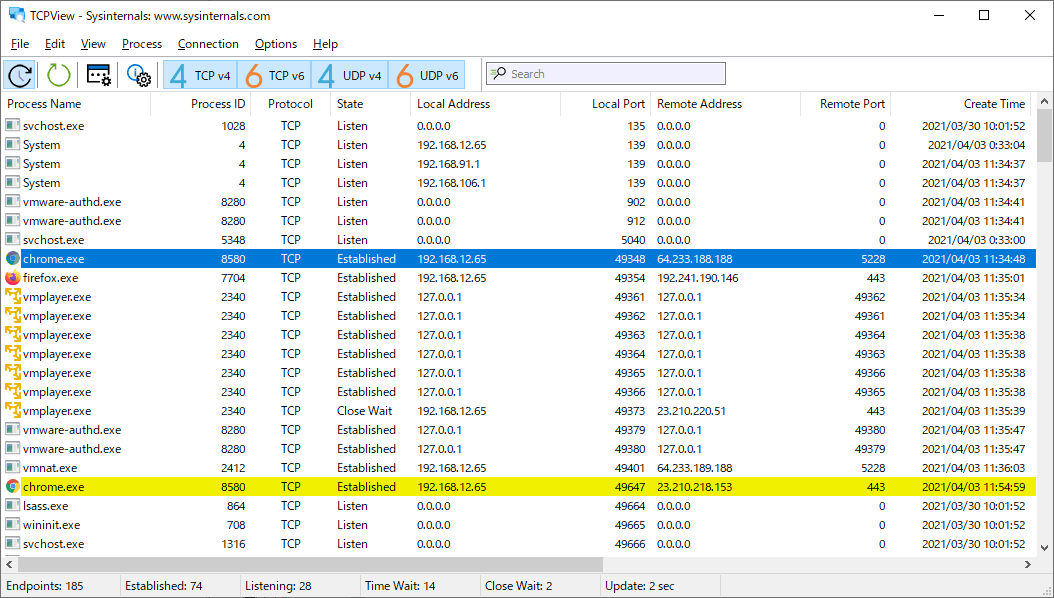
- TCPView を起動すると、システム上のすべての TCP および UDP エンドポイントの詳細なリストが表示されます。

・Process Name:プロセス名
・Process ID:プロセス ID
・Protocol:プロトコル
・State:状態
・Local Address:ローカルアドレス
・Local Port:ローカルポート
・Remote Address:リモートアドレス
・Remote Port:リモートポート
・Create Time:作成日時
・Module Name:モジュール名
・Sent Packets:送信パケット数
・Recv Packets:受信パケット数
・Sent Bytes:送信バイト数
・Recv Bytes:受信バイト数
2.ツールバー

メニュー
1.File

・Save:現在表示されているリストを CSV ファイルに保存する
・Exit:プログラムを終了する
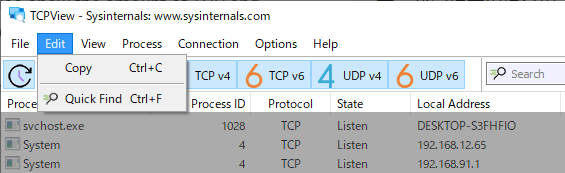
2.Edit

・Copy:プロセス名/ID/プロトコルをクリップボードにコピーする
・Quick Find:検索を使用する
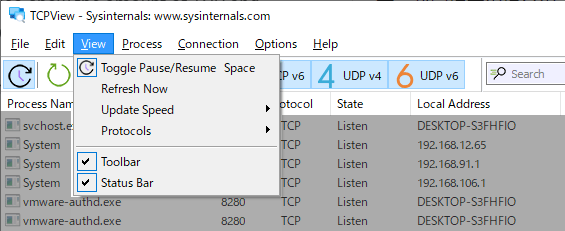
3.View

・Toggle Pause/Resume:一時停止/再開
・Refrash Now:更新
・Update Speed:更新頻度
・Protocols:表示するプロトコル
・Toolbar:ツールバーの表示/非表示を切り替え
・Status Bar:ステータスバーの表示/非表示を切り替え
4.Process
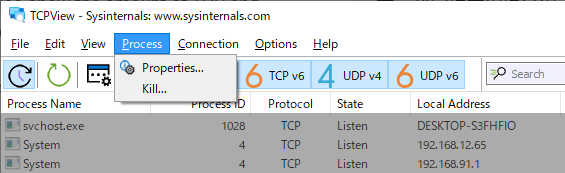
・Properties:プロセスのプロパティを表示する
・Kill:プロセスを閉じる
5.Connection

・Whois:接続先を Whois で検索する
・Close:接続を切断する
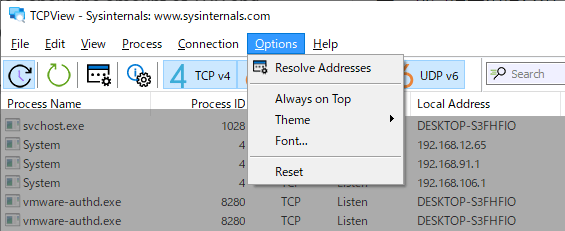
6.Options

・Resolve Adddresses:アドレスをホスト名で表示する
・Always on Top:最前面に表示する
・Theme:テーマを変更する
・Font:フォントを変更する
・Reset:設定をリセットする
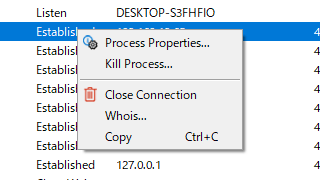
7.右クリックメニュー

・Process Properties:プロセスのプロパティを表示する
・Kill Process:プロセスを終了する
・Close Connection:接続を切断する
・Whois:Whois 検索する
・Copy:行のデータをコピーする
よくある質問と回答
ライセンスについて。
TCPView は、どなたでも無料で利用できます。