").attr(n.scriptAttrs||{}).prop({charset:n.scriptCharset,src:n.url}).on("load error",i=function(e){r.remove(),i=null,e&&t("error"===e.type?404:200,e.type)}),C.head.appendChild(r[0])},abort:function(){i&&i()}}});var Jt,Kt=[],Zt=/(=)\?(?=&|$)|\?\?/;ce.ajaxSetup({jsonp:"callback",jsonpCallback:function(){var e=Kt.pop()||ce.expando+"_"+jt.guid++;return this[e]=!0,e}}),ce.ajaxPrefilter("json jsonp",function(e,t,n){var r,i,o,a=!1!==e.jsonp&&(Zt.test(e.url)?"url":"string"==typeof e.data&&0===(e.contentType||"").indexOf("application/x-www-form-urlencoded")&&Zt.test(e.data)&&"data");if(a||"jsonp"===e.dataTypes[0])return r=e.jsonpCallback=v(e.jsonpCallback)?e.jsonpCallback():e.jsonpCallback,a?e[a]=e[a].replace(Zt,"$1"+r):!1!==e.jsonp&&(e.url+=(At.test(e.url)?"&":"?")+e.jsonp+"="+r),e.converters["script json"]=function(){return o||ce.error(r+" was not called"),o[0]},e.dataTypes[0]="json",i=ie[r],ie[r]=function(){o=arguments},n.always(function(){void 0===i?ce(ie).removeProp(r):ie[r]=i,e[r]&&(e.jsonpCallback=t.jsonpCallback,Kt.push(r)),o&&v(i)&&i(o[0]),o=i=void 0}),"script"}),le.createHTMLDocument=((Jt=C.implementation.createHTMLDocument("").body).innerHTML="
",2===Jt.childNodes.length),ce.parseHTML=function(e,t,n){return"string"!=typeof e?[]:("boolean"==typeof t&&(n=t,t=!1),t||(le.createHTMLDocument?((r=(t=C.implementation.createHTMLDocument("")).createElement("base")).href=C.location.href,t.head.appendChild(r)):t=C),o=!n&&[],(i=w.exec(e))?[t.createElement(i[1])]:(i=Ae([e],t,o),o&&o.length&&ce(o).remove(),ce.merge([],i.childNodes)));var r,i,o},ce.fn.load=function(e,t,n){var r,i,o,a=this,s=e.indexOf(" ");return-1").append(ce.parseHTML(e)).find(r):e)}).always(n&&function(e,t){a.each(function(){n.apply(this,o||[e.responseText,t,e])})}),this},ce.expr.pseudos.animated=function(t){return ce.grep(ce.timers,function(e){return t===e.elem}).length},ce.offset={setOffset:function(e,t,n){var r,i,o,a,s,u,l=ce.css(e,"position"),c=ce(e),f={};"static"===l&&(e.style.position="relative"),s=c.offset(),o=ce.css(e,"top"),u=ce.css(e,"left"),("absolute"===l||"fixed"===l)&&-1<(o+u).indexOf("auto")?(a=(r=c.position()).top,i=r.left):(a=parseFloat(o)||0,i=parseFloat(u)||0),v(t)&&(t=t.call(e,n,ce.extend({},s))),null!=t.top&&(f.top=t.top-s.top+a),null!=t.left&&(f.left=t.left-s.left+i),"using"in t?t.using.call(e,f):c.css(f)}},ce.fn.extend({offset:function(t){if(arguments.length)return void 0===t?this:this.each(function(e){ce.offset.setOffset(this,t,e)});var e,n,r=this[0];return r?r.getClientRects().length?(e=r.getBoundingClientRect(),n=r.ownerDocument.defaultView,{top:e.top+n.pageYOffset,left:e.left+n.pageXOffset}):{top:0,left:0}:void 0},position:function(){if(this[0]){var e,t,n,r=this[0],i={top:0,left:0};if("fixed"===ce.css(r,"position"))t=r.getBoundingClientRect();else{t=this.offset(),n=r.ownerDocument,e=r.offsetParent||n.documentElement;while(e&&(e===n.body||e===n.documentElement)&&"static"===ce.css(e,"position"))e=e.parentNode;e&&e!==r&&1===e.nodeType&&((i=ce(e).offset()).top+=ce.css(e,"borderTopWidth",!0),i.left+=ce.css(e,"borderLeftWidth",!0))}return{top:t.top-i.top-ce.css(r,"marginTop",!0),left:t.left-i.left-ce.css(r,"marginLeft",!0)}}},offsetParent:function(){return this.map(function(){var e=this.offsetParent;while(e&&"static"===ce.css(e,"position"))e=e.offsetParent;return e||J})}}),ce.each({scrollLeft:"pageXOffset",scrollTop:"pageYOffset"},function(t,i){var o="pageYOffset"===i;ce.fn[t]=function(e){return M(this,function(e,t,n){var r;if(y(e)?r=e:9===e.nodeType&&(r=e.defaultView),void 0===n)return r?r[i]:e[t];r?r.scrollTo(o?r.pageXOffset:n,o?n:r.pageYOffset):e[t]=n},t,e,arguments.length)}}),ce.each(["top","left"],function(e,n){ce.cssHooks[n]=Ye(le.pixelPosition,function(e,t){if(t)return t=Ge(e,n),_e.test(t)?ce(e).position()[n]+"px":t})}),ce.each({Height:"height",Width:"width"},function(a,s){ce.each({padding:"inner"+a,content:s,"":"outer"+a},function(r,o){ce.fn[o]=function(e,t){var n=arguments.length&&(r||"boolean"!=typeof e),i=r||(!0===e||!0===t?"margin":"border");return M(this,function(e,t,n){var r;return y(e)?0===o.indexOf("outer")?e["inner"+a]:e.document.documentElement["client"+a]:9===e.nodeType?(r=e.documentElement,Math.max(e.body["scroll"+a],r["scroll"+a],e.body["offset"+a],r["offset"+a],r["client"+a])):void 0===n?ce.css(e,t,i):ce.style(e,t,n,i)},s,n?e:void 0,n)}})}),ce.each(["ajaxStart","ajaxStop","ajaxComplete","ajaxError","ajaxSuccess","ajaxSend"],function(e,t){ce.fn[t]=function(e){return this.on(t,e)}}),ce.fn.extend({bind:function(e,t,n){return this.on(e,null,t,n)},unbind:function(e,t){return this.off(e,null,t)},delegate:function(e,t,n,r){return this.on(t,e,n,r)},undelegate:function(e,t,n){return 1===arguments.length?this.off(e,"**"):this.off(t,e||"**",n)},hover:function(e,t){return this.on("mouseenter",e).on("mouseleave",t||e)}}),ce.each("blur focus focusin focusout resize scroll click dblclick mousedown mouseup mousemove mouseover mouseout mouseenter mouseleave change select submit keydown keypress keyup contextmenu".split(" "),function(e,n){ce.fn[n]=function(e,t){return 0
FreeTube 0.24.0 Beta
マルチメディアプレーヤー
2020/12/08 17:14
説明機能仕様ダウンロード画像使い方
広告なしで YouTube 動画を再生することができる YouTube 専用プレーヤー

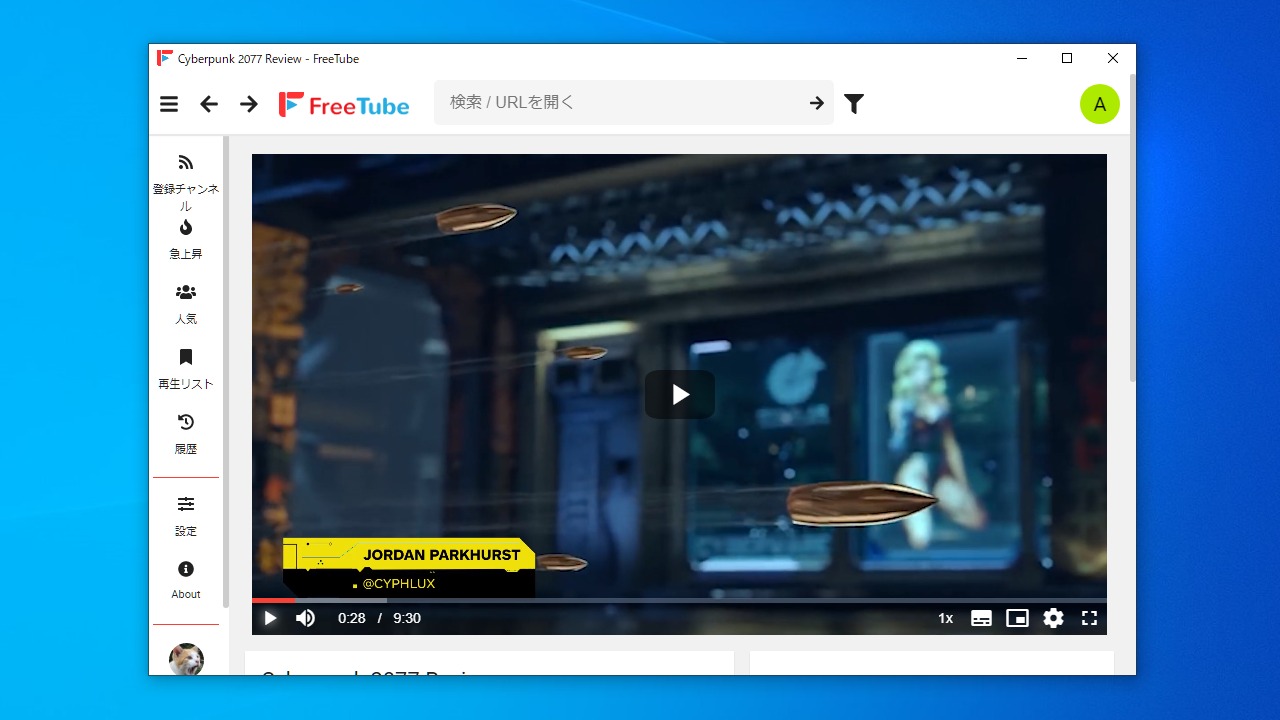
広告無しで YouTube を視聴することができる YouTube プレーヤー。Cookie などによる追跡をされることなくプライベートな環境で YouTube を再生することができます。アカウントがなくてもチャンネル登録をすることが可能です。
FreeTube の概要
FreeTube は、Windows、Mac、および Linux 用の YouTube クライアントであり、YouTube をよりプライベートに楽しめるように構築されています。習慣を追跡することなく、お気に入りのコンテンツやクリエイターを楽しむことができます。すべてのユーザーデータはローカルに保存され、インターネットに送信または公開されることはありません。
FreeTube の機能
FreeTube の主な機能です。
| 機能 |
概要 |
| メイン機能 |
YouTube の視聴 |
| オプション機能 |
チャンネル登録(ログイン不要)
動画検索
登録チャンネルの動画の表示
急上昇/人気の動画の表示
登録チャンネルのインポート/エクスポート |
お気に入りの YouTube 動画を再生できます
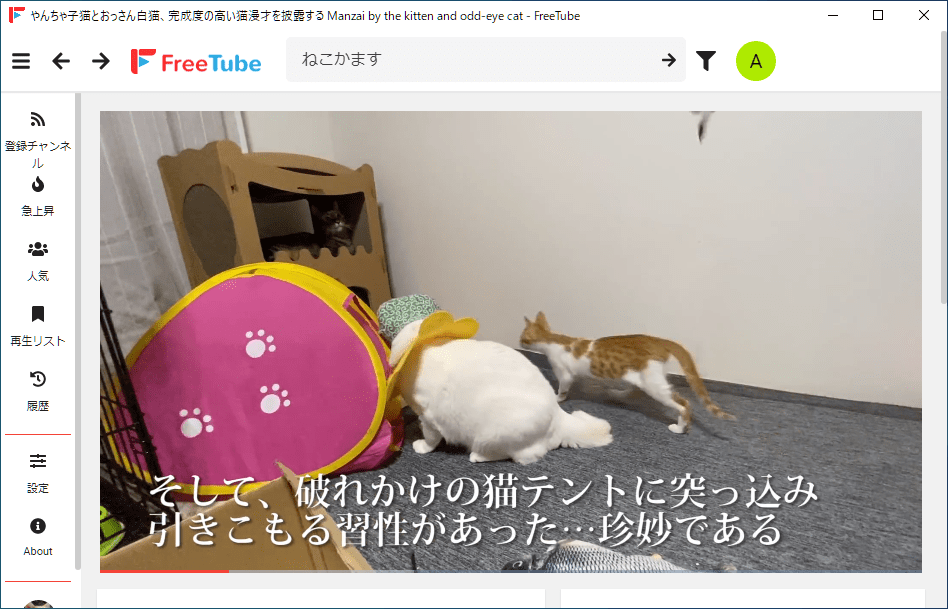
FreeTube は、広告や追跡がないプライベートな自由な環境で YouTube を視聴することができる YouTube クライアントソフトです。Windows と Mac、Linux で使用できます。
ログインしなくても(アカウントがなくても)チャンネルを登録することが可能で 、広告バナーや CM なしで YouTube のコンテンツを楽しむことができます。
便利な YouTube 視聴ソフト
FreeTube は、YouTube の動画を広告なしで再生したり、集中できる環境で再生したいユーザーに適したプレーヤーです。FreeTube に慣れるとブラウザを使用して YouTube を視聴する必要が無くなります。
機能
- 広告なしで Youtube 動画を視聴
- Cookie と JavaScript を使用しての追跡がなく YouTube を利用することができます
- 選択できる2つのエクストラクタ API(組み込みまたは Invidious)
- アカウントなしでチャンネルを購読する
- ローカルサブスクリプション、履歴、および保存されたビデオ
- サブスクリプションのエクスポートとインポート
- 完全なテーマのサポート
価格: 無料
動作環境:Windows 7|8|8.1|10・Mac・Linux
使用言語:日本語ほかマルチ言語
最終更新日:
1か月前 (2026/04/01)
ダウンロード数:20481
使い方
インストール
1.インストール方法(Windows)
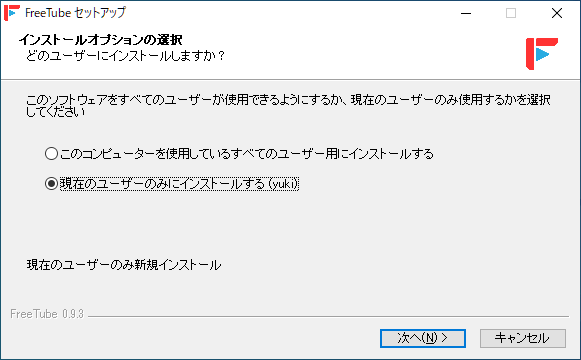
- ダウンロードしたインストーラを実行するとセットアップが始まります。FreeTube をインストールするユーザーを選択して[次へ]をクリックします。
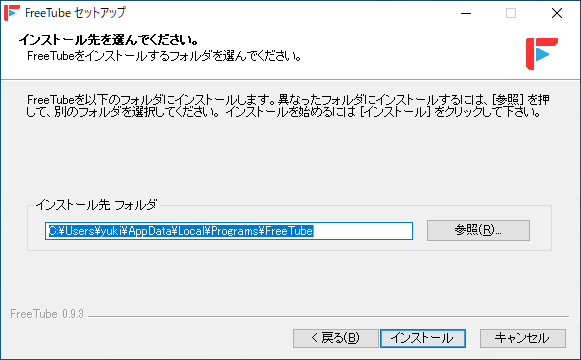
- インストール先を確認または変更し[インストール]ボタンをクリックします。
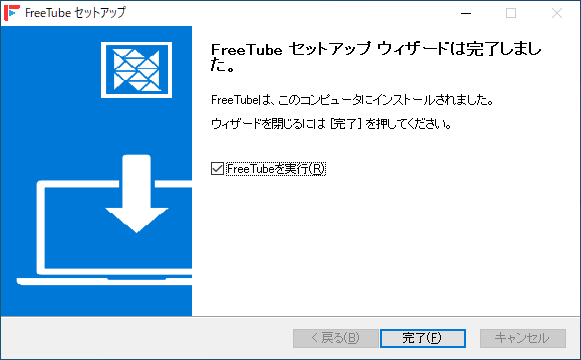
- インストールが完了しました。[完了]をクリックしてセットアップウィザードを閉じます。
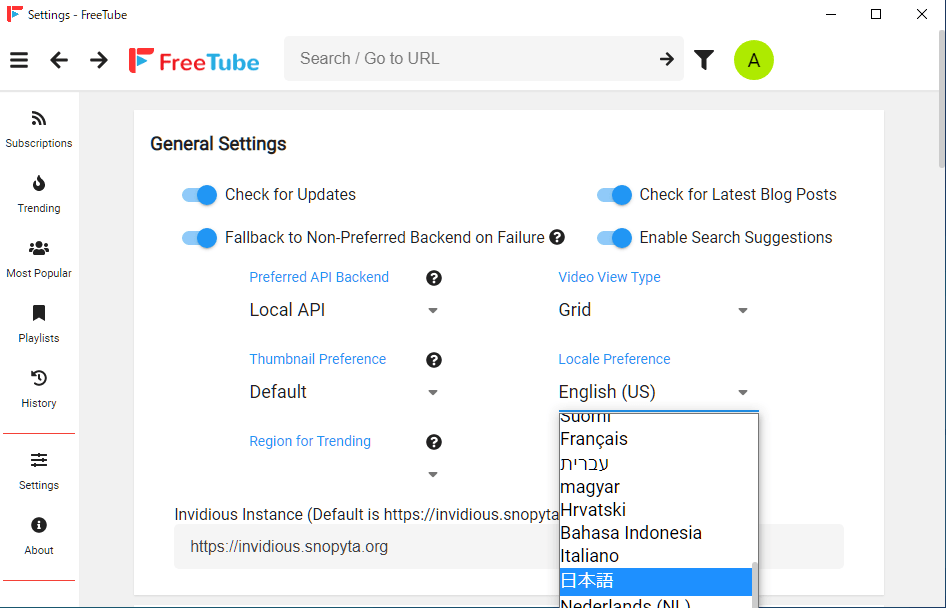
言語の変更(日本語化)
- 左のメニューの「Settings」をクリックします。
- 「Locate preference」のドロップダウンから「日本語」を選択します。
基本的な使い方
1. 動画を検索する/再生する
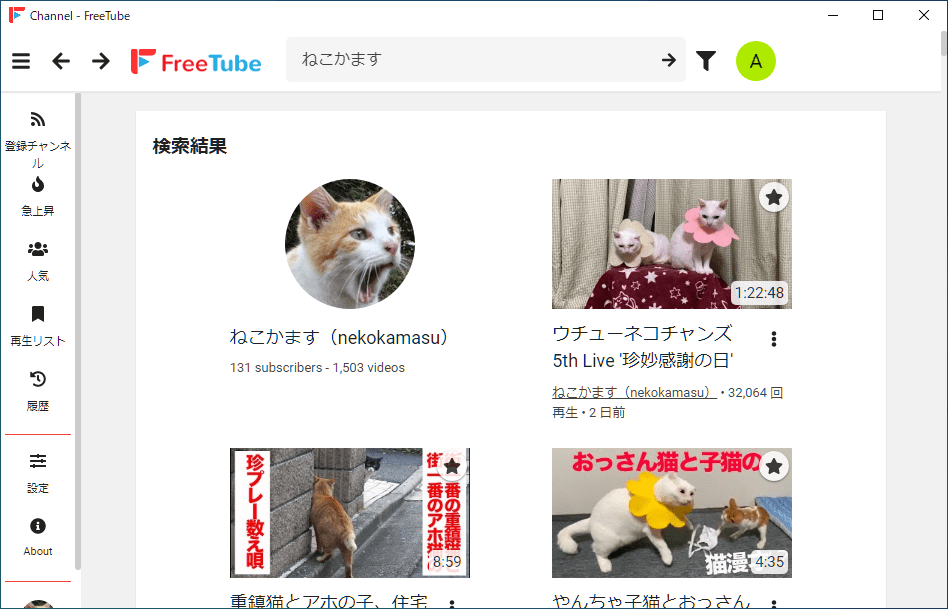
- 上部のフィールドに検索ワードを入力すると、動画やチャンネルを検索できます。


2.登録チャンネル
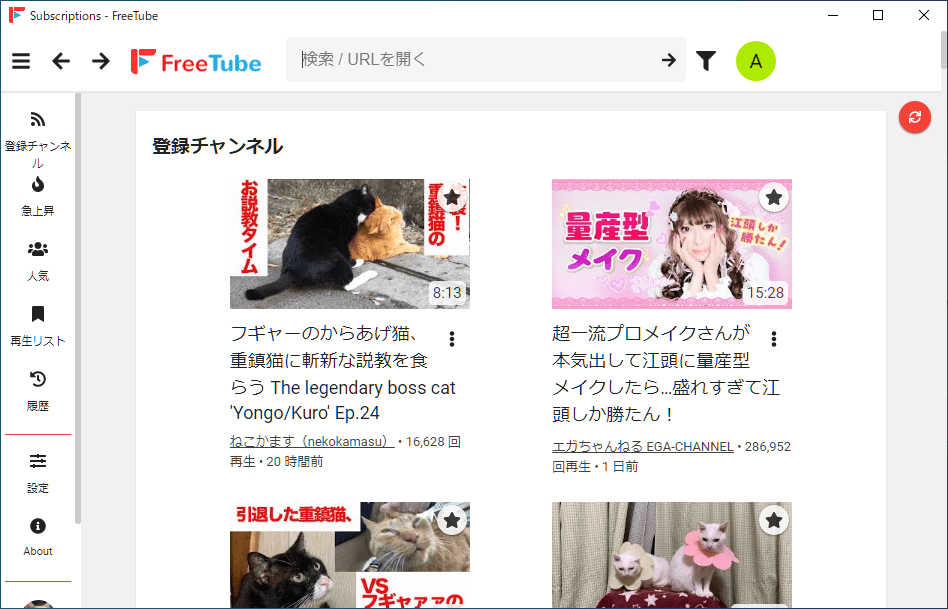
- 「登録チャンネル」には、チャンネル登録してあるチャンネルの最新の動画が表示されます。

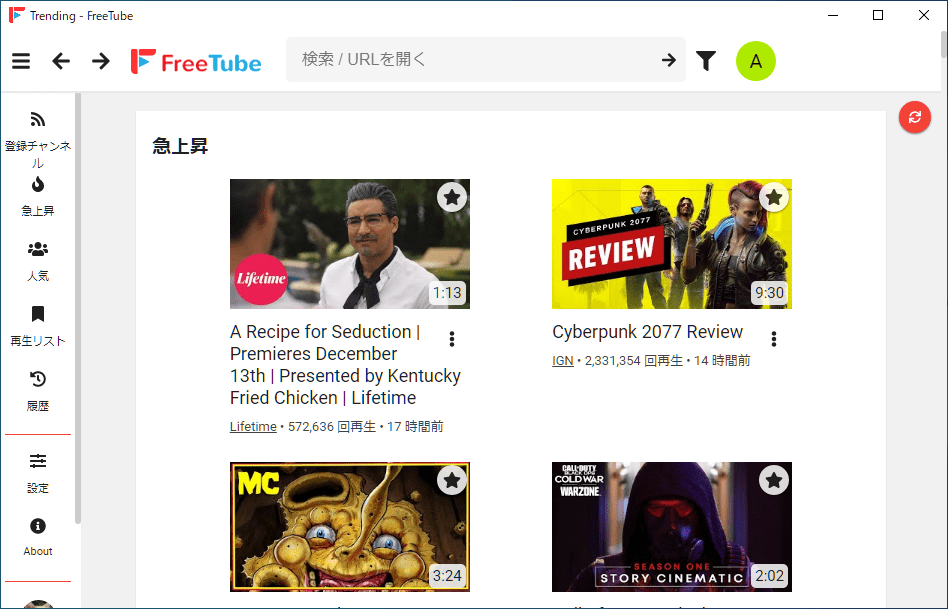
3.急上昇/人気
- 「急上昇」には、再生回数が伸びている動画が表示されます。ただし日本の動画ではありません
よくある質問と回答
ライセンスについて。