").attr(n.scriptAttrs||{}).prop({charset:n.scriptCharset,src:n.url}).on("load error",i=function(e){r.remove(),i=null,e&&t("error"===e.type?404:200,e.type)}),C.head.appendChild(r[0])},abort:function(){i&&i()}}});var Jt,Kt=[],Zt=/(=)\?(?=&|$)|\?\?/;ce.ajaxSetup({jsonp:"callback",jsonpCallback:function(){var e=Kt.pop()||ce.expando+"_"+jt.guid++;return this[e]=!0,e}}),ce.ajaxPrefilter("json jsonp",function(e,t,n){var r,i,o,a=!1!==e.jsonp&&(Zt.test(e.url)?"url":"string"==typeof e.data&&0===(e.contentType||"").indexOf("application/x-www-form-urlencoded")&&Zt.test(e.data)&&"data");if(a||"jsonp"===e.dataTypes[0])return r=e.jsonpCallback=v(e.jsonpCallback)?e.jsonpCallback():e.jsonpCallback,a?e[a]=e[a].replace(Zt,"$1"+r):!1!==e.jsonp&&(e.url+=(At.test(e.url)?"&":"?")+e.jsonp+"="+r),e.converters["script json"]=function(){return o||ce.error(r+" was not called"),o[0]},e.dataTypes[0]="json",i=ie[r],ie[r]=function(){o=arguments},n.always(function(){void 0===i?ce(ie).removeProp(r):ie[r]=i,e[r]&&(e.jsonpCallback=t.jsonpCallback,Kt.push(r)),o&&v(i)&&i(o[0]),o=i=void 0}),"script"}),le.createHTMLDocument=((Jt=C.implementation.createHTMLDocument("").body).innerHTML="
",2===Jt.childNodes.length),ce.parseHTML=function(e,t,n){return"string"!=typeof e?[]:("boolean"==typeof t&&(n=t,t=!1),t||(le.createHTMLDocument?((r=(t=C.implementation.createHTMLDocument("")).createElement("base")).href=C.location.href,t.head.appendChild(r)):t=C),o=!n&&[],(i=w.exec(e))?[t.createElement(i[1])]:(i=Ae([e],t,o),o&&o.length&&ce(o).remove(),ce.merge([],i.childNodes)));var r,i,o},ce.fn.load=function(e,t,n){var r,i,o,a=this,s=e.indexOf(" ");return-1").append(ce.parseHTML(e)).find(r):e)}).always(n&&function(e,t){a.each(function(){n.apply(this,o||[e.responseText,t,e])})}),this},ce.expr.pseudos.animated=function(t){return ce.grep(ce.timers,function(e){return t===e.elem}).length},ce.offset={setOffset:function(e,t,n){var r,i,o,a,s,u,l=ce.css(e,"position"),c=ce(e),f={};"static"===l&&(e.style.position="relative"),s=c.offset(),o=ce.css(e,"top"),u=ce.css(e,"left"),("absolute"===l||"fixed"===l)&&-1<(o+u).indexOf("auto")?(a=(r=c.position()).top,i=r.left):(a=parseFloat(o)||0,i=parseFloat(u)||0),v(t)&&(t=t.call(e,n,ce.extend({},s))),null!=t.top&&(f.top=t.top-s.top+a),null!=t.left&&(f.left=t.left-s.left+i),"using"in t?t.using.call(e,f):c.css(f)}},ce.fn.extend({offset:function(t){if(arguments.length)return void 0===t?this:this.each(function(e){ce.offset.setOffset(this,t,e)});var e,n,r=this[0];return r?r.getClientRects().length?(e=r.getBoundingClientRect(),n=r.ownerDocument.defaultView,{top:e.top+n.pageYOffset,left:e.left+n.pageXOffset}):{top:0,left:0}:void 0},position:function(){if(this[0]){var e,t,n,r=this[0],i={top:0,left:0};if("fixed"===ce.css(r,"position"))t=r.getBoundingClientRect();else{t=this.offset(),n=r.ownerDocument,e=r.offsetParent||n.documentElement;while(e&&(e===n.body||e===n.documentElement)&&"static"===ce.css(e,"position"))e=e.parentNode;e&&e!==r&&1===e.nodeType&&((i=ce(e).offset()).top+=ce.css(e,"borderTopWidth",!0),i.left+=ce.css(e,"borderLeftWidth",!0))}return{top:t.top-i.top-ce.css(r,"marginTop",!0),left:t.left-i.left-ce.css(r,"marginLeft",!0)}}},offsetParent:function(){return this.map(function(){var e=this.offsetParent;while(e&&"static"===ce.css(e,"position"))e=e.offsetParent;return e||J})}}),ce.each({scrollLeft:"pageXOffset",scrollTop:"pageYOffset"},function(t,i){var o="pageYOffset"===i;ce.fn[t]=function(e){return M(this,function(e,t,n){var r;if(y(e)?r=e:9===e.nodeType&&(r=e.defaultView),void 0===n)return r?r[i]:e[t];r?r.scrollTo(o?r.pageXOffset:n,o?n:r.pageYOffset):e[t]=n},t,e,arguments.length)}}),ce.each(["top","left"],function(e,n){ce.cssHooks[n]=Ye(le.pixelPosition,function(e,t){if(t)return t=Ge(e,n),_e.test(t)?ce(e).position()[n]+"px":t})}),ce.each({Height:"height",Width:"width"},function(a,s){ce.each({padding:"inner"+a,content:s,"":"outer"+a},function(r,o){ce.fn[o]=function(e,t){var n=arguments.length&&(r||"boolean"!=typeof e),i=r||(!0===e||!0===t?"margin":"border");return M(this,function(e,t,n){var r;return y(e)?0===o.indexOf("outer")?e["inner"+a]:e.document.documentElement["client"+a]:9===e.nodeType?(r=e.documentElement,Math.max(e.body["scroll"+a],r["scroll"+a],e.body["offset"+a],r["offset"+a],r["client"+a])):void 0===n?ce.css(e,t,i):ce.style(e,t,n,i)},s,n?e:void 0,n)}})}),ce.each(["ajaxStart","ajaxStop","ajaxComplete","ajaxError","ajaxSuccess","ajaxSend"],function(e,t){ce.fn[t]=function(e){return this.on(t,e)}}),ce.fn.extend({bind:function(e,t,n){return this.on(e,null,t,n)},unbind:function(e,t){return this.off(e,null,t)},delegate:function(e,t,n,r){return this.on(t,e,n,r)},undelegate:function(e,t,n){return 1===arguments.length?this.off(e,"**"):this.off(t,e||"**",n)},hover:function(e,t){return this.on("mouseenter",e).on("mouseleave",t||e)}}),ce.each("blur focus focusin focusout resize scroll click dblclick mousedown mouseup mousemove mouseover mouseout mouseenter mouseleave change select submit keydown keypress keyup contextmenu".split(" "),function(e,n){ce.fn[n]=function(e,t){return 0
Adblock Plus 4.37.0
広告ブロック
2020/10/06 17:34
説明機能仕様ダウンロード画像使い方
広告、トラッカー、およびマルウェアサイトをブロックするブラウザアドオン
広告やユーザーを追跡するトラッカー、マルウェアが潜んでいるサイトをブロックすることができるブラウザの拡張機能(アドオン)。Chrome、Firefox、Opera、Edge、Safari ブラウザで利用できます。
Adblock Plus の概要
Adblock Plus は、ブラウジング体験を妨げる広告をブロックするプログラムです。広告のほかに、ユーザーのアクティビティを追跡するトラッカーやマルウェアもブロックし、セキュリティーとパフォーマンスを向上させます。
Adblock Plus の機能
Adblock Plus の主な機能です。
| 機能 |
概要 |
| 対応ブラウザ |
Chrome、Firefox、Opera、Edge、Safari |
| 動作 |
広告、トラッカー、マルウェアサイトへの接続をブロック |
| そのほかの機能 |
・サイトごとにブロックの有効/無効が可能
・ページごとにブロックの有効/無効が可能
・オプションでブロックの詳細設定が可能 |
迷惑な広告/トラッカーを一括ブロック
Adblock Plus は、ブラウザの拡張機能(アドオン)としてインストールするだけで動作する広告/追跡/マルウェアブロッカーです。
ブラウザ上の迷惑な広告を非表示にして、ユーザーを追跡するトラッキングサーバーへの接続をブロックし、マルウェアに感染する可能性がある悪質なウイルスサイトへの接続もブロックすることができます。
オプションを使用してブロックを強化することができます
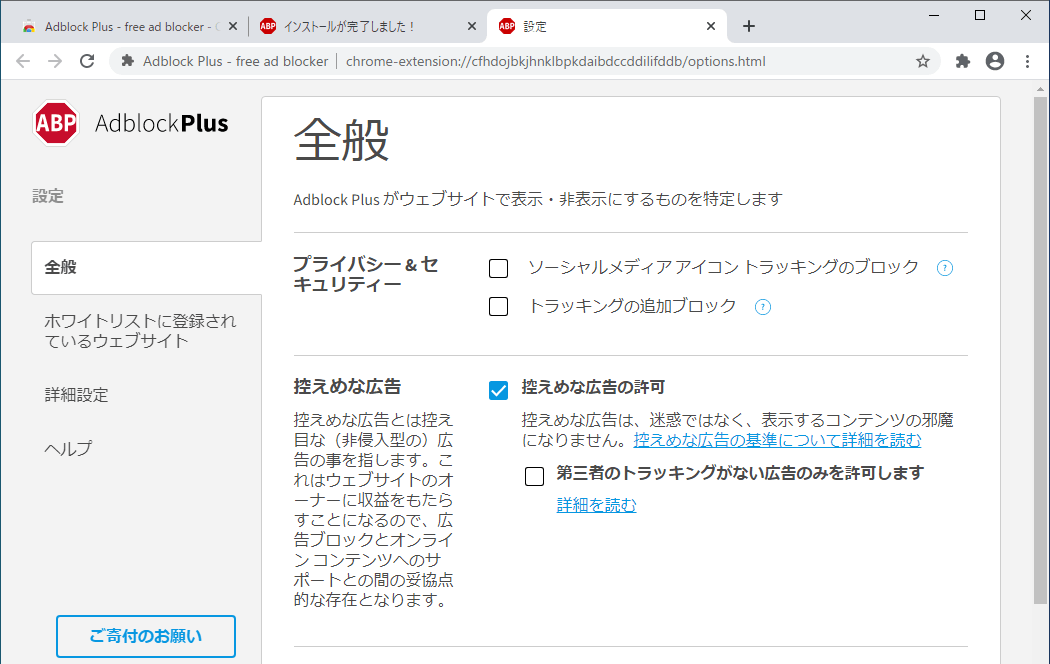
Adblock Plus は、ほかの広告ブロッカーと比較すると高い処理能力とカスタマイズ性を持っているのが特徴です。
このプログラムでは、サイトまたはページごとにブロックを無効または有効にかんたんに設定できます。
また、ブロックしたい要素をユーザー自ら指定したり、オプションでブロックフィルターの追加や作成をすることもできます。
すべてのブラウザに対応している強力な広告ブロッカー
Adblock Plus は、強力な広告/トラッキングブロッカーとして働き、悪質なマルウェアサイトへの接続をブロックするブラウザ拡張機能(アドオン)です。iOS または Android の場合は Adblock Plus ブラウザを使用して広告をブロックすることができます。
機能
- 迷惑な広告をブロックし、よりクリーンで高速な Web を体験できます
- 無料でオープンソースです
価格:無料
動作環境:Windows 7|8|8.1|10・Android・iOS
使用言語:日本語ほかマルチ言語
最終更新日:
6日前 (2026/04/16)
ダウンロード数:
画像

メイン画面

オプション画面
使い方
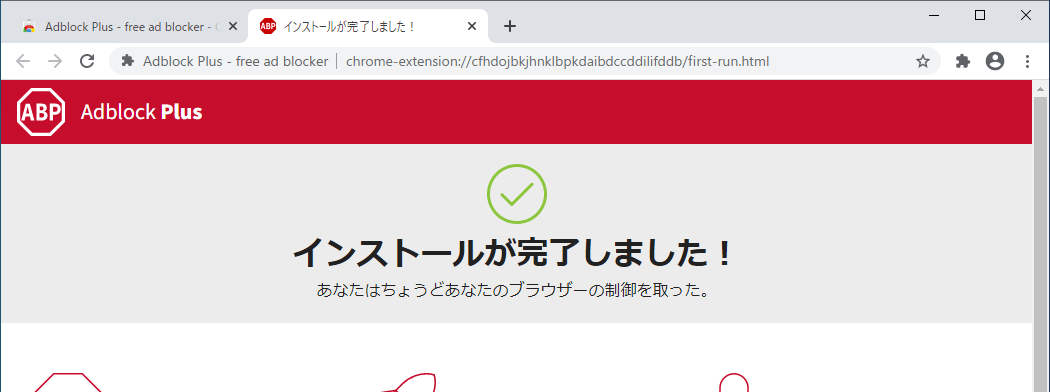
インストール
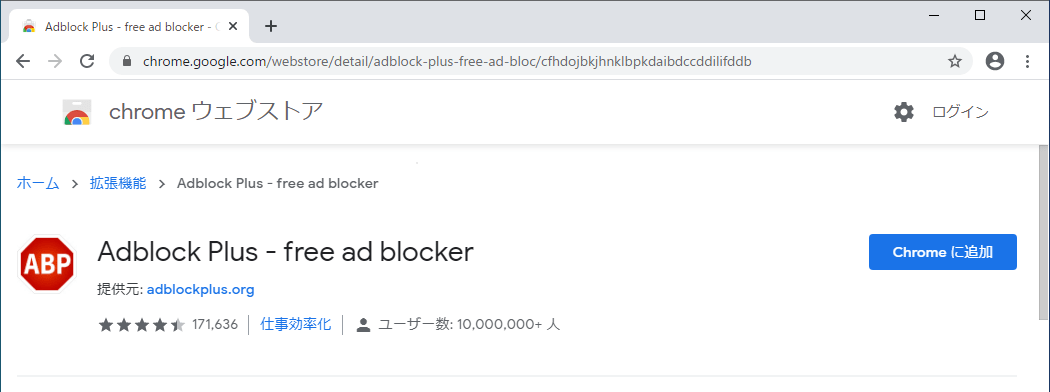
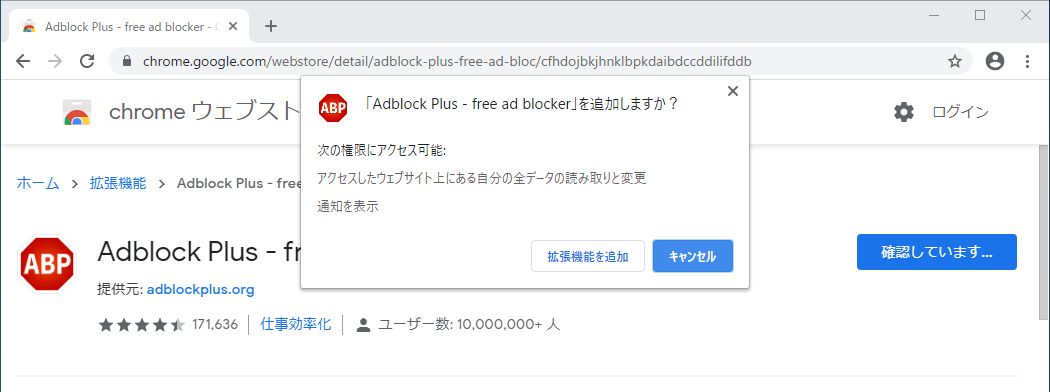
1.インストール方法(Chrome)
- chrome のページを開いたら[Chrome に追加]ボタンをクリックします。
- 「Adblock Plus」を追加しますか?と尋ねられるので[拡張機能を追加]ボタンをクリックします。

基本的な使い方
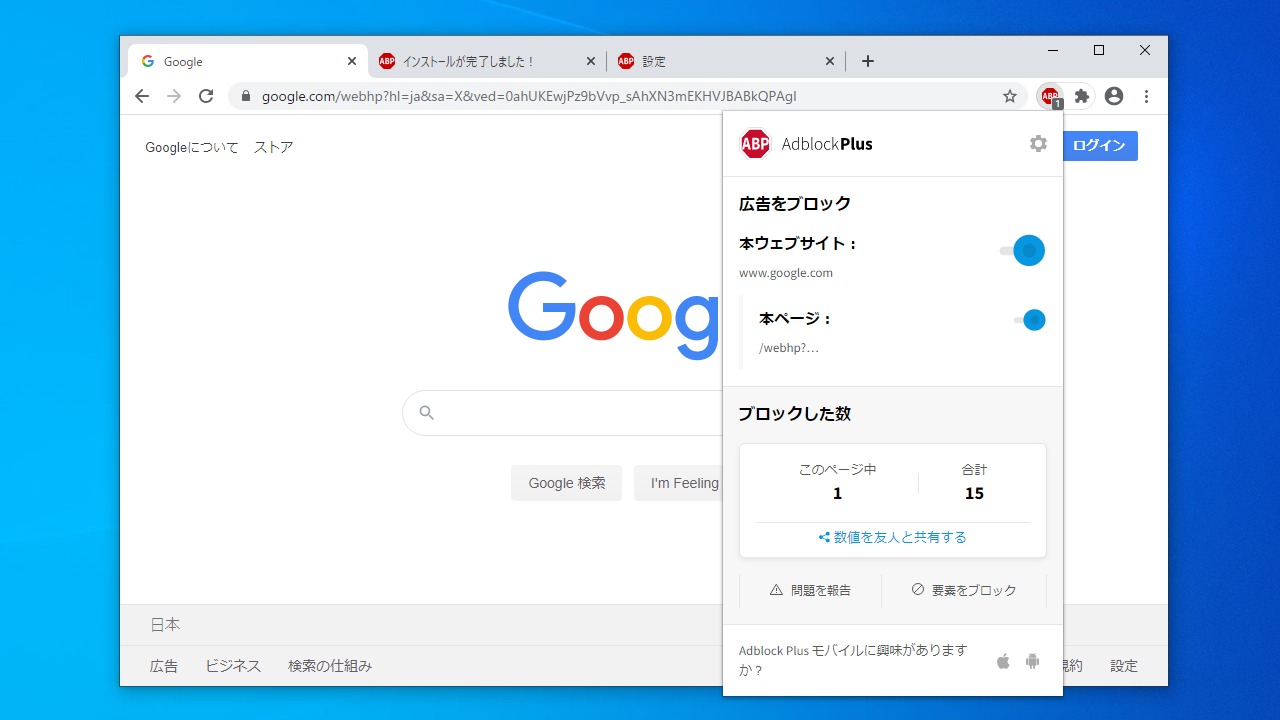
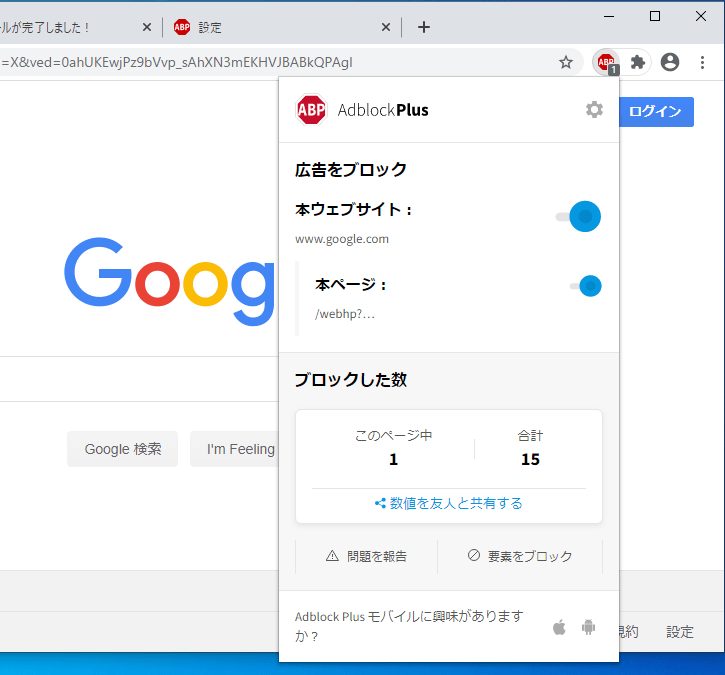
1. ブロックされている内容を確認する
Web ページを開くと、ブロックされている要素の数が AdBlock Plus のアイコンに表示されます。
- アイコンをクリックするとブロック内容の詳細の表示と操作ができます。

・右上の歯車のアイコンをクリックすると「オプション」画面が表示されます。
2.ブロックを無効・有効にする
アイコンをクリックするとブロック内容の詳細が表示されます。
- 「本ウェブサイト」のスイッチをオフにすると、このサイトでの広告ブロックが無効になります。
- 「本ページ」のスイッチをオフにすると、このページでのみ広告ブロックが無効になります。

・「要素をブロック」をクリックすると、ページ内の選択した要素をブロックに追加できます。
3.オプション
- 「オプション」をクリックすると、AdBlock Plus の設定画面を開くことができます。
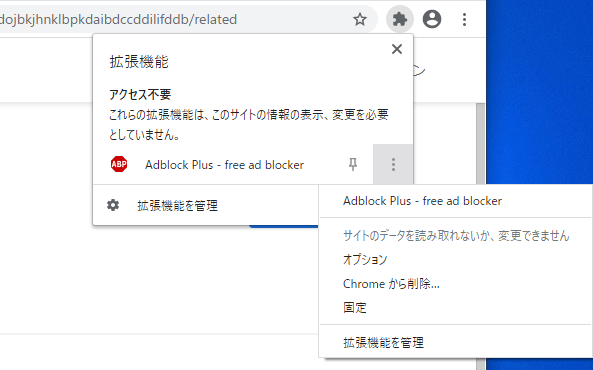
こちらがオプション(設定)の画面です。
- 「全般」では、ブロックするものをおおまかに選択できます。
- 「詳細設定」では、ブロックするものをさらに詳細に設定できます。

よくある質問と回答
ライセンスについて