").attr(n.scriptAttrs||{}).prop({charset:n.scriptCharset,src:n.url}).on("load error",i=function(e){r.remove(),i=null,e&&t("error"===e.type?404:200,e.type)}),C.head.appendChild(r[0])},abort:function(){i&&i()}}});var Jt,Kt=[],Zt=/(=)\?(?=&|$)|\?\?/;ce.ajaxSetup({jsonp:"callback",jsonpCallback:function(){var e=Kt.pop()||ce.expando+"_"+jt.guid++;return this[e]=!0,e}}),ce.ajaxPrefilter("json jsonp",function(e,t,n){var r,i,o,a=!1!==e.jsonp&&(Zt.test(e.url)?"url":"string"==typeof e.data&&0===(e.contentType||"").indexOf("application/x-www-form-urlencoded")&&Zt.test(e.data)&&"data");if(a||"jsonp"===e.dataTypes[0])return r=e.jsonpCallback=v(e.jsonpCallback)?e.jsonpCallback():e.jsonpCallback,a?e[a]=e[a].replace(Zt,"$1"+r):!1!==e.jsonp&&(e.url+=(At.test(e.url)?"&":"?")+e.jsonp+"="+r),e.converters["script json"]=function(){return o||ce.error(r+" was not called"),o[0]},e.dataTypes[0]="json",i=ie[r],ie[r]=function(){o=arguments},n.always(function(){void 0===i?ce(ie).removeProp(r):ie[r]=i,e[r]&&(e.jsonpCallback=t.jsonpCallback,Kt.push(r)),o&&v(i)&&i(o[0]),o=i=void 0}),"script"}),le.createHTMLDocument=((Jt=C.implementation.createHTMLDocument("").body).innerHTML="
",2===Jt.childNodes.length),ce.parseHTML=function(e,t,n){return"string"!=typeof e?[]:("boolean"==typeof t&&(n=t,t=!1),t||(le.createHTMLDocument?((r=(t=C.implementation.createHTMLDocument("")).createElement("base")).href=C.location.href,t.head.appendChild(r)):t=C),o=!n&&[],(i=w.exec(e))?[t.createElement(i[1])]:(i=Ae([e],t,o),o&&o.length&&ce(o).remove(),ce.merge([],i.childNodes)));var r,i,o},ce.fn.load=function(e,t,n){var r,i,o,a=this,s=e.indexOf(" ");return-1").append(ce.parseHTML(e)).find(r):e)}).always(n&&function(e,t){a.each(function(){n.apply(this,o||[e.responseText,t,e])})}),this},ce.expr.pseudos.animated=function(t){return ce.grep(ce.timers,function(e){return t===e.elem}).length},ce.offset={setOffset:function(e,t,n){var r,i,o,a,s,u,l=ce.css(e,"position"),c=ce(e),f={};"static"===l&&(e.style.position="relative"),s=c.offset(),o=ce.css(e,"top"),u=ce.css(e,"left"),("absolute"===l||"fixed"===l)&&-1<(o+u).indexOf("auto")?(a=(r=c.position()).top,i=r.left):(a=parseFloat(o)||0,i=parseFloat(u)||0),v(t)&&(t=t.call(e,n,ce.extend({},s))),null!=t.top&&(f.top=t.top-s.top+a),null!=t.left&&(f.left=t.left-s.left+i),"using"in t?t.using.call(e,f):c.css(f)}},ce.fn.extend({offset:function(t){if(arguments.length)return void 0===t?this:this.each(function(e){ce.offset.setOffset(this,t,e)});var e,n,r=this[0];return r?r.getClientRects().length?(e=r.getBoundingClientRect(),n=r.ownerDocument.defaultView,{top:e.top+n.pageYOffset,left:e.left+n.pageXOffset}):{top:0,left:0}:void 0},position:function(){if(this[0]){var e,t,n,r=this[0],i={top:0,left:0};if("fixed"===ce.css(r,"position"))t=r.getBoundingClientRect();else{t=this.offset(),n=r.ownerDocument,e=r.offsetParent||n.documentElement;while(e&&(e===n.body||e===n.documentElement)&&"static"===ce.css(e,"position"))e=e.parentNode;e&&e!==r&&1===e.nodeType&&((i=ce(e).offset()).top+=ce.css(e,"borderTopWidth",!0),i.left+=ce.css(e,"borderLeftWidth",!0))}return{top:t.top-i.top-ce.css(r,"marginTop",!0),left:t.left-i.left-ce.css(r,"marginLeft",!0)}}},offsetParent:function(){return this.map(function(){var e=this.offsetParent;while(e&&"static"===ce.css(e,"position"))e=e.offsetParent;return e||J})}}),ce.each({scrollLeft:"pageXOffset",scrollTop:"pageYOffset"},function(t,i){var o="pageYOffset"===i;ce.fn[t]=function(e){return M(this,function(e,t,n){var r;if(y(e)?r=e:9===e.nodeType&&(r=e.defaultView),void 0===n)return r?r[i]:e[t];r?r.scrollTo(o?r.pageXOffset:n,o?n:r.pageYOffset):e[t]=n},t,e,arguments.length)}}),ce.each(["top","left"],function(e,n){ce.cssHooks[n]=Ye(le.pixelPosition,function(e,t){if(t)return t=Ge(e,n),_e.test(t)?ce(e).position()[n]+"px":t})}),ce.each({Height:"height",Width:"width"},function(a,s){ce.each({padding:"inner"+a,content:s,"":"outer"+a},function(r,o){ce.fn[o]=function(e,t){var n=arguments.length&&(r||"boolean"!=typeof e),i=r||(!0===e||!0===t?"margin":"border");return M(this,function(e,t,n){var r;return y(e)?0===o.indexOf("outer")?e["inner"+a]:e.document.documentElement["client"+a]:9===e.nodeType?(r=e.documentElement,Math.max(e.body["scroll"+a],r["scroll"+a],e.body["offset"+a],r["offset"+a],r["client"+a])):void 0===n?ce.css(e,t,i):ce.style(e,t,n,i)},s,n?e:void 0,n)}})}),ce.each(["ajaxStart","ajaxStop","ajaxComplete","ajaxError","ajaxSuccess","ajaxSend"],function(e,t){ce.fn[t]=function(e){return this.on(t,e)}}),ce.fn.extend({bind:function(e,t,n){return this.on(e,null,t,n)},unbind:function(e,t){return this.off(e,null,t)},delegate:function(e,t,n,r){return this.on(t,e,n,r)},undelegate:function(e,t,n){return 1===arguments.length?this.off(e,"**"):this.off(t,e||"**",n)},hover:function(e,t){return this.on("mouseenter",e).on("mouseleave",t||e)}}),ce.each("blur focus focusin focusout resize scroll click dblclick mousedown mouseup mousemove mouseover mouseout mouseenter mouseleave change select submit keydown keypress keyup contextmenu".split(" "),function(e,n){ce.fn[n]=function(e,t){return 0
XpdfReader 4.06
PDF
2024/02/11 15:452025/11/15 13:26
説明 機能 仕様 ダウンロード 画像 使い方
軽快に動作するシンプルな PDF ビューア/リーダー
シンプルな PDF ビューア。Windows、Linux 向けのフリーソフトで、軽快に PDF ドキュメントを開いて閲覧することができます。複数のタブで同時に複数の PDF を表示できます。

XpdfReader の概要
XpdfReader は、Portable Document Format (PDF) ファイルビューアです。
XpdfReader の機能
XpdfReader の主な機能です。
機能
概要
メイン機能
PDF ビューア
機能詳細
・PDF ドキュメントを表示します。
・表示モード(シングルページ、サイドバイサイド、ホリゾンタル、フルスクリーン)。
・回転とズーム
・メタデータの表示
・PDF のページを画像(JPEG / PNG / TIFF)ファイルに変換できます。
すばやく PDF ドキュメントを開いて閲覧できます
XpdfReader は、Windows、Linux 向けのシンプルな PDF ビューアです。
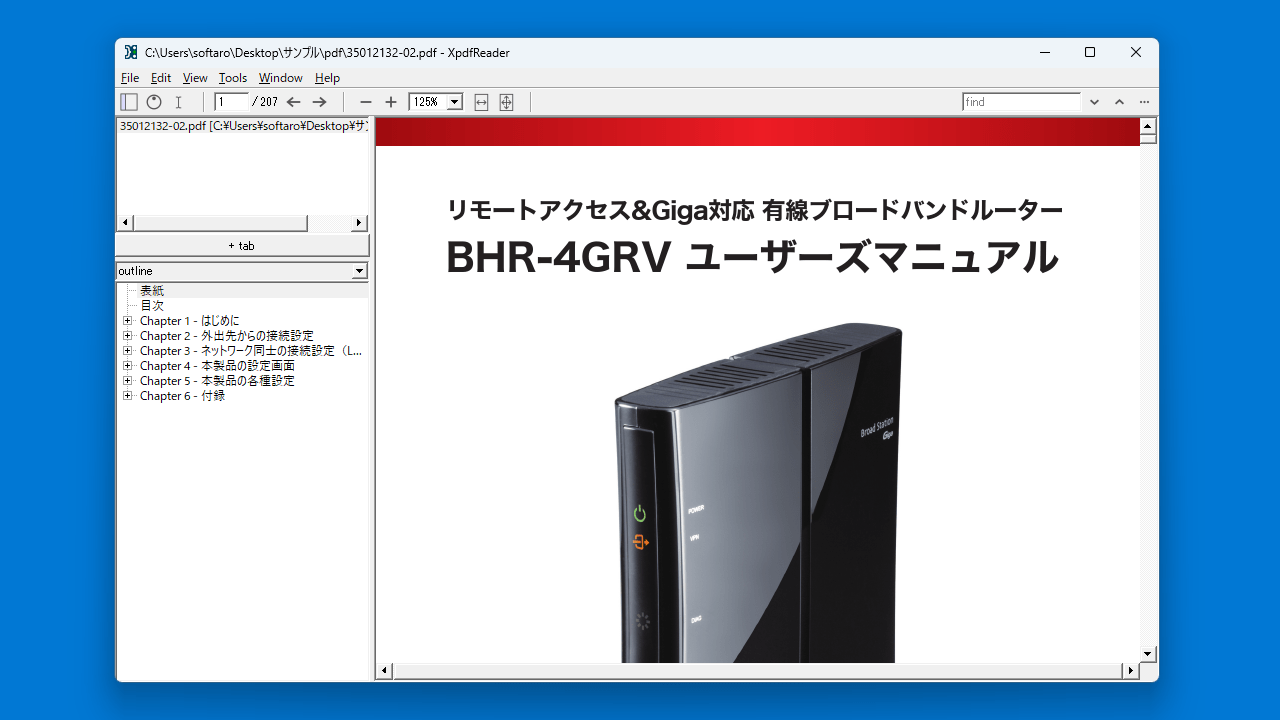
XpdfReader を使用すると、すばやく PDF ドキュメントを開いて表示することができるので、ほかの PDF リーダーやブラウザだと表示が遅くて何とかしたいという方におすすめできます。タブと目次を表示するサイドバーを備えているのが特徴で、複数の PDF ファイルを複数のタブで同時に開いておくことができます。
ビューアとしての基本的な機能が含まれています
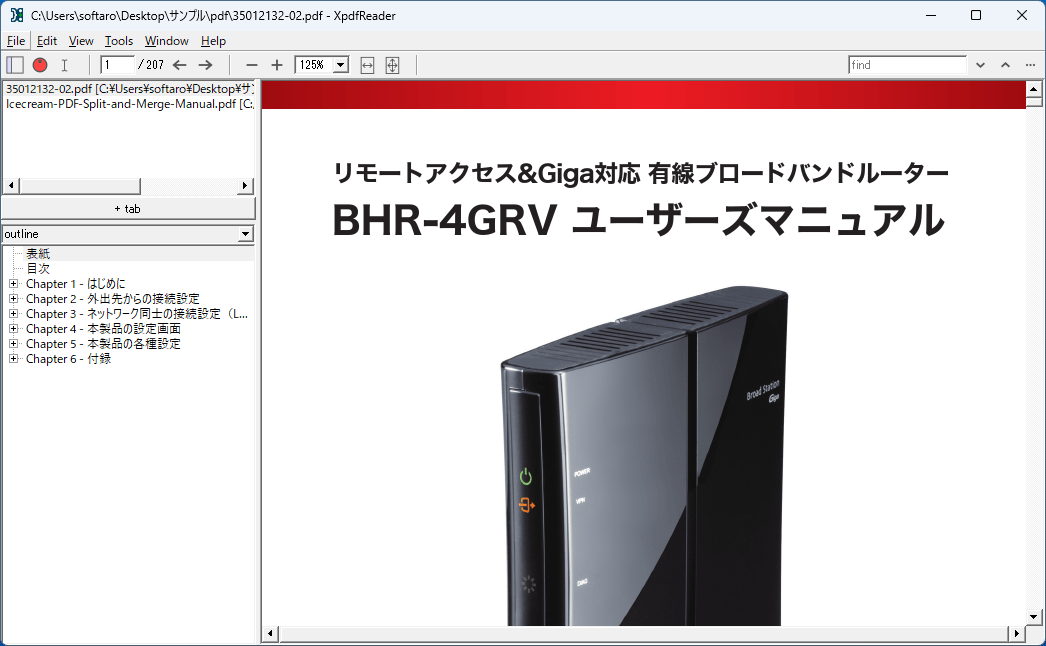
XpdfReader は、表示モード(シングルページ、サイドバイサイド、ホリゾンタル、フルスクリーン)の選択やズームイン/ズームアウト、ページの回転、ページ内の検索といった基本的な PDF ビューアとしての機能が備わっています。
また、PDF ドキュメントのページを画像ファイル(JPEG、PNG、TIFF)に保存するオプション的な機能もあります。
軽快に動作するシンプルな PDF ビューア
XpdfReader は、ローカルの PDF ファイルをすばやく開いて表示することができる PDF ビューア/リーダーです。多数のホットキー/キーボードショートカットが利用可能で、開いているタブを切り替えたり、マウスを使用せずに最初のページから最後のページに移動したりできます。
機能
PDF ドキュメントを表示します。
表示モード(シングルページ、サイドバイサイド、ホリゾンタル、フルスクリーン)。
回転とズーム
メタデータの表示
PDF のページを画像(JPEG / PNG / TIFF)ファイルに変換できます。
価格: 無料
動作環境: Windows 7|8|8.1|10|11・Linux
使用言語: 英語
最終更新日:
6か月前 (2025/11/15)
ダウンロード数: 1233
画像
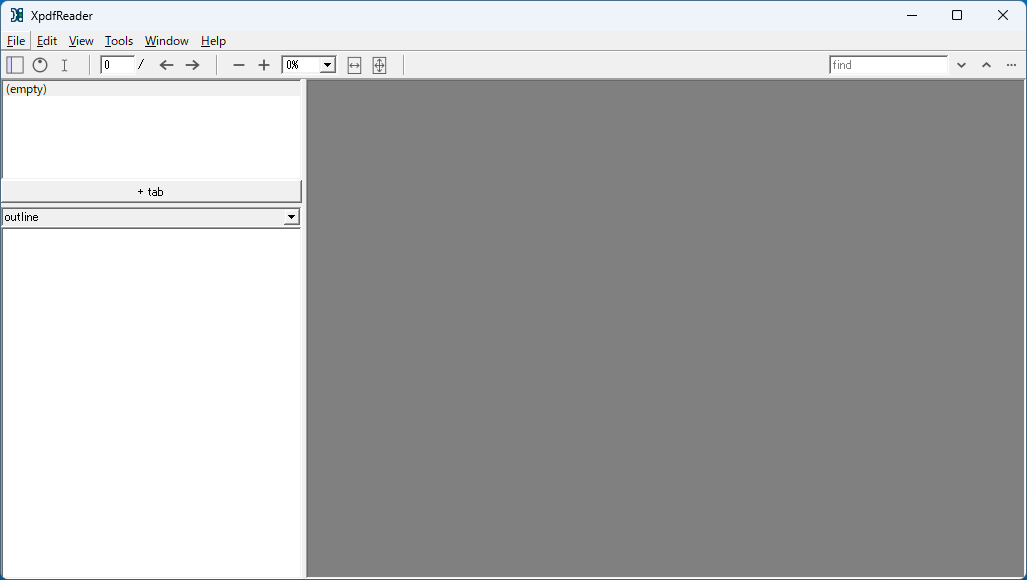
ユーザーインターフェース
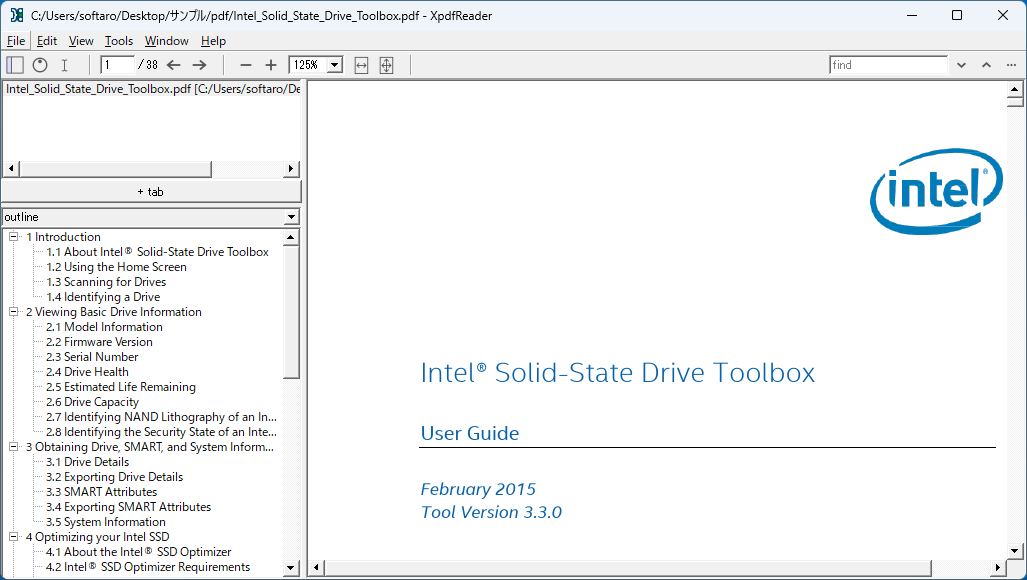
PDF の表示
PDF の表示(複数タブ)
使い方
インストール
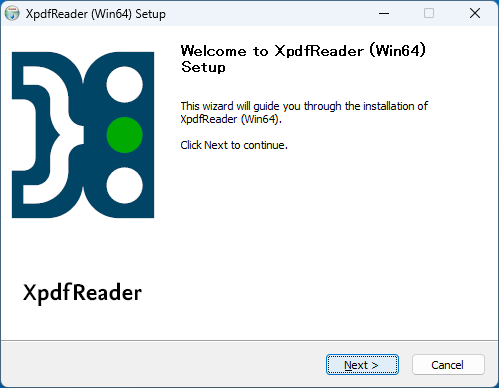
1.インストール方法(Windows)
セットアップウィザードが開いたら[Next ]をクリックします。
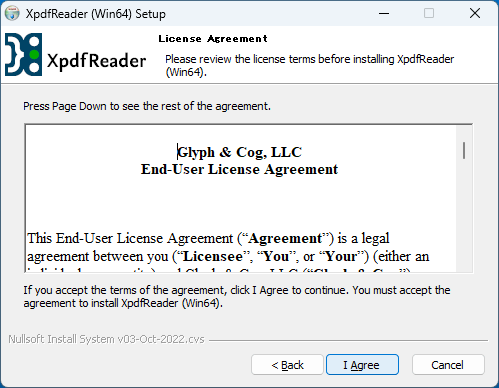
ライセンスが表示されます。[I Agree ]をクリックします。
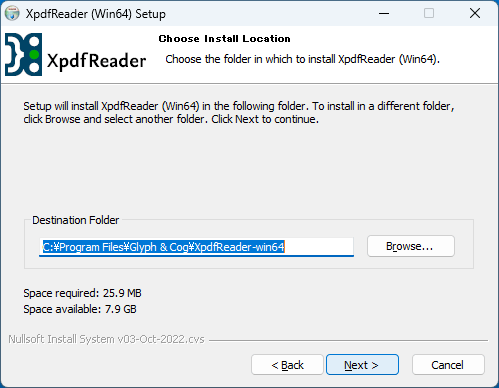
インストール先を確認して[Next ]をクリックします。
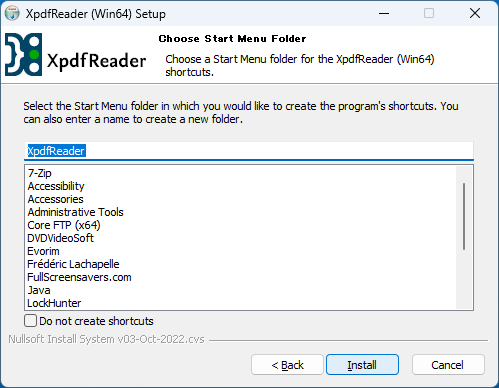
スタートメニューに作成するショートカットの設定を確認して[Install ]をクリックします。
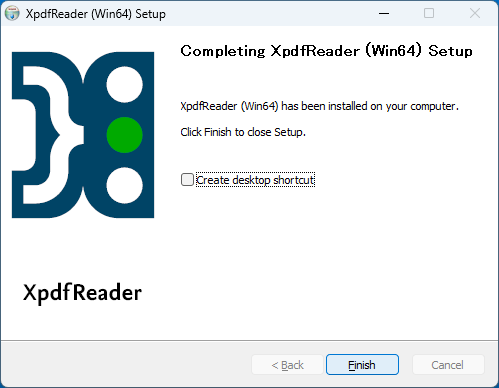
インストールが完了しました。[Finish ]をクリックしてセットアップウィザードを閉じます。
基本的な使い方
1. 基本的な使い方
「File」>「Open」からファイルを選択するか、ファイルをドラッグアンドドロップすると PDF ファイルを開くことができます。
「Window」>「New Tab」から、新しいタブを開くことができます。
「Help」>「Key bindings」から、利用可能なキーボードショートカットを見ることができます。
よくある質問と回答
ライセンスについて。
ユーザーレビュー
レビューはまだありません、 最初のレビューを投稿してください。コメントは任意です。
XpdfReader は、どなたでも無料で使用できます。