").attr(n.scriptAttrs||{}).prop({charset:n.scriptCharset,src:n.url}).on("load error",i=function(e){r.remove(),i=null,e&&t("error"===e.type?404:200,e.type)}),C.head.appendChild(r[0])},abort:function(){i&&i()}}});var Jt,Kt=[],Zt=/(=)\?(?=&|$)|\?\?/;ce.ajaxSetup({jsonp:"callback",jsonpCallback:function(){var e=Kt.pop()||ce.expando+"_"+jt.guid++;return this[e]=!0,e}}),ce.ajaxPrefilter("json jsonp",function(e,t,n){var r,i,o,a=!1!==e.jsonp&&(Zt.test(e.url)?"url":"string"==typeof e.data&&0===(e.contentType||"").indexOf("application/x-www-form-urlencoded")&&Zt.test(e.data)&&"data");if(a||"jsonp"===e.dataTypes[0])return r=e.jsonpCallback=v(e.jsonpCallback)?e.jsonpCallback():e.jsonpCallback,a?e[a]=e[a].replace(Zt,"$1"+r):!1!==e.jsonp&&(e.url+=(At.test(e.url)?"&":"?")+e.jsonp+"="+r),e.converters["script json"]=function(){return o||ce.error(r+" was not called"),o[0]},e.dataTypes[0]="json",i=ie[r],ie[r]=function(){o=arguments},n.always(function(){void 0===i?ce(ie).removeProp(r):ie[r]=i,e[r]&&(e.jsonpCallback=t.jsonpCallback,Kt.push(r)),o&&v(i)&&i(o[0]),o=i=void 0}),"script"}),le.createHTMLDocument=((Jt=C.implementation.createHTMLDocument("").body).innerHTML="
",2===Jt.childNodes.length),ce.parseHTML=function(e,t,n){return"string"!=typeof e?[]:("boolean"==typeof t&&(n=t,t=!1),t||(le.createHTMLDocument?((r=(t=C.implementation.createHTMLDocument("")).createElement("base")).href=C.location.href,t.head.appendChild(r)):t=C),o=!n&&[],(i=w.exec(e))?[t.createElement(i[1])]:(i=Ae([e],t,o),o&&o.length&&ce(o).remove(),ce.merge([],i.childNodes)));var r,i,o},ce.fn.load=function(e,t,n){var r,i,o,a=this,s=e.indexOf(" ");return-1").append(ce.parseHTML(e)).find(r):e)}).always(n&&function(e,t){a.each(function(){n.apply(this,o||[e.responseText,t,e])})}),this},ce.expr.pseudos.animated=function(t){return ce.grep(ce.timers,function(e){return t===e.elem}).length},ce.offset={setOffset:function(e,t,n){var r,i,o,a,s,u,l=ce.css(e,"position"),c=ce(e),f={};"static"===l&&(e.style.position="relative"),s=c.offset(),o=ce.css(e,"top"),u=ce.css(e,"left"),("absolute"===l||"fixed"===l)&&-1<(o+u).indexOf("auto")?(a=(r=c.position()).top,i=r.left):(a=parseFloat(o)||0,i=parseFloat(u)||0),v(t)&&(t=t.call(e,n,ce.extend({},s))),null!=t.top&&(f.top=t.top-s.top+a),null!=t.left&&(f.left=t.left-s.left+i),"using"in t?t.using.call(e,f):c.css(f)}},ce.fn.extend({offset:function(t){if(arguments.length)return void 0===t?this:this.each(function(e){ce.offset.setOffset(this,t,e)});var e,n,r=this[0];return r?r.getClientRects().length?(e=r.getBoundingClientRect(),n=r.ownerDocument.defaultView,{top:e.top+n.pageYOffset,left:e.left+n.pageXOffset}):{top:0,left:0}:void 0},position:function(){if(this[0]){var e,t,n,r=this[0],i={top:0,left:0};if("fixed"===ce.css(r,"position"))t=r.getBoundingClientRect();else{t=this.offset(),n=r.ownerDocument,e=r.offsetParent||n.documentElement;while(e&&(e===n.body||e===n.documentElement)&&"static"===ce.css(e,"position"))e=e.parentNode;e&&e!==r&&1===e.nodeType&&((i=ce(e).offset()).top+=ce.css(e,"borderTopWidth",!0),i.left+=ce.css(e,"borderLeftWidth",!0))}return{top:t.top-i.top-ce.css(r,"marginTop",!0),left:t.left-i.left-ce.css(r,"marginLeft",!0)}}},offsetParent:function(){return this.map(function(){var e=this.offsetParent;while(e&&"static"===ce.css(e,"position"))e=e.offsetParent;return e||J})}}),ce.each({scrollLeft:"pageXOffset",scrollTop:"pageYOffset"},function(t,i){var o="pageYOffset"===i;ce.fn[t]=function(e){return M(this,function(e,t,n){var r;if(y(e)?r=e:9===e.nodeType&&(r=e.defaultView),void 0===n)return r?r[i]:e[t];r?r.scrollTo(o?r.pageXOffset:n,o?n:r.pageYOffset):e[t]=n},t,e,arguments.length)}}),ce.each(["top","left"],function(e,n){ce.cssHooks[n]=Ye(le.pixelPosition,function(e,t){if(t)return t=Ge(e,n),_e.test(t)?ce(e).position()[n]+"px":t})}),ce.each({Height:"height",Width:"width"},function(a,s){ce.each({padding:"inner"+a,content:s,"":"outer"+a},function(r,o){ce.fn[o]=function(e,t){var n=arguments.length&&(r||"boolean"!=typeof e),i=r||(!0===e||!0===t?"margin":"border");return M(this,function(e,t,n){var r;return y(e)?0===o.indexOf("outer")?e["inner"+a]:e.document.documentElement["client"+a]:9===e.nodeType?(r=e.documentElement,Math.max(e.body["scroll"+a],r["scroll"+a],e.body["offset"+a],r["offset"+a],r["client"+a])):void 0===n?ce.css(e,t,i):ce.style(e,t,n,i)},s,n?e:void 0,n)}})}),ce.each(["ajaxStart","ajaxStop","ajaxComplete","ajaxError","ajaxSuccess","ajaxSend"],function(e,t){ce.fn[t]=function(e){return this.on(t,e)}}),ce.fn.extend({bind:function(e,t,n){return this.on(e,null,t,n)},unbind:function(e,t){return this.off(e,null,t)},delegate:function(e,t,n,r){return this.on(t,e,n,r)},undelegate:function(e,t,n){return 1===arguments.length?this.off(e,"**"):this.off(t,e||"**",n)},hover:function(e,t){return this.on("mouseenter",e).on("mouseleave",t||e)}}),ce.each("blur focus focusin focusout resize scroll click dblclick mousedown mouseup mousemove mouseover mouseout mouseenter mouseleave change select submit keydown keypress keyup contextmenu".split(" "),function(e,n){ce.fn[n]=function(e,t){return 0
Modern Winver 1.1.1.0
システム情報
2022/06/11 11:56
説明 機能 仕様 ダウンロード 画像 使い方
PC および Windows の詳細情報(OS のバージョンなど)を表示するアプリ

Windows のバージョン情報やインストールに関する情報、プロセッサのモデルやシステムドライブとメモリの使用状況、現在の壁紙とロック画面などの情報を表示する、「winver」の代替アプリケーション。
Modern Winver の概要
Modern Winver は、Windows と PC の詳細情報を表示する、「winver」の代替アプリです。
Modern Winver の機能
Modern Winver の主な機能です。
機能
概要
メイン機能
Windows のバージョン情報などを表示する
機能詳細
・Windows の現在のインストールに関する情報を提供します
・プロセッサ、システムドライブ、システムメモリの使用状況の概要を表示します
・現在の壁紙、ロック画面、アクセントカラーを表示および変更できます
Windows のバージョン情報などの詳細な情報を見ることができます
「ファイル名を指定して実行」に「winver」と入力して実行すると、Windows のバージョン情報を見ることができますが、そのほかの詳細な情報は見ることができません。
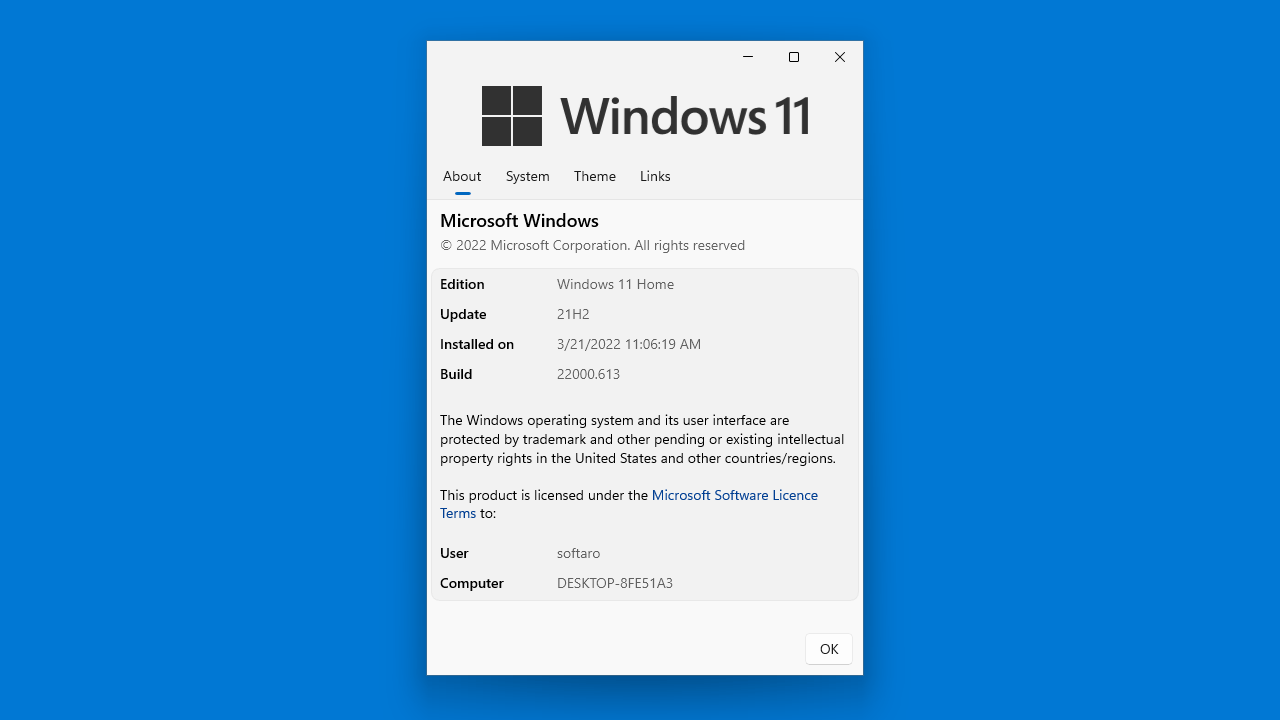
Modern Winver を使用すると、Windows のバージョン情報のほかに、インストール日時やシステムに関する情報、テーマや現在の壁紙やロック画面に関する情報を見ることができます。
システムに関するさまざまな情報を表示します
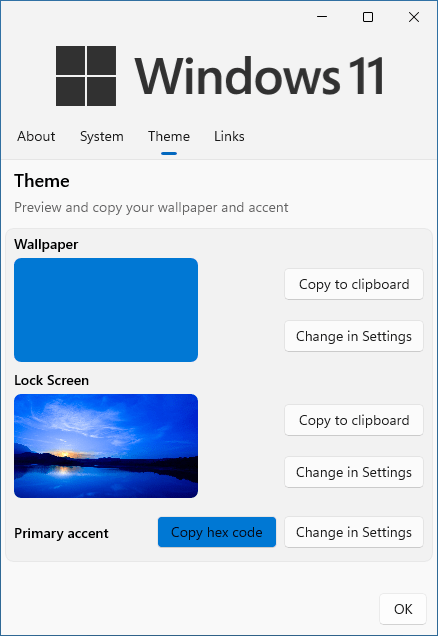
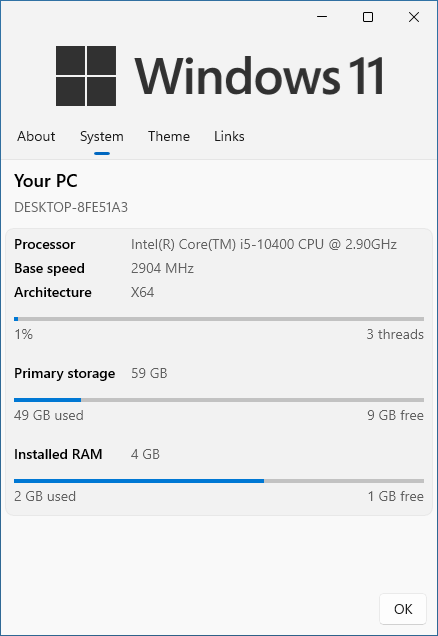
Modern Winver の「System」タブでは、PC のプロセッサのモデル名およびストレージデバイスと RAM の使用状況(空き容量など)を確認することができます。
「Theme」タブでは、現在使用中の壁紙とロック画面がサムネイルで表示され、アクセントカラーを確認し、それぞれの設定にアクセスしてテーマの設定を変更することができます。
モダンなシステム情報表示ツール
Modern Winver は、現在実行中の Windows のバージョンやエディションを確認したり、プロセッサ(CPU)のモデル名を確認したり、テーマの設定を確認して Windows の設定画面にアクセスしたい場合に役に立つアプリケーションです。ファイル名を指定して実行で「mwv:」と入力して実行することもできます。
機能
Windowsの現在のインストールに関する情報を提供します
コアシステムの仕様とリソースの使用状況の概要を簡単に説明します
現在の壁紙、ロック画面、アクセントカラーをすばやく表示および変更できます
Windows 11 用に設計されており、Windows10 と互換性があります。
ブラウザまたは「ファイル名を指定して実行」から起動可能(mwv:)
価格: 無料
動作環境: Windows 10|11
使用言語: 英語
最終更新日:
4年前 (2022/06/11)
ダウンロード数: 508
画像
About
System
Theme
Links
使い方
インストール
1.インストール方法
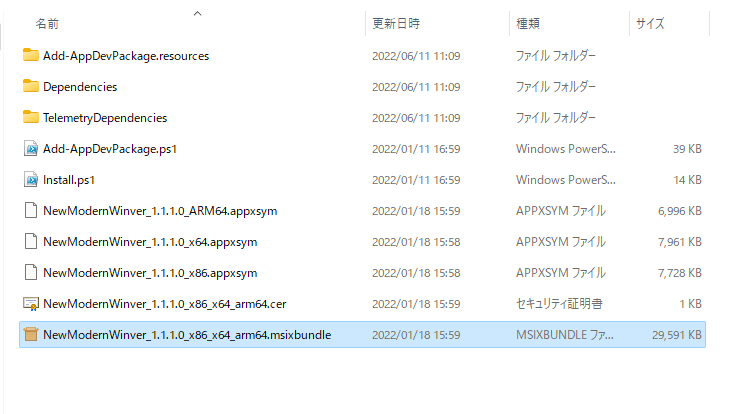
ダウンロードした ZIP ファイルを解凍し、「.msixbundle 」ファイルを実行するとアプリケーションをインストールできます。
基本的な使い方
1. 基本的な使い方
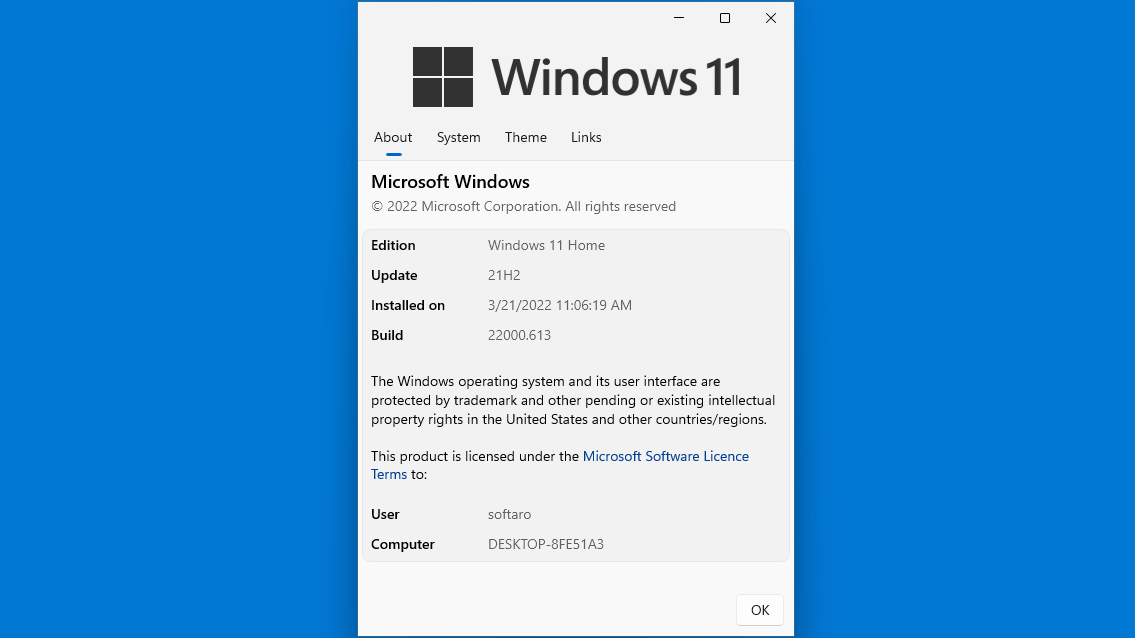
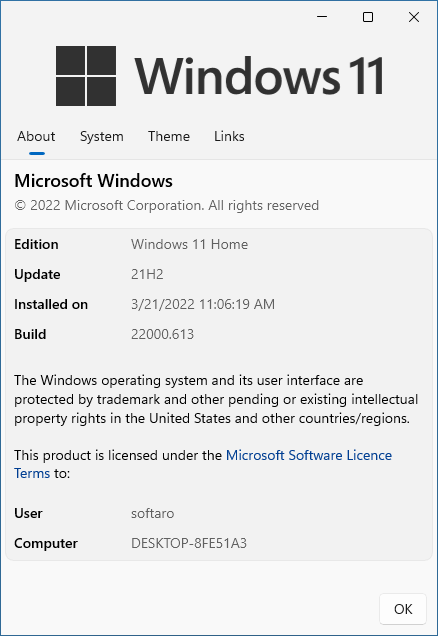
「About 」タブでは、Windows OS のバージョン情報などが表示されます。
「System 」タブでは、プロセッサのモデルやシステムドライブ、メモリの容量などの情報が表示されます。
「Theme 」タブでは、現在の壁紙とロック画面、アクセントカラーが表示され、各設定にアクセスすることができます。
よくある質問と回答
ライセンスについて。
ユーザーレビュー
レビューはまだありません、 最初のレビューを投稿してください。コメントは任意です。
Modern Winver は、どなたでも無料で使用できます。