").attr(n.scriptAttrs||{}).prop({charset:n.scriptCharset,src:n.url}).on("load error",i=function(e){r.remove(),i=null,e&&t("error"===e.type?404:200,e.type)}),C.head.appendChild(r[0])},abort:function(){i&&i()}}});var Jt,Kt=[],Zt=/(=)\?(?=&|$)|\?\?/;ce.ajaxSetup({jsonp:"callback",jsonpCallback:function(){var e=Kt.pop()||ce.expando+"_"+jt.guid++;return this[e]=!0,e}}),ce.ajaxPrefilter("json jsonp",function(e,t,n){var r,i,o,a=!1!==e.jsonp&&(Zt.test(e.url)?"url":"string"==typeof e.data&&0===(e.contentType||"").indexOf("application/x-www-form-urlencoded")&&Zt.test(e.data)&&"data");if(a||"jsonp"===e.dataTypes[0])return r=e.jsonpCallback=v(e.jsonpCallback)?e.jsonpCallback():e.jsonpCallback,a?e[a]=e[a].replace(Zt,"$1"+r):!1!==e.jsonp&&(e.url+=(At.test(e.url)?"&":"?")+e.jsonp+"="+r),e.converters["script json"]=function(){return o||ce.error(r+" was not called"),o[0]},e.dataTypes[0]="json",i=ie[r],ie[r]=function(){o=arguments},n.always(function(){void 0===i?ce(ie).removeProp(r):ie[r]=i,e[r]&&(e.jsonpCallback=t.jsonpCallback,Kt.push(r)),o&&v(i)&&i(o[0]),o=i=void 0}),"script"}),le.createHTMLDocument=((Jt=C.implementation.createHTMLDocument("").body).innerHTML="
",2===Jt.childNodes.length),ce.parseHTML=function(e,t,n){return"string"!=typeof e?[]:("boolean"==typeof t&&(n=t,t=!1),t||(le.createHTMLDocument?((r=(t=C.implementation.createHTMLDocument("")).createElement("base")).href=C.location.href,t.head.appendChild(r)):t=C),o=!n&&[],(i=w.exec(e))?[t.createElement(i[1])]:(i=Ae([e],t,o),o&&o.length&&ce(o).remove(),ce.merge([],i.childNodes)));var r,i,o},ce.fn.load=function(e,t,n){var r,i,o,a=this,s=e.indexOf(" ");return-1").append(ce.parseHTML(e)).find(r):e)}).always(n&&function(e,t){a.each(function(){n.apply(this,o||[e.responseText,t,e])})}),this},ce.expr.pseudos.animated=function(t){return ce.grep(ce.timers,function(e){return t===e.elem}).length},ce.offset={setOffset:function(e,t,n){var r,i,o,a,s,u,l=ce.css(e,"position"),c=ce(e),f={};"static"===l&&(e.style.position="relative"),s=c.offset(),o=ce.css(e,"top"),u=ce.css(e,"left"),("absolute"===l||"fixed"===l)&&-1<(o+u).indexOf("auto")?(a=(r=c.position()).top,i=r.left):(a=parseFloat(o)||0,i=parseFloat(u)||0),v(t)&&(t=t.call(e,n,ce.extend({},s))),null!=t.top&&(f.top=t.top-s.top+a),null!=t.left&&(f.left=t.left-s.left+i),"using"in t?t.using.call(e,f):c.css(f)}},ce.fn.extend({offset:function(t){if(arguments.length)return void 0===t?this:this.each(function(e){ce.offset.setOffset(this,t,e)});var e,n,r=this[0];return r?r.getClientRects().length?(e=r.getBoundingClientRect(),n=r.ownerDocument.defaultView,{top:e.top+n.pageYOffset,left:e.left+n.pageXOffset}):{top:0,left:0}:void 0},position:function(){if(this[0]){var e,t,n,r=this[0],i={top:0,left:0};if("fixed"===ce.css(r,"position"))t=r.getBoundingClientRect();else{t=this.offset(),n=r.ownerDocument,e=r.offsetParent||n.documentElement;while(e&&(e===n.body||e===n.documentElement)&&"static"===ce.css(e,"position"))e=e.parentNode;e&&e!==r&&1===e.nodeType&&((i=ce(e).offset()).top+=ce.css(e,"borderTopWidth",!0),i.left+=ce.css(e,"borderLeftWidth",!0))}return{top:t.top-i.top-ce.css(r,"marginTop",!0),left:t.left-i.left-ce.css(r,"marginLeft",!0)}}},offsetParent:function(){return this.map(function(){var e=this.offsetParent;while(e&&"static"===ce.css(e,"position"))e=e.offsetParent;return e||J})}}),ce.each({scrollLeft:"pageXOffset",scrollTop:"pageYOffset"},function(t,i){var o="pageYOffset"===i;ce.fn[t]=function(e){return M(this,function(e,t,n){var r;if(y(e)?r=e:9===e.nodeType&&(r=e.defaultView),void 0===n)return r?r[i]:e[t];r?r.scrollTo(o?r.pageXOffset:n,o?n:r.pageYOffset):e[t]=n},t,e,arguments.length)}}),ce.each(["top","left"],function(e,n){ce.cssHooks[n]=Ye(le.pixelPosition,function(e,t){if(t)return t=Ge(e,n),_e.test(t)?ce(e).position()[n]+"px":t})}),ce.each({Height:"height",Width:"width"},function(a,s){ce.each({padding:"inner"+a,content:s,"":"outer"+a},function(r,o){ce.fn[o]=function(e,t){var n=arguments.length&&(r||"boolean"!=typeof e),i=r||(!0===e||!0===t?"margin":"border");return M(this,function(e,t,n){var r;return y(e)?0===o.indexOf("outer")?e["inner"+a]:e.document.documentElement["client"+a]:9===e.nodeType?(r=e.documentElement,Math.max(e.body["scroll"+a],r["scroll"+a],e.body["offset"+a],r["offset"+a],r["client"+a])):void 0===n?ce.css(e,t,i):ce.style(e,t,n,i)},s,n?e:void 0,n)}})}),ce.each(["ajaxStart","ajaxStop","ajaxComplete","ajaxError","ajaxSuccess","ajaxSend"],function(e,t){ce.fn[t]=function(e){return this.on(t,e)}}),ce.fn.extend({bind:function(e,t,n){return this.on(e,null,t,n)},unbind:function(e,t){return this.off(e,null,t)},delegate:function(e,t,n,r){return this.on(t,e,n,r)},undelegate:function(e,t,n){return 1===arguments.length?this.off(e,"**"):this.off(t,e||"**",n)},hover:function(e,t){return this.on("mouseenter",e).on("mouseleave",t||e)}}),ce.each("blur focus focusin focusout resize scroll click dblclick mousedown mouseup mousemove mouseover mouseout mouseenter mouseleave change select submit keydown keypress keyup contextmenu".split(" "),function(e,n){ce.fn[n]=function(e,t){return 0
USB Disk Manager 1.2.6.0
USB ドライブ
2024/04/06 11:14
説明 機能 仕様 ダウンロード 画像 使い方
USB メモリなどをウイルスの感染などから保護するユーティリティ
USB メモリなどの USB リムーバブルディスクを書き込み禁止にしたり、USB 内の EXE ファイルの実行を防止したり、すべての USB デバイスを無効にすることができる、Windows 向けの USB 保護ユーティリティ。
USB Disk Manager の概要
USB Disk Manager は、USB ディスクをより安全に使用できるようにする、コンパクトでポータブルな、かんたんに設定できる Windows ユーティリティです。
USB Disk Manager の機能
USB Disk Manager の主な機能です。
機能
概要
メイン機能
USB ディスクの保護
機能詳細
・USB デバイスを書き込み禁止にします
・USB デバイス内の EXE ファイルの実行を防止します
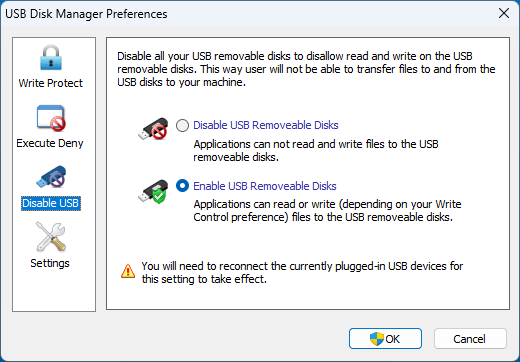
・USB デバイスを無効にします
USB デバイスを保護するユーティリティです
USB Disk Manager は、USB メモリなどの USB リムーバブルディスクを書き込み禁止にしたり、USB 内の EXE ファイルの実行を防止したり、USB を無効にすることができる、Windows 向けの USB 保護ユーティリティです。
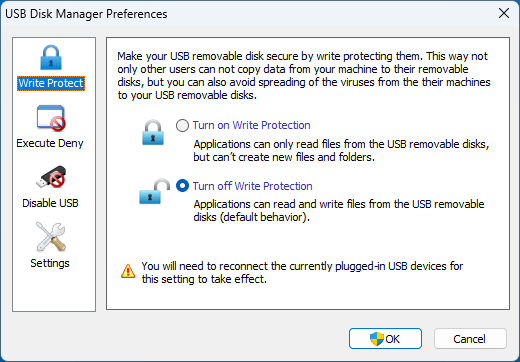
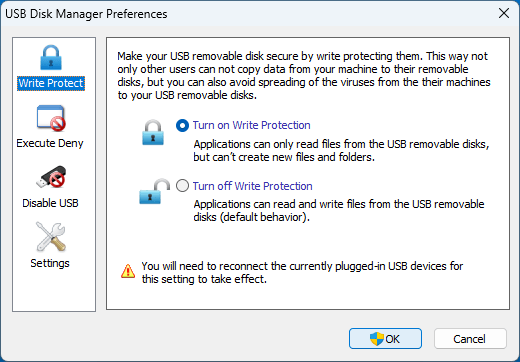
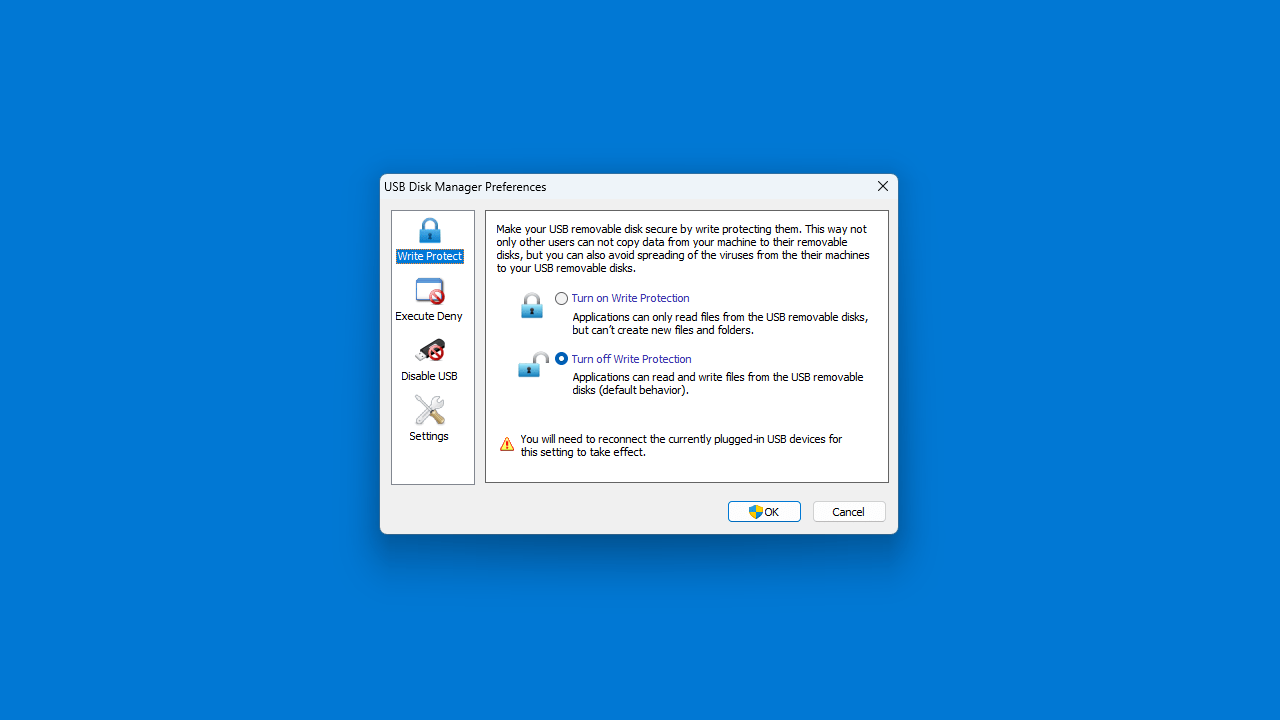
USB Disk Manager を使用して USB デバイスを書き込み禁止にすると、リムーバブル ディスクにデータをコピーしたり、新しいファイルやフォルダの作成ができなくなります。
EXE ファイルの実行を防止できます
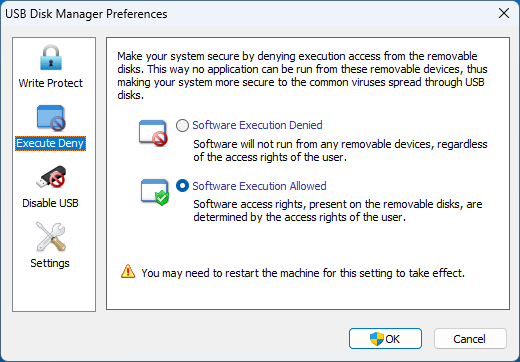
USB Disk Manager を使用すると、リムーバブルディスクからの EXE ファイルの実行を拒否することでシステムを安全にします。 これにより、リムーバブルデバイスからアプリケーションを実行できなくなり、USB ディスクを介して広がる一般的なウイルスに対してシステムの安全性が高まります。
また、すべての USB リムーバブルディスクを無効にして、USB リムーバブルディスクの読み取りと書き込みを禁止することもできます。
ウイルスの感染やデータの改ざんから保護します
USB Disk Manager は、リムーバブル USB ドライブを、ウイルスの感染やデータの改ざんから保護することができる便利なアプリケーションです。USB メモリを持ち歩いてほかのマシンで使用する場合は、アプリケーションを自動実行として USB ディスクに自動的にコピーすることができます。
機能
USB デバイスを書き込み禁止にします
USB デバイス内の EXE ファイルの実行を防止します
USB デバイスを無効にします
価格: 無料
動作環境: Windows 7|8|8.1|10|11
使用言語: 英語
最終更新日:
2年前 (2024/04/06)
ダウンロード数: 405
画像
USB を書き込み禁止にする
EXE ファイルの実行を防止する
USB を無効にする
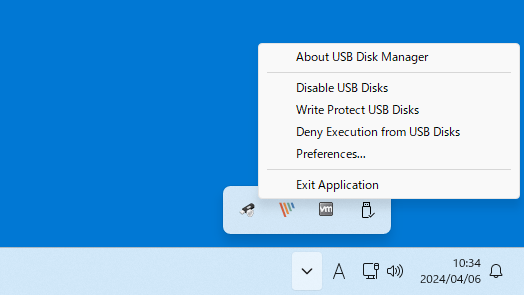
トレイアイコン
使い方
インストール
1.インストール方法
USB Disk Manager は、インストール不要で使用できるアプリケーションです。
ダウンロードした Zip ファイルを解凍し、EXE ファイルを実行すると、アプリケーションを起動できます。
基本的な使い方
1. 基本的な使い方(USB を書き込み禁止にする)
「Write Protect 」タブを開きます。
「Turn on Write Protection 」を選択します。
[OK ]ボタンをクリックします。
USB デバイスを再接続すると、設定が有効になります。
トレイアイコンの右クリックメニューから操作することもできます。
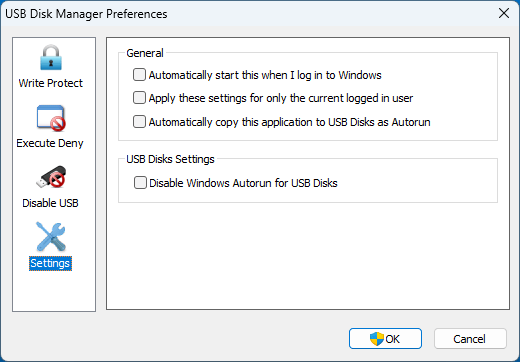
2.設定
「Settings 」を開くと、アプリの設定ができます。
・Automatically start this when I log in to Windows :Windows ログイン時に自動起動する
・Apply these settings for only the current logged in user :設定を現在ログインしているユーザーにのみ適用する
・Automatically copy this application to USB Disks as Autorun :アプリケーションを Autorun として USB ディスクに自動的にコピーする
・Disable Windows Autorun for USB Disks :USB ディスクの Windows 自動実行を無効にする
よくある質問と回答
ライセンスについて。
ユーザーレビュー
レビューはまだありません、 最初のレビューを投稿してください。コメントは任意です。
USB Disk Manager は、どなたでも無料で使用できます。