").attr(n.scriptAttrs||{}).prop({charset:n.scriptCharset,src:n.url}).on("load error",i=function(e){r.remove(),i=null,e&&t("error"===e.type?404:200,e.type)}),C.head.appendChild(r[0])},abort:function(){i&&i()}}});var Jt,Kt=[],Zt=/(=)\?(?=&|$)|\?\?/;ce.ajaxSetup({jsonp:"callback",jsonpCallback:function(){var e=Kt.pop()||ce.expando+"_"+jt.guid++;return this[e]=!0,e}}),ce.ajaxPrefilter("json jsonp",function(e,t,n){var r,i,o,a=!1!==e.jsonp&&(Zt.test(e.url)?"url":"string"==typeof e.data&&0===(e.contentType||"").indexOf("application/x-www-form-urlencoded")&&Zt.test(e.data)&&"data");if(a||"jsonp"===e.dataTypes[0])return r=e.jsonpCallback=v(e.jsonpCallback)?e.jsonpCallback():e.jsonpCallback,a?e[a]=e[a].replace(Zt,"$1"+r):!1!==e.jsonp&&(e.url+=(At.test(e.url)?"&":"?")+e.jsonp+"="+r),e.converters["script json"]=function(){return o||ce.error(r+" was not called"),o[0]},e.dataTypes[0]="json",i=ie[r],ie[r]=function(){o=arguments},n.always(function(){void 0===i?ce(ie).removeProp(r):ie[r]=i,e[r]&&(e.jsonpCallback=t.jsonpCallback,Kt.push(r)),o&&v(i)&&i(o[0]),o=i=void 0}),"script"}),le.createHTMLDocument=((Jt=C.implementation.createHTMLDocument("").body).innerHTML="
",2===Jt.childNodes.length),ce.parseHTML=function(e,t,n){return"string"!=typeof e?[]:("boolean"==typeof t&&(n=t,t=!1),t||(le.createHTMLDocument?((r=(t=C.implementation.createHTMLDocument("")).createElement("base")).href=C.location.href,t.head.appendChild(r)):t=C),o=!n&&[],(i=w.exec(e))?[t.createElement(i[1])]:(i=Ae([e],t,o),o&&o.length&&ce(o).remove(),ce.merge([],i.childNodes)));var r,i,o},ce.fn.load=function(e,t,n){var r,i,o,a=this,s=e.indexOf(" ");return-1").append(ce.parseHTML(e)).find(r):e)}).always(n&&function(e,t){a.each(function(){n.apply(this,o||[e.responseText,t,e])})}),this},ce.expr.pseudos.animated=function(t){return ce.grep(ce.timers,function(e){return t===e.elem}).length},ce.offset={setOffset:function(e,t,n){var r,i,o,a,s,u,l=ce.css(e,"position"),c=ce(e),f={};"static"===l&&(e.style.position="relative"),s=c.offset(),o=ce.css(e,"top"),u=ce.css(e,"left"),("absolute"===l||"fixed"===l)&&-1<(o+u).indexOf("auto")?(a=(r=c.position()).top,i=r.left):(a=parseFloat(o)||0,i=parseFloat(u)||0),v(t)&&(t=t.call(e,n,ce.extend({},s))),null!=t.top&&(f.top=t.top-s.top+a),null!=t.left&&(f.left=t.left-s.left+i),"using"in t?t.using.call(e,f):c.css(f)}},ce.fn.extend({offset:function(t){if(arguments.length)return void 0===t?this:this.each(function(e){ce.offset.setOffset(this,t,e)});var e,n,r=this[0];return r?r.getClientRects().length?(e=r.getBoundingClientRect(),n=r.ownerDocument.defaultView,{top:e.top+n.pageYOffset,left:e.left+n.pageXOffset}):{top:0,left:0}:void 0},position:function(){if(this[0]){var e,t,n,r=this[0],i={top:0,left:0};if("fixed"===ce.css(r,"position"))t=r.getBoundingClientRect();else{t=this.offset(),n=r.ownerDocument,e=r.offsetParent||n.documentElement;while(e&&(e===n.body||e===n.documentElement)&&"static"===ce.css(e,"position"))e=e.parentNode;e&&e!==r&&1===e.nodeType&&((i=ce(e).offset()).top+=ce.css(e,"borderTopWidth",!0),i.left+=ce.css(e,"borderLeftWidth",!0))}return{top:t.top-i.top-ce.css(r,"marginTop",!0),left:t.left-i.left-ce.css(r,"marginLeft",!0)}}},offsetParent:function(){return this.map(function(){var e=this.offsetParent;while(e&&"static"===ce.css(e,"position"))e=e.offsetParent;return e||J})}}),ce.each({scrollLeft:"pageXOffset",scrollTop:"pageYOffset"},function(t,i){var o="pageYOffset"===i;ce.fn[t]=function(e){return M(this,function(e,t,n){var r;if(y(e)?r=e:9===e.nodeType&&(r=e.defaultView),void 0===n)return r?r[i]:e[t];r?r.scrollTo(o?r.pageXOffset:n,o?n:r.pageYOffset):e[t]=n},t,e,arguments.length)}}),ce.each(["top","left"],function(e,n){ce.cssHooks[n]=Ye(le.pixelPosition,function(e,t){if(t)return t=Ge(e,n),_e.test(t)?ce(e).position()[n]+"px":t})}),ce.each({Height:"height",Width:"width"},function(a,s){ce.each({padding:"inner"+a,content:s,"":"outer"+a},function(r,o){ce.fn[o]=function(e,t){var n=arguments.length&&(r||"boolean"!=typeof e),i=r||(!0===e||!0===t?"margin":"border");return M(this,function(e,t,n){var r;return y(e)?0===o.indexOf("outer")?e["inner"+a]:e.document.documentElement["client"+a]:9===e.nodeType?(r=e.documentElement,Math.max(e.body["scroll"+a],r["scroll"+a],e.body["offset"+a],r["offset"+a],r["client"+a])):void 0===n?ce.css(e,t,i):ce.style(e,t,n,i)},s,n?e:void 0,n)}})}),ce.each(["ajaxStart","ajaxStop","ajaxComplete","ajaxError","ajaxSuccess","ajaxSend"],function(e,t){ce.fn[t]=function(e){return this.on(t,e)}}),ce.fn.extend({bind:function(e,t,n){return this.on(e,null,t,n)},unbind:function(e,t){return this.off(e,null,t)},delegate:function(e,t,n,r){return this.on(t,e,n,r)},undelegate:function(e,t,n){return 1===arguments.length?this.off(e,"**"):this.off(t,e||"**",n)},hover:function(e,t){return this.on("mouseenter",e).on("mouseleave",t||e)}}),ce.each("blur focus focusin focusout resize scroll click dblclick mousedown mouseup mousemove mouseover mouseout mouseenter mouseleave change select submit keydown keypress keyup contextmenu".split(" "),function(e,n){ce.fn[n]=function(e,t){return 0
K-Lite Codec Pack 19.7.0 / 19.7.0 Update
コーデック
2020/08/24 16:162026/05/08 08:05
説明 機能 仕様 ダウンロード 画像 使い方
すべての動画ファイルを再生するためのコーデックとプレーヤーのパッケージ

すべてのビデオファイルとオーディオファイルを再生することができるコーデックとプレーヤー(MPC-HC)のパッケージ。あらゆるオーディオおよびビデオ形式をデコード(再生)またはエンコードするために必要です。
K-Lite Codec Pack の概要
K-Lite Codec Pack は、MPC-HC, LAV Filters, MPC Video Renderer などを含んだ、DirectShowフィルター、VFW / ACMコーデック、およびツールのコレクションです。
K-Lite Codec Pack のインストール時にはサードパーティ製の追加のソフトウェアのインストールが勧められます。必要ない場合は拒否することができます。
K-Lite Codec Pack の機能
K-Lite Codec Pack には 4 つのバージョンがあります。違いは次のとおりです。
Basic
Standard
Full
Mega
・メディアの再生に必要なコーデック
○
○
○
○
・MPC-HC
・MadVR
・MediaInfo
✕
○
○
○
・DC-Bass Source Mod
・GraphStudioNext
・3D ビデオデコード用プラグイン
✕
✕
○
○
・x264VFW などの ACM / VFW コーデック
・ffdshowオーディオ/ビデオプロセッサ
・AC3Filter など
✕
✕
✕
○
MPC-HC を使用してメディアを再生したい場合は「Standard」バージョンで十分ということになります。
あらゆるメディアを再生できます
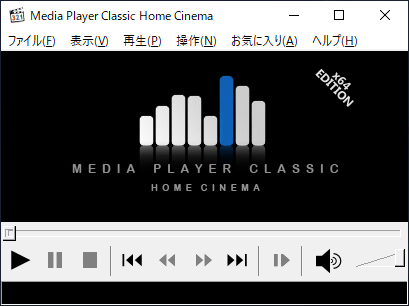
K-Lite Codec Pack は、MPC-HC(またはそのほかのメディアプレーヤー) を使用して、あらゆるメディアファイルを高品質に再生したい場合の解決策です。
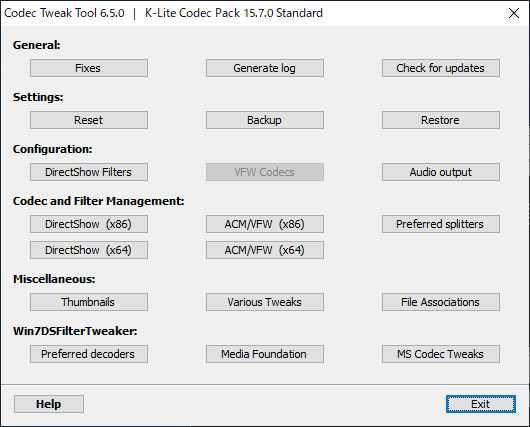
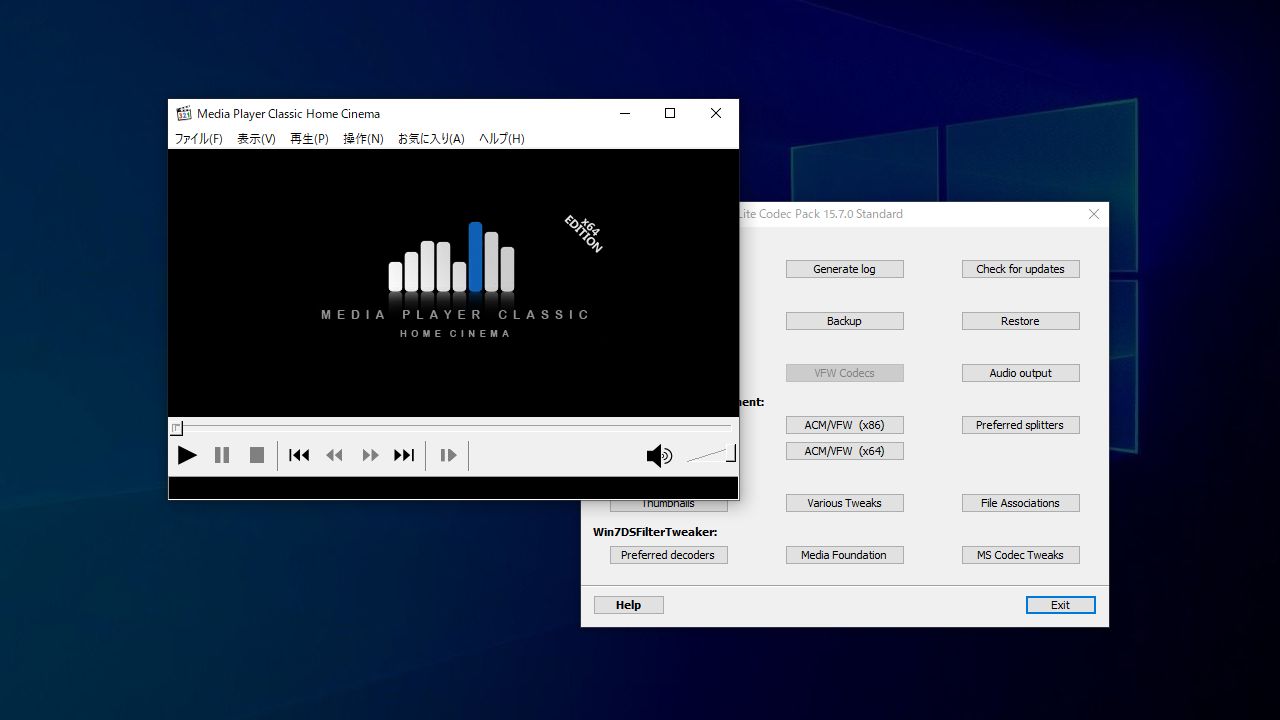
このコーデックには、MPC-HC プレーヤー、高品質のビデオレンダラの MadVR 、メディア情報の詳細を表示する MediaInfo、壊れているコーデックの修復やコーデック調整ができる Codec Tweak Tool が含まれています。
使いやすいコーデック&プレーヤーのパック
K-Lite Codec Pack は、すべての動画ファイルを再生するための使いやすいソフトウェアパッケージです。動画が再生できない場合や、どのプレーヤーを使用したら良いか悩んでいるユーザーにおすすめできます。
機能
.wav を Monkey’s Audio(.ape)ファイルに圧縮
Monkey’s Audio(.ape)ファイルを .wav に変換
Monkey’s Audio(.ape)ファイルを Monkey’s Audio に変換
圧縮率オプション
価格: 無料
動作環境: Windows Vista|7|8|8.1|10|11
使用言語: 英語
最終更新日:
16時間前 (2026/05/08)
ダウンロード数: 7861
画像
MPC-HC
Codec Tweak Tool
使い方
インストール方法
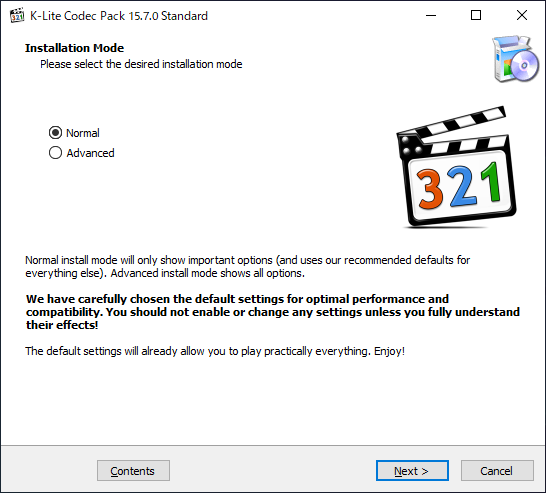
1.インストール
はじめにインストールするモードの選択画面になります。「Normal 」を選択して[Next ]をクリックします。
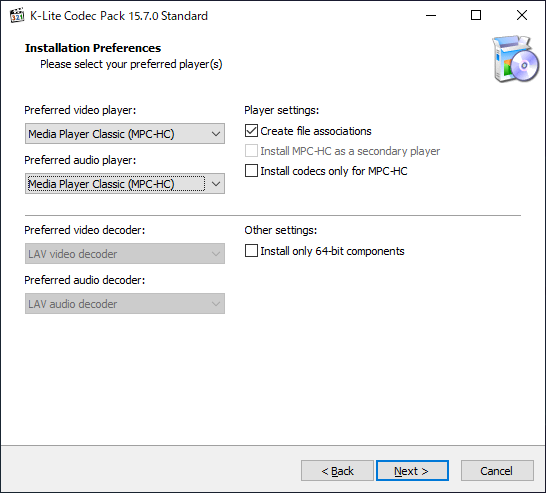
次は通常使用するプレーヤーの選択画面です。「Preferred Video Player 」または「Preferred Audio Player」のドロップダウンから使用するプレーヤーを選択して[Next ]をクリックします。
Player Settings :
・Create file associations :ファイルの関連付けをする
・Install MPC-HC as a secondary player :MPC-HCをセカンダリープレーヤーとしてインストールする
・Install codecs only for MPC-HC :MPC-HC のコーデックのみをインストールする
Other settings :
・Install only 64-bit components :64 bit コーデックのみをインストールする
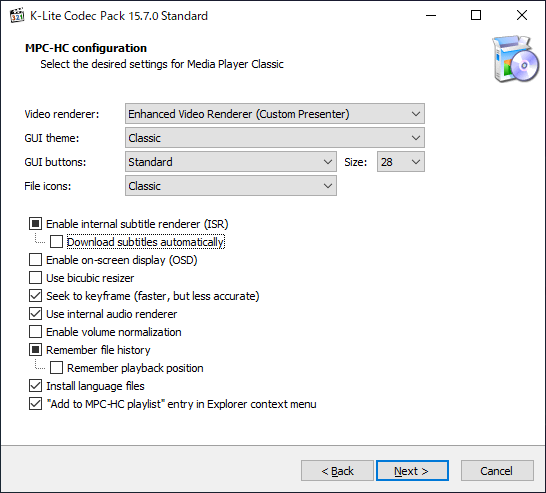
次は、MPC-HC の設定です。ビデオレンダラや GUI テーマ/ボタン、ファイルアイコンなどを選択できます。選択したら[Next ]をクリックします。
分からない場合は変更しないで[Next ]をクリックします。
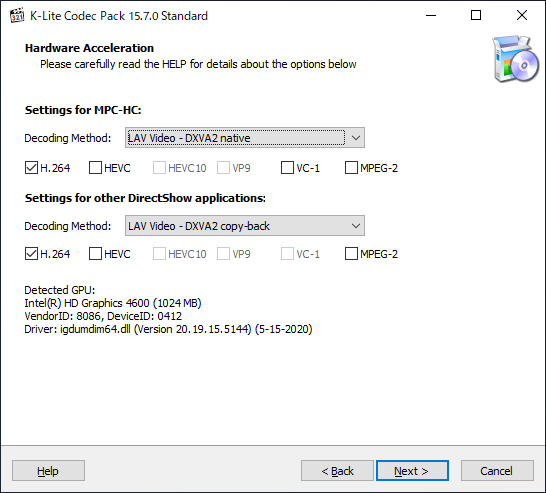
つぎは、デコード方法の設定画面になります。MPC-HC とそのほかの Directshow プレーヤーのデコード方法を選択し、[Next ]をクリックします。
分からない場合は変更しないでそのまま[Next ]をクリックします。
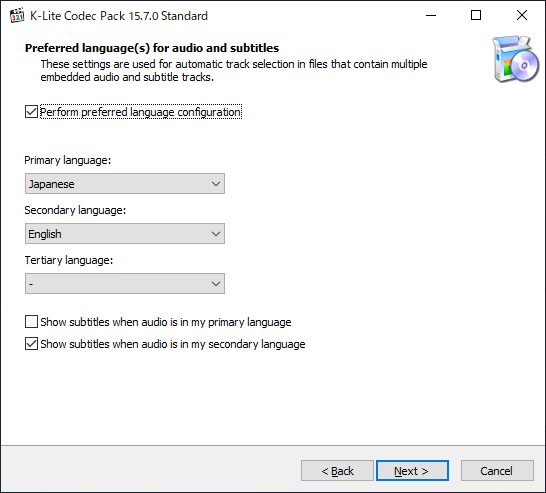
次は、字幕と音声の言語の選択画面になります。「Primary language」で第 1 候補の言語「Secondary language」で第 2 候補の言語を選択して[Next ]をクリックします。
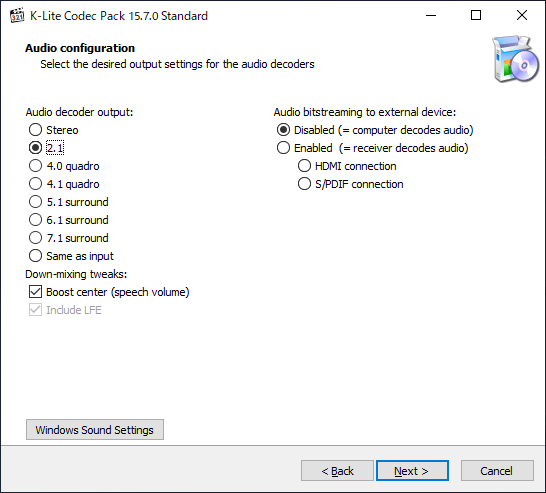
次はオーディオ出力の設定です。オーディオ出力のチェンネルを選択して[Next ]をクリックします。
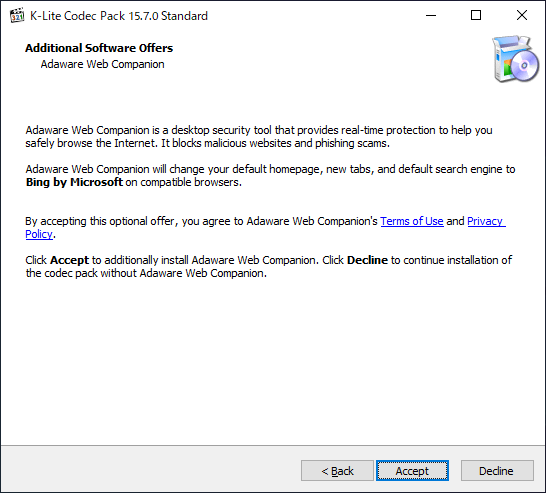
この画面では、サードパーティ製の追加のソフトウェアのインストールが勧められます。必要ない場合は[Decline ]をクリックしましょう。
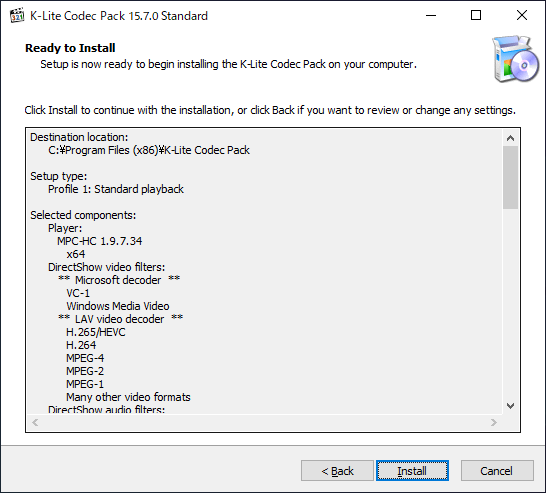
インストールの準備ができました。[Install ]ボタンをクリックするとインストールを開始します。
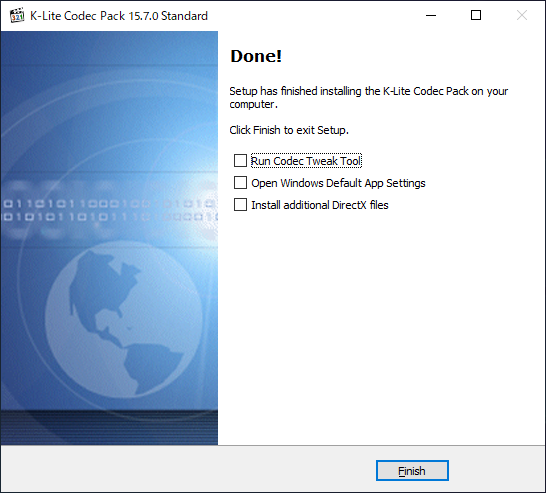
インストールが完了しました。[Finish]ボタンをクリックしてセットアップウィザードを閉じましょう。
基本的な使い方
よくある質問と回答
ライセンスについて
ユーザーレビュー
レビューはまだありません、 最初のレビューを投稿してください。コメントは任意です。
K-Lite Codec Pack はどなたでも無料で使用できます。