").attr(n.scriptAttrs||{}).prop({charset:n.scriptCharset,src:n.url}).on("load error",i=function(e){r.remove(),i=null,e&&t("error"===e.type?404:200,e.type)}),C.head.appendChild(r[0])},abort:function(){i&&i()}}});var Jt,Kt=[],Zt=/(=)\?(?=&|$)|\?\?/;ce.ajaxSetup({jsonp:"callback",jsonpCallback:function(){var e=Kt.pop()||ce.expando+"_"+jt.guid++;return this[e]=!0,e}}),ce.ajaxPrefilter("json jsonp",function(e,t,n){var r,i,o,a=!1!==e.jsonp&&(Zt.test(e.url)?"url":"string"==typeof e.data&&0===(e.contentType||"").indexOf("application/x-www-form-urlencoded")&&Zt.test(e.data)&&"data");if(a||"jsonp"===e.dataTypes[0])return r=e.jsonpCallback=v(e.jsonpCallback)?e.jsonpCallback():e.jsonpCallback,a?e[a]=e[a].replace(Zt,"$1"+r):!1!==e.jsonp&&(e.url+=(At.test(e.url)?"&":"?")+e.jsonp+"="+r),e.converters["script json"]=function(){return o||ce.error(r+" was not called"),o[0]},e.dataTypes[0]="json",i=ie[r],ie[r]=function(){o=arguments},n.always(function(){void 0===i?ce(ie).removeProp(r):ie[r]=i,e[r]&&(e.jsonpCallback=t.jsonpCallback,Kt.push(r)),o&&v(i)&&i(o[0]),o=i=void 0}),"script"}),le.createHTMLDocument=((Jt=C.implementation.createHTMLDocument("").body).innerHTML="
",2===Jt.childNodes.length),ce.parseHTML=function(e,t,n){return"string"!=typeof e?[]:("boolean"==typeof t&&(n=t,t=!1),t||(le.createHTMLDocument?((r=(t=C.implementation.createHTMLDocument("")).createElement("base")).href=C.location.href,t.head.appendChild(r)):t=C),o=!n&&[],(i=w.exec(e))?[t.createElement(i[1])]:(i=Ae([e],t,o),o&&o.length&&ce(o).remove(),ce.merge([],i.childNodes)));var r,i,o},ce.fn.load=function(e,t,n){var r,i,o,a=this,s=e.indexOf(" ");return-1").append(ce.parseHTML(e)).find(r):e)}).always(n&&function(e,t){a.each(function(){n.apply(this,o||[e.responseText,t,e])})}),this},ce.expr.pseudos.animated=function(t){return ce.grep(ce.timers,function(e){return t===e.elem}).length},ce.offset={setOffset:function(e,t,n){var r,i,o,a,s,u,l=ce.css(e,"position"),c=ce(e),f={};"static"===l&&(e.style.position="relative"),s=c.offset(),o=ce.css(e,"top"),u=ce.css(e,"left"),("absolute"===l||"fixed"===l)&&-1<(o+u).indexOf("auto")?(a=(r=c.position()).top,i=r.left):(a=parseFloat(o)||0,i=parseFloat(u)||0),v(t)&&(t=t.call(e,n,ce.extend({},s))),null!=t.top&&(f.top=t.top-s.top+a),null!=t.left&&(f.left=t.left-s.left+i),"using"in t?t.using.call(e,f):c.css(f)}},ce.fn.extend({offset:function(t){if(arguments.length)return void 0===t?this:this.each(function(e){ce.offset.setOffset(this,t,e)});var e,n,r=this[0];return r?r.getClientRects().length?(e=r.getBoundingClientRect(),n=r.ownerDocument.defaultView,{top:e.top+n.pageYOffset,left:e.left+n.pageXOffset}):{top:0,left:0}:void 0},position:function(){if(this[0]){var e,t,n,r=this[0],i={top:0,left:0};if("fixed"===ce.css(r,"position"))t=r.getBoundingClientRect();else{t=this.offset(),n=r.ownerDocument,e=r.offsetParent||n.documentElement;while(e&&(e===n.body||e===n.documentElement)&&"static"===ce.css(e,"position"))e=e.parentNode;e&&e!==r&&1===e.nodeType&&((i=ce(e).offset()).top+=ce.css(e,"borderTopWidth",!0),i.left+=ce.css(e,"borderLeftWidth",!0))}return{top:t.top-i.top-ce.css(r,"marginTop",!0),left:t.left-i.left-ce.css(r,"marginLeft",!0)}}},offsetParent:function(){return this.map(function(){var e=this.offsetParent;while(e&&"static"===ce.css(e,"position"))e=e.offsetParent;return e||J})}}),ce.each({scrollLeft:"pageXOffset",scrollTop:"pageYOffset"},function(t,i){var o="pageYOffset"===i;ce.fn[t]=function(e){return M(this,function(e,t,n){var r;if(y(e)?r=e:9===e.nodeType&&(r=e.defaultView),void 0===n)return r?r[i]:e[t];r?r.scrollTo(o?r.pageXOffset:n,o?n:r.pageYOffset):e[t]=n},t,e,arguments.length)}}),ce.each(["top","left"],function(e,n){ce.cssHooks[n]=Ye(le.pixelPosition,function(e,t){if(t)return t=Ge(e,n),_e.test(t)?ce(e).position()[n]+"px":t})}),ce.each({Height:"height",Width:"width"},function(a,s){ce.each({padding:"inner"+a,content:s,"":"outer"+a},function(r,o){ce.fn[o]=function(e,t){var n=arguments.length&&(r||"boolean"!=typeof e),i=r||(!0===e||!0===t?"margin":"border");return M(this,function(e,t,n){var r;return y(e)?0===o.indexOf("outer")?e["inner"+a]:e.document.documentElement["client"+a]:9===e.nodeType?(r=e.documentElement,Math.max(e.body["scroll"+a],r["scroll"+a],e.body["offset"+a],r["offset"+a],r["client"+a])):void 0===n?ce.css(e,t,i):ce.style(e,t,n,i)},s,n?e:void 0,n)}})}),ce.each(["ajaxStart","ajaxStop","ajaxComplete","ajaxError","ajaxSuccess","ajaxSend"],function(e,t){ce.fn[t]=function(e){return this.on(t,e)}}),ce.fn.extend({bind:function(e,t,n){return this.on(e,null,t,n)},unbind:function(e,t){return this.off(e,null,t)},delegate:function(e,t,n,r){return this.on(t,e,n,r)},undelegate:function(e,t,n){return 1===arguments.length?this.off(e,"**"):this.off(t,e||"**",n)},hover:function(e,t){return this.on("mouseenter",e).on("mouseleave",t||e)}}),ce.each("blur focus focusin focusout resize scroll click dblclick mousedown mouseup mousemove mouseover mouseout mouseenter mouseleave change select submit keydown keypress keyup contextmenu".split(" "),function(e,n){ce.fn[n]=function(e,t){return 0
Windows 10 Codec Pack 2.2.3
コーデック
2021/02/01 14:212025/02/15 14:09
説明 機能 仕様 ダウンロード 画像 使い方
ほぼすべてのビデオ/オーディオファイルと、Blu-ray や DVD を PC で再生

Windows PC で、ほぼすべてのビデオ/オーディオ形式を再生可能にする、コーデックと メディアプレーヤー(Media Player Classic)のセット。さまざまなメディアファイルおよび Bluray、HD-DVD、AVCHD、DVD、CD を再生できるようになります。
Windows 10 Codec Pack の概要
Windows 10 Codec Pack は、最新のビデオおよびオーディオファイルで使用されるほぼすべての圧縮形式およびファイル形式をサポートするコーデックパックです。
Windows 10 Codec Pack の機能
Windows 10 Codec Pack で利用できる主な機能の一覧です。
機能
概要
メイン機能
コーデックとメディアプレーヤーのインストール
再生可能なもの
・.evo | .hevc | .mkv | .avi | .flv | .webm | .mp4 | .ts | .m4v | .m4a | .ogm | .ac3 | .dts | .flac | .ape | .aac | .ogg | .ofr | .mpc | .3gp およびそのほか多数のファイル形式
・Bluray、HD-DVD、AVCHD、DVD、CD ディスク
オプション機能
・映像出力設定
・音声出力設定
・詳細設定
インストールするだけで、すべてのメディアを再生することができます
Windows 10 Codec Pack は、ほぼすべてのビデオ/オーディオファイルと、Blu-ray や DVD を Windows PC で再生できるようにする、コーデックと メディアプレーヤー(MPC-HC)のパックです。
インストールするだけで、あらゆるメディアが再生可能になります。また、上級ユーザー向けに、コーデックの詳細設定を行うことができる GUI も用意されています。
シンプルで便利なコーデックパック
Windows 10 Codec Pack は、映画や音楽を正しく再生するために必要な、すべてのものが含まれているコーデックパックです。
機能
LAV Video decoder
ffdshow DirectShow Video Codec
XviD Video (Encoder) Codec
X264 Video (Encoder) Codec
Lagarith Video (Encoder) Codec
LAV Audio Decoder
Sony DSD 1.0 Audio Decoder
DivX Audio Decoder
madFLAC Audio Decoder
DSP-worx Bass Source Mod Filter/Decoder
Haali Media Splitter/Decoder
LAV Splitter
xy-VSFilter
CDXA Reader
Icaros
Application Tuning (Media Player Classic のデフォルト設定を変更)
価格: 無料
動作環境: Windows 7|8|8.1|10|11
使用言語: 英語
最終更新日:
1年前 (2025/02/15)
ダウンロード数: 5737
使い方
インストール
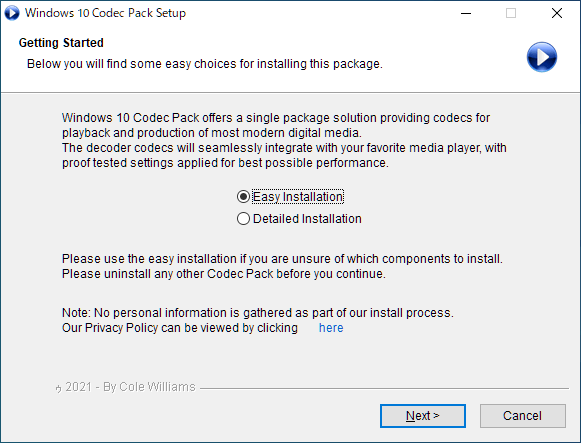
1.インストール方法
インストーラを実行すると、インストール方法の選択画面が表示されます。「Easy Installation 」を選択して[Next ]をクリックします。
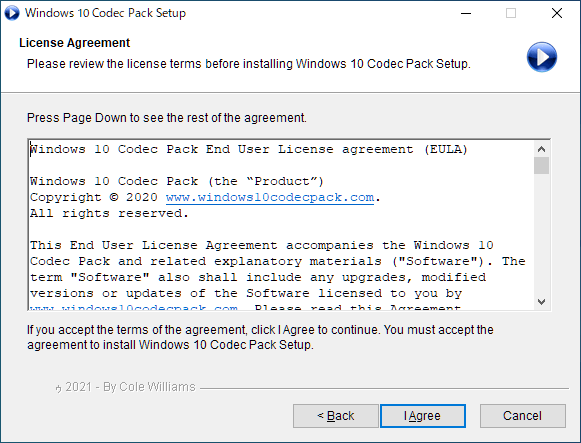
ライセンスが表示されます。[I Agree ]をクリックします。
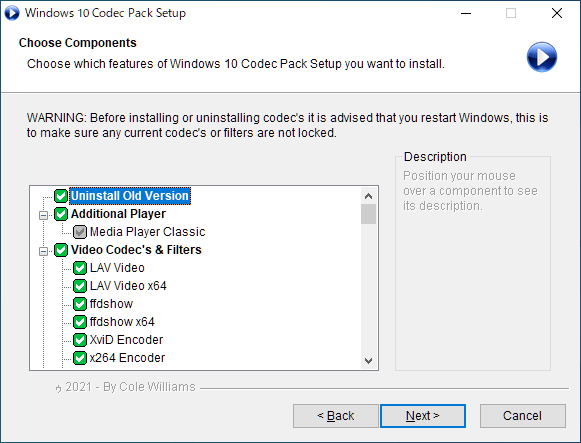
インストールするコンポーネントの選択画面になります。通常はこのまま[Next ]をクリックします。
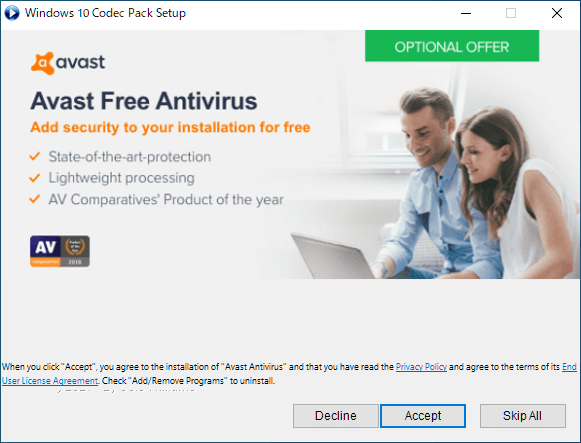
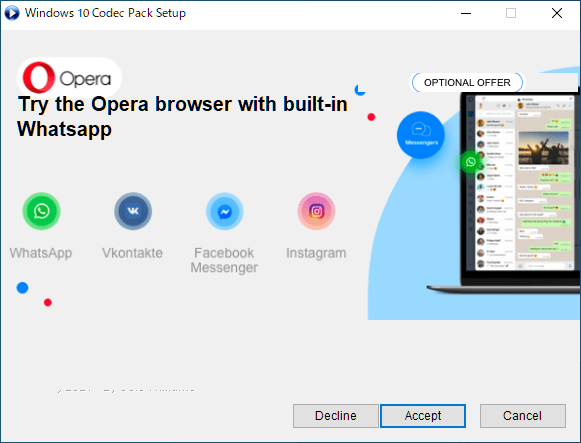
サードパーティーアプリのインストールが勧められます。必要ない場合は[Decline ]をクリックします。
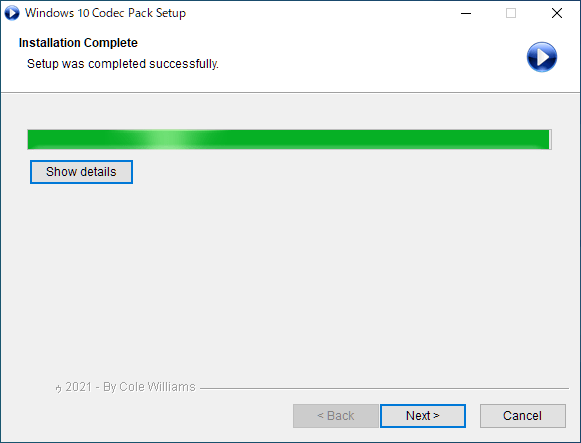
インストールが完了しました。[Next ]をクリックしてセットアップウィザードを閉じます。
2.確認画面
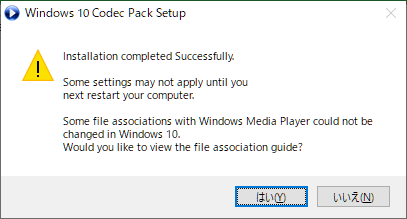
インストールが完了すると、「一部の設定は、次にコンピュータを再起動するまで適用されない場合があります。一部のファイルの関連付けを Windows10 で変更できませんでした。ファイルの関連付けガイドを表示しますか?」といったメッセージが表示されます。表示しない場合は[いいえ]をクリックします。
基本的な使い方
1.トレイアイコン
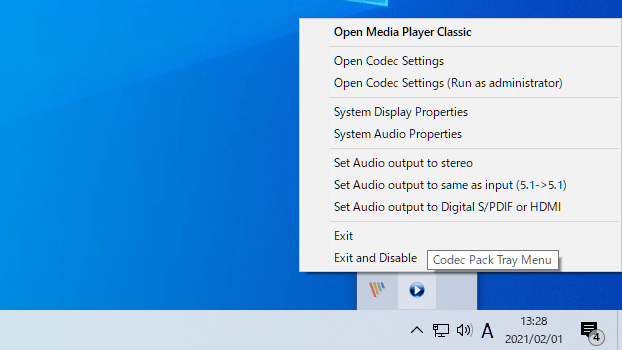
Windows 10 Codec Pack を起動すると、タスクトレイにアイコンが表示されます。
アイコンの右クリックメニューから、コーデックの設定などを行うことができます。
・Open Media Player Classic :MPC を起動する
・Open Codec Setings :コーデックの設定を開く
・Open Codec Setings (Run as administrator) :コーデックの設定を管理者として開く
・System Display Properties :Windows のディスプレイの設定を開く
・System Audio Properties :Windows のサウンドの設定を開く
・Set Audio output to stereo :音声出力をステレオに設定する
・Set Audio output to same as input :音声出力を入力と同じに設定する
・Set Audio output to Digital S/PDIF or HDMI :音声出力をデジタル S/PDIF または HDMI に設定する
・Exit :プログラムを閉じる
・Exit and Disable :プログラムを無効にして閉じる
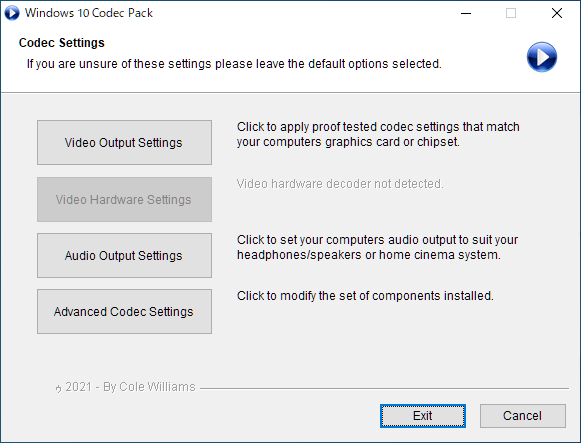
2.コーデックの設定をする
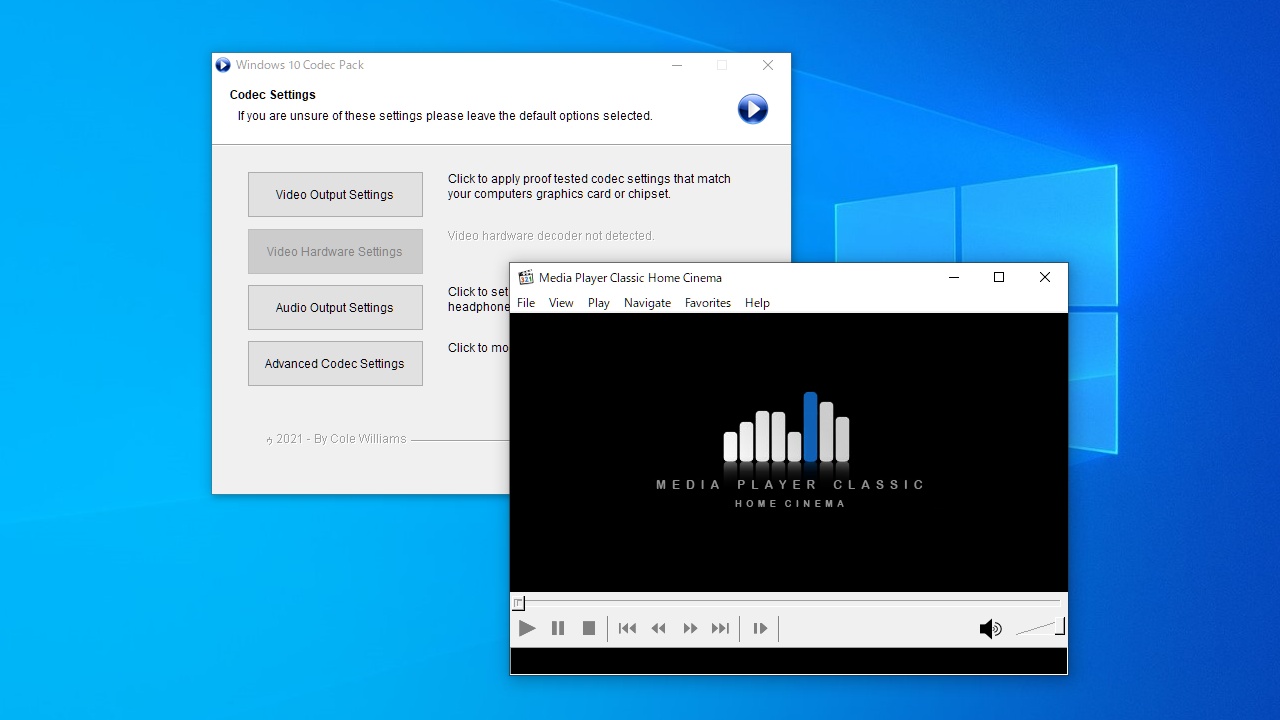
スタートメニューの「Codec Settings 」または、トレイアイコンの「Open Codec Setings 」を選択すると、コーデックの設定ができます。
・Video Output Settings :映像出力設定
・Video Hardware Settings :映像ハードウェア設定
・Audio Output Settings :音声出力設定
・Advanced Codec Settings :詳細設定
よくある質問と回答
ライセンスについて。
ユーザーレビュー
レビューはまだありません、 最初のレビューを投稿してください。コメントは任意です。