").attr(n.scriptAttrs||{}).prop({charset:n.scriptCharset,src:n.url}).on("load error",i=function(e){r.remove(),i=null,e&&t("error"===e.type?404:200,e.type)}),C.head.appendChild(r[0])},abort:function(){i&&i()}}});var Jt,Kt=[],Zt=/(=)\?(?=&|$)|\?\?/;ce.ajaxSetup({jsonp:"callback",jsonpCallback:function(){var e=Kt.pop()||ce.expando+"_"+jt.guid++;return this[e]=!0,e}}),ce.ajaxPrefilter("json jsonp",function(e,t,n){var r,i,o,a=!1!==e.jsonp&&(Zt.test(e.url)?"url":"string"==typeof e.data&&0===(e.contentType||"").indexOf("application/x-www-form-urlencoded")&&Zt.test(e.data)&&"data");if(a||"jsonp"===e.dataTypes[0])return r=e.jsonpCallback=v(e.jsonpCallback)?e.jsonpCallback():e.jsonpCallback,a?e[a]=e[a].replace(Zt,"$1"+r):!1!==e.jsonp&&(e.url+=(At.test(e.url)?"&":"?")+e.jsonp+"="+r),e.converters["script json"]=function(){return o||ce.error(r+" was not called"),o[0]},e.dataTypes[0]="json",i=ie[r],ie[r]=function(){o=arguments},n.always(function(){void 0===i?ce(ie).removeProp(r):ie[r]=i,e[r]&&(e.jsonpCallback=t.jsonpCallback,Kt.push(r)),o&&v(i)&&i(o[0]),o=i=void 0}),"script"}),le.createHTMLDocument=((Jt=C.implementation.createHTMLDocument("").body).innerHTML="
",2===Jt.childNodes.length),ce.parseHTML=function(e,t,n){return"string"!=typeof e?[]:("boolean"==typeof t&&(n=t,t=!1),t||(le.createHTMLDocument?((r=(t=C.implementation.createHTMLDocument("")).createElement("base")).href=C.location.href,t.head.appendChild(r)):t=C),o=!n&&[],(i=w.exec(e))?[t.createElement(i[1])]:(i=Ae([e],t,o),o&&o.length&&ce(o).remove(),ce.merge([],i.childNodes)));var r,i,o},ce.fn.load=function(e,t,n){var r,i,o,a=this,s=e.indexOf(" ");return-1").append(ce.parseHTML(e)).find(r):e)}).always(n&&function(e,t){a.each(function(){n.apply(this,o||[e.responseText,t,e])})}),this},ce.expr.pseudos.animated=function(t){return ce.grep(ce.timers,function(e){return t===e.elem}).length},ce.offset={setOffset:function(e,t,n){var r,i,o,a,s,u,l=ce.css(e,"position"),c=ce(e),f={};"static"===l&&(e.style.position="relative"),s=c.offset(),o=ce.css(e,"top"),u=ce.css(e,"left"),("absolute"===l||"fixed"===l)&&-1<(o+u).indexOf("auto")?(a=(r=c.position()).top,i=r.left):(a=parseFloat(o)||0,i=parseFloat(u)||0),v(t)&&(t=t.call(e,n,ce.extend({},s))),null!=t.top&&(f.top=t.top-s.top+a),null!=t.left&&(f.left=t.left-s.left+i),"using"in t?t.using.call(e,f):c.css(f)}},ce.fn.extend({offset:function(t){if(arguments.length)return void 0===t?this:this.each(function(e){ce.offset.setOffset(this,t,e)});var e,n,r=this[0];return r?r.getClientRects().length?(e=r.getBoundingClientRect(),n=r.ownerDocument.defaultView,{top:e.top+n.pageYOffset,left:e.left+n.pageXOffset}):{top:0,left:0}:void 0},position:function(){if(this[0]){var e,t,n,r=this[0],i={top:0,left:0};if("fixed"===ce.css(r,"position"))t=r.getBoundingClientRect();else{t=this.offset(),n=r.ownerDocument,e=r.offsetParent||n.documentElement;while(e&&(e===n.body||e===n.documentElement)&&"static"===ce.css(e,"position"))e=e.parentNode;e&&e!==r&&1===e.nodeType&&((i=ce(e).offset()).top+=ce.css(e,"borderTopWidth",!0),i.left+=ce.css(e,"borderLeftWidth",!0))}return{top:t.top-i.top-ce.css(r,"marginTop",!0),left:t.left-i.left-ce.css(r,"marginLeft",!0)}}},offsetParent:function(){return this.map(function(){var e=this.offsetParent;while(e&&"static"===ce.css(e,"position"))e=e.offsetParent;return e||J})}}),ce.each({scrollLeft:"pageXOffset",scrollTop:"pageYOffset"},function(t,i){var o="pageYOffset"===i;ce.fn[t]=function(e){return M(this,function(e,t,n){var r;if(y(e)?r=e:9===e.nodeType&&(r=e.defaultView),void 0===n)return r?r[i]:e[t];r?r.scrollTo(o?r.pageXOffset:n,o?n:r.pageYOffset):e[t]=n},t,e,arguments.length)}}),ce.each(["top","left"],function(e,n){ce.cssHooks[n]=Ye(le.pixelPosition,function(e,t){if(t)return t=Ge(e,n),_e.test(t)?ce(e).position()[n]+"px":t})}),ce.each({Height:"height",Width:"width"},function(a,s){ce.each({padding:"inner"+a,content:s,"":"outer"+a},function(r,o){ce.fn[o]=function(e,t){var n=arguments.length&&(r||"boolean"!=typeof e),i=r||(!0===e||!0===t?"margin":"border");return M(this,function(e,t,n){var r;return y(e)?0===o.indexOf("outer")?e["inner"+a]:e.document.documentElement["client"+a]:9===e.nodeType?(r=e.documentElement,Math.max(e.body["scroll"+a],r["scroll"+a],e.body["offset"+a],r["offset"+a],r["client"+a])):void 0===n?ce.css(e,t,i):ce.style(e,t,n,i)},s,n?e:void 0,n)}})}),ce.each(["ajaxStart","ajaxStop","ajaxComplete","ajaxError","ajaxSuccess","ajaxSend"],function(e,t){ce.fn[t]=function(e){return this.on(t,e)}}),ce.fn.extend({bind:function(e,t,n){return this.on(e,null,t,n)},unbind:function(e,t){return this.off(e,null,t)},delegate:function(e,t,n,r){return this.on(t,e,n,r)},undelegate:function(e,t,n){return 1===arguments.length?this.off(e,"**"):this.off(t,e||"**",n)},hover:function(e,t){return this.on("mouseenter",e).on("mouseleave",t||e)}}),ce.each("blur focus focusin focusout resize scroll click dblclick mousedown mouseup mousemove mouseover mouseout mouseenter mouseleave change select submit keydown keypress keyup contextmenu".split(" "),function(e,n){ce.fn[n]=function(e,t){return 0
Windows 10 Bloat Remover and Tweaker 5.0
Windows 設定変更
2021/08/04 14:572023/08/18 08:48
説明 機能 仕様 ダウンロード 画像 使い方
Windows 10 の不要なアプリや機能を削除したり不要な設定を無効化するツール

Windows 10 の不要なアプリや機能をアンインストールして削除したり、必要のない設定を無効化できる Windows デブロート&チューニングツール。UWP アプリや Microsoft Edge、OneDrive を削除したり、Windows Defender、テレメトリなどを無効化できます。
Windows 10 Bloat Remover and Tweaker の概要
Windows 10 Bloat Remover and Tweaker は、Windows 10 のインストールをデブロートおよび微調整するためのコマンドラインインターフェイスを提供します。
Windows 10 Bloat Remover and Tweaker の機能
Windows 10 Bloat Remover and Tweaker の主な機能です。
機能
概要
メイン機能
Windows ブロートウェア削除&設定のチューニング
機能詳細
0: Make system apps removable :legacy Edge やセキュリティセンターなどのアプリを削除する
1: Remove UWP apps :Bing, Cortana, Skype などのプリインストールされている UWP アプリを削除する
2: Remove Microsoft Edge :Microsoft Edge を削除する
3: Remove OneDrive :OneDrive を削除する
4: Remove miscellaneous services :一部のシステムサービスを削除する(サービスは実行可能ファイルと同じフォルダーにバックアップされます)
5: Remove Windows features :ステップ記録ツール、クイックアシスト、Internet Explorer、Hello Face(顔認証)などの機能を削除する
6: Tweak settings for privacy :個人データを危険にさらす特定のシステム機能をオフにしてプライバシーを保護します
7: Disable telemetry :テレメトリ、インベントリ、カスタマーエクスペリエンス向上プログラムなどの診断および使用情報を収集するいくつかの Windows コンポーネントを無効にします
8: Disable Windows Defender :Windows Defender を無効にします
9: Disable automatic updates :Windows の自動更新を無効にします
10: Disable miscellaneous scheduled tasks :一部のスケジュールされたタスクを無効にします
11: Disable Windows Error Reporting :Windows エラー報告サービスを無効にします
12: Disable suggestions, cloud content and feedback requests :提案、クラウドベースのコンテンツ(Spotlight、News and Interests を含む)、フィードバックリクエストを無効にします
Windows の不要なアプリや機能を削除します
Windows 10 Bloat Remover and Tweaker は、Windows にプリインストールされている不要なアプリ(ブロートウェア)をアンインストールしたり、不要な機能を削除したり、必要のない設定を無効化することができるアプリケーションです。
このアプリは、コマンドプロンプトのようなインターフェースでかんたんに使用できますが、このツールからは実行した内容をもとに戻すことができないので、ある程度の Windows スキルが必要になります。
Windows を軽量化し、プライバシーを保護します
Windows 10 Bloat Remover and Tweaker では、UWP アプリや Microsoft Edge、OneDrive などの不要なアプリを削除したり、不要なサービスを削除したり、ステップ記録ツール、クイックアシスト、Internet Explorer、Hello 顔認証などの不要な機能を削除できるので、Windows を軽量化できます。
また、テレメトリを無効にしたりやプライバシーに関する設定を無効化して、ユーザーのプライバシーを保護します。
Windows 10 デブロートツール
Windows 10 Bloat Remover and Tweaker は、初心者ユーザーでもかんたんに Windows の機能をカスタマイズできるアプリケーションです。何か問題が発生した場合に備えて、このアプリを使用する前にシステムの復元ポイントを作成しておくことをおすすめします。
機能
legacy Edge やセキュリティセンターなどのアプリを削除する
Bing, Cortana, Skype などのプリインストールされている UWP アプリを削除する
Microsoft Edge を削除する
OneDrive を削除する
一部のシステムサービスを削除する(サービスは実行可能ファイルと同じフォルダーにバックアップされます)
ステップ記録ツール、クイックアシスト、Internet Explorer、Hello Face(顔認証)などの機能を削除する
個人データを危険にさらす特定のシステム機能をオフにしてプライバシーを保護します
テレメトリ、インベントリ、カスタマーエクスペリエンス向上プログラムなどの診断および使用情報を収集するいくつかの Windows コンポーネントを無効にします
Windows Defender を無効にします
Windows の自動更新を無効にします
一部のスケジュールされたタスクを無効にします
Windows エラー報告サービスを無効にします
提案、クラウドベースのコンテンツ(Spotlight、News and Interests を含む)、フィードバックリクエストを無効にします
価格: 無料
動作環境: Windows 10
使用言語: 英語
最終更新日:
3年前 (2023/08/18)
ダウンロード数: 476
画像
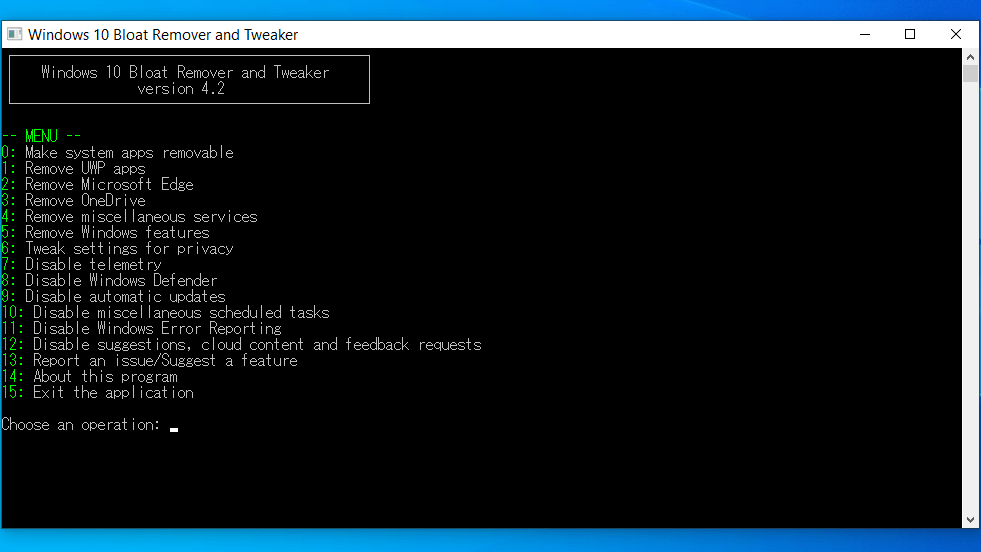
メイン画面
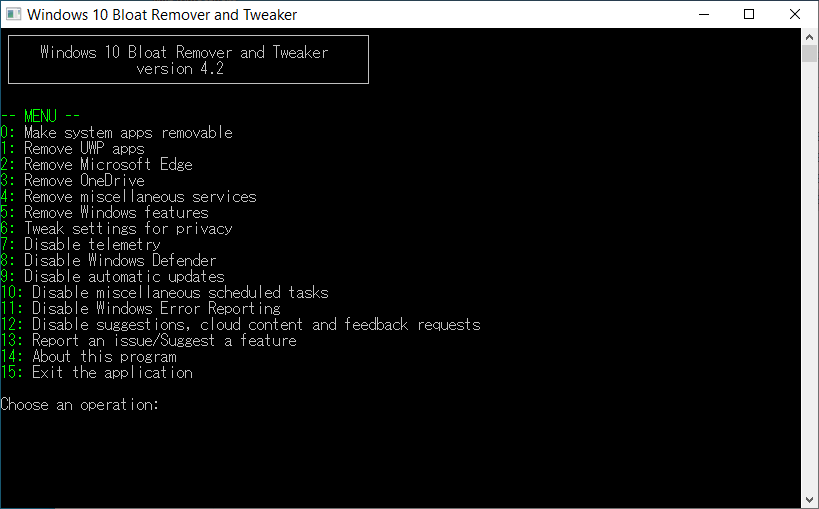
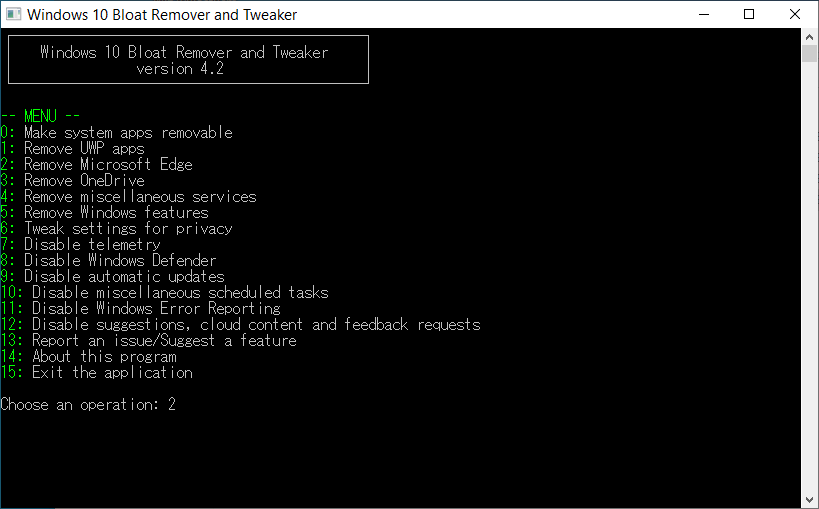
実行する機能の選択
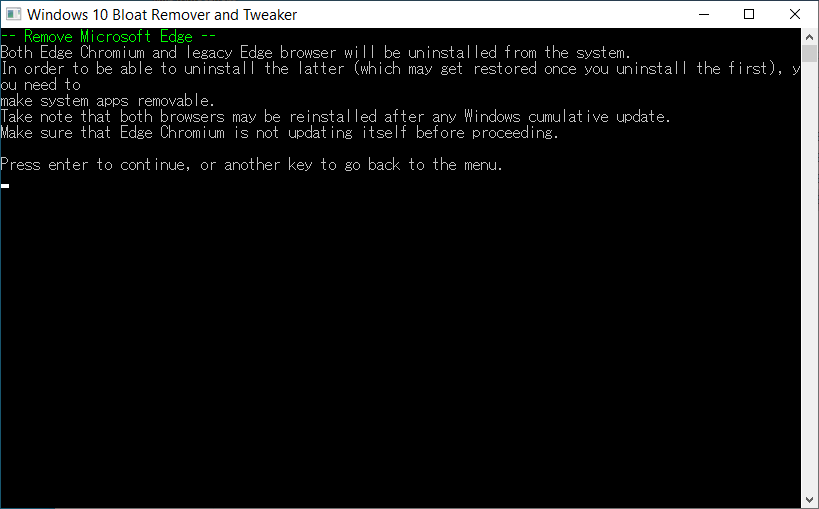
実行の確認
実行中画面
使い方
インストール
1.インストール方法
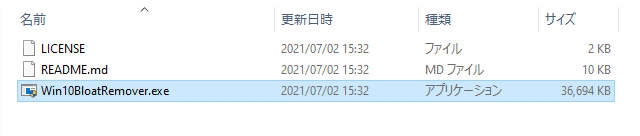
Windows 10 Bloat Remover and Tweaker はインストール不要で使用できます。
ダウンロードした ZIP ファイルを解凍し、「Win10BloatRemover.exe 」ファイルを実行するとアプリケーションを起動できます。
基本的な使い方
1.基本的な使い方
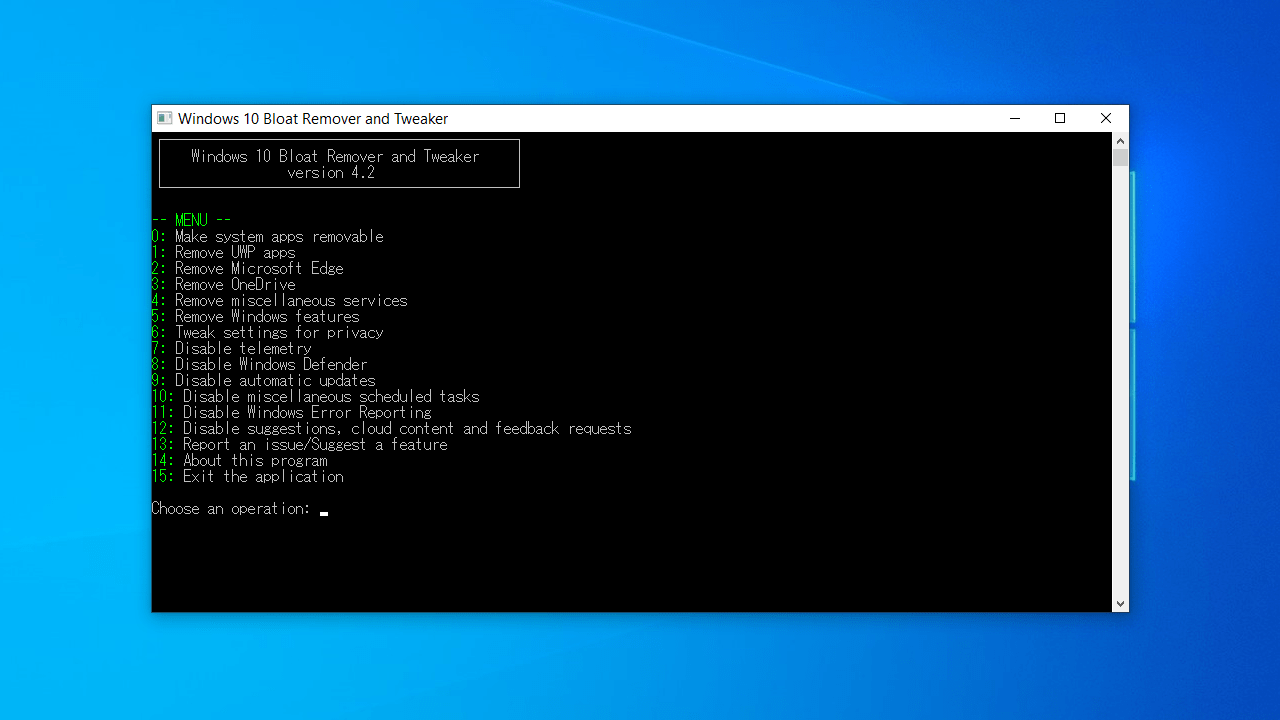
Windows 10 Bloat Remover and Tweaker を起動すると、利用可能な機能の一覧が番号で表示されます。
例えば、Microsoft Edge をアンインストールしたい場合は、「2 」と入力してエンターキーを押します。
0: Make system apps removable :legacy Edge やセキュリティセンターなどのアプリを削除する
1: Remove UWP apps :Bing, Cortana, Skype などのプリインストールされている UWP アプリを削除する
2: Remove Microsoft Edge :Microsoft Edge を削除する
3: Remove OneDrive :OneDrive を削除する
4: Remove miscellaneous services :一部のシステムサービスを削除する(サービスは実行可能ファイルと同じフォルダーにバックアップされます)
5: Remove Windows features :ステップ記録ツール、クイックアシスト、Internet Explorer、Hello Face(顔認証)などの機能を削除する
6: Tweak settings for privacy :個人データを危険にさらす特定のシステム機能をオフにしてプライバシーを保護します
7: Disable telemetry :テレメトリ、インベントリ、カスタマーエクスペリエンス向上プログラムなどの診断および使用情報を収集するいくつかの Windows コンポーネントを無効にします
8: Disable Windows Defender :Windows Defender を無効にします
9: Disable automatic updates :Windows の自動更新を無効にします
10: Disable miscellaneous scheduled tasks :一部のスケジュールされたタスクを無効にします
11: Disable Windows Error Reporting :Windows エラー報告サービスを無効にします
12: Disable suggestions, cloud content and feedback requests :提案、クラウドベースのコンテンツ(Spotlight、News and Interestsを含む)、フィードバックリクエストを無効にします
13: Report an issue/Suggest a feature :バグや提案を報告する
14: About this program :プログラムのバージョン情報などを表示する
15: Exit the application :アプリを閉じる
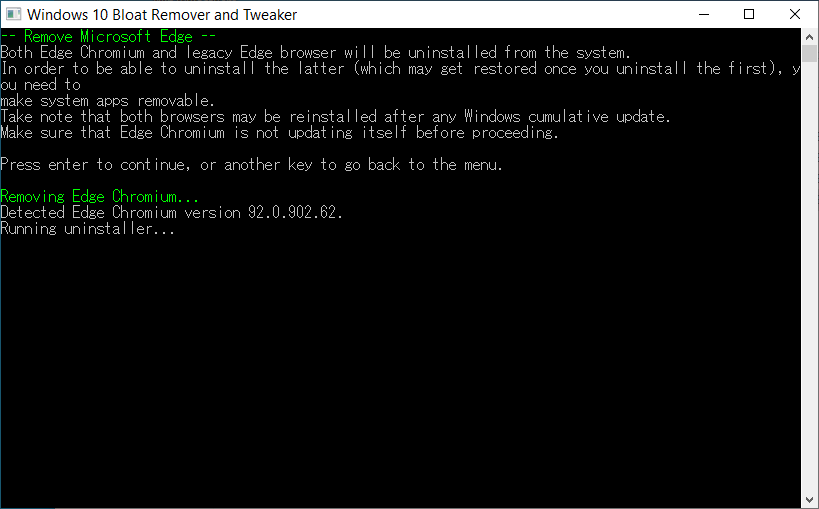
いずれかの番号を選択すると、下の画像のように実行される内容についての説明が表示されます。「エンターキー」を押すと続行します。それ以外のキーを押すと前の画面に戻ります。
例として、Microsoft Edge のアンインストール中の画面です。
よくある質問と回答
ライセンスについて。
ユーザーレビュー
レビューはまだありません、 最初のレビューを投稿してください。コメントは任意です。
Windows 10 Bloat Remover and Tweaker は、どなたでも無料で使用できます。