").attr(n.scriptAttrs||{}).prop({charset:n.scriptCharset,src:n.url}).on("load error",i=function(e){r.remove(),i=null,e&&t("error"===e.type?404:200,e.type)}),C.head.appendChild(r[0])},abort:function(){i&&i()}}});var Jt,Kt=[],Zt=/(=)\?(?=&|$)|\?\?/;ce.ajaxSetup({jsonp:"callback",jsonpCallback:function(){var e=Kt.pop()||ce.expando+"_"+jt.guid++;return this[e]=!0,e}}),ce.ajaxPrefilter("json jsonp",function(e,t,n){var r,i,o,a=!1!==e.jsonp&&(Zt.test(e.url)?"url":"string"==typeof e.data&&0===(e.contentType||"").indexOf("application/x-www-form-urlencoded")&&Zt.test(e.data)&&"data");if(a||"jsonp"===e.dataTypes[0])return r=e.jsonpCallback=v(e.jsonpCallback)?e.jsonpCallback():e.jsonpCallback,a?e[a]=e[a].replace(Zt,"$1"+r):!1!==e.jsonp&&(e.url+=(At.test(e.url)?"&":"?")+e.jsonp+"="+r),e.converters["script json"]=function(){return o||ce.error(r+" was not called"),o[0]},e.dataTypes[0]="json",i=ie[r],ie[r]=function(){o=arguments},n.always(function(){void 0===i?ce(ie).removeProp(r):ie[r]=i,e[r]&&(e.jsonpCallback=t.jsonpCallback,Kt.push(r)),o&&v(i)&&i(o[0]),o=i=void 0}),"script"}),le.createHTMLDocument=((Jt=C.implementation.createHTMLDocument("").body).innerHTML="
",2===Jt.childNodes.length),ce.parseHTML=function(e,t,n){return"string"!=typeof e?[]:("boolean"==typeof t&&(n=t,t=!1),t||(le.createHTMLDocument?((r=(t=C.implementation.createHTMLDocument("")).createElement("base")).href=C.location.href,t.head.appendChild(r)):t=C),o=!n&&[],(i=w.exec(e))?[t.createElement(i[1])]:(i=Ae([e],t,o),o&&o.length&&ce(o).remove(),ce.merge([],i.childNodes)));var r,i,o},ce.fn.load=function(e,t,n){var r,i,o,a=this,s=e.indexOf(" ");return-1").append(ce.parseHTML(e)).find(r):e)}).always(n&&function(e,t){a.each(function(){n.apply(this,o||[e.responseText,t,e])})}),this},ce.expr.pseudos.animated=function(t){return ce.grep(ce.timers,function(e){return t===e.elem}).length},ce.offset={setOffset:function(e,t,n){var r,i,o,a,s,u,l=ce.css(e,"position"),c=ce(e),f={};"static"===l&&(e.style.position="relative"),s=c.offset(),o=ce.css(e,"top"),u=ce.css(e,"left"),("absolute"===l||"fixed"===l)&&-1<(o+u).indexOf("auto")?(a=(r=c.position()).top,i=r.left):(a=parseFloat(o)||0,i=parseFloat(u)||0),v(t)&&(t=t.call(e,n,ce.extend({},s))),null!=t.top&&(f.top=t.top-s.top+a),null!=t.left&&(f.left=t.left-s.left+i),"using"in t?t.using.call(e,f):c.css(f)}},ce.fn.extend({offset:function(t){if(arguments.length)return void 0===t?this:this.each(function(e){ce.offset.setOffset(this,t,e)});var e,n,r=this[0];return r?r.getClientRects().length?(e=r.getBoundingClientRect(),n=r.ownerDocument.defaultView,{top:e.top+n.pageYOffset,left:e.left+n.pageXOffset}):{top:0,left:0}:void 0},position:function(){if(this[0]){var e,t,n,r=this[0],i={top:0,left:0};if("fixed"===ce.css(r,"position"))t=r.getBoundingClientRect();else{t=this.offset(),n=r.ownerDocument,e=r.offsetParent||n.documentElement;while(e&&(e===n.body||e===n.documentElement)&&"static"===ce.css(e,"position"))e=e.parentNode;e&&e!==r&&1===e.nodeType&&((i=ce(e).offset()).top+=ce.css(e,"borderTopWidth",!0),i.left+=ce.css(e,"borderLeftWidth",!0))}return{top:t.top-i.top-ce.css(r,"marginTop",!0),left:t.left-i.left-ce.css(r,"marginLeft",!0)}}},offsetParent:function(){return this.map(function(){var e=this.offsetParent;while(e&&"static"===ce.css(e,"position"))e=e.offsetParent;return e||J})}}),ce.each({scrollLeft:"pageXOffset",scrollTop:"pageYOffset"},function(t,i){var o="pageYOffset"===i;ce.fn[t]=function(e){return M(this,function(e,t,n){var r;if(y(e)?r=e:9===e.nodeType&&(r=e.defaultView),void 0===n)return r?r[i]:e[t];r?r.scrollTo(o?r.pageXOffset:n,o?n:r.pageYOffset):e[t]=n},t,e,arguments.length)}}),ce.each(["top","left"],function(e,n){ce.cssHooks[n]=Ye(le.pixelPosition,function(e,t){if(t)return t=Ge(e,n),_e.test(t)?ce(e).position()[n]+"px":t})}),ce.each({Height:"height",Width:"width"},function(a,s){ce.each({padding:"inner"+a,content:s,"":"outer"+a},function(r,o){ce.fn[o]=function(e,t){var n=arguments.length&&(r||"boolean"!=typeof e),i=r||(!0===e||!0===t?"margin":"border");return M(this,function(e,t,n){var r;return y(e)?0===o.indexOf("outer")?e["inner"+a]:e.document.documentElement["client"+a]:9===e.nodeType?(r=e.documentElement,Math.max(e.body["scroll"+a],r["scroll"+a],e.body["offset"+a],r["offset"+a],r["client"+a])):void 0===n?ce.css(e,t,i):ce.style(e,t,n,i)},s,n?e:void 0,n)}})}),ce.each(["ajaxStart","ajaxStop","ajaxComplete","ajaxError","ajaxSuccess","ajaxSend"],function(e,t){ce.fn[t]=function(e){return this.on(t,e)}}),ce.fn.extend({bind:function(e,t,n){return this.on(e,null,t,n)},unbind:function(e,t){return this.off(e,null,t)},delegate:function(e,t,n,r){return this.on(t,e,n,r)},undelegate:function(e,t,n){return 1===arguments.length?this.off(e,"**"):this.off(t,e||"**",n)},hover:function(e,t){return this.on("mouseenter",e).on("mouseleave",t||e)}}),ce.each("blur focus focusin focusout resize scroll click dblclick mousedown mouseup mousemove mouseover mouseout mouseenter mouseleave change select submit keydown keypress keyup contextmenu".split(" "),function(e,n){ce.fn[n]=function(e,t){return 0
optimizerDuck 2.13.3
Windows 設定変更
2025/11/13 11:15
説明機能仕様ダウンロード画像使い方
パフォーマンス、プライバシー、シンプルさを重視した、無料の Windows 最適化ツール

パフォーマンスの向上、プライバシーの強化、シンプルさを重視して構築された、無料のオープンソース Windows 最適化ツール。PC の動作をよりスムーズかつ高速にし、バックグラウンドの煩わしさを軽減します。

optimizerDuck の概要
optimizerDuck は、Windows をチューニングしたい場合に役に立つアプリケーションです。
optimizerDuck の機能
optimizerDuck の主な機能です。
| 機能 |
概要 |
| メイン機能 |
PC 最適化 |
| 機能詳細 |
・パフォーマンス:CPU / GPUの応答性を向上させ、ゲーム時の入力遅延を軽減します。
・Debloat & Services:不要なアプリを削除し、バックグラウンドサービスを無効化します。
・電源:電源プランを最適化して、パフォーマンスを最大限に高めます。
・プライバシーとセキュリティ:テレメトリを制限し、Cortana、Copilot、システム広告を無効化します。
・ユーザーエクスペリエンス:タスクバーを整理し、エクスプローラーを改善し、ダークモードを有効にし、入力デバイスを強化します。 |
Windows をカスタマイズして最適化します
optimizerDuck は、パフォーマンスの向上、プライバシーの強化、シンプルさを重視して構築された、無料のオープンソース Windows 最適化ツールです。
optimizerDuck は、低スペックの PC でもゲームをスムーズにプレイできるようにするために開発されました。このアプリは、ユーザーの好みどおりに Windows をチューニングできるのが特徴です。
さまざまな最適化を実行できます
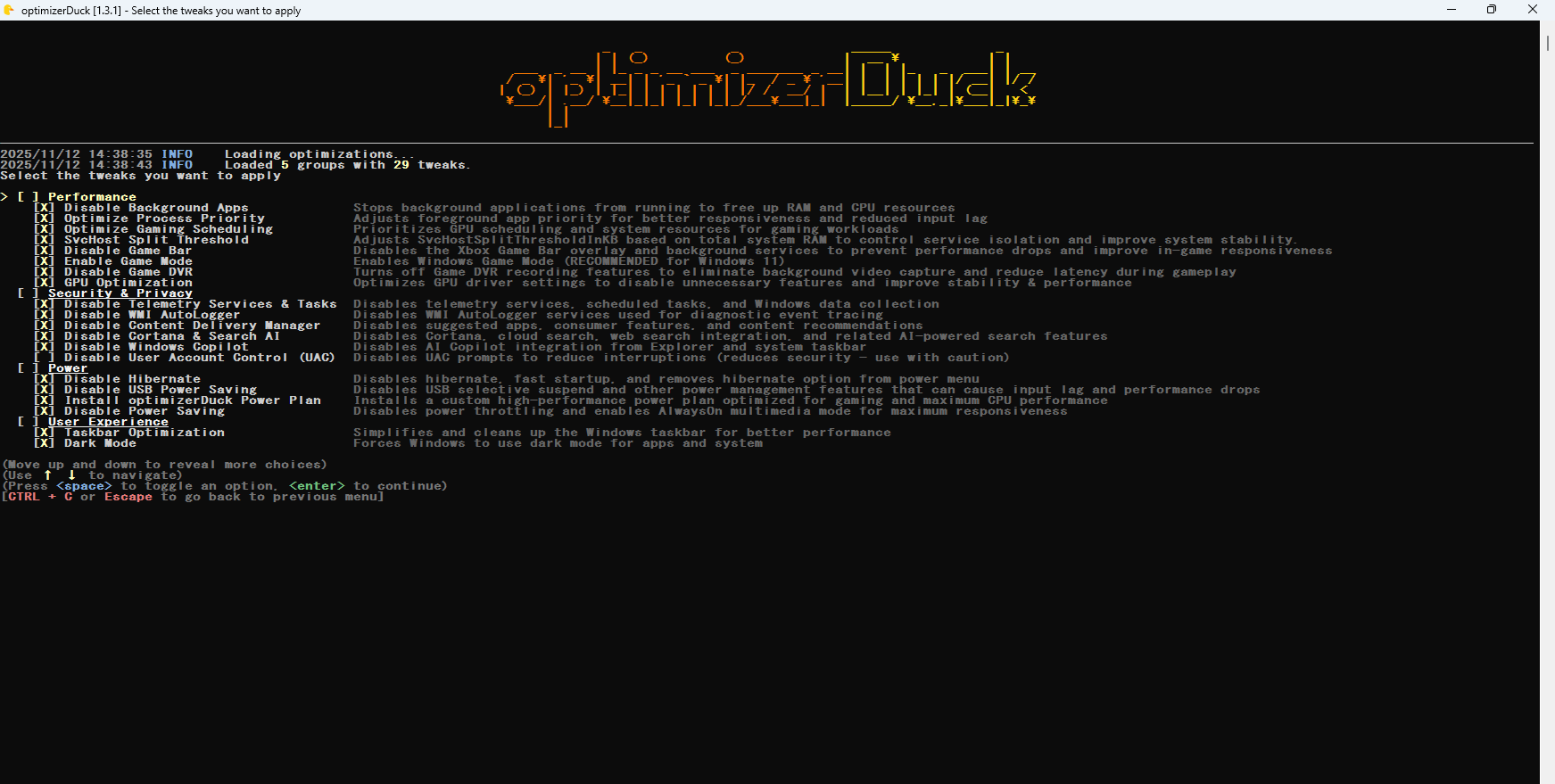
optimizerDuck を使用すると、バックグラウンドアプリを無効化して RAM と CPU のリソースを解放したり、フォアグラウンドアプリの優先度を調整して応答性を向上させたり、テレメトリサービスとタスクを無効にしたり、Cortana と Search AI、Copilot を無効にしたり、ユーザー アカウント制御 (UAC) を無効にしたり、休止状態を無効にしたり、USB 省電力や電源プランの省電力を無効にしたり、タスクバーを簡素化して整理したり、プリインストールアプリ(ブロートウェア)を削除することができます。
ユーザーの思い通りに Windows PC をチューニングできます
optimizerDuck は、使いやすさを確保しながらシステムパフォーマンスを向上させることができる強力な Windows 最適化ツールです。システムの復元ポイントを作成するオプションも用意されているので、安心してシステムをチューニングすることができます。
機能
- パフォーマンス:CPU / GPUの応答性を向上させ、ゲーム時の入力遅延を軽減します。
- Debloat & Services:不要なアプリを削除し、バックグラウンドサービスを無効化します。
- 電源:電源プランを最適化して、パフォーマンスを最大限に高めます。
- プライバシーとセキュリティ:テレメトリを制限し、Cortana、Copilot、システム広告を無効化します。
- ユーザーエクスペリエンス:タスクバーを整理し、エクスプローラーを改善し、ダークモードを有効にし、入力デバイスを強化します。
価格:無料
動作環境:Windows 10|11
使用言語:英語
最終更新日:
12時間前 (2026/05/15)
ダウンロード数:253
画像

スタート画面

メインメニュー

最適化項目

復元ポイントの作成
使い方
インストール
1.インストール方法
optimizerDuck は、インストール不要で使用できるアプリケーションです。
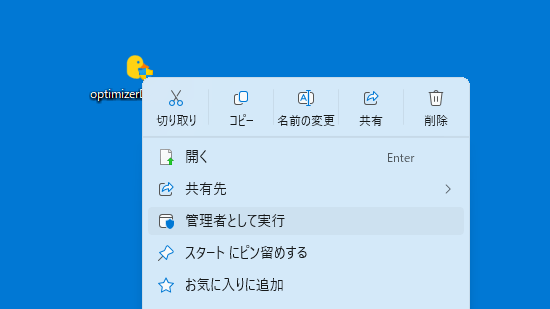
- ダウンロードした EXE ファイルを右クリックし、「管理者として実行」します。
基本的な使い方
1. 基本的な使い方
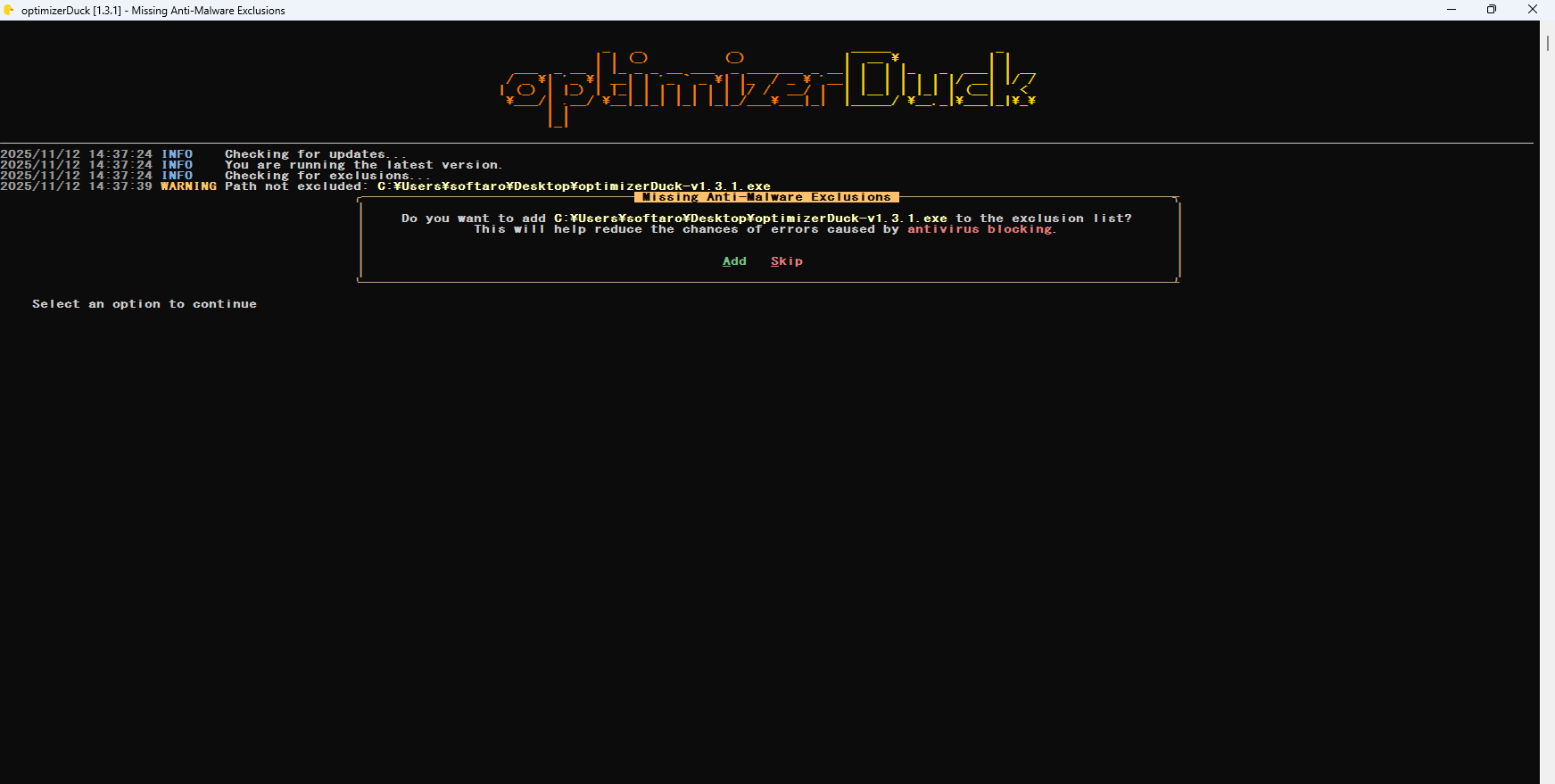
- はじめに、optimizerDuck をウイルス対策の除外リストに追加するかどうかを尋ねられます。追加する場合は「A」追加しない場合は「S」キーを押します。

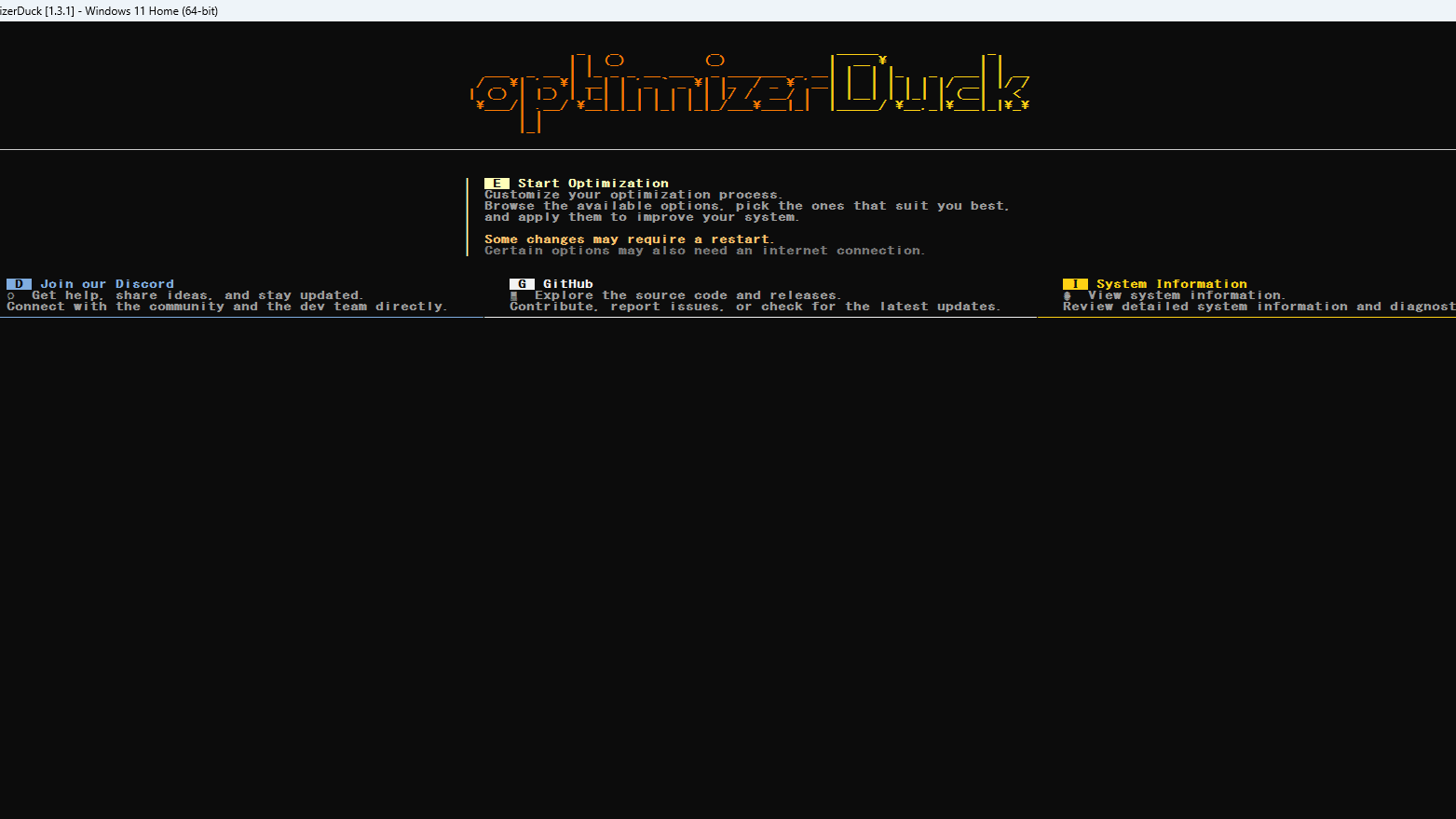
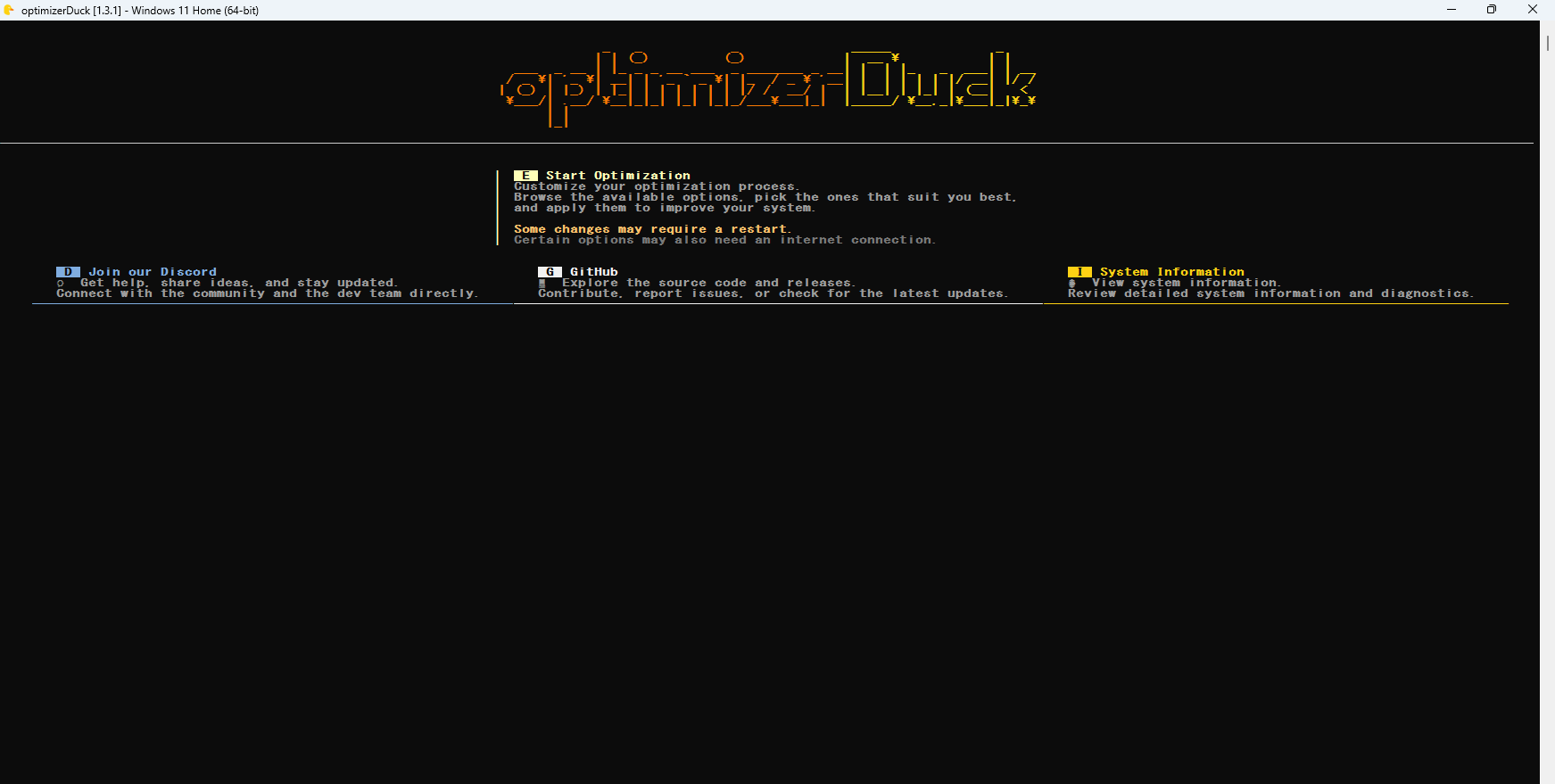
- メインメニューです。最適化を開始する場合は「E」キーを押します。

- 最適化可能な項目のリストが表示されます。「上下」キーで選択し、「スペース」キーでオンオフを決定します。すべての項目を確認したら「エンター」キーを押し処理を開始します。

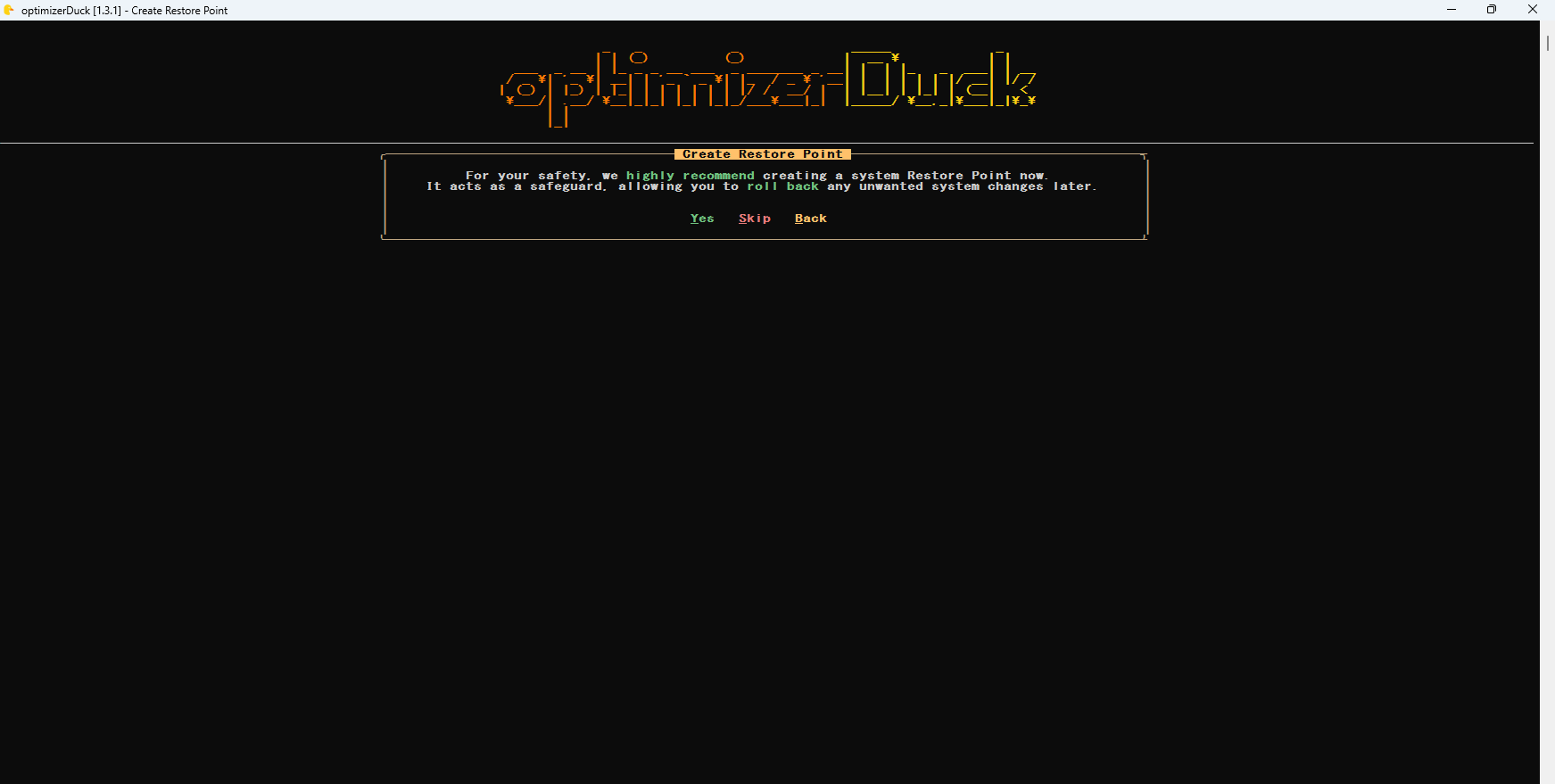
- システムの復元ポイントを作成するかどうか尋ねられます。作成する場合は「Y」作成しない場合は「S」戻る場合は「B」キーを押します。

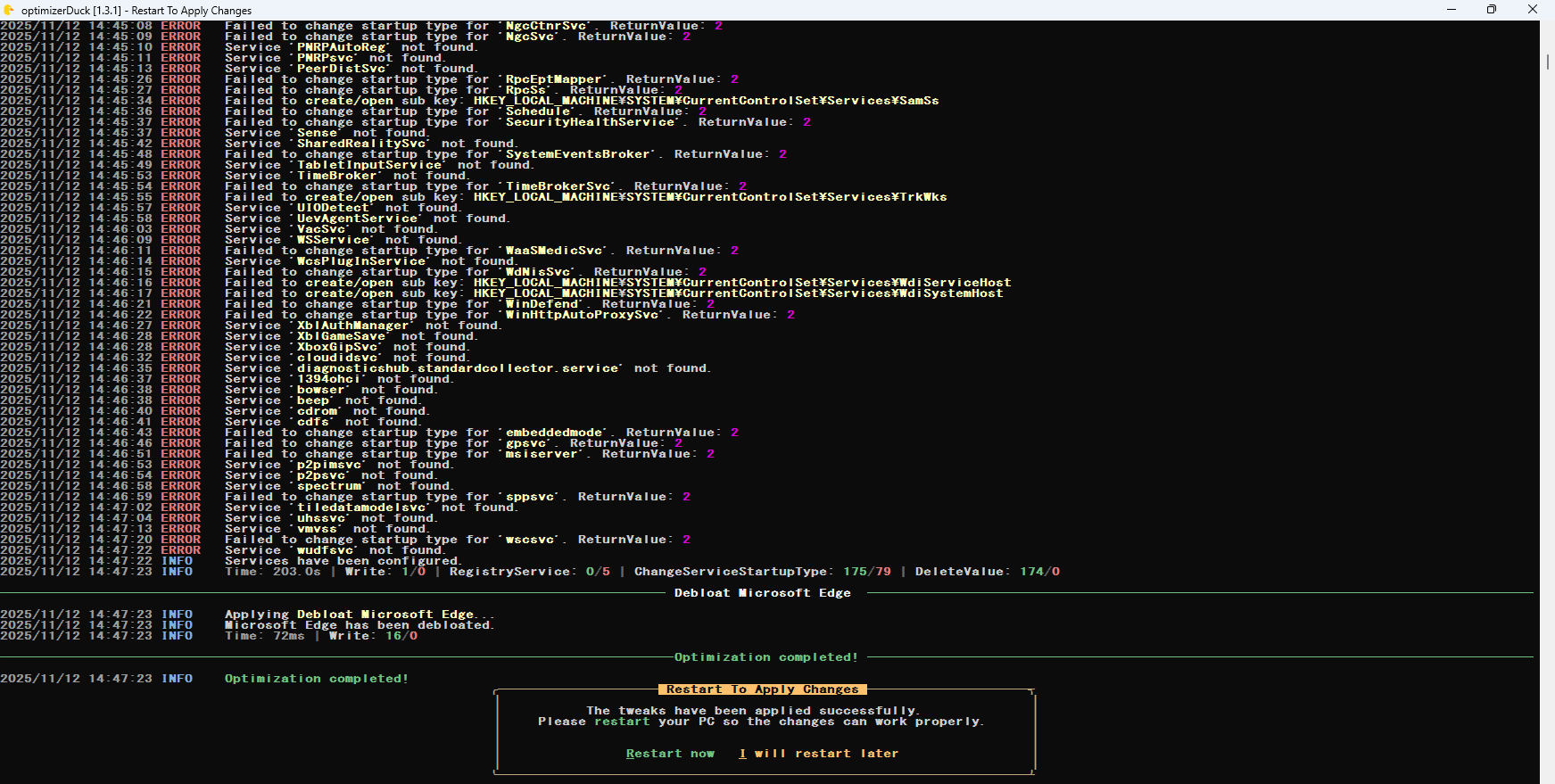
- 処理が完了すると、PC を再起動するかどうか尋ねられます。再起動する場合は「R」、あとで再起動する場合は「I」キーを押します。
よくある質問と回答
ライセンスについて。
optimizerDuck は、どなたでも無料で使用できます。