").attr(n.scriptAttrs||{}).prop({charset:n.scriptCharset,src:n.url}).on("load error",i=function(e){r.remove(),i=null,e&&t("error"===e.type?404:200,e.type)}),C.head.appendChild(r[0])},abort:function(){i&&i()}}});var Jt,Kt=[],Zt=/(=)\?(?=&|$)|\?\?/;ce.ajaxSetup({jsonp:"callback",jsonpCallback:function(){var e=Kt.pop()||ce.expando+"_"+jt.guid++;return this[e]=!0,e}}),ce.ajaxPrefilter("json jsonp",function(e,t,n){var r,i,o,a=!1!==e.jsonp&&(Zt.test(e.url)?"url":"string"==typeof e.data&&0===(e.contentType||"").indexOf("application/x-www-form-urlencoded")&&Zt.test(e.data)&&"data");if(a||"jsonp"===e.dataTypes[0])return r=e.jsonpCallback=v(e.jsonpCallback)?e.jsonpCallback():e.jsonpCallback,a?e[a]=e[a].replace(Zt,"$1"+r):!1!==e.jsonp&&(e.url+=(At.test(e.url)?"&":"?")+e.jsonp+"="+r),e.converters["script json"]=function(){return o||ce.error(r+" was not called"),o[0]},e.dataTypes[0]="json",i=ie[r],ie[r]=function(){o=arguments},n.always(function(){void 0===i?ce(ie).removeProp(r):ie[r]=i,e[r]&&(e.jsonpCallback=t.jsonpCallback,Kt.push(r)),o&&v(i)&&i(o[0]),o=i=void 0}),"script"}),le.createHTMLDocument=((Jt=C.implementation.createHTMLDocument("").body).innerHTML="
",2===Jt.childNodes.length),ce.parseHTML=function(e,t,n){return"string"!=typeof e?[]:("boolean"==typeof t&&(n=t,t=!1),t||(le.createHTMLDocument?((r=(t=C.implementation.createHTMLDocument("")).createElement("base")).href=C.location.href,t.head.appendChild(r)):t=C),o=!n&&[],(i=w.exec(e))?[t.createElement(i[1])]:(i=Ae([e],t,o),o&&o.length&&ce(o).remove(),ce.merge([],i.childNodes)));var r,i,o},ce.fn.load=function(e,t,n){var r,i,o,a=this,s=e.indexOf(" ");return-1").append(ce.parseHTML(e)).find(r):e)}).always(n&&function(e,t){a.each(function(){n.apply(this,o||[e.responseText,t,e])})}),this},ce.expr.pseudos.animated=function(t){return ce.grep(ce.timers,function(e){return t===e.elem}).length},ce.offset={setOffset:function(e,t,n){var r,i,o,a,s,u,l=ce.css(e,"position"),c=ce(e),f={};"static"===l&&(e.style.position="relative"),s=c.offset(),o=ce.css(e,"top"),u=ce.css(e,"left"),("absolute"===l||"fixed"===l)&&-1<(o+u).indexOf("auto")?(a=(r=c.position()).top,i=r.left):(a=parseFloat(o)||0,i=parseFloat(u)||0),v(t)&&(t=t.call(e,n,ce.extend({},s))),null!=t.top&&(f.top=t.top-s.top+a),null!=t.left&&(f.left=t.left-s.left+i),"using"in t?t.using.call(e,f):c.css(f)}},ce.fn.extend({offset:function(t){if(arguments.length)return void 0===t?this:this.each(function(e){ce.offset.setOffset(this,t,e)});var e,n,r=this[0];return r?r.getClientRects().length?(e=r.getBoundingClientRect(),n=r.ownerDocument.defaultView,{top:e.top+n.pageYOffset,left:e.left+n.pageXOffset}):{top:0,left:0}:void 0},position:function(){if(this[0]){var e,t,n,r=this[0],i={top:0,left:0};if("fixed"===ce.css(r,"position"))t=r.getBoundingClientRect();else{t=this.offset(),n=r.ownerDocument,e=r.offsetParent||n.documentElement;while(e&&(e===n.body||e===n.documentElement)&&"static"===ce.css(e,"position"))e=e.parentNode;e&&e!==r&&1===e.nodeType&&((i=ce(e).offset()).top+=ce.css(e,"borderTopWidth",!0),i.left+=ce.css(e,"borderLeftWidth",!0))}return{top:t.top-i.top-ce.css(r,"marginTop",!0),left:t.left-i.left-ce.css(r,"marginLeft",!0)}}},offsetParent:function(){return this.map(function(){var e=this.offsetParent;while(e&&"static"===ce.css(e,"position"))e=e.offsetParent;return e||J})}}),ce.each({scrollLeft:"pageXOffset",scrollTop:"pageYOffset"},function(t,i){var o="pageYOffset"===i;ce.fn[t]=function(e){return M(this,function(e,t,n){var r;if(y(e)?r=e:9===e.nodeType&&(r=e.defaultView),void 0===n)return r?r[i]:e[t];r?r.scrollTo(o?r.pageXOffset:n,o?n:r.pageYOffset):e[t]=n},t,e,arguments.length)}}),ce.each(["top","left"],function(e,n){ce.cssHooks[n]=Ye(le.pixelPosition,function(e,t){if(t)return t=Ge(e,n),_e.test(t)?ce(e).position()[n]+"px":t})}),ce.each({Height:"height",Width:"width"},function(a,s){ce.each({padding:"inner"+a,content:s,"":"outer"+a},function(r,o){ce.fn[o]=function(e,t){var n=arguments.length&&(r||"boolean"!=typeof e),i=r||(!0===e||!0===t?"margin":"border");return M(this,function(e,t,n){var r;return y(e)?0===o.indexOf("outer")?e["inner"+a]:e.document.documentElement["client"+a]:9===e.nodeType?(r=e.documentElement,Math.max(e.body["scroll"+a],r["scroll"+a],e.body["offset"+a],r["offset"+a],r["client"+a])):void 0===n?ce.css(e,t,i):ce.style(e,t,n,i)},s,n?e:void 0,n)}})}),ce.each(["ajaxStart","ajaxStop","ajaxComplete","ajaxError","ajaxSuccess","ajaxSend"],function(e,t){ce.fn[t]=function(e){return this.on(t,e)}}),ce.fn.extend({bind:function(e,t,n){return this.on(e,null,t,n)},unbind:function(e,t){return this.off(e,null,t)},delegate:function(e,t,n,r){return this.on(t,e,n,r)},undelegate:function(e,t,n){return 1===arguments.length?this.off(e,"**"):this.off(t,e||"**",n)},hover:function(e,t){return this.on("mouseenter",e).on("mouseleave",t||e)}}),ce.each("blur focus focusin focusout resize scroll click dblclick mousedown mouseup mousemove mouseover mouseout mouseenter mouseleave change select submit keydown keypress keyup contextmenu".split(" "),function(e,n){ce.fn[n]=function(e,t){return 0
StaxRip 2.52.3.1
ビデオエンコード
2020/07/30 22:10
説明機能仕様ダウンロード画像使い方
DVD/ブルーレイ/動画ファイルを x265・x264 ビデオに変換

DVD や Blu-ray およびそのほかの多くの動画フォーマットを XviD、x264 / AVC、x265 / HEVC、VP7 などの MPEG-4 ビデオ(MP4, MKV, WebM)にかんたんに変換できるビデオエンコードソフト。
StaxRip の概要
StaxRip は、Windows 用のビデオエンコーディング GUI アプリケーションです。x265、mkvmerge、ffmpeg などのコンソールアプリを実行および制御することが可能で、ビデオ処理にスクリプトベースのフレームサーバーの AviSynth および VapourSynth を使用しています。
StaxRip の機能
StaxRip で変換可能なフォーマットは以下のとおりです。
| 機能 |
概要 |
| 入力フォーマット |
・シングルファイル
・Blu-ray フォルダ
・Merge Files(ファイルを結合する、DVD VOB ファイルなど)
・File Batch(複数のファイルをバッチエンコード) |
| 出力フォーマット |
MP4, MKV, WebM |
| エンコーダ |
x264, x265, FFmpeg, Intel, AMD, Nvidia |
あらゆるソースの形式のビデオファイルを変換できます
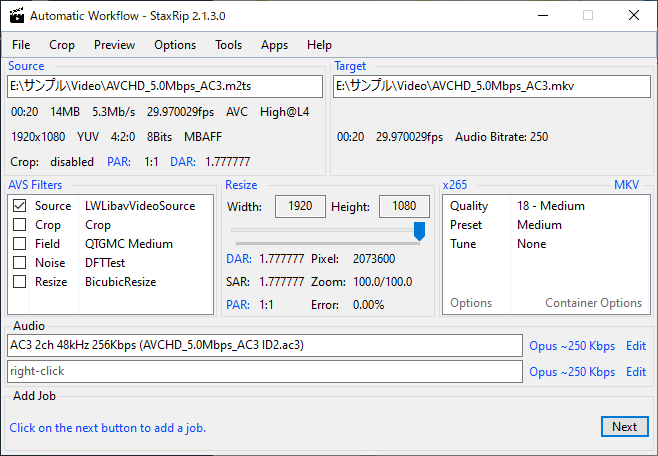
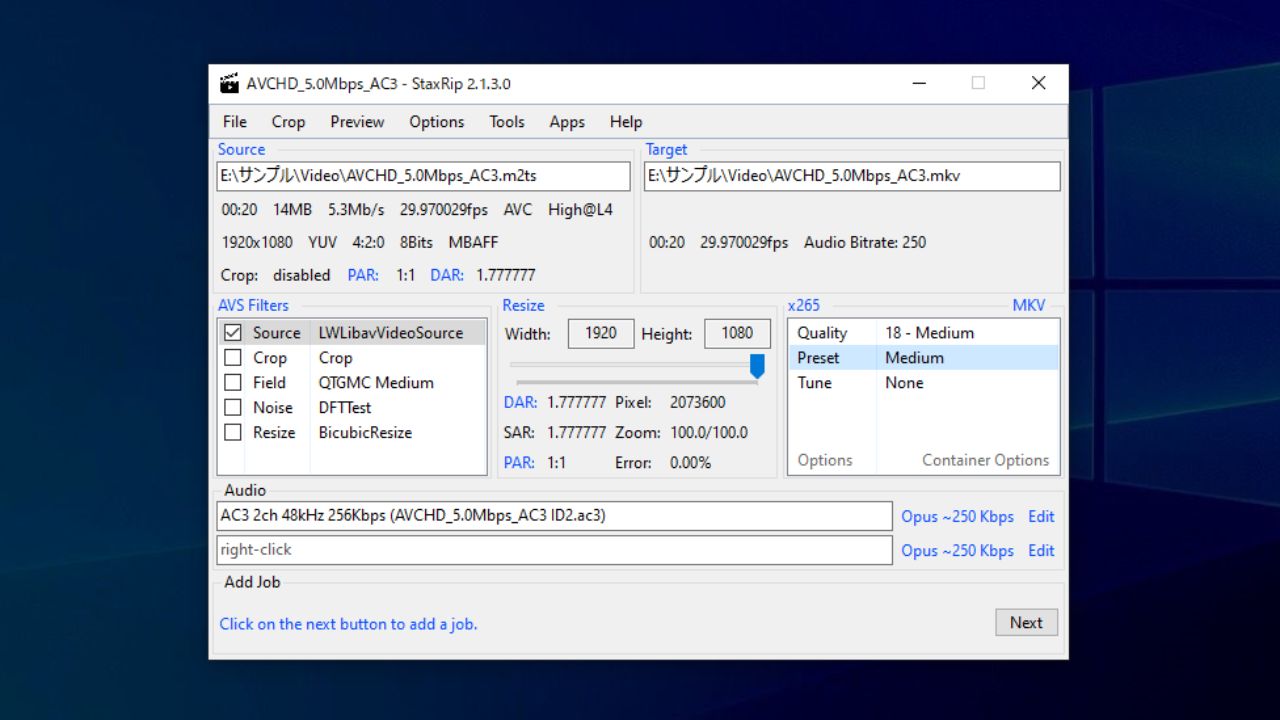
StaxRip は一見使い方が難しいように見えますが、ソースを入力するだけで入力ファイルの分離や DVD のインデックス作成などを自動で行ってくれるので、ユーザーは何もしなくて済みます。
出力設定もデフォルトで標準的な数値が設定されているので、ユーザーは使用するエンコーダやコンテナ形式、オーディオ形式を選択するだけで好みの動画形式に変換することができます。
必要に応じて画面のクロップやリサイズ、ノイズ除去などを行うことが可能です。
便利なフリーの動画変換ソフト
StaxRip は、AviSynth + や VapourSynth、およびそのほかのさまざまなマルチメディアツールの使用をカバーする、用途が広いフロントエンドアプリケーションです。フリーで利用できるエンコードソフトのひとつとしておすすめできます。
機能
- DVD、Blu-ray、DVB、DVキャプチャ、またはそのほかのほとんどすべてのソース形式を変換
- バグ追跡とサポートシステム
- 広告の削除などのタスクのための豊富で便利なカット/トリム機能
- 画面サイズのリサイズ
- ジョブリストとバッチ処理
- 必要なサードパーティアプリケーションを簡単に管理、統合、ダウンロードできます
- 自動インターネット更新
価格:無料
動作環境:Windows 7|8|8.1|10
使用言語:英語
最終更新日:
3週間前 (2026/04/09)
ダウンロード数:1982
画像

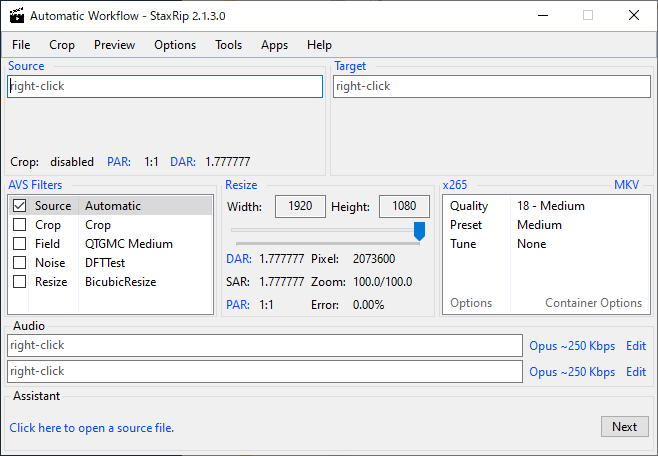
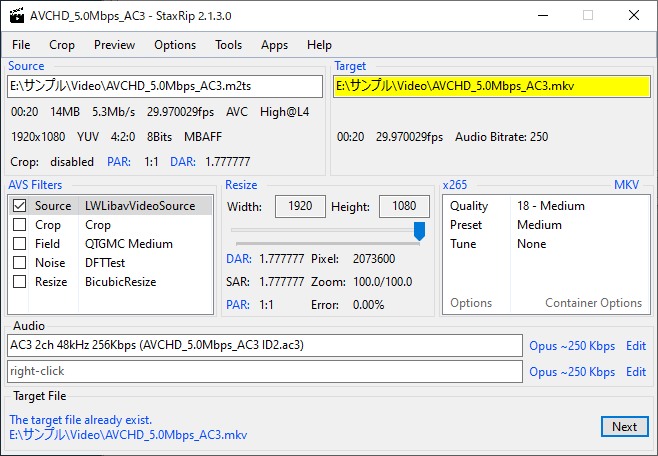
メイン画面

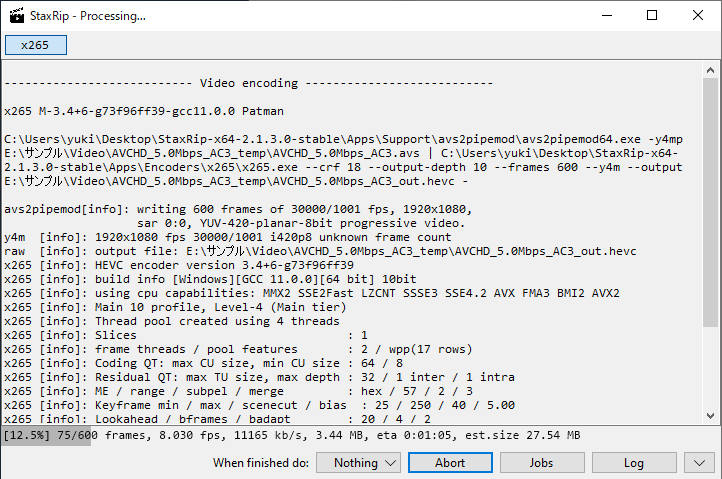
エンコード中画面
使い方
インストール
1.インストール
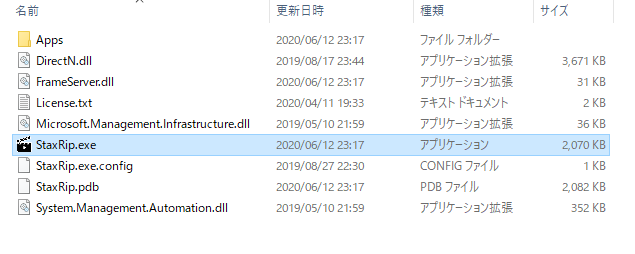
StaxRip はインストール不要で使用できます。
- ダウンロードした ZIP ファイルを解凍し、「StaxRip.exe」ファイルを実行するとアプリケーションを起動できます。
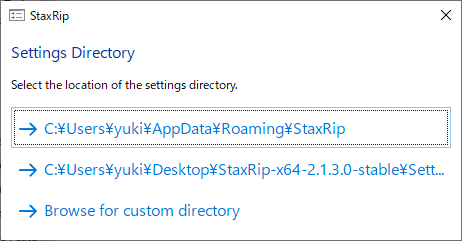
2.設定ファイルの保存先を指定する
- StaxRip を起動すると、設定ファイルの保存先をどこにするか聞かれるので、保存先をクリックします。
基本的な使い方
ここでは、m2ts ファイルを mkv (x265) にエンコードする場合の方法を説明します。
1.動画を変換する
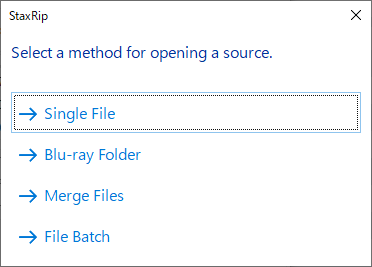
- 左上の「Source」または、「File」メニュー>「Open Video File」をクリックします。


・DVD ファイルを変換する場合は「Merge Files」を選択して、すべての VOB ファイルを選択します。
- オーディオを選択し。[OK]ボタンをクリックします。
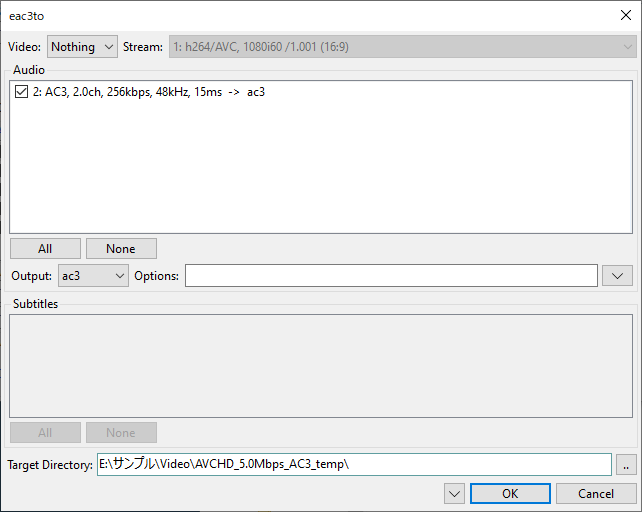
・DVD を選択した場合は自動でインデックスファイルが作成されます。
・この画面を閉じると自動で映像と音声が Demux されます。
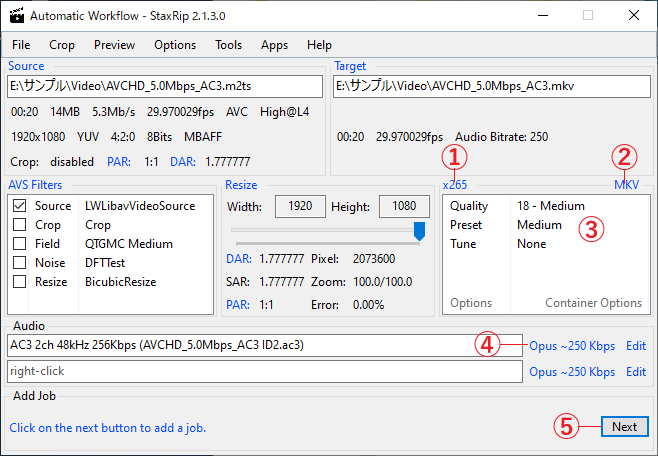
①:エンコーダを選択
②:コンテナ(出力ファイル形式)を選択
③:ビデオ品質やエンコード速度を選択
④:出力オーディオを選択
⑤:変換を開始する
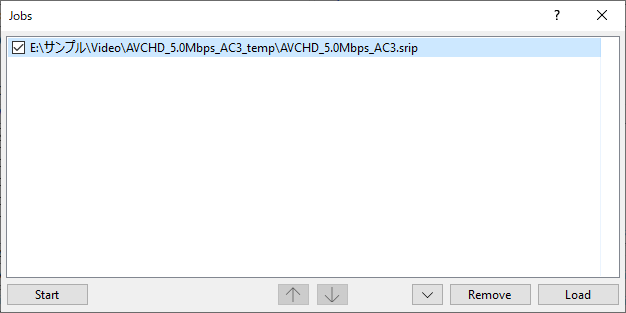
- [Next]をクリックするとジョブ一覧の画面になるので、[Start]ボタンをクリックして変換を開始します。
よくある質問と回答
ライセンスについて。