").attr(n.scriptAttrs||{}).prop({charset:n.scriptCharset,src:n.url}).on("load error",i=function(e){r.remove(),i=null,e&&t("error"===e.type?404:200,e.type)}),C.head.appendChild(r[0])},abort:function(){i&&i()}}});var Jt,Kt=[],Zt=/(=)\?(?=&|$)|\?\?/;ce.ajaxSetup({jsonp:"callback",jsonpCallback:function(){var e=Kt.pop()||ce.expando+"_"+jt.guid++;return this[e]=!0,e}}),ce.ajaxPrefilter("json jsonp",function(e,t,n){var r,i,o,a=!1!==e.jsonp&&(Zt.test(e.url)?"url":"string"==typeof e.data&&0===(e.contentType||"").indexOf("application/x-www-form-urlencoded")&&Zt.test(e.data)&&"data");if(a||"jsonp"===e.dataTypes[0])return r=e.jsonpCallback=v(e.jsonpCallback)?e.jsonpCallback():e.jsonpCallback,a?e[a]=e[a].replace(Zt,"$1"+r):!1!==e.jsonp&&(e.url+=(At.test(e.url)?"&":"?")+e.jsonp+"="+r),e.converters["script json"]=function(){return o||ce.error(r+" was not called"),o[0]},e.dataTypes[0]="json",i=ie[r],ie[r]=function(){o=arguments},n.always(function(){void 0===i?ce(ie).removeProp(r):ie[r]=i,e[r]&&(e.jsonpCallback=t.jsonpCallback,Kt.push(r)),o&&v(i)&&i(o[0]),o=i=void 0}),"script"}),le.createHTMLDocument=((Jt=C.implementation.createHTMLDocument("").body).innerHTML="
",2===Jt.childNodes.length),ce.parseHTML=function(e,t,n){return"string"!=typeof e?[]:("boolean"==typeof t&&(n=t,t=!1),t||(le.createHTMLDocument?((r=(t=C.implementation.createHTMLDocument("")).createElement("base")).href=C.location.href,t.head.appendChild(r)):t=C),o=!n&&[],(i=w.exec(e))?[t.createElement(i[1])]:(i=Ae([e],t,o),o&&o.length&&ce(o).remove(),ce.merge([],i.childNodes)));var r,i,o},ce.fn.load=function(e,t,n){var r,i,o,a=this,s=e.indexOf(" ");return-1").append(ce.parseHTML(e)).find(r):e)}).always(n&&function(e,t){a.each(function(){n.apply(this,o||[e.responseText,t,e])})}),this},ce.expr.pseudos.animated=function(t){return ce.grep(ce.timers,function(e){return t===e.elem}).length},ce.offset={setOffset:function(e,t,n){var r,i,o,a,s,u,l=ce.css(e,"position"),c=ce(e),f={};"static"===l&&(e.style.position="relative"),s=c.offset(),o=ce.css(e,"top"),u=ce.css(e,"left"),("absolute"===l||"fixed"===l)&&-1<(o+u).indexOf("auto")?(a=(r=c.position()).top,i=r.left):(a=parseFloat(o)||0,i=parseFloat(u)||0),v(t)&&(t=t.call(e,n,ce.extend({},s))),null!=t.top&&(f.top=t.top-s.top+a),null!=t.left&&(f.left=t.left-s.left+i),"using"in t?t.using.call(e,f):c.css(f)}},ce.fn.extend({offset:function(t){if(arguments.length)return void 0===t?this:this.each(function(e){ce.offset.setOffset(this,t,e)});var e,n,r=this[0];return r?r.getClientRects().length?(e=r.getBoundingClientRect(),n=r.ownerDocument.defaultView,{top:e.top+n.pageYOffset,left:e.left+n.pageXOffset}):{top:0,left:0}:void 0},position:function(){if(this[0]){var e,t,n,r=this[0],i={top:0,left:0};if("fixed"===ce.css(r,"position"))t=r.getBoundingClientRect();else{t=this.offset(),n=r.ownerDocument,e=r.offsetParent||n.documentElement;while(e&&(e===n.body||e===n.documentElement)&&"static"===ce.css(e,"position"))e=e.parentNode;e&&e!==r&&1===e.nodeType&&((i=ce(e).offset()).top+=ce.css(e,"borderTopWidth",!0),i.left+=ce.css(e,"borderLeftWidth",!0))}return{top:t.top-i.top-ce.css(r,"marginTop",!0),left:t.left-i.left-ce.css(r,"marginLeft",!0)}}},offsetParent:function(){return this.map(function(){var e=this.offsetParent;while(e&&"static"===ce.css(e,"position"))e=e.offsetParent;return e||J})}}),ce.each({scrollLeft:"pageXOffset",scrollTop:"pageYOffset"},function(t,i){var o="pageYOffset"===i;ce.fn[t]=function(e){return M(this,function(e,t,n){var r;if(y(e)?r=e:9===e.nodeType&&(r=e.defaultView),void 0===n)return r?r[i]:e[t];r?r.scrollTo(o?r.pageXOffset:n,o?n:r.pageYOffset):e[t]=n},t,e,arguments.length)}}),ce.each(["top","left"],function(e,n){ce.cssHooks[n]=Ye(le.pixelPosition,function(e,t){if(t)return t=Ge(e,n),_e.test(t)?ce(e).position()[n]+"px":t})}),ce.each({Height:"height",Width:"width"},function(a,s){ce.each({padding:"inner"+a,content:s,"":"outer"+a},function(r,o){ce.fn[o]=function(e,t){var n=arguments.length&&(r||"boolean"!=typeof e),i=r||(!0===e||!0===t?"margin":"border");return M(this,function(e,t,n){var r;return y(e)?0===o.indexOf("outer")?e["inner"+a]:e.document.documentElement["client"+a]:9===e.nodeType?(r=e.documentElement,Math.max(e.body["scroll"+a],r["scroll"+a],e.body["offset"+a],r["offset"+a],r["client"+a])):void 0===n?ce.css(e,t,i):ce.style(e,t,n,i)},s,n?e:void 0,n)}})}),ce.each(["ajaxStart","ajaxStop","ajaxComplete","ajaxError","ajaxSuccess","ajaxSend"],function(e,t){ce.fn[t]=function(e){return this.on(t,e)}}),ce.fn.extend({bind:function(e,t,n){return this.on(e,null,t,n)},unbind:function(e,t){return this.off(e,null,t)},delegate:function(e,t,n,r){return this.on(t,e,n,r)},undelegate:function(e,t,n){return 1===arguments.length?this.off(e,"**"):this.off(t,e||"**",n)},hover:function(e,t){return this.on("mouseenter",e).on("mouseleave",t||e)}}),ce.each("blur focus focusin focusout resize scroll click dblclick mousedown mouseup mousemove mouseover mouseout mouseenter mouseleave change select submit keydown keypress keyup contextmenu".split(" "),function(e,n){ce.fn[n]=function(e,t){return 0
Windows ISO Debloater 1.3.12
Windows 設定変更
2026/02/03 14:17
説明 機能 仕様 ダウンロード 画像 使い方
Windows ISO ファイルをデブロートして再構築するスクリプト

Windows ISO ファイルから不要なアプリやコンポーネントを削除することができる、Windows ISO 再構築ツール。Windows ISO ファイルを最適化し、不要なファイルを削除することができます。

Windows ISO Debloater の概要
Windows ISO Debloater は、Windows ISO イメージのデブロート化プロセスを自動化する PowerShell スクリプトです。
Windows ISO Debloater の機能
Windows ISO Debloater の主な機能です。
機能
概要
メイン機能
Windows ISO ファイルをデブロート化する
機能詳細
・軽量な Windows インストールを作成できます。
・プリインストールされたブロートウェアを削除します。
・ISO から削除するものを完全に制御できます。
・テレメトリデータを収集する可能性のあるコンポーネントを削除します。
・インストールメディアの全体サイズを縮小できます。
Windows ISO ファイルをデブロートできます
Windows ISO Debloater は、Windows ISO ファイルから不要なアプリやコンポーネントを削除することができる、Windows ISO 再構築ツールです。
Windows ISO Debloater を使用すると、Windows ISO からプリインストールされている不要なアプリを削除したり、AI やテレメトリなどの不要な機能を削除することができます。
ISO のカスタマイズが可能です
Windows ISO Debloater を使用すると、軽量でクリーンなISOファイルを作成できるため、インストールが効率化され、セットアップ時間の短縮とシステム全体のパフォーマンス向上につながります。
Windows ISO Debloater は、Windowsインストールのカスタマイズを完全に制御できるため、特定のニーズや好みに合わせてオペレーティングシステムをカスタマイズできます。
Windows の ISO ファイルをカスタマイズすることができる便利なアプリケーション
Windows ISO Debloater は、Windows ISO ファイルから不要なコンポーネントを削除して最適化したいユーザーに適した便利なアプリケーションです。プリインストールされている不要なアプリ、OneDrive や Edge、そのほかの不要な機能、テレメトリ、AI コンポーネントなどを削除することができます。
機能
パフォーマンスブースト :軽量な Windows インストールを作成
クリーンスタート :インストール前にプリインストールされたブロートウェアを削除します
カスタマイズ可能 :ISO から削除されるものを完全に制御できます
プライバシー重視 :テレメトリデータを収集する可能性のあるコンポーネントを削除します
ISO サイズの縮小 :インストールメディアの全体サイズを縮小します
価格: 無料
動作環境: Windows 10|11
使用言語: 英語
最終更新日:
3か月前 (2026/02/03)
ダウンロード数: 104
画像
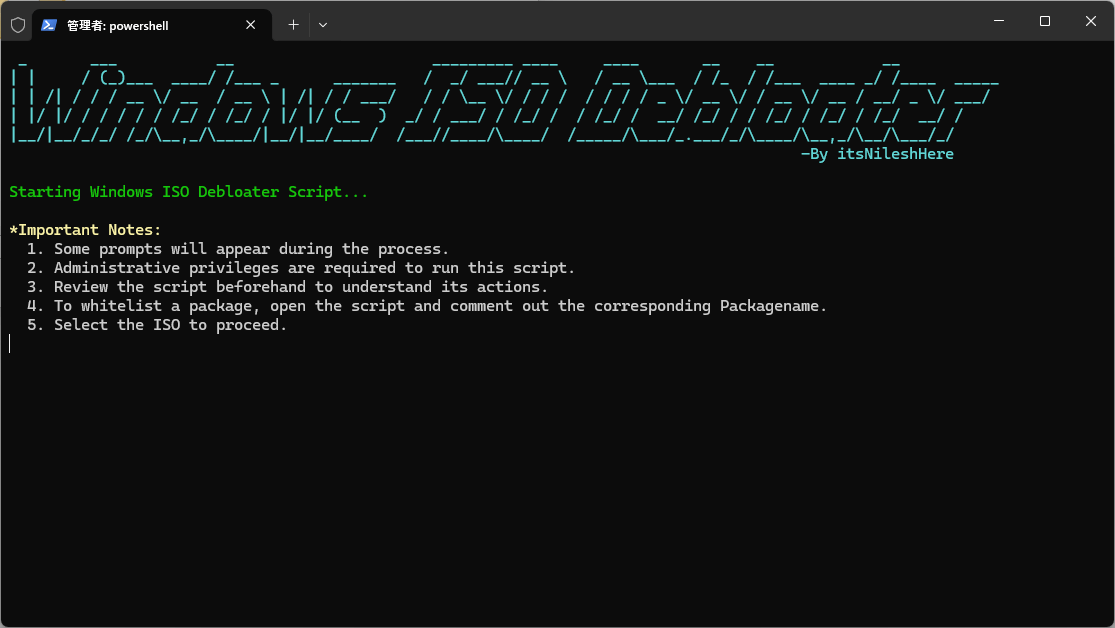
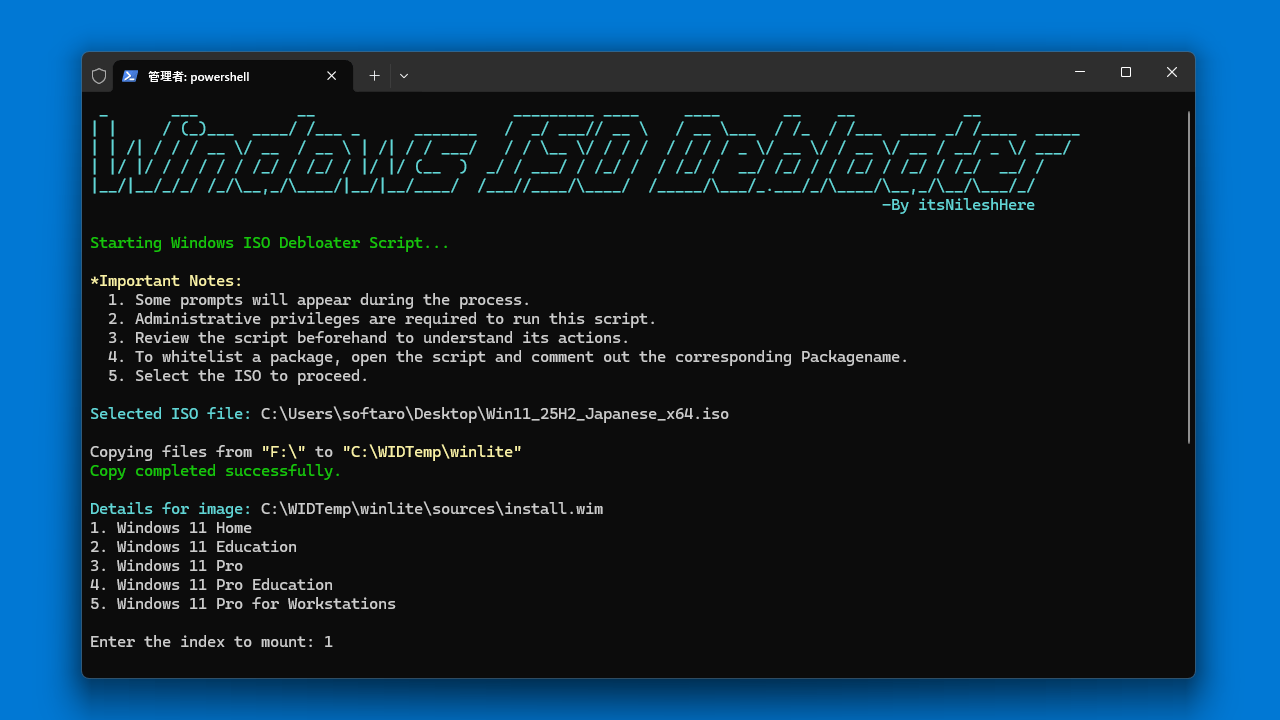
ユーザーインターフェース
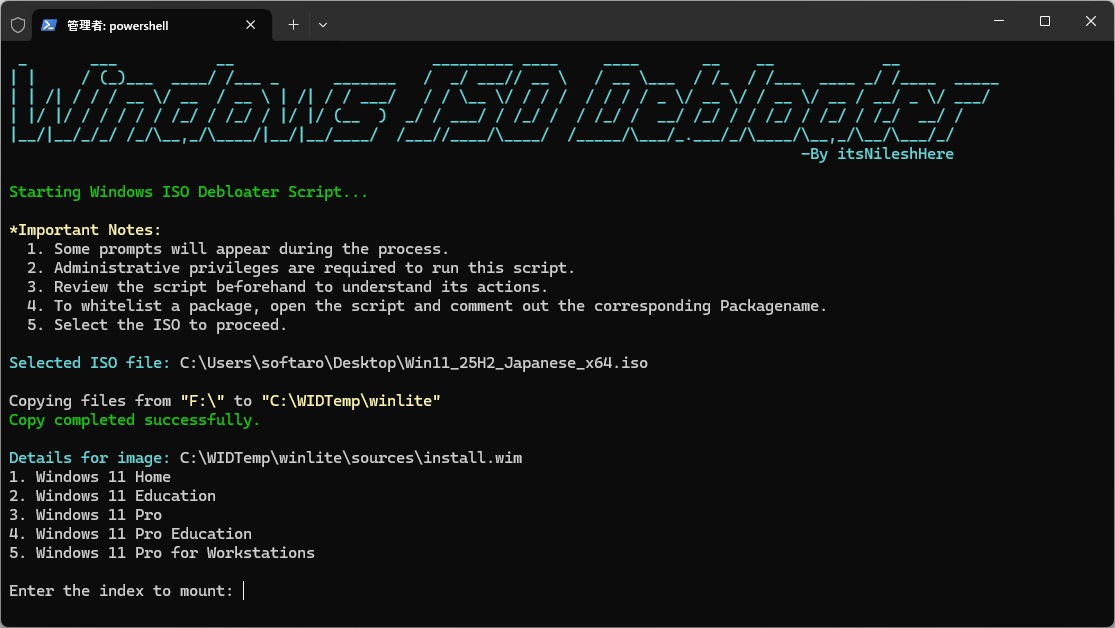
エディションの選択
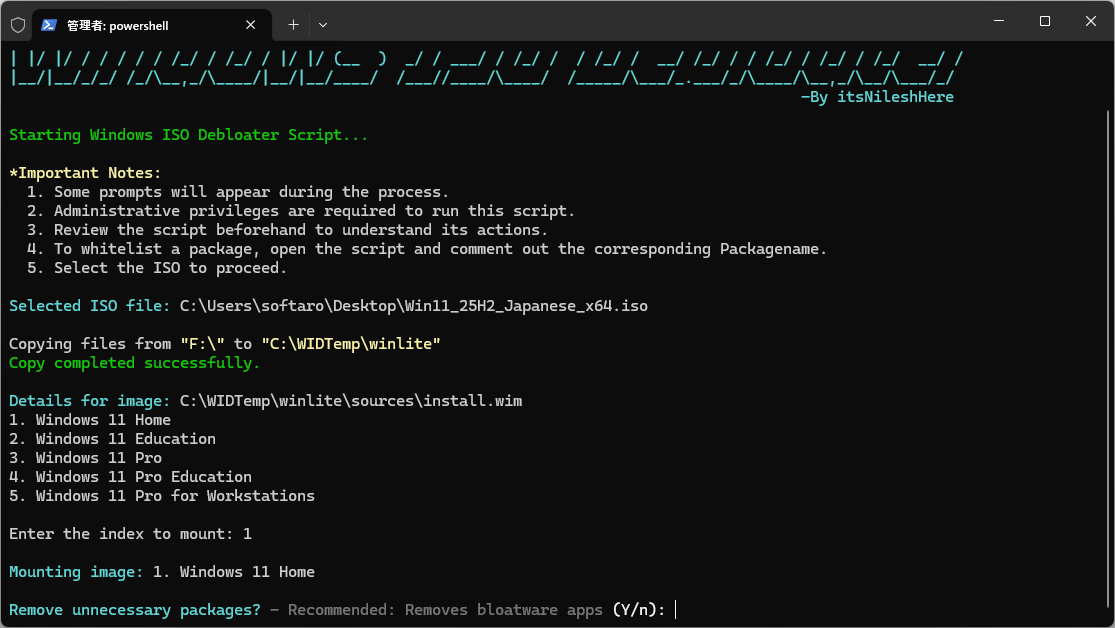
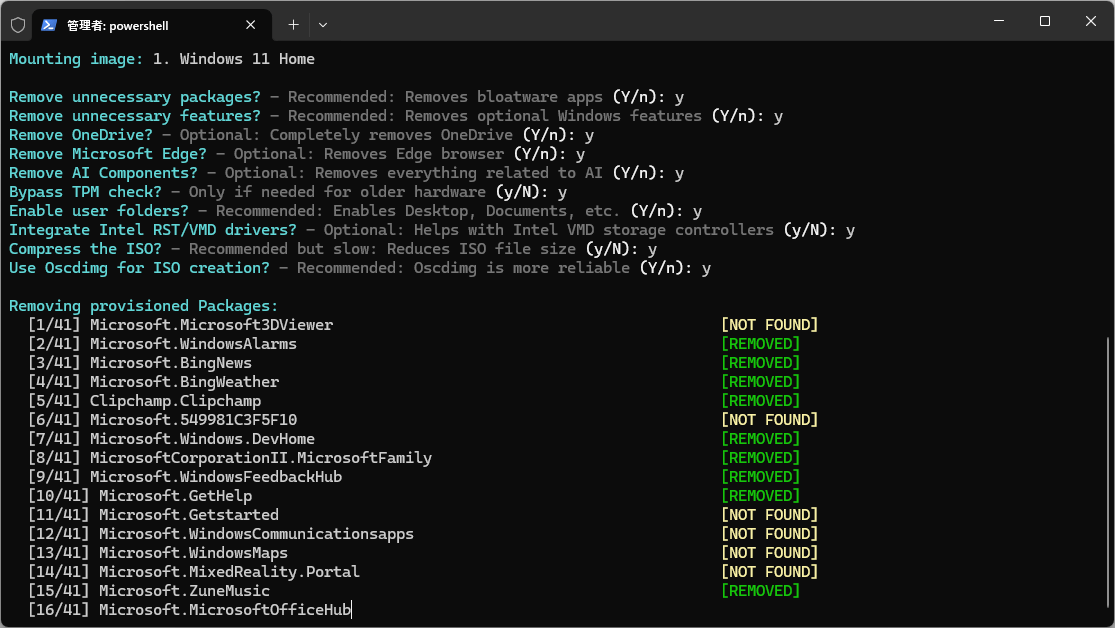
削除するものの選択
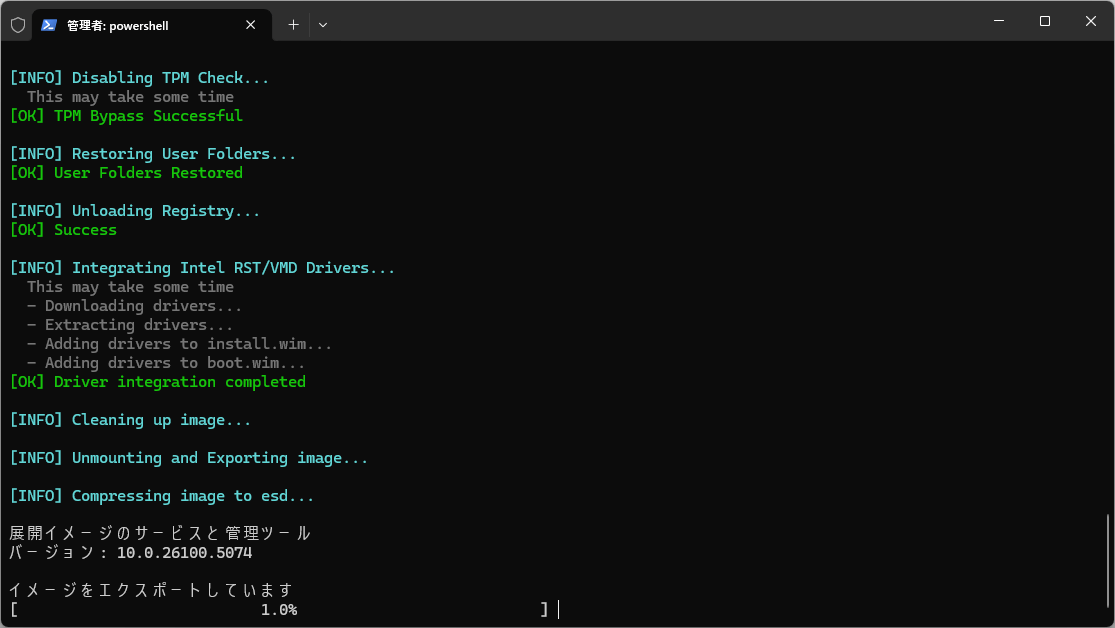
処理中
使い方
インストール
1.インストール方法
Windows ISO Debloater は、インストール不要で使用できるアプリケーションです。
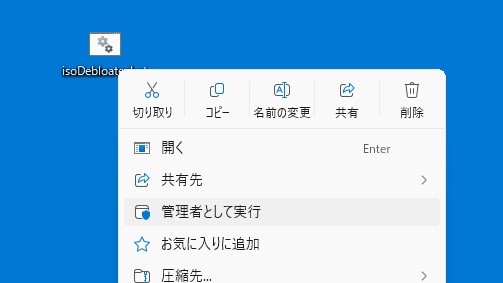
ダウンロードした BAT ファイルを右クリックし、「管理者として実行」実行します。または、ダウンロードした PS1 ファイルを PowerShell で実行します。
基本的な使い方
1. 基本的な使い方
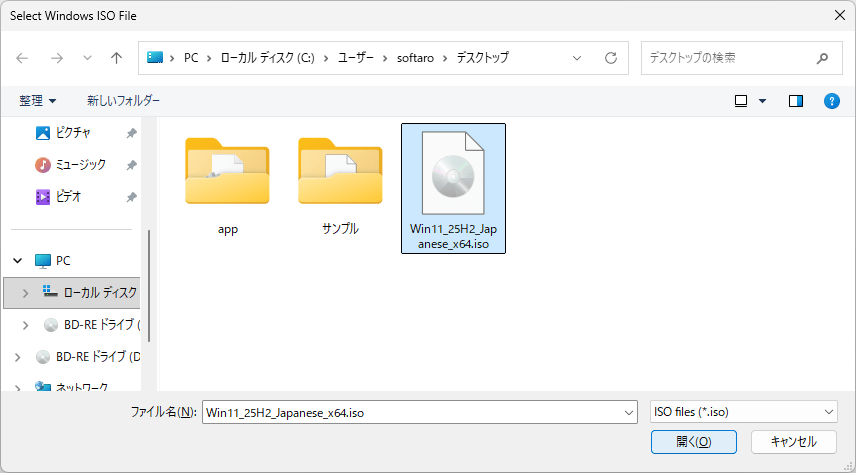
Windows ISO Debloater を起動すると、ISO ファイルを選択するプロンプトが開きます。カスタマイズする ISO ファイルを選択して、[開く ]をクリックします。
ISO ファイルは C ドライブにコピーされます。コピーが完了したら、Windows のエディションを選択します。
はじめに、不要なアプリを削除するかどうか聞かれるので、「Y」か「N」で答えます。
ほかの質問にも同様に答えます。
処理が完了すると、ISO ファイルがスクリプトと同じ場所(C:\scriptdir)にエクスポートされます。
よくある質問と回答
ライセンスについて。
ユーザーレビュー
レビューはまだありません、 最初のレビューを投稿してください。コメントは任意です。