").attr(n.scriptAttrs||{}).prop({charset:n.scriptCharset,src:n.url}).on("load error",i=function(e){r.remove(),i=null,e&&t("error"===e.type?404:200,e.type)}),C.head.appendChild(r[0])},abort:function(){i&&i()}}});var Jt,Kt=[],Zt=/(=)\?(?=&|$)|\?\?/;ce.ajaxSetup({jsonp:"callback",jsonpCallback:function(){var e=Kt.pop()||ce.expando+"_"+jt.guid++;return this[e]=!0,e}}),ce.ajaxPrefilter("json jsonp",function(e,t,n){var r,i,o,a=!1!==e.jsonp&&(Zt.test(e.url)?"url":"string"==typeof e.data&&0===(e.contentType||"").indexOf("application/x-www-form-urlencoded")&&Zt.test(e.data)&&"data");if(a||"jsonp"===e.dataTypes[0])return r=e.jsonpCallback=v(e.jsonpCallback)?e.jsonpCallback():e.jsonpCallback,a?e[a]=e[a].replace(Zt,"$1"+r):!1!==e.jsonp&&(e.url+=(At.test(e.url)?"&":"?")+e.jsonp+"="+r),e.converters["script json"]=function(){return o||ce.error(r+" was not called"),o[0]},e.dataTypes[0]="json",i=ie[r],ie[r]=function(){o=arguments},n.always(function(){void 0===i?ce(ie).removeProp(r):ie[r]=i,e[r]&&(e.jsonpCallback=t.jsonpCallback,Kt.push(r)),o&&v(i)&&i(o[0]),o=i=void 0}),"script"}),le.createHTMLDocument=((Jt=C.implementation.createHTMLDocument("").body).innerHTML="
",2===Jt.childNodes.length),ce.parseHTML=function(e,t,n){return"string"!=typeof e?[]:("boolean"==typeof t&&(n=t,t=!1),t||(le.createHTMLDocument?((r=(t=C.implementation.createHTMLDocument("")).createElement("base")).href=C.location.href,t.head.appendChild(r)):t=C),o=!n&&[],(i=w.exec(e))?[t.createElement(i[1])]:(i=Ae([e],t,o),o&&o.length&&ce(o).remove(),ce.merge([],i.childNodes)));var r,i,o},ce.fn.load=function(e,t,n){var r,i,o,a=this,s=e.indexOf(" ");return-1").append(ce.parseHTML(e)).find(r):e)}).always(n&&function(e,t){a.each(function(){n.apply(this,o||[e.responseText,t,e])})}),this},ce.expr.pseudos.animated=function(t){return ce.grep(ce.timers,function(e){return t===e.elem}).length},ce.offset={setOffset:function(e,t,n){var r,i,o,a,s,u,l=ce.css(e,"position"),c=ce(e),f={};"static"===l&&(e.style.position="relative"),s=c.offset(),o=ce.css(e,"top"),u=ce.css(e,"left"),("absolute"===l||"fixed"===l)&&-1<(o+u).indexOf("auto")?(a=(r=c.position()).top,i=r.left):(a=parseFloat(o)||0,i=parseFloat(u)||0),v(t)&&(t=t.call(e,n,ce.extend({},s))),null!=t.top&&(f.top=t.top-s.top+a),null!=t.left&&(f.left=t.left-s.left+i),"using"in t?t.using.call(e,f):c.css(f)}},ce.fn.extend({offset:function(t){if(arguments.length)return void 0===t?this:this.each(function(e){ce.offset.setOffset(this,t,e)});var e,n,r=this[0];return r?r.getClientRects().length?(e=r.getBoundingClientRect(),n=r.ownerDocument.defaultView,{top:e.top+n.pageYOffset,left:e.left+n.pageXOffset}):{top:0,left:0}:void 0},position:function(){if(this[0]){var e,t,n,r=this[0],i={top:0,left:0};if("fixed"===ce.css(r,"position"))t=r.getBoundingClientRect();else{t=this.offset(),n=r.ownerDocument,e=r.offsetParent||n.documentElement;while(e&&(e===n.body||e===n.documentElement)&&"static"===ce.css(e,"position"))e=e.parentNode;e&&e!==r&&1===e.nodeType&&((i=ce(e).offset()).top+=ce.css(e,"borderTopWidth",!0),i.left+=ce.css(e,"borderLeftWidth",!0))}return{top:t.top-i.top-ce.css(r,"marginTop",!0),left:t.left-i.left-ce.css(r,"marginLeft",!0)}}},offsetParent:function(){return this.map(function(){var e=this.offsetParent;while(e&&"static"===ce.css(e,"position"))e=e.offsetParent;return e||J})}}),ce.each({scrollLeft:"pageXOffset",scrollTop:"pageYOffset"},function(t,i){var o="pageYOffset"===i;ce.fn[t]=function(e){return M(this,function(e,t,n){var r;if(y(e)?r=e:9===e.nodeType&&(r=e.defaultView),void 0===n)return r?r[i]:e[t];r?r.scrollTo(o?r.pageXOffset:n,o?n:r.pageYOffset):e[t]=n},t,e,arguments.length)}}),ce.each(["top","left"],function(e,n){ce.cssHooks[n]=Ye(le.pixelPosition,function(e,t){if(t)return t=Ge(e,n),_e.test(t)?ce(e).position()[n]+"px":t})}),ce.each({Height:"height",Width:"width"},function(a,s){ce.each({padding:"inner"+a,content:s,"":"outer"+a},function(r,o){ce.fn[o]=function(e,t){var n=arguments.length&&(r||"boolean"!=typeof e),i=r||(!0===e||!0===t?"margin":"border");return M(this,function(e,t,n){var r;return y(e)?0===o.indexOf("outer")?e["inner"+a]:e.document.documentElement["client"+a]:9===e.nodeType?(r=e.documentElement,Math.max(e.body["scroll"+a],r["scroll"+a],e.body["offset"+a],r["offset"+a],r["client"+a])):void 0===n?ce.css(e,t,i):ce.style(e,t,n,i)},s,n?e:void 0,n)}})}),ce.each(["ajaxStart","ajaxStop","ajaxComplete","ajaxError","ajaxSuccess","ajaxSend"],function(e,t){ce.fn[t]=function(e){return this.on(t,e)}}),ce.fn.extend({bind:function(e,t,n){return this.on(e,null,t,n)},unbind:function(e,t){return this.off(e,null,t)},delegate:function(e,t,n,r){return this.on(t,e,n,r)},undelegate:function(e,t,n){return 1===arguments.length?this.off(e,"**"):this.off(t,e||"**",n)},hover:function(e,t){return this.on("mouseenter",e).on("mouseleave",t||e)}}),ce.each("blur focus focusin focusout resize scroll click dblclick mousedown mouseup mousemove mouseover mouseout mouseenter mouseleave change select submit keydown keypress keyup contextmenu".split(" "),function(e,n){ce.fn[n]=function(e,t){return 0
Intelligent Standby List Cleaner (ISLC) 1.0.4.5
メモリ最適化
2020/02/17 15:432026/04/11 07:32
説明 機能 仕様 ダウンロード 画像 使い方
メモリのスタンバイリストを解放してゲームの問題を解決

メモリのスタンバイリストを監視して解放するメモリクリーナーツール。設定値を超えたときにスタンバイリストをクリアして、Windows 10 でゲームやアプリケーションの動作が途切れ途切れになってしまう問題を解決します。
Intelligent Standby List Cleaner の概要
Intelligent Standby List Cleaner(ISLC) は、Windows 10 を実行しているコンピュータでゲームをプレイするときに起こる不具合(画面のカクつき、フレームが途切れるなど)を無くす(または軽減する)ために作られたツールです。このツールはメモリのスタンバイリスト(キャッシュされたデータ)を監視して解放することによって前述の不具合が起こらないようにします。
Intelligent Standby List Cleaner の機能
Intelligent Standby List Cleaner(ISLC)の機能は次の通りです。
動作
・スタンバイリストの監視&解放
・手動でスタンバイリストを解放
解放する条件の設定
・スタンバイリストのサイズが ~MB 以上になった時にクリアする
・空きメモリが ~MB 未満になった時にスタンバイリストをクリアする
オプション
・除外するプログラムの設定
・OS ログイン時に起動
ISLC の使い方
Intelligent Standby List Cleaner の使用方法は、[Purge]ボタンを押して手動でスタンバイリストをクリアするか、[Start]ボタンを押して監視を開始するかのどちらかです。
監視を開始した場合は、最小化するとタスクトレイに格納して常時監視します。ほかに、オプションにチェックを入れると Windows の起動時に ISLC を自動的に開始することができます。
メモリを解放する条件の指定などのオプション機能
デフォルトでは「スタンバイリストのサイズが 1024MB 以上になった時&メモリの空き容量が 1024MB 以下になった時」にスタンバイリストがクリアされる設定になっています。この数値は好みに変更できます
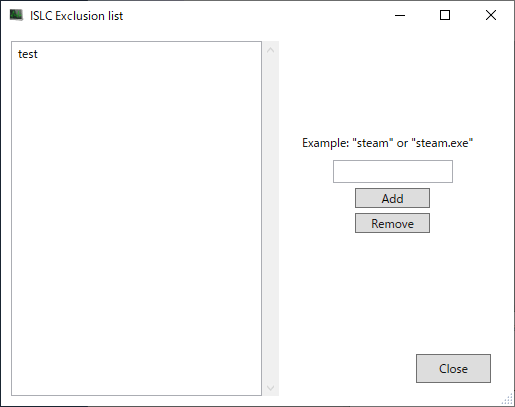
[Exclusion]オプションは、ISLC でメモリを解放したときにメモリを解放したくないアプリケーションを指定するオプションです。この設定を使うと、頻繁に使用するアプリケーションなどをメモリから削除しないように設定できます。
ゲームをプレイする人向けの便利なツール
Intelligent Standby List Cleaner は、ゲームのプレイ中に発生するレンダリングの不具合を改善できるツールです。ゲームやそのほかのアプリケーションでパフォーマンスの問題が発生した場合に原因を確かめたり解決できます。
機能
メモリのスタンバイリストの監視と解放
解放の設定
手動でスタンバイリストを解放
除外するプログラムの設定
価格: 無料
動作環境: Windows 10
使用言語: 英語
最終更新日:
1か月前 (2026/04/11)
ダウンロード数: 7884
画像
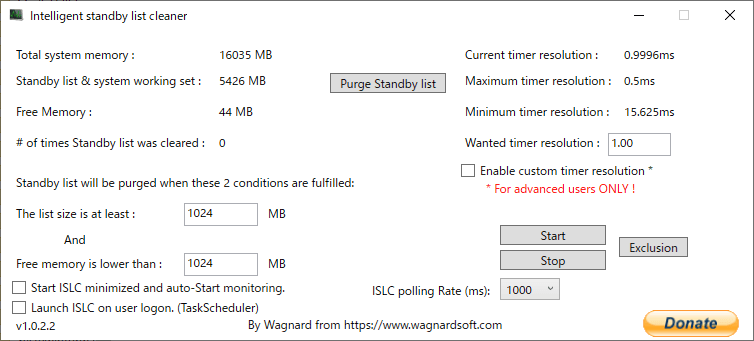
ユーザーインタフェース
除外設定
使い方
インストール
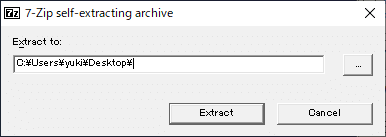
ダウンロードした「ISLC [バージョン].exe 」ファイルをダブルクリックして実行してください。
ISLC(Intelligent Standby List Cleaner) のファイルを保存する場所を指定して[Extract ]ボタンをクリックします。
ISLC フォルダにファイルが解凍されます。フォルダ内の「Intelligent standby list cleaner ISLC.exe 」ファイルを実行するとアプリケーションを起動できます。
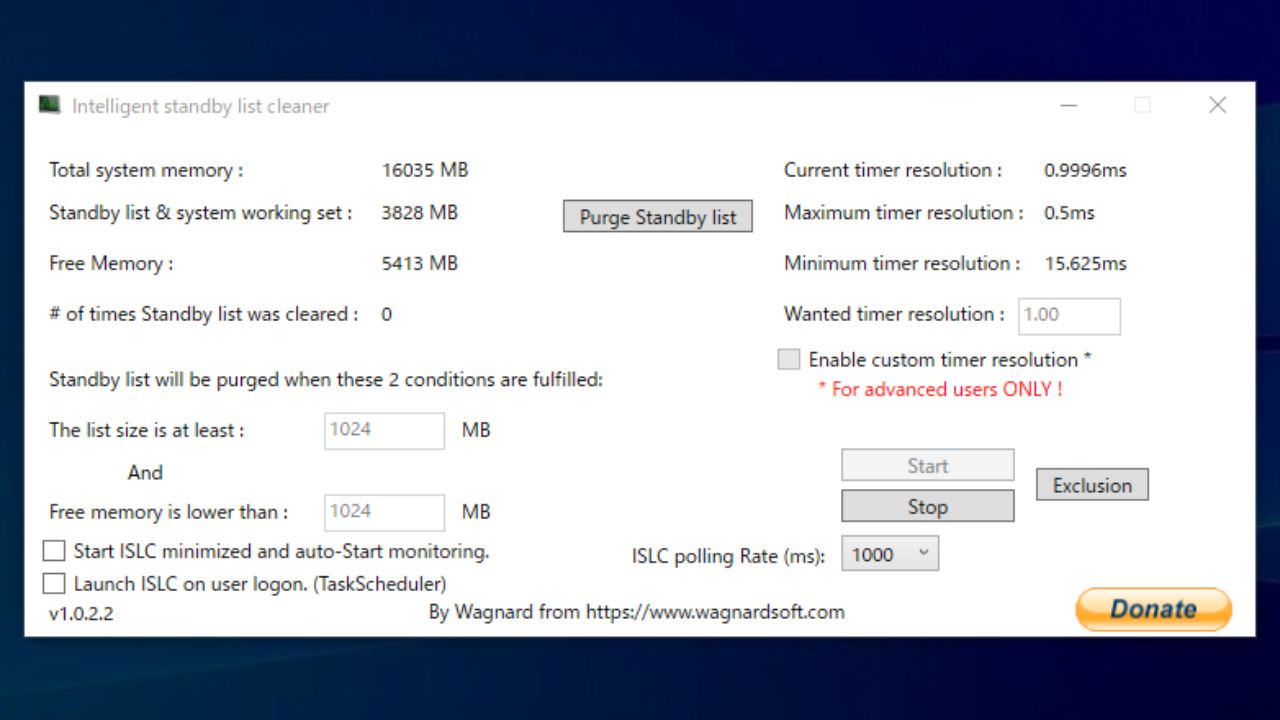
インターフェースの説明(使い方)
1.基本的な使い方
Intelligent Standby List Cleaner はボタンをクリックして操作ができます。
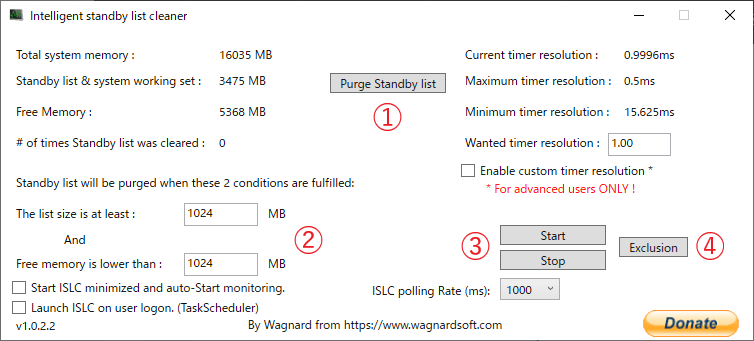
③ の[Start ]ボタンをクリックするとメモリの監視を開始します、② の条件が満たされるとスタンバイリストが自動的にクリアされます。
① のボタンを押すとスタンバイリストがすぐにクリアされます。
① Purge Standby List :スタンバイリストをクリアする
② :スタンバイリストのサイズが [ 1024 ] MB(上)以上または、空きメモリが [ 1024 ] MB(下) 未満になった場合にスタンバイリストをクリアする
③ Start / Stop :ISCL を開始する/停止する
④ Exclusion :除外するプログラム(exe ファイルなど)を指定する
2.インターフェースの見方
・Total system memory :システムメモリ(RAM)の合計
・Standby list & system working set :スタンバイリストとシステムワーキングセットのサイズ
・Free Memory :メモリの空き容量
・Purge Standby list :スタンバイリストをクリアする
・# of times Standby list was cleared :スタンバイリストがクリアされた回数
・The list size is at least :スタンバイリストが [ 1024 ] MB 以上になった場合にクリアする
・Free memory is lower than :空きメモリが [ 1024 ] MB 未満になった場合にスタンバイリストをクリアする
・Start ISLC minimized and auto-Start monitoring :ISLC 最小化時に自動的に監視を開始する
・Launch ISLC on user logon. (TaskScheduler) :ユーザーログオン時に ISLC を起動する(タスクスケジューラ)
・Current timer resolution :現在のタイマー解像度
・Maximum timer resolution :最大タイマー解像度
・Minimum timer resolution :最小タイマー解像度
・Wanted timer resolution :カスタムタイマー解像度
・Enable custom timer resolution * :カスタムタイマー解決を有効にする(※ 上級者のみ)
・Start :ISLC で監視を開始する
・Stop :ISLC の監視を停止する
・Exclusion :除外設定を開く
・ISLC polling Rate (ms) :ISLC ポーリングレート(ミリ秒)
3.タスクトレイ
ISLC を最小化するとシステムトレイに表示されます。右クリックメニューから終了したり、ダブルクリックしてウィンドウを表示することができます。

よくある質問と回答
コマンドラインについて
ユーザーレビュー
レビューはまだありません、 最初のレビューを投稿してください。コメントは任意です。