").attr(n.scriptAttrs||{}).prop({charset:n.scriptCharset,src:n.url}).on("load error",i=function(e){r.remove(),i=null,e&&t("error"===e.type?404:200,e.type)}),C.head.appendChild(r[0])},abort:function(){i&&i()}}});var Jt,Kt=[],Zt=/(=)\?(?=&|$)|\?\?/;ce.ajaxSetup({jsonp:"callback",jsonpCallback:function(){var e=Kt.pop()||ce.expando+"_"+jt.guid++;return this[e]=!0,e}}),ce.ajaxPrefilter("json jsonp",function(e,t,n){var r,i,o,a=!1!==e.jsonp&&(Zt.test(e.url)?"url":"string"==typeof e.data&&0===(e.contentType||"").indexOf("application/x-www-form-urlencoded")&&Zt.test(e.data)&&"data");if(a||"jsonp"===e.dataTypes[0])return r=e.jsonpCallback=v(e.jsonpCallback)?e.jsonpCallback():e.jsonpCallback,a?e[a]=e[a].replace(Zt,"$1"+r):!1!==e.jsonp&&(e.url+=(At.test(e.url)?"&":"?")+e.jsonp+"="+r),e.converters["script json"]=function(){return o||ce.error(r+" was not called"),o[0]},e.dataTypes[0]="json",i=ie[r],ie[r]=function(){o=arguments},n.always(function(){void 0===i?ce(ie).removeProp(r):ie[r]=i,e[r]&&(e.jsonpCallback=t.jsonpCallback,Kt.push(r)),o&&v(i)&&i(o[0]),o=i=void 0}),"script"}),le.createHTMLDocument=((Jt=C.implementation.createHTMLDocument("").body).innerHTML="
",2===Jt.childNodes.length),ce.parseHTML=function(e,t,n){return"string"!=typeof e?[]:("boolean"==typeof t&&(n=t,t=!1),t||(le.createHTMLDocument?((r=(t=C.implementation.createHTMLDocument("")).createElement("base")).href=C.location.href,t.head.appendChild(r)):t=C),o=!n&&[],(i=w.exec(e))?[t.createElement(i[1])]:(i=Ae([e],t,o),o&&o.length&&ce(o).remove(),ce.merge([],i.childNodes)));var r,i,o},ce.fn.load=function(e,t,n){var r,i,o,a=this,s=e.indexOf(" ");return-1").append(ce.parseHTML(e)).find(r):e)}).always(n&&function(e,t){a.each(function(){n.apply(this,o||[e.responseText,t,e])})}),this},ce.expr.pseudos.animated=function(t){return ce.grep(ce.timers,function(e){return t===e.elem}).length},ce.offset={setOffset:function(e,t,n){var r,i,o,a,s,u,l=ce.css(e,"position"),c=ce(e),f={};"static"===l&&(e.style.position="relative"),s=c.offset(),o=ce.css(e,"top"),u=ce.css(e,"left"),("absolute"===l||"fixed"===l)&&-1<(o+u).indexOf("auto")?(a=(r=c.position()).top,i=r.left):(a=parseFloat(o)||0,i=parseFloat(u)||0),v(t)&&(t=t.call(e,n,ce.extend({},s))),null!=t.top&&(f.top=t.top-s.top+a),null!=t.left&&(f.left=t.left-s.left+i),"using"in t?t.using.call(e,f):c.css(f)}},ce.fn.extend({offset:function(t){if(arguments.length)return void 0===t?this:this.each(function(e){ce.offset.setOffset(this,t,e)});var e,n,r=this[0];return r?r.getClientRects().length?(e=r.getBoundingClientRect(),n=r.ownerDocument.defaultView,{top:e.top+n.pageYOffset,left:e.left+n.pageXOffset}):{top:0,left:0}:void 0},position:function(){if(this[0]){var e,t,n,r=this[0],i={top:0,left:0};if("fixed"===ce.css(r,"position"))t=r.getBoundingClientRect();else{t=this.offset(),n=r.ownerDocument,e=r.offsetParent||n.documentElement;while(e&&(e===n.body||e===n.documentElement)&&"static"===ce.css(e,"position"))e=e.parentNode;e&&e!==r&&1===e.nodeType&&((i=ce(e).offset()).top+=ce.css(e,"borderTopWidth",!0),i.left+=ce.css(e,"borderLeftWidth",!0))}return{top:t.top-i.top-ce.css(r,"marginTop",!0),left:t.left-i.left-ce.css(r,"marginLeft",!0)}}},offsetParent:function(){return this.map(function(){var e=this.offsetParent;while(e&&"static"===ce.css(e,"position"))e=e.offsetParent;return e||J})}}),ce.each({scrollLeft:"pageXOffset",scrollTop:"pageYOffset"},function(t,i){var o="pageYOffset"===i;ce.fn[t]=function(e){return M(this,function(e,t,n){var r;if(y(e)?r=e:9===e.nodeType&&(r=e.defaultView),void 0===n)return r?r[i]:e[t];r?r.scrollTo(o?r.pageXOffset:n,o?n:r.pageYOffset):e[t]=n},t,e,arguments.length)}}),ce.each(["top","left"],function(e,n){ce.cssHooks[n]=Ye(le.pixelPosition,function(e,t){if(t)return t=Ge(e,n),_e.test(t)?ce(e).position()[n]+"px":t})}),ce.each({Height:"height",Width:"width"},function(a,s){ce.each({padding:"inner"+a,content:s,"":"outer"+a},function(r,o){ce.fn[o]=function(e,t){var n=arguments.length&&(r||"boolean"!=typeof e),i=r||(!0===e||!0===t?"margin":"border");return M(this,function(e,t,n){var r;return y(e)?0===o.indexOf("outer")?e["inner"+a]:e.document.documentElement["client"+a]:9===e.nodeType?(r=e.documentElement,Math.max(e.body["scroll"+a],r["scroll"+a],e.body["offset"+a],r["offset"+a],r["client"+a])):void 0===n?ce.css(e,t,i):ce.style(e,t,n,i)},s,n?e:void 0,n)}})}),ce.each(["ajaxStart","ajaxStop","ajaxComplete","ajaxError","ajaxSuccess","ajaxSend"],function(e,t){ce.fn[t]=function(e){return this.on(t,e)}}),ce.fn.extend({bind:function(e,t,n){return this.on(e,null,t,n)},unbind:function(e,t){return this.off(e,null,t)},delegate:function(e,t,n,r){return this.on(t,e,n,r)},undelegate:function(e,t,n){return 1===arguments.length?this.off(e,"**"):this.off(t,e||"**",n)},hover:function(e,t){return this.on("mouseenter",e).on("mouseleave",t||e)}}),ce.each("blur focus focusin focusout resize scroll click dblclick mousedown mouseup mousemove mouseover mouseout mouseenter mouseleave change select submit keydown keypress keyup contextmenu".split(" "),function(e,n){ce.fn[n]=function(e,t){return 0
IconSwapperGui 2.0.2
画像そのほか
2024/12/09 11:18
説明機能仕様ダウンロード画像使い方
.url および .lnk ショートカットのアイコンを変更するツール

デスクトップなどにある、Windows ショートカットのアイコンをほかのアイコンにかんたんに変更することができる、Windows 向けのフリーソフト。PNG、JPEG、JPG 画像を ICO に変換する機能も備えています。

IconSwapperGui の概要
IconSwapperGui は、Windows ショートカットアイコンの変更を簡素化するアプリケーションです。
IconSwapperGui の機能
IconSwapperGui の主な機能です。
| 機能 |
概要 |
| メイン機能 |
ショートカットアイコンのアイコンを変更する |
| 機能詳細 |
・.url および .lnk ショートカットのアイコンを変更できます。
・.png、.jpg、.jpeg 画像を .ico ファイルに変換して、交換できるようにします。
・独自のアイコンを作成できるピクセルアートエディタ。 |
ショートカットのアイコンを変更できます
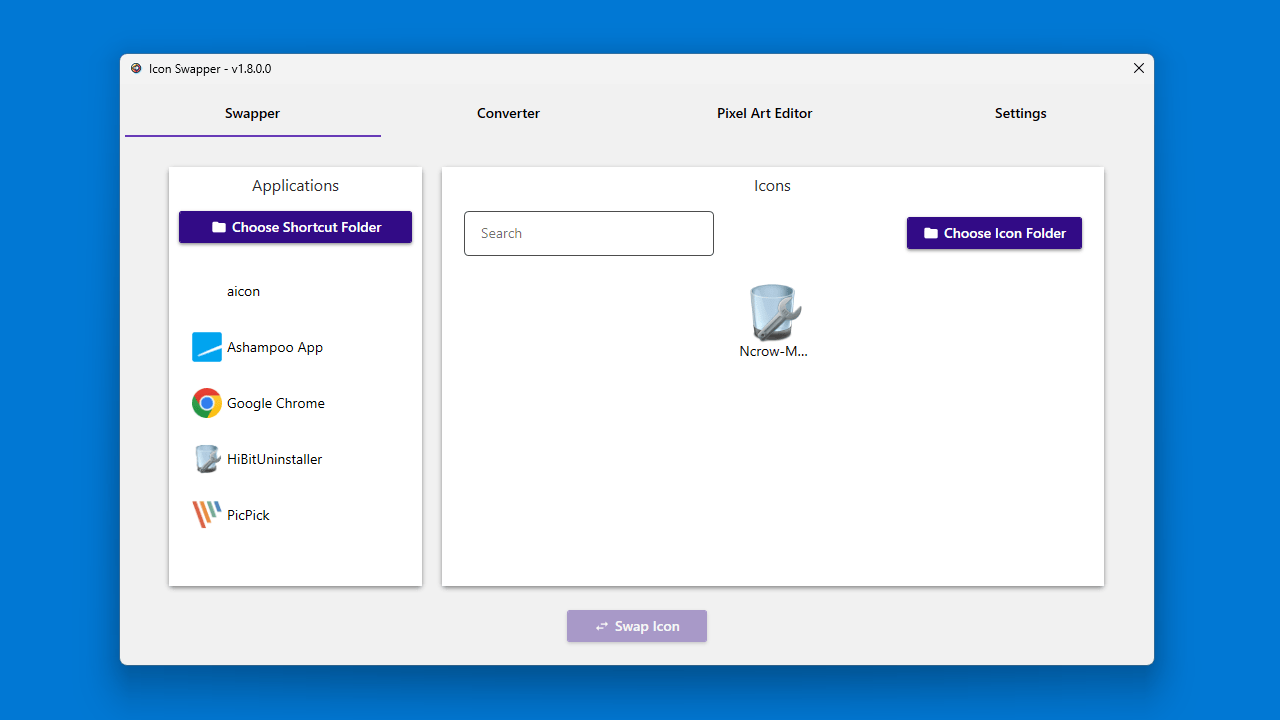
IconSwapperGui は、デスクトップなどにある、Windows ショートカットのアイコンをほかのアイコンにかんたんに変更することができる、Windows 向けのフリーソフトです。
IconSwapperGui を使用すると、ショートカットファイルのプロパティにアクセスする必要なく、かんたんな操作で .url および .lnk ショートカットのアイコンを好みのアイコンに変更できます。
コンバータとエディタが内蔵しています
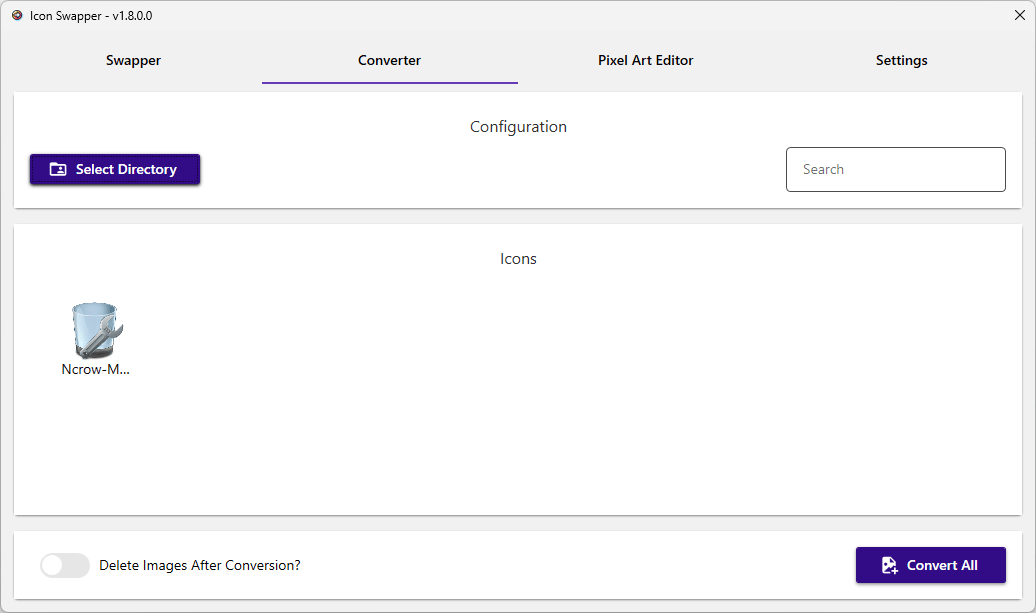
IconSwapperGui には、PNG、JPEG、JPG 画像を ICO に変換する機能が備わっているので、お気に入りの画像をショートカットのアイコンに使用することができます。
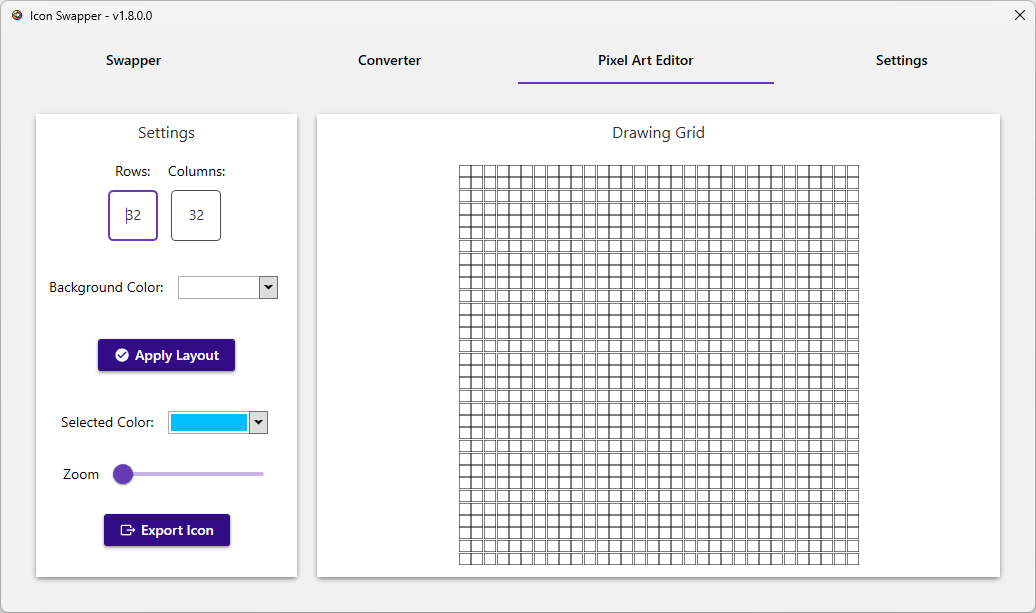
また、IconSwapperGui には、アイコンを作成できる「ピクセルアートエディタ」もあるので、デザインに自信がある人は独自のアイコンを作成することもできます。
ショートカットのアイコンを変更したい場合に役に立つツール
IconSwapperGui は、デスクトップやそのほかの場所にあるショートカットのアイコンをほかのアイコンにすばやく変更することができる便利なアプリケーションです。元に戻す機能は無いので、アプリを使用する前に、元のアイコンのバックアップを保存しておくことをおすすめします。
機能
- ショートカットのアイコンを変更します。
- .url および .lnk ショートカットタイプをサポートしています。
- .png、.jpg、.jpeg 画像を .ico ファイルに変換して、交換できるようにします。
- 独自のアイコンを作成できるピクセルアートエディタ。
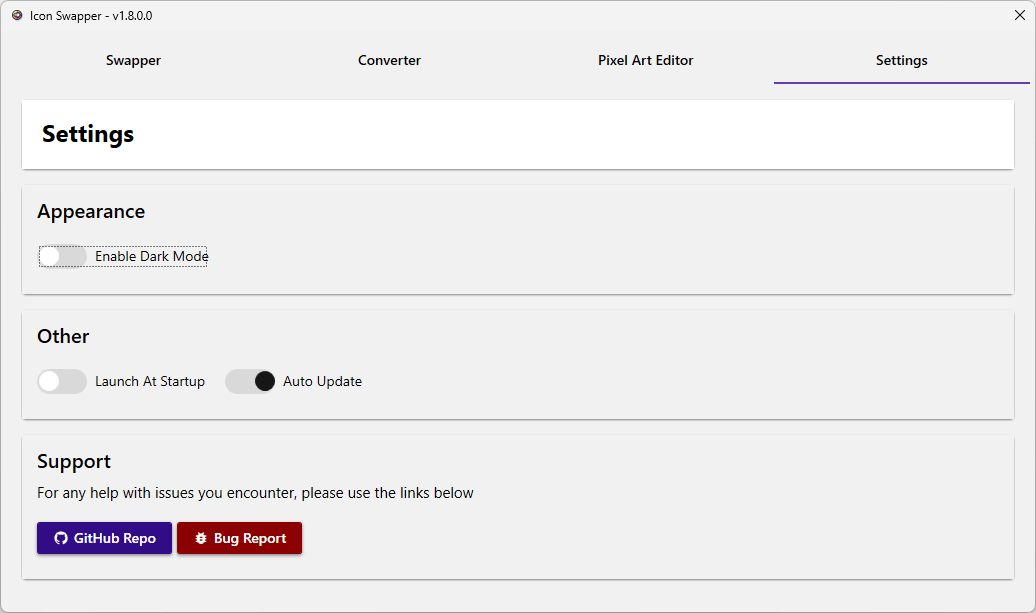
- ライトモード/ダークモード。
価格:無料
動作環境:Windows 10|11
使用言語:英語
最終更新日:
3か月前 (2026/01/13)
ダウンロード数:375
画像

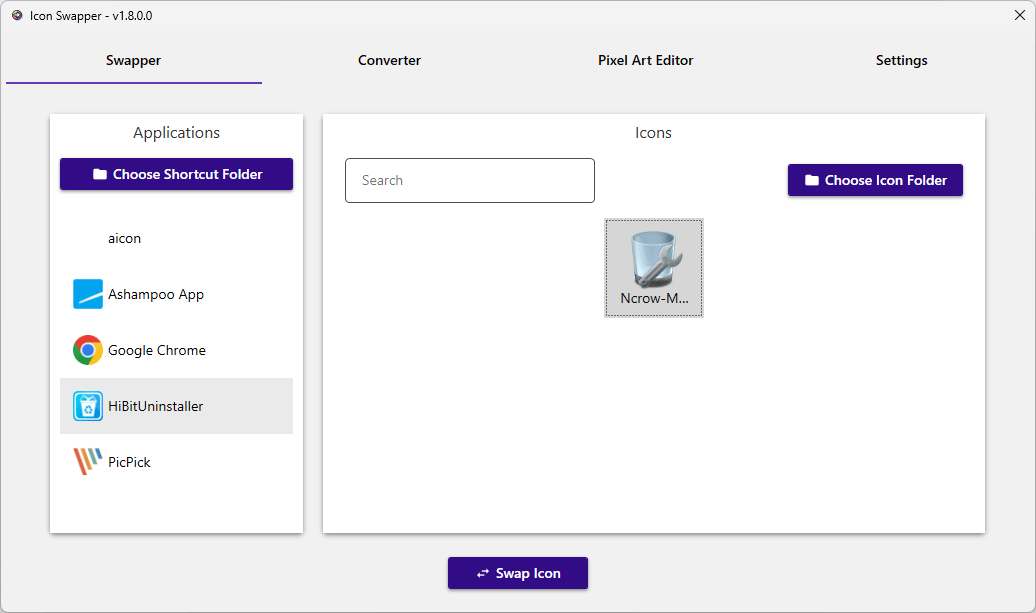
スワッパー

コンバータ

ピクセルアートエディタ

設定
使い方
インストール
1.インストール
IconSwapperGui は、インストール不要で使用できるアプリケーションです。
- ダウンロードした「IconSwapperGui.exe」ファイルを実行します。

基本的な使い方
1. 基本的な使い方
- [Choose Shortcut Folder]ボタンをクリックし、アイコンを変更したいショートカットがあるフォルダを選択します。
- [Choose Icon Folder]ボタンをクリックし、適用したいアイコンがあるフォルダを選択します。
- 左側の「Applications」から、変更したいショートカットを選択します。
- 右側の「Icons」から、適用したいアイコンを選択します。
- [Swap Icon]ボタンをクリックすると、アイコンを変更できます。

- 「Converter」では、JPEG、JPG、PNG 画像を ICO に変換できます。

- 「Pixcel Art Editor」では、エディタを使用して、独自のアイコンを作成できます。
- 「Settings」では、アプリの設定ができます。

よくある質問と回答
ライセンスについて。
IconSwapperGui は、どなたでも無料で利用できます。