").attr(n.scriptAttrs||{}).prop({charset:n.scriptCharset,src:n.url}).on("load error",i=function(e){r.remove(),i=null,e&&t("error"===e.type?404:200,e.type)}),C.head.appendChild(r[0])},abort:function(){i&&i()}}});var Jt,Kt=[],Zt=/(=)\?(?=&|$)|\?\?/;ce.ajaxSetup({jsonp:"callback",jsonpCallback:function(){var e=Kt.pop()||ce.expando+"_"+jt.guid++;return this[e]=!0,e}}),ce.ajaxPrefilter("json jsonp",function(e,t,n){var r,i,o,a=!1!==e.jsonp&&(Zt.test(e.url)?"url":"string"==typeof e.data&&0===(e.contentType||"").indexOf("application/x-www-form-urlencoded")&&Zt.test(e.data)&&"data");if(a||"jsonp"===e.dataTypes[0])return r=e.jsonpCallback=v(e.jsonpCallback)?e.jsonpCallback():e.jsonpCallback,a?e[a]=e[a].replace(Zt,"$1"+r):!1!==e.jsonp&&(e.url+=(At.test(e.url)?"&":"?")+e.jsonp+"="+r),e.converters["script json"]=function(){return o||ce.error(r+" was not called"),o[0]},e.dataTypes[0]="json",i=ie[r],ie[r]=function(){o=arguments},n.always(function(){void 0===i?ce(ie).removeProp(r):ie[r]=i,e[r]&&(e.jsonpCallback=t.jsonpCallback,Kt.push(r)),o&&v(i)&&i(o[0]),o=i=void 0}),"script"}),le.createHTMLDocument=((Jt=C.implementation.createHTMLDocument("").body).innerHTML="
",2===Jt.childNodes.length),ce.parseHTML=function(e,t,n){return"string"!=typeof e?[]:("boolean"==typeof t&&(n=t,t=!1),t||(le.createHTMLDocument?((r=(t=C.implementation.createHTMLDocument("")).createElement("base")).href=C.location.href,t.head.appendChild(r)):t=C),o=!n&&[],(i=w.exec(e))?[t.createElement(i[1])]:(i=Ae([e],t,o),o&&o.length&&ce(o).remove(),ce.merge([],i.childNodes)));var r,i,o},ce.fn.load=function(e,t,n){var r,i,o,a=this,s=e.indexOf(" ");return-1").append(ce.parseHTML(e)).find(r):e)}).always(n&&function(e,t){a.each(function(){n.apply(this,o||[e.responseText,t,e])})}),this},ce.expr.pseudos.animated=function(t){return ce.grep(ce.timers,function(e){return t===e.elem}).length},ce.offset={setOffset:function(e,t,n){var r,i,o,a,s,u,l=ce.css(e,"position"),c=ce(e),f={};"static"===l&&(e.style.position="relative"),s=c.offset(),o=ce.css(e,"top"),u=ce.css(e,"left"),("absolute"===l||"fixed"===l)&&-1<(o+u).indexOf("auto")?(a=(r=c.position()).top,i=r.left):(a=parseFloat(o)||0,i=parseFloat(u)||0),v(t)&&(t=t.call(e,n,ce.extend({},s))),null!=t.top&&(f.top=t.top-s.top+a),null!=t.left&&(f.left=t.left-s.left+i),"using"in t?t.using.call(e,f):c.css(f)}},ce.fn.extend({offset:function(t){if(arguments.length)return void 0===t?this:this.each(function(e){ce.offset.setOffset(this,t,e)});var e,n,r=this[0];return r?r.getClientRects().length?(e=r.getBoundingClientRect(),n=r.ownerDocument.defaultView,{top:e.top+n.pageYOffset,left:e.left+n.pageXOffset}):{top:0,left:0}:void 0},position:function(){if(this[0]){var e,t,n,r=this[0],i={top:0,left:0};if("fixed"===ce.css(r,"position"))t=r.getBoundingClientRect();else{t=this.offset(),n=r.ownerDocument,e=r.offsetParent||n.documentElement;while(e&&(e===n.body||e===n.documentElement)&&"static"===ce.css(e,"position"))e=e.parentNode;e&&e!==r&&1===e.nodeType&&((i=ce(e).offset()).top+=ce.css(e,"borderTopWidth",!0),i.left+=ce.css(e,"borderLeftWidth",!0))}return{top:t.top-i.top-ce.css(r,"marginTop",!0),left:t.left-i.left-ce.css(r,"marginLeft",!0)}}},offsetParent:function(){return this.map(function(){var e=this.offsetParent;while(e&&"static"===ce.css(e,"position"))e=e.offsetParent;return e||J})}}),ce.each({scrollLeft:"pageXOffset",scrollTop:"pageYOffset"},function(t,i){var o="pageYOffset"===i;ce.fn[t]=function(e){return M(this,function(e,t,n){var r;if(y(e)?r=e:9===e.nodeType&&(r=e.defaultView),void 0===n)return r?r[i]:e[t];r?r.scrollTo(o?r.pageXOffset:n,o?n:r.pageYOffset):e[t]=n},t,e,arguments.length)}}),ce.each(["top","left"],function(e,n){ce.cssHooks[n]=Ye(le.pixelPosition,function(e,t){if(t)return t=Ge(e,n),_e.test(t)?ce(e).position()[n]+"px":t})}),ce.each({Height:"height",Width:"width"},function(a,s){ce.each({padding:"inner"+a,content:s,"":"outer"+a},function(r,o){ce.fn[o]=function(e,t){var n=arguments.length&&(r||"boolean"!=typeof e),i=r||(!0===e||!0===t?"margin":"border");return M(this,function(e,t,n){var r;return y(e)?0===o.indexOf("outer")?e["inner"+a]:e.document.documentElement["client"+a]:9===e.nodeType?(r=e.documentElement,Math.max(e.body["scroll"+a],r["scroll"+a],e.body["offset"+a],r["offset"+a],r["client"+a])):void 0===n?ce.css(e,t,i):ce.style(e,t,n,i)},s,n?e:void 0,n)}})}),ce.each(["ajaxStart","ajaxStop","ajaxComplete","ajaxError","ajaxSuccess","ajaxSend"],function(e,t){ce.fn[t]=function(e){return this.on(t,e)}}),ce.fn.extend({bind:function(e,t,n){return this.on(e,null,t,n)},unbind:function(e,t){return this.off(e,null,t)},delegate:function(e,t,n,r){return this.on(t,e,n,r)},undelegate:function(e,t,n){return 1===arguments.length?this.off(e,"**"):this.off(t,e||"**",n)},hover:function(e,t){return this.on("mouseenter",e).on("mouseleave",t||e)}}),ce.each("blur focus focusin focusout resize scroll click dblclick mousedown mouseup mousemove mouseover mouseout mouseenter mouseleave change select submit keydown keypress keyup contextmenu".split(" "),function(e,n){ce.fn[n]=function(e,t){return 0
Icecream Video Editor 3.25
ビデオ編集
2020/10/23 13:272026/02/04 09:22
説明 機能 仕様 ダウンロード 画像 使い方
複数の便利な機能を備えた動画編集ソフト
ビデオまたは画像(写真)を追加して新しいビデオを作成できる無料の Windows 向け動画編集ソフト。ビデオのトリミング、トランジションとバックグラウンドオーディオの追加、タイトルの追加、視覚効果の適用などを行うことができます。
Icecream Video Editor の概要
Icecream Video Editor は、Windows 用の使いやすい無料のビデオ編集ソフトウェアで、ビデオを編集し、ビデオと写真の両方から数分で新しいビデオを作成できます。ビデオと写真の組み合わせ、トランジションの追加、ビデオのトリミング、タイトルと背景オーディオの追加、視覚効果の適用。また、回転、高速化、ビデオのぼかしなどを行うこともできます。
Icecream Video Editor の機能
Icecream Video Editor の主な機能です。
機能
概要
対応電子書籍形式
ビデオまたは写真を結合する
トランジション(移行時のエフェクト)を追加する
ビデオをトリミングする
ビデオ効果を追加する
ビデオや写真のシーンを切り抜く
ビデオにサウンドを追加する
ビデオまたは写真にテキストを追加する
映像を調整する(明るさ/コントラストなど)
出力ビデオ形式
MP4, WebM, MP3
多くの便利なビデオ編集機能
Icecream Video Editor は、ビデオまたは画像(写真)をソースにして結合したり、ビデオエフェクト効果を追加したり、サウンドを追加して動画を作成することができるビデオ編集ソフトです。
ビデオの結合やトリミング、テキストの追加、速度の変更(スローまたはスピードアップ)、オーディオの追加やオーディオの削除などを行うことができます。
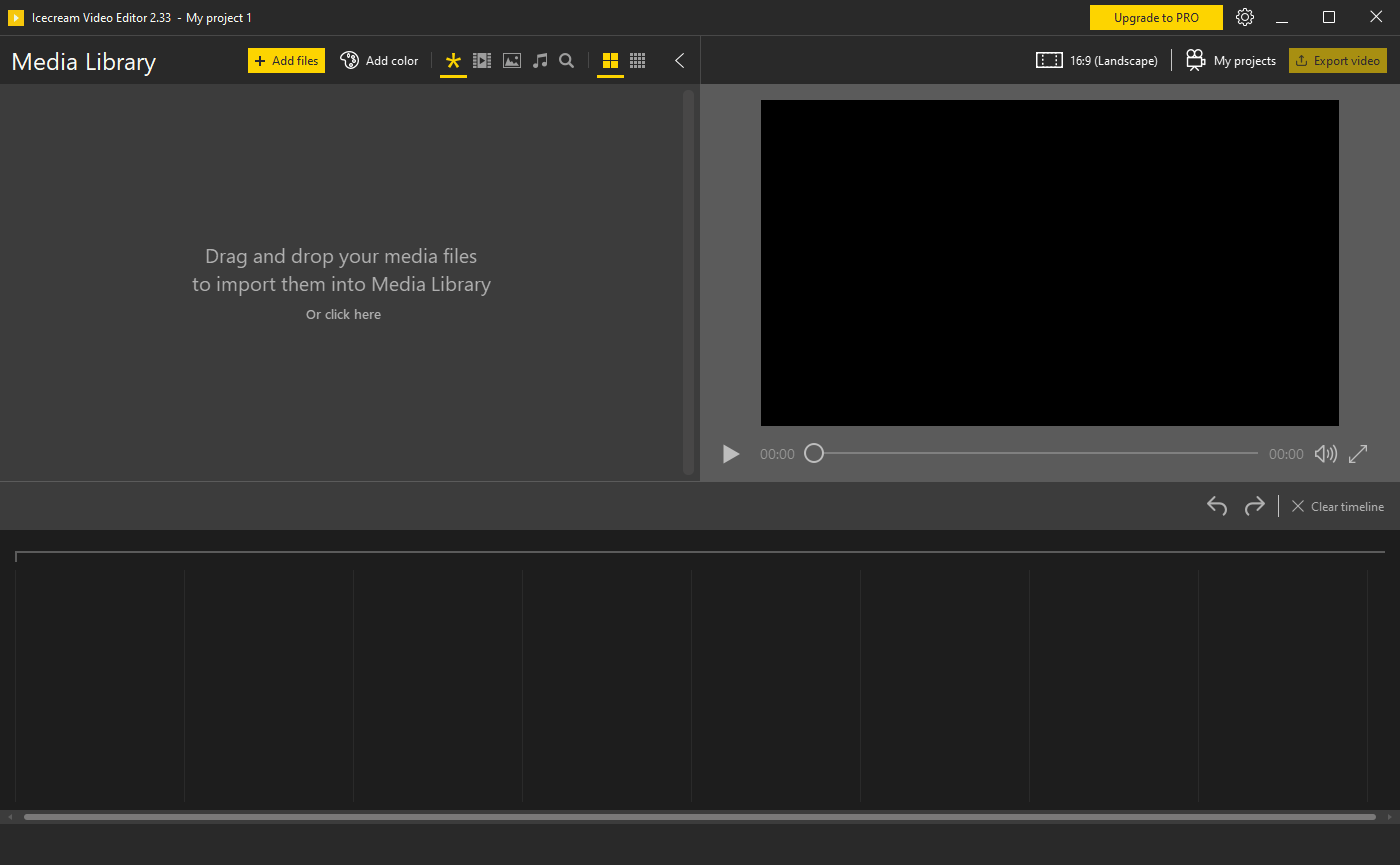
シンプルで使いやすいビデオ編集ソフト
Icecream Video Editor は、基本的なビデオ編集機能を備えている無料の動画編集ソフトです。基本的な機能はすべて無料で使用できますが、無料版の場合、出力ビデオに透かしが追加されます。
機能
タイムライン:単一のタイムラインでビデオと写真をマージする
トランジションを追加する:15のシーントランジションのいずれかを選択するか、ランダム
なビデオエフェクトを追加します
ビデオをぼかす、古いムービーエフェクトを適用するなど
ビデオをトリミングする:ビデオエディタに追加されたビデオのトリミング
ビデオにオーディオを追加:音楽のサウンドトラックまたはナレーションを追加する
タイトルを追加する:タイムライン上の任意のビデオまたは写真シーンにテキストを追加します。
無料版で制限されている機能:
タイムラインのシーン数制限 10 個まで
出力ビデオに透かし(ウォーターマーク)が追加されます
価格: 無料
動作環境: Windows 7|8|8.1|10|11
使用言語: 英語ほか
最終更新日:
3か月前 (2026/02/04)
ダウンロード数: 746
画像
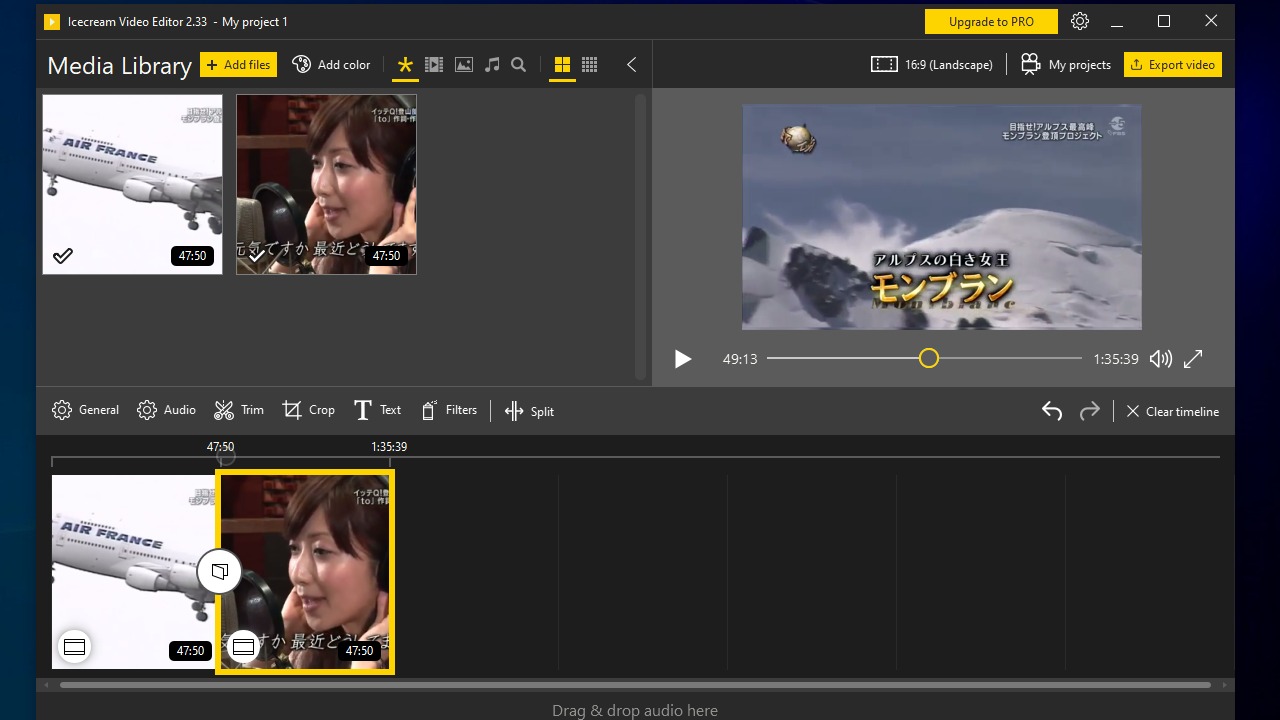
メイン画面
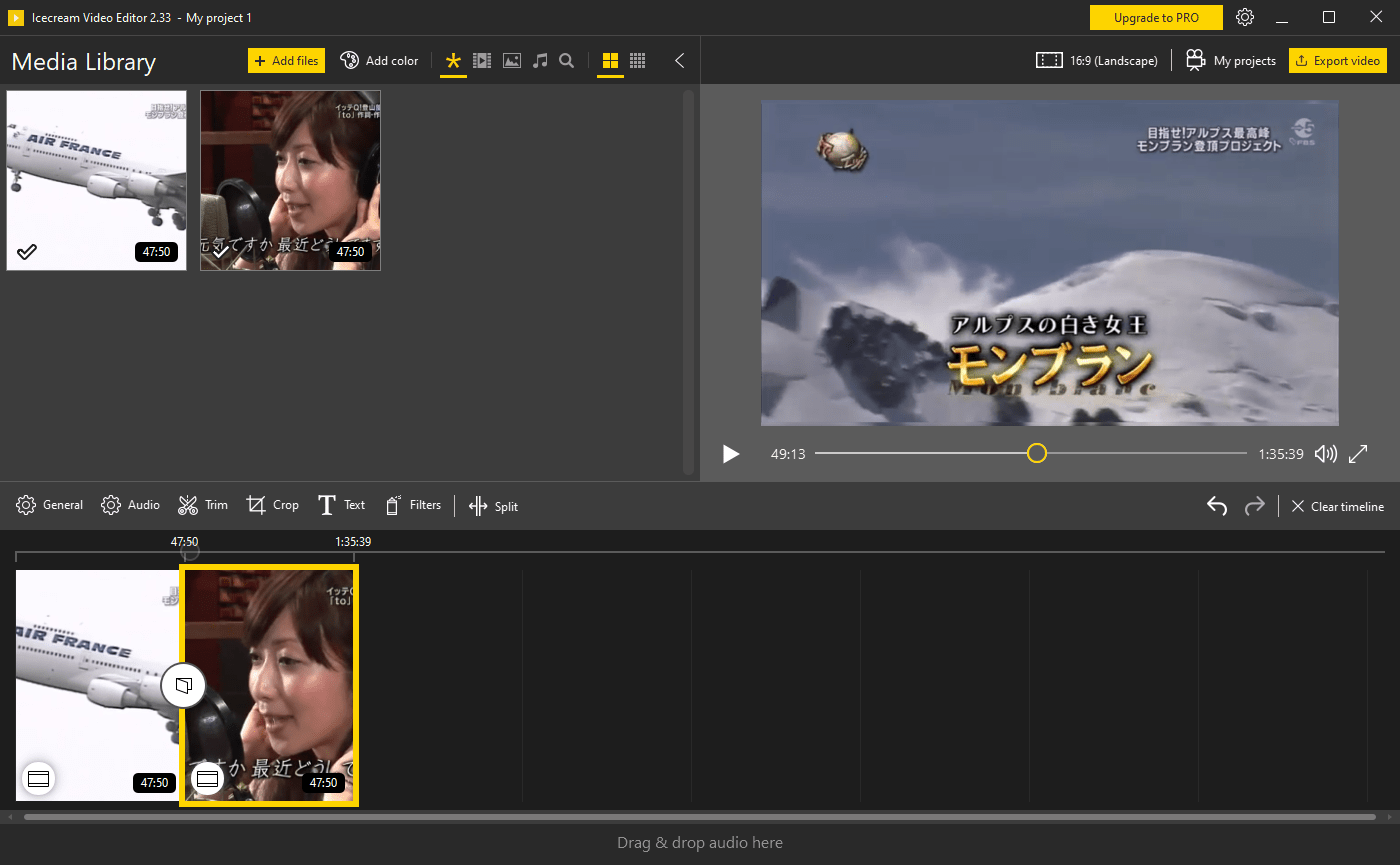
編集画面
使い方
インストール
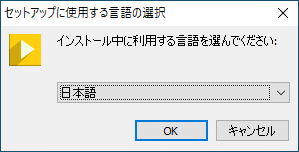
1.インストール方法
ダウンロードしたセットアップファイルを実行すると言語の選択画面が表示されます。言語を選択して[OK ]をクリックします。
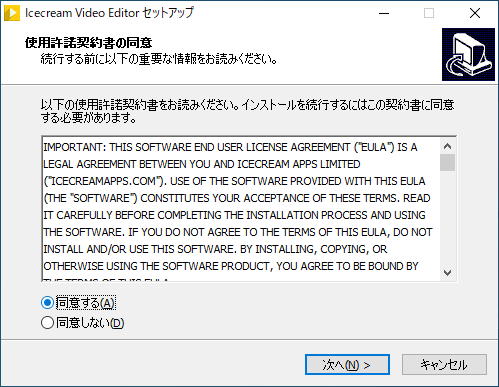
ライセンスが表示されます。[同意する ]を選択して[次へ ]ボタンをクリックします。
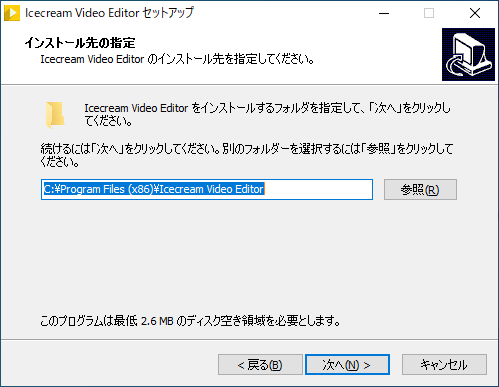
インストール先の設定です。変更しない場合はこのまま[次へ ]をクリックします。
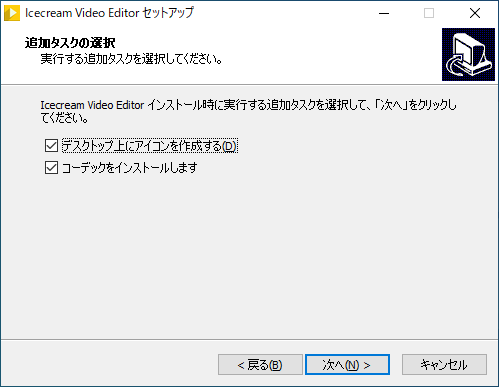
デスクトップアイコンを作成する場合はチェックして[次へ ]をクリックします。
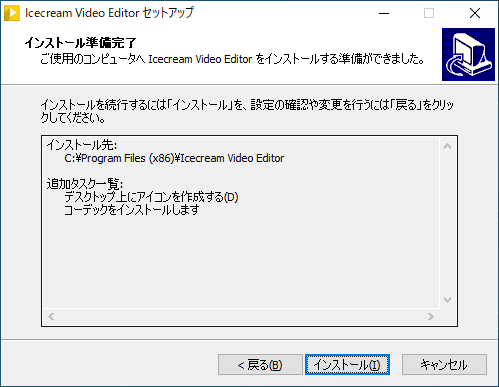
インストールの準備が整いました。[インストール ]をクリックしてインストールを開始します。
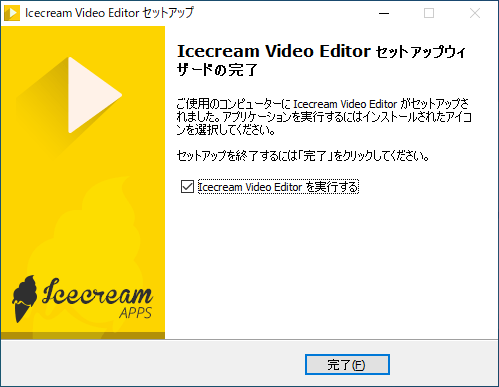
インストールが完了しました。[完了 ]をクリックしてセットアップウィザードを閉じましょう。
ビデオを編集する
1.ファイルを追加する/タイムラインに追加する
「Add files」ボタンをクリックするか、ファイルを左上のボックスにドラッグ&ドロップしてファイルを追加します。
追加したファイルを下のタイムラインにドラッグ&ドロップすると、ファイルをタイムラインに追加できます。
よくある質問と回答
ライセンスについて
ユーザーレビュー
レビューはまだありません、 最初のレビューを投稿してください。コメントは任意です。
Icecream Video Editor はどなたでも無料で使用できますが、無料版では一部の機能が制限されています。