").attr(n.scriptAttrs||{}).prop({charset:n.scriptCharset,src:n.url}).on("load error",i=function(e){r.remove(),i=null,e&&t("error"===e.type?404:200,e.type)}),C.head.appendChild(r[0])},abort:function(){i&&i()}}});var Jt,Kt=[],Zt=/(=)\?(?=&|$)|\?\?/;ce.ajaxSetup({jsonp:"callback",jsonpCallback:function(){var e=Kt.pop()||ce.expando+"_"+jt.guid++;return this[e]=!0,e}}),ce.ajaxPrefilter("json jsonp",function(e,t,n){var r,i,o,a=!1!==e.jsonp&&(Zt.test(e.url)?"url":"string"==typeof e.data&&0===(e.contentType||"").indexOf("application/x-www-form-urlencoded")&&Zt.test(e.data)&&"data");if(a||"jsonp"===e.dataTypes[0])return r=e.jsonpCallback=v(e.jsonpCallback)?e.jsonpCallback():e.jsonpCallback,a?e[a]=e[a].replace(Zt,"$1"+r):!1!==e.jsonp&&(e.url+=(At.test(e.url)?"&":"?")+e.jsonp+"="+r),e.converters["script json"]=function(){return o||ce.error(r+" was not called"),o[0]},e.dataTypes[0]="json",i=ie[r],ie[r]=function(){o=arguments},n.always(function(){void 0===i?ce(ie).removeProp(r):ie[r]=i,e[r]&&(e.jsonpCallback=t.jsonpCallback,Kt.push(r)),o&&v(i)&&i(o[0]),o=i=void 0}),"script"}),le.createHTMLDocument=((Jt=C.implementation.createHTMLDocument("").body).innerHTML="
",2===Jt.childNodes.length),ce.parseHTML=function(e,t,n){return"string"!=typeof e?[]:("boolean"==typeof t&&(n=t,t=!1),t||(le.createHTMLDocument?((r=(t=C.implementation.createHTMLDocument("")).createElement("base")).href=C.location.href,t.head.appendChild(r)):t=C),o=!n&&[],(i=w.exec(e))?[t.createElement(i[1])]:(i=Ae([e],t,o),o&&o.length&&ce(o).remove(),ce.merge([],i.childNodes)));var r,i,o},ce.fn.load=function(e,t,n){var r,i,o,a=this,s=e.indexOf(" ");return-1").append(ce.parseHTML(e)).find(r):e)}).always(n&&function(e,t){a.each(function(){n.apply(this,o||[e.responseText,t,e])})}),this},ce.expr.pseudos.animated=function(t){return ce.grep(ce.timers,function(e){return t===e.elem}).length},ce.offset={setOffset:function(e,t,n){var r,i,o,a,s,u,l=ce.css(e,"position"),c=ce(e),f={};"static"===l&&(e.style.position="relative"),s=c.offset(),o=ce.css(e,"top"),u=ce.css(e,"left"),("absolute"===l||"fixed"===l)&&-1<(o+u).indexOf("auto")?(a=(r=c.position()).top,i=r.left):(a=parseFloat(o)||0,i=parseFloat(u)||0),v(t)&&(t=t.call(e,n,ce.extend({},s))),null!=t.top&&(f.top=t.top-s.top+a),null!=t.left&&(f.left=t.left-s.left+i),"using"in t?t.using.call(e,f):c.css(f)}},ce.fn.extend({offset:function(t){if(arguments.length)return void 0===t?this:this.each(function(e){ce.offset.setOffset(this,t,e)});var e,n,r=this[0];return r?r.getClientRects().length?(e=r.getBoundingClientRect(),n=r.ownerDocument.defaultView,{top:e.top+n.pageYOffset,left:e.left+n.pageXOffset}):{top:0,left:0}:void 0},position:function(){if(this[0]){var e,t,n,r=this[0],i={top:0,left:0};if("fixed"===ce.css(r,"position"))t=r.getBoundingClientRect();else{t=this.offset(),n=r.ownerDocument,e=r.offsetParent||n.documentElement;while(e&&(e===n.body||e===n.documentElement)&&"static"===ce.css(e,"position"))e=e.parentNode;e&&e!==r&&1===e.nodeType&&((i=ce(e).offset()).top+=ce.css(e,"borderTopWidth",!0),i.left+=ce.css(e,"borderLeftWidth",!0))}return{top:t.top-i.top-ce.css(r,"marginTop",!0),left:t.left-i.left-ce.css(r,"marginLeft",!0)}}},offsetParent:function(){return this.map(function(){var e=this.offsetParent;while(e&&"static"===ce.css(e,"position"))e=e.offsetParent;return e||J})}}),ce.each({scrollLeft:"pageXOffset",scrollTop:"pageYOffset"},function(t,i){var o="pageYOffset"===i;ce.fn[t]=function(e){return M(this,function(e,t,n){var r;if(y(e)?r=e:9===e.nodeType&&(r=e.defaultView),void 0===n)return r?r[i]:e[t];r?r.scrollTo(o?r.pageXOffset:n,o?n:r.pageYOffset):e[t]=n},t,e,arguments.length)}}),ce.each(["top","left"],function(e,n){ce.cssHooks[n]=Ye(le.pixelPosition,function(e,t){if(t)return t=Ge(e,n),_e.test(t)?ce(e).position()[n]+"px":t})}),ce.each({Height:"height",Width:"width"},function(a,s){ce.each({padding:"inner"+a,content:s,"":"outer"+a},function(r,o){ce.fn[o]=function(e,t){var n=arguments.length&&(r||"boolean"!=typeof e),i=r||(!0===e||!0===t?"margin":"border");return M(this,function(e,t,n){var r;return y(e)?0===o.indexOf("outer")?e["inner"+a]:e.document.documentElement["client"+a]:9===e.nodeType?(r=e.documentElement,Math.max(e.body["scroll"+a],r["scroll"+a],e.body["offset"+a],r["offset"+a],r["client"+a])):void 0===n?ce.css(e,t,i):ce.style(e,t,n,i)},s,n?e:void 0,n)}})}),ce.each(["ajaxStart","ajaxStop","ajaxComplete","ajaxError","ajaxSuccess","ajaxSend"],function(e,t){ce.fn[t]=function(e){return this.on(t,e)}}),ce.fn.extend({bind:function(e,t,n){return this.on(e,null,t,n)},unbind:function(e,t){return this.off(e,null,t)},delegate:function(e,t,n,r){return this.on(t,e,n,r)},undelegate:function(e,t,n){return 1===arguments.length?this.off(e,"**"):this.off(t,e||"**",n)},hover:function(e,t){return this.on("mouseenter",e).on("mouseleave",t||e)}}),ce.each("blur focus focusin focusout resize scroll click dblclick mousedown mouseup mousemove mouseover mouseout mouseenter mouseleave change select submit keydown keypress keyup contextmenu".split(" "),function(e,n){ce.fn[n]=function(e,t){return 0
FRSFileList 1.7.0
ファイル管理
2021/05/06 15:082021/05/24 14:03
説明 機能 仕様 ダウンロード 画像 使い方
コンピュータ上の最大/最小、最新/最古ファイルを検索するツール
PC 上のサイズが最も大きいファイル/小さいファイル、最も新しいファイル/古いファイルを検索してリスト表示することができるファイル管理ツール。ディスクスペースを占有している大きいファイルなどを探したい場合に役に立ちます。

FRSFileList の概要
FRSFileList は、コンピュータ上の最大ファイル、最小ファイル、最新ファイル、最も古いファイルをすばやく見つけることができます。
FRSFileList の機能
FRSFileList の主な機能です。
機能
概要
メイン機能
最大ファイル、最小ファイル、最新ファイル、最も古いファイルを検索
機能詳細
・ファイルサイズが大きい順に表示する
・ファイルサイズが小さい順に表示する
・ファイル日時が古い順に表示する
・ファイル日時が新しい順に表示する
複数の条件でファイルを検索できます
FRSFileList は、コンピュータのドライブまたはフォルダ内の特定のファイルを検索して、順番に並べ替えて表示することができるツールです。
例えば、ディスク内を占有しているファイルサイズが大きいファイルを検索したり、ファイルの日時が最も新しいファイルを新しい順に表示するといったような条件でファイルを検索することができます。
検索結果に表示されているファイルはエクスプローラで開いたり、削除することが可能で、検索結果のリストは印刷したりテキストファイルにエクスポートすることができます。
コンピュータ上の最大/最小、最新/最古ファイルを検索
FRSFileList は、特定の条件でユーザーが探しているファイルを見つけることができるツールです。Windows エクスプローラや一般的なファイルマネージャにはない便利な機能を使うことができます。
機能
ファイルサイズが大きい順に表示する
ファイルサイズが小さい順に表示する
ファイル日時が古い順に表示する
ファイル日時が新しい順に表示する
普通のファイルを検索する
普通のファイルと隠しファイルを検索する
普通のファイルとシステムファイルを検索する
普通のファイルと隠しファイルとシステムファイルを検索する
5 ~ 75 個のファイルを表示
価格: 無料
動作環境: Windows 7|8|8.1|10|11
使用言語: 英語
最終更新日:
5年前 (2021/05/24)
ダウンロード数: 989
画像
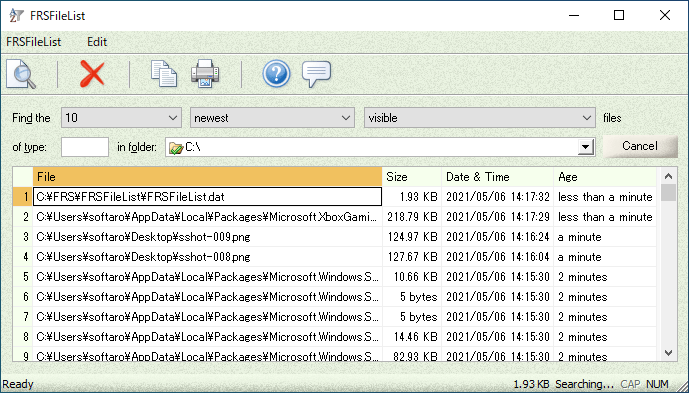
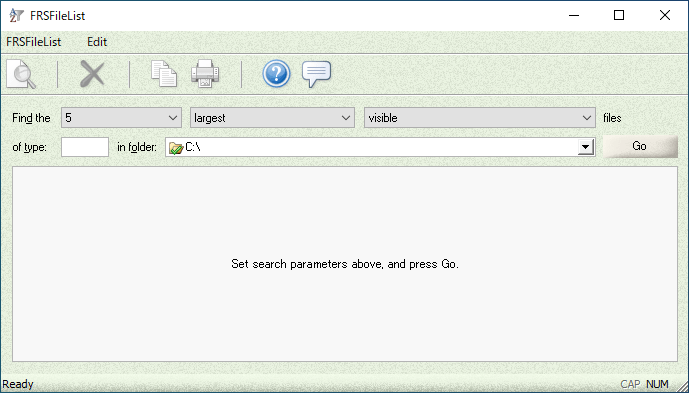
ユーザーインターフェース
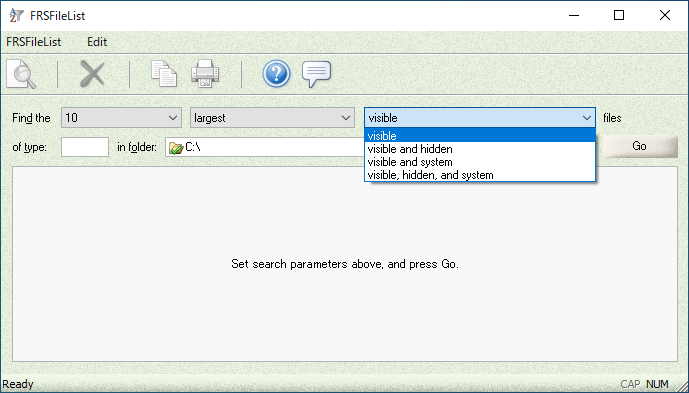
検索するファイルの選択
検索結果
右クリックメニュー
使い方
インストール
1.インストール方法
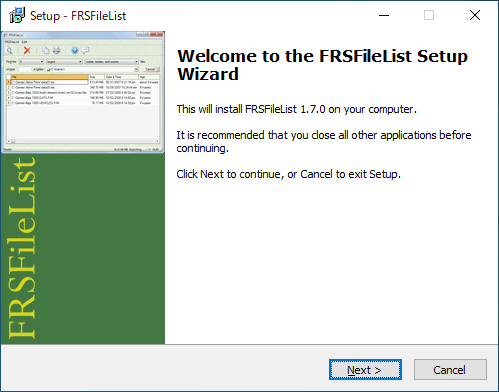
インストーラを実行するとセットアップウィザードが表示されます。[Next ]をクリックします。
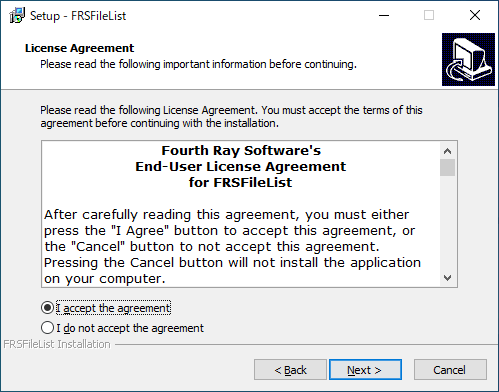
ライセンスが表示されます。「I accept the agreement 」を選択して[Next ]をクリックします。
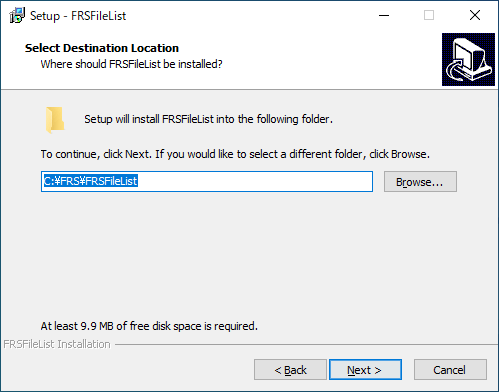
インストール先を指定して[Next ]をクリックします。
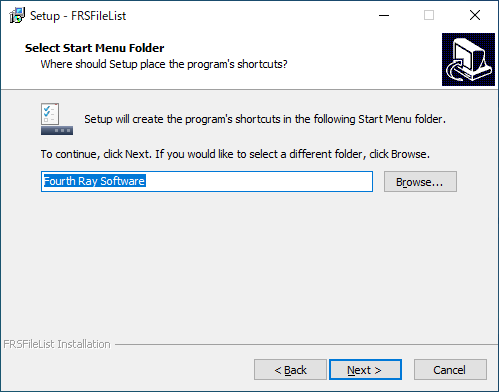
スタートメニューに作成するショートカットを指定して[Next ]をクリックします。
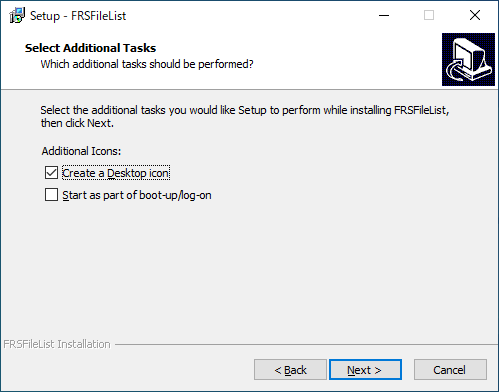
追加のタスクを選択して[Next ]をクリックします。
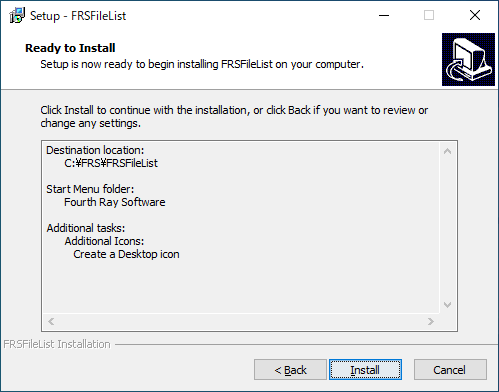
インストールの準備ができました。[Install ]をクリックしてインストールを開始します。
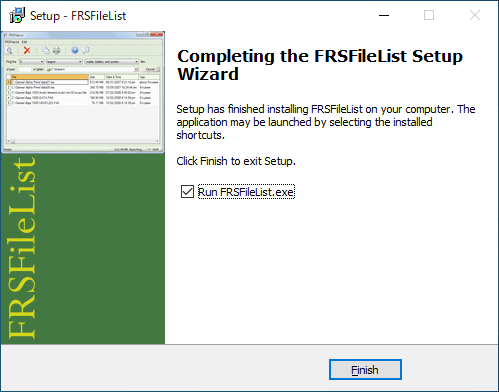
インストールが完了しました。[Finish ]をクリックしてセットアップウィザードを閉じます。
基本的な使い方
1.基本的な使い方
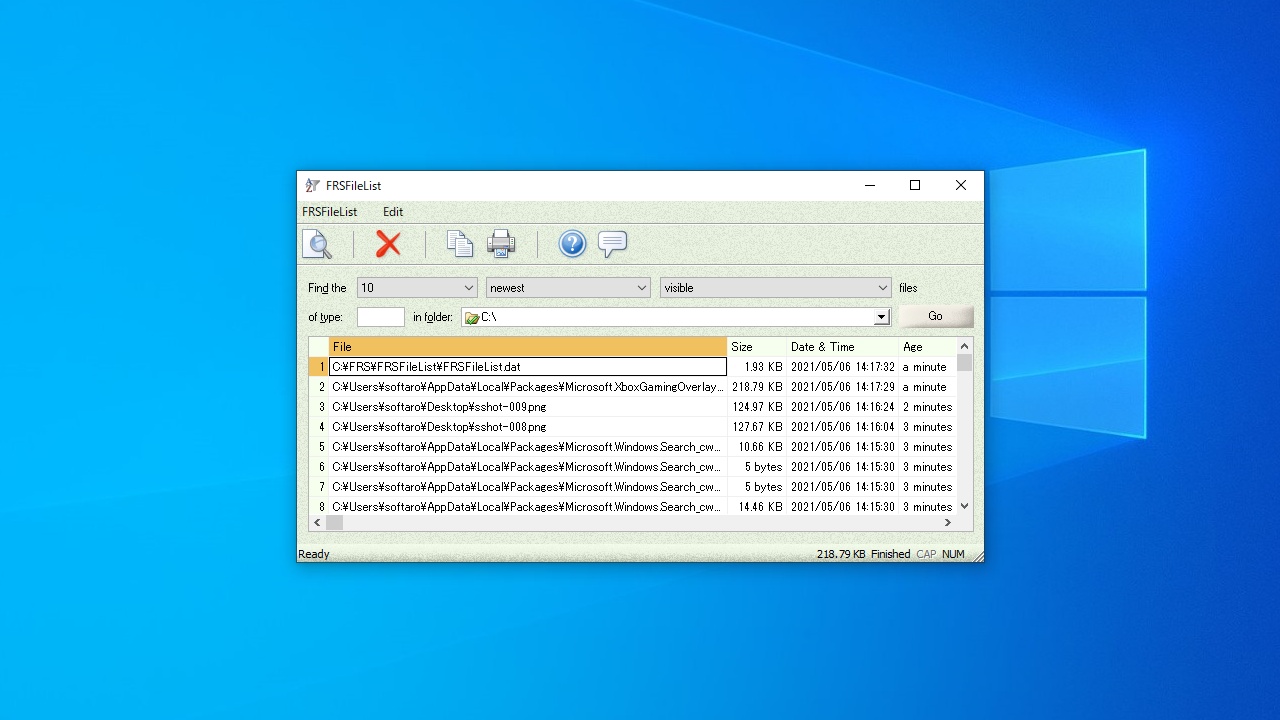
「Find the 」のドロップダウンから、「表示するファイル数」「表示条件」「検索するファイルの種類」を選択します。
「in folder 」で検索する場所を選択します。
必要な場合、「of type」でファイルの種類を指定します。
[Go ]ボタンをクリックして検索を開始します。
・largest :ファイルサイズが大きい順に表示する
・Smallest :ファイルサイズが小さい順に表示する
・Oldest :ファイル日時が古い順に表示する
・Newest :ファイル日時が新しい順に表示する
・visible :普通のファイル
・visible and hidden :普通のファイルと隠しファイル
・visible and system :普通のファイルとシステムファイル
・visible, hidden, and system :普通のファイルと隠しファイルとシステムファイル
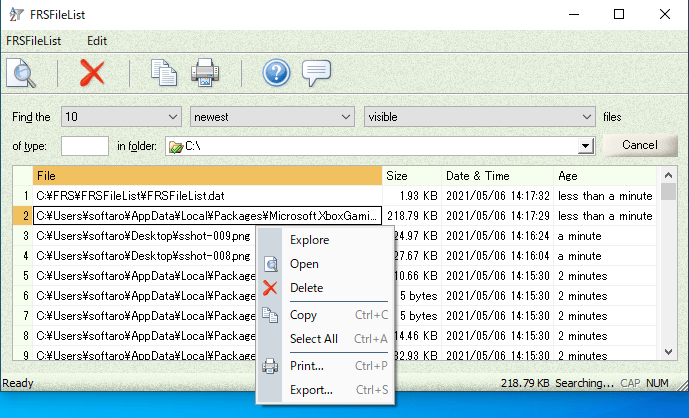
検索が完了すると結果が表示され、ファイル名とファイルサイズ、ファイル日時などの詳細情報が表示されます。
2.右クリックメニュー
・Exolore :ファイルの場所をエクスプローラで開く
・Open :ファイルを開く
・Delete :ファイルを削除する
・Copy :ファイルをコピーする
・Select All :すべてのファイルを選択する
・Print :印刷する
・Export :リストをテキストファイルにエクスポートする
よくある質問と回答
ライセンスについて。
ユーザーレビュー
レビューはまだありません、 最初のレビューを投稿してください。コメントは任意です。
FRSFileList は、どなたでも無料で使用できます。