").attr(n.scriptAttrs||{}).prop({charset:n.scriptCharset,src:n.url}).on("load error",i=function(e){r.remove(),i=null,e&&t("error"===e.type?404:200,e.type)}),C.head.appendChild(r[0])},abort:function(){i&&i()}}});var Jt,Kt=[],Zt=/(=)\?(?=&|$)|\?\?/;ce.ajaxSetup({jsonp:"callback",jsonpCallback:function(){var e=Kt.pop()||ce.expando+"_"+jt.guid++;return this[e]=!0,e}}),ce.ajaxPrefilter("json jsonp",function(e,t,n){var r,i,o,a=!1!==e.jsonp&&(Zt.test(e.url)?"url":"string"==typeof e.data&&0===(e.contentType||"").indexOf("application/x-www-form-urlencoded")&&Zt.test(e.data)&&"data");if(a||"jsonp"===e.dataTypes[0])return r=e.jsonpCallback=v(e.jsonpCallback)?e.jsonpCallback():e.jsonpCallback,a?e[a]=e[a].replace(Zt,"$1"+r):!1!==e.jsonp&&(e.url+=(At.test(e.url)?"&":"?")+e.jsonp+"="+r),e.converters["script json"]=function(){return o||ce.error(r+" was not called"),o[0]},e.dataTypes[0]="json",i=ie[r],ie[r]=function(){o=arguments},n.always(function(){void 0===i?ce(ie).removeProp(r):ie[r]=i,e[r]&&(e.jsonpCallback=t.jsonpCallback,Kt.push(r)),o&&v(i)&&i(o[0]),o=i=void 0}),"script"}),le.createHTMLDocument=((Jt=C.implementation.createHTMLDocument("").body).innerHTML="
",2===Jt.childNodes.length),ce.parseHTML=function(e,t,n){return"string"!=typeof e?[]:("boolean"==typeof t&&(n=t,t=!1),t||(le.createHTMLDocument?((r=(t=C.implementation.createHTMLDocument("")).createElement("base")).href=C.location.href,t.head.appendChild(r)):t=C),o=!n&&[],(i=w.exec(e))?[t.createElement(i[1])]:(i=Ae([e],t,o),o&&o.length&&ce(o).remove(),ce.merge([],i.childNodes)));var r,i,o},ce.fn.load=function(e,t,n){var r,i,o,a=this,s=e.indexOf(" ");return-1").append(ce.parseHTML(e)).find(r):e)}).always(n&&function(e,t){a.each(function(){n.apply(this,o||[e.responseText,t,e])})}),this},ce.expr.pseudos.animated=function(t){return ce.grep(ce.timers,function(e){return t===e.elem}).length},ce.offset={setOffset:function(e,t,n){var r,i,o,a,s,u,l=ce.css(e,"position"),c=ce(e),f={};"static"===l&&(e.style.position="relative"),s=c.offset(),o=ce.css(e,"top"),u=ce.css(e,"left"),("absolute"===l||"fixed"===l)&&-1<(o+u).indexOf("auto")?(a=(r=c.position()).top,i=r.left):(a=parseFloat(o)||0,i=parseFloat(u)||0),v(t)&&(t=t.call(e,n,ce.extend({},s))),null!=t.top&&(f.top=t.top-s.top+a),null!=t.left&&(f.left=t.left-s.left+i),"using"in t?t.using.call(e,f):c.css(f)}},ce.fn.extend({offset:function(t){if(arguments.length)return void 0===t?this:this.each(function(e){ce.offset.setOffset(this,t,e)});var e,n,r=this[0];return r?r.getClientRects().length?(e=r.getBoundingClientRect(),n=r.ownerDocument.defaultView,{top:e.top+n.pageYOffset,left:e.left+n.pageXOffset}):{top:0,left:0}:void 0},position:function(){if(this[0]){var e,t,n,r=this[0],i={top:0,left:0};if("fixed"===ce.css(r,"position"))t=r.getBoundingClientRect();else{t=this.offset(),n=r.ownerDocument,e=r.offsetParent||n.documentElement;while(e&&(e===n.body||e===n.documentElement)&&"static"===ce.css(e,"position"))e=e.parentNode;e&&e!==r&&1===e.nodeType&&((i=ce(e).offset()).top+=ce.css(e,"borderTopWidth",!0),i.left+=ce.css(e,"borderLeftWidth",!0))}return{top:t.top-i.top-ce.css(r,"marginTop",!0),left:t.left-i.left-ce.css(r,"marginLeft",!0)}}},offsetParent:function(){return this.map(function(){var e=this.offsetParent;while(e&&"static"===ce.css(e,"position"))e=e.offsetParent;return e||J})}}),ce.each({scrollLeft:"pageXOffset",scrollTop:"pageYOffset"},function(t,i){var o="pageYOffset"===i;ce.fn[t]=function(e){return M(this,function(e,t,n){var r;if(y(e)?r=e:9===e.nodeType&&(r=e.defaultView),void 0===n)return r?r[i]:e[t];r?r.scrollTo(o?r.pageXOffset:n,o?n:r.pageYOffset):e[t]=n},t,e,arguments.length)}}),ce.each(["top","left"],function(e,n){ce.cssHooks[n]=Ye(le.pixelPosition,function(e,t){if(t)return t=Ge(e,n),_e.test(t)?ce(e).position()[n]+"px":t})}),ce.each({Height:"height",Width:"width"},function(a,s){ce.each({padding:"inner"+a,content:s,"":"outer"+a},function(r,o){ce.fn[o]=function(e,t){var n=arguments.length&&(r||"boolean"!=typeof e),i=r||(!0===e||!0===t?"margin":"border");return M(this,function(e,t,n){var r;return y(e)?0===o.indexOf("outer")?e["inner"+a]:e.document.documentElement["client"+a]:9===e.nodeType?(r=e.documentElement,Math.max(e.body["scroll"+a],r["scroll"+a],e.body["offset"+a],r["offset"+a],r["client"+a])):void 0===n?ce.css(e,t,i):ce.style(e,t,n,i)},s,n?e:void 0,n)}})}),ce.each(["ajaxStart","ajaxStop","ajaxComplete","ajaxError","ajaxSuccess","ajaxSend"],function(e,t){ce.fn[t]=function(e){return this.on(t,e)}}),ce.fn.extend({bind:function(e,t,n){return this.on(e,null,t,n)},unbind:function(e,t){return this.off(e,null,t)},delegate:function(e,t,n,r){return this.on(t,e,n,r)},undelegate:function(e,t,n){return 1===arguments.length?this.off(e,"**"):this.off(t,e||"**",n)},hover:function(e,t){return this.on("mouseenter",e).on("mouseleave",t||e)}}),ce.each("blur focus focusin focusout resize scroll click dblclick mousedown mouseup mousemove mouseover mouseout mouseenter mouseleave change select submit keydown keypress keyup contextmenu".split(" "),function(e,n){ce.fn[n]=function(e,t){return 0
f.lux 4.137 / 4.141 Beta
ディスプレイ
2020/05/24 17:28
説明機能仕様ダウンロード画像使い方
PC の画面の色を自動調整して目の疲れを減らし、画面を見やすくします

PC のディスプレイの色を時間(外の明るさ)に合わせて変更し、PC の画面を見やすくしたり目の疲れを減らすことができるツール。昼と夜で画面の色を自動調整し、PC の使用による眼精疲労を軽減させることができます。
f.lux の概要
f.lux は、PC の画面の色を昼間は明るく寒色系に、夜は暖色系にして暗くするアプリです。PC の画面を外光に合わせて調整することで目への刺激を低くしたり、ディスプレイを見やすくすることができます。f.lux で自分の場所の設定をすると自動で日の出と日の入り時間が設定され、時間に合わせて画面の色/明るさが調整されます。
f.lux の機能
f.lux の機能と概要です。
| 機能 |
概要 |
| 場所の設定 |
都市名などを入力して場所(日照時間)を自動設定 |
| モード |
・Recommended Colors:推奨の色
・Reduce Eyestrain:目の疲れを減らす
・Classic f.lux:デフォルトの設定
・Working Late:遅くまで仕事する場合
・Far from the Equator:赤道から遠い地域の場合
・Cave Painting:壁画のようにする
・Color Fidelity:色を忠実に表現する |
| 色温度/明るさの設定 |
・昼時間の色を設定
・夜時間の色を設定 |
| ホットキー |
f.lux のオン・オフ/色の変更/明るさの変更をホットキーに割り当て |
| そのほか |
・画面にエフェクト(視覚効果)を追加
・昼夜の移行時のスムーズさを設定 |
昼と夜で画面の色温度と明るさを変更します
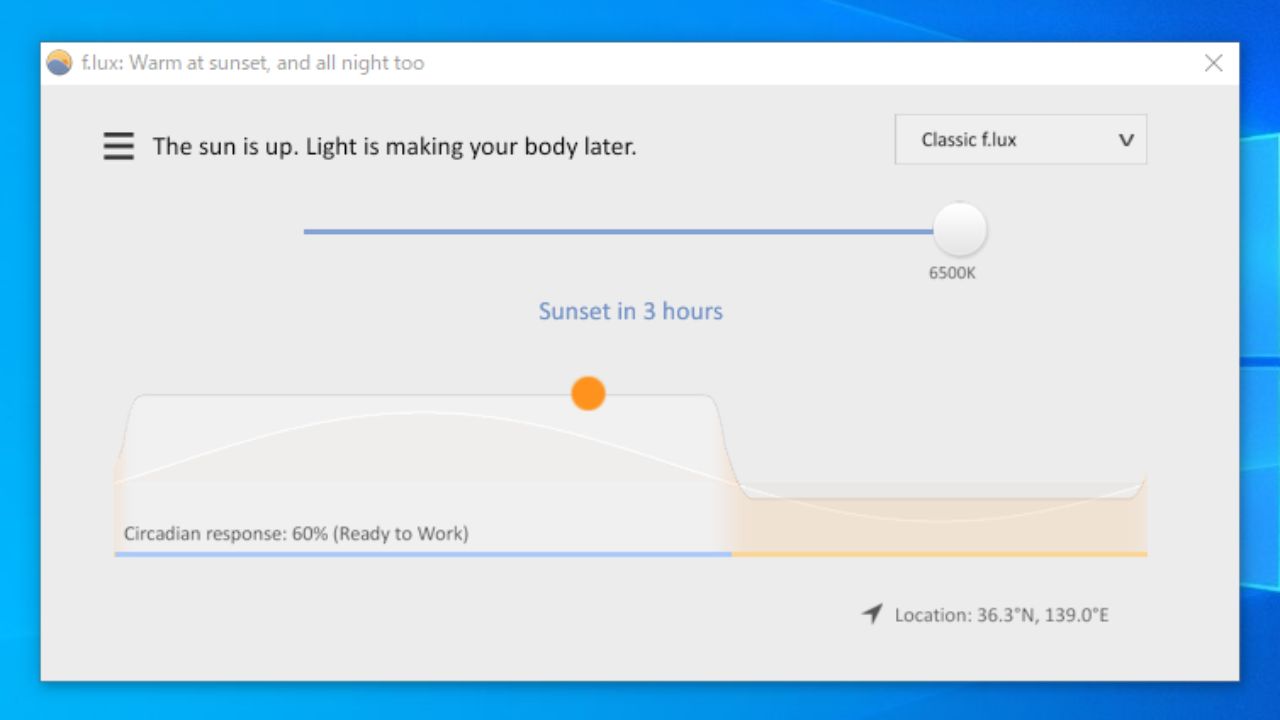
f.lux は、ディスプレイの色を昼と夜で自動で変更するアプリです。昼は周りが明るくても見やすいように寒色系で表示し、夜になると目に優しい暖色系にして、PC の周りの明るさと調和させます。
昼または夜をどのくらいの色にするかは好みに設定可能で、ビデオを鑑賞したり、遅くまで仕事をする場合はモードを変更して画面を見やすくすることができます。
エフェクトの追加やそのほかの設定
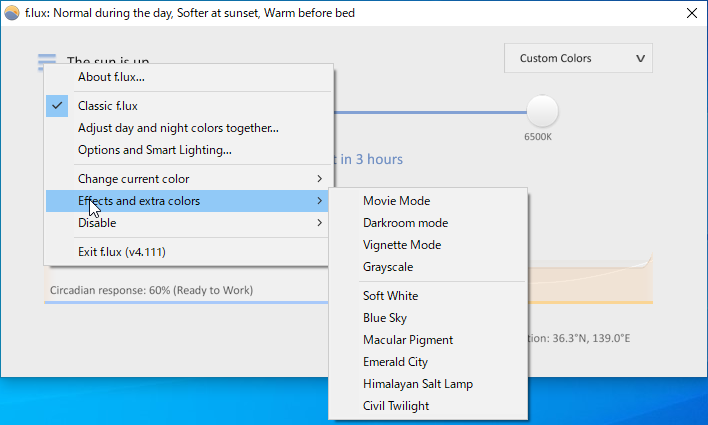
f.lux では画面にグレースケールやソフトホワイト、ブルースカイなどのエフェクトを追加して、画面を特別な色で表示することができます。
有効/無効、明るさや色の変更はホットキーで変更可能で、色の移行をスムーズにしたり、GPU を使用して色の品質を向上させることもできます。
長時間 PC を使う人の目の疲れや睡眠障害を軽減
f.lux は、PC の画面の刺激による睡眠障害や目の疲れを減らすことができる便利なアプリケーションです。PC で長時間仕事をしていて日常的に目の疲れを感じている人は試してみると良いでしょう。
機能
- 昼または夜に適応するようにコンピュータの画面の色を変更
- ロケーションに基づいて日の出/日の入りの時間を自動的に計算
- モードの変更
- 画面にエフェクトを追加
- ホットキー(オン・オフの切り替え/明るさの変更/色の変更)
価格:無料
動作環境:Windows XP|Vista|7|8|8.1|10|11・Mac・Linux
使用言語:英語
最終更新日:
3週間前 (2026/04/09)
ダウンロード数:1654
画像

メインウィンドウ

設定など
使い方
インストール
1.セットアップ
- ダウンロードしたインストーラを実行すると使用許諾契約書が表示されます。[Accept]ボタンをクリックするとインストールが開始します。

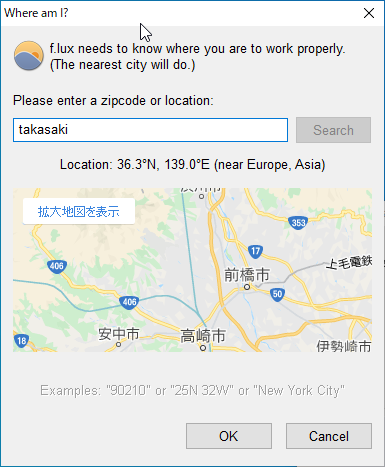
「Whire I am?」の画面が表示されたら場所の設定をします。
- 「Please enter a zipcode or location」のフィールドに現在の場所の都市名を入力して[Search]をクリックします。
- 下に表示されたの地図で場所を確認し、問題なければ[OK]ボタンをクリックします。
基本的な使い方
1.インターフェース
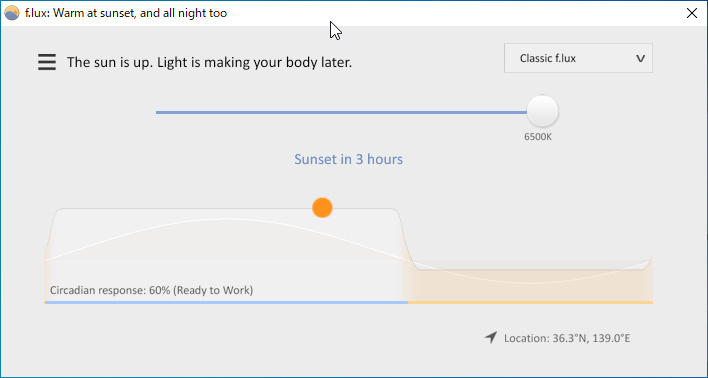
f.lux の画面には現在または時間が経過した時の色温度の状態が表示されます。
- このままの設定で良い場合はこの画面を閉じて OK です。

2.モードを変更する
- 右のドロップダウンをクリックすると、仕事モードや目の疲れを癒やすモードなどに変更できます。
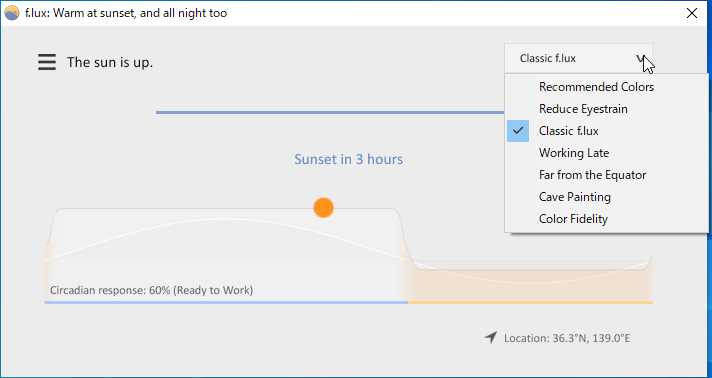
・Recommended Colors:推奨の色
・Reduce Eyestrain:目の疲れを減らす
・Classic f.lux:デフォルトの設定
・Working Late:遅くまで仕事する
・Far from the Equator:赤道から遠い地域の場合
・Cave Painting:壁画のようにする
・Color Fidelity:色を忠実に表示する
3.色を調整する
左のドロップダウンでは色の調整などができます。
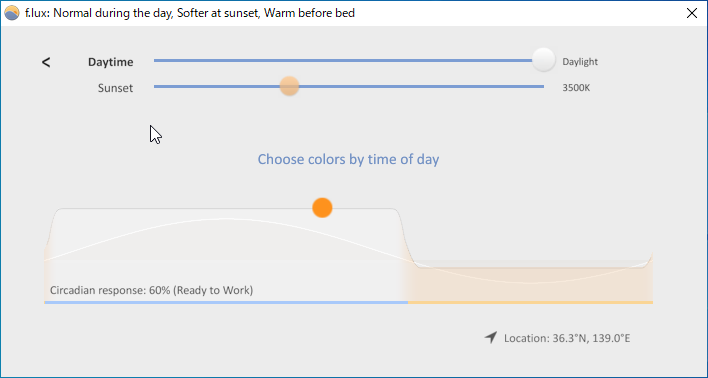
- 昼間および夜の色を調整するには「Adjust day and night colors together」を選択します。
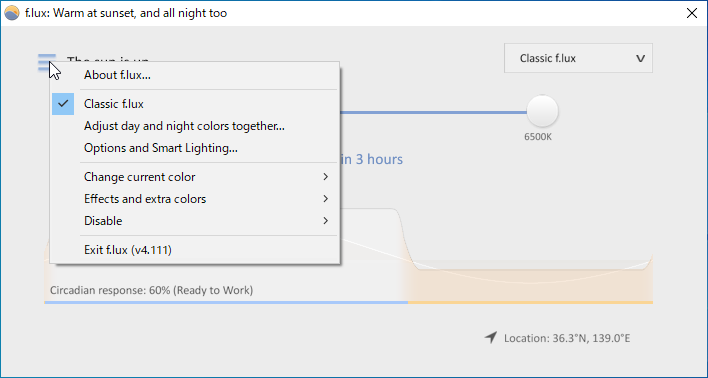
- 「Daytime」で昼の色、「sunset」で夜間の色を設定できます。
・
Day-time color temperature:昼の色温度(デフォルトは 6600)
・
Night-time color temperature:夜の色温度(デフォルトは 3900)
・
Day-time brightness:昼の明るさ(デフォルトは 100%)
・
Night-time brightness:夜の明るさ(デフォルトは 59%)
・
Transition duration:移行する時間の長さ
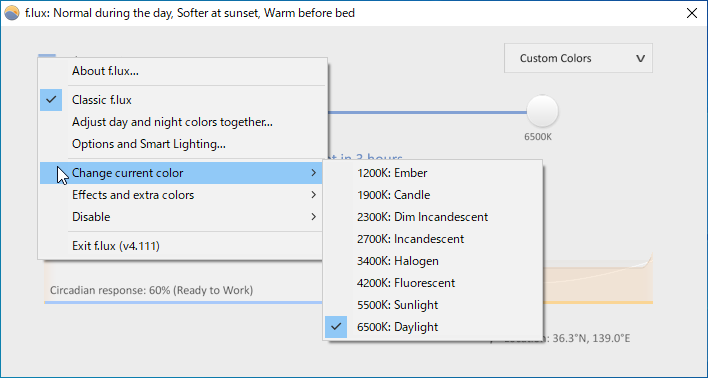
4.現在の色を変更する
ウィンドウ上のスライダーを動かすか、左のメニューの「Change current color」を選択すると、現在の色を変更できます。

5.エフェクトを追加する
- 左のメニューの「Effects and extra colors」を選択すると、画面にエフェクトを追加することができます。

・Movie Mode:ムービーモード(動画の画面の色を見やすくする)
・Darkroom mode:ダークルームモード(赤と黒の色調)
・Vignette Mode:ヴィネットモード(画面の周りを暗くする)
・Grayscale:グレースケール
・Soft White:ソフトホワイト(白をソフトにする)
・Blue Sky:ブルースカイ(青空の色にする)
・Macular Pigment:黄斑色素(黄色っぽくする)
・Emerald City:エメラルドシティ(緑色っぽくする)
・Himalayan Salt Lamp:ヒマラヤソルトランプ(オレンジ色っぽくする)
・Civil Twilight:シビルトワイライト(薄明色)
6.無効にする
- 左のメニューの「Disable」を選択すると、f.lux を無効にできます。
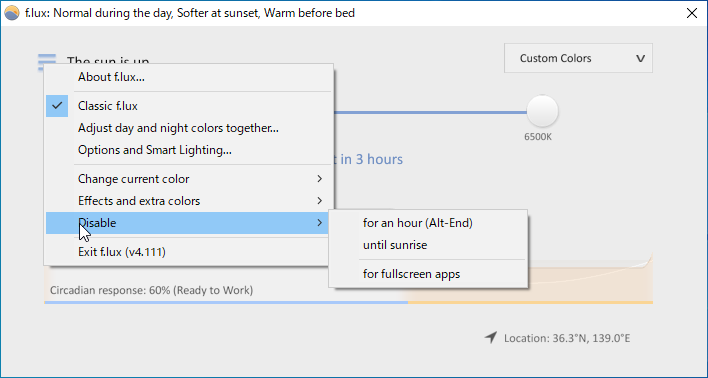
・for an hour (Alt-End):一時間無効にする(Alt+Endキーで切り替え)
・until sunrise:日の出まで無効にする
・for fullscreen apps:フルスクリーンで無効にする
基本的な使い方
左のメニューの「Options and Smart Lighting」を選択すると f.lux の詳細な設定ができます。
1.Features and Notifications
- 「Features and Notifications」では、プログラムの全般的な設定ができます。
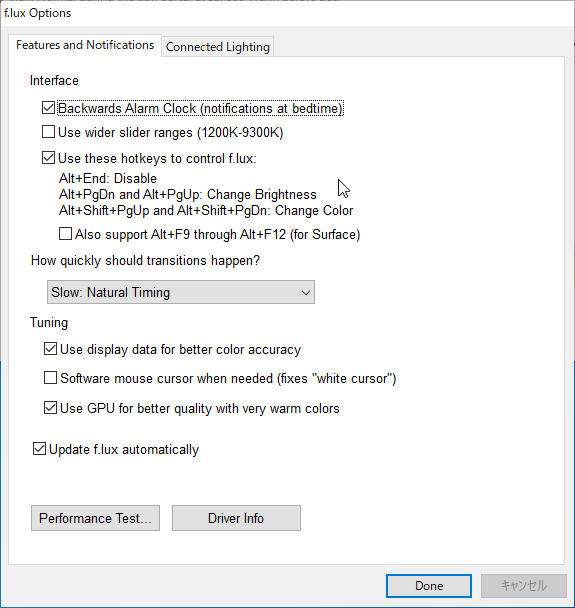
Interface:
・Backwards Alarm Clock (notifications at bedtime):就寝時にお知らせを表示する
・Use wider slider ranges (1200K-9300K):スライダーの範囲を広くする
・Use these hotkeys to control f.lux:以下のホットキーを有効にする
─ Alt+End:無効
─ Alt+PgDn / Alt+PgUp:明るさを変更
─ Alt+Shift+PgUp / Alt+Shift+PgDn:色を変更
─ Also support Alt+F9 through Alt+F12 (for Surface):Alt + F9〜Alt + F12 キーも使用する
How quickly should transitions happen?:色の移行のタイミングについて
─ Slow: Natural Timing:自然なタイミング
─ Medium: Adapt your eyes:目に合わせる
─ Very Fast: Gaming:ゲーミング
Tuning:
・Use display data for better color accuracy:表示データを使用して色の精度を高める
・Software mouse cursor when needed (fixes “white cursor”):必要に応じてソフトウェアマウスカーソルを修正する
・Use GPU for better quality with very warm colors:暖色系で GPU を使用して品質を向上させる
・Update f.lux automatically:f.lux を自動更新する
Performance Test…:パフォーマンステストを実行する
Driver Info:ドライバの情報を表示する
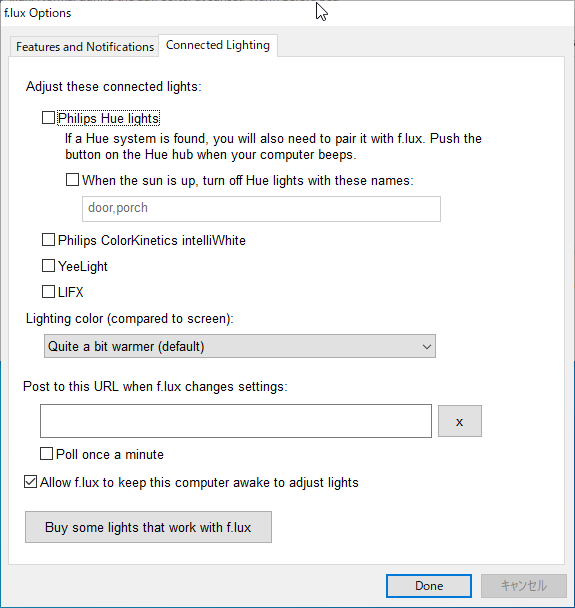
2.Connected Lighting
- 「Connected Lighting」タブは、PC に接続されたライトを調整するための設定なので通常は必要ありません。
よくある質問と回答
画面の色が時間と合わない。