").attr(n.scriptAttrs||{}).prop({charset:n.scriptCharset,src:n.url}).on("load error",i=function(e){r.remove(),i=null,e&&t("error"===e.type?404:200,e.type)}),C.head.appendChild(r[0])},abort:function(){i&&i()}}});var Jt,Kt=[],Zt=/(=)\?(?=&|$)|\?\?/;ce.ajaxSetup({jsonp:"callback",jsonpCallback:function(){var e=Kt.pop()||ce.expando+"_"+jt.guid++;return this[e]=!0,e}}),ce.ajaxPrefilter("json jsonp",function(e,t,n){var r,i,o,a=!1!==e.jsonp&&(Zt.test(e.url)?"url":"string"==typeof e.data&&0===(e.contentType||"").indexOf("application/x-www-form-urlencoded")&&Zt.test(e.data)&&"data");if(a||"jsonp"===e.dataTypes[0])return r=e.jsonpCallback=v(e.jsonpCallback)?e.jsonpCallback():e.jsonpCallback,a?e[a]=e[a].replace(Zt,"$1"+r):!1!==e.jsonp&&(e.url+=(At.test(e.url)?"&":"?")+e.jsonp+"="+r),e.converters["script json"]=function(){return o||ce.error(r+" was not called"),o[0]},e.dataTypes[0]="json",i=ie[r],ie[r]=function(){o=arguments},n.always(function(){void 0===i?ce(ie).removeProp(r):ie[r]=i,e[r]&&(e.jsonpCallback=t.jsonpCallback,Kt.push(r)),o&&v(i)&&i(o[0]),o=i=void 0}),"script"}),le.createHTMLDocument=((Jt=C.implementation.createHTMLDocument("").body).innerHTML="
",2===Jt.childNodes.length),ce.parseHTML=function(e,t,n){return"string"!=typeof e?[]:("boolean"==typeof t&&(n=t,t=!1),t||(le.createHTMLDocument?((r=(t=C.implementation.createHTMLDocument("")).createElement("base")).href=C.location.href,t.head.appendChild(r)):t=C),o=!n&&[],(i=w.exec(e))?[t.createElement(i[1])]:(i=Ae([e],t,o),o&&o.length&&ce(o).remove(),ce.merge([],i.childNodes)));var r,i,o},ce.fn.load=function(e,t,n){var r,i,o,a=this,s=e.indexOf(" ");return-1").append(ce.parseHTML(e)).find(r):e)}).always(n&&function(e,t){a.each(function(){n.apply(this,o||[e.responseText,t,e])})}),this},ce.expr.pseudos.animated=function(t){return ce.grep(ce.timers,function(e){return t===e.elem}).length},ce.offset={setOffset:function(e,t,n){var r,i,o,a,s,u,l=ce.css(e,"position"),c=ce(e),f={};"static"===l&&(e.style.position="relative"),s=c.offset(),o=ce.css(e,"top"),u=ce.css(e,"left"),("absolute"===l||"fixed"===l)&&-1<(o+u).indexOf("auto")?(a=(r=c.position()).top,i=r.left):(a=parseFloat(o)||0,i=parseFloat(u)||0),v(t)&&(t=t.call(e,n,ce.extend({},s))),null!=t.top&&(f.top=t.top-s.top+a),null!=t.left&&(f.left=t.left-s.left+i),"using"in t?t.using.call(e,f):c.css(f)}},ce.fn.extend({offset:function(t){if(arguments.length)return void 0===t?this:this.each(function(e){ce.offset.setOffset(this,t,e)});var e,n,r=this[0];return r?r.getClientRects().length?(e=r.getBoundingClientRect(),n=r.ownerDocument.defaultView,{top:e.top+n.pageYOffset,left:e.left+n.pageXOffset}):{top:0,left:0}:void 0},position:function(){if(this[0]){var e,t,n,r=this[0],i={top:0,left:0};if("fixed"===ce.css(r,"position"))t=r.getBoundingClientRect();else{t=this.offset(),n=r.ownerDocument,e=r.offsetParent||n.documentElement;while(e&&(e===n.body||e===n.documentElement)&&"static"===ce.css(e,"position"))e=e.parentNode;e&&e!==r&&1===e.nodeType&&((i=ce(e).offset()).top+=ce.css(e,"borderTopWidth",!0),i.left+=ce.css(e,"borderLeftWidth",!0))}return{top:t.top-i.top-ce.css(r,"marginTop",!0),left:t.left-i.left-ce.css(r,"marginLeft",!0)}}},offsetParent:function(){return this.map(function(){var e=this.offsetParent;while(e&&"static"===ce.css(e,"position"))e=e.offsetParent;return e||J})}}),ce.each({scrollLeft:"pageXOffset",scrollTop:"pageYOffset"},function(t,i){var o="pageYOffset"===i;ce.fn[t]=function(e){return M(this,function(e,t,n){var r;if(y(e)?r=e:9===e.nodeType&&(r=e.defaultView),void 0===n)return r?r[i]:e[t];r?r.scrollTo(o?r.pageXOffset:n,o?n:r.pageYOffset):e[t]=n},t,e,arguments.length)}}),ce.each(["top","left"],function(e,n){ce.cssHooks[n]=Ye(le.pixelPosition,function(e,t){if(t)return t=Ge(e,n),_e.test(t)?ce(e).position()[n]+"px":t})}),ce.each({Height:"height",Width:"width"},function(a,s){ce.each({padding:"inner"+a,content:s,"":"outer"+a},function(r,o){ce.fn[o]=function(e,t){var n=arguments.length&&(r||"boolean"!=typeof e),i=r||(!0===e||!0===t?"margin":"border");return M(this,function(e,t,n){var r;return y(e)?0===o.indexOf("outer")?e["inner"+a]:e.document.documentElement["client"+a]:9===e.nodeType?(r=e.documentElement,Math.max(e.body["scroll"+a],r["scroll"+a],e.body["offset"+a],r["offset"+a],r["client"+a])):void 0===n?ce.css(e,t,i):ce.style(e,t,n,i)},s,n?e:void 0,n)}})}),ce.each(["ajaxStart","ajaxStop","ajaxComplete","ajaxError","ajaxSuccess","ajaxSend"],function(e,t){ce.fn[t]=function(e){return this.on(t,e)}}),ce.fn.extend({bind:function(e,t,n){return this.on(e,null,t,n)},unbind:function(e,t){return this.off(e,null,t)},delegate:function(e,t,n,r){return this.on(t,e,n,r)},undelegate:function(e,t,n){return 1===arguments.length?this.off(e,"**"):this.off(t,e||"**",n)},hover:function(e,t){return this.on("mouseenter",e).on("mouseleave",t||e)}}),ce.each("blur focus focusin focusout resize scroll click dblclick mousedown mouseup mousemove mouseover mouseout mouseenter mouseleave change select submit keydown keypress keyup contextmenu".split(" "),function(e,n){ce.fn[n]=function(e,t){return 0
SpywareBlaster 6.0
スパイウェア対策・駆除
2018/12/05 23:462020/08/15 08:56
説明 機能 仕様 ダウンロード 画像 使い方
シンプルで強力なスパイウェア感染予防、保護ソフト
SpywareBlaster は、インターネットブラウザのセキュリティを強化し、システムのバックアップと復元を行うことができる、スパイウェア感染予防、システム保護/復旧ソフトです。
ブラウザをよりセキュアにする2+の機能
1つめの主な機能は、ウェブページから感染する ActiveX やスクリプト、ブラウザの脆弱性を悪用したスパイウェアやアドウェアやハイジャッカー、その他の不審なプログラムのインストール、トラッキングクッキーの追跡を阻止します。
それらはウェブページを閲覧しただけで感染してしまうので、SpywareBlaster は多くの危険なウェブサイトをブロックするようにブラウザに設定します。
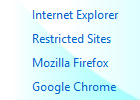
対応しているブラウザは、Internet Explorer と Mozilla Firefox 、Google Chrome およびそれらと同一エンジンを使っているブラウザです。
Internet Explorer では制限サイトに害のあるサイトを登録し、望ましくないActiveXベースのソフトウェアのインストールとクッキーをブロックします。
Google Chrome ではスクリプトベースの悪質なプログラムのインストールをブロックし、クッキーの追跡をブロックします。Mozilla Firefox ではクッキーの制限のみ行います。
2つめの主な機能はシステムスナップショットです。
スナップショットはレジストリとディスクをスキャンして重要なシステムとブラウザの設定を保存するので、スナップショットを保存しておけば、スパイウェアに感染した場合に以前の状態に復元させることができます。
スパイウェアに感染してしまった場合、駆除ソフトを使ってスパイウェアを駆除した後にこのスナップショットからレストアするのが効果的です。
その他のツールは、Internet Explorer に登録されているのホームページと検索エンジンの編集、hosts ファイルのバックアップ作成と復元、Internet Explorer での Adobe Flash コンテンツのブロック機能などがあります。
静かで力強い防御を提供
SpywareBlaster の使い方は簡単で、一週間に一度アップデートを確認し、「Enable All Protection」 をクリックしておくだけでスパイウェアの感染を防ぐことができます。他の対策ソフトのようにバックグラウンドで常駐することもしません。なので、スペックが低い PC でも十分な効果を発揮します。
無料版の場合は自動アップデートの機能はないので、手動でデーターベースのアップデートを行って下さい。
ソフトウェア本体は2016年から更新されていませんが、データーベースは2018年現在でも更新されています。
機能
インターネットブラウザ経由でのスパイウェア、アドウェア、ブラウザハイジャッカー、ダイヤラー、マルウェア、その他の感染を予防。
ActiveX ベースのスパイウェアやその他の不審なプログラムのインストールを防止。
クッキーのトラッキング(追跡)をブロック。
Internet Explorer、Mozilla Firefox、Google chrome など多くのブラウザに対応。
IEのスタートページ/検索サイト/ローカルフォルダの編集。
hostsファイルのバックアップ。
Adobe Flash をブロック(IEのみ)。
インターネットアップデート機能。
価格: 無料
動作環境: Windows 2000 / XP|Vista|7|8|8.1|10|11
使用言語: 英語
最終更新日:
6年前 (2020/08/15)
ダウンロード数: 723
画像
使い方
インストール方法
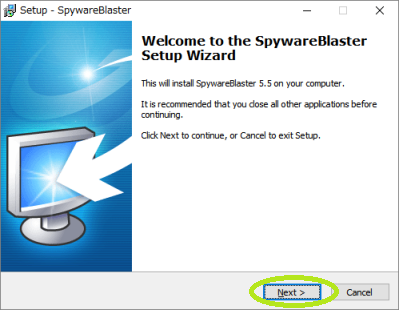
ダウンロードした SpywareBlaster のセットアップファイルを実行します。
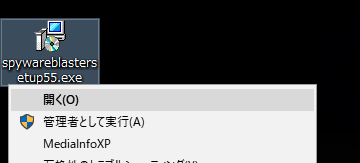
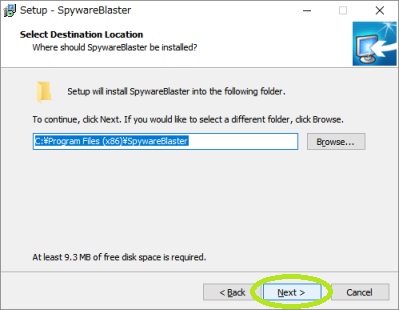
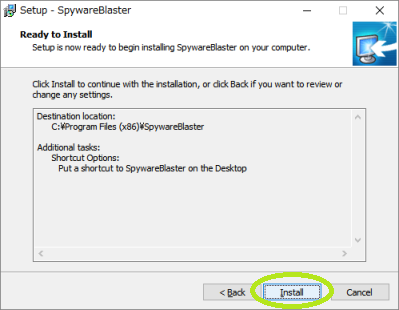
画像通り、ほぼそのまま Next を押して進んでいってOKです。
ライセンスの確認画面が出るので I accept (同意する)を選択します。
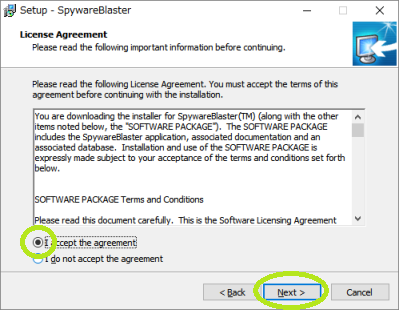
インストール先のフォルダを変更する場合はここで変更して下さい。
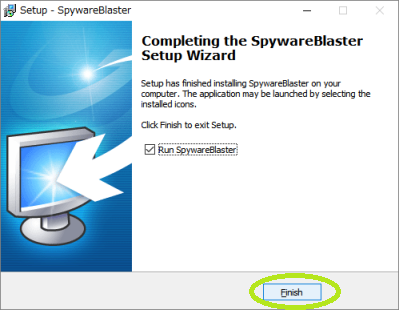
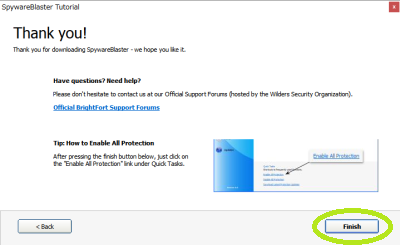
最後、Finish をクリックしてインストールは完了です。
起動と保護の適用方法
SpywareBlaster 起動すると、始めに設定画面が表示されます。 「Next」をクリックします。
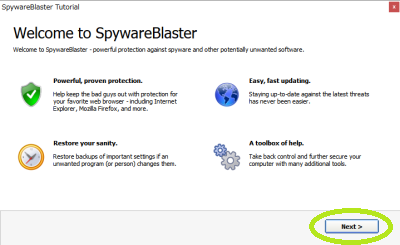
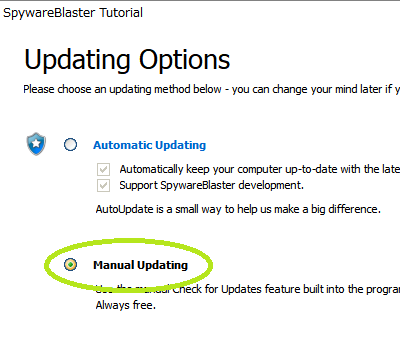
するとアップデートの設定画面が表示されます。 無料で使用する場合は下の Manual Updating を選択しましょう。
最新の状態にするために、一番下の Download Latest Protection Updates をクリックします。
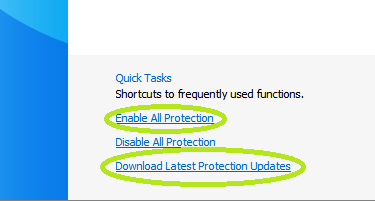
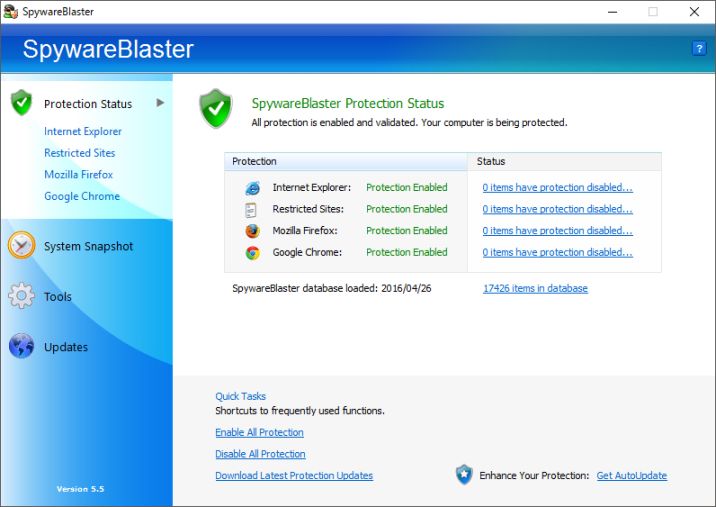
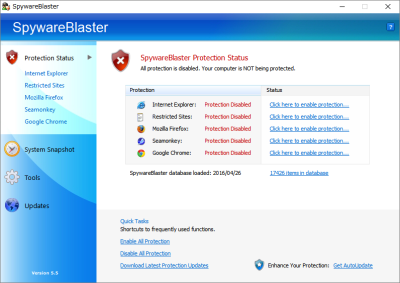
ブラウザの保護を開始するには、メイン画面の Enable All Protection をクリックします。
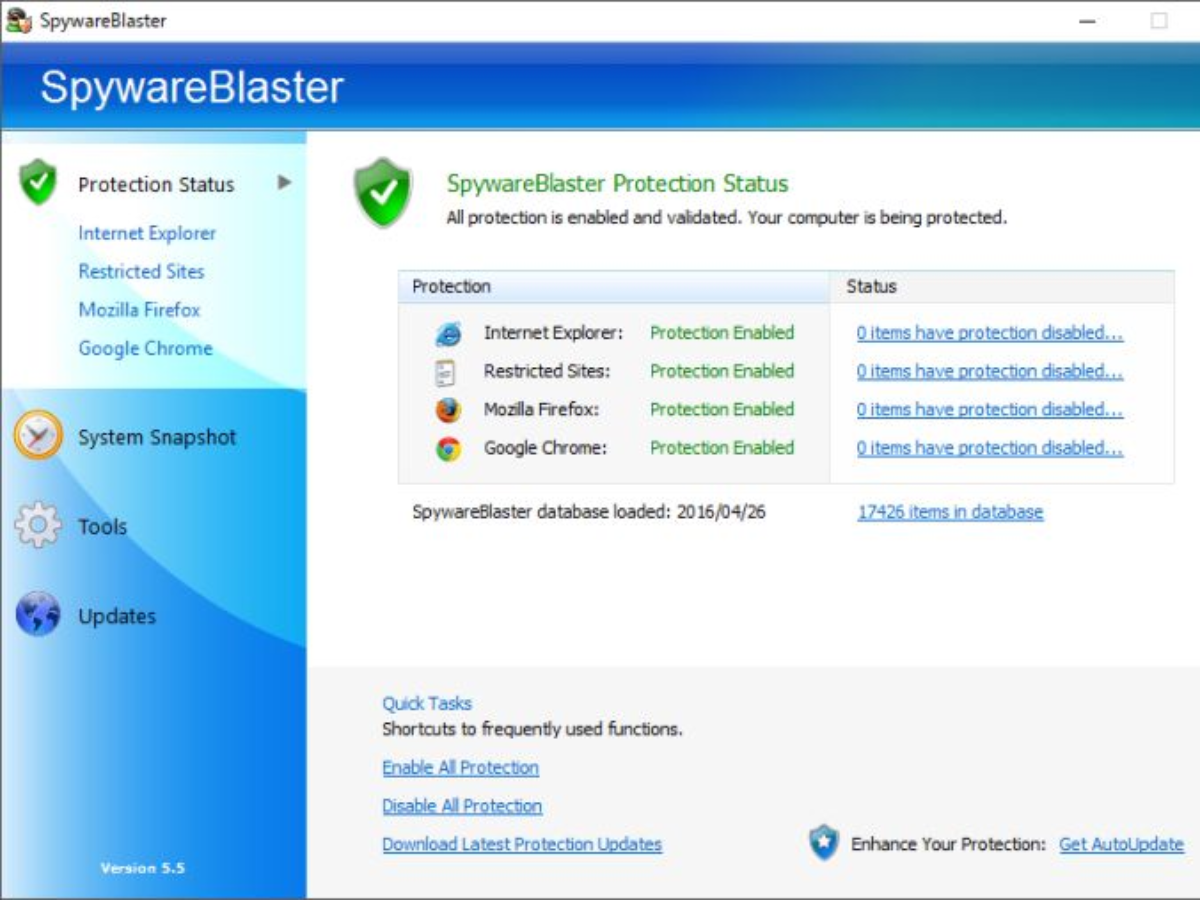
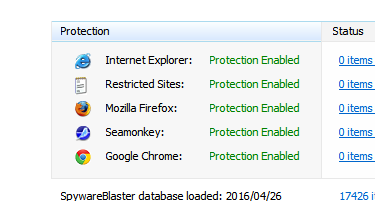
下の画像のように、緑色の文字で Protection Enabled となれば保護は完了です。SpywareBlaster を終了させても保護は継続します。
よくある質問と回答
他のセキュリティーソフトと一緒に使える?
ユーザーレビュー
レビューはまだありません、 最初のレビューを投稿してください。コメントは任意です。