").attr(n.scriptAttrs||{}).prop({charset:n.scriptCharset,src:n.url}).on("load error",i=function(e){r.remove(),i=null,e&&t("error"===e.type?404:200,e.type)}),C.head.appendChild(r[0])},abort:function(){i&&i()}}});var Jt,Kt=[],Zt=/(=)\?(?=&|$)|\?\?/;ce.ajaxSetup({jsonp:"callback",jsonpCallback:function(){var e=Kt.pop()||ce.expando+"_"+jt.guid++;return this[e]=!0,e}}),ce.ajaxPrefilter("json jsonp",function(e,t,n){var r,i,o,a=!1!==e.jsonp&&(Zt.test(e.url)?"url":"string"==typeof e.data&&0===(e.contentType||"").indexOf("application/x-www-form-urlencoded")&&Zt.test(e.data)&&"data");if(a||"jsonp"===e.dataTypes[0])return r=e.jsonpCallback=v(e.jsonpCallback)?e.jsonpCallback():e.jsonpCallback,a?e[a]=e[a].replace(Zt,"$1"+r):!1!==e.jsonp&&(e.url+=(At.test(e.url)?"&":"?")+e.jsonp+"="+r),e.converters["script json"]=function(){return o||ce.error(r+" was not called"),o[0]},e.dataTypes[0]="json",i=ie[r],ie[r]=function(){o=arguments},n.always(function(){void 0===i?ce(ie).removeProp(r):ie[r]=i,e[r]&&(e.jsonpCallback=t.jsonpCallback,Kt.push(r)),o&&v(i)&&i(o[0]),o=i=void 0}),"script"}),le.createHTMLDocument=((Jt=C.implementation.createHTMLDocument("").body).innerHTML="
",2===Jt.childNodes.length),ce.parseHTML=function(e,t,n){return"string"!=typeof e?[]:("boolean"==typeof t&&(n=t,t=!1),t||(le.createHTMLDocument?((r=(t=C.implementation.createHTMLDocument("")).createElement("base")).href=C.location.href,t.head.appendChild(r)):t=C),o=!n&&[],(i=w.exec(e))?[t.createElement(i[1])]:(i=Ae([e],t,o),o&&o.length&&ce(o).remove(),ce.merge([],i.childNodes)));var r,i,o},ce.fn.load=function(e,t,n){var r,i,o,a=this,s=e.indexOf(" ");return-1").append(ce.parseHTML(e)).find(r):e)}).always(n&&function(e,t){a.each(function(){n.apply(this,o||[e.responseText,t,e])})}),this},ce.expr.pseudos.animated=function(t){return ce.grep(ce.timers,function(e){return t===e.elem}).length},ce.offset={setOffset:function(e,t,n){var r,i,o,a,s,u,l=ce.css(e,"position"),c=ce(e),f={};"static"===l&&(e.style.position="relative"),s=c.offset(),o=ce.css(e,"top"),u=ce.css(e,"left"),("absolute"===l||"fixed"===l)&&-1<(o+u).indexOf("auto")?(a=(r=c.position()).top,i=r.left):(a=parseFloat(o)||0,i=parseFloat(u)||0),v(t)&&(t=t.call(e,n,ce.extend({},s))),null!=t.top&&(f.top=t.top-s.top+a),null!=t.left&&(f.left=t.left-s.left+i),"using"in t?t.using.call(e,f):c.css(f)}},ce.fn.extend({offset:function(t){if(arguments.length)return void 0===t?this:this.each(function(e){ce.offset.setOffset(this,t,e)});var e,n,r=this[0];return r?r.getClientRects().length?(e=r.getBoundingClientRect(),n=r.ownerDocument.defaultView,{top:e.top+n.pageYOffset,left:e.left+n.pageXOffset}):{top:0,left:0}:void 0},position:function(){if(this[0]){var e,t,n,r=this[0],i={top:0,left:0};if("fixed"===ce.css(r,"position"))t=r.getBoundingClientRect();else{t=this.offset(),n=r.ownerDocument,e=r.offsetParent||n.documentElement;while(e&&(e===n.body||e===n.documentElement)&&"static"===ce.css(e,"position"))e=e.parentNode;e&&e!==r&&1===e.nodeType&&((i=ce(e).offset()).top+=ce.css(e,"borderTopWidth",!0),i.left+=ce.css(e,"borderLeftWidth",!0))}return{top:t.top-i.top-ce.css(r,"marginTop",!0),left:t.left-i.left-ce.css(r,"marginLeft",!0)}}},offsetParent:function(){return this.map(function(){var e=this.offsetParent;while(e&&"static"===ce.css(e,"position"))e=e.offsetParent;return e||J})}}),ce.each({scrollLeft:"pageXOffset",scrollTop:"pageYOffset"},function(t,i){var o="pageYOffset"===i;ce.fn[t]=function(e){return M(this,function(e,t,n){var r;if(y(e)?r=e:9===e.nodeType&&(r=e.defaultView),void 0===n)return r?r[i]:e[t];r?r.scrollTo(o?r.pageXOffset:n,o?n:r.pageYOffset):e[t]=n},t,e,arguments.length)}}),ce.each(["top","left"],function(e,n){ce.cssHooks[n]=Ye(le.pixelPosition,function(e,t){if(t)return t=Ge(e,n),_e.test(t)?ce(e).position()[n]+"px":t})}),ce.each({Height:"height",Width:"width"},function(a,s){ce.each({padding:"inner"+a,content:s,"":"outer"+a},function(r,o){ce.fn[o]=function(e,t){var n=arguments.length&&(r||"boolean"!=typeof e),i=r||(!0===e||!0===t?"margin":"border");return M(this,function(e,t,n){var r;return y(e)?0===o.indexOf("outer")?e["inner"+a]:e.document.documentElement["client"+a]:9===e.nodeType?(r=e.documentElement,Math.max(e.body["scroll"+a],r["scroll"+a],e.body["offset"+a],r["offset"+a],r["client"+a])):void 0===n?ce.css(e,t,i):ce.style(e,t,n,i)},s,n?e:void 0,n)}})}),ce.each(["ajaxStart","ajaxStop","ajaxComplete","ajaxError","ajaxSuccess","ajaxSend"],function(e,t){ce.fn[t]=function(e){return this.on(t,e)}}),ce.fn.extend({bind:function(e,t,n){return this.on(e,null,t,n)},unbind:function(e,t){return this.off(e,null,t)},delegate:function(e,t,n,r){return this.on(t,e,n,r)},undelegate:function(e,t,n){return 1===arguments.length?this.off(e,"**"):this.off(t,e||"**",n)},hover:function(e,t){return this.on("mouseenter",e).on("mouseleave",t||e)}}),ce.each("blur focus focusin focusout resize scroll click dblclick mousedown mouseup mousemove mouseover mouseout mouseenter mouseleave change select submit keydown keypress keyup contextmenu".split(" "),function(e,n){ce.fn[n]=function(e,t){return 0
Windows 11 Context Menu Manager 1.0.1
Windows 設定変更
2026/04/15 11:23
説明 機能 仕様 ダウンロード 画像 使い方
コンテキストメニューの不要な項目を無効化できるツール

Windows 11 エクスプローラのコンテキストメニュー(右クリックメニュー)の不要な項目を無効にできるシンプルなツール。

Windows 11 Context Menu Manager の概要
Windows 11 Context Menu Manager は、コンテキストメニューを管理できるアプリケーションです。
Windows 11 Context Menu Manager の機能
Windows 11 Context Menu Manager の主な機能です。
機能
概要
メイン機能
コンテキストメニューの管理
機能詳細
・画像、動画、音声、RAW ファイル、アーカイブを閲覧できます。
・画像のリサイズ、リネーム、調整、スライドショー、メタデータの編集。
コンテキストメニューの不要な項目を無効化できます
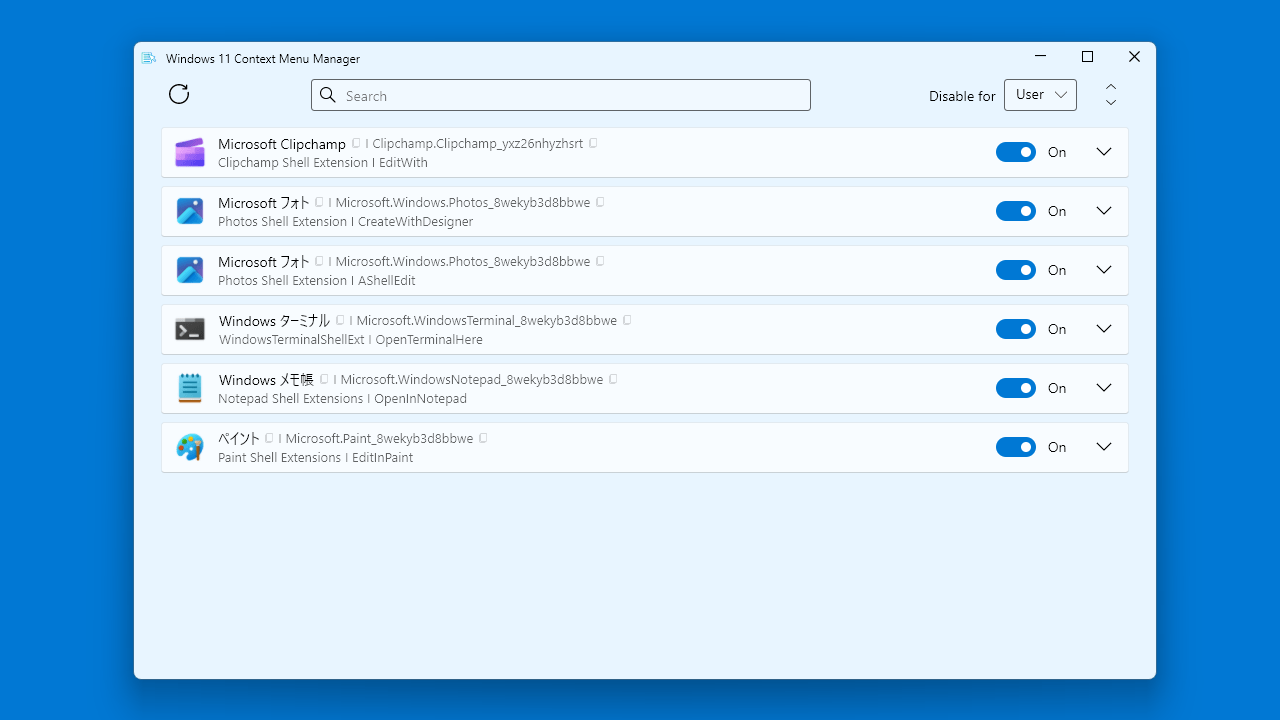
Windows 11 Context Menu Manager は、Windows 11 エクスプローラのコンテキストメニュー(右クリックメニュー)の不要な項目を無効にできるシンプルなアプリケーションです。
Windows 11 Context Menu Manager を使用すると、Windows のコンテキストメニューに表示させたくない項目をかんたんに非表示にできます。
かんたんにすばやく設定を変更できます
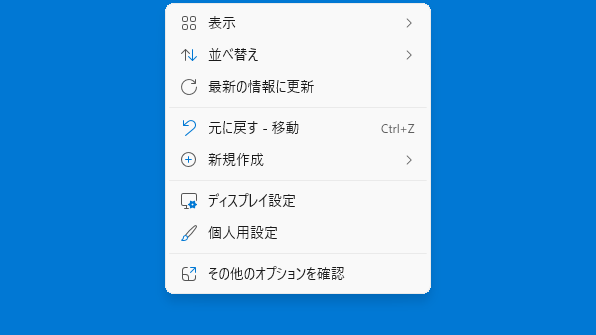
Windows 11 Context Menu Manager では、PC やエクスプローラを再起動したり、ログオフしたりする必要なく、瞬時に不要なコンテキストメニューの項目を無効化し、必要になった場合はかんたんに元に戻すことができます。
Windows 11 Context Menu Manager は、現在のユーザーまたはマシン全体のコンテキストメニューを管理できます。
使いやすいインターフェースを備えたコンテキストメニュー管理アプリ
Windows 11 Context Menu Manager は、Windows エクスプローラのコンテキストメニューをユーザーに好みに合わせてカスタマイズすることができる便利なアプリケーションです。マシン全体のコンテキストメニューを管理する場合はアプリを「管理者として実行」して、タブから「Machine」を選択してください。
機能
画像は高速プレビューで瞬時に表示され、その後フル解像度に鮮明化されます。大容量ファイルの読み込みを待つ必要はありません。
サムネイルストリップはプリフェッチ機能によりバックグラウンドで読み込まれます。フォルダツリー全体を閲覧するための再帰モードにも対応しています。
再生中でも、フレーム単位で正確なアニメーション再生が可能で、パンとズームも完全にサポートします。
内蔵メディアプレーヤー:
MP4、MKV、MP3、FLAC など、様々な形式の動画ファイルや音声ファイルを直接再生できます。専用アプリは不要です。
価格: 無料
動作環境: Windows 11
使用言語: 英語
最終更新日:
2時間前 (2026/04/15)
ダウンロード数: 2
画像
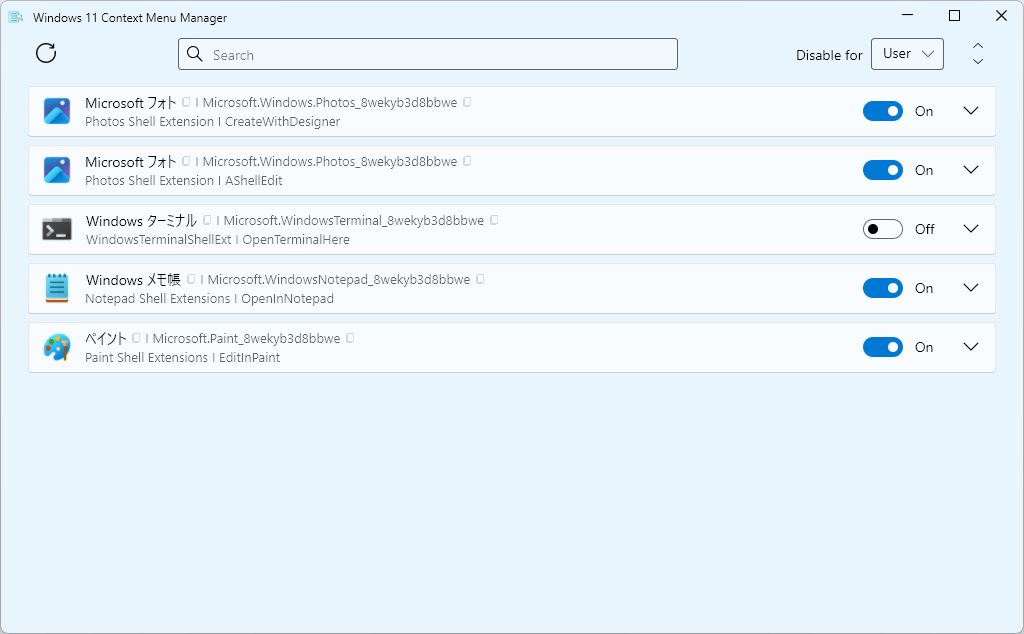
ユーザーインターフェース
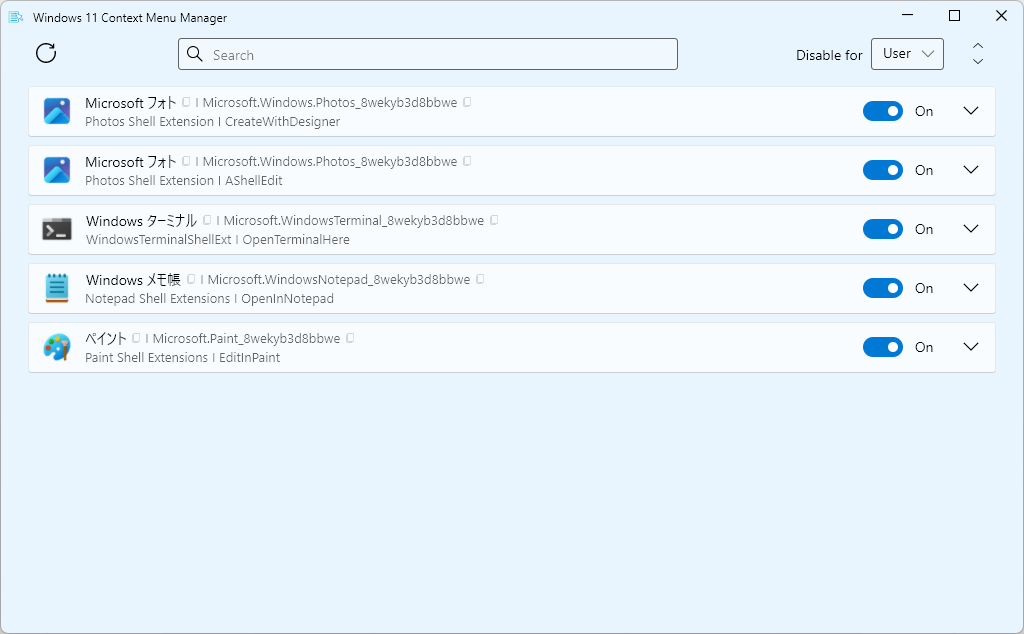
項目の無効化
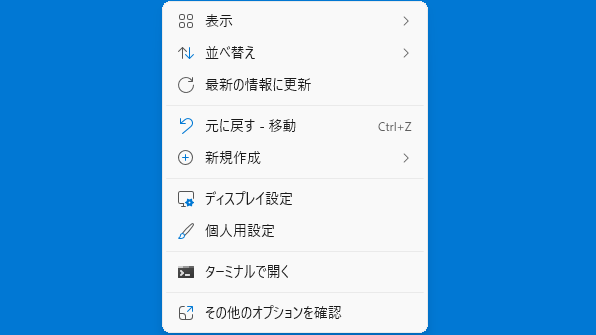
ビフォア
アフター
使い方
インストール
1.インストール方法
Windows 11 Context Menu Manager は、インストール不要で使用できるアプリケーションです。
ダウンロードした ZIP ファイルを解凍し、EXE ファイルを実行します。
マシン全体のコンテキストメニューを無効化する場合は「管理者として実行 」してください。
基本的な使い方
1. 基本的な使い方
Windows 11 Context Menu Manager を起動すると、コンテキストメニューの項目が一覧表示されます。
例として、「Windows ターミナル 」をオフにすると、「ターミナルで開く 」が非表示になります。
よくある質問と回答
ライセンスについて。
ユーザーレビュー
レビューはまだありません、 最初のレビューを投稿してください。コメントは任意です。