").attr(n.scriptAttrs||{}).prop({charset:n.scriptCharset,src:n.url}).on("load error",i=function(e){r.remove(),i=null,e&&t("error"===e.type?404:200,e.type)}),C.head.appendChild(r[0])},abort:function(){i&&i()}}});var Jt,Kt=[],Zt=/(=)\?(?=&|$)|\?\?/;ce.ajaxSetup({jsonp:"callback",jsonpCallback:function(){var e=Kt.pop()||ce.expando+"_"+jt.guid++;return this[e]=!0,e}}),ce.ajaxPrefilter("json jsonp",function(e,t,n){var r,i,o,a=!1!==e.jsonp&&(Zt.test(e.url)?"url":"string"==typeof e.data&&0===(e.contentType||"").indexOf("application/x-www-form-urlencoded")&&Zt.test(e.data)&&"data");if(a||"jsonp"===e.dataTypes[0])return r=e.jsonpCallback=v(e.jsonpCallback)?e.jsonpCallback():e.jsonpCallback,a?e[a]=e[a].replace(Zt,"$1"+r):!1!==e.jsonp&&(e.url+=(At.test(e.url)?"&":"?")+e.jsonp+"="+r),e.converters["script json"]=function(){return o||ce.error(r+" was not called"),o[0]},e.dataTypes[0]="json",i=ie[r],ie[r]=function(){o=arguments},n.always(function(){void 0===i?ce(ie).removeProp(r):ie[r]=i,e[r]&&(e.jsonpCallback=t.jsonpCallback,Kt.push(r)),o&&v(i)&&i(o[0]),o=i=void 0}),"script"}),le.createHTMLDocument=((Jt=C.implementation.createHTMLDocument("").body).innerHTML="
",2===Jt.childNodes.length),ce.parseHTML=function(e,t,n){return"string"!=typeof e?[]:("boolean"==typeof t&&(n=t,t=!1),t||(le.createHTMLDocument?((r=(t=C.implementation.createHTMLDocument("")).createElement("base")).href=C.location.href,t.head.appendChild(r)):t=C),o=!n&&[],(i=w.exec(e))?[t.createElement(i[1])]:(i=Ae([e],t,o),o&&o.length&&ce(o).remove(),ce.merge([],i.childNodes)));var r,i,o},ce.fn.load=function(e,t,n){var r,i,o,a=this,s=e.indexOf(" ");return-1").append(ce.parseHTML(e)).find(r):e)}).always(n&&function(e,t){a.each(function(){n.apply(this,o||[e.responseText,t,e])})}),this},ce.expr.pseudos.animated=function(t){return ce.grep(ce.timers,function(e){return t===e.elem}).length},ce.offset={setOffset:function(e,t,n){var r,i,o,a,s,u,l=ce.css(e,"position"),c=ce(e),f={};"static"===l&&(e.style.position="relative"),s=c.offset(),o=ce.css(e,"top"),u=ce.css(e,"left"),("absolute"===l||"fixed"===l)&&-1<(o+u).indexOf("auto")?(a=(r=c.position()).top,i=r.left):(a=parseFloat(o)||0,i=parseFloat(u)||0),v(t)&&(t=t.call(e,n,ce.extend({},s))),null!=t.top&&(f.top=t.top-s.top+a),null!=t.left&&(f.left=t.left-s.left+i),"using"in t?t.using.call(e,f):c.css(f)}},ce.fn.extend({offset:function(t){if(arguments.length)return void 0===t?this:this.each(function(e){ce.offset.setOffset(this,t,e)});var e,n,r=this[0];return r?r.getClientRects().length?(e=r.getBoundingClientRect(),n=r.ownerDocument.defaultView,{top:e.top+n.pageYOffset,left:e.left+n.pageXOffset}):{top:0,left:0}:void 0},position:function(){if(this[0]){var e,t,n,r=this[0],i={top:0,left:0};if("fixed"===ce.css(r,"position"))t=r.getBoundingClientRect();else{t=this.offset(),n=r.ownerDocument,e=r.offsetParent||n.documentElement;while(e&&(e===n.body||e===n.documentElement)&&"static"===ce.css(e,"position"))e=e.parentNode;e&&e!==r&&1===e.nodeType&&((i=ce(e).offset()).top+=ce.css(e,"borderTopWidth",!0),i.left+=ce.css(e,"borderLeftWidth",!0))}return{top:t.top-i.top-ce.css(r,"marginTop",!0),left:t.left-i.left-ce.css(r,"marginLeft",!0)}}},offsetParent:function(){return this.map(function(){var e=this.offsetParent;while(e&&"static"===ce.css(e,"position"))e=e.offsetParent;return e||J})}}),ce.each({scrollLeft:"pageXOffset",scrollTop:"pageYOffset"},function(t,i){var o="pageYOffset"===i;ce.fn[t]=function(e){return M(this,function(e,t,n){var r;if(y(e)?r=e:9===e.nodeType&&(r=e.defaultView),void 0===n)return r?r[i]:e[t];r?r.scrollTo(o?r.pageXOffset:n,o?n:r.pageYOffset):e[t]=n},t,e,arguments.length)}}),ce.each(["top","left"],function(e,n){ce.cssHooks[n]=Ye(le.pixelPosition,function(e,t){if(t)return t=Ge(e,n),_e.test(t)?ce(e).position()[n]+"px":t})}),ce.each({Height:"height",Width:"width"},function(a,s){ce.each({padding:"inner"+a,content:s,"":"outer"+a},function(r,o){ce.fn[o]=function(e,t){var n=arguments.length&&(r||"boolean"!=typeof e),i=r||(!0===e||!0===t?"margin":"border");return M(this,function(e,t,n){var r;return y(e)?0===o.indexOf("outer")?e["inner"+a]:e.document.documentElement["client"+a]:9===e.nodeType?(r=e.documentElement,Math.max(e.body["scroll"+a],r["scroll"+a],e.body["offset"+a],r["offset"+a],r["client"+a])):void 0===n?ce.css(e,t,i):ce.style(e,t,n,i)},s,n?e:void 0,n)}})}),ce.each(["ajaxStart","ajaxStop","ajaxComplete","ajaxError","ajaxSuccess","ajaxSend"],function(e,t){ce.fn[t]=function(e){return this.on(t,e)}}),ce.fn.extend({bind:function(e,t,n){return this.on(e,null,t,n)},unbind:function(e,t){return this.off(e,null,t)},delegate:function(e,t,n,r){return this.on(t,e,n,r)},undelegate:function(e,t,n){return 1===arguments.length?this.off(e,"**"):this.off(t,e||"**",n)},hover:function(e,t){return this.on("mouseenter",e).on("mouseleave",t||e)}}),ce.each("blur focus focusin focusout resize scroll click dblclick mousedown mouseup mousemove mouseover mouseout mouseenter mouseleave change select submit keydown keypress keyup contextmenu".split(" "),function(e,n){ce.fn[n]=function(e,t){return 0
UV Weather 2.0.62
Web ブラウザ
2021/11/25 13:11
説明機能仕様ダウンロード画像使い方
現在の天気情報や天気予報を確認できるブラウザ拡張機能

リアルタイムの気象情報や天気予報をブラウザ上で確認できる Chrome ブラウザ拡張機能。現在の天気や気温、UV インデックス(紫外線)、湿度、日の出/日の入り時刻や、一週間または 24 時間の天気予報を表示します。

UV Weather の概要
UV Weather は、ブラウザで現在の天気情報や天気予報を直接確認できる無料のブラウザ拡張機能です。
UV Weather の機能
UV Weather の主な機能です。
| 機能 |
概要 |
| メイン機能 |
天気情報の表示 |
| 機能詳細 |
・現在の天気や気温、UV インデックス(紫外線)、湿度、日の出/日の入り時刻、ACCUFEEL(体感温度)を表示
・一週間または 24 時間の天気予報を表示
・ロケーションを追加して、複数の場所の天気を管理できます |
天気情報を詳しく表示します
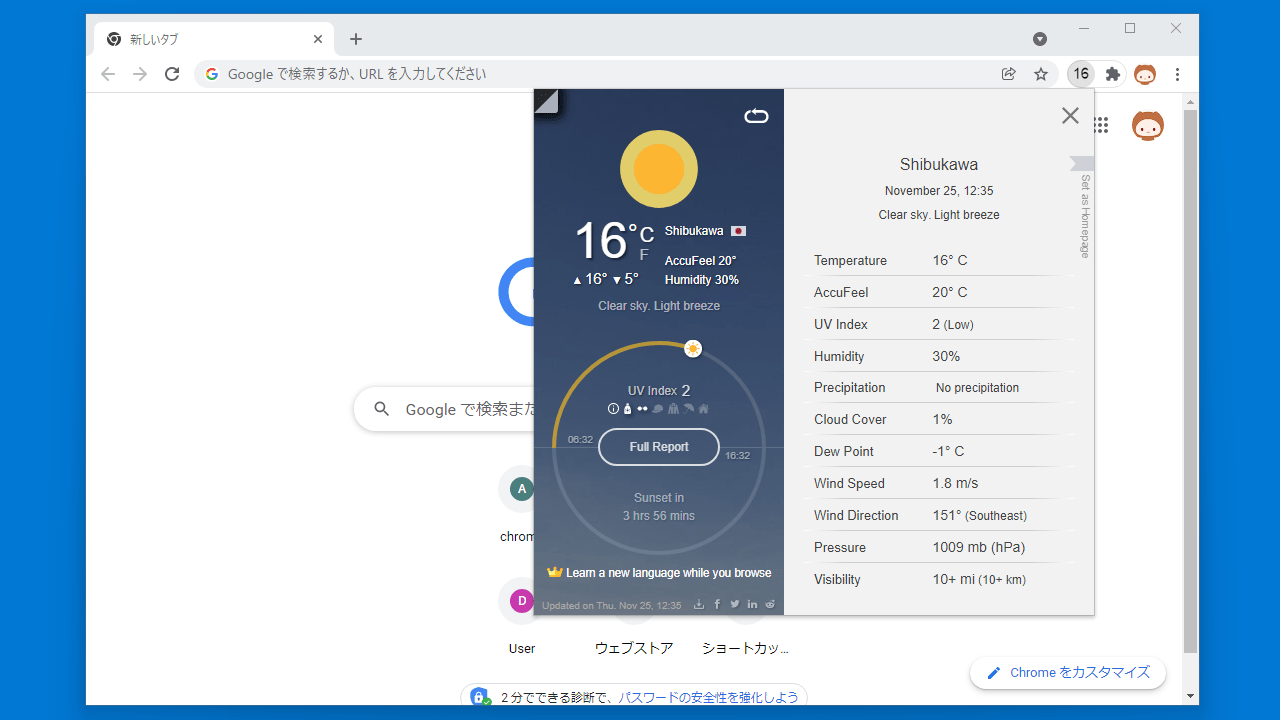
UV Weather は、現在の天気や今後の天気予報をブラウザ上ですばやくチェックすることができる、Google Chrome 向けのブラウザ拡張機能です。
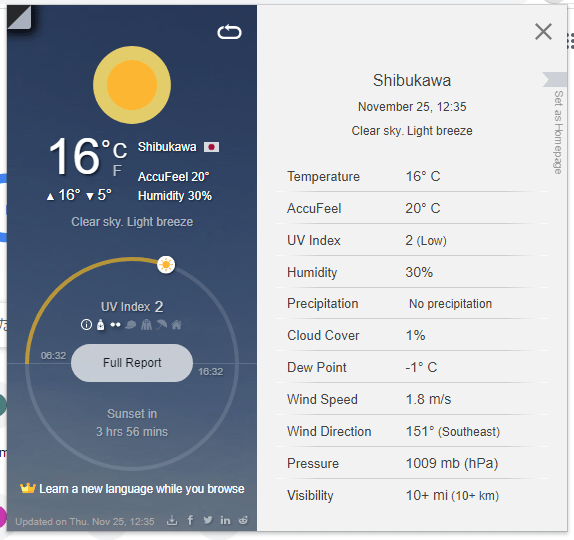
現在の天気や気温、UV インデックス(紫外線)、湿度、日の出/日の入り時刻といった基本的な情報から、雲量、露点、風速、風向、気圧、可視性といった詳細情報までを確認することができます。
ロケーションを自由に変更または追加できます
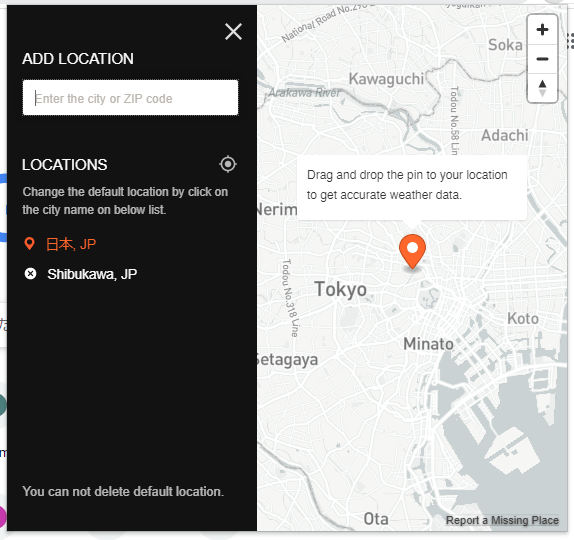
UV Weather をインストールすると、自動的に位置情報が検出されてその地域の天気情報が表示されますが、郵便番号や住所を入力して正確な位置に設定したり、複数の地域を追加して必要なときに切り替えることもできます。
また、一週間や24時間の天気予報を表示したり、太陽時を調べたり、大気汚染の情報を調べることもできます。
天気の全ての情報を確認できるブラウザ拡張機能
UV Weather は、現在または今後の天気や紫外線が気になったり、詳しく知りたい人に適した天気情報表示アプリです。基本的な情報から詳細な専門的な情報までのすべてを網羅しています。
機能
- 複数の場所のサポート
- ブラウザツールバーの温度
- 完全な天気予報(風、雨、気圧、POP など)
- 気象レーダーマップ
- リアルタイムの空気質指数と大気汚染物質の濃度
- UV インデックス(毎時および毎日)
- 分単位の降水量予測
- 7日と48時間の天気予報
- 30日間の気候予報
- 太陽(日の出、日の入りなど)
- 月の満ち欠け
- ワンクリックインストール、設定は不要
- 自動位置検出
- 住所または郵便番号で場所を手動で追加するオプション
- リアルタイムの天気情報
- ダークとライトのテーマ
- 夜間にダークモードに自動切り替え
- 暗い Chrome ブラウザテーマの白いアイコン
- ツールバーバッジに多数(温度/ UV)
- 高速位置変更ボタン
- 12H/ 24H 時間形式
- アニメーションアイコン
- すっきりとしたシンプルで洗練されたデザイン
価格:無料
動作環境:Windows 7|8|8.1|10|11
使用言語:英語
最終更新日:
2週間前 (2026/05/06)
ダウンロード数:
画像

ユーザーインターフェース

フルレポート

ロケーションの変更

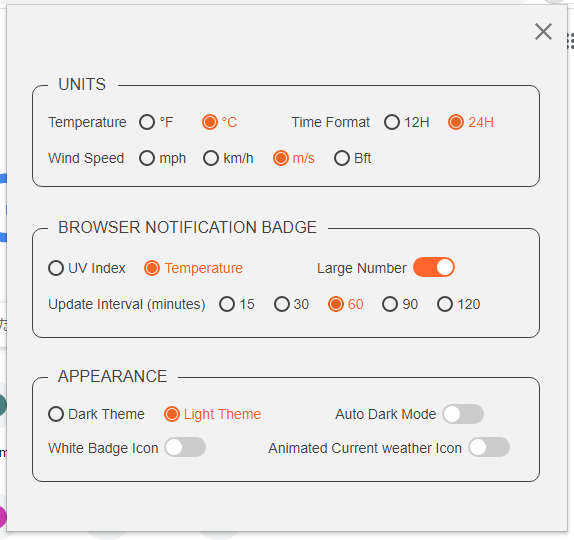
設定
使い方
インストール
1.インストール(Chrome)
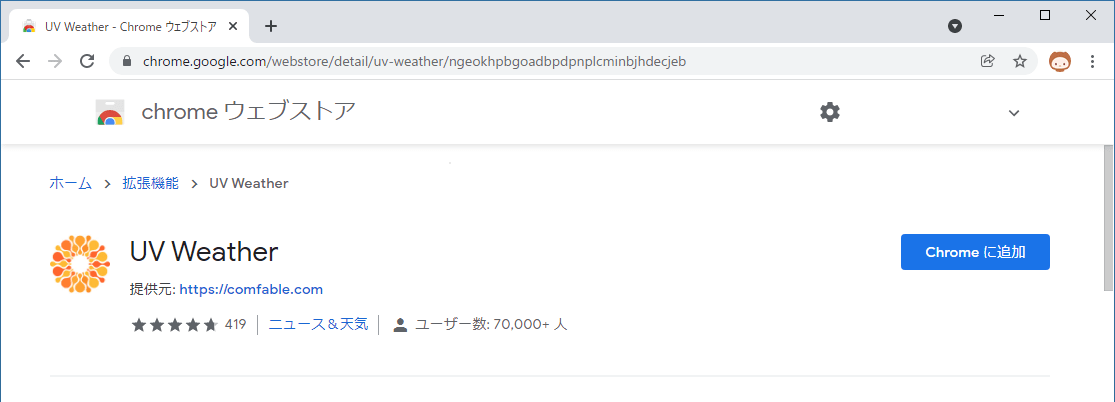
- ダウンロード先のページに移動したら[Chrome に追加]をクリックします。
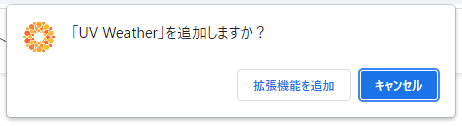
- ポップアップが表示されたら[拡張機能を追加]をクリックします。
基本的な使い方
1. 基本的な使い方
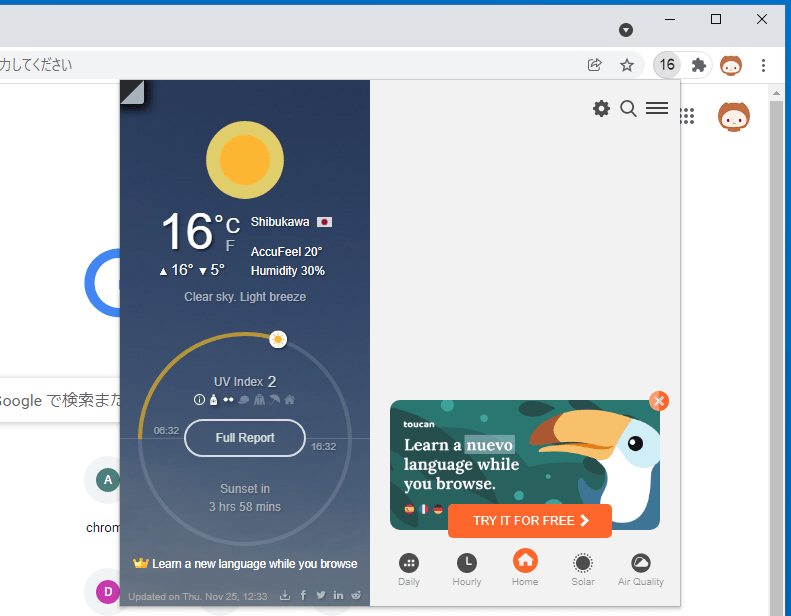
拡張機能をピン留めすると、バーにアイコンが表示されます。アイコン部分には現在の気温が表示されます。
- アイコンをクリックすると天気情報の詳細が表示されます。

- 「Full Report」をクリックすると、すべての詳細情報を確認できます。

- 右下の「Daily」や「Hourly」をクリックすると、天気予報を確認できます。
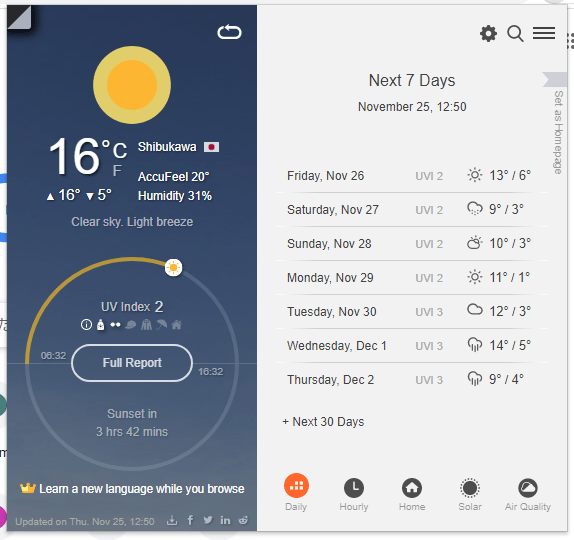
- 右上の「検索(虫眼鏡)」アイコンをクリックすると、郵便番号を入力して、天気情報を表示する場所を追加・変更できます。

- 「歯車」アイコンをクリックすると、アプリの設定ができます。

よくある質問と回答
ライセンスについて。
UV Weather は、どなたでも無料で利用できます。