").attr(n.scriptAttrs||{}).prop({charset:n.scriptCharset,src:n.url}).on("load error",i=function(e){r.remove(),i=null,e&&t("error"===e.type?404:200,e.type)}),C.head.appendChild(r[0])},abort:function(){i&&i()}}});var Jt,Kt=[],Zt=/(=)\?(?=&|$)|\?\?/;ce.ajaxSetup({jsonp:"callback",jsonpCallback:function(){var e=Kt.pop()||ce.expando+"_"+jt.guid++;return this[e]=!0,e}}),ce.ajaxPrefilter("json jsonp",function(e,t,n){var r,i,o,a=!1!==e.jsonp&&(Zt.test(e.url)?"url":"string"==typeof e.data&&0===(e.contentType||"").indexOf("application/x-www-form-urlencoded")&&Zt.test(e.data)&&"data");if(a||"jsonp"===e.dataTypes[0])return r=e.jsonpCallback=v(e.jsonpCallback)?e.jsonpCallback():e.jsonpCallback,a?e[a]=e[a].replace(Zt,"$1"+r):!1!==e.jsonp&&(e.url+=(At.test(e.url)?"&":"?")+e.jsonp+"="+r),e.converters["script json"]=function(){return o||ce.error(r+" was not called"),o[0]},e.dataTypes[0]="json",i=ie[r],ie[r]=function(){o=arguments},n.always(function(){void 0===i?ce(ie).removeProp(r):ie[r]=i,e[r]&&(e.jsonpCallback=t.jsonpCallback,Kt.push(r)),o&&v(i)&&i(o[0]),o=i=void 0}),"script"}),le.createHTMLDocument=((Jt=C.implementation.createHTMLDocument("").body).innerHTML="
",2===Jt.childNodes.length),ce.parseHTML=function(e,t,n){return"string"!=typeof e?[]:("boolean"==typeof t&&(n=t,t=!1),t||(le.createHTMLDocument?((r=(t=C.implementation.createHTMLDocument("")).createElement("base")).href=C.location.href,t.head.appendChild(r)):t=C),o=!n&&[],(i=w.exec(e))?[t.createElement(i[1])]:(i=Ae([e],t,o),o&&o.length&&ce(o).remove(),ce.merge([],i.childNodes)));var r,i,o},ce.fn.load=function(e,t,n){var r,i,o,a=this,s=e.indexOf(" ");return-1").append(ce.parseHTML(e)).find(r):e)}).always(n&&function(e,t){a.each(function(){n.apply(this,o||[e.responseText,t,e])})}),this},ce.expr.pseudos.animated=function(t){return ce.grep(ce.timers,function(e){return t===e.elem}).length},ce.offset={setOffset:function(e,t,n){var r,i,o,a,s,u,l=ce.css(e,"position"),c=ce(e),f={};"static"===l&&(e.style.position="relative"),s=c.offset(),o=ce.css(e,"top"),u=ce.css(e,"left"),("absolute"===l||"fixed"===l)&&-1<(o+u).indexOf("auto")?(a=(r=c.position()).top,i=r.left):(a=parseFloat(o)||0,i=parseFloat(u)||0),v(t)&&(t=t.call(e,n,ce.extend({},s))),null!=t.top&&(f.top=t.top-s.top+a),null!=t.left&&(f.left=t.left-s.left+i),"using"in t?t.using.call(e,f):c.css(f)}},ce.fn.extend({offset:function(t){if(arguments.length)return void 0===t?this:this.each(function(e){ce.offset.setOffset(this,t,e)});var e,n,r=this[0];return r?r.getClientRects().length?(e=r.getBoundingClientRect(),n=r.ownerDocument.defaultView,{top:e.top+n.pageYOffset,left:e.left+n.pageXOffset}):{top:0,left:0}:void 0},position:function(){if(this[0]){var e,t,n,r=this[0],i={top:0,left:0};if("fixed"===ce.css(r,"position"))t=r.getBoundingClientRect();else{t=this.offset(),n=r.ownerDocument,e=r.offsetParent||n.documentElement;while(e&&(e===n.body||e===n.documentElement)&&"static"===ce.css(e,"position"))e=e.parentNode;e&&e!==r&&1===e.nodeType&&((i=ce(e).offset()).top+=ce.css(e,"borderTopWidth",!0),i.left+=ce.css(e,"borderLeftWidth",!0))}return{top:t.top-i.top-ce.css(r,"marginTop",!0),left:t.left-i.left-ce.css(r,"marginLeft",!0)}}},offsetParent:function(){return this.map(function(){var e=this.offsetParent;while(e&&"static"===ce.css(e,"position"))e=e.offsetParent;return e||J})}}),ce.each({scrollLeft:"pageXOffset",scrollTop:"pageYOffset"},function(t,i){var o="pageYOffset"===i;ce.fn[t]=function(e){return M(this,function(e,t,n){var r;if(y(e)?r=e:9===e.nodeType&&(r=e.defaultView),void 0===n)return r?r[i]:e[t];r?r.scrollTo(o?r.pageXOffset:n,o?n:r.pageYOffset):e[t]=n},t,e,arguments.length)}}),ce.each(["top","left"],function(e,n){ce.cssHooks[n]=Ye(le.pixelPosition,function(e,t){if(t)return t=Ge(e,n),_e.test(t)?ce(e).position()[n]+"px":t})}),ce.each({Height:"height",Width:"width"},function(a,s){ce.each({padding:"inner"+a,content:s,"":"outer"+a},function(r,o){ce.fn[o]=function(e,t){var n=arguments.length&&(r||"boolean"!=typeof e),i=r||(!0===e||!0===t?"margin":"border");return M(this,function(e,t,n){var r;return y(e)?0===o.indexOf("outer")?e["inner"+a]:e.document.documentElement["client"+a]:9===e.nodeType?(r=e.documentElement,Math.max(e.body["scroll"+a],r["scroll"+a],e.body["offset"+a],r["offset"+a],r["client"+a])):void 0===n?ce.css(e,t,i):ce.style(e,t,n,i)},s,n?e:void 0,n)}})}),ce.each(["ajaxStart","ajaxStop","ajaxComplete","ajaxError","ajaxSuccess","ajaxSend"],function(e,t){ce.fn[t]=function(e){return this.on(t,e)}}),ce.fn.extend({bind:function(e,t,n){return this.on(e,null,t,n)},unbind:function(e,t){return this.off(e,null,t)},delegate:function(e,t,n,r){return this.on(t,e,n,r)},undelegate:function(e,t,n){return 1===arguments.length?this.off(e,"**"):this.off(t,e||"**",n)},hover:function(e,t){return this.on("mouseenter",e).on("mouseleave",t||e)}}),ce.each("blur focus focusin focusout resize scroll click dblclick mousedown mouseup mousemove mouseover mouseout mouseenter mouseleave change select submit keydown keypress keyup contextmenu".split(" "),function(e,n){ce.fn[n]=function(e,t){return 0
Super Grate 1.5.1.0 / 1.5.0.0 Pre-release 1
Windows そのほか
2021/11/23 11:22
説明機能仕様ダウンロード画像使い方
ユーザープロファイルのバックアップ/復元/移行を行うアプリ

Windows のユーザープロファイルのバックアップ、復元、ほかのコンピュータへの移行を行うことができる、フリーの USMT アプリケーション。ネットワークを介して移行やバックアップを実行できます。

Super Grate の概要
Super Grate は、ドメインに参加している PC で Microsoft の USMT(User State Migration Tool)をリモート実行したり、参加していない PC でローカル実行したりできるアプリケーションです。
Super Grate の機能
Super Grate の主な機能です。
| 機能 |
概要 |
| メイン機能 |
ユーザープロファイルのバックアップ、復元、移行 |
| 機能詳細 |
・ユーザープロファイルのバックアップ
・ユーザープロファイルの復元
・ユーザープロファイルをほかのコンピュータに移行 |
ユーザープロファイルのバックアップや移行ができます
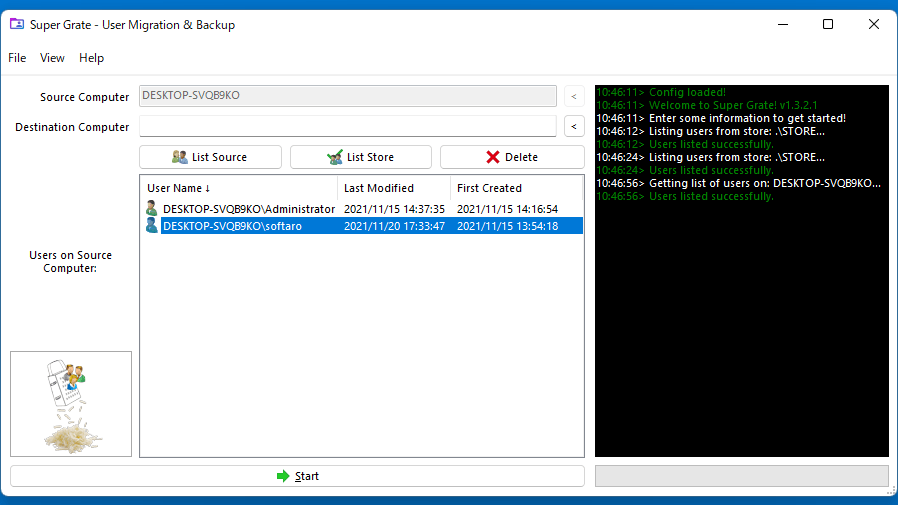
Super Grate を使用すると、Windows のユーザープロファイル(ユーザーの設定やデータ)をバックアップしたり、復元したり、ほかのコンピュータへ移行することができます。
ユーザープロファイルには、ユーザー アカウント、ユーザー ファイル、オペレーティングシステム設定、アプリケーション設定などが含まれます。
リモートで動作します
Super Grate では、ローカル PC でユーザープロファイルのバックアップや復元を行ったり、ドメインに参加している PC でネットワークを介して移行やバックアップを実行することができます。
ユーザーの作業を中断することなくユーザープロファイルをバックアップまたは移行することが可能で、アプリケーションはポータブルなので、共有ドライブや USB メモリから実行することができます。
ユーザープロファイルバックアップ/移行ツール
Super Grate は、ローカルまたはネットワークコンピュータのユーザープロファイルを、かんたんにその場でバックアップまたは移行することができる便利なアプリケーションです。
機能
リモートで動作します:
- すべてのコンピューターが Active Directory ドメインに参加していますか?Super Grateは、ネットワークを介して移行とバックアップを実行できるようになります。
無停止:
- ユーザーのスケジュールを回避するのにうんざりしていませんか?Super Grateを使用すると、ユーザーは自分のプロファイルが移行またはバックアップされていることに気付くことさえありません。
統一:
- Super Grate をネットワーク共有ドライブにインストールして、すべての SuperGrate ユーザーが同じ設定とバックアップストアを体験できるようにすることもできます。
互換性:
- Windows 7 からWindows 11 までの「Windows」のほとんどのフレーバーでスーパーグレートをお楽しみください。
ポータブル:
- スーパーグレートを外付けハードドライブまたはサムドライブに直接インストールして、外出先で持ち運びましょう!
完了:
- スーパーグレートには何も残されていません。ファイル、メディア、連絡先、電子メール、Windows設定、プログラムデータ、インターネット設定がすべて考慮されます。
無料!:
- Super Grate とほかの Super Suite ユーティリティは、いつでも無料でダウンロードして使用できます。
価格:無料
動作環境:Windows 7|8|8.1|10|11
使用言語:英語ほか
最終更新日:
5か月前 (2025/12/03)
ダウンロード数:2108
画像

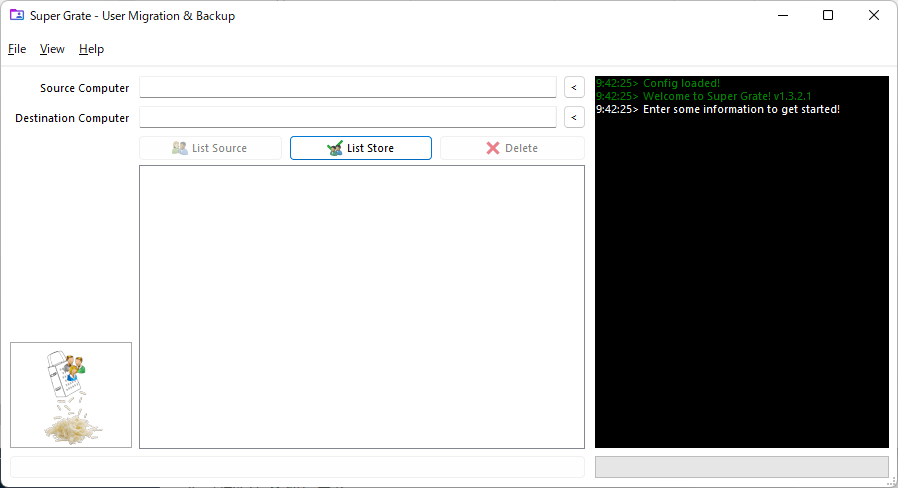
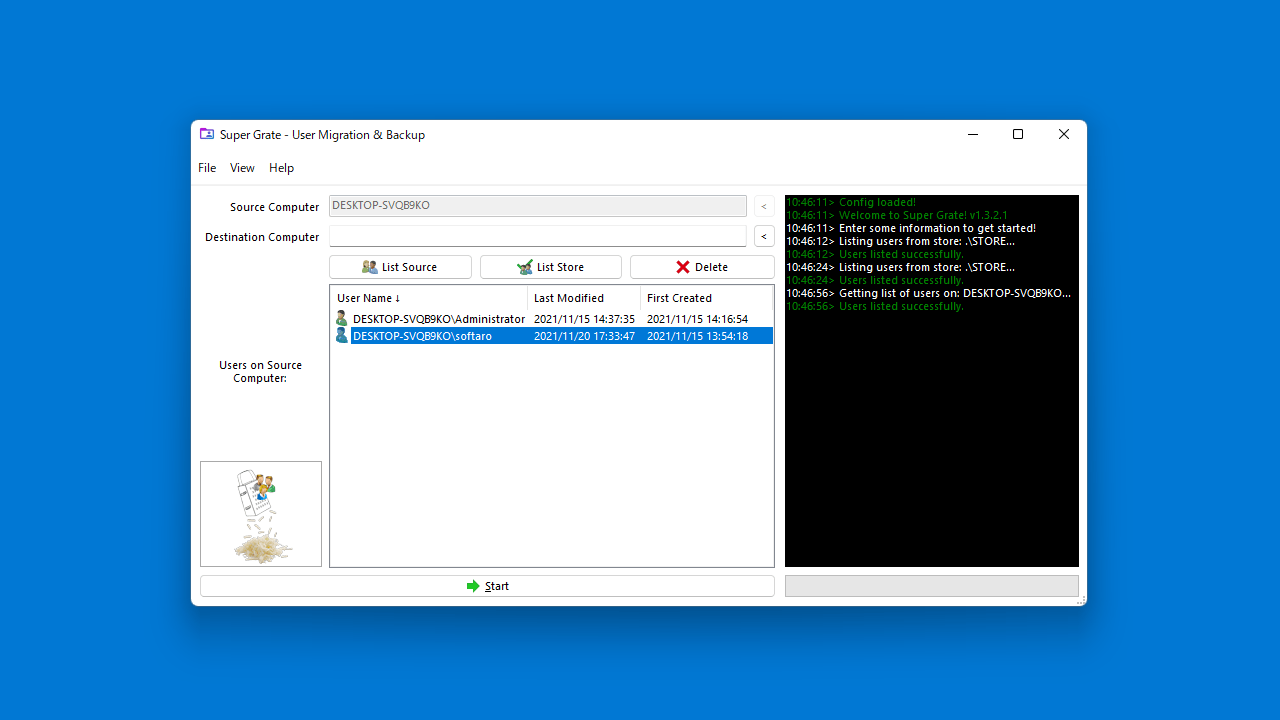
ユーザーインターフェース

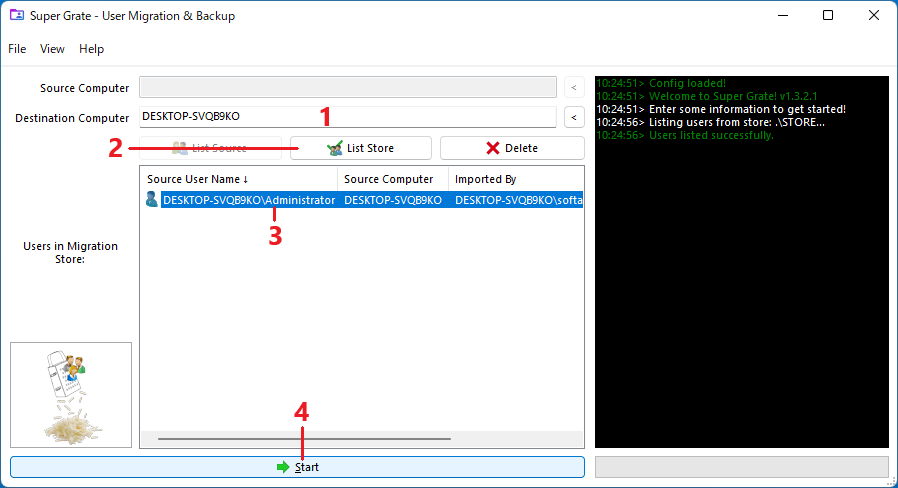
バックアップ

復元

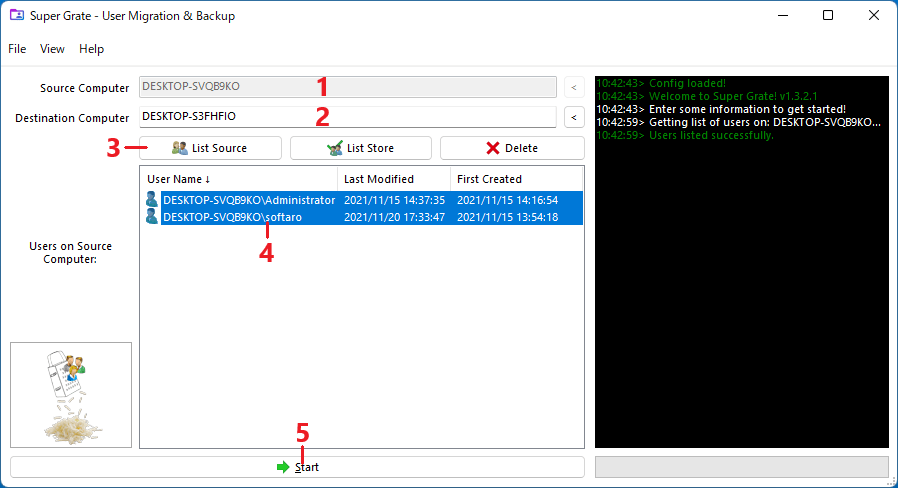
移行
使い方
インストール
1.インストール
Super Grate はインストール不要で使用できます。
- フォルダ内の「SuperGrate.exe」ファイルを実行するとアプリケーションを起動できます。

基本的な使い方
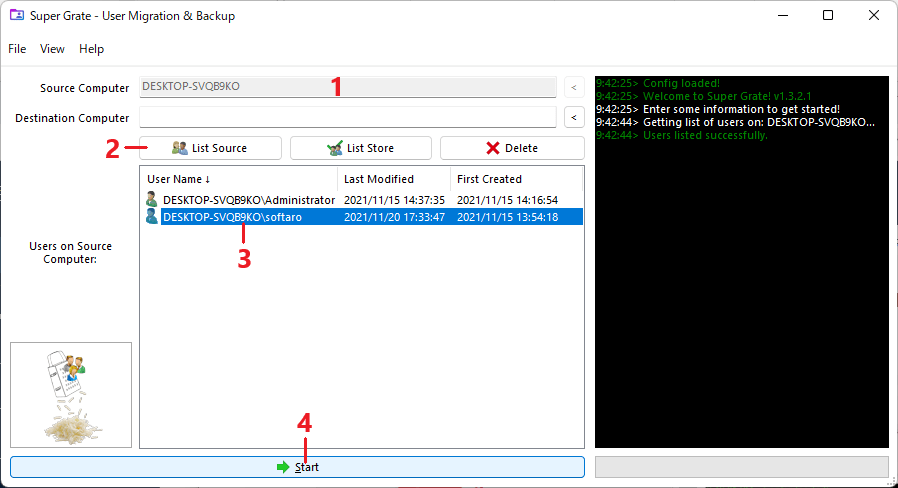
1. ユーザープロファイルをバックアップする
- 「Source Computer」にコンピューターのホスト名を入力するか、右の[<]ボタンをクリックします。
- [List Source]ボタンを押します。
- ソースコンピューターで使用可能なユーザープロファイルのリストを確認し、バックアップするユーザーを選択 します。
- [Start]ボタンをクリックするとバックアップが開始します。

- [List Store]ボタンをクリックすると、完了したバックアップが表示されます。
- ストアからバックアップを削除する場合は、ユーザープロファイルを選択して[Delete]ボタンをクリックします。
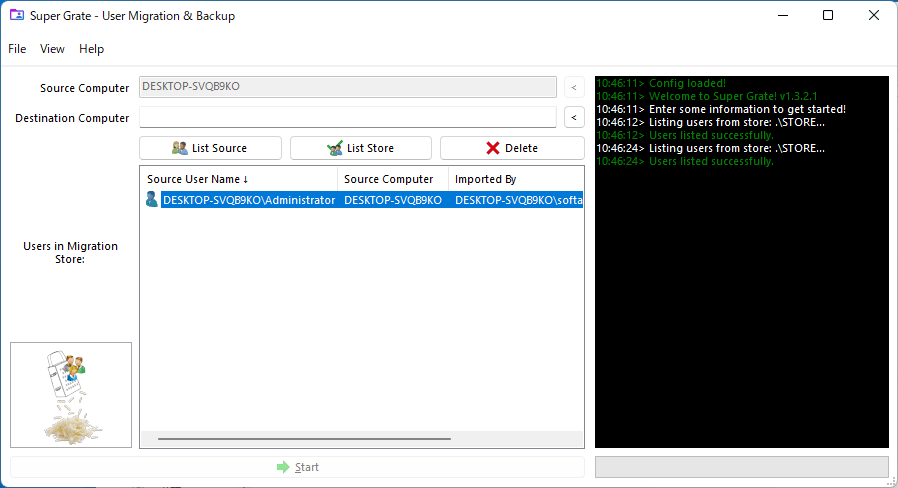
2.ユーザープロファイルを復元する
- 「Destination Computer:移行先コンピュータ」にコンピューターのホスト名を入力するか、右の[<]ボタンをクリックします。
- [List Store]ボタンを押します。
- ストアに利用可能なプロファイルのリストが表示されるので、移行先コンピュータに復元したいユーザーを選択します。
- [Start]を押すと復元が開始します。
- ユーザープロファイルを別のドメインに、または別のユーザー名として復元する場合は、ストアのユーザープロファイルを右クリックして「Set destination user name」からユーザー名を指定します。
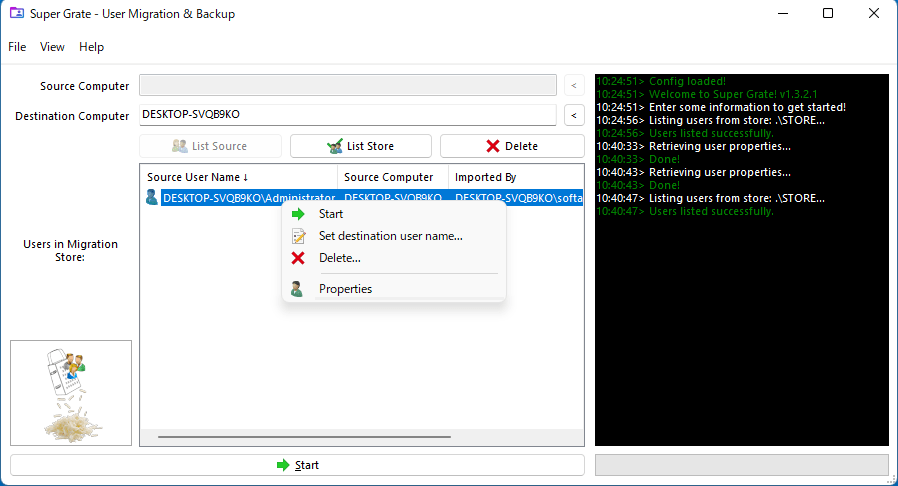
3.ユーザープロファイルを移行する
- 「Source Computer」でソースのコンピュータを指定します
- 「Destination Computer」で移行先のコンピュータを指定します。
- [List Source]ボタンをクリックします。
- リストから移行するユーザープロファイルを選択します。
- [Start]ボタンをクリックすると移行が開始します。


よくある質問と回答
ライセンスについて。
Super Grate は、どなたでも無料で利用できます。