").attr(n.scriptAttrs||{}).prop({charset:n.scriptCharset,src:n.url}).on("load error",i=function(e){r.remove(),i=null,e&&t("error"===e.type?404:200,e.type)}),C.head.appendChild(r[0])},abort:function(){i&&i()}}});var Jt,Kt=[],Zt=/(=)\?(?=&|$)|\?\?/;ce.ajaxSetup({jsonp:"callback",jsonpCallback:function(){var e=Kt.pop()||ce.expando+"_"+jt.guid++;return this[e]=!0,e}}),ce.ajaxPrefilter("json jsonp",function(e,t,n){var r,i,o,a=!1!==e.jsonp&&(Zt.test(e.url)?"url":"string"==typeof e.data&&0===(e.contentType||"").indexOf("application/x-www-form-urlencoded")&&Zt.test(e.data)&&"data");if(a||"jsonp"===e.dataTypes[0])return r=e.jsonpCallback=v(e.jsonpCallback)?e.jsonpCallback():e.jsonpCallback,a?e[a]=e[a].replace(Zt,"$1"+r):!1!==e.jsonp&&(e.url+=(At.test(e.url)?"&":"?")+e.jsonp+"="+r),e.converters["script json"]=function(){return o||ce.error(r+" was not called"),o[0]},e.dataTypes[0]="json",i=ie[r],ie[r]=function(){o=arguments},n.always(function(){void 0===i?ce(ie).removeProp(r):ie[r]=i,e[r]&&(e.jsonpCallback=t.jsonpCallback,Kt.push(r)),o&&v(i)&&i(o[0]),o=i=void 0}),"script"}),le.createHTMLDocument=((Jt=C.implementation.createHTMLDocument("").body).innerHTML="
",2===Jt.childNodes.length),ce.parseHTML=function(e,t,n){return"string"!=typeof e?[]:("boolean"==typeof t&&(n=t,t=!1),t||(le.createHTMLDocument?((r=(t=C.implementation.createHTMLDocument("")).createElement("base")).href=C.location.href,t.head.appendChild(r)):t=C),o=!n&&[],(i=w.exec(e))?[t.createElement(i[1])]:(i=Ae([e],t,o),o&&o.length&&ce(o).remove(),ce.merge([],i.childNodes)));var r,i,o},ce.fn.load=function(e,t,n){var r,i,o,a=this,s=e.indexOf(" ");return-1").append(ce.parseHTML(e)).find(r):e)}).always(n&&function(e,t){a.each(function(){n.apply(this,o||[e.responseText,t,e])})}),this},ce.expr.pseudos.animated=function(t){return ce.grep(ce.timers,function(e){return t===e.elem}).length},ce.offset={setOffset:function(e,t,n){var r,i,o,a,s,u,l=ce.css(e,"position"),c=ce(e),f={};"static"===l&&(e.style.position="relative"),s=c.offset(),o=ce.css(e,"top"),u=ce.css(e,"left"),("absolute"===l||"fixed"===l)&&-1<(o+u).indexOf("auto")?(a=(r=c.position()).top,i=r.left):(a=parseFloat(o)||0,i=parseFloat(u)||0),v(t)&&(t=t.call(e,n,ce.extend({},s))),null!=t.top&&(f.top=t.top-s.top+a),null!=t.left&&(f.left=t.left-s.left+i),"using"in t?t.using.call(e,f):c.css(f)}},ce.fn.extend({offset:function(t){if(arguments.length)return void 0===t?this:this.each(function(e){ce.offset.setOffset(this,t,e)});var e,n,r=this[0];return r?r.getClientRects().length?(e=r.getBoundingClientRect(),n=r.ownerDocument.defaultView,{top:e.top+n.pageYOffset,left:e.left+n.pageXOffset}):{top:0,left:0}:void 0},position:function(){if(this[0]){var e,t,n,r=this[0],i={top:0,left:0};if("fixed"===ce.css(r,"position"))t=r.getBoundingClientRect();else{t=this.offset(),n=r.ownerDocument,e=r.offsetParent||n.documentElement;while(e&&(e===n.body||e===n.documentElement)&&"static"===ce.css(e,"position"))e=e.parentNode;e&&e!==r&&1===e.nodeType&&((i=ce(e).offset()).top+=ce.css(e,"borderTopWidth",!0),i.left+=ce.css(e,"borderLeftWidth",!0))}return{top:t.top-i.top-ce.css(r,"marginTop",!0),left:t.left-i.left-ce.css(r,"marginLeft",!0)}}},offsetParent:function(){return this.map(function(){var e=this.offsetParent;while(e&&"static"===ce.css(e,"position"))e=e.offsetParent;return e||J})}}),ce.each({scrollLeft:"pageXOffset",scrollTop:"pageYOffset"},function(t,i){var o="pageYOffset"===i;ce.fn[t]=function(e){return M(this,function(e,t,n){var r;if(y(e)?r=e:9===e.nodeType&&(r=e.defaultView),void 0===n)return r?r[i]:e[t];r?r.scrollTo(o?r.pageXOffset:n,o?n:r.pageYOffset):e[t]=n},t,e,arguments.length)}}),ce.each(["top","left"],function(e,n){ce.cssHooks[n]=Ye(le.pixelPosition,function(e,t){if(t)return t=Ge(e,n),_e.test(t)?ce(e).position()[n]+"px":t})}),ce.each({Height:"height",Width:"width"},function(a,s){ce.each({padding:"inner"+a,content:s,"":"outer"+a},function(r,o){ce.fn[o]=function(e,t){var n=arguments.length&&(r||"boolean"!=typeof e),i=r||(!0===e||!0===t?"margin":"border");return M(this,function(e,t,n){var r;return y(e)?0===o.indexOf("outer")?e["inner"+a]:e.document.documentElement["client"+a]:9===e.nodeType?(r=e.documentElement,Math.max(e.body["scroll"+a],r["scroll"+a],e.body["offset"+a],r["offset"+a],r["client"+a])):void 0===n?ce.css(e,t,i):ce.style(e,t,n,i)},s,n?e:void 0,n)}})}),ce.each(["ajaxStart","ajaxStop","ajaxComplete","ajaxError","ajaxSuccess","ajaxSend"],function(e,t){ce.fn[t]=function(e){return this.on(t,e)}}),ce.fn.extend({bind:function(e,t,n){return this.on(e,null,t,n)},unbind:function(e,t){return this.off(e,null,t)},delegate:function(e,t,n,r){return this.on(t,e,n,r)},undelegate:function(e,t,n){return 1===arguments.length?this.off(e,"**"):this.off(t,e||"**",n)},hover:function(e,t){return this.on("mouseenter",e).on("mouseleave",t||e)}}),ce.each("blur focus focusin focusout resize scroll click dblclick mousedown mouseup mousemove mouseover mouseout mouseenter mouseleave change select submit keydown keypress keyup contextmenu".split(" "),function(e,n){ce.fn[n]=function(e,t){return 0
StopWinUpdates 2.8
Windows 設定変更
2021/01/07 14:24
説明 機能 仕様 ダウンロード 画像 使い方
Windows Update による自動更新を無効にすることができます
Windows Update の自動更新を無効にすることができるアプリケーション。Windows Update のほかにストアアプリの更新やデバイスドライバの更新、Windows Defender の更新、オフラインマップのダウンロードなどを無効にして停止することができます。
StopWinUpdates の概要
StopWinUpdates は、Windows Update を有効または無効にすることができるポータブルアプリケーションです。
StopWinUpdates の機能
StopWinUpdates の主な機能と概要です。
機能
概要
メイン機能
Windows アップデート(自動更新)の無効化または有効化
機能詳細
・Windows アップデートの無効化/有効化
・ストアアプリのアップデートの無効化/有効化
・Windows Defender のアップデートの無効化/有効化
・デバイスドライバの自動インストールの無効化/有効化
・オフラインマップのダウンロードの無効化/有効化
・Delivery Optimization サービスの無効化/有効化
Windows Update を無効にすることができます
StopWinUpdates は、Windows Update やそのほかの関連するアップデートサービス(ストアアプリの更新やデバイスドライバの更新など)を無効にするためのアプリケーションです。
使用方法はかんたんで、無効または有効にしたい項目をチェックしてボタンをクリックするだけです。設定の変更を有効にするにはコンピュータの再起動が必要になります。
Windows の更新をブロックすることができる便利なアプリ
StopWinUpdates は、コンピュータが自動的に再起動してオペレーティングシステムの更新を完了するのを防いだり、そのほかのアップデートサービスを無効にすることができるアプリケーションです。
機能
Windows アップデートの無効化/有効化
ストアアプリのアップデートの無効化/有効化
Windows Defender のアップデートの無効化/有効化
デバイスドライバの自動インストールの無効化/有効化
オフラインマップのダウンロードの無効化/有効化
Delivery Optimization サービスの無効化/有効化
価格: 無料
動作環境: Windows 7|8|8.1|10|11
使用言語: 英語
最終更新日:
5年前 (2021/01/07)
ダウンロード数: 593
使い方
インストール
1.インストール方法
StopWinUpdates はインストール不要で使用できます。
ダウンロードした ZIP ファイルを解凍し、「StopWinUpdates (バージョン).exe」ファイルを実行するとアプリケーションを起動できます。

基本的な使い方
1.メイン画面
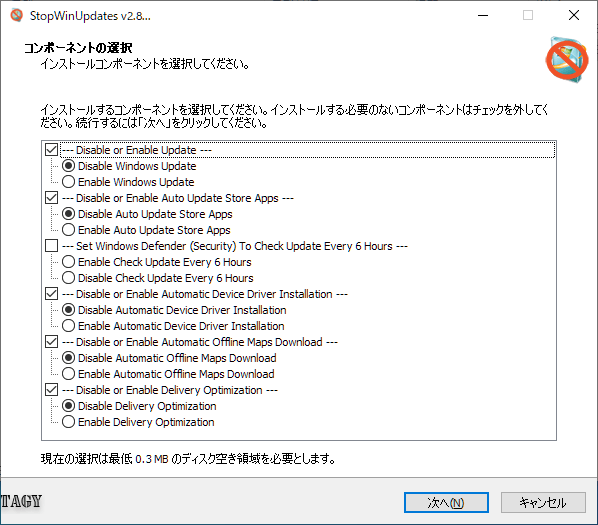
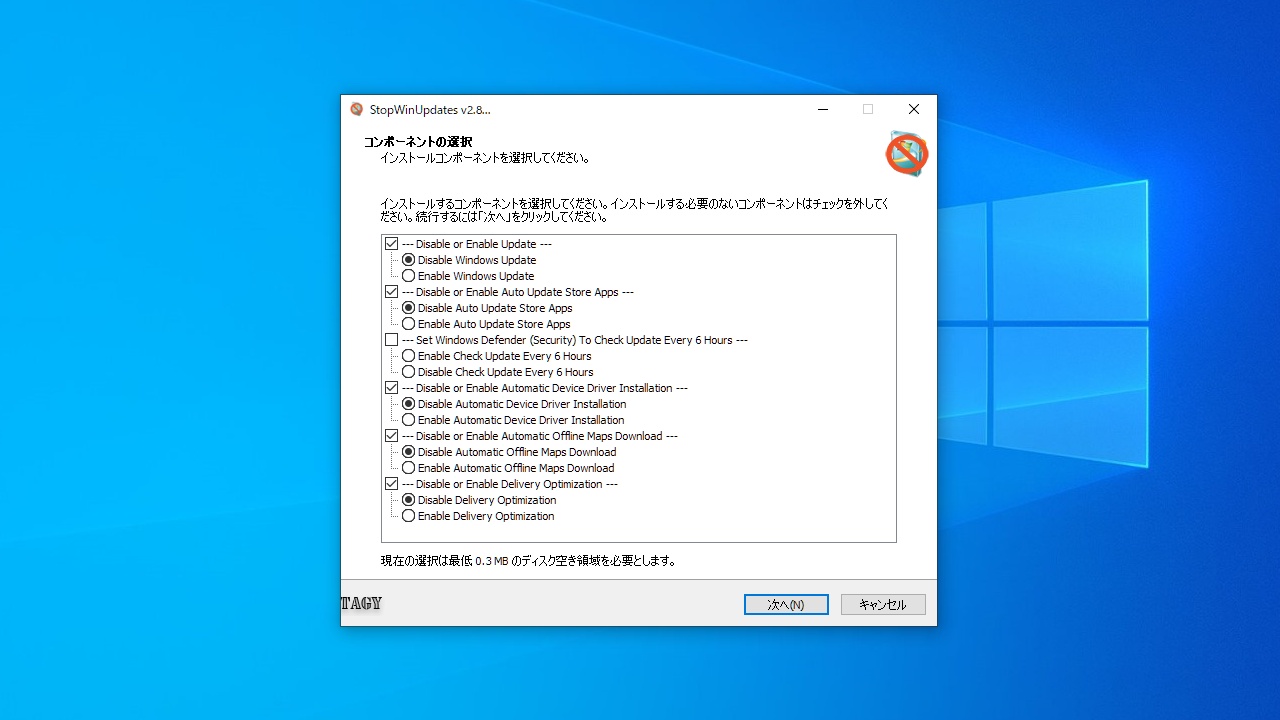
StopWinUpdates を起動します。デフォルト状態では Windows Defender 以外のすべてのアップデート機能が無効になるように選択されています。必要に応じて選択して下さい。
[次へ ]ボタンをクリックすると設定の変更が適用されます。
・Disable or Enable Update :Windows アップデートを無効または有効にする
・Disable or Enable Auto Update Store Apps :ストアアプリのアップデートを無効または有効にする
・Set Windows Defender (Security) To Check Update Every 6 Hours :Windows Defender のアップデートを 6 時間おきにチェックする
・Disable or Enable Automatic Device Driver Installation :ドライバの自動インストールを無効または有効にする
・Disable or Enable Automatic Offline Maps Download :オフラインマップのダウンロードを無効または有効にする
・Disable or Enable Delivery Optimization :Delivery Optimization サービスを無効または有効にする
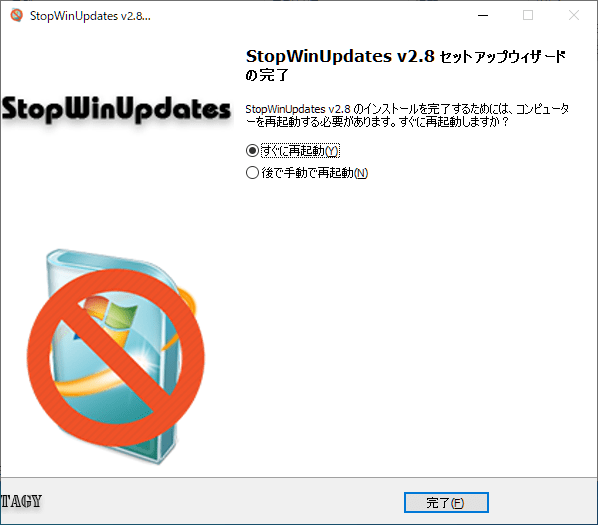
設定を有効にするにはコンピュータの再起動が必要になります。
すぐ再起動したくない場合は「後で手動で再起動」を選択して[完了]をクリックして下さい。
よくある質問と回答
ライセンスについて。
ユーザーレビュー
レビューはまだありません、 最初のレビューを投稿してください。コメントは任意です。