").attr(n.scriptAttrs||{}).prop({charset:n.scriptCharset,src:n.url}).on("load error",i=function(e){r.remove(),i=null,e&&t("error"===e.type?404:200,e.type)}),C.head.appendChild(r[0])},abort:function(){i&&i()}}});var Jt,Kt=[],Zt=/(=)\?(?=&|$)|\?\?/;ce.ajaxSetup({jsonp:"callback",jsonpCallback:function(){var e=Kt.pop()||ce.expando+"_"+jt.guid++;return this[e]=!0,e}}),ce.ajaxPrefilter("json jsonp",function(e,t,n){var r,i,o,a=!1!==e.jsonp&&(Zt.test(e.url)?"url":"string"==typeof e.data&&0===(e.contentType||"").indexOf("application/x-www-form-urlencoded")&&Zt.test(e.data)&&"data");if(a||"jsonp"===e.dataTypes[0])return r=e.jsonpCallback=v(e.jsonpCallback)?e.jsonpCallback():e.jsonpCallback,a?e[a]=e[a].replace(Zt,"$1"+r):!1!==e.jsonp&&(e.url+=(At.test(e.url)?"&":"?")+e.jsonp+"="+r),e.converters["script json"]=function(){return o||ce.error(r+" was not called"),o[0]},e.dataTypes[0]="json",i=ie[r],ie[r]=function(){o=arguments},n.always(function(){void 0===i?ce(ie).removeProp(r):ie[r]=i,e[r]&&(e.jsonpCallback=t.jsonpCallback,Kt.push(r)),o&&v(i)&&i(o[0]),o=i=void 0}),"script"}),le.createHTMLDocument=((Jt=C.implementation.createHTMLDocument("").body).innerHTML="
",2===Jt.childNodes.length),ce.parseHTML=function(e,t,n){return"string"!=typeof e?[]:("boolean"==typeof t&&(n=t,t=!1),t||(le.createHTMLDocument?((r=(t=C.implementation.createHTMLDocument("")).createElement("base")).href=C.location.href,t.head.appendChild(r)):t=C),o=!n&&[],(i=w.exec(e))?[t.createElement(i[1])]:(i=Ae([e],t,o),o&&o.length&&ce(o).remove(),ce.merge([],i.childNodes)));var r,i,o},ce.fn.load=function(e,t,n){var r,i,o,a=this,s=e.indexOf(" ");return-1").append(ce.parseHTML(e)).find(r):e)}).always(n&&function(e,t){a.each(function(){n.apply(this,o||[e.responseText,t,e])})}),this},ce.expr.pseudos.animated=function(t){return ce.grep(ce.timers,function(e){return t===e.elem}).length},ce.offset={setOffset:function(e,t,n){var r,i,o,a,s,u,l=ce.css(e,"position"),c=ce(e),f={};"static"===l&&(e.style.position="relative"),s=c.offset(),o=ce.css(e,"top"),u=ce.css(e,"left"),("absolute"===l||"fixed"===l)&&-1<(o+u).indexOf("auto")?(a=(r=c.position()).top,i=r.left):(a=parseFloat(o)||0,i=parseFloat(u)||0),v(t)&&(t=t.call(e,n,ce.extend({},s))),null!=t.top&&(f.top=t.top-s.top+a),null!=t.left&&(f.left=t.left-s.left+i),"using"in t?t.using.call(e,f):c.css(f)}},ce.fn.extend({offset:function(t){if(arguments.length)return void 0===t?this:this.each(function(e){ce.offset.setOffset(this,t,e)});var e,n,r=this[0];return r?r.getClientRects().length?(e=r.getBoundingClientRect(),n=r.ownerDocument.defaultView,{top:e.top+n.pageYOffset,left:e.left+n.pageXOffset}):{top:0,left:0}:void 0},position:function(){if(this[0]){var e,t,n,r=this[0],i={top:0,left:0};if("fixed"===ce.css(r,"position"))t=r.getBoundingClientRect();else{t=this.offset(),n=r.ownerDocument,e=r.offsetParent||n.documentElement;while(e&&(e===n.body||e===n.documentElement)&&"static"===ce.css(e,"position"))e=e.parentNode;e&&e!==r&&1===e.nodeType&&((i=ce(e).offset()).top+=ce.css(e,"borderTopWidth",!0),i.left+=ce.css(e,"borderLeftWidth",!0))}return{top:t.top-i.top-ce.css(r,"marginTop",!0),left:t.left-i.left-ce.css(r,"marginLeft",!0)}}},offsetParent:function(){return this.map(function(){var e=this.offsetParent;while(e&&"static"===ce.css(e,"position"))e=e.offsetParent;return e||J})}}),ce.each({scrollLeft:"pageXOffset",scrollTop:"pageYOffset"},function(t,i){var o="pageYOffset"===i;ce.fn[t]=function(e){return M(this,function(e,t,n){var r;if(y(e)?r=e:9===e.nodeType&&(r=e.defaultView),void 0===n)return r?r[i]:e[t];r?r.scrollTo(o?r.pageXOffset:n,o?n:r.pageYOffset):e[t]=n},t,e,arguments.length)}}),ce.each(["top","left"],function(e,n){ce.cssHooks[n]=Ye(le.pixelPosition,function(e,t){if(t)return t=Ge(e,n),_e.test(t)?ce(e).position()[n]+"px":t})}),ce.each({Height:"height",Width:"width"},function(a,s){ce.each({padding:"inner"+a,content:s,"":"outer"+a},function(r,o){ce.fn[o]=function(e,t){var n=arguments.length&&(r||"boolean"!=typeof e),i=r||(!0===e||!0===t?"margin":"border");return M(this,function(e,t,n){var r;return y(e)?0===o.indexOf("outer")?e["inner"+a]:e.document.documentElement["client"+a]:9===e.nodeType?(r=e.documentElement,Math.max(e.body["scroll"+a],r["scroll"+a],e.body["offset"+a],r["offset"+a],r["client"+a])):void 0===n?ce.css(e,t,i):ce.style(e,t,n,i)},s,n?e:void 0,n)}})}),ce.each(["ajaxStart","ajaxStop","ajaxComplete","ajaxError","ajaxSuccess","ajaxSend"],function(e,t){ce.fn[t]=function(e){return this.on(t,e)}}),ce.fn.extend({bind:function(e,t,n){return this.on(e,null,t,n)},unbind:function(e,t){return this.off(e,null,t)},delegate:function(e,t,n,r){return this.on(t,e,n,r)},undelegate:function(e,t,n){return 1===arguments.length?this.off(e,"**"):this.off(t,e||"**",n)},hover:function(e,t){return this.on("mouseenter",e).on("mouseleave",t||e)}}),ce.each("blur focus focusin focusout resize scroll click dblclick mousedown mouseup mousemove mouseover mouseout mouseenter mouseleave change select submit keydown keypress keyup contextmenu".split(" "),function(e,n){ce.fn[n]=function(e,t){return 0
Open with++ 4.0
Windows そのほか
2021/05/31 11:512022/08/13 16:59
説明 機能 仕様 ダウンロード 画像 使い方
Windows のコンテキストメニューをカスタマイズするアプリ
Windows エクスプローラのコンテキストメニューにカスタム項目を追加できるシェル拡張機能。好みのアプリケーションやフォルダなどの項目を、対応するファイルの種類や引数やそのほかのオプションを指定して右クリックメニューに追加できます。

Open with++ の概要
Open with++ は、カスタムメニュー項目を Windows エクスプローラのコンテキストメニューに追加できるシェル拡張機能です。
Open with++ の機能
Open with++ の主な機能です。
機能
概要
メイン機能
コンテキストメニューにカスタム項目を追加
機能詳細
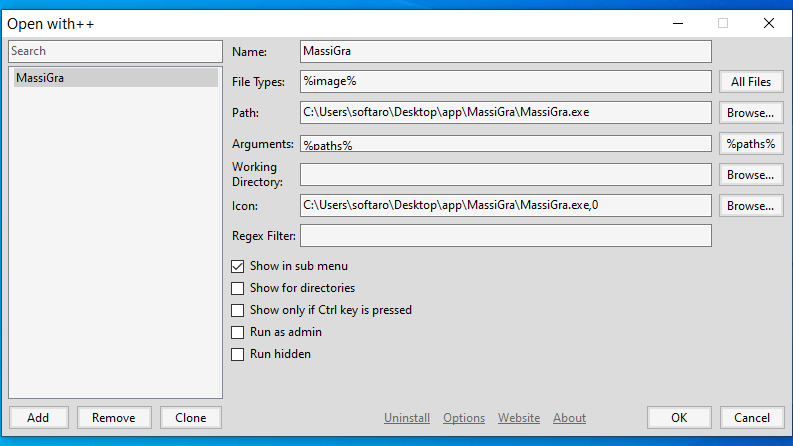
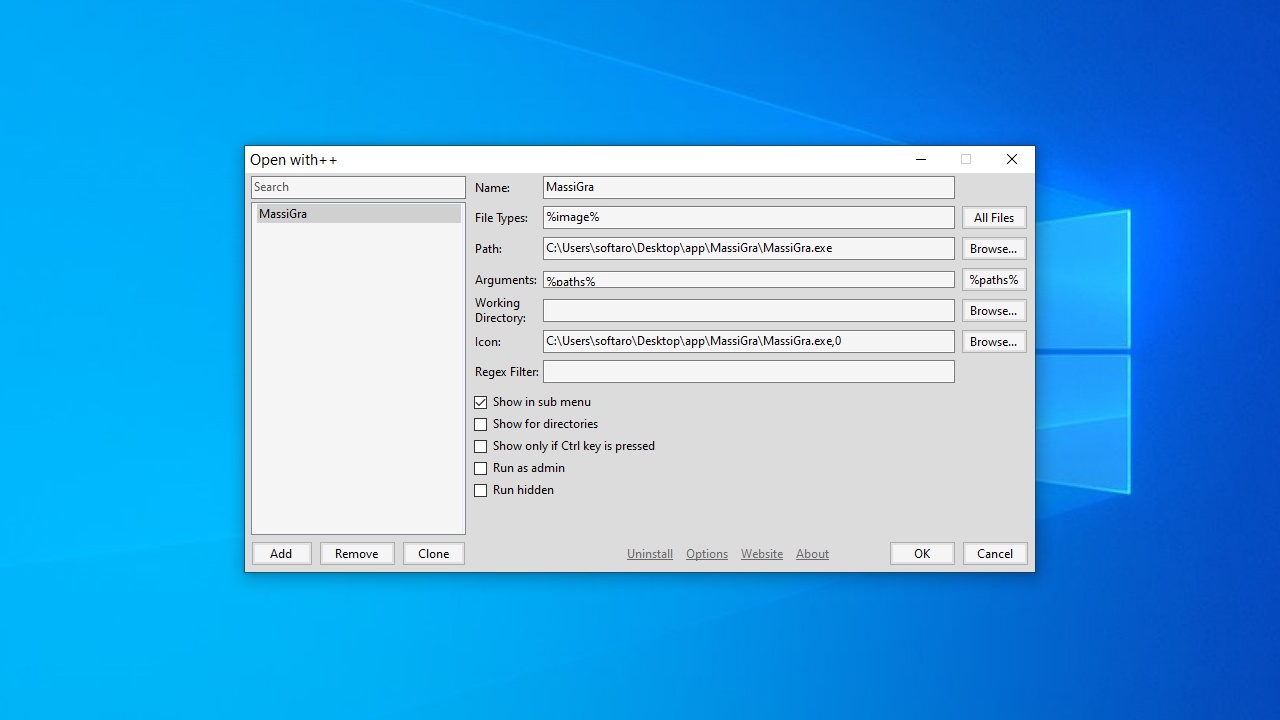
・項目の名前、対応するファイルの種類、実行可能ファイルの場所、作業フォルダ、アイコン、引数を設定できます
・メニューまたはサブメニューに表示する
・管理者として実行する
・ディレクトリとして表示する
Windows のコンテキストメニューをカスタマイズできます
Open with++ は、Windows のコンテキストメニューにカスタム項目を追加してカスタマイズすることができるアプリケーションです。
項目を表示するファイルの種類をワイルドカードやマクロで指定することができるので、ビデオやオーディオ、画像ファイルなどの特定のファイル種類の右クリックメニューを使いやすくすることができます。
高度なカスタマイズが可能です
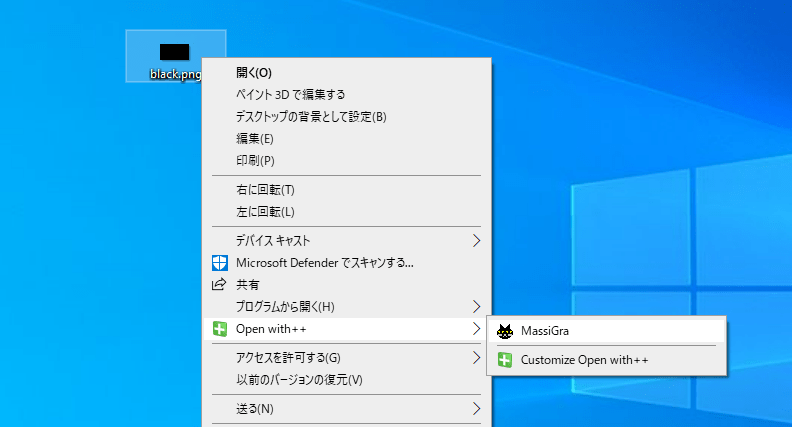
Open with++ では、実行するコマンドに引数を設定したり、アプリケーションを管理者として実行したり、項目をディレクトリとして表示したりすることができます。
コンテキストメニュー項目を作成すると、通常は右の画像のように「Open with++」サブメニューに項目が追加されますが、 オプションでメインメニュー内に表示するように設定することもできます。
コンテキストメニューをより活用するためのアプリ
Open with++ は、Windows エクスプローラのコンテキストメニューを自分好みにカスタマイズして、ユーザーの動作を効率的に速く楽にすることができる便利なアプリケーションです。
機能
エクスプローラのコンテキストメニューにカスタム項目を追加する
項目の名前、対応するファイルの種類、実行可能ファイルの場所、作業フォルダ、アイコン、引数を設定できます
サブメニューまたはメインメニューに表示
管理者として実行するオプション
ディレクトリとして表示するオプション
価格: 無料
動作環境: Windows 7|8|8.1|10|11
使用言語: 英語
最終更新日:
4年前 (2022/08/13)
ダウンロード数: 497
画像
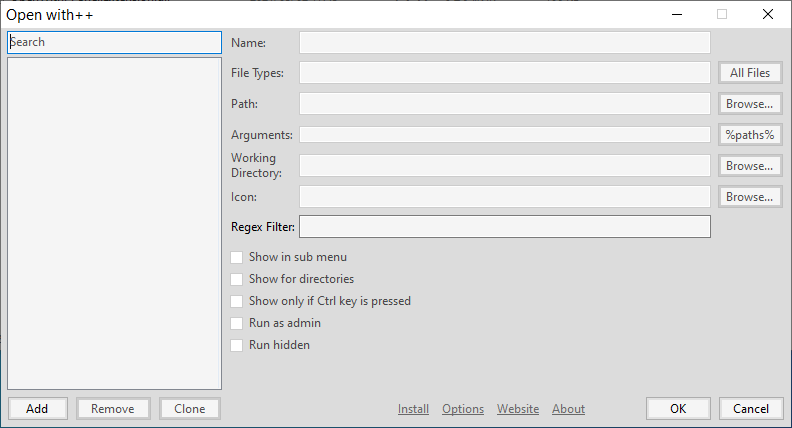
ユーザーインターフェース
インストール
コマンドの追加
コンテキストメニュー
オプション
使い方
インストール
1.インストール方法
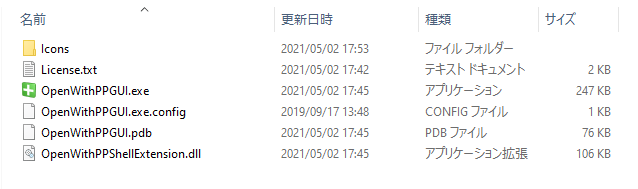
Open with++ を実行し、「OpenwithPPGUI.exe 」ファイルを実行します。
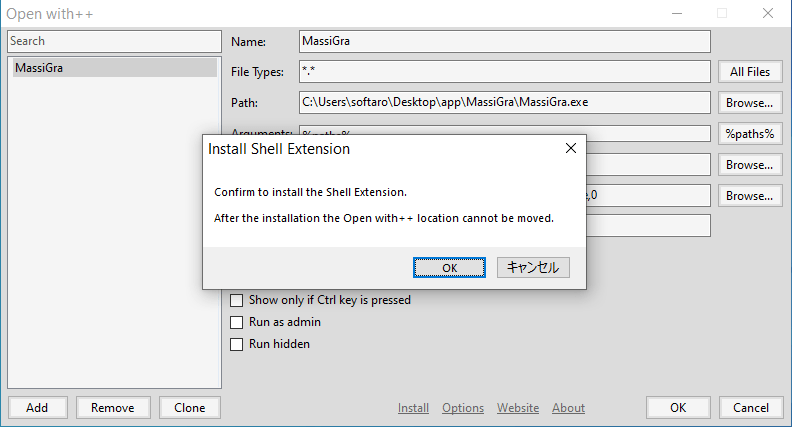
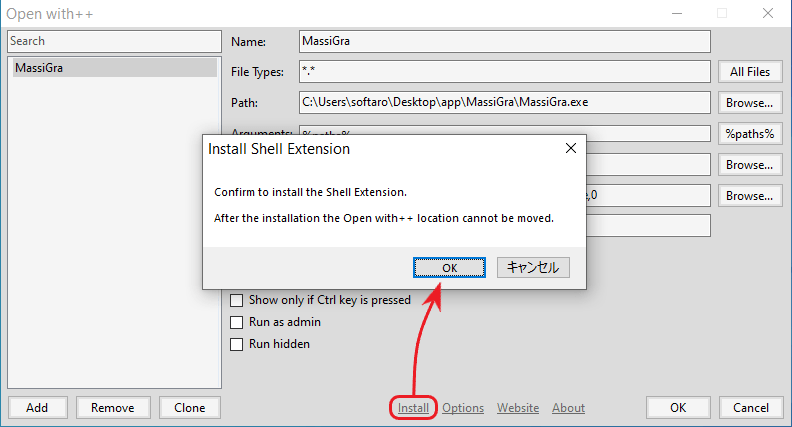
Open with++ が起動したら、「Install」をクリックし、確認画面が表示されたら[OK ]をクリックします。
・インストール後はフォルダの場所は変更できないので、好みの場所にフォルダを配置してからインストールしてください。
基本的な使い方
1.コンテキストメニューに項目を追加する
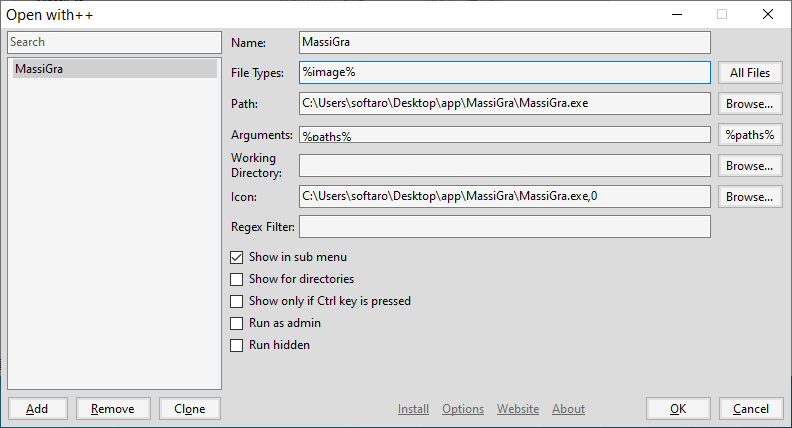
左下の[Add ]ボタンをクリックして項目を追加し、編集します。
右下の[OK ]ボタンをクリックすると、コンテキストメニューに項目が追加されます。
・Show in sub menu :サブメニューに表示する
・Show for directories :ディレクトリとして表示する
・Show only if Ctrl key is pressed :「Ctrl」キー+右クリックで表示する
・Run as admin :管理者として実行する
・Run hidden :非表示で実行する
2.オプション
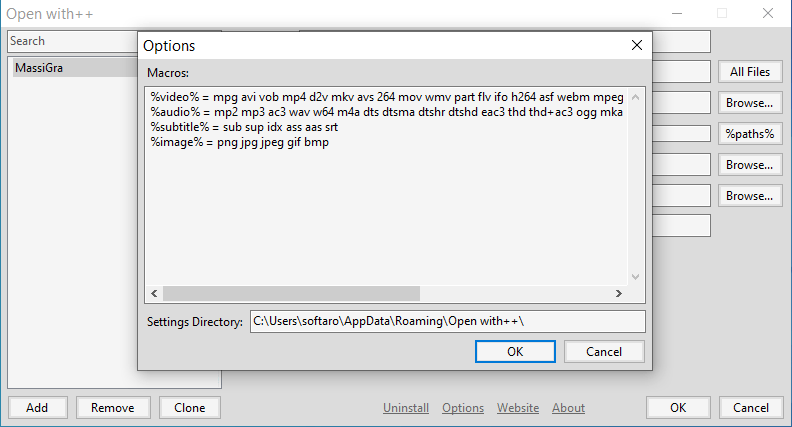
下部の「Options 」をクリックすると、使用するフォルダと、「File Type 」に使用するマクロの設定ができます。
3.コンテキストメニュー
コンテキストメニューには画像のように表示されます。
よくある質問と回答
ライセンスについて。
アンインストール方法。
ユーザーレビュー
レビューはまだありません、 最初のレビューを投稿してください。コメントは任意です。
Open with++ は、どなたでも無料で使用できます。