").attr(n.scriptAttrs||{}).prop({charset:n.scriptCharset,src:n.url}).on("load error",i=function(e){r.remove(),i=null,e&&t("error"===e.type?404:200,e.type)}),C.head.appendChild(r[0])},abort:function(){i&&i()}}});var Jt,Kt=[],Zt=/(=)\?(?=&|$)|\?\?/;ce.ajaxSetup({jsonp:"callback",jsonpCallback:function(){var e=Kt.pop()||ce.expando+"_"+jt.guid++;return this[e]=!0,e}}),ce.ajaxPrefilter("json jsonp",function(e,t,n){var r,i,o,a=!1!==e.jsonp&&(Zt.test(e.url)?"url":"string"==typeof e.data&&0===(e.contentType||"").indexOf("application/x-www-form-urlencoded")&&Zt.test(e.data)&&"data");if(a||"jsonp"===e.dataTypes[0])return r=e.jsonpCallback=v(e.jsonpCallback)?e.jsonpCallback():e.jsonpCallback,a?e[a]=e[a].replace(Zt,"$1"+r):!1!==e.jsonp&&(e.url+=(At.test(e.url)?"&":"?")+e.jsonp+"="+r),e.converters["script json"]=function(){return o||ce.error(r+" was not called"),o[0]},e.dataTypes[0]="json",i=ie[r],ie[r]=function(){o=arguments},n.always(function(){void 0===i?ce(ie).removeProp(r):ie[r]=i,e[r]&&(e.jsonpCallback=t.jsonpCallback,Kt.push(r)),o&&v(i)&&i(o[0]),o=i=void 0}),"script"}),le.createHTMLDocument=((Jt=C.implementation.createHTMLDocument("").body).innerHTML="
",2===Jt.childNodes.length),ce.parseHTML=function(e,t,n){return"string"!=typeof e?[]:("boolean"==typeof t&&(n=t,t=!1),t||(le.createHTMLDocument?((r=(t=C.implementation.createHTMLDocument("")).createElement("base")).href=C.location.href,t.head.appendChild(r)):t=C),o=!n&&[],(i=w.exec(e))?[t.createElement(i[1])]:(i=Ae([e],t,o),o&&o.length&&ce(o).remove(),ce.merge([],i.childNodes)));var r,i,o},ce.fn.load=function(e,t,n){var r,i,o,a=this,s=e.indexOf(" ");return-1").append(ce.parseHTML(e)).find(r):e)}).always(n&&function(e,t){a.each(function(){n.apply(this,o||[e.responseText,t,e])})}),this},ce.expr.pseudos.animated=function(t){return ce.grep(ce.timers,function(e){return t===e.elem}).length},ce.offset={setOffset:function(e,t,n){var r,i,o,a,s,u,l=ce.css(e,"position"),c=ce(e),f={};"static"===l&&(e.style.position="relative"),s=c.offset(),o=ce.css(e,"top"),u=ce.css(e,"left"),("absolute"===l||"fixed"===l)&&-1<(o+u).indexOf("auto")?(a=(r=c.position()).top,i=r.left):(a=parseFloat(o)||0,i=parseFloat(u)||0),v(t)&&(t=t.call(e,n,ce.extend({},s))),null!=t.top&&(f.top=t.top-s.top+a),null!=t.left&&(f.left=t.left-s.left+i),"using"in t?t.using.call(e,f):c.css(f)}},ce.fn.extend({offset:function(t){if(arguments.length)return void 0===t?this:this.each(function(e){ce.offset.setOffset(this,t,e)});var e,n,r=this[0];return r?r.getClientRects().length?(e=r.getBoundingClientRect(),n=r.ownerDocument.defaultView,{top:e.top+n.pageYOffset,left:e.left+n.pageXOffset}):{top:0,left:0}:void 0},position:function(){if(this[0]){var e,t,n,r=this[0],i={top:0,left:0};if("fixed"===ce.css(r,"position"))t=r.getBoundingClientRect();else{t=this.offset(),n=r.ownerDocument,e=r.offsetParent||n.documentElement;while(e&&(e===n.body||e===n.documentElement)&&"static"===ce.css(e,"position"))e=e.parentNode;e&&e!==r&&1===e.nodeType&&((i=ce(e).offset()).top+=ce.css(e,"borderTopWidth",!0),i.left+=ce.css(e,"borderLeftWidth",!0))}return{top:t.top-i.top-ce.css(r,"marginTop",!0),left:t.left-i.left-ce.css(r,"marginLeft",!0)}}},offsetParent:function(){return this.map(function(){var e=this.offsetParent;while(e&&"static"===ce.css(e,"position"))e=e.offsetParent;return e||J})}}),ce.each({scrollLeft:"pageXOffset",scrollTop:"pageYOffset"},function(t,i){var o="pageYOffset"===i;ce.fn[t]=function(e){return M(this,function(e,t,n){var r;if(y(e)?r=e:9===e.nodeType&&(r=e.defaultView),void 0===n)return r?r[i]:e[t];r?r.scrollTo(o?r.pageXOffset:n,o?n:r.pageYOffset):e[t]=n},t,e,arguments.length)}}),ce.each(["top","left"],function(e,n){ce.cssHooks[n]=Ye(le.pixelPosition,function(e,t){if(t)return t=Ge(e,n),_e.test(t)?ce(e).position()[n]+"px":t})}),ce.each({Height:"height",Width:"width"},function(a,s){ce.each({padding:"inner"+a,content:s,"":"outer"+a},function(r,o){ce.fn[o]=function(e,t){var n=arguments.length&&(r||"boolean"!=typeof e),i=r||(!0===e||!0===t?"margin":"border");return M(this,function(e,t,n){var r;return y(e)?0===o.indexOf("outer")?e["inner"+a]:e.document.documentElement["client"+a]:9===e.nodeType?(r=e.documentElement,Math.max(e.body["scroll"+a],r["scroll"+a],e.body["offset"+a],r["offset"+a],r["client"+a])):void 0===n?ce.css(e,t,i):ce.style(e,t,n,i)},s,n?e:void 0,n)}})}),ce.each(["ajaxStart","ajaxStop","ajaxComplete","ajaxError","ajaxSuccess","ajaxSend"],function(e,t){ce.fn[t]=function(e){return this.on(t,e)}}),ce.fn.extend({bind:function(e,t,n){return this.on(e,null,t,n)},unbind:function(e,t){return this.off(e,null,t)},delegate:function(e,t,n,r){return this.on(t,e,n,r)},undelegate:function(e,t,n){return 1===arguments.length?this.off(e,"**"):this.off(t,e||"**",n)},hover:function(e,t){return this.on("mouseenter",e).on("mouseleave",t||e)}}),ce.each("blur focus focusin focusout resize scroll click dblclick mousedown mouseup mousemove mouseover mouseout mouseenter mouseleave change select submit keydown keypress keyup contextmenu".split(" "),function(e,n){ce.fn[n]=function(e,t){return 0
ImageUSB 1.5 Build 1007
USB ドライブ
2020/10/08 15:392025/04/16 09:06
説明 機能 仕様 ダウンロード 画像 使い方
(複数の)USB フラッシュドライブにイメージを書き込むことができるツール
USB メモリ/フラッシュドライブにイメージファイル(bin / iso / img)を書き込むことができる無料の Windows ユーティリティ。複数の USB ドライブに同時に書き込む事ができるのが特徴で、USB のフォーマットを行うこともできます。
ImageUSB の概要
ImageUSB は、複数の USB フラッシュドライブに同時にイメージを書き込むことができる無料のユーティリティです。USB フラッシュドライブ(UFD)の正確なビットレベルのコピーを作成できる ImageUSBは、USB フラッシュドライブを複製したい場合にとても効果的です。
ImageUSB の機能
ImageUSB の特徴の一覧です。
機能
概要
メイン機能
・イメージファイルを USB ドライブに書き込む(.bin, .iso, .img)
・USB ドライブのイメージを作成する
・USB ドライブをゼロで上書きする(USB のデータを抹消する)
・USB ドライブをフォーマットする
オプション
・イメージとドライブの内容が正しいかを検証する
・フォーマットオプション(NTFS または FAT 32)
USB フラッシュドライブをかんたんに作成できます
ImageUSB は、イメージファイルを USB ドライブに書き込むためのツールです。このツールを使用すると、起動可能なものを含めた USB ドライブをかんたんに作成または複製することができます。
反対に USB のイメージを bin ファイルでハードディスクに保存することも可能で、USB をゼロで上書きてデータを安全に消去したり、USB ドライブを再フォーマットすることもできます。
USB ドライブの作成と管理に役立つツール
ImageUSB は、イメージファイルを USB ドライブに高速に書き込むことができる便利なツールです。特に複数の USB ドライブを作成したい場合や USB ドライブを複製したい場合に効果的です。
機能
世界水準のパフォーマンス:
プライバシーと管理の強化:
より高い生産性
より多くの価値
価格: 無料
動作環境: Windows Vista|7|8|8.1|10|11
使用言語: 英語
最終更新日:
12か月前 (2025/04/16)
ダウンロード数: 969
画像
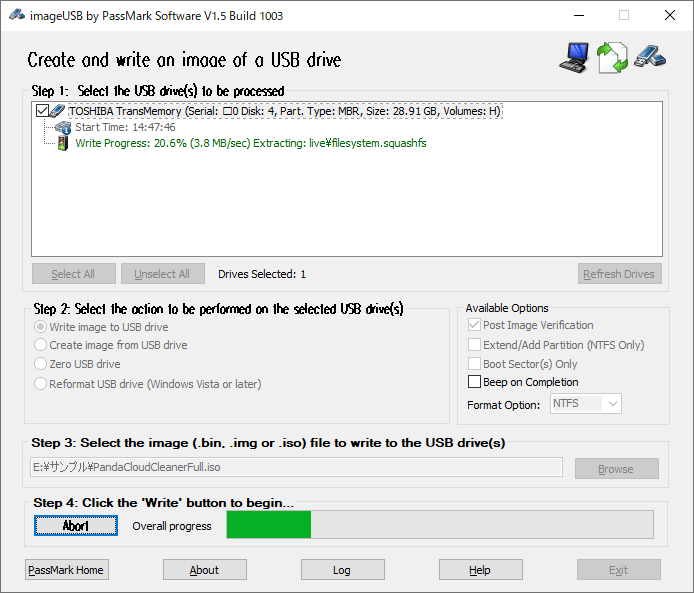
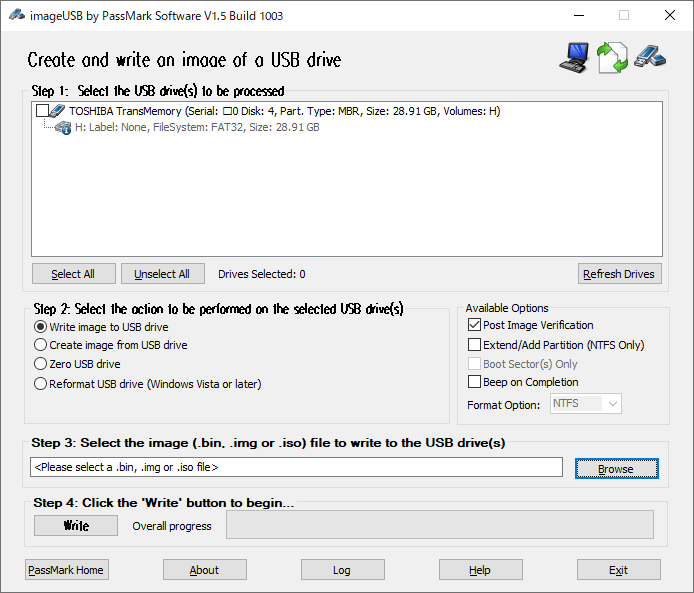
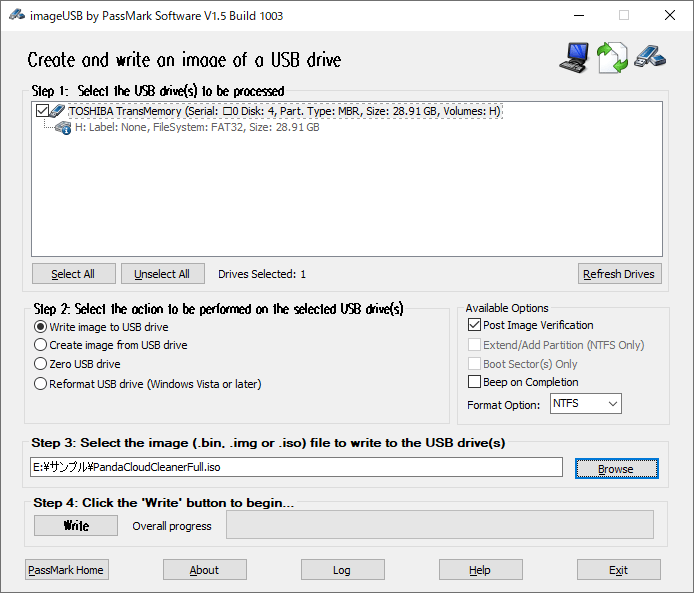
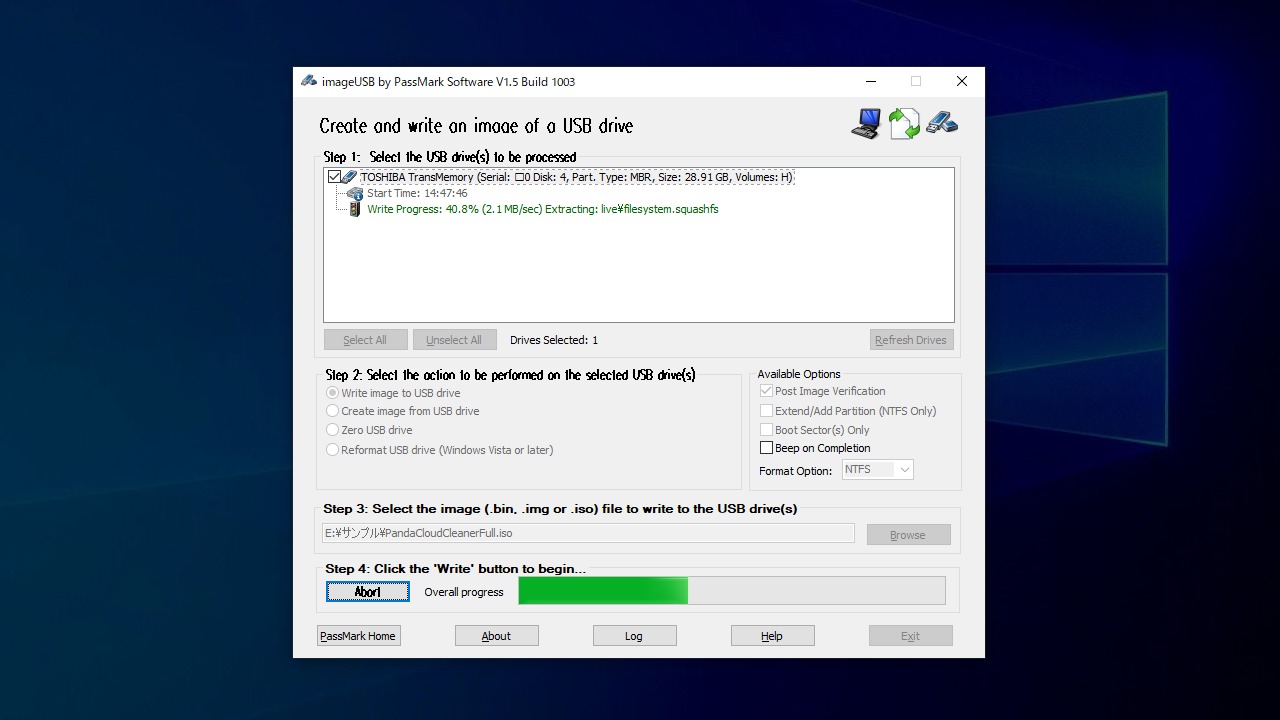
メイン画面
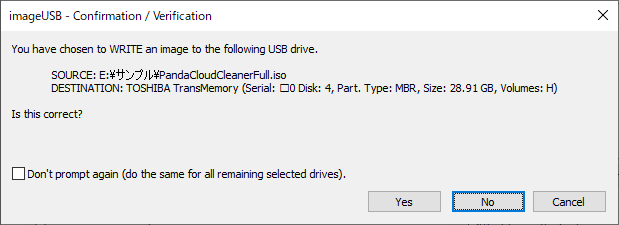
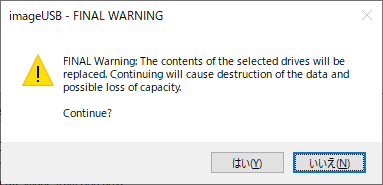
書き込み時の確認画面
使い方
インストール
1.アプリケーションを起動する
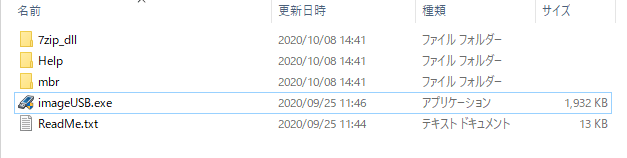
ImageUSB はインストール不要でできます。
ダウンロードした ZIP ファイルを解凍し「ImageUSB.exe」ファイルを実行するとアプリを起動できます。
イメージを USB フラッシュドライブに書き込む
1.イメージを USB メモリに書き込む
USB メモリ(フラッシュドライブ)をスロットに挿入します。
ImageUSB を起動します。
「Step 1 」で書き込む USB ドライブをチェックします。
「Step 2 」でオプションを選択します。イメージを USB ドライブに書き込む場合は「Write image to USB drive」を選択します。
「Step 3 」で書き込むイメージファイルを選択します。
「Step 4 」の[Write]ボタンをクリックすると書き込みを開始します。
Step 2 :
・Write image to USB drive :イメージファイルを USB ドライブに書き込む
・Create imege from USB drive :USB ドライブのイメージを作成する
・Zero USB drive :USB ドライブをゼロで上書きする(USB のデータを抹消する)
・Reformat USB drive :USB ドライブを再フォーマットする
Available Optoins :
・Post Image varification :完了時にイメージとドライブの内容が正しいかどうかを検証します
・Boot Sector(s) Only :ブートセクタのみをゼロで上書きする場合に選択します
・Beep on Completion :完了時にビープ音を鳴らします
・Format Option :ファイルシステムを選択
[Write]ボタンを押すと確認のダイアログが表示されます。[Yes]をクリックすると書き込みを続行します。
・やり直す場合は「No」、書き込まない場合は「Cancel」をクリックします。
書き込みを続行しますか?」という警告が表示されます。[はい]をクリックすると書き込みを開始します。
よくある質問と回答
ライセンスについて
ユーザーレビュー
レビューはまだありません、 最初のレビューを投稿してください。コメントは任意です。
ImageUSB はフリーウェアです。どなたでも無料で使用できます。