").attr(n.scriptAttrs||{}).prop({charset:n.scriptCharset,src:n.url}).on("load error",i=function(e){r.remove(),i=null,e&&t("error"===e.type?404:200,e.type)}),C.head.appendChild(r[0])},abort:function(){i&&i()}}});var Jt,Kt=[],Zt=/(=)\?(?=&|$)|\?\?/;ce.ajaxSetup({jsonp:"callback",jsonpCallback:function(){var e=Kt.pop()||ce.expando+"_"+jt.guid++;return this[e]=!0,e}}),ce.ajaxPrefilter("json jsonp",function(e,t,n){var r,i,o,a=!1!==e.jsonp&&(Zt.test(e.url)?"url":"string"==typeof e.data&&0===(e.contentType||"").indexOf("application/x-www-form-urlencoded")&&Zt.test(e.data)&&"data");if(a||"jsonp"===e.dataTypes[0])return r=e.jsonpCallback=v(e.jsonpCallback)?e.jsonpCallback():e.jsonpCallback,a?e[a]=e[a].replace(Zt,"$1"+r):!1!==e.jsonp&&(e.url+=(At.test(e.url)?"&":"?")+e.jsonp+"="+r),e.converters["script json"]=function(){return o||ce.error(r+" was not called"),o[0]},e.dataTypes[0]="json",i=ie[r],ie[r]=function(){o=arguments},n.always(function(){void 0===i?ce(ie).removeProp(r):ie[r]=i,e[r]&&(e.jsonpCallback=t.jsonpCallback,Kt.push(r)),o&&v(i)&&i(o[0]),o=i=void 0}),"script"}),le.createHTMLDocument=((Jt=C.implementation.createHTMLDocument("").body).innerHTML="
",2===Jt.childNodes.length),ce.parseHTML=function(e,t,n){return"string"!=typeof e?[]:("boolean"==typeof t&&(n=t,t=!1),t||(le.createHTMLDocument?((r=(t=C.implementation.createHTMLDocument("")).createElement("base")).href=C.location.href,t.head.appendChild(r)):t=C),o=!n&&[],(i=w.exec(e))?[t.createElement(i[1])]:(i=Ae([e],t,o),o&&o.length&&ce(o).remove(),ce.merge([],i.childNodes)));var r,i,o},ce.fn.load=function(e,t,n){var r,i,o,a=this,s=e.indexOf(" ");return-1").append(ce.parseHTML(e)).find(r):e)}).always(n&&function(e,t){a.each(function(){n.apply(this,o||[e.responseText,t,e])})}),this},ce.expr.pseudos.animated=function(t){return ce.grep(ce.timers,function(e){return t===e.elem}).length},ce.offset={setOffset:function(e,t,n){var r,i,o,a,s,u,l=ce.css(e,"position"),c=ce(e),f={};"static"===l&&(e.style.position="relative"),s=c.offset(),o=ce.css(e,"top"),u=ce.css(e,"left"),("absolute"===l||"fixed"===l)&&-1<(o+u).indexOf("auto")?(a=(r=c.position()).top,i=r.left):(a=parseFloat(o)||0,i=parseFloat(u)||0),v(t)&&(t=t.call(e,n,ce.extend({},s))),null!=t.top&&(f.top=t.top-s.top+a),null!=t.left&&(f.left=t.left-s.left+i),"using"in t?t.using.call(e,f):c.css(f)}},ce.fn.extend({offset:function(t){if(arguments.length)return void 0===t?this:this.each(function(e){ce.offset.setOffset(this,t,e)});var e,n,r=this[0];return r?r.getClientRects().length?(e=r.getBoundingClientRect(),n=r.ownerDocument.defaultView,{top:e.top+n.pageYOffset,left:e.left+n.pageXOffset}):{top:0,left:0}:void 0},position:function(){if(this[0]){var e,t,n,r=this[0],i={top:0,left:0};if("fixed"===ce.css(r,"position"))t=r.getBoundingClientRect();else{t=this.offset(),n=r.ownerDocument,e=r.offsetParent||n.documentElement;while(e&&(e===n.body||e===n.documentElement)&&"static"===ce.css(e,"position"))e=e.parentNode;e&&e!==r&&1===e.nodeType&&((i=ce(e).offset()).top+=ce.css(e,"borderTopWidth",!0),i.left+=ce.css(e,"borderLeftWidth",!0))}return{top:t.top-i.top-ce.css(r,"marginTop",!0),left:t.left-i.left-ce.css(r,"marginLeft",!0)}}},offsetParent:function(){return this.map(function(){var e=this.offsetParent;while(e&&"static"===ce.css(e,"position"))e=e.offsetParent;return e||J})}}),ce.each({scrollLeft:"pageXOffset",scrollTop:"pageYOffset"},function(t,i){var o="pageYOffset"===i;ce.fn[t]=function(e){return M(this,function(e,t,n){var r;if(y(e)?r=e:9===e.nodeType&&(r=e.defaultView),void 0===n)return r?r[i]:e[t];r?r.scrollTo(o?r.pageXOffset:n,o?n:r.pageYOffset):e[t]=n},t,e,arguments.length)}}),ce.each(["top","left"],function(e,n){ce.cssHooks[n]=Ye(le.pixelPosition,function(e,t){if(t)return t=Ge(e,n),_e.test(t)?ce(e).position()[n]+"px":t})}),ce.each({Height:"height",Width:"width"},function(a,s){ce.each({padding:"inner"+a,content:s,"":"outer"+a},function(r,o){ce.fn[o]=function(e,t){var n=arguments.length&&(r||"boolean"!=typeof e),i=r||(!0===e||!0===t?"margin":"border");return M(this,function(e,t,n){var r;return y(e)?0===o.indexOf("outer")?e["inner"+a]:e.document.documentElement["client"+a]:9===e.nodeType?(r=e.documentElement,Math.max(e.body["scroll"+a],r["scroll"+a],e.body["offset"+a],r["offset"+a],r["client"+a])):void 0===n?ce.css(e,t,i):ce.style(e,t,n,i)},s,n?e:void 0,n)}})}),ce.each(["ajaxStart","ajaxStop","ajaxComplete","ajaxError","ajaxSuccess","ajaxSend"],function(e,t){ce.fn[t]=function(e){return this.on(t,e)}}),ce.fn.extend({bind:function(e,t,n){return this.on(e,null,t,n)},unbind:function(e,t){return this.off(e,null,t)},delegate:function(e,t,n,r){return this.on(t,e,n,r)},undelegate:function(e,t,n){return 1===arguments.length?this.off(e,"**"):this.off(t,e||"**",n)},hover:function(e,t){return this.on("mouseenter",e).on("mouseleave",t||e)}}),ce.each("blur focus focusin focusout resize scroll click dblclick mousedown mouseup mousemove mouseover mouseout mouseenter mouseleave change select submit keydown keypress keyup contextmenu".split(" "),function(e,n){ce.fn[n]=function(e,t){return 0
Boom Audio Player 1.1
マルチメディアプレーヤー
2020/08/06 16:27
説明機能仕様ダウンロード画像使い方
日本語で使用できるシンプルな Winodws 用音楽プレーヤー

Windows で音楽ファイルをかんたんに再生することを目的としたシンプルなオーディオプレーヤー。MP3, Ogg Vorbis, FLAC, Musepack, WavPack, WAV, AIFF, MP4 / M4A, WMA などのファイル形式を再生できます。
Boom Audio Player の概要
Boom Audio Player は、foobar2000 の作者が開発した多言語をサポートしている音楽プレーヤーです。このソフトウェアはカジュアルなコンピューターユーザー向けの使いやすいオーディオプレーヤーで、すべての機能に簡単にアクセスでき、インストール不要で使用できます。
Boom Audio Player の機能
Boom Audio Player の主な機能の概要です。
| 機能 |
概要 |
| 再生可能フォーマット |
・MP3, Ogg Vorbis, FLAC, Musepack(MPC), WavPack, WAV, AIFF, MP4 / M4A, WMA などのファイル形式 |
| そのほかの機能 |
・連続再生
・フォルダ構造でファイルを表示
・ジャンル/アーティスト/アルバムで表示
・簡易タグ編集機能
・音楽フォルダを自由に追加可能 |
すばやく PC の音楽ファイルを再生できます
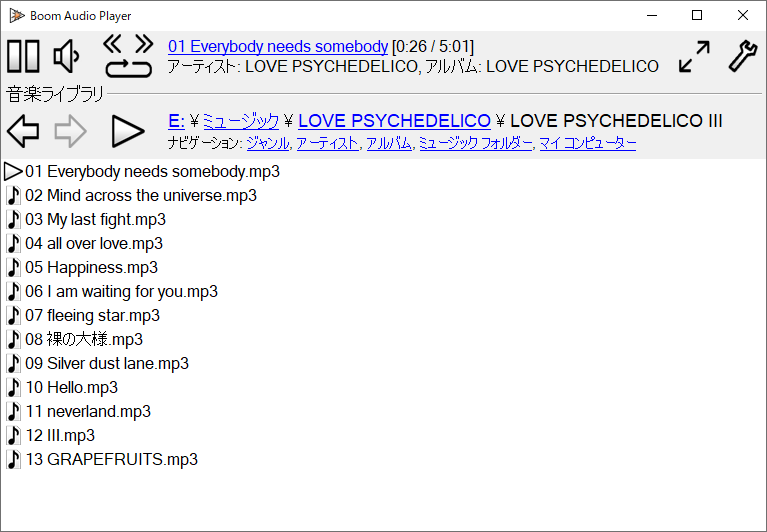
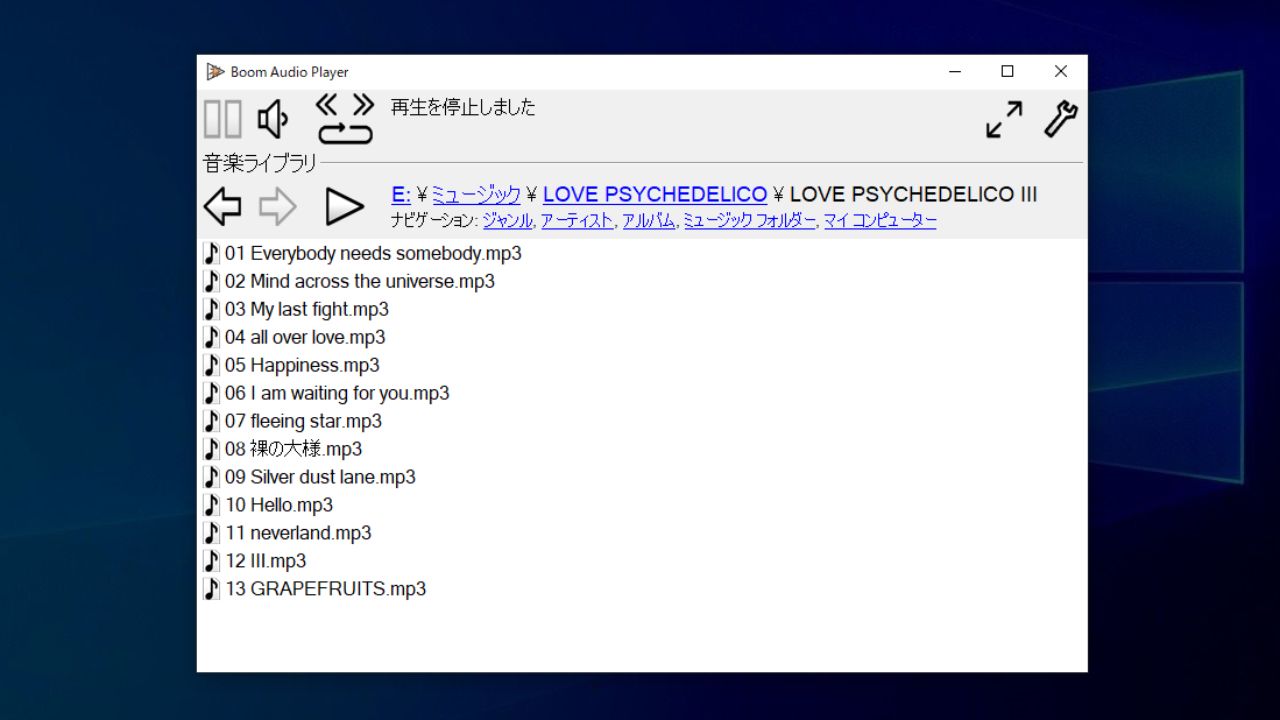
Boom Audio Player は、PC の音楽ファイルをかんたんに再生することができるミュージックプレーヤーです。デフォルトでは「マイミュージック」フォルダまたは Windows ミュージックライブラリフォルダの内容が表示されます。
Boom には、好みの音楽フォルダを追加することが可能で、フォルダ構造またはジャンル・アーティスト・アルバム名をクリックしてすばやく音楽ファイルを再生できます。
シンプルなプレーヤーを探している人に最適です
Boom Audio Player は、日本語を含む多言語で使用できる、多くのフォーマットに対応しているシンプルなオーディオプレイヤーです。USB メモリなどのリムーバブルメディアへ Boom をインストールすることもできます。
機能
- エンコードされたファイルのギャップレス再生。トラック間のスムーズな移行
- ReplayGain のサポート
- 音楽フォルダーの内容を、ジャンル/アーティスト/アルバムで表示
- リムーバブルメディアにインストール
- フォルダー構造によって音楽ライブラリを閲覧
- タグ付け
- 多言語サポート
対応形式:
- MP3, Ogg Vorbis, FLAC, Musepack(MPC), WavPack, WAV, AIFF, MP4 / M4A, WMA など
価格:無料
動作環境:Windows Vista|7|8|8.1|10
使用言語:日本語・英語ほか
最終更新日:
8か月前 (2025/09/18)
ダウンロード数:1115
画像

プレーヤー画面

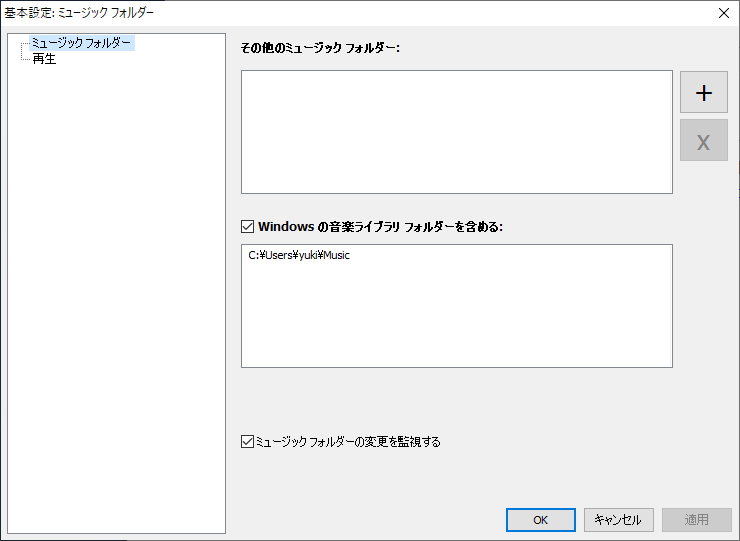
基本設定画面
使い方
インストール
1.プレーヤーを起動する
Boom Audio Player はインストールの必要なく使用できます。
- ダウンロードした EXE ファイルを実行するとプレーヤーを起動できます。
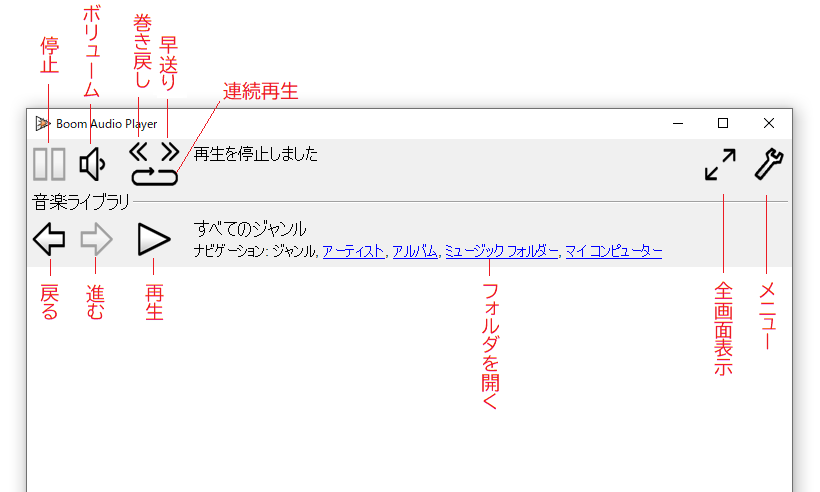
基本的な使い方。
1.インターフェース
2.メニュー
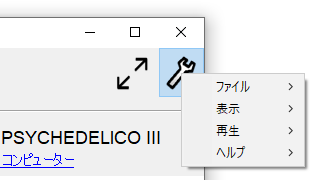
・ファイル:リムーバブルメディアへのインストール/基本設定/Boom の終了
・表示:テーマの変更/アルバムアートの表示の有効無効の切り替え
・再生:停止/一時停止/再生/前へ/次へ
・ヘルプ:バージョン情報/Boom Web サイト
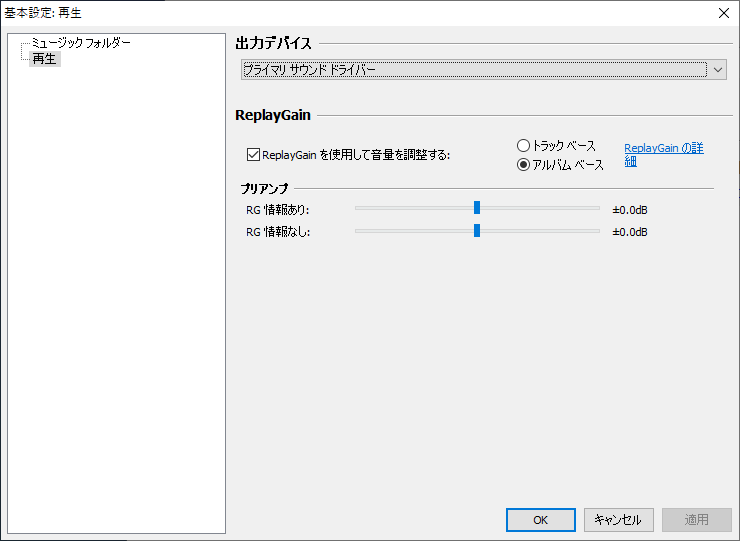
3.基本設定
「ファイル」メニューの「基本設定」を開くと、Boom の設定ができます。
- 「ミュージックフォルダー」では、Boom のウィンドウに表示するミュージックフォルダを追加できます。
- 「再生」では、出力デバイスの選択および「ReplayGain」の使用の設定ができます。
よくある質問と回答
ライセンスについて。