").attr(n.scriptAttrs||{}).prop({charset:n.scriptCharset,src:n.url}).on("load error",i=function(e){r.remove(),i=null,e&&t("error"===e.type?404:200,e.type)}),C.head.appendChild(r[0])},abort:function(){i&&i()}}});var Jt,Kt=[],Zt=/(=)\?(?=&|$)|\?\?/;ce.ajaxSetup({jsonp:"callback",jsonpCallback:function(){var e=Kt.pop()||ce.expando+"_"+jt.guid++;return this[e]=!0,e}}),ce.ajaxPrefilter("json jsonp",function(e,t,n){var r,i,o,a=!1!==e.jsonp&&(Zt.test(e.url)?"url":"string"==typeof e.data&&0===(e.contentType||"").indexOf("application/x-www-form-urlencoded")&&Zt.test(e.data)&&"data");if(a||"jsonp"===e.dataTypes[0])return r=e.jsonpCallback=v(e.jsonpCallback)?e.jsonpCallback():e.jsonpCallback,a?e[a]=e[a].replace(Zt,"$1"+r):!1!==e.jsonp&&(e.url+=(At.test(e.url)?"&":"?")+e.jsonp+"="+r),e.converters["script json"]=function(){return o||ce.error(r+" was not called"),o[0]},e.dataTypes[0]="json",i=ie[r],ie[r]=function(){o=arguments},n.always(function(){void 0===i?ce(ie).removeProp(r):ie[r]=i,e[r]&&(e.jsonpCallback=t.jsonpCallback,Kt.push(r)),o&&v(i)&&i(o[0]),o=i=void 0}),"script"}),le.createHTMLDocument=((Jt=C.implementation.createHTMLDocument("").body).innerHTML="
",2===Jt.childNodes.length),ce.parseHTML=function(e,t,n){return"string"!=typeof e?[]:("boolean"==typeof t&&(n=t,t=!1),t||(le.createHTMLDocument?((r=(t=C.implementation.createHTMLDocument("")).createElement("base")).href=C.location.href,t.head.appendChild(r)):t=C),o=!n&&[],(i=w.exec(e))?[t.createElement(i[1])]:(i=Ae([e],t,o),o&&o.length&&ce(o).remove(),ce.merge([],i.childNodes)));var r,i,o},ce.fn.load=function(e,t,n){var r,i,o,a=this,s=e.indexOf(" ");return-1").append(ce.parseHTML(e)).find(r):e)}).always(n&&function(e,t){a.each(function(){n.apply(this,o||[e.responseText,t,e])})}),this},ce.expr.pseudos.animated=function(t){return ce.grep(ce.timers,function(e){return t===e.elem}).length},ce.offset={setOffset:function(e,t,n){var r,i,o,a,s,u,l=ce.css(e,"position"),c=ce(e),f={};"static"===l&&(e.style.position="relative"),s=c.offset(),o=ce.css(e,"top"),u=ce.css(e,"left"),("absolute"===l||"fixed"===l)&&-1<(o+u).indexOf("auto")?(a=(r=c.position()).top,i=r.left):(a=parseFloat(o)||0,i=parseFloat(u)||0),v(t)&&(t=t.call(e,n,ce.extend({},s))),null!=t.top&&(f.top=t.top-s.top+a),null!=t.left&&(f.left=t.left-s.left+i),"using"in t?t.using.call(e,f):c.css(f)}},ce.fn.extend({offset:function(t){if(arguments.length)return void 0===t?this:this.each(function(e){ce.offset.setOffset(this,t,e)});var e,n,r=this[0];return r?r.getClientRects().length?(e=r.getBoundingClientRect(),n=r.ownerDocument.defaultView,{top:e.top+n.pageYOffset,left:e.left+n.pageXOffset}):{top:0,left:0}:void 0},position:function(){if(this[0]){var e,t,n,r=this[0],i={top:0,left:0};if("fixed"===ce.css(r,"position"))t=r.getBoundingClientRect();else{t=this.offset(),n=r.ownerDocument,e=r.offsetParent||n.documentElement;while(e&&(e===n.body||e===n.documentElement)&&"static"===ce.css(e,"position"))e=e.parentNode;e&&e!==r&&1===e.nodeType&&((i=ce(e).offset()).top+=ce.css(e,"borderTopWidth",!0),i.left+=ce.css(e,"borderLeftWidth",!0))}return{top:t.top-i.top-ce.css(r,"marginTop",!0),left:t.left-i.left-ce.css(r,"marginLeft",!0)}}},offsetParent:function(){return this.map(function(){var e=this.offsetParent;while(e&&"static"===ce.css(e,"position"))e=e.offsetParent;return e||J})}}),ce.each({scrollLeft:"pageXOffset",scrollTop:"pageYOffset"},function(t,i){var o="pageYOffset"===i;ce.fn[t]=function(e){return M(this,function(e,t,n){var r;if(y(e)?r=e:9===e.nodeType&&(r=e.defaultView),void 0===n)return r?r[i]:e[t];r?r.scrollTo(o?r.pageXOffset:n,o?n:r.pageYOffset):e[t]=n},t,e,arguments.length)}}),ce.each(["top","left"],function(e,n){ce.cssHooks[n]=Ye(le.pixelPosition,function(e,t){if(t)return t=Ge(e,n),_e.test(t)?ce(e).position()[n]+"px":t})}),ce.each({Height:"height",Width:"width"},function(a,s){ce.each({padding:"inner"+a,content:s,"":"outer"+a},function(r,o){ce.fn[o]=function(e,t){var n=arguments.length&&(r||"boolean"!=typeof e),i=r||(!0===e||!0===t?"margin":"border");return M(this,function(e,t,n){var r;return y(e)?0===o.indexOf("outer")?e["inner"+a]:e.document.documentElement["client"+a]:9===e.nodeType?(r=e.documentElement,Math.max(e.body["scroll"+a],r["scroll"+a],e.body["offset"+a],r["offset"+a],r["client"+a])):void 0===n?ce.css(e,t,i):ce.style(e,t,n,i)},s,n?e:void 0,n)}})}),ce.each(["ajaxStart","ajaxStop","ajaxComplete","ajaxError","ajaxSuccess","ajaxSend"],function(e,t){ce.fn[t]=function(e){return this.on(t,e)}}),ce.fn.extend({bind:function(e,t,n){return this.on(e,null,t,n)},unbind:function(e,t){return this.off(e,null,t)},delegate:function(e,t,n,r){return this.on(t,e,n,r)},undelegate:function(e,t,n){return 1===arguments.length?this.off(e,"**"):this.off(t,e||"**",n)},hover:function(e,t){return this.on("mouseenter",e).on("mouseleave",t||e)}}),ce.each("blur focus focusin focusout resize scroll click dblclick mousedown mouseup mousemove mouseover mouseout mouseenter mouseleave change select submit keydown keypress keyup contextmenu".split(" "),function(e,n){ce.fn[n]=function(e,t){return 0
Windows メディア作成ツール Win10/11 10.0.26100.7019
Windows OS
2019/03/12 08:492025/10/29 10:56
説明 機能 仕様 ダウンロード 画像 使い方
Windows 10 のインストール、アップグレードおよびメディア作成ツール
Windows 10 をダウンロードし、クリーンインストールに必要なインストールメディアの作成や再インストールを行なうことができる Microsoft 公式のツール。WIndows をダウンロードしてインストール用の DVD または USB フラッシュドライブを作成できます。
Windows 10 のインストールに必要なファイルをダウンロード
Windows メディア作成ツール(Windows Media Creation Tool)は、インターネット経由で Windows のインストールに必要な全てのファイルをダウンロードし、DVD に焼くための ISO イメージファイルまたは USB メディアを作成するファイル、セットアップに必要なファイルを準備します。メディア作成ツールは最新リリースの Windows 10 をダウンロードします。
新規インストールや再インストールに必要
このツールには、『この PC をアップグレードする』と『別の PC にインストールするインストールメディアを作成する』の 2 つのオプションがあります。
前者は、Windows 7 または Windows 8.1 からアップグレードした PC ライセンスを持っている場合と、Windows 10 のライセンス認証が完了した PC で、Windows 10 を再インストールする場合に適しています。
後者は、Windows XP または Windows Vista を実行している PC に Windows 10 をインストールする場合、または別の PC に Windows 10 をインストールするためにインストールメディアを作成する場合(新しいコピーのインストール、クリーンインストールの実行、Windows 10 の再インストール)に適しています。
インストール USB または DVD を作成
『別の PC にインストールするインストールメディアを作成する』を選択した場合は、USB にインストールするか、ISO イメージファイルをダウンロードするかのどちらかを選択できます。メディアの作成には空の DVD ディスク、または 8 GB以上の空き領域がある空の USB フラッシュドライブ(USB メモリ)が必要です。ISO をダウンロードした場合は ISO をマウントして PC に直接インストールすることもできます。
初心者でも使用できるシステムバックアップ&リカバリソフト
Windows メディア作成ツールは、PC に Windows 10 をインストールしたり、インストールメディアを持っていない場合に便利です。簡単に Windows 10 を展開するための起動可能なディスクまたはISOイメージを作成することができます。
機能
Windows 10 のインストール
Windows 10 のアップグレード
Windows 10 のインストールメディアの作成
価格: 無料
動作環境: Windows 7|8|8.1|10|11
使用言語: 日本語
最終更新日:
6か月前 (2025/10/29)
ダウンロード数: 3176
画像
使い方
USB の作成・ISO のダウンロード
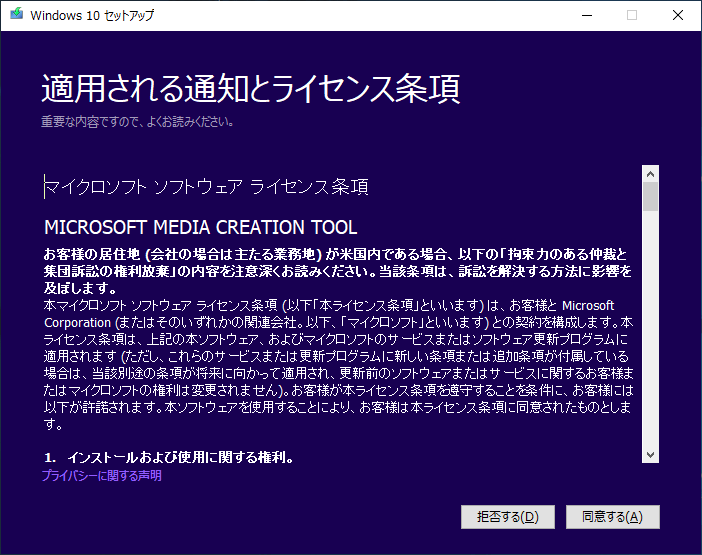
ツールを実行するとライセンスが表示されます、[同意する ]をクリックします。
ライセンスの確認(Windows メディア作成ツール)
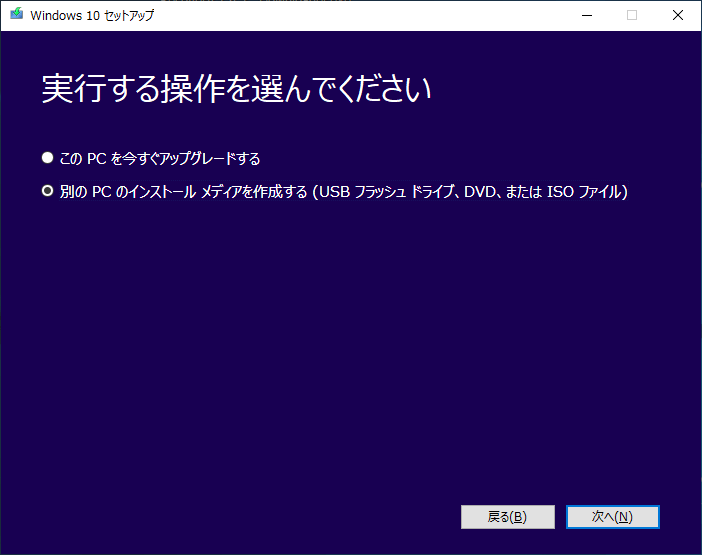
Windows 7 や Windows 8.1 から PC をアップグレードする、もしくは Windows 10 を再インストールする場合は「この PC を今すぐアップグレードする 」を選択して[次へ ]をクリック。
XP または Vista を実行している PC に Windows 10 をインストールする場合や、インストールメディアを作成する場合は「別の PC のインストール メディアを作成する (USB フラッシュ ドライブ、DVD、または ISO ファイル) 」を選択して[次へ ]をクリック。
操作・用途の選択(Windows メディア作成ツール)
「アップグレードする」を選択するとファイルのダウンロード後、セットアップが準備されます。
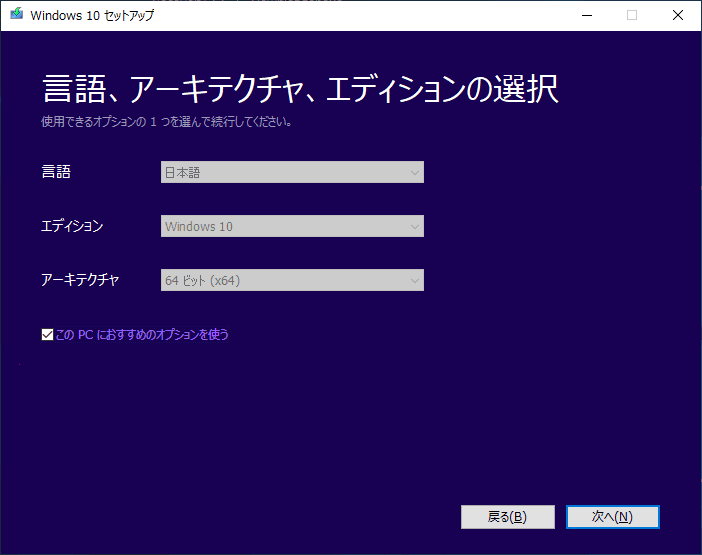
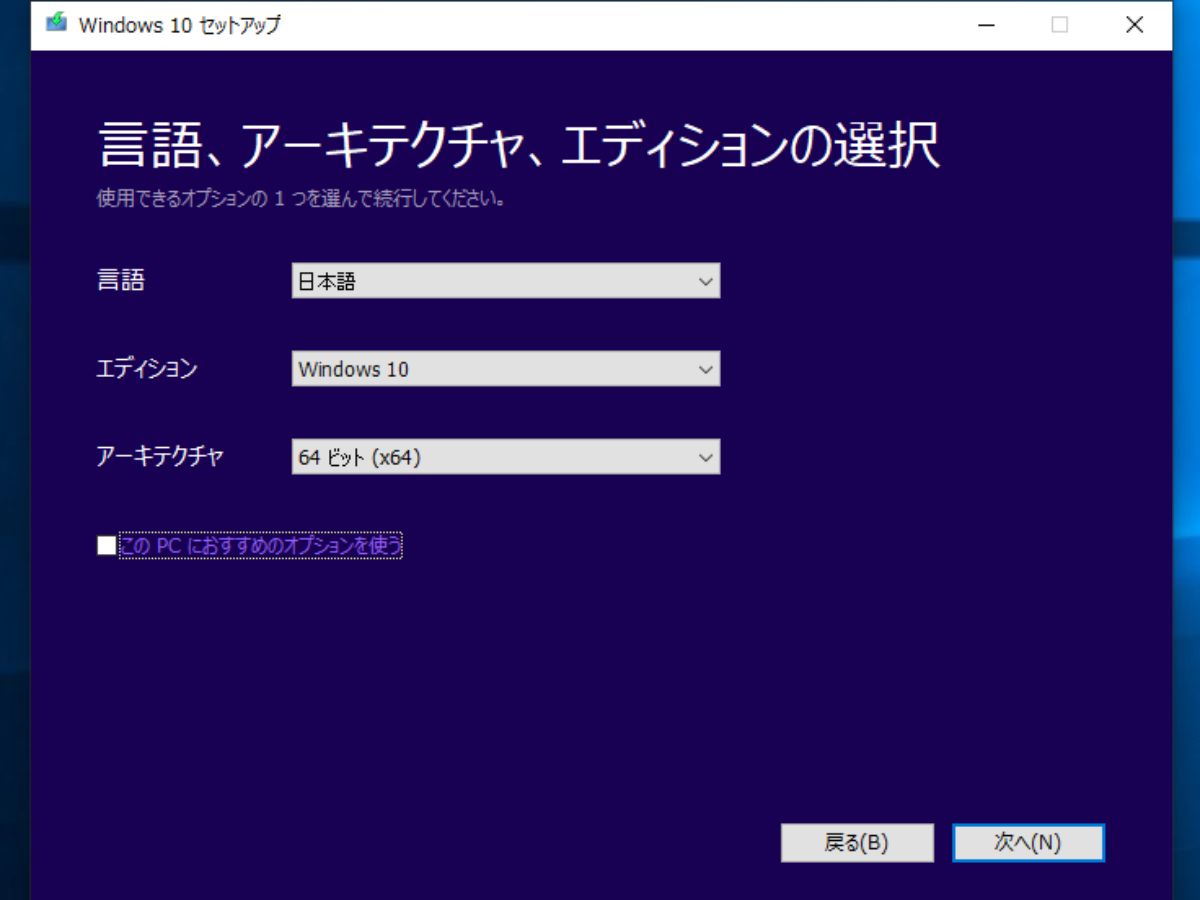
「別の PC のインストール メディアを作成する」を選択した後の画面です。言語・アーキテクチャ・エディションを確認または選択して[次へ ]をクリックします。
エディションの選択(Windows メディア作成ツール)
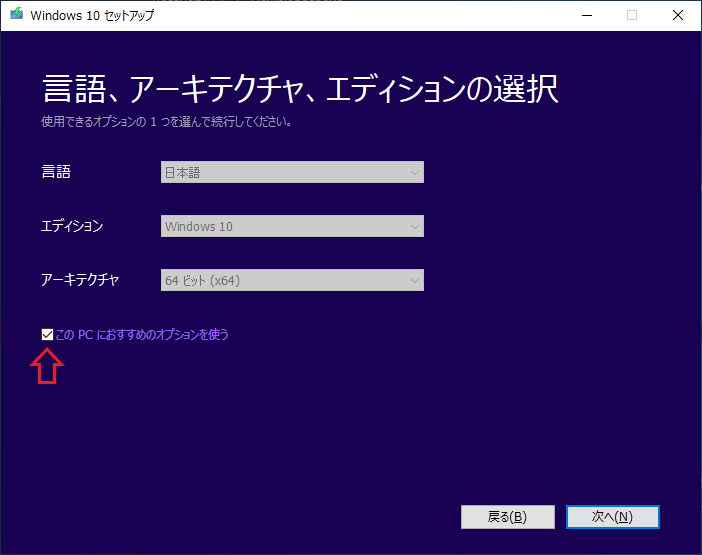
言語・アーキテクチャ・エディションは自動で選択されます。「この PC におすすめのオプションを使う」のチェックを外すと選択できます。
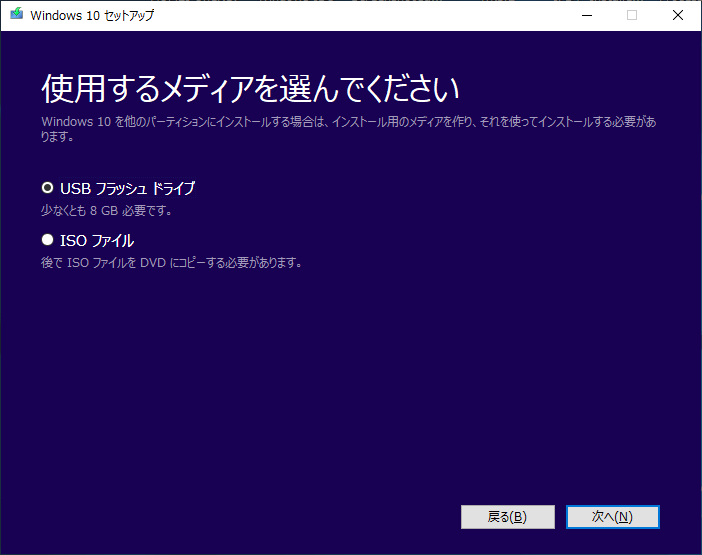
作成に使用するメディアを選択し、[次へ ]をクリックします。
USB・ISO の選択(Windows メディア作成ツール)
・USB に作成する場合は、8 GB 以上の空き領域がある空の USB フラッシュドライブが必要です。
・「ISO ファイル」を選択すると ISO イメージファイルでダウンロードできます。
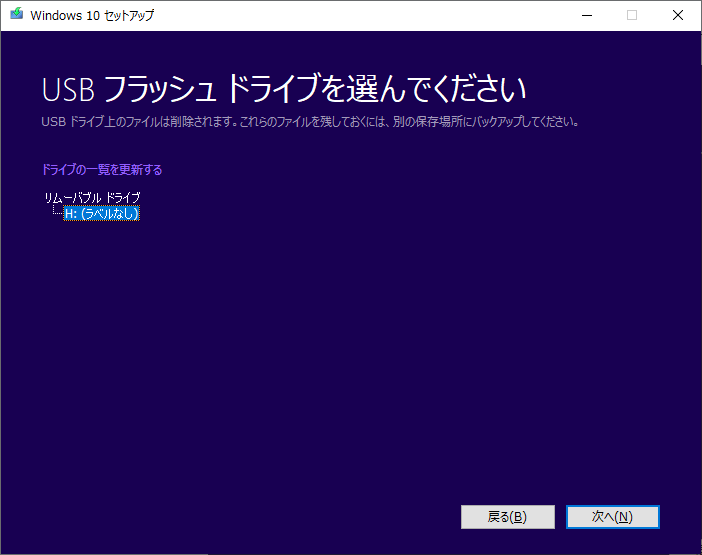
「USB フラッシュ ドライブ 」を選択した場合は、作成する USB ドライブを選択し[次へ ]をクリックするとダウンロードと作成が開始されます。
USB フラッシュドライブの選択(Windows メディア作成ツール)
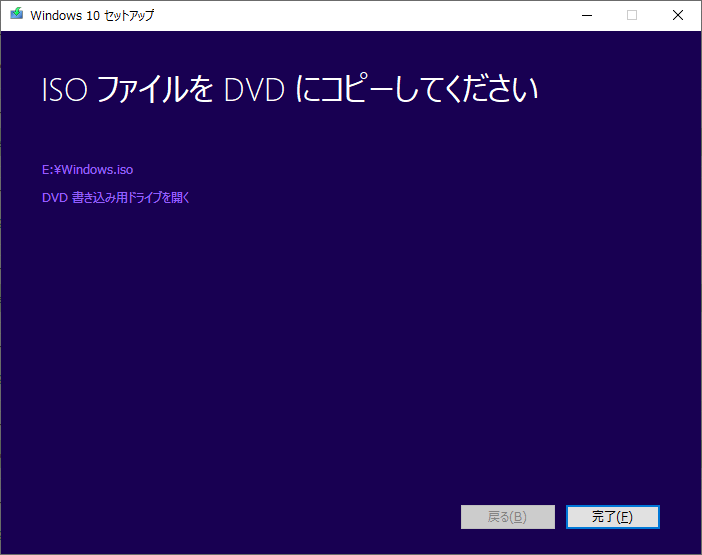
「ISO ファイル 」を選択した場合は、保存先を設定するとダウンロードが開始されます。ダウンロードが完了すると下の画面になるので、左上の ISO ファイルもしくはドライブへのリンク、または[完了 ]をクリックして終了します。
ISO ファイルのダウンロード完了時画面(Windows メディア作成ツール)
ISO から直接インストールする方法
DVD や USB を使用せずに、ISO ファイルから Windows 10 を直接インストールすることができます。
ダウンロードした ISO ファイルを右クリックして「プロパティ」を選択します。
「全般」 タブの「変更」をクリックし、.iso ファイルを開アプリで「エクスプローラー」を選択し、「OK」をクリックします。
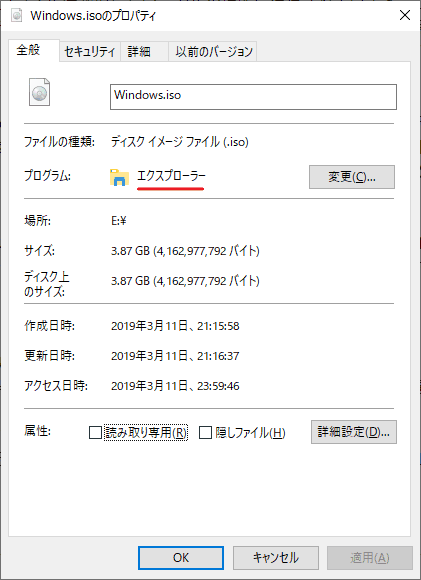
ISO からインストール(Windows メディア作成ツール)
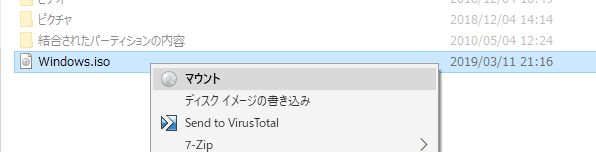
ISO ファイルを右クリックして、「マウント 」を選択します。(DVD に書き込む場合は「ディスクイメージの書き込み 」を選択します。)
ISO をマウント(Windows メディア作成ツール)
ISO ファイルをダブルクリックしてエクスプローラで開き、中の「setup.exe」をダブルクリックすると Windows 10 のセットアップが起動します。
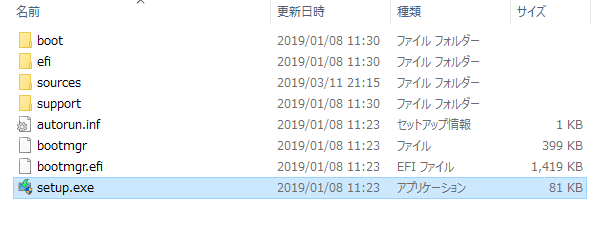
セットアップの起動(Windows メディア作成ツール)
よくある質問と回答
ライセンスが必要な場合とそうでない場合
ユーザーレビュー
レビューはまだありません、 最初のレビューを投稿してください。コメントは任意です。