").attr(n.scriptAttrs||{}).prop({charset:n.scriptCharset,src:n.url}).on("load error",i=function(e){r.remove(),i=null,e&&t("error"===e.type?404:200,e.type)}),C.head.appendChild(r[0])},abort:function(){i&&i()}}});var Jt,Kt=[],Zt=/(=)\?(?=&|$)|\?\?/;ce.ajaxSetup({jsonp:"callback",jsonpCallback:function(){var e=Kt.pop()||ce.expando+"_"+jt.guid++;return this[e]=!0,e}}),ce.ajaxPrefilter("json jsonp",function(e,t,n){var r,i,o,a=!1!==e.jsonp&&(Zt.test(e.url)?"url":"string"==typeof e.data&&0===(e.contentType||"").indexOf("application/x-www-form-urlencoded")&&Zt.test(e.data)&&"data");if(a||"jsonp"===e.dataTypes[0])return r=e.jsonpCallback=v(e.jsonpCallback)?e.jsonpCallback():e.jsonpCallback,a?e[a]=e[a].replace(Zt,"$1"+r):!1!==e.jsonp&&(e.url+=(At.test(e.url)?"&":"?")+e.jsonp+"="+r),e.converters["script json"]=function(){return o||ce.error(r+" was not called"),o[0]},e.dataTypes[0]="json",i=ie[r],ie[r]=function(){o=arguments},n.always(function(){void 0===i?ce(ie).removeProp(r):ie[r]=i,e[r]&&(e.jsonpCallback=t.jsonpCallback,Kt.push(r)),o&&v(i)&&i(o[0]),o=i=void 0}),"script"}),le.createHTMLDocument=((Jt=C.implementation.createHTMLDocument("").body).innerHTML="
",2===Jt.childNodes.length),ce.parseHTML=function(e,t,n){return"string"!=typeof e?[]:("boolean"==typeof t&&(n=t,t=!1),t||(le.createHTMLDocument?((r=(t=C.implementation.createHTMLDocument("")).createElement("base")).href=C.location.href,t.head.appendChild(r)):t=C),o=!n&&[],(i=w.exec(e))?[t.createElement(i[1])]:(i=Ae([e],t,o),o&&o.length&&ce(o).remove(),ce.merge([],i.childNodes)));var r,i,o},ce.fn.load=function(e,t,n){var r,i,o,a=this,s=e.indexOf(" ");return-1").append(ce.parseHTML(e)).find(r):e)}).always(n&&function(e,t){a.each(function(){n.apply(this,o||[e.responseText,t,e])})}),this},ce.expr.pseudos.animated=function(t){return ce.grep(ce.timers,function(e){return t===e.elem}).length},ce.offset={setOffset:function(e,t,n){var r,i,o,a,s,u,l=ce.css(e,"position"),c=ce(e),f={};"static"===l&&(e.style.position="relative"),s=c.offset(),o=ce.css(e,"top"),u=ce.css(e,"left"),("absolute"===l||"fixed"===l)&&-1<(o+u).indexOf("auto")?(a=(r=c.position()).top,i=r.left):(a=parseFloat(o)||0,i=parseFloat(u)||0),v(t)&&(t=t.call(e,n,ce.extend({},s))),null!=t.top&&(f.top=t.top-s.top+a),null!=t.left&&(f.left=t.left-s.left+i),"using"in t?t.using.call(e,f):c.css(f)}},ce.fn.extend({offset:function(t){if(arguments.length)return void 0===t?this:this.each(function(e){ce.offset.setOffset(this,t,e)});var e,n,r=this[0];return r?r.getClientRects().length?(e=r.getBoundingClientRect(),n=r.ownerDocument.defaultView,{top:e.top+n.pageYOffset,left:e.left+n.pageXOffset}):{top:0,left:0}:void 0},position:function(){if(this[0]){var e,t,n,r=this[0],i={top:0,left:0};if("fixed"===ce.css(r,"position"))t=r.getBoundingClientRect();else{t=this.offset(),n=r.ownerDocument,e=r.offsetParent||n.documentElement;while(e&&(e===n.body||e===n.documentElement)&&"static"===ce.css(e,"position"))e=e.parentNode;e&&e!==r&&1===e.nodeType&&((i=ce(e).offset()).top+=ce.css(e,"borderTopWidth",!0),i.left+=ce.css(e,"borderLeftWidth",!0))}return{top:t.top-i.top-ce.css(r,"marginTop",!0),left:t.left-i.left-ce.css(r,"marginLeft",!0)}}},offsetParent:function(){return this.map(function(){var e=this.offsetParent;while(e&&"static"===ce.css(e,"position"))e=e.offsetParent;return e||J})}}),ce.each({scrollLeft:"pageXOffset",scrollTop:"pageYOffset"},function(t,i){var o="pageYOffset"===i;ce.fn[t]=function(e){return M(this,function(e,t,n){var r;if(y(e)?r=e:9===e.nodeType&&(r=e.defaultView),void 0===n)return r?r[i]:e[t];r?r.scrollTo(o?r.pageXOffset:n,o?n:r.pageYOffset):e[t]=n},t,e,arguments.length)}}),ce.each(["top","left"],function(e,n){ce.cssHooks[n]=Ye(le.pixelPosition,function(e,t){if(t)return t=Ge(e,n),_e.test(t)?ce(e).position()[n]+"px":t})}),ce.each({Height:"height",Width:"width"},function(a,s){ce.each({padding:"inner"+a,content:s,"":"outer"+a},function(r,o){ce.fn[o]=function(e,t){var n=arguments.length&&(r||"boolean"!=typeof e),i=r||(!0===e||!0===t?"margin":"border");return M(this,function(e,t,n){var r;return y(e)?0===o.indexOf("outer")?e["inner"+a]:e.document.documentElement["client"+a]:9===e.nodeType?(r=e.documentElement,Math.max(e.body["scroll"+a],r["scroll"+a],e.body["offset"+a],r["offset"+a],r["client"+a])):void 0===n?ce.css(e,t,i):ce.style(e,t,n,i)},s,n?e:void 0,n)}})}),ce.each(["ajaxStart","ajaxStop","ajaxComplete","ajaxError","ajaxSuccess","ajaxSend"],function(e,t){ce.fn[t]=function(e){return this.on(t,e)}}),ce.fn.extend({bind:function(e,t,n){return this.on(e,null,t,n)},unbind:function(e,t){return this.off(e,null,t)},delegate:function(e,t,n,r){return this.on(t,e,n,r)},undelegate:function(e,t,n){return 1===arguments.length?this.off(e,"**"):this.off(t,e||"**",n)},hover:function(e,t){return this.on("mouseenter",e).on("mouseleave",t||e)}}),ce.each("blur focus focusin focusout resize scroll click dblclick mousedown mouseup mousemove mouseover mouseout mouseenter mouseleave change select submit keydown keypress keyup contextmenu".split(" "),function(e,n){ce.fn[n]=function(e,t){return 0
Windows 11 Classic Context Menu 1.2
Windows 設定変更
2021/10/10 10:13
説明機能仕様ダウンロード画像使い方
Windows 11 の右クリックメニューを従来のスタイルに変更するユーティリティ

Windows 11 のコンテキストメニュー(右クリックメニュー)を、従来の(Windows 10 までのような)クラシックスタイルに変更するアプリケーション。
Windows 11 Classic Context Menu の概要
Windows 11 Classic Context Menu は、Windows 11 のコンテキストメニューをクラシックスタイルに変更するユーティリティです。
Windows 11 Classic Context Menu の機能
Windows 11 Classic Context Menu の主な機能です。
| 機能 |
概要 |
| メイン機能 |
Windows 11 のコンテキストメニューをクラシックスタイルに変更 |
| 機能詳細 |
・コンテキストメニューをクラシックスタイルに変更
・Windows 11 のデフォルトに戻す |
Windows 11 の右クリックメニューを従来のスタイルに変更します
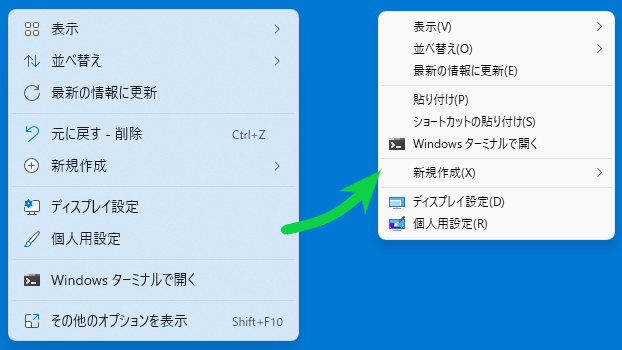
Windows 11 では、デスクトップやファイルの右クリックで表示されるコンテキストメニューのデザインの変更が行われ、一部のオプションが非表示になるように変更されました。
Windows 11 Classic Context Menu を使用すると、Windows 11 のコンテキストメニューを、Windows 10 までのような従来のクラシックなスタイルに変更することができます。
ワンクリックで変更または元に戻すことができます
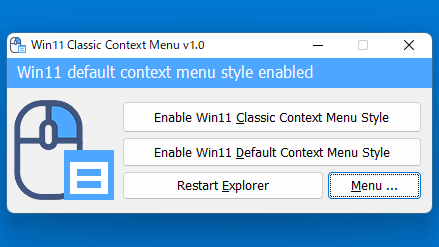
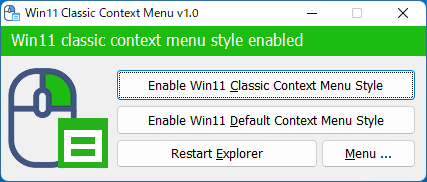
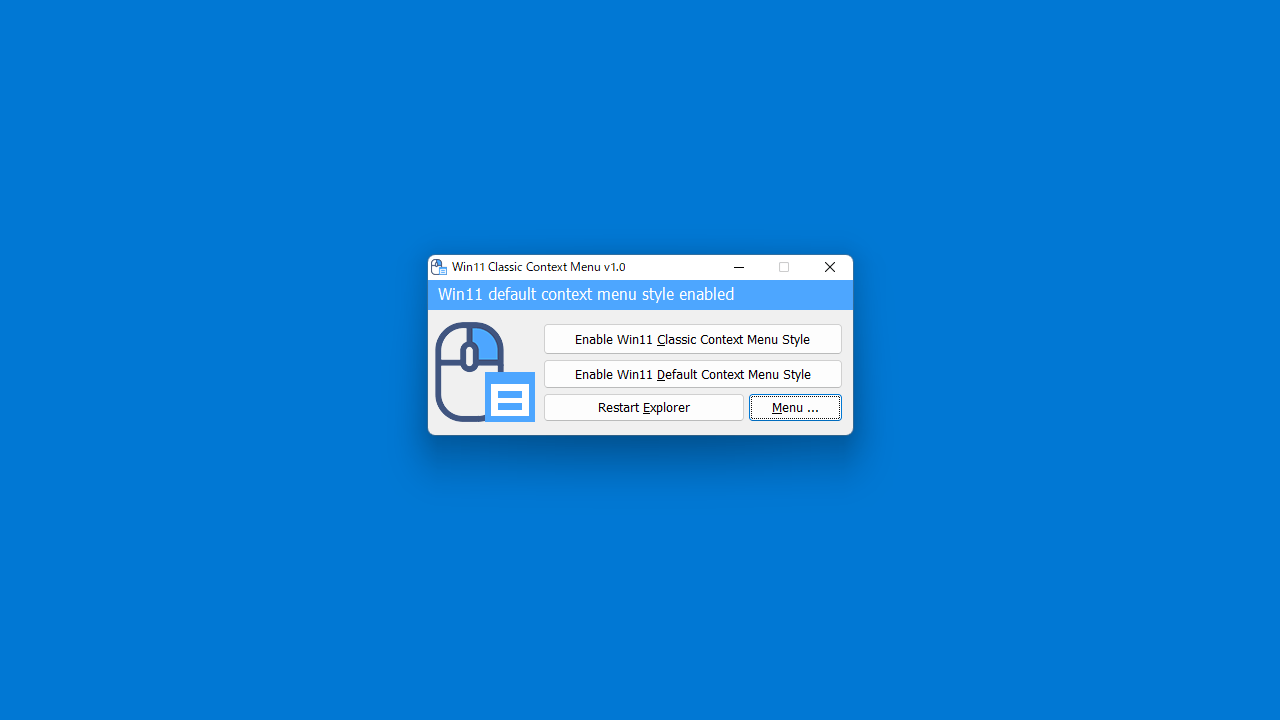
Windows 11 Classic Context Menu の使い方はかんたんで、ボタンをクリックするだけで、コンテキストメニューをクラシックスタイルに変更できます(変更の適用に必要なエクスプローラの再起動も行うことができます)。
また、ワンクリックで Windows 11 のデフォルトのコンテキストメニューに戻すことができるので、どちらが使いやすいかを試すことができます。
有用な WIndows 11 カスタマイズツールのひとつ
Windows 11 Classic Context Menu は、Windows 11 のコンテキストメニューの不便さを解消し、PC 作業を効率化することができる便利なアプリケーションです。
機能
- Windows 11 のコンテキストメニューをクラシック(従来の)スタイルに変更する
価格:無料
動作環境:Windows 11
使用言語:英語
最終更新日:
3年前 (2023/07/28)
ダウンロード数:889
画像

ユーザーインターフェース

クラシックコンテキストメニュー適用後

変更前後のイメージ
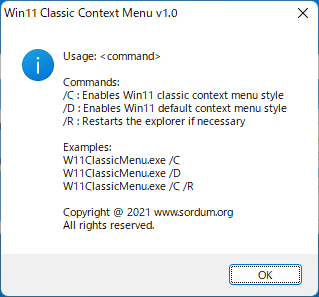
コマンドライン
使い方
インストール
1.インストール方法
Windows 11 Classic Context Menu はインストール不要で使用できます。
- ダウンロードした ZIP ファイルを解凍し、「W11ClassicMenu.exe」ファイルを実行するとアプリケーションを使用できます

基本的な使い方
1.コンテキストメニューをクラシックにする
- コンテキストメニューをクラシック(従来の)スタイルに変更するには、上の[Enable Windows 11 Classic Context Menu Style]ボタンをクリックします。
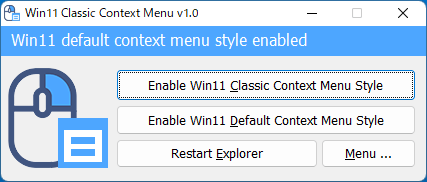
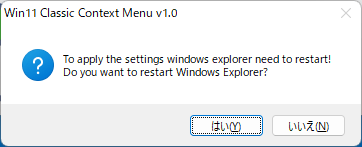
- 確認画面が表示されるので、[はい]をクリックしてエクスプローラを再起動するとコンテキストメニューが変更されます。
2.元のコンテキストメニューに戻す
- 元の(Windows 11 デフォルトの)コンテキストメニューに戻すには、下の[Enable Windows 11 Default Context Menu Style]ボタンをクリックします。

3.コマンドライン引数
- [Menu]>「Command Line Info」を選択すると、利用可能なコマンドラインオプションを確認できます。
よくある質問と回答
ライセンスについて。
Windows 11 Classic Context Menu は、どなたでも無料で使用できます。