").attr(n.scriptAttrs||{}).prop({charset:n.scriptCharset,src:n.url}).on("load error",i=function(e){r.remove(),i=null,e&&t("error"===e.type?404:200,e.type)}),C.head.appendChild(r[0])},abort:function(){i&&i()}}});var Jt,Kt=[],Zt=/(=)\?(?=&|$)|\?\?/;ce.ajaxSetup({jsonp:"callback",jsonpCallback:function(){var e=Kt.pop()||ce.expando+"_"+jt.guid++;return this[e]=!0,e}}),ce.ajaxPrefilter("json jsonp",function(e,t,n){var r,i,o,a=!1!==e.jsonp&&(Zt.test(e.url)?"url":"string"==typeof e.data&&0===(e.contentType||"").indexOf("application/x-www-form-urlencoded")&&Zt.test(e.data)&&"data");if(a||"jsonp"===e.dataTypes[0])return r=e.jsonpCallback=v(e.jsonpCallback)?e.jsonpCallback():e.jsonpCallback,a?e[a]=e[a].replace(Zt,"$1"+r):!1!==e.jsonp&&(e.url+=(At.test(e.url)?"&":"?")+e.jsonp+"="+r),e.converters["script json"]=function(){return o||ce.error(r+" was not called"),o[0]},e.dataTypes[0]="json",i=ie[r],ie[r]=function(){o=arguments},n.always(function(){void 0===i?ce(ie).removeProp(r):ie[r]=i,e[r]&&(e.jsonpCallback=t.jsonpCallback,Kt.push(r)),o&&v(i)&&i(o[0]),o=i=void 0}),"script"}),le.createHTMLDocument=((Jt=C.implementation.createHTMLDocument("").body).innerHTML="
",2===Jt.childNodes.length),ce.parseHTML=function(e,t,n){return"string"!=typeof e?[]:("boolean"==typeof t&&(n=t,t=!1),t||(le.createHTMLDocument?((r=(t=C.implementation.createHTMLDocument("")).createElement("base")).href=C.location.href,t.head.appendChild(r)):t=C),o=!n&&[],(i=w.exec(e))?[t.createElement(i[1])]:(i=Ae([e],t,o),o&&o.length&&ce(o).remove(),ce.merge([],i.childNodes)));var r,i,o},ce.fn.load=function(e,t,n){var r,i,o,a=this,s=e.indexOf(" ");return-1").append(ce.parseHTML(e)).find(r):e)}).always(n&&function(e,t){a.each(function(){n.apply(this,o||[e.responseText,t,e])})}),this},ce.expr.pseudos.animated=function(t){return ce.grep(ce.timers,function(e){return t===e.elem}).length},ce.offset={setOffset:function(e,t,n){var r,i,o,a,s,u,l=ce.css(e,"position"),c=ce(e),f={};"static"===l&&(e.style.position="relative"),s=c.offset(),o=ce.css(e,"top"),u=ce.css(e,"left"),("absolute"===l||"fixed"===l)&&-1<(o+u).indexOf("auto")?(a=(r=c.position()).top,i=r.left):(a=parseFloat(o)||0,i=parseFloat(u)||0),v(t)&&(t=t.call(e,n,ce.extend({},s))),null!=t.top&&(f.top=t.top-s.top+a),null!=t.left&&(f.left=t.left-s.left+i),"using"in t?t.using.call(e,f):c.css(f)}},ce.fn.extend({offset:function(t){if(arguments.length)return void 0===t?this:this.each(function(e){ce.offset.setOffset(this,t,e)});var e,n,r=this[0];return r?r.getClientRects().length?(e=r.getBoundingClientRect(),n=r.ownerDocument.defaultView,{top:e.top+n.pageYOffset,left:e.left+n.pageXOffset}):{top:0,left:0}:void 0},position:function(){if(this[0]){var e,t,n,r=this[0],i={top:0,left:0};if("fixed"===ce.css(r,"position"))t=r.getBoundingClientRect();else{t=this.offset(),n=r.ownerDocument,e=r.offsetParent||n.documentElement;while(e&&(e===n.body||e===n.documentElement)&&"static"===ce.css(e,"position"))e=e.parentNode;e&&e!==r&&1===e.nodeType&&((i=ce(e).offset()).top+=ce.css(e,"borderTopWidth",!0),i.left+=ce.css(e,"borderLeftWidth",!0))}return{top:t.top-i.top-ce.css(r,"marginTop",!0),left:t.left-i.left-ce.css(r,"marginLeft",!0)}}},offsetParent:function(){return this.map(function(){var e=this.offsetParent;while(e&&"static"===ce.css(e,"position"))e=e.offsetParent;return e||J})}}),ce.each({scrollLeft:"pageXOffset",scrollTop:"pageYOffset"},function(t,i){var o="pageYOffset"===i;ce.fn[t]=function(e){return M(this,function(e,t,n){var r;if(y(e)?r=e:9===e.nodeType&&(r=e.defaultView),void 0===n)return r?r[i]:e[t];r?r.scrollTo(o?r.pageXOffset:n,o?n:r.pageYOffset):e[t]=n},t,e,arguments.length)}}),ce.each(["top","left"],function(e,n){ce.cssHooks[n]=Ye(le.pixelPosition,function(e,t){if(t)return t=Ge(e,n),_e.test(t)?ce(e).position()[n]+"px":t})}),ce.each({Height:"height",Width:"width"},function(a,s){ce.each({padding:"inner"+a,content:s,"":"outer"+a},function(r,o){ce.fn[o]=function(e,t){var n=arguments.length&&(r||"boolean"!=typeof e),i=r||(!0===e||!0===t?"margin":"border");return M(this,function(e,t,n){var r;return y(e)?0===o.indexOf("outer")?e["inner"+a]:e.document.documentElement["client"+a]:9===e.nodeType?(r=e.documentElement,Math.max(e.body["scroll"+a],r["scroll"+a],e.body["offset"+a],r["offset"+a],r["client"+a])):void 0===n?ce.css(e,t,i):ce.style(e,t,n,i)},s,n?e:void 0,n)}})}),ce.each(["ajaxStart","ajaxStop","ajaxComplete","ajaxError","ajaxSuccess","ajaxSend"],function(e,t){ce.fn[t]=function(e){return this.on(t,e)}}),ce.fn.extend({bind:function(e,t,n){return this.on(e,null,t,n)},unbind:function(e,t){return this.off(e,null,t)},delegate:function(e,t,n,r){return this.on(t,e,n,r)},undelegate:function(e,t,n){return 1===arguments.length?this.off(e,"**"):this.off(t,e||"**",n)},hover:function(e,t){return this.on("mouseenter",e).on("mouseleave",t||e)}}),ce.each("blur focus focusin focusout resize scroll click dblclick mousedown mouseup mousemove mouseover mouseout mouseenter mouseleave change select submit keydown keypress keyup contextmenu".split(" "),function(e,n){ce.fn[n]=function(e,t){return 0
Attribute Changer 11.40b
ファイル管理
2021/05/24 13:15
説明機能仕様ダウンロード画像使い方
ファイルの属性と日時を変更することができるフリーソフト

ファイルの属性と日付と時刻を変更することができる Windows 向けのフリーソフト。ファイル/フォルダの右クリックメニューから使用可能で、複数のファイルの属性やタイムスタンプを一括変更することができます。

Attribute Changer の概要
Attribute Changer は、ファイルの属性と日付と時刻を変更することができる、Windows エクスプローラのアドオンです。
Attribute Changer の機能
Attribute Changer の主な機能です。
| 機能 |
概要 |
| メイン機能 |
・ファイルの属性の変更
・ファイル/フォルダの日時の変更
・ファイル名(大文字/小文字)の変更 |
| オプション機能 |
・属性、日時、サイズ、ファイル名でフィルタリング
・シミュレーションモード |
ファイルの属性と日時を変更できます
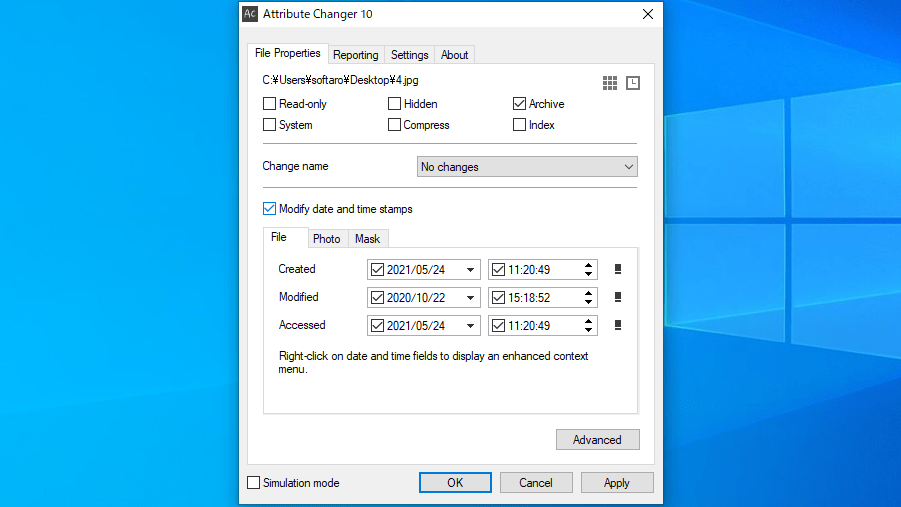
Attribute Changer は、Windows エクスプローラのファイルとフォルダの右クリックメニューから、ファイルの属性を変更したり、ファイルやフォルダの日付と時刻を変更することができるフリーソフトです。
通常のファイルまたはフォルダのほかに、JPG ファイルなどのデジタル写真に保存されている EXIF 情報の日付と時刻変更することもできます。
フィルター機能を使用して変更できます
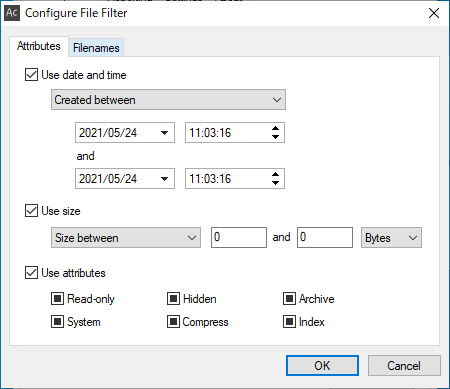
Attribute Changer では、フォルダ内のサブフォルダを含む複数のファイルの属性や日時を一括変更することもでき、ファイルの日時やファイルサイズ、ファイル属性のフィルターを使用して、特定のファイルを除外または含めることができます。
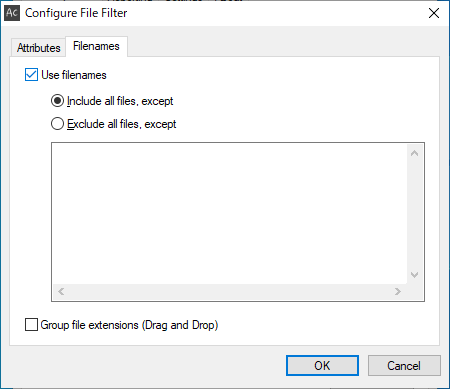
また、ワイルドカードを使用して特定のファイル名やフォルダ名を除外または包含することもできます。
フォルダ、ファイル、ドライブの右クリックから使用できます
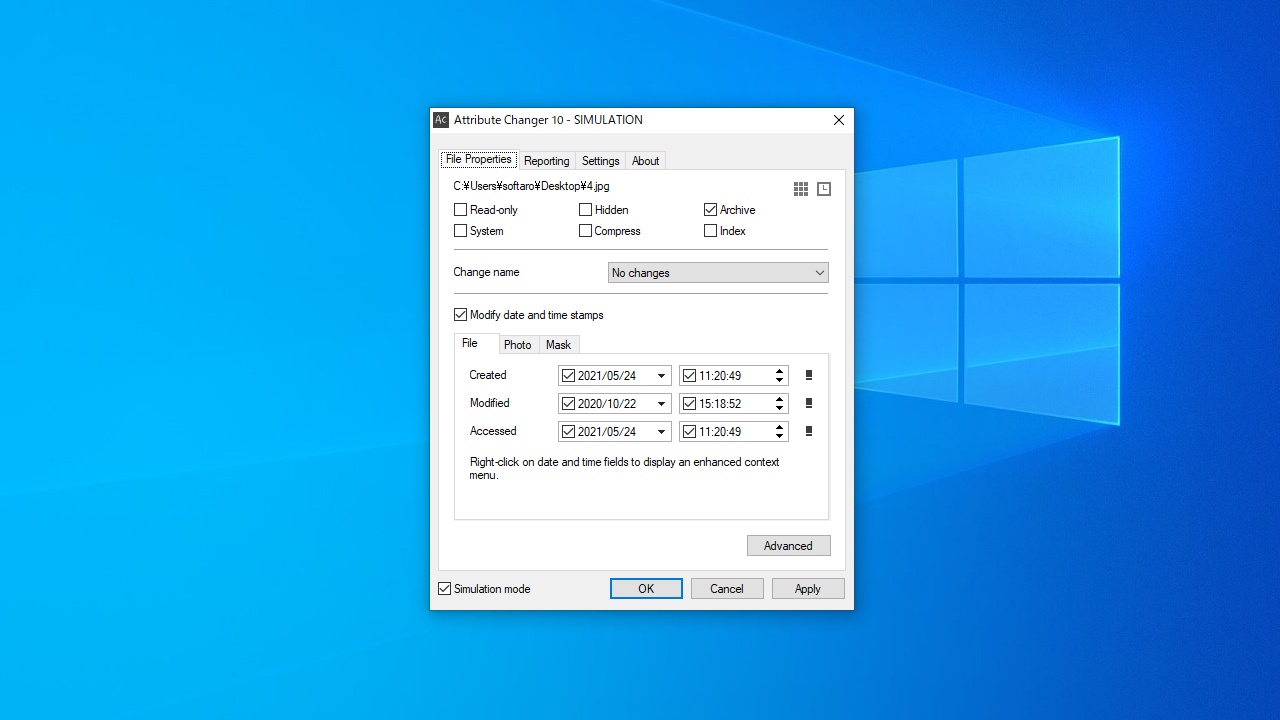
Attribute Changer は、ファイルの属性だけでなく、日付と時刻のスタンプを変更することができる便利なアプリケーションです。シミュレーションモードを使用すると、変更を適用する前に変更をプレビューできるので、失敗なくファイルを操作できます。
機能
- ファイル/フォルダの属性を変更できます
- Windows エクスプローラ:ファイル、フォルダーまたはドライブの右クリックメニューから使用できます
- フィルター:属性、日付、時刻、サイズ、ファイル名またはフォルダ名のワイルドカードなどの複数の基準に基づいてオブジェクトを除外または含めることができます
- ファイル/フォルダの日付とタイムスタンプを変更できます
- 写真の日付とタイムスタンプ:EXIF 情報を変更できます
- レポート:すべてのアクティビティをリアルタイムでログに記録します
- シミュレーション:変更が適用される前に、詳細なレポートウィンドウですべての変更をプレビューできます
価格:無料
動作環境:Windows 7|8|8.1|10|11
使用言語:英語
最終更新日:
9か月前 (2025/08/13)
ダウンロード数:820
画像

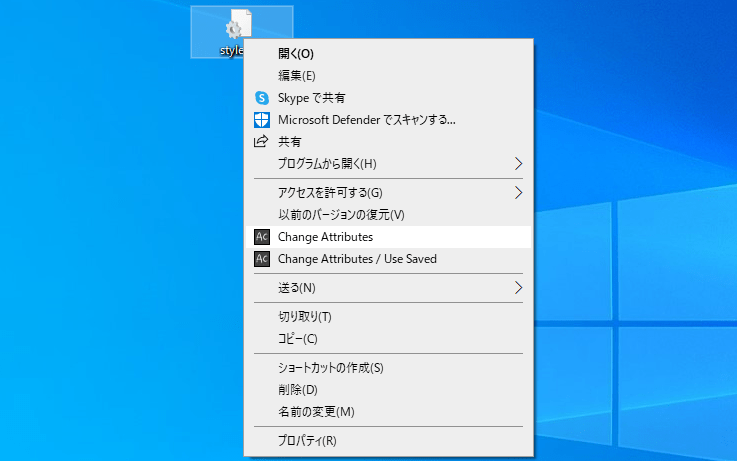
コンテキストメニュー

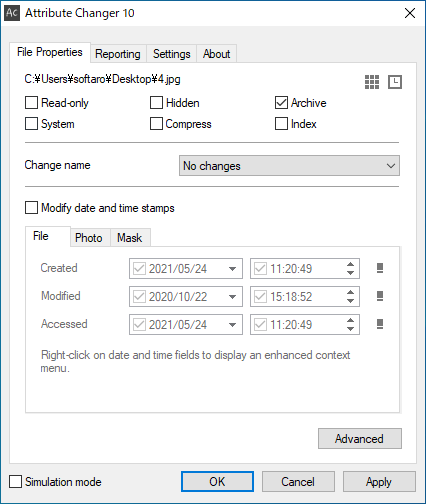
ファイル属性の変更

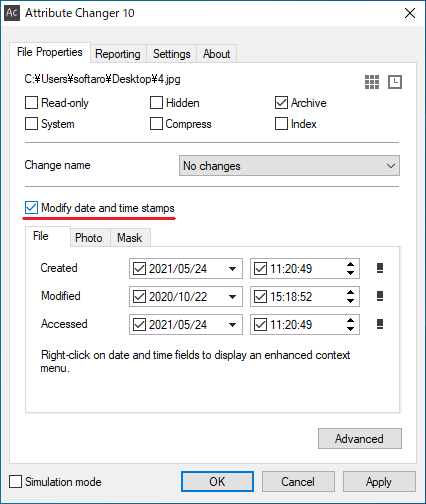
ファイルの日時の変更

Advanced オプション
Advanced オプション
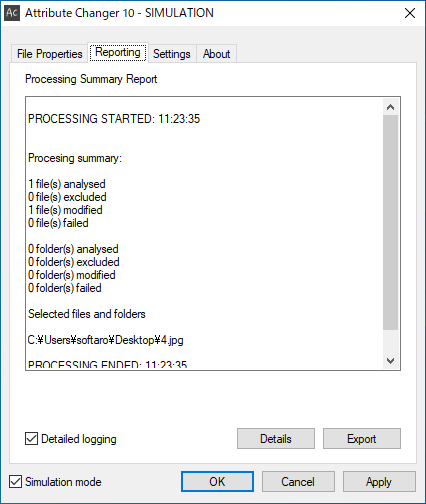
レポートの表示
使い方
インストール
1.インストール方法
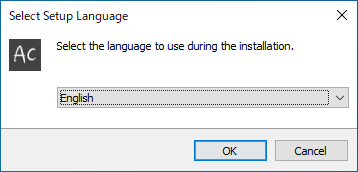
- インストーラを実行したら、言語を選択して[OK]をクリックします。
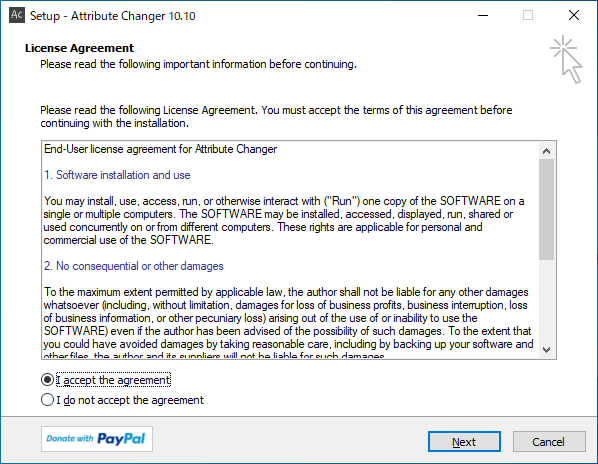
- ライセンスが表示されます。「I accept the agreement」を選択して[Next]をクリックします。
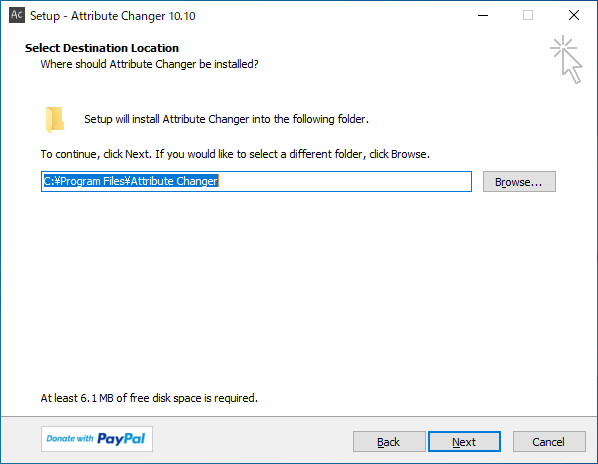
- インストール先を指定して[Next]をクリックします。
- インストールの準備ができました。[Install]をクリックしてインストールを開始します。
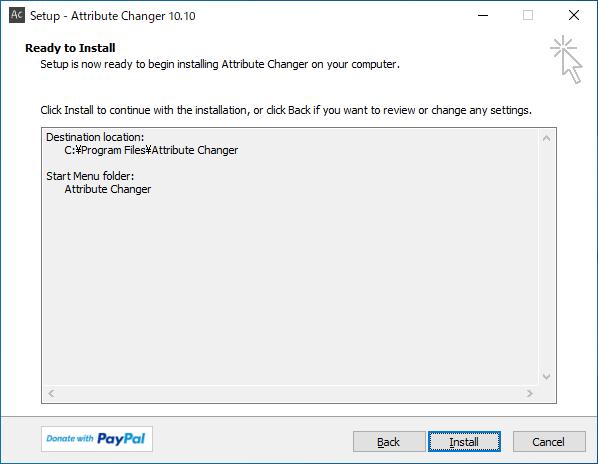
- インストールが完了しました。[Finish]をクリックしてセットアップウィザードを閉じます。

基本的な使い方
1.コンテキストメニュー
- ファイルのコンテキストメニューから「Change Attribute」を選択すると使用できます。

2.ファイルの属性を変更する
- 「File Properties」の上部でファイルの属性の変更と、ファイル名の変更ができます。

3.ファイルの日時を変更する
- 「Modify date and time stamps」をチェックすると、ファイルのタイムスタンプを変更できます。

4.Advanced オプション(ファイルフィルター)
[Advanced]ボタンをクリックすると、ファイルフィルターを使用できます。
- 「Attributes」タブでは、属性、日付、時刻、サイズ、に基づいてオブジェクトを含めたり除外したりできます。

- 「Filename」タブでは、名前のワイルドカードに基づいてオブジェクトを含めたり除外したりできます。

5.レポート
- 「Report」では、成功した変更や失敗した変更など、すべてのアクティビティの完全なビューをリアルタイムで表示できます。

よくある質問と回答
ライセンスについて。
Attribute Changer は、どなたでも無料で使用できます。