").attr(n.scriptAttrs||{}).prop({charset:n.scriptCharset,src:n.url}).on("load error",i=function(e){r.remove(),i=null,e&&t("error"===e.type?404:200,e.type)}),C.head.appendChild(r[0])},abort:function(){i&&i()}}});var Jt,Kt=[],Zt=/(=)\?(?=&|$)|\?\?/;ce.ajaxSetup({jsonp:"callback",jsonpCallback:function(){var e=Kt.pop()||ce.expando+"_"+jt.guid++;return this[e]=!0,e}}),ce.ajaxPrefilter("json jsonp",function(e,t,n){var r,i,o,a=!1!==e.jsonp&&(Zt.test(e.url)?"url":"string"==typeof e.data&&0===(e.contentType||"").indexOf("application/x-www-form-urlencoded")&&Zt.test(e.data)&&"data");if(a||"jsonp"===e.dataTypes[0])return r=e.jsonpCallback=v(e.jsonpCallback)?e.jsonpCallback():e.jsonpCallback,a?e[a]=e[a].replace(Zt,"$1"+r):!1!==e.jsonp&&(e.url+=(At.test(e.url)?"&":"?")+e.jsonp+"="+r),e.converters["script json"]=function(){return o||ce.error(r+" was not called"),o[0]},e.dataTypes[0]="json",i=ie[r],ie[r]=function(){o=arguments},n.always(function(){void 0===i?ce(ie).removeProp(r):ie[r]=i,e[r]&&(e.jsonpCallback=t.jsonpCallback,Kt.push(r)),o&&v(i)&&i(o[0]),o=i=void 0}),"script"}),le.createHTMLDocument=((Jt=C.implementation.createHTMLDocument("").body).innerHTML="
",2===Jt.childNodes.length),ce.parseHTML=function(e,t,n){return"string"!=typeof e?[]:("boolean"==typeof t&&(n=t,t=!1),t||(le.createHTMLDocument?((r=(t=C.implementation.createHTMLDocument("")).createElement("base")).href=C.location.href,t.head.appendChild(r)):t=C),o=!n&&[],(i=w.exec(e))?[t.createElement(i[1])]:(i=Ae([e],t,o),o&&o.length&&ce(o).remove(),ce.merge([],i.childNodes)));var r,i,o},ce.fn.load=function(e,t,n){var r,i,o,a=this,s=e.indexOf(" ");return-1").append(ce.parseHTML(e)).find(r):e)}).always(n&&function(e,t){a.each(function(){n.apply(this,o||[e.responseText,t,e])})}),this},ce.expr.pseudos.animated=function(t){return ce.grep(ce.timers,function(e){return t===e.elem}).length},ce.offset={setOffset:function(e,t,n){var r,i,o,a,s,u,l=ce.css(e,"position"),c=ce(e),f={};"static"===l&&(e.style.position="relative"),s=c.offset(),o=ce.css(e,"top"),u=ce.css(e,"left"),("absolute"===l||"fixed"===l)&&-1<(o+u).indexOf("auto")?(a=(r=c.position()).top,i=r.left):(a=parseFloat(o)||0,i=parseFloat(u)||0),v(t)&&(t=t.call(e,n,ce.extend({},s))),null!=t.top&&(f.top=t.top-s.top+a),null!=t.left&&(f.left=t.left-s.left+i),"using"in t?t.using.call(e,f):c.css(f)}},ce.fn.extend({offset:function(t){if(arguments.length)return void 0===t?this:this.each(function(e){ce.offset.setOffset(this,t,e)});var e,n,r=this[0];return r?r.getClientRects().length?(e=r.getBoundingClientRect(),n=r.ownerDocument.defaultView,{top:e.top+n.pageYOffset,left:e.left+n.pageXOffset}):{top:0,left:0}:void 0},position:function(){if(this[0]){var e,t,n,r=this[0],i={top:0,left:0};if("fixed"===ce.css(r,"position"))t=r.getBoundingClientRect();else{t=this.offset(),n=r.ownerDocument,e=r.offsetParent||n.documentElement;while(e&&(e===n.body||e===n.documentElement)&&"static"===ce.css(e,"position"))e=e.parentNode;e&&e!==r&&1===e.nodeType&&((i=ce(e).offset()).top+=ce.css(e,"borderTopWidth",!0),i.left+=ce.css(e,"borderLeftWidth",!0))}return{top:t.top-i.top-ce.css(r,"marginTop",!0),left:t.left-i.left-ce.css(r,"marginLeft",!0)}}},offsetParent:function(){return this.map(function(){var e=this.offsetParent;while(e&&"static"===ce.css(e,"position"))e=e.offsetParent;return e||J})}}),ce.each({scrollLeft:"pageXOffset",scrollTop:"pageYOffset"},function(t,i){var o="pageYOffset"===i;ce.fn[t]=function(e){return M(this,function(e,t,n){var r;if(y(e)?r=e:9===e.nodeType&&(r=e.defaultView),void 0===n)return r?r[i]:e[t];r?r.scrollTo(o?r.pageXOffset:n,o?n:r.pageYOffset):e[t]=n},t,e,arguments.length)}}),ce.each(["top","left"],function(e,n){ce.cssHooks[n]=Ye(le.pixelPosition,function(e,t){if(t)return t=Ge(e,n),_e.test(t)?ce(e).position()[n]+"px":t})}),ce.each({Height:"height",Width:"width"},function(a,s){ce.each({padding:"inner"+a,content:s,"":"outer"+a},function(r,o){ce.fn[o]=function(e,t){var n=arguments.length&&(r||"boolean"!=typeof e),i=r||(!0===e||!0===t?"margin":"border");return M(this,function(e,t,n){var r;return y(e)?0===o.indexOf("outer")?e["inner"+a]:e.document.documentElement["client"+a]:9===e.nodeType?(r=e.documentElement,Math.max(e.body["scroll"+a],r["scroll"+a],e.body["offset"+a],r["offset"+a],r["client"+a])):void 0===n?ce.css(e,t,i):ce.style(e,t,n,i)},s,n?e:void 0,n)}})}),ce.each(["ajaxStart","ajaxStop","ajaxComplete","ajaxError","ajaxSuccess","ajaxSend"],function(e,t){ce.fn[t]=function(e){return this.on(t,e)}}),ce.fn.extend({bind:function(e,t,n){return this.on(e,null,t,n)},unbind:function(e,t){return this.off(e,null,t)},delegate:function(e,t,n,r){return this.on(t,e,n,r)},undelegate:function(e,t,n){return 1===arguments.length?this.off(e,"**"):this.off(t,e||"**",n)},hover:function(e,t){return this.on("mouseenter",e).on("mouseleave",t||e)}}),ce.each("blur focus focusin focusout resize scroll click dblclick mousedown mouseup mousemove mouseover mouseout mouseenter mouseleave change select submit keydown keypress keyup contextmenu".split(" "),function(e,n){ce.fn[n]=function(e,t){return 0
Kaspersky Virus Removal Tool 20.0.14.0 (2026.04.11)
マルウェア駆除
2018/12/20 22:32
説明機能仕様ダウンロード画像使い方
オンラインの脅威やマルウェアの攻撃を除去
Windows PC の感染をスキャンしてウイルスを検出し、検出された脅威を排除するための無料のウイルス駆除ツール。インストール不要なポータブルなツールなので、ネットワークドライブやリムーバブルドライブからも実行が可能です。
既に PC がウイルスに感染している場合、ウイルスによってセキュリティソフトの機能が無効にされていたり、新しいウイルス対策ソフトのインストールを阻止される事があります。また、正常にインターネット接続ができなくなることもあります。そのような時にはこの駆除ツールが役に立ちます。
KVRT の機能
Kaspersky Virus Removal Tool(KVRT) は、トロイの木馬、ルートキットなどの一般的なマルウェアのほか、アドウェアやリスクウェアも検出します。システムメモリ、スタートアップ、ブートセクタ、システムファイル、プログラムファイル、その他の感染がありそうな場所(他ドライブのアプリケーションなど)を検査します。その他の場所をスキャンしたい場合はオプションで追加できます。
検出したアイテムに対しては、削除・隔離・無視のアクションが可能で、隔離されるファイルはバックアップが作成されるので、誤検出した場合に元に戻すことができます。マルウェアの重大な感染が検出された場合には、アイテムは自動的に削除されます。
この駆除ツールは感染を駆除しますが、感染から保護はしないので注意して下さい、リアルタイムの感染から PC を保護するにはウイルス対策ソフトのインストールが必要です。
また、データベースを更新する機能はないので、常に最新のものをダウンロードして使って下さい。データーベースが古い場合には通知されます。
頼もしい駆除ツール
ツールはシンプルですが、スキャン設定→スキャン→検出→駆除・隔離→レポートといった一通りの機能を提供します。ウイルススキャンは速く、PC のパフォーマンスの負担にはなりません。アンインストールは必要なく、ツールを閉じたらダウンロードしたファイルを削除するだけで OK です。
ウイルス対策ソフトがインストールしてない PC などの、セキュリティに疑問がある PC を検査しクリーンする場合にとても便利なツールです。ウイルス対策ソフトを導入していても駆除できなかったり、一つの対策ソフトでは不安な場合もあるので、このツールはそのようなケースで役に立ちます。
機能
- マルウェアの検出・駆除
- PUP、リスクウェアの検出
- 検出ファイルの隔離
価格:無料
動作環境:Windows XP|Vista|7|8|8.1|10|2003|2008|2012
使用言語:英語
最終更新日:
4日前 (2026/04/12)
ダウンロード数:1665
画像

使い方
ウイルススキャンの実行
- ダウンロードした Kaspersky Virus Removal Tools のファイルを実行します。
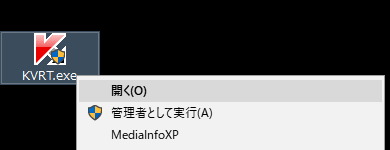
- ライセンスが表示されるので、確認のチェックを入れ Accept をクリック。
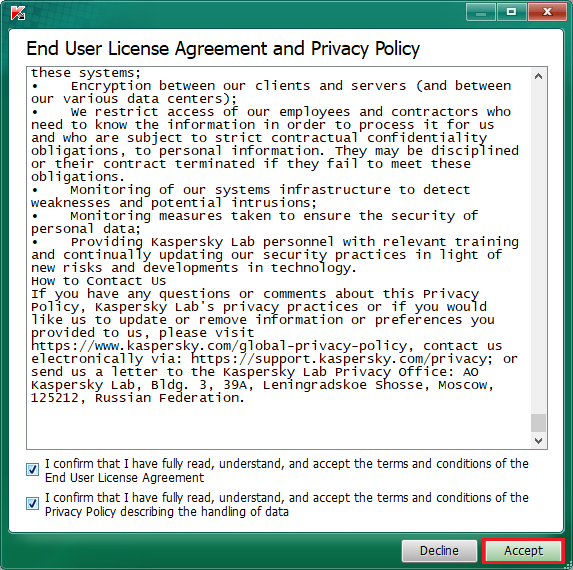
使用許諾契約(Kaspersky Virus Removal Tool)
- メイン画面が立ち上がります。Start scan をクリックすると、スキャンが開始されます。
スキャンする場所を指定してカスタムスキャンを行う場合は、Change parameters を選択。
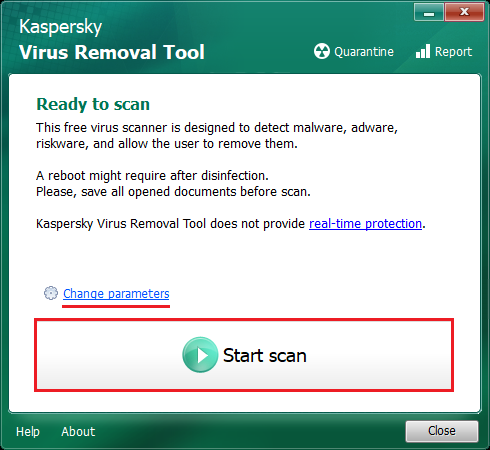
メイン画面(Kaspersky Virus Removal Tool)
- カスタムスキャンの画面です。スキャンするフォルダやドライブを追加する場合は、Add object… をクリックして下さい。元の設定に戻す場合は Restore default actions をクリック。
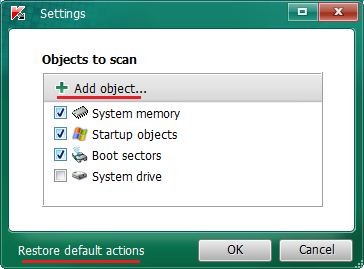
カスタムスキャンの設定(Kaspersky Virus Removal Tool)

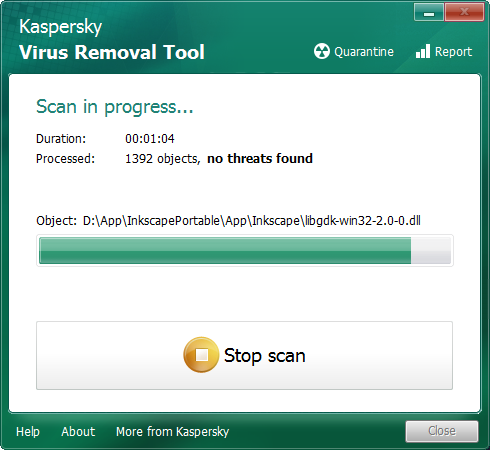
スキャン中(Kaspersky Virus Removal Tool)
- スキャン終了。スキャンの詳細結果を見るには details、隔離されたファイルを見るには Quarantine、履歴を見るには Report から。
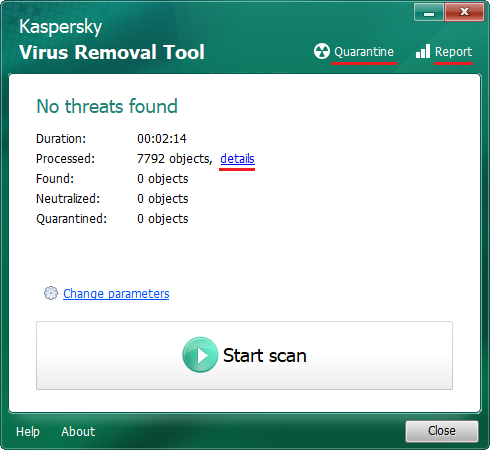
スキャン結果(Kaspersky Virus Removal Tool)
その他の機能とアンインストール方法

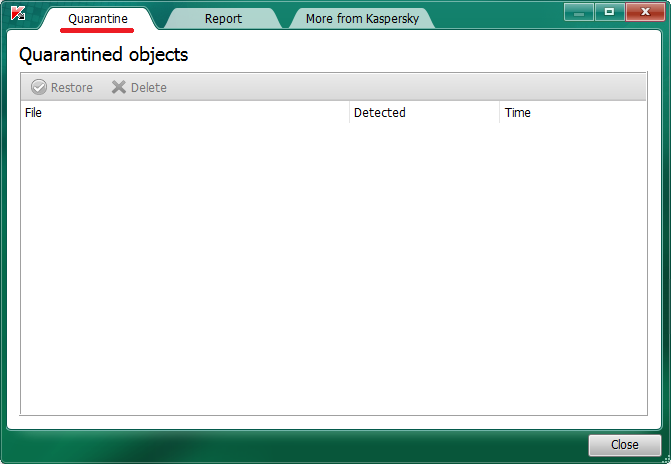
隔離画面(Kaspersky Virus Removal Tool)

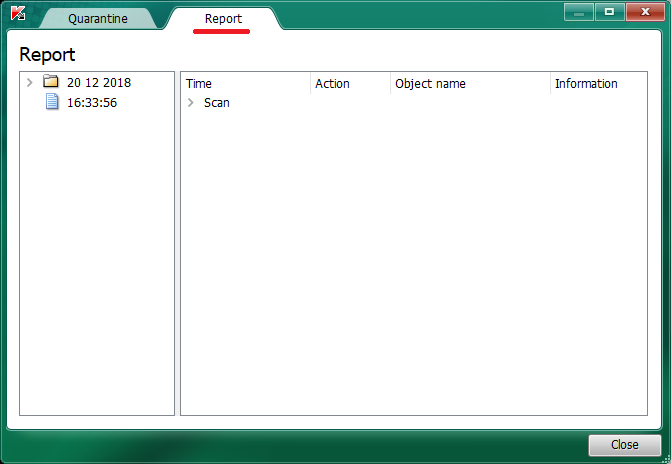
レポート画面(Kaspersky Virus Removal Tool)
- 作業後、KVRT_Data というフォルダが C ドライブに作成されます(C:KVRT_Data)。
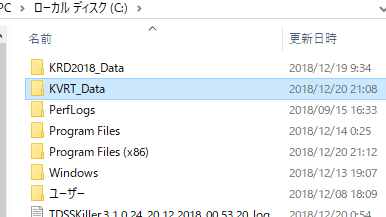
ログ保存フォルダ(Kaspersky Virus Removal Tool)
- フォルダの中身は隔離ファイルと暗号化されたトレースファイル、その他のファイルです。トレースファイルとは、問題があった場合にカスペルスキーのラボに提出するファイルです。作業が無事終了し、検出して隔離されたファイルを完全に削除しても良い場合は、フォルダごと削除しても問題ありません。
よくある質問と回答
検出(駆除)したファイルを元に戻したい