").attr(n.scriptAttrs||{}).prop({charset:n.scriptCharset,src:n.url}).on("load error",i=function(e){r.remove(),i=null,e&&t("error"===e.type?404:200,e.type)}),C.head.appendChild(r[0])},abort:function(){i&&i()}}});var Jt,Kt=[],Zt=/(=)\?(?=&|$)|\?\?/;ce.ajaxSetup({jsonp:"callback",jsonpCallback:function(){var e=Kt.pop()||ce.expando+"_"+jt.guid++;return this[e]=!0,e}}),ce.ajaxPrefilter("json jsonp",function(e,t,n){var r,i,o,a=!1!==e.jsonp&&(Zt.test(e.url)?"url":"string"==typeof e.data&&0===(e.contentType||"").indexOf("application/x-www-form-urlencoded")&&Zt.test(e.data)&&"data");if(a||"jsonp"===e.dataTypes[0])return r=e.jsonpCallback=v(e.jsonpCallback)?e.jsonpCallback():e.jsonpCallback,a?e[a]=e[a].replace(Zt,"$1"+r):!1!==e.jsonp&&(e.url+=(At.test(e.url)?"&":"?")+e.jsonp+"="+r),e.converters["script json"]=function(){return o||ce.error(r+" was not called"),o[0]},e.dataTypes[0]="json",i=ie[r],ie[r]=function(){o=arguments},n.always(function(){void 0===i?ce(ie).removeProp(r):ie[r]=i,e[r]&&(e.jsonpCallback=t.jsonpCallback,Kt.push(r)),o&&v(i)&&i(o[0]),o=i=void 0}),"script"}),le.createHTMLDocument=((Jt=C.implementation.createHTMLDocument("").body).innerHTML="
",2===Jt.childNodes.length),ce.parseHTML=function(e,t,n){return"string"!=typeof e?[]:("boolean"==typeof t&&(n=t,t=!1),t||(le.createHTMLDocument?((r=(t=C.implementation.createHTMLDocument("")).createElement("base")).href=C.location.href,t.head.appendChild(r)):t=C),o=!n&&[],(i=w.exec(e))?[t.createElement(i[1])]:(i=Ae([e],t,o),o&&o.length&&ce(o).remove(),ce.merge([],i.childNodes)));var r,i,o},ce.fn.load=function(e,t,n){var r,i,o,a=this,s=e.indexOf(" ");return-1").append(ce.parseHTML(e)).find(r):e)}).always(n&&function(e,t){a.each(function(){n.apply(this,o||[e.responseText,t,e])})}),this},ce.expr.pseudos.animated=function(t){return ce.grep(ce.timers,function(e){return t===e.elem}).length},ce.offset={setOffset:function(e,t,n){var r,i,o,a,s,u,l=ce.css(e,"position"),c=ce(e),f={};"static"===l&&(e.style.position="relative"),s=c.offset(),o=ce.css(e,"top"),u=ce.css(e,"left"),("absolute"===l||"fixed"===l)&&-1<(o+u).indexOf("auto")?(a=(r=c.position()).top,i=r.left):(a=parseFloat(o)||0,i=parseFloat(u)||0),v(t)&&(t=t.call(e,n,ce.extend({},s))),null!=t.top&&(f.top=t.top-s.top+a),null!=t.left&&(f.left=t.left-s.left+i),"using"in t?t.using.call(e,f):c.css(f)}},ce.fn.extend({offset:function(t){if(arguments.length)return void 0===t?this:this.each(function(e){ce.offset.setOffset(this,t,e)});var e,n,r=this[0];return r?r.getClientRects().length?(e=r.getBoundingClientRect(),n=r.ownerDocument.defaultView,{top:e.top+n.pageYOffset,left:e.left+n.pageXOffset}):{top:0,left:0}:void 0},position:function(){if(this[0]){var e,t,n,r=this[0],i={top:0,left:0};if("fixed"===ce.css(r,"position"))t=r.getBoundingClientRect();else{t=this.offset(),n=r.ownerDocument,e=r.offsetParent||n.documentElement;while(e&&(e===n.body||e===n.documentElement)&&"static"===ce.css(e,"position"))e=e.parentNode;e&&e!==r&&1===e.nodeType&&((i=ce(e).offset()).top+=ce.css(e,"borderTopWidth",!0),i.left+=ce.css(e,"borderLeftWidth",!0))}return{top:t.top-i.top-ce.css(r,"marginTop",!0),left:t.left-i.left-ce.css(r,"marginLeft",!0)}}},offsetParent:function(){return this.map(function(){var e=this.offsetParent;while(e&&"static"===ce.css(e,"position"))e=e.offsetParent;return e||J})}}),ce.each({scrollLeft:"pageXOffset",scrollTop:"pageYOffset"},function(t,i){var o="pageYOffset"===i;ce.fn[t]=function(e){return M(this,function(e,t,n){var r;if(y(e)?r=e:9===e.nodeType&&(r=e.defaultView),void 0===n)return r?r[i]:e[t];r?r.scrollTo(o?r.pageXOffset:n,o?n:r.pageYOffset):e[t]=n},t,e,arguments.length)}}),ce.each(["top","left"],function(e,n){ce.cssHooks[n]=Ye(le.pixelPosition,function(e,t){if(t)return t=Ge(e,n),_e.test(t)?ce(e).position()[n]+"px":t})}),ce.each({Height:"height",Width:"width"},function(a,s){ce.each({padding:"inner"+a,content:s,"":"outer"+a},function(r,o){ce.fn[o]=function(e,t){var n=arguments.length&&(r||"boolean"!=typeof e),i=r||(!0===e||!0===t?"margin":"border");return M(this,function(e,t,n){var r;return y(e)?0===o.indexOf("outer")?e["inner"+a]:e.document.documentElement["client"+a]:9===e.nodeType?(r=e.documentElement,Math.max(e.body["scroll"+a],r["scroll"+a],e.body["offset"+a],r["offset"+a],r["client"+a])):void 0===n?ce.css(e,t,i):ce.style(e,t,n,i)},s,n?e:void 0,n)}})}),ce.each(["ajaxStart","ajaxStop","ajaxComplete","ajaxError","ajaxSuccess","ajaxSend"],function(e,t){ce.fn[t]=function(e){return this.on(t,e)}}),ce.fn.extend({bind:function(e,t,n){return this.on(e,null,t,n)},unbind:function(e,t){return this.off(e,null,t)},delegate:function(e,t,n,r){return this.on(t,e,n,r)},undelegate:function(e,t,n){return 1===arguments.length?this.off(e,"**"):this.off(t,e||"**",n)},hover:function(e,t){return this.on("mouseenter",e).on("mouseleave",t||e)}}),ce.each("blur focus focusin focusout resize scroll click dblclick mousedown mouseup mousemove mouseover mouseout mouseenter mouseleave change select submit keydown keypress keyup contextmenu".split(" "),function(e,n){ce.fn[n]=function(e,t){return 0
ClamWin Free Antivirus 0.103.2.1
マルウェア駆除
2018/12/11 22:302021/06/08 08:41
説明 機能 仕様 ダウンロード 画像 使い方
オープンソースのウイルススキャンソフト
ClamWin Free Antivirus は、オープンソースで開発されている Windows 用のアンチウイルスソフトです。
ClamWin は世界中の60万人以上のユーザーが使用している、誰でも無料で使うことができるアンチウイルスソフトで、ウイルススキャン、ウイルスデータベースの自動更新、スケジューラ、エクスプローラの右クリックメニュー、MS Outlook のアドオンの機能があります。
ClamWin の機能
ClamWin アンチウイルスはオンデマンドのスキャナのみ搭載しています、リアルタイムの保護機能はありません。なので、定期的にシステムスキャンを実行させて下さい。Outlook のメールスキャンは自動で送受信のメールをスキャンします。
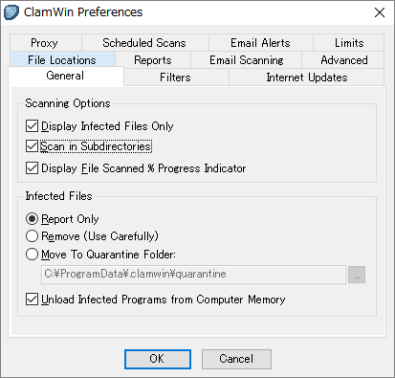
細かい設定は本ソフト画面のメニューまたはタスクトレイアイコンの右クリックから行えます。デフォルトでは検出されたファイルは「報告するだけで何もしない」設定になっているので、「隔離フォルダに移動(Move to Quarantine Folder)」にチェックを入れることをおすすめします。
スケジュールスキャンは、毎日・毎週・何時のようにスケジュールしてウイルススキャンを自動実行させることができます。
フィルターではスキャンしないファイル拡張子の設定ができます。
ClamWin はリアルタイムスキャンはできませんが、ウイルスとスパイウェアの検出率が高く、ウイルスデーターベースは常に更新されているので、安全性を高めるためにセカンドのウイルス対策ソフトとして持っておいたり、簡易的にスキャンを実行するには良い選択です。
古い Windows オペレーティングシステムでも動作するのが特徴ですが、そこそこリソースを食うのでスキャンには時間がかかります。
機能
ウイルス、スパイウェアを検出。
スキャンをスケジュールして実行。
定期的に更新されるウイルスデータベースの自動ダウンロード。
スタンドアロンのウイルススキャナとエクスプローラ右クリックからのファイルスキャン。
Microsoft Outlook アドオンで、感染したメールの添付ファイルを削除。
価格: 無料
動作環境: Windows 98|2000|Me|XP|Vista|7|8|8.1|10|11
使用言語: 英語
最終更新日:
5年前 (2021/06/08)
ダウンロード数: 988
画像
使い方
セットアップとインストール方法
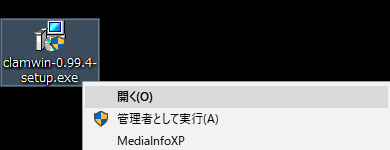
ダウンロードしたセットアップファイルを実行します。
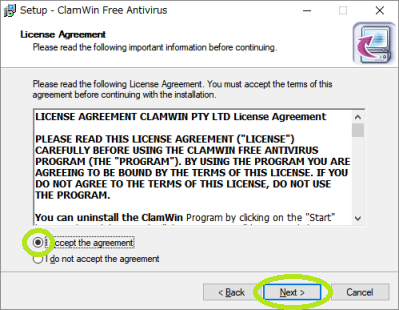
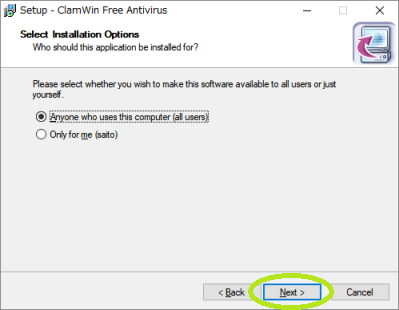
ウィザードに従って進みます。インストールするユーザー(現在のユーザーまたはすべてのユーザー)を選択して下さい。
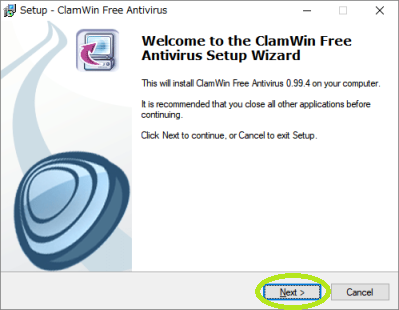
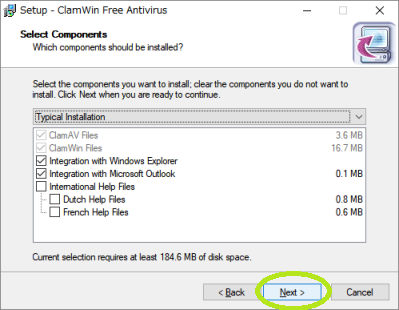
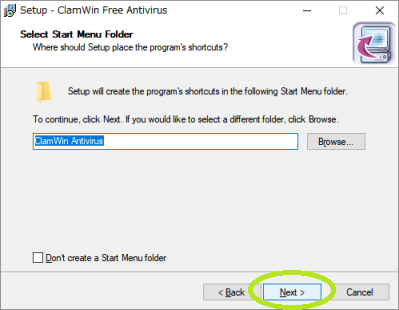
ウィザードに従って進みます。
特に変更する箇所はなく、通常そのまま進めばOKです。デフォルトでは C:Program Files (x86)ClamWin にインストールされます。
Download Virus Database Files にチェックを入れましょう。
これにチェックを入れておけば自動的にウイルスデーターベースファイルをダウンロードしてくれます。
デスクトップショートカットアイコンを作成する場合は下にチェックを入れましょう。
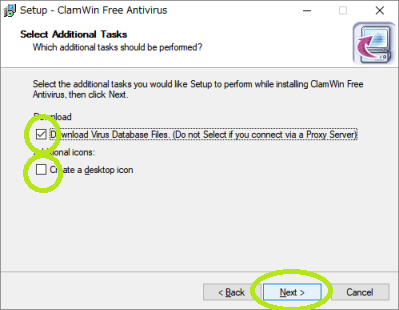
Install をクリックすると、インストールが開始されます。
インストールが完了すると自動的にウイルスデーターベースのダウンロードが開始されます。
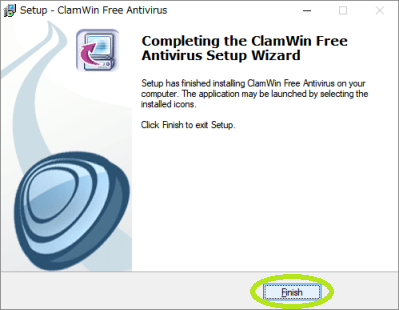
Finish をクリックすると、インストールは完了です。
更新とウイルススキャンの実行
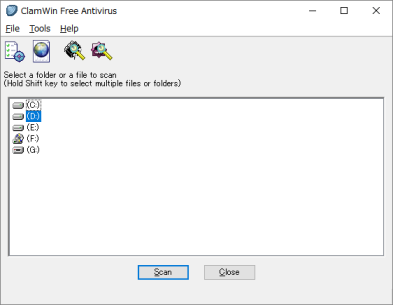
ClamWin Antivirus のデスクトップアイコン(または C:Program Files (x86)ClamWinbinClamWin.exe)をダブルクリックし実行します。
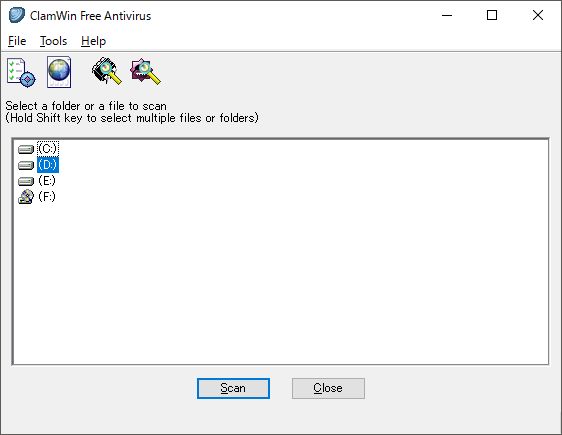
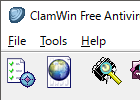
ウイルスデーターベースをアップデートする場合には、メニューの左から二番目のボタンをクリックして下さい。
アップデートが実行されます。
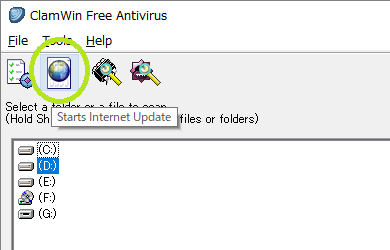
ドライブをスキャンする場合、対象のドライブを選択してスキャンをクリックして下さい。
メモリをスキャンする場合、メニューの左から三番目のボタンをクリックして下さい。
メモリのスキャンはおそらく数分で終わると思います。
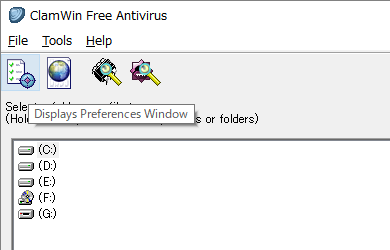
各種設定を行う場合は、メニューの一番左のボタンをクリックして下さい。設定画面が立ち上がります。
Eメールスキャンやスケジュールスキャンの設定を行うことができます。
よくある質問と回答
他のアンチウイルスソフトがインストールしてある環境で使えますか?
ユーザーレビュー
レビューはまだありません、 最初のレビューを投稿してください。コメントは任意です。