").attr(n.scriptAttrs||{}).prop({charset:n.scriptCharset,src:n.url}).on("load error",i=function(e){r.remove(),i=null,e&&t("error"===e.type?404:200,e.type)}),C.head.appendChild(r[0])},abort:function(){i&&i()}}});var Jt,Kt=[],Zt=/(=)\?(?=&|$)|\?\?/;ce.ajaxSetup({jsonp:"callback",jsonpCallback:function(){var e=Kt.pop()||ce.expando+"_"+jt.guid++;return this[e]=!0,e}}),ce.ajaxPrefilter("json jsonp",function(e,t,n){var r,i,o,a=!1!==e.jsonp&&(Zt.test(e.url)?"url":"string"==typeof e.data&&0===(e.contentType||"").indexOf("application/x-www-form-urlencoded")&&Zt.test(e.data)&&"data");if(a||"jsonp"===e.dataTypes[0])return r=e.jsonpCallback=v(e.jsonpCallback)?e.jsonpCallback():e.jsonpCallback,a?e[a]=e[a].replace(Zt,"$1"+r):!1!==e.jsonp&&(e.url+=(At.test(e.url)?"&":"?")+e.jsonp+"="+r),e.converters["script json"]=function(){return o||ce.error(r+" was not called"),o[0]},e.dataTypes[0]="json",i=ie[r],ie[r]=function(){o=arguments},n.always(function(){void 0===i?ce(ie).removeProp(r):ie[r]=i,e[r]&&(e.jsonpCallback=t.jsonpCallback,Kt.push(r)),o&&v(i)&&i(o[0]),o=i=void 0}),"script"}),le.createHTMLDocument=((Jt=C.implementation.createHTMLDocument("").body).innerHTML="
",2===Jt.childNodes.length),ce.parseHTML=function(e,t,n){return"string"!=typeof e?[]:("boolean"==typeof t&&(n=t,t=!1),t||(le.createHTMLDocument?((r=(t=C.implementation.createHTMLDocument("")).createElement("base")).href=C.location.href,t.head.appendChild(r)):t=C),o=!n&&[],(i=w.exec(e))?[t.createElement(i[1])]:(i=Ae([e],t,o),o&&o.length&&ce(o).remove(),ce.merge([],i.childNodes)));var r,i,o},ce.fn.load=function(e,t,n){var r,i,o,a=this,s=e.indexOf(" ");return-1").append(ce.parseHTML(e)).find(r):e)}).always(n&&function(e,t){a.each(function(){n.apply(this,o||[e.responseText,t,e])})}),this},ce.expr.pseudos.animated=function(t){return ce.grep(ce.timers,function(e){return t===e.elem}).length},ce.offset={setOffset:function(e,t,n){var r,i,o,a,s,u,l=ce.css(e,"position"),c=ce(e),f={};"static"===l&&(e.style.position="relative"),s=c.offset(),o=ce.css(e,"top"),u=ce.css(e,"left"),("absolute"===l||"fixed"===l)&&-1<(o+u).indexOf("auto")?(a=(r=c.position()).top,i=r.left):(a=parseFloat(o)||0,i=parseFloat(u)||0),v(t)&&(t=t.call(e,n,ce.extend({},s))),null!=t.top&&(f.top=t.top-s.top+a),null!=t.left&&(f.left=t.left-s.left+i),"using"in t?t.using.call(e,f):c.css(f)}},ce.fn.extend({offset:function(t){if(arguments.length)return void 0===t?this:this.each(function(e){ce.offset.setOffset(this,t,e)});var e,n,r=this[0];return r?r.getClientRects().length?(e=r.getBoundingClientRect(),n=r.ownerDocument.defaultView,{top:e.top+n.pageYOffset,left:e.left+n.pageXOffset}):{top:0,left:0}:void 0},position:function(){if(this[0]){var e,t,n,r=this[0],i={top:0,left:0};if("fixed"===ce.css(r,"position"))t=r.getBoundingClientRect();else{t=this.offset(),n=r.ownerDocument,e=r.offsetParent||n.documentElement;while(e&&(e===n.body||e===n.documentElement)&&"static"===ce.css(e,"position"))e=e.parentNode;e&&e!==r&&1===e.nodeType&&((i=ce(e).offset()).top+=ce.css(e,"borderTopWidth",!0),i.left+=ce.css(e,"borderLeftWidth",!0))}return{top:t.top-i.top-ce.css(r,"marginTop",!0),left:t.left-i.left-ce.css(r,"marginLeft",!0)}}},offsetParent:function(){return this.map(function(){var e=this.offsetParent;while(e&&"static"===ce.css(e,"position"))e=e.offsetParent;return e||J})}}),ce.each({scrollLeft:"pageXOffset",scrollTop:"pageYOffset"},function(t,i){var o="pageYOffset"===i;ce.fn[t]=function(e){return M(this,function(e,t,n){var r;if(y(e)?r=e:9===e.nodeType&&(r=e.defaultView),void 0===n)return r?r[i]:e[t];r?r.scrollTo(o?r.pageXOffset:n,o?n:r.pageYOffset):e[t]=n},t,e,arguments.length)}}),ce.each(["top","left"],function(e,n){ce.cssHooks[n]=Ye(le.pixelPosition,function(e,t){if(t)return t=Ge(e,n),_e.test(t)?ce(e).position()[n]+"px":t})}),ce.each({Height:"height",Width:"width"},function(a,s){ce.each({padding:"inner"+a,content:s,"":"outer"+a},function(r,o){ce.fn[o]=function(e,t){var n=arguments.length&&(r||"boolean"!=typeof e),i=r||(!0===e||!0===t?"margin":"border");return M(this,function(e,t,n){var r;return y(e)?0===o.indexOf("outer")?e["inner"+a]:e.document.documentElement["client"+a]:9===e.nodeType?(r=e.documentElement,Math.max(e.body["scroll"+a],r["scroll"+a],e.body["offset"+a],r["offset"+a],r["client"+a])):void 0===n?ce.css(e,t,i):ce.style(e,t,n,i)},s,n?e:void 0,n)}})}),ce.each(["ajaxStart","ajaxStop","ajaxComplete","ajaxError","ajaxSuccess","ajaxSend"],function(e,t){ce.fn[t]=function(e){return this.on(t,e)}}),ce.fn.extend({bind:function(e,t,n){return this.on(e,null,t,n)},unbind:function(e,t){return this.off(e,null,t)},delegate:function(e,t,n,r){return this.on(t,e,n,r)},undelegate:function(e,t,n){return 1===arguments.length?this.off(e,"**"):this.off(t,e||"**",n)},hover:function(e,t){return this.on("mouseenter",e).on("mouseleave",t||e)}}),ce.each("blur focus focusin focusout resize scroll click dblclick mousedown mouseup mousemove mouseover mouseout mouseenter mouseleave change select submit keydown keypress keyup contextmenu".split(" "),function(e,n){ce.fn[n]=function(e,t){return 0
VirtuaWin 4.5
デスクトップ
2021/04/18 10:162021/05/24 14:03
説明 機能 仕様 ダウンロード 画像 使い方
複数の作業環境を切り替えることができる仮想デスクトップツール
最大で 20 個の仮想デスクトップを作成することができる、Windows 向けの仮想デスクトップソフト。用途に応じてデスクトップ環境を切り替えることができるので、PC の作業環境を改善することができます。
VirtuaWin の概要
VirtuaWin は、Windows オペレーティングシステム用の仮想デスクトップマネージャーです。仮想デスクトップマネージャーを使用すると、複数の仮想デスクトップ(「ワークスペース」とも呼ばれます)でアプリケーションを整理できます。
VirtuaWin の機能
VirtuaWin の主な機能です。
機能
概要
メイン機能
仮想デスクトップ
機能詳細
・最大 20 台の仮想デスクトップを作成
・ホットキー
・起動中のアプリケーションをすべて表示
複数のデスクトップ環境を作成できます
VirtuaWin は、最大 20 台の仮想デスクトップをサポートしている仮想デスクトップソフトです。シンプルな使いやすさと、細かい設定が可能なのが特徴です。
必要に応じてデスクトップを切り替えることができるので、デスクトップやタスクバーが整理された環境で、多数のアプリケーションを開いてさまざまな作業を行うことができます。
無料で使える仮想デスクトップソフト
VirtuaWin は、Linux や Mac で仮想デスクトップに慣れ親しんでいる人におすすめできる、Windows 向けの仮想デスクトップソフトです。基本的には、ホットキー「Alt + Ctrl + 矢印」でデスクトップを切り替えるだけなので、初心者でもかんたんに使用できます。
機能
Windows 用の複数の仮想デスクトップ
すべての新しい Windows バージョンで、デュアルモニター、Unicode、および 64 ビットをサポートします
ポータブルバージョン
マウス、ホットキー、メニュー、またはビジュアルページャーを使用してナビゲートします
カスタマイズ可能なシステムトレイアイコンといくつかのビジュアルページャー
無限の拡張性のためのモジュールインターフェース
価格: 無料
動作環境: Windows 7|8|8.1|10|11
使用言語: 英語
最終更新日:
5年前 (2021/05/24)
ダウンロード数: 1068
使い方
インストール
1.インストール方法
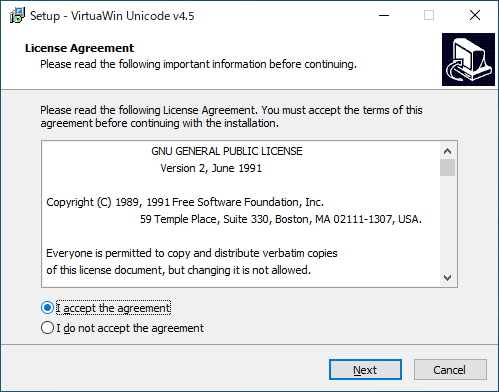
インストーラを実行するとライセンスが表示されます。「I accept the agreement 」を選択して[Next ]をクリックします。
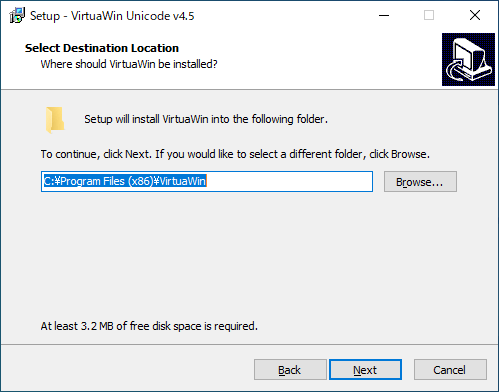
インストール先を指定します。変更しない場合はこのまま[Next ]をクリックします。
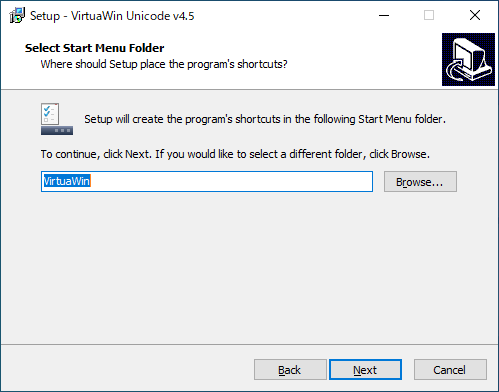
スタートメニューに作成するショートカットの指定です。変更しない場合はこのまま[Next ]をクリックします。
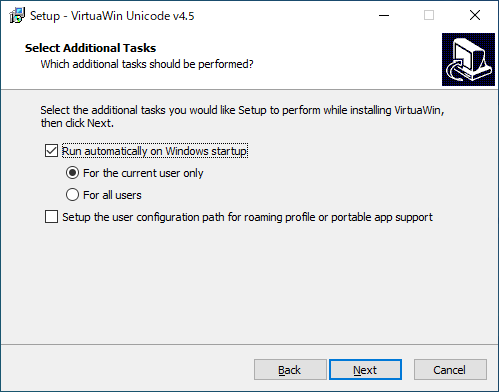
追加のタスクを選択して[Next ]をクリックします。
・Run automatically on Windows startup :Windows 起動時に実行する
・For the current user only :現在のユーザーで有効
・For all users :すべてのユーザーで有効
・Setup the user configuration path for roaming profile or portable app support :設定ファイルのパスを設定する
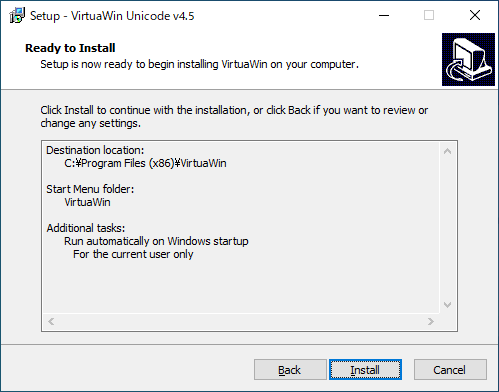
インストールの準備ができました。[Install ]をクリックしてインストールを開始します。
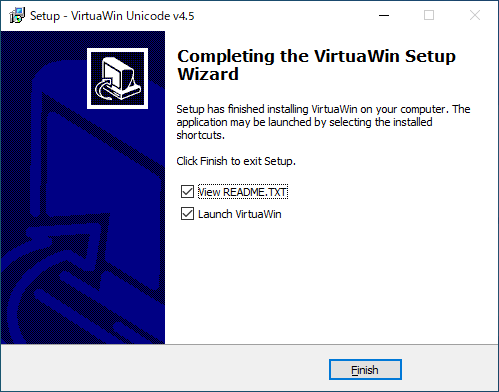
インストールが完了しました。[Finish ]をクリックしてセットアップウィザードを閉じます。
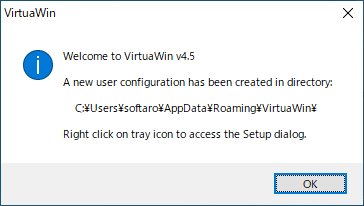
インストールが完了すると設定ファイルの作成場所が表示されます。[OK ]をクリックします。
基本的な使い方
1.基本的な使い方
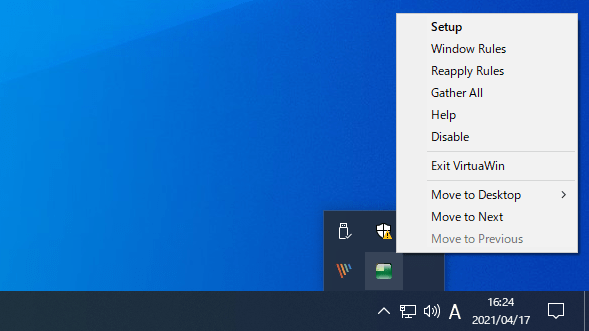
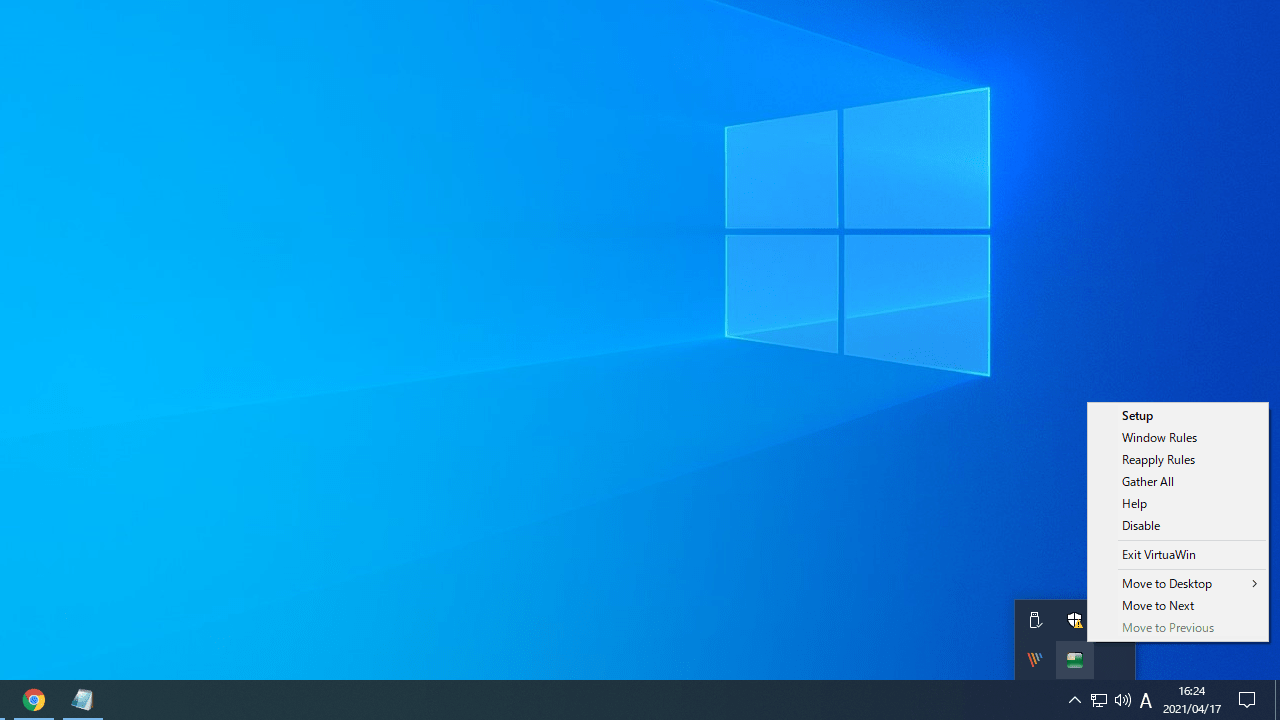
VirtuaWin を起動すると、タスクトレイに常駐します。
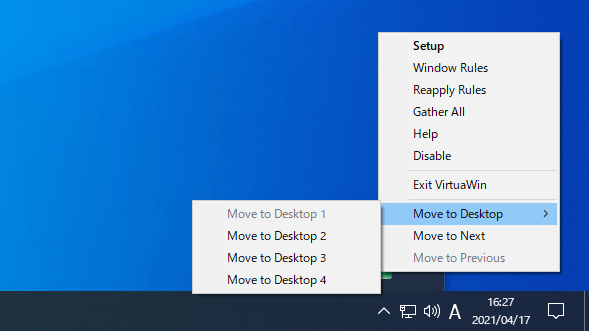
初期状態では 4 つの仮想デスクトップが作成されており、右クリックメニューの「Move to ~ 」または、「Alt + Ctrl + 矢印 」キーでデスクトップを切り替えることができます。
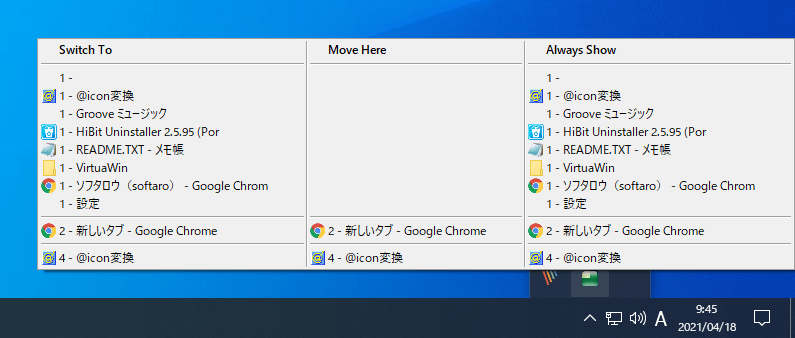
アイコンを左クリックすると、現在起動中のアプリケーションがデスクトップ番号と一緒に表示されます。
「Swith to 」に表示されているアプリケーションをクリックすると、そのアプリが起動しているデスクトップへ切り替えることができます。
「Always Show 」のアプリケーションをクリックすると、そのアプリをすべてのデスクトップで表示するように設定できます。
上の「Switch To」「Move Here」「Always Show」の項目名をクリックすると「Show」という項目が表示されます。「Show」に表示されているアプリケーションをクリックすると、現在のデスクトップでアプリケーションを表示できます。
2.設定
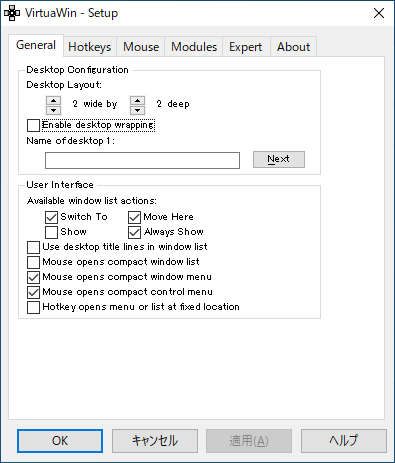
トレイアイコンの右クリックメニューの「Setup 」をクリックすると、VirtuaWin の設定ができます。
デスクトップの数を増やしたり、ホットキーを追加することができます。
よくある質問と回答
ライセンスについて。
ユーザーレビュー
レビューはまだありません、 最初のレビューを投稿してください。コメントは任意です。
VirtuaWin は、どなたでも無料で利用できます。