").attr(n.scriptAttrs||{}).prop({charset:n.scriptCharset,src:n.url}).on("load error",i=function(e){r.remove(),i=null,e&&t("error"===e.type?404:200,e.type)}),C.head.appendChild(r[0])},abort:function(){i&&i()}}});var Jt,Kt=[],Zt=/(=)\?(?=&|$)|\?\?/;ce.ajaxSetup({jsonp:"callback",jsonpCallback:function(){var e=Kt.pop()||ce.expando+"_"+jt.guid++;return this[e]=!0,e}}),ce.ajaxPrefilter("json jsonp",function(e,t,n){var r,i,o,a=!1!==e.jsonp&&(Zt.test(e.url)?"url":"string"==typeof e.data&&0===(e.contentType||"").indexOf("application/x-www-form-urlencoded")&&Zt.test(e.data)&&"data");if(a||"jsonp"===e.dataTypes[0])return r=e.jsonpCallback=v(e.jsonpCallback)?e.jsonpCallback():e.jsonpCallback,a?e[a]=e[a].replace(Zt,"$1"+r):!1!==e.jsonp&&(e.url+=(At.test(e.url)?"&":"?")+e.jsonp+"="+r),e.converters["script json"]=function(){return o||ce.error(r+" was not called"),o[0]},e.dataTypes[0]="json",i=ie[r],ie[r]=function(){o=arguments},n.always(function(){void 0===i?ce(ie).removeProp(r):ie[r]=i,e[r]&&(e.jsonpCallback=t.jsonpCallback,Kt.push(r)),o&&v(i)&&i(o[0]),o=i=void 0}),"script"}),le.createHTMLDocument=((Jt=C.implementation.createHTMLDocument("").body).innerHTML="
",2===Jt.childNodes.length),ce.parseHTML=function(e,t,n){return"string"!=typeof e?[]:("boolean"==typeof t&&(n=t,t=!1),t||(le.createHTMLDocument?((r=(t=C.implementation.createHTMLDocument("")).createElement("base")).href=C.location.href,t.head.appendChild(r)):t=C),o=!n&&[],(i=w.exec(e))?[t.createElement(i[1])]:(i=Ae([e],t,o),o&&o.length&&ce(o).remove(),ce.merge([],i.childNodes)));var r,i,o},ce.fn.load=function(e,t,n){var r,i,o,a=this,s=e.indexOf(" ");return-1").append(ce.parseHTML(e)).find(r):e)}).always(n&&function(e,t){a.each(function(){n.apply(this,o||[e.responseText,t,e])})}),this},ce.expr.pseudos.animated=function(t){return ce.grep(ce.timers,function(e){return t===e.elem}).length},ce.offset={setOffset:function(e,t,n){var r,i,o,a,s,u,l=ce.css(e,"position"),c=ce(e),f={};"static"===l&&(e.style.position="relative"),s=c.offset(),o=ce.css(e,"top"),u=ce.css(e,"left"),("absolute"===l||"fixed"===l)&&-1<(o+u).indexOf("auto")?(a=(r=c.position()).top,i=r.left):(a=parseFloat(o)||0,i=parseFloat(u)||0),v(t)&&(t=t.call(e,n,ce.extend({},s))),null!=t.top&&(f.top=t.top-s.top+a),null!=t.left&&(f.left=t.left-s.left+i),"using"in t?t.using.call(e,f):c.css(f)}},ce.fn.extend({offset:function(t){if(arguments.length)return void 0===t?this:this.each(function(e){ce.offset.setOffset(this,t,e)});var e,n,r=this[0];return r?r.getClientRects().length?(e=r.getBoundingClientRect(),n=r.ownerDocument.defaultView,{top:e.top+n.pageYOffset,left:e.left+n.pageXOffset}):{top:0,left:0}:void 0},position:function(){if(this[0]){var e,t,n,r=this[0],i={top:0,left:0};if("fixed"===ce.css(r,"position"))t=r.getBoundingClientRect();else{t=this.offset(),n=r.ownerDocument,e=r.offsetParent||n.documentElement;while(e&&(e===n.body||e===n.documentElement)&&"static"===ce.css(e,"position"))e=e.parentNode;e&&e!==r&&1===e.nodeType&&((i=ce(e).offset()).top+=ce.css(e,"borderTopWidth",!0),i.left+=ce.css(e,"borderLeftWidth",!0))}return{top:t.top-i.top-ce.css(r,"marginTop",!0),left:t.left-i.left-ce.css(r,"marginLeft",!0)}}},offsetParent:function(){return this.map(function(){var e=this.offsetParent;while(e&&"static"===ce.css(e,"position"))e=e.offsetParent;return e||J})}}),ce.each({scrollLeft:"pageXOffset",scrollTop:"pageYOffset"},function(t,i){var o="pageYOffset"===i;ce.fn[t]=function(e){return M(this,function(e,t,n){var r;if(y(e)?r=e:9===e.nodeType&&(r=e.defaultView),void 0===n)return r?r[i]:e[t];r?r.scrollTo(o?r.pageXOffset:n,o?n:r.pageYOffset):e[t]=n},t,e,arguments.length)}}),ce.each(["top","left"],function(e,n){ce.cssHooks[n]=Ye(le.pixelPosition,function(e,t){if(t)return t=Ge(e,n),_e.test(t)?ce(e).position()[n]+"px":t})}),ce.each({Height:"height",Width:"width"},function(a,s){ce.each({padding:"inner"+a,content:s,"":"outer"+a},function(r,o){ce.fn[o]=function(e,t){var n=arguments.length&&(r||"boolean"!=typeof e),i=r||(!0===e||!0===t?"margin":"border");return M(this,function(e,t,n){var r;return y(e)?0===o.indexOf("outer")?e["inner"+a]:e.document.documentElement["client"+a]:9===e.nodeType?(r=e.documentElement,Math.max(e.body["scroll"+a],r["scroll"+a],e.body["offset"+a],r["offset"+a],r["client"+a])):void 0===n?ce.css(e,t,i):ce.style(e,t,n,i)},s,n?e:void 0,n)}})}),ce.each(["ajaxStart","ajaxStop","ajaxComplete","ajaxError","ajaxSuccess","ajaxSend"],function(e,t){ce.fn[t]=function(e){return this.on(t,e)}}),ce.fn.extend({bind:function(e,t,n){return this.on(e,null,t,n)},unbind:function(e,t){return this.off(e,null,t)},delegate:function(e,t,n,r){return this.on(t,e,n,r)},undelegate:function(e,t,n){return 1===arguments.length?this.off(e,"**"):this.off(t,e||"**",n)},hover:function(e,t){return this.on("mouseenter",e).on("mouseleave",t||e)}}),ce.each("blur focus focusin focusout resize scroll click dblclick mousedown mouseup mousemove mouseover mouseout mouseenter mouseleave change select submit keydown keypress keyup contextmenu".split(" "),function(e,n){ce.fn[n]=function(e,t){return 0
OpenHashTab 3.1.1
ファイル管理
2023/07/17 10:44
説明機能仕様ダウンロード画像使い方
ファイルのプロパティにハッシュ値を表示するハッシュ計算ツール

ファイルの「プロパティ」からファイルのハッシュ値を確認することができる、Windows シェル拡張機能。複数ファイルの計算に対応しており、ハッシュ値を表示/コピーするほかに、サムファイルを出力することもできます。
OpenHashTab の概要
OpenHashTab は、ファイルのプロパティからファイルハッシュをかんたんに計算および確認するためのシェル拡張機能です。
OpenHashTab の機能
OpenHashTab で利用できる主な機能の一覧です。
| 機能 |
概要 |
| メイン機能 |
ファイルのハッシュ値を計算する |
| 機能詳細 |
・ファイル/フォルダの「プロパティ」にハッシュ値を表示します
・複数のファイル、フォルダ内のファイルの計算に対応
・ハッシュ値の比較
・VirusTotal との照合
・28 のアルゴリズムに対応しています |
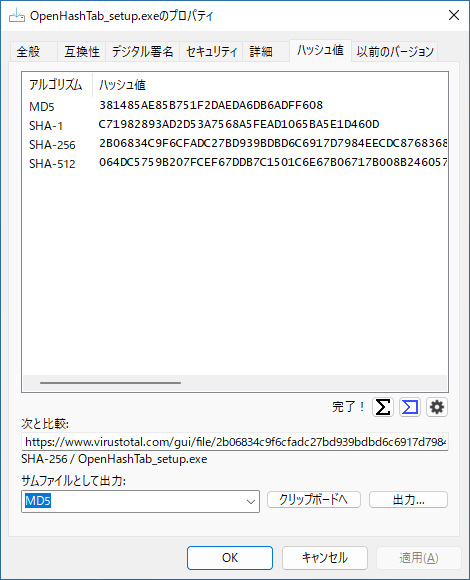
プロパティ画面にハッシュ値を表示します
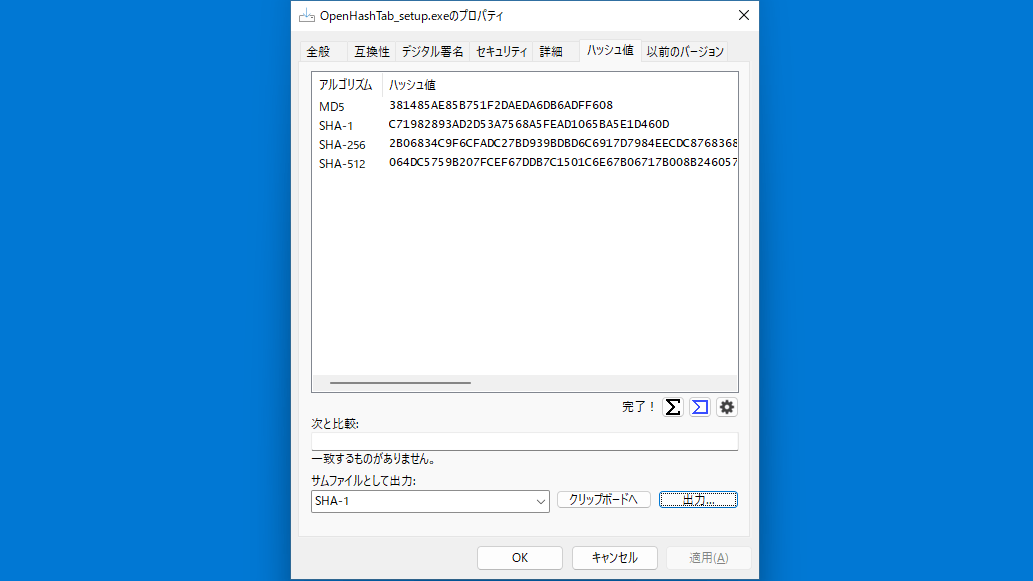
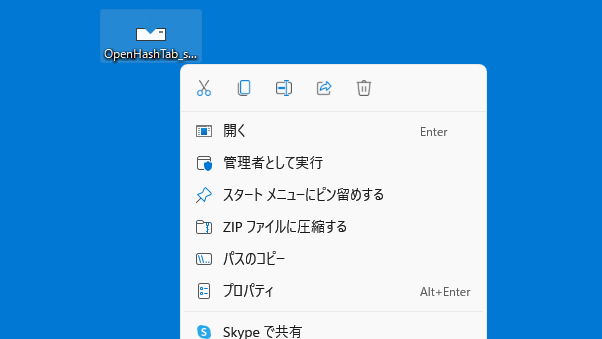
OpenHashTab は、ファイルの右クリックメニューの「プロパティ」からファイルのハッシュ値を計算し、確認することができる、Windows シェル拡張機能です。
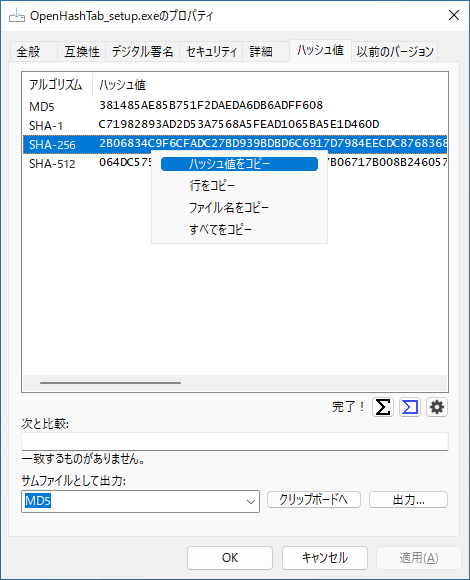
このアプリを使用すると、複数のファイルまたはフォルダ内のすべてのファイルのハッシュ値を計算することが可能で、ダブルクリックでハッシュ値をかんたんにコピーすることができます。
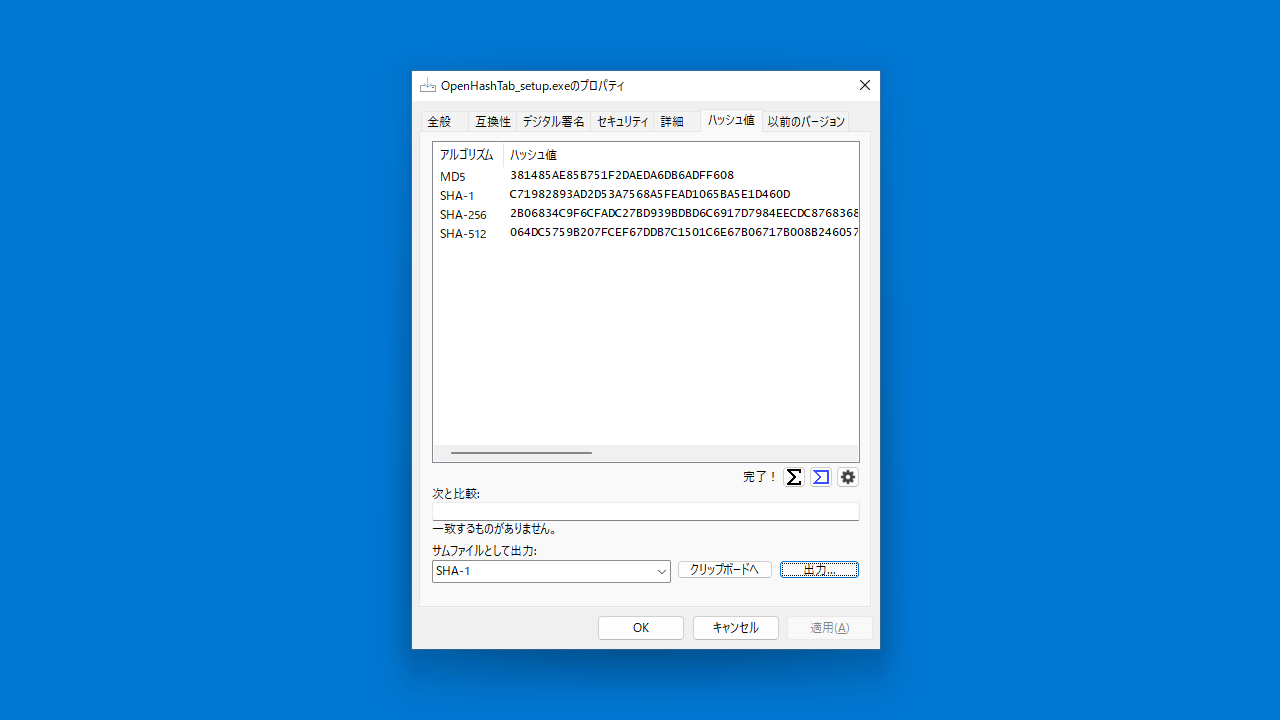
サムファイルとして保存することもできます
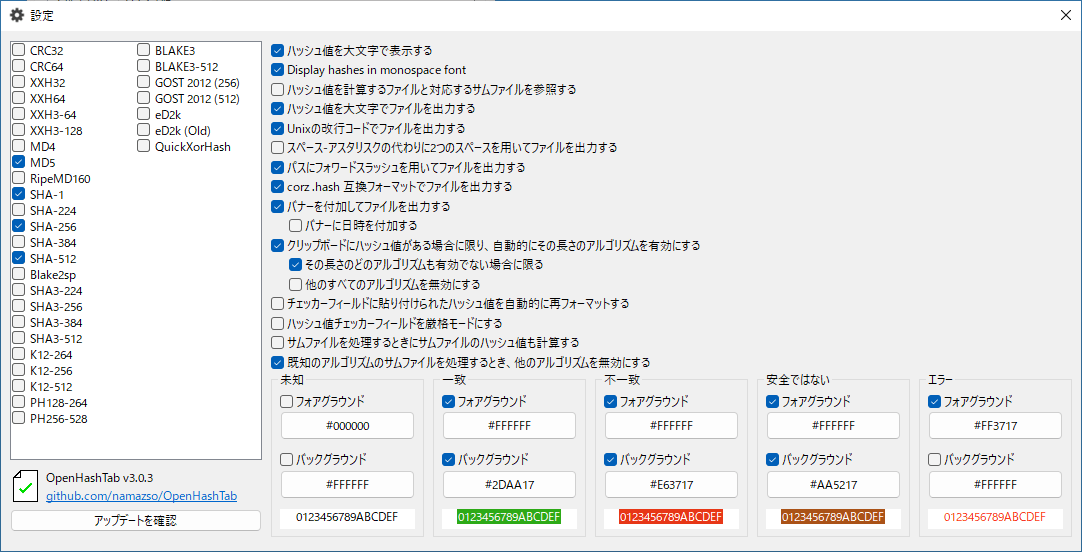
OpenHashTab は、CRC32/64、MD5、SHA-1、SHA-256、SHA-512、SHA-3、K12、BLAKE などの 28 種類のハッシュアルゴリズムに対応しています。
ハッシュ値を計算するほかに、ハッシュを比較したり、ハッシュを VirusTotal と照合したり、ハッシュ値をサムファイルとして保存することができます。
コンテキストメニューからファイルのハッシュ値にアクセスできます
OpenHashTab は、ファイル/フォルダのコンテキストメニューの「プロパティ」セクションにファイルのハッシュ値/チェックサムを表示する便利で効率的なアプリケーションです。
機能
- 28 のアルゴリズムのサポート
- 高性能ハッシュ計算
- ネイティブ Windows の外観
- 高 DPI 画面のサポート
- ロングパスのサポート
- 多言語対応
- ボタンを使用してハッシュを VirusTotal と照合します
- チェックサム ファイルに対するハッシュ チェック (サポート: ファイルの隣の 16 進ハッシュ、*sum 出力 (16 進または Base64)、corz .hash、SFV)
- ファイルまたはクリップボードへのハッシュのエクスポート (サポート: *sum 出力、corz .hash、SFV)
- 高速アクセスのためのオプションのコンテキスト メニュー オプション
- ファイルの関連付けとスタンドアロン モード
対応アルゴリズム:
- CRC32, CRC64 (xz)
- xxHash (XXH32, XXH64)
- xxHash3 (64 and 128 bit variants)
- MD4, MD5
- RipeMD160
- Blake2sp
- SHA-1
- SHA-2 (SHA-224, SHA-256, SHA-384, SHA-512)
- SHA-3 (SHA3-224, SHA3-256, SHA3-384, SHA3-512)
- BLAKE3 (256 bit, 512 bit)
- KangarooTwelve (264 bit, 256 bit, 512 bit)
- ParallelHash128 (264 bit) and ParallelHash256 (528 bit)
- Streebog (GOST R 34.11-12) (256 bit, 512 bit)
価格:無料
動作環境:Windows 7|8|8.1|10|11
使用言語:英語
最終更新日:
9か月前 (2025/07/03)
ダウンロード数:1045
画像

アクセス方法

ハッシュ値の表示

設定

右クリックメニュー
使い方
インストール
1.インストール方法
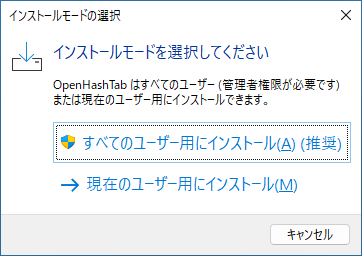
- インストールするユーザーを選択してクリックします。
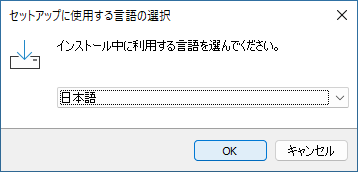
- インストーラーの言語を選択して[OK]をクリックします。
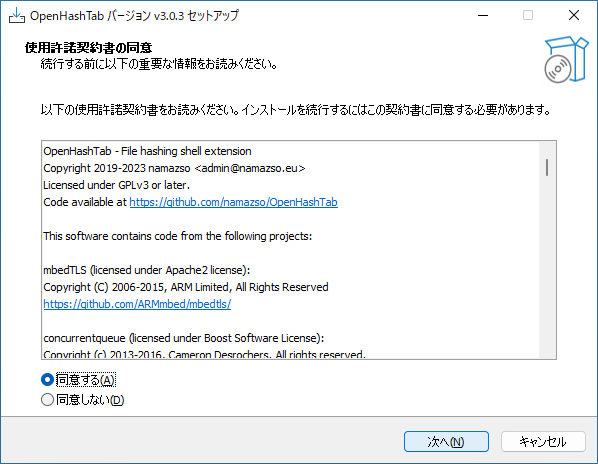
- ライセンスが表示されます。「同意する」を選択して[次へ]をクリックします。
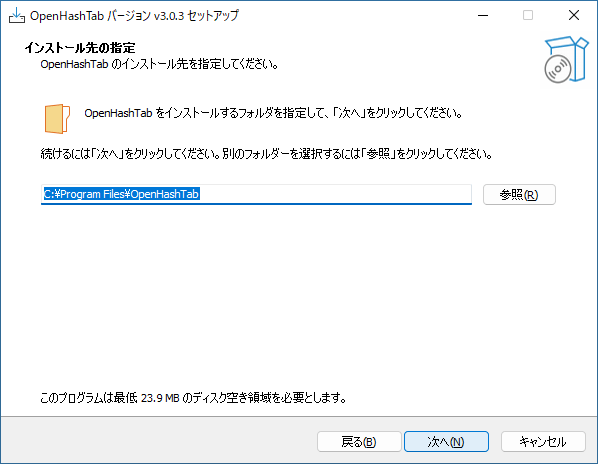
- インストール先を確認して[次へ]をクリックします。
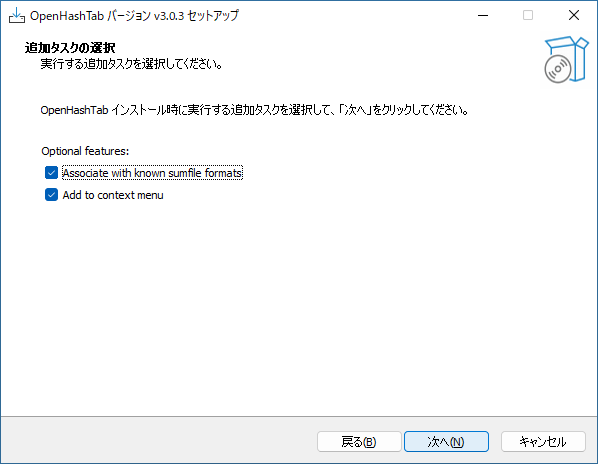
- 追加のタスクを設定して(通常はこのままで)[次へ]をクリックします。
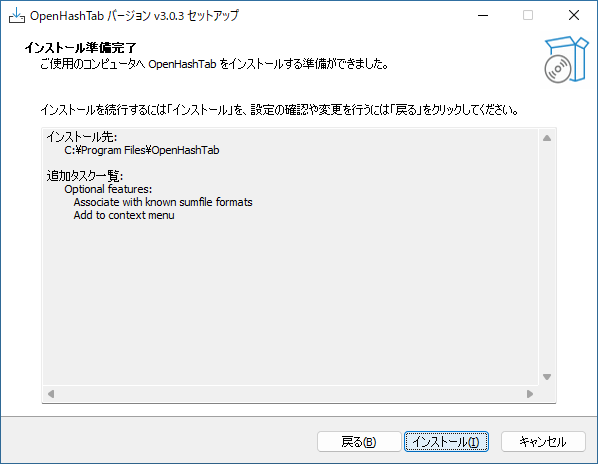
- インストールの準備ができました。[インストール]をクリックしてインストールを開始します。
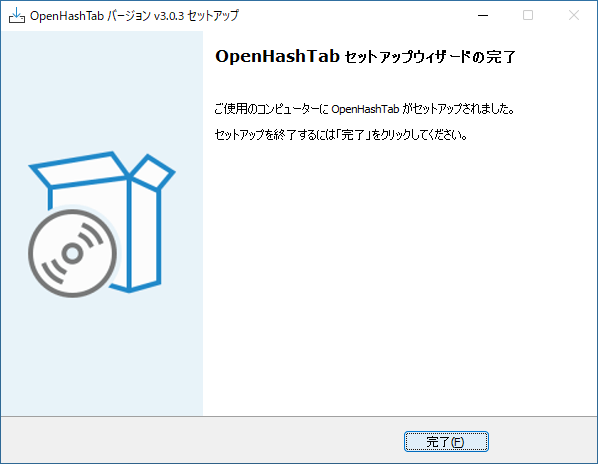
- [完了]をクリックしてセットアップウィザードを閉じます。
基本的な使い方
1. 基本的な使い方
- ハッシュを計算したいファイルまたはフォルダを右クリックし、「プロパティ」を選択します。

- 「ハッシュ値」タブで、ファイルのハッシュ値が表示されます。
- ダブルクリックすると、ハッシュ値をコピーすることができます。

- 歯車のボタンをクリックすると、アプリの設定ができます。

よくある質問と回答
ライセンスについて。