").attr(n.scriptAttrs||{}).prop({charset:n.scriptCharset,src:n.url}).on("load error",i=function(e){r.remove(),i=null,e&&t("error"===e.type?404:200,e.type)}),C.head.appendChild(r[0])},abort:function(){i&&i()}}});var Jt,Kt=[],Zt=/(=)\?(?=&|$)|\?\?/;ce.ajaxSetup({jsonp:"callback",jsonpCallback:function(){var e=Kt.pop()||ce.expando+"_"+jt.guid++;return this[e]=!0,e}}),ce.ajaxPrefilter("json jsonp",function(e,t,n){var r,i,o,a=!1!==e.jsonp&&(Zt.test(e.url)?"url":"string"==typeof e.data&&0===(e.contentType||"").indexOf("application/x-www-form-urlencoded")&&Zt.test(e.data)&&"data");if(a||"jsonp"===e.dataTypes[0])return r=e.jsonpCallback=v(e.jsonpCallback)?e.jsonpCallback():e.jsonpCallback,a?e[a]=e[a].replace(Zt,"$1"+r):!1!==e.jsonp&&(e.url+=(At.test(e.url)?"&":"?")+e.jsonp+"="+r),e.converters["script json"]=function(){return o||ce.error(r+" was not called"),o[0]},e.dataTypes[0]="json",i=ie[r],ie[r]=function(){o=arguments},n.always(function(){void 0===i?ce(ie).removeProp(r):ie[r]=i,e[r]&&(e.jsonpCallback=t.jsonpCallback,Kt.push(r)),o&&v(i)&&i(o[0]),o=i=void 0}),"script"}),le.createHTMLDocument=((Jt=C.implementation.createHTMLDocument("").body).innerHTML="
",2===Jt.childNodes.length),ce.parseHTML=function(e,t,n){return"string"!=typeof e?[]:("boolean"==typeof t&&(n=t,t=!1),t||(le.createHTMLDocument?((r=(t=C.implementation.createHTMLDocument("")).createElement("base")).href=C.location.href,t.head.appendChild(r)):t=C),o=!n&&[],(i=w.exec(e))?[t.createElement(i[1])]:(i=Ae([e],t,o),o&&o.length&&ce(o).remove(),ce.merge([],i.childNodes)));var r,i,o},ce.fn.load=function(e,t,n){var r,i,o,a=this,s=e.indexOf(" ");return-1").append(ce.parseHTML(e)).find(r):e)}).always(n&&function(e,t){a.each(function(){n.apply(this,o||[e.responseText,t,e])})}),this},ce.expr.pseudos.animated=function(t){return ce.grep(ce.timers,function(e){return t===e.elem}).length},ce.offset={setOffset:function(e,t,n){var r,i,o,a,s,u,l=ce.css(e,"position"),c=ce(e),f={};"static"===l&&(e.style.position="relative"),s=c.offset(),o=ce.css(e,"top"),u=ce.css(e,"left"),("absolute"===l||"fixed"===l)&&-1<(o+u).indexOf("auto")?(a=(r=c.position()).top,i=r.left):(a=parseFloat(o)||0,i=parseFloat(u)||0),v(t)&&(t=t.call(e,n,ce.extend({},s))),null!=t.top&&(f.top=t.top-s.top+a),null!=t.left&&(f.left=t.left-s.left+i),"using"in t?t.using.call(e,f):c.css(f)}},ce.fn.extend({offset:function(t){if(arguments.length)return void 0===t?this:this.each(function(e){ce.offset.setOffset(this,t,e)});var e,n,r=this[0];return r?r.getClientRects().length?(e=r.getBoundingClientRect(),n=r.ownerDocument.defaultView,{top:e.top+n.pageYOffset,left:e.left+n.pageXOffset}):{top:0,left:0}:void 0},position:function(){if(this[0]){var e,t,n,r=this[0],i={top:0,left:0};if("fixed"===ce.css(r,"position"))t=r.getBoundingClientRect();else{t=this.offset(),n=r.ownerDocument,e=r.offsetParent||n.documentElement;while(e&&(e===n.body||e===n.documentElement)&&"static"===ce.css(e,"position"))e=e.parentNode;e&&e!==r&&1===e.nodeType&&((i=ce(e).offset()).top+=ce.css(e,"borderTopWidth",!0),i.left+=ce.css(e,"borderLeftWidth",!0))}return{top:t.top-i.top-ce.css(r,"marginTop",!0),left:t.left-i.left-ce.css(r,"marginLeft",!0)}}},offsetParent:function(){return this.map(function(){var e=this.offsetParent;while(e&&"static"===ce.css(e,"position"))e=e.offsetParent;return e||J})}}),ce.each({scrollLeft:"pageXOffset",scrollTop:"pageYOffset"},function(t,i){var o="pageYOffset"===i;ce.fn[t]=function(e){return M(this,function(e,t,n){var r;if(y(e)?r=e:9===e.nodeType&&(r=e.defaultView),void 0===n)return r?r[i]:e[t];r?r.scrollTo(o?r.pageXOffset:n,o?n:r.pageYOffset):e[t]=n},t,e,arguments.length)}}),ce.each(["top","left"],function(e,n){ce.cssHooks[n]=Ye(le.pixelPosition,function(e,t){if(t)return t=Ge(e,n),_e.test(t)?ce(e).position()[n]+"px":t})}),ce.each({Height:"height",Width:"width"},function(a,s){ce.each({padding:"inner"+a,content:s,"":"outer"+a},function(r,o){ce.fn[o]=function(e,t){var n=arguments.length&&(r||"boolean"!=typeof e),i=r||(!0===e||!0===t?"margin":"border");return M(this,function(e,t,n){var r;return y(e)?0===o.indexOf("outer")?e["inner"+a]:e.document.documentElement["client"+a]:9===e.nodeType?(r=e.documentElement,Math.max(e.body["scroll"+a],r["scroll"+a],e.body["offset"+a],r["offset"+a],r["client"+a])):void 0===n?ce.css(e,t,i):ce.style(e,t,n,i)},s,n?e:void 0,n)}})}),ce.each(["ajaxStart","ajaxStop","ajaxComplete","ajaxError","ajaxSuccess","ajaxSend"],function(e,t){ce.fn[t]=function(e){return this.on(t,e)}}),ce.fn.extend({bind:function(e,t,n){return this.on(e,null,t,n)},unbind:function(e,t){return this.off(e,null,t)},delegate:function(e,t,n,r){return this.on(t,e,n,r)},undelegate:function(e,t,n){return 1===arguments.length?this.off(e,"**"):this.off(t,e||"**",n)},hover:function(e,t){return this.on("mouseenter",e).on("mouseleave",t||e)}}),ce.each("blur focus focusin focusout resize scroll click dblclick mousedown mouseup mousemove mouseover mouseout mouseenter mouseleave change select submit keydown keypress keyup contextmenu".split(" "),function(e,n){ce.fn[n]=function(e,t){return 0
インテル Wi-Fi ドライバ PROSet/Wireless ソフトウェア 24.30.1
ドライバ
2019/06/08 17:192026/03/25 09:56
説明 機能 仕様 ダウンロード 画像 使い方
インテル ワイヤレスカード用の Wi-Fi ドライバ

このソフトウェアは、インテル ワイヤレスアダプタの PROSet/Wireless ソフトウェアと Wi-Fi ドライバを含んだパッケージです。セキュリティと機能のアップデート含んでいる最新バージョンをインストールしてください。
インテル Wi-Fi ドライバ(PROSet/Wireless ソフトウェア)とは?
インテル Wi-Fi ドライバ(PROSet/Wireless ソフトウェア)は、サポートされているインテルのワイヤレスアダプタのドライバをインストールまたは更新するために必要なすべてのファイルを含んでいます。インストールパッケージを作成できる管理者向けのツールキットもインストールできます(PROSet/Wireless ソフトウェアのインストール時にカスタマイズを選択した場合)。
対応 ワイヤレスアダプタと OS
このドライバは、主に* 以下のワイヤレスカードに対応していて、Windows 7・Windows 8.1・ Windows 10 で利用できます。
Intel ワイヤレス アダプタ
Windows 10
Windows 8.1
Windows 7
Intel Wi-Fi 6 AX200
Intel Wireless-AC 9560
Intel Wireless-AC 9461/ 9462
Intel Wireless-AC 9260
◯
64 bit のみ
n/a
n/a
Intel Dual Band Wireless-AC 8265
Intel Dual Band Wireless-AC 8260
◯
64 bit のみ
◯
64 bit のみ
◯
Intel Dual Band Wireless-AC 3168
Intel Dual Band Wireless-AC 3165
Intel Wireless 7265 Family (Rev.D)
Intel Wireless 7265 Family (Rev.C)
Intel Dual Band Wireless-AC 3160
Intel Wireless 7260 Family
◯
◯
◯
※ 表記されているものがすべてではありません。
インストールされるドライバのバージョンは使用しているワイヤレスアダプタによって異なります、インテル PROSet/Wireless ソフトウェアのパッケージのバージョンとドライバのバージョンは一致しない場合があります。
ワイヤレスアダプタとドライバのバージョンを調べるには
システムにインストールされているワイヤレスアダプタの製品名と Wi-Fi ドライバのバージョンを調べるには以下の方法で行ってください(Win10 の場合)。
タスクバーのワイヤレスネットワークのアイコンをクリックして「ネットワークとインターネット」をクリックします(または Windows の設定から「ネットワークとインターネット」を開きます)。
左側にある「Wi-Fi」を選択し、「ハードウェアのプロパティ」をクリックします。
製品名と Wi-Fi ドライバのバージョンが表示されます。
インストールについて
Windows 10 用の PROSet/Wireless ソフトウェアのバージョンは 20.120 以降は更新されておらず、「Wi-Fi ドライバのみ」のリリースに切り替えられています。Windows 10 に新しいドライバをインストールする場合は、従来のインテル PROSet/Wireless ソフトウェアではなく、下のダウンロードリストの「wi-fi driver」をダウンロードしてください。
機能
インテル ワイヤレスアダプタ Wi-Fi ドライバ のインストール
価格: 無料
動作環境: Windows 7|8.1|10|11
使用言語: 日本語含むマルチ言語
最終更新日:
4週間前 (2026/03/25)
ダウンロード数: 10362
画像
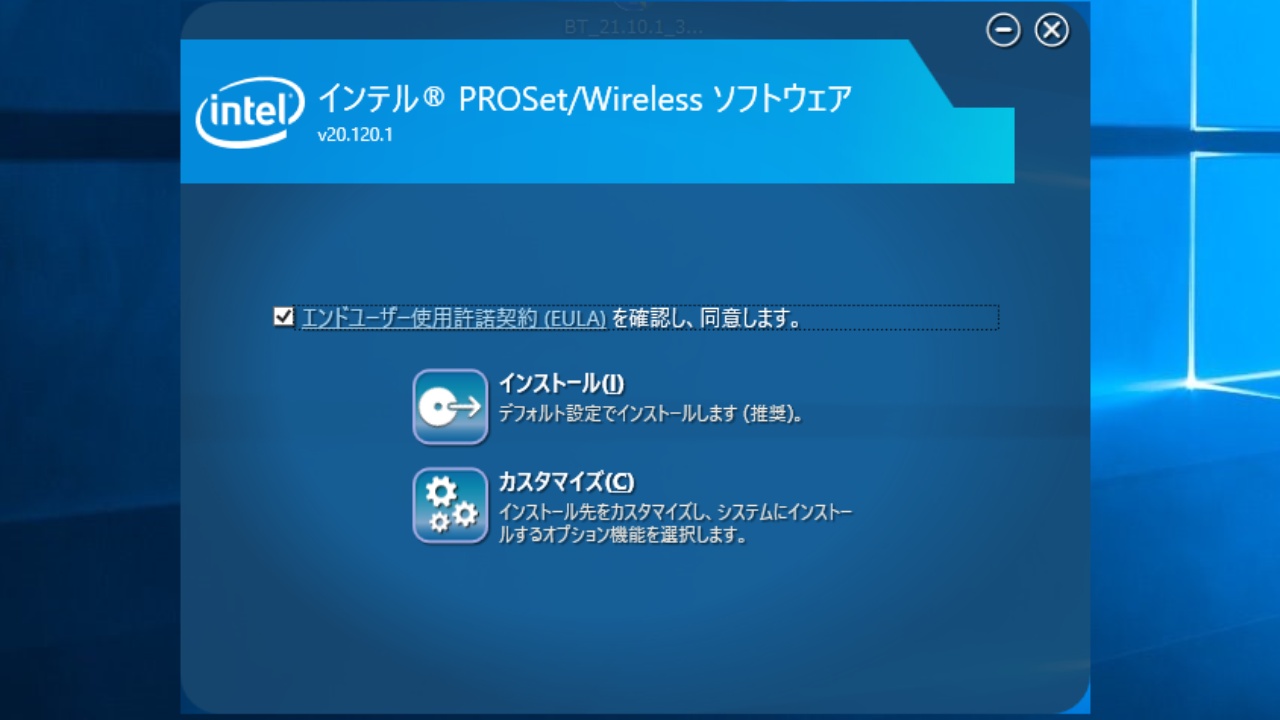
セットアップ
インストールのカスタマイズ
使い方
インストール
:インストール
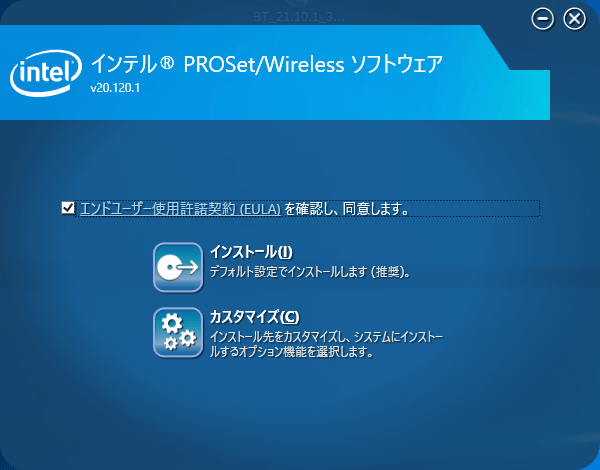
ダウンロードしたセットアッププログラムを実行すると、セットアップウィザートが表示されます。
「エンドユーザー使用許諾契約(EULA)を確認し、同意します。」にチェックを入れて「インストール」をクリックするとインストールを開始します。
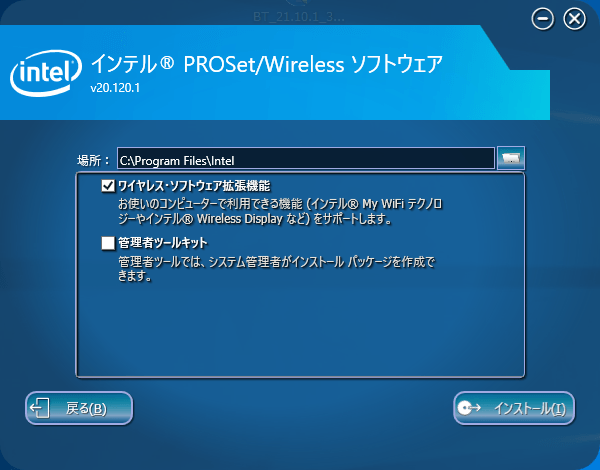
インストール先を変更する、または管理者ツールキットをインストールする場合は「カスタマイズ」をクリックしてください。
こちらは「カスタマイズ」をクリックした場合の画面です。
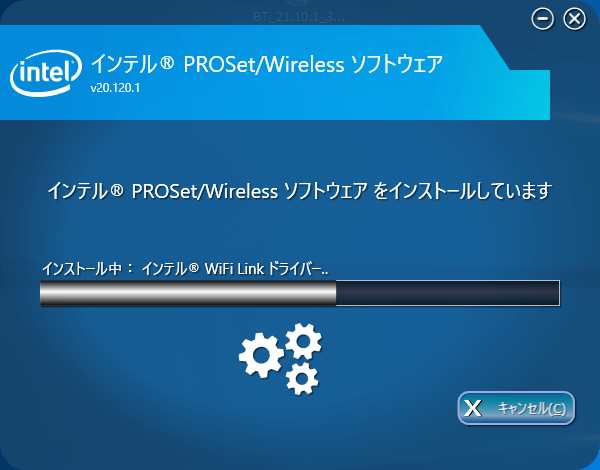
「インストール」をクリックするとインストールが開始されます。
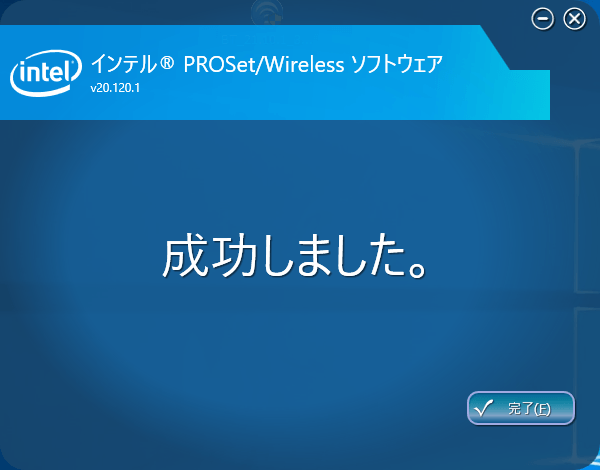
成功しました。と表示されればインストールは完了です。
よくある質問と回答
どれをインストールしたら良いか分からない
ユーザーレビュー
レビューはまだありません、 最初のレビューを投稿してください。コメントは任意です。