").attr(n.scriptAttrs||{}).prop({charset:n.scriptCharset,src:n.url}).on("load error",i=function(e){r.remove(),i=null,e&&t("error"===e.type?404:200,e.type)}),C.head.appendChild(r[0])},abort:function(){i&&i()}}});var Jt,Kt=[],Zt=/(=)\?(?=&|$)|\?\?/;ce.ajaxSetup({jsonp:"callback",jsonpCallback:function(){var e=Kt.pop()||ce.expando+"_"+jt.guid++;return this[e]=!0,e}}),ce.ajaxPrefilter("json jsonp",function(e,t,n){var r,i,o,a=!1!==e.jsonp&&(Zt.test(e.url)?"url":"string"==typeof e.data&&0===(e.contentType||"").indexOf("application/x-www-form-urlencoded")&&Zt.test(e.data)&&"data");if(a||"jsonp"===e.dataTypes[0])return r=e.jsonpCallback=v(e.jsonpCallback)?e.jsonpCallback():e.jsonpCallback,a?e[a]=e[a].replace(Zt,"$1"+r):!1!==e.jsonp&&(e.url+=(At.test(e.url)?"&":"?")+e.jsonp+"="+r),e.converters["script json"]=function(){return o||ce.error(r+" was not called"),o[0]},e.dataTypes[0]="json",i=ie[r],ie[r]=function(){o=arguments},n.always(function(){void 0===i?ce(ie).removeProp(r):ie[r]=i,e[r]&&(e.jsonpCallback=t.jsonpCallback,Kt.push(r)),o&&v(i)&&i(o[0]),o=i=void 0}),"script"}),le.createHTMLDocument=((Jt=C.implementation.createHTMLDocument("").body).innerHTML="
",2===Jt.childNodes.length),ce.parseHTML=function(e,t,n){return"string"!=typeof e?[]:("boolean"==typeof t&&(n=t,t=!1),t||(le.createHTMLDocument?((r=(t=C.implementation.createHTMLDocument("")).createElement("base")).href=C.location.href,t.head.appendChild(r)):t=C),o=!n&&[],(i=w.exec(e))?[t.createElement(i[1])]:(i=Ae([e],t,o),o&&o.length&&ce(o).remove(),ce.merge([],i.childNodes)));var r,i,o},ce.fn.load=function(e,t,n){var r,i,o,a=this,s=e.indexOf(" ");return-1").append(ce.parseHTML(e)).find(r):e)}).always(n&&function(e,t){a.each(function(){n.apply(this,o||[e.responseText,t,e])})}),this},ce.expr.pseudos.animated=function(t){return ce.grep(ce.timers,function(e){return t===e.elem}).length},ce.offset={setOffset:function(e,t,n){var r,i,o,a,s,u,l=ce.css(e,"position"),c=ce(e),f={};"static"===l&&(e.style.position="relative"),s=c.offset(),o=ce.css(e,"top"),u=ce.css(e,"left"),("absolute"===l||"fixed"===l)&&-1<(o+u).indexOf("auto")?(a=(r=c.position()).top,i=r.left):(a=parseFloat(o)||0,i=parseFloat(u)||0),v(t)&&(t=t.call(e,n,ce.extend({},s))),null!=t.top&&(f.top=t.top-s.top+a),null!=t.left&&(f.left=t.left-s.left+i),"using"in t?t.using.call(e,f):c.css(f)}},ce.fn.extend({offset:function(t){if(arguments.length)return void 0===t?this:this.each(function(e){ce.offset.setOffset(this,t,e)});var e,n,r=this[0];return r?r.getClientRects().length?(e=r.getBoundingClientRect(),n=r.ownerDocument.defaultView,{top:e.top+n.pageYOffset,left:e.left+n.pageXOffset}):{top:0,left:0}:void 0},position:function(){if(this[0]){var e,t,n,r=this[0],i={top:0,left:0};if("fixed"===ce.css(r,"position"))t=r.getBoundingClientRect();else{t=this.offset(),n=r.ownerDocument,e=r.offsetParent||n.documentElement;while(e&&(e===n.body||e===n.documentElement)&&"static"===ce.css(e,"position"))e=e.parentNode;e&&e!==r&&1===e.nodeType&&((i=ce(e).offset()).top+=ce.css(e,"borderTopWidth",!0),i.left+=ce.css(e,"borderLeftWidth",!0))}return{top:t.top-i.top-ce.css(r,"marginTop",!0),left:t.left-i.left-ce.css(r,"marginLeft",!0)}}},offsetParent:function(){return this.map(function(){var e=this.offsetParent;while(e&&"static"===ce.css(e,"position"))e=e.offsetParent;return e||J})}}),ce.each({scrollLeft:"pageXOffset",scrollTop:"pageYOffset"},function(t,i){var o="pageYOffset"===i;ce.fn[t]=function(e){return M(this,function(e,t,n){var r;if(y(e)?r=e:9===e.nodeType&&(r=e.defaultView),void 0===n)return r?r[i]:e[t];r?r.scrollTo(o?r.pageXOffset:n,o?n:r.pageYOffset):e[t]=n},t,e,arguments.length)}}),ce.each(["top","left"],function(e,n){ce.cssHooks[n]=Ye(le.pixelPosition,function(e,t){if(t)return t=Ge(e,n),_e.test(t)?ce(e).position()[n]+"px":t})}),ce.each({Height:"height",Width:"width"},function(a,s){ce.each({padding:"inner"+a,content:s,"":"outer"+a},function(r,o){ce.fn[o]=function(e,t){var n=arguments.length&&(r||"boolean"!=typeof e),i=r||(!0===e||!0===t?"margin":"border");return M(this,function(e,t,n){var r;return y(e)?0===o.indexOf("outer")?e["inner"+a]:e.document.documentElement["client"+a]:9===e.nodeType?(r=e.documentElement,Math.max(e.body["scroll"+a],r["scroll"+a],e.body["offset"+a],r["offset"+a],r["client"+a])):void 0===n?ce.css(e,t,i):ce.style(e,t,n,i)},s,n?e:void 0,n)}})}),ce.each(["ajaxStart","ajaxStop","ajaxComplete","ajaxError","ajaxSuccess","ajaxSend"],function(e,t){ce.fn[t]=function(e){return this.on(t,e)}}),ce.fn.extend({bind:function(e,t,n){return this.on(e,null,t,n)},unbind:function(e,t){return this.off(e,null,t)},delegate:function(e,t,n,r){return this.on(t,e,n,r)},undelegate:function(e,t,n){return 1===arguments.length?this.off(e,"**"):this.off(t,e||"**",n)},hover:function(e,t){return this.on("mouseenter",e).on("mouseleave",t||e)}}),ce.each("blur focus focusin focusout resize scroll click dblclick mousedown mouseup mousemove mouseover mouseout mouseenter mouseleave change select submit keydown keypress keyup contextmenu".split(" "),function(e,n){ce.fn[n]=function(e,t){return 0
EasyBrake 1.3.0.0
ビデオエンコード
説明機能仕様ダウンロード画像使い方
あらゆる動画形式を MP4 または MKV に変換するツール
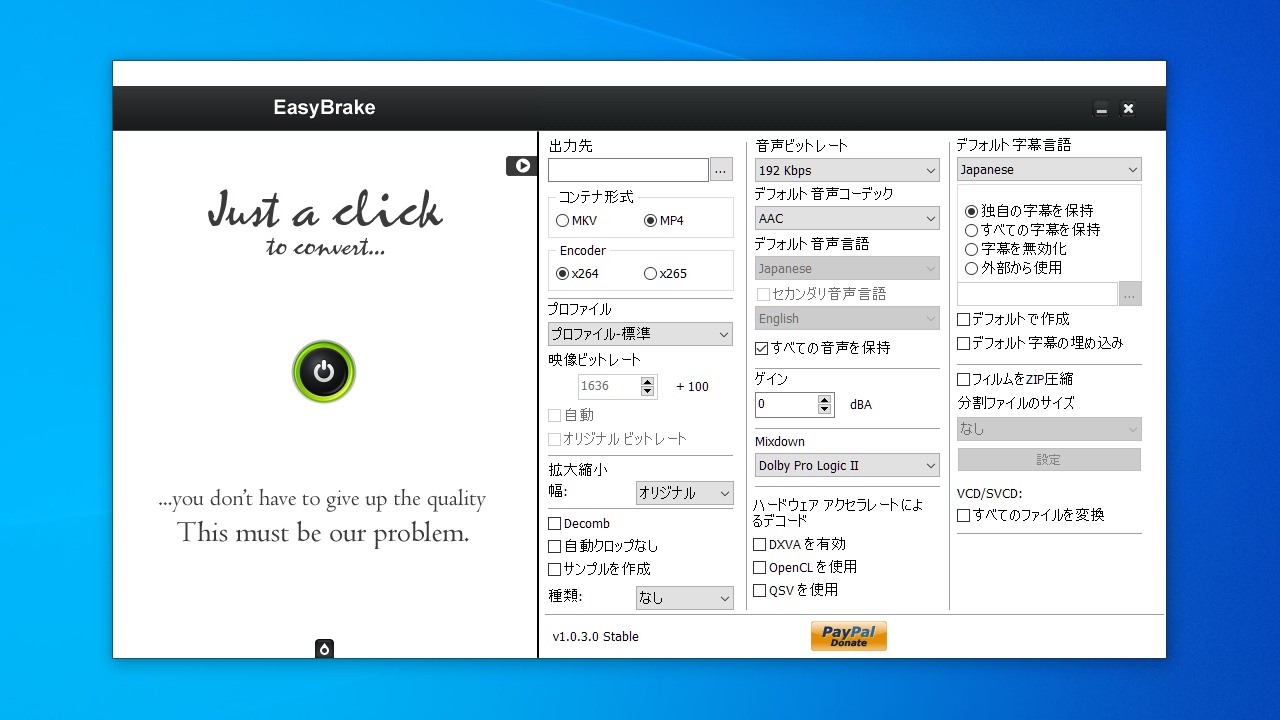
動画ファイルを一般的な MP4 / MKV ビデオ、または、 iPod, iPhone, iPad, Android 向けの MP4 / MKV ビデオに変換することができるフリーのビデオ変換ソフト。DVD や Blu-ray を変換したり、CD を MP3 にリッピングすることもできます。
EasyBrake の概要
EasyBrake は、ほとんどの動画形式を簡単に MP4 や MKV に変換する事ができるツールです。このアプリケーションは、よく知られているオープンソースのトランスコーダである「HandBrake」のエンジンを使用しています。
EasyBrake の機能
EasyBrake の主な機能と概要です。
| 機能 |
概要 |
| メイン機能 |
ビデオファイルを MP4 / MKV に変換 |
| 機能詳細 |
・ビデオファイルを MP4 / MKV に変換
・VCD / SVCD / DVD / Blu-ray を MP4 / MKV に変換
・オーディオ CD を MP3 にリッピング
・クイックサンプル機能(動画を全部エンコードせずに品質などをチェックできる)
・メディアファイルの情報を取得(MediaInfo) |
| 入力フォーマット |
3gp, avi, flv, m2t, m2ts, mkv, mp4, qt, wtv など 62 種類 |
| 出力プロファイル |
iPod, iPhone, iPad, Android, Android タブレット, Apple TV, Windows Phone ほか |
あらゆる動画形式または DVD / Blu-ray を変換できます
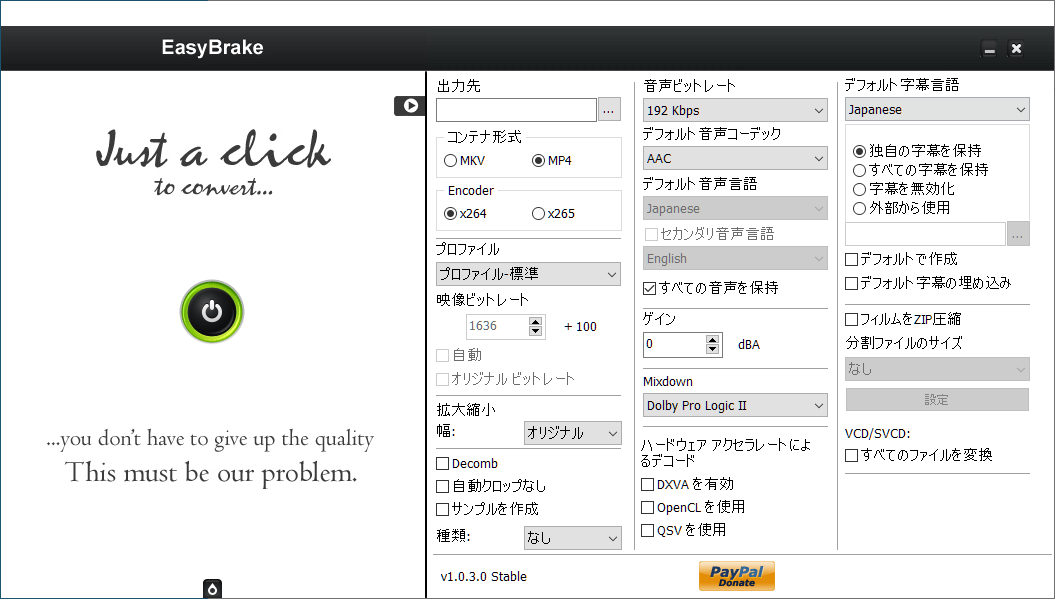
EasyBrake を使用すると、さまざまな形式の動画ファイル、または暗号化されていない DVD / ブルーレイ / VCD / SVCD を、 MP4 / MKV 動画(x264 または x265)に変換することができます。
出力ビデオは、iPod / iPhone / iPod Touch / Android / Android タブレット / Apple TV などのデバイス向けのほか、カスタムプロファイルで出力を設定することが可能です。
かんたんに使用できる動画変換ソフト
EasyBrake は、さまざまな形式のビデオや、DVD または Blu-ray を一般的な動画形式に変換したい場合に役に立つビデオ変換ソフトです。オーディオ CD をリッピングする機能も付いています。
機能
- ビデオファイルを MP4 / MKV に変換
- VCD / SVCD / DVD / Blu-ray を MP4 / MKV に変換
- オーディオ CD をリッピング
- ハードウェアアクセラレーションのサポート(DXVA / OpenCL / Intel QSV)
価格:無料
動作環境:Windows 7|8|8.1|10|11
使用言語:英語
最終更新日:
11年前 (2015/03/02)
ダウンロード数:492
使い方
インストール
1.アプリを起動する
EasyBrake はインストール不要で使用できます。
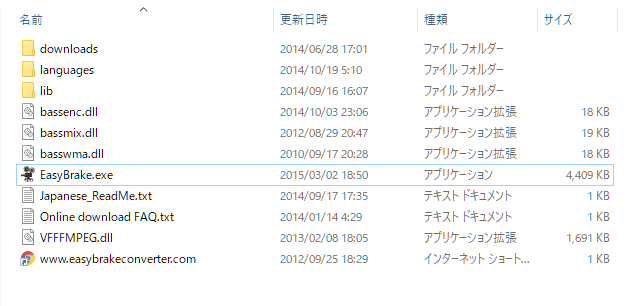
- ダウンロードした ZIP ファイルを解凍し、フォルダ内の「EasyBrake.exe」ファイルを実行するとアプリケーションを起動できます。
基本的な使い方
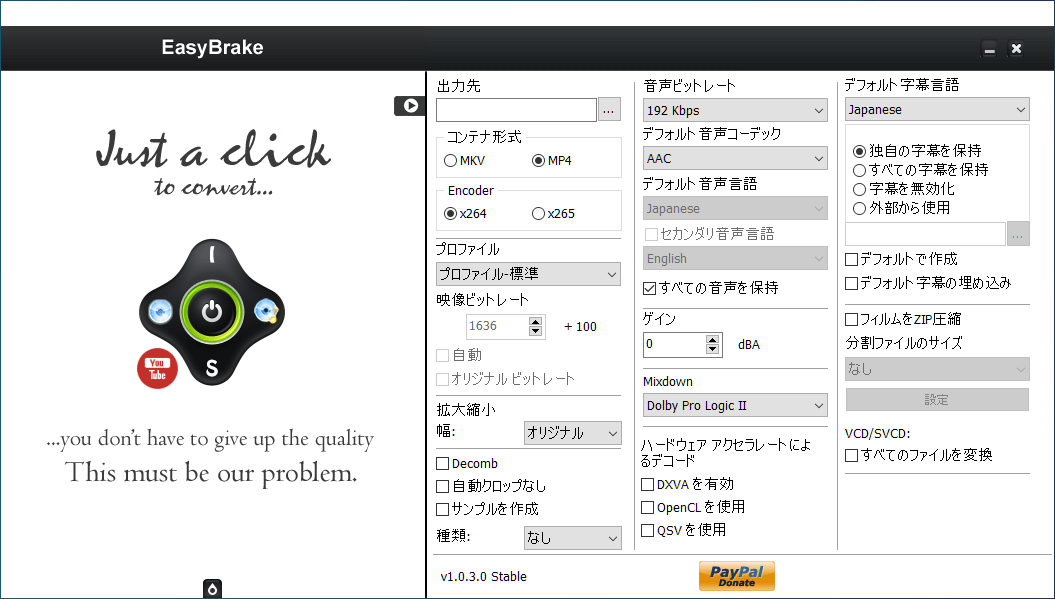
1.動画ファイルを変換する
- EasyBrake を起動します。
- 右上の「▶」ボタンをクリックすると設定パネルが開くので、出力設定をします。

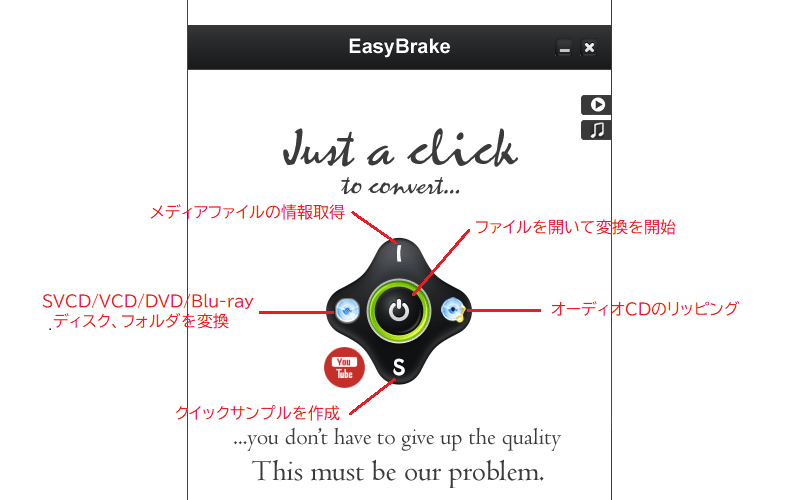
- 中央のボタンをクリックして、変換する動画ファイルを選択します。
- 左のボタンをクリックして、DVD や Blu-ray を変換することもできます。
- 変換中はボタンの下にオレンジ色で進捗状況が表示されます。
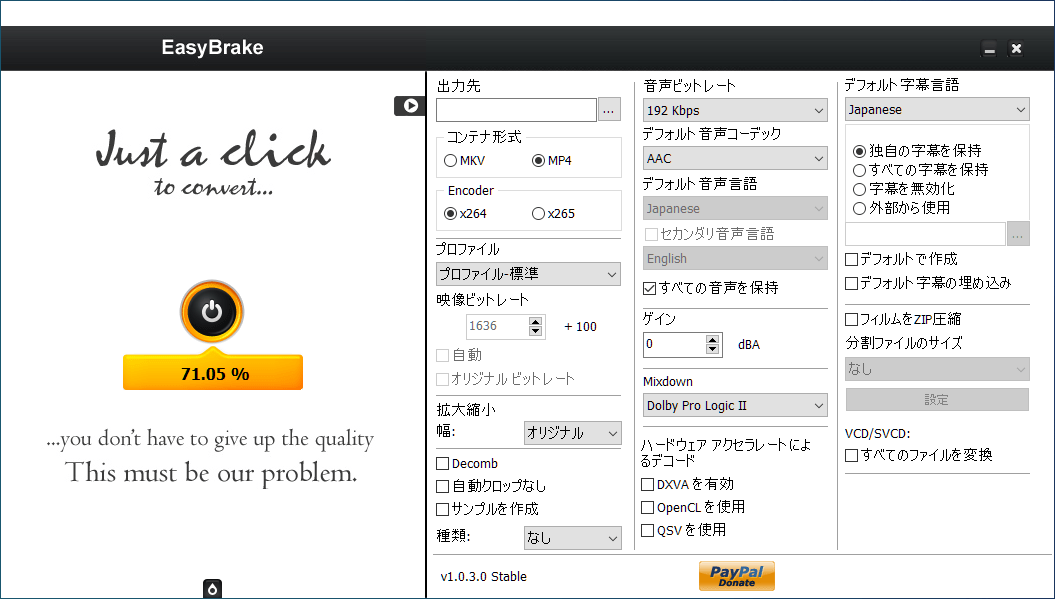
- 出力先が空白の場合は、元のファイルと同じ場所に保存されます。
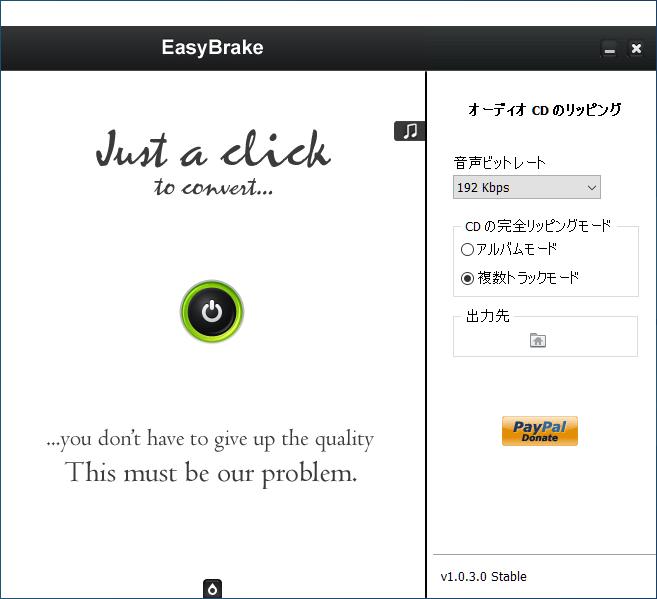
2.CD をリッピングする
- EasyBrake を起動します。
- 右上の「♫」ボタンをクリックして、オーディオの出力設定をします。

- 「オーディオCDのリッピング」ボタンをクリックして CD ドライブを選択します。

よくある質問と回答
ライセンスについて。