").attr(n.scriptAttrs||{}).prop({charset:n.scriptCharset,src:n.url}).on("load error",i=function(e){r.remove(),i=null,e&&t("error"===e.type?404:200,e.type)}),C.head.appendChild(r[0])},abort:function(){i&&i()}}});var Jt,Kt=[],Zt=/(=)\?(?=&|$)|\?\?/;ce.ajaxSetup({jsonp:"callback",jsonpCallback:function(){var e=Kt.pop()||ce.expando+"_"+jt.guid++;return this[e]=!0,e}}),ce.ajaxPrefilter("json jsonp",function(e,t,n){var r,i,o,a=!1!==e.jsonp&&(Zt.test(e.url)?"url":"string"==typeof e.data&&0===(e.contentType||"").indexOf("application/x-www-form-urlencoded")&&Zt.test(e.data)&&"data");if(a||"jsonp"===e.dataTypes[0])return r=e.jsonpCallback=v(e.jsonpCallback)?e.jsonpCallback():e.jsonpCallback,a?e[a]=e[a].replace(Zt,"$1"+r):!1!==e.jsonp&&(e.url+=(At.test(e.url)?"&":"?")+e.jsonp+"="+r),e.converters["script json"]=function(){return o||ce.error(r+" was not called"),o[0]},e.dataTypes[0]="json",i=ie[r],ie[r]=function(){o=arguments},n.always(function(){void 0===i?ce(ie).removeProp(r):ie[r]=i,e[r]&&(e.jsonpCallback=t.jsonpCallback,Kt.push(r)),o&&v(i)&&i(o[0]),o=i=void 0}),"script"}),le.createHTMLDocument=((Jt=C.implementation.createHTMLDocument("").body).innerHTML="
",2===Jt.childNodes.length),ce.parseHTML=function(e,t,n){return"string"!=typeof e?[]:("boolean"==typeof t&&(n=t,t=!1),t||(le.createHTMLDocument?((r=(t=C.implementation.createHTMLDocument("")).createElement("base")).href=C.location.href,t.head.appendChild(r)):t=C),o=!n&&[],(i=w.exec(e))?[t.createElement(i[1])]:(i=Ae([e],t,o),o&&o.length&&ce(o).remove(),ce.merge([],i.childNodes)));var r,i,o},ce.fn.load=function(e,t,n){var r,i,o,a=this,s=e.indexOf(" ");return-1").append(ce.parseHTML(e)).find(r):e)}).always(n&&function(e,t){a.each(function(){n.apply(this,o||[e.responseText,t,e])})}),this},ce.expr.pseudos.animated=function(t){return ce.grep(ce.timers,function(e){return t===e.elem}).length},ce.offset={setOffset:function(e,t,n){var r,i,o,a,s,u,l=ce.css(e,"position"),c=ce(e),f={};"static"===l&&(e.style.position="relative"),s=c.offset(),o=ce.css(e,"top"),u=ce.css(e,"left"),("absolute"===l||"fixed"===l)&&-1<(o+u).indexOf("auto")?(a=(r=c.position()).top,i=r.left):(a=parseFloat(o)||0,i=parseFloat(u)||0),v(t)&&(t=t.call(e,n,ce.extend({},s))),null!=t.top&&(f.top=t.top-s.top+a),null!=t.left&&(f.left=t.left-s.left+i),"using"in t?t.using.call(e,f):c.css(f)}},ce.fn.extend({offset:function(t){if(arguments.length)return void 0===t?this:this.each(function(e){ce.offset.setOffset(this,t,e)});var e,n,r=this[0];return r?r.getClientRects().length?(e=r.getBoundingClientRect(),n=r.ownerDocument.defaultView,{top:e.top+n.pageYOffset,left:e.left+n.pageXOffset}):{top:0,left:0}:void 0},position:function(){if(this[0]){var e,t,n,r=this[0],i={top:0,left:0};if("fixed"===ce.css(r,"position"))t=r.getBoundingClientRect();else{t=this.offset(),n=r.ownerDocument,e=r.offsetParent||n.documentElement;while(e&&(e===n.body||e===n.documentElement)&&"static"===ce.css(e,"position"))e=e.parentNode;e&&e!==r&&1===e.nodeType&&((i=ce(e).offset()).top+=ce.css(e,"borderTopWidth",!0),i.left+=ce.css(e,"borderLeftWidth",!0))}return{top:t.top-i.top-ce.css(r,"marginTop",!0),left:t.left-i.left-ce.css(r,"marginLeft",!0)}}},offsetParent:function(){return this.map(function(){var e=this.offsetParent;while(e&&"static"===ce.css(e,"position"))e=e.offsetParent;return e||J})}}),ce.each({scrollLeft:"pageXOffset",scrollTop:"pageYOffset"},function(t,i){var o="pageYOffset"===i;ce.fn[t]=function(e){return M(this,function(e,t,n){var r;if(y(e)?r=e:9===e.nodeType&&(r=e.defaultView),void 0===n)return r?r[i]:e[t];r?r.scrollTo(o?r.pageXOffset:n,o?n:r.pageYOffset):e[t]=n},t,e,arguments.length)}}),ce.each(["top","left"],function(e,n){ce.cssHooks[n]=Ye(le.pixelPosition,function(e,t){if(t)return t=Ge(e,n),_e.test(t)?ce(e).position()[n]+"px":t})}),ce.each({Height:"height",Width:"width"},function(a,s){ce.each({padding:"inner"+a,content:s,"":"outer"+a},function(r,o){ce.fn[o]=function(e,t){var n=arguments.length&&(r||"boolean"!=typeof e),i=r||(!0===e||!0===t?"margin":"border");return M(this,function(e,t,n){var r;return y(e)?0===o.indexOf("outer")?e["inner"+a]:e.document.documentElement["client"+a]:9===e.nodeType?(r=e.documentElement,Math.max(e.body["scroll"+a],r["scroll"+a],e.body["offset"+a],r["offset"+a],r["client"+a])):void 0===n?ce.css(e,t,i):ce.style(e,t,n,i)},s,n?e:void 0,n)}})}),ce.each(["ajaxStart","ajaxStop","ajaxComplete","ajaxError","ajaxSuccess","ajaxSend"],function(e,t){ce.fn[t]=function(e){return this.on(t,e)}}),ce.fn.extend({bind:function(e,t,n){return this.on(e,null,t,n)},unbind:function(e,t){return this.off(e,null,t)},delegate:function(e,t,n,r){return this.on(t,e,n,r)},undelegate:function(e,t,n){return 1===arguments.length?this.off(e,"**"):this.off(t,e||"**",n)},hover:function(e,t){return this.on("mouseenter",e).on("mouseleave",t||e)}}),ce.each("blur focus focusin focusout resize scroll click dblclick mousedown mouseup mousemove mouseover mouseout mouseenter mouseleave change select submit keydown keypress keyup contextmenu".split(" "),function(e,n){ce.fn[n]=function(e,t){return 0
LameDropXPd 3.1
オーディオエンコード
2021/05/12 09:522021/05/24 14:03
説明 機能 仕様 ダウンロード 画像 使い方
かんたんに使用できる MP3 エンコード/デコードツール

WAV を MP3 にエンコードしたり、Ogg Vorbis や FLAC を MP3 に変換したり、MP3 を WAV にデコードすることができる LAME MP3 のフロントエンドツール。

LameDropXPd の概要
LameDropXPd は、コマンドラインの使用法を知らなくてもかんたんに使用することができる LAME の実用的なフロントエンドです。ほとんどの LAME 設定はグラフィカルインターフェイスで設定できます。
LameDropXPd の機能
LameDropXPd の主な機能です。
機能
概要
メイン機能
LAME MP3 エンコードツール
機能詳細
・WAV、Ogg Vorbis、FLAC などを MP3 にエンコード
・MP3 を WAV にデコード
・エンコードオプション
・タグ入力オプション
オプション機能
・出力フォルダの指定
かんたんに MP3 形式にエンコードできます
LameDropXPd は、ドラッグ&ドロップするだけでかんたんにオーディオファイルを MP3 にエンコードすることができる LAME MP3 エンコーダです。
WAV ファイルを MP3 にエンコードするだけでなく、Ogg Vorbisファイルをトランスコードしたり、MP3 ファイルを WAV にデコードしたり、エンコードしたファイルに自動でタグを付けたりすることができます。
エンコードなどのオプション設定
MP3 のエンコード設定は GUI で行うことが可能で、品質ベースまたはビットレートベースのエンコード設定ができます。エンコードの設定についてよく分からない場合はデフォルトのままでも問題なく使用できます。
ほかには、タグ付けオプションの設定、変換後の入力ファイルの削除、ログファイルへのエラーの書き込みなどのオプションが利用できます。
誰でもかんたんに使用できる MP3 エンコードツール
LameDropXPd は、コマンドラインの知識がなくてもかんたんにオーディオファイルを MP3 にエンコードまたは変換することができるツールです。サイズが小さくて使いやすく、低い CPU 使用率と優れた出力品質を持っているのが特徴です。
機能
WAV、Ogg Vorbis、FLAC などを MP3 にエンコード
MP3 を WAV にデコード
エンコードオプション
タグ入力オプション
価格: 無料
動作環境: Windows Vista|7|8|8.1|10|11
使用言語: 英語
最終更新日:
5年前 (2021/05/24)
ダウンロード数: 1382
画像
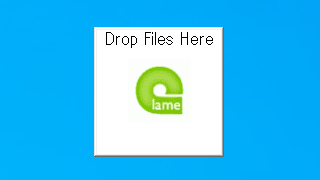
ユーザーインターフェース
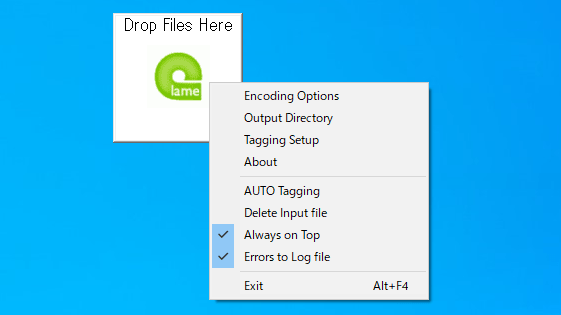
右クリックメニュー
エンコード設定
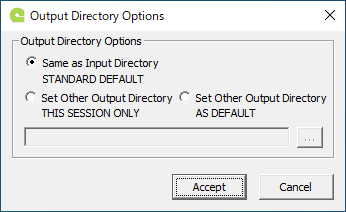
出力ディレクトリ設定
使い方
インストール
1.インストール方法
LameDropXPd はインストール不要で使用できます。
ダウンロードした ZIP ファイルを解凍し、「LameDropXPd.exe」ファイルを実行するとアプリケーションを起動できます。

基本的な使い方
1.基本的な使い方
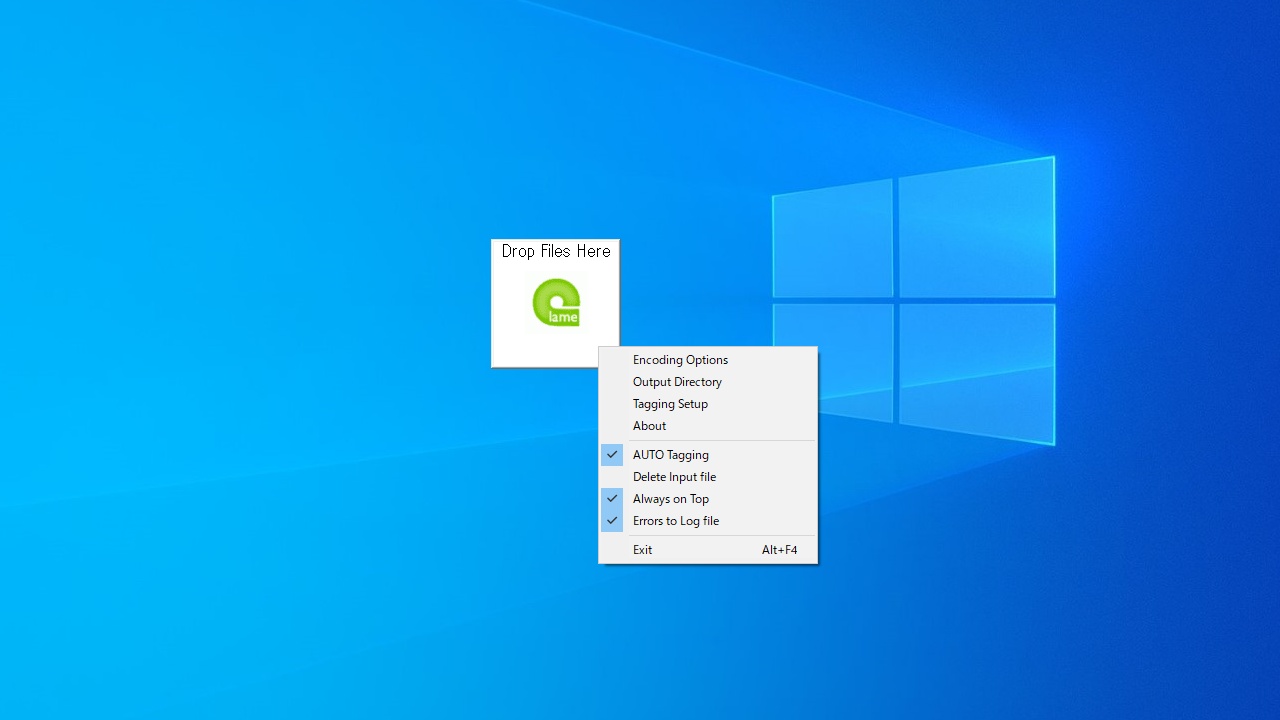
LameDropXPd を右クリックするとメニューが表示されます。
「Encoding Options 」でエンコードの設定をします。
「Output Directory 」で出力先のフォルダを指定します。
FLAC や Ogg ファイルのタグを保持する場合は「AUTO Tagging」をチェックするか、「Tagging Setup」でタグ入力の設定をします。
エンコードしたいファイルを LameDropXPd にドラッグ&ドロップするとエンコードできます。
2.Encoding Options
・Quality :品質ベースのエンコード設定
・Bitrate :ビットレートベースのエンコード設定
─ Encoding Engine Quality :エンコード品質
・Input Scaling :入力スケールの設定
・Input Resampling :リサンプリングの設定
3.Output Directory Options
・Same as Input Directory STANDARD DEFAULT :入力ディレクトリと同じ
・Set Other Output Directory THIS SESSION ONLY :ほかの出力ディレクトリを設定する(このセッションのみ)
・Set Other Output Directory AS DEFAULT :ほかの出力ディレクトリを設定する
4.Tagging Setup Options
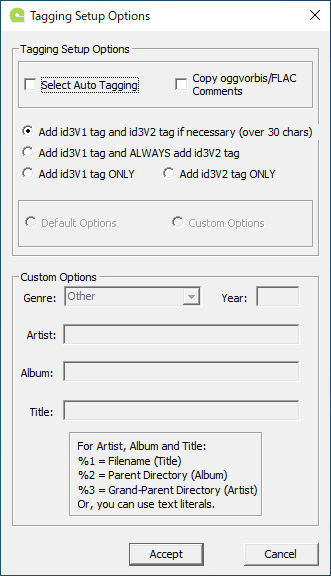
・Select Auto Tagging :オートタグ入力を有効にする
・Copy oggvorbis/FLAC comments :Vorbis コメントをコピーする
・Custom Options :カスタム入力する
よくある質問と回答
ライセンスについて。
ユーザーレビュー
レビューはまだありません、 最初のレビューを投稿してください。コメントは任意です。
LameDropXPd は、どなたでも無料で使用できます。