").attr(n.scriptAttrs||{}).prop({charset:n.scriptCharset,src:n.url}).on("load error",i=function(e){r.remove(),i=null,e&&t("error"===e.type?404:200,e.type)}),C.head.appendChild(r[0])},abort:function(){i&&i()}}});var Jt,Kt=[],Zt=/(=)\?(?=&|$)|\?\?/;ce.ajaxSetup({jsonp:"callback",jsonpCallback:function(){var e=Kt.pop()||ce.expando+"_"+jt.guid++;return this[e]=!0,e}}),ce.ajaxPrefilter("json jsonp",function(e,t,n){var r,i,o,a=!1!==e.jsonp&&(Zt.test(e.url)?"url":"string"==typeof e.data&&0===(e.contentType||"").indexOf("application/x-www-form-urlencoded")&&Zt.test(e.data)&&"data");if(a||"jsonp"===e.dataTypes[0])return r=e.jsonpCallback=v(e.jsonpCallback)?e.jsonpCallback():e.jsonpCallback,a?e[a]=e[a].replace(Zt,"$1"+r):!1!==e.jsonp&&(e.url+=(At.test(e.url)?"&":"?")+e.jsonp+"="+r),e.converters["script json"]=function(){return o||ce.error(r+" was not called"),o[0]},e.dataTypes[0]="json",i=ie[r],ie[r]=function(){o=arguments},n.always(function(){void 0===i?ce(ie).removeProp(r):ie[r]=i,e[r]&&(e.jsonpCallback=t.jsonpCallback,Kt.push(r)),o&&v(i)&&i(o[0]),o=i=void 0}),"script"}),le.createHTMLDocument=((Jt=C.implementation.createHTMLDocument("").body).innerHTML="
",2===Jt.childNodes.length),ce.parseHTML=function(e,t,n){return"string"!=typeof e?[]:("boolean"==typeof t&&(n=t,t=!1),t||(le.createHTMLDocument?((r=(t=C.implementation.createHTMLDocument("")).createElement("base")).href=C.location.href,t.head.appendChild(r)):t=C),o=!n&&[],(i=w.exec(e))?[t.createElement(i[1])]:(i=Ae([e],t,o),o&&o.length&&ce(o).remove(),ce.merge([],i.childNodes)));var r,i,o},ce.fn.load=function(e,t,n){var r,i,o,a=this,s=e.indexOf(" ");return-1").append(ce.parseHTML(e)).find(r):e)}).always(n&&function(e,t){a.each(function(){n.apply(this,o||[e.responseText,t,e])})}),this},ce.expr.pseudos.animated=function(t){return ce.grep(ce.timers,function(e){return t===e.elem}).length},ce.offset={setOffset:function(e,t,n){var r,i,o,a,s,u,l=ce.css(e,"position"),c=ce(e),f={};"static"===l&&(e.style.position="relative"),s=c.offset(),o=ce.css(e,"top"),u=ce.css(e,"left"),("absolute"===l||"fixed"===l)&&-1<(o+u).indexOf("auto")?(a=(r=c.position()).top,i=r.left):(a=parseFloat(o)||0,i=parseFloat(u)||0),v(t)&&(t=t.call(e,n,ce.extend({},s))),null!=t.top&&(f.top=t.top-s.top+a),null!=t.left&&(f.left=t.left-s.left+i),"using"in t?t.using.call(e,f):c.css(f)}},ce.fn.extend({offset:function(t){if(arguments.length)return void 0===t?this:this.each(function(e){ce.offset.setOffset(this,t,e)});var e,n,r=this[0];return r?r.getClientRects().length?(e=r.getBoundingClientRect(),n=r.ownerDocument.defaultView,{top:e.top+n.pageYOffset,left:e.left+n.pageXOffset}):{top:0,left:0}:void 0},position:function(){if(this[0]){var e,t,n,r=this[0],i={top:0,left:0};if("fixed"===ce.css(r,"position"))t=r.getBoundingClientRect();else{t=this.offset(),n=r.ownerDocument,e=r.offsetParent||n.documentElement;while(e&&(e===n.body||e===n.documentElement)&&"static"===ce.css(e,"position"))e=e.parentNode;e&&e!==r&&1===e.nodeType&&((i=ce(e).offset()).top+=ce.css(e,"borderTopWidth",!0),i.left+=ce.css(e,"borderLeftWidth",!0))}return{top:t.top-i.top-ce.css(r,"marginTop",!0),left:t.left-i.left-ce.css(r,"marginLeft",!0)}}},offsetParent:function(){return this.map(function(){var e=this.offsetParent;while(e&&"static"===ce.css(e,"position"))e=e.offsetParent;return e||J})}}),ce.each({scrollLeft:"pageXOffset",scrollTop:"pageYOffset"},function(t,i){var o="pageYOffset"===i;ce.fn[t]=function(e){return M(this,function(e,t,n){var r;if(y(e)?r=e:9===e.nodeType&&(r=e.defaultView),void 0===n)return r?r[i]:e[t];r?r.scrollTo(o?r.pageXOffset:n,o?n:r.pageYOffset):e[t]=n},t,e,arguments.length)}}),ce.each(["top","left"],function(e,n){ce.cssHooks[n]=Ye(le.pixelPosition,function(e,t){if(t)return t=Ge(e,n),_e.test(t)?ce(e).position()[n]+"px":t})}),ce.each({Height:"height",Width:"width"},function(a,s){ce.each({padding:"inner"+a,content:s,"":"outer"+a},function(r,o){ce.fn[o]=function(e,t){var n=arguments.length&&(r||"boolean"!=typeof e),i=r||(!0===e||!0===t?"margin":"border");return M(this,function(e,t,n){var r;return y(e)?0===o.indexOf("outer")?e["inner"+a]:e.document.documentElement["client"+a]:9===e.nodeType?(r=e.documentElement,Math.max(e.body["scroll"+a],r["scroll"+a],e.body["offset"+a],r["offset"+a],r["client"+a])):void 0===n?ce.css(e,t,i):ce.style(e,t,n,i)},s,n?e:void 0,n)}})}),ce.each(["ajaxStart","ajaxStop","ajaxComplete","ajaxError","ajaxSuccess","ajaxSend"],function(e,t){ce.fn[t]=function(e){return this.on(t,e)}}),ce.fn.extend({bind:function(e,t,n){return this.on(e,null,t,n)},unbind:function(e,t){return this.off(e,null,t)},delegate:function(e,t,n,r){return this.on(t,e,n,r)},undelegate:function(e,t,n){return 1===arguments.length?this.off(e,"**"):this.off(t,e||"**",n)},hover:function(e,t){return this.on("mouseenter",e).on("mouseleave",t||e)}}),ce.each("blur focus focusin focusout resize scroll click dblclick mousedown mouseup mousemove mouseover mouseout mouseenter mouseleave change select submit keydown keypress keyup contextmenu".split(" "),function(e,n){ce.fn[n]=function(e,t){return 0
Stretchly 1.20.0
デスクトップ
2021/04/25 10:172025/12/25 08:14
説明 機能 仕様 ダウンロード 画像 使い方
PC での作業中に休憩を取るようにユーザーに促すアプリ
PC 画面に定期的に休憩画面を表示するアプリケーション。パソコンでの作業中の目や体の疲れを取るために、定期的に休憩を促し、 画面に優しい色の休憩画面を表示します。休憩時間や休憩の頻度はカスタム設定できます。

Stretchly の概要
Stretchly は、コンピュータで作業するときに休憩を取るように通知するクロスプラットフォームのオープンソースアプリです。
Stretchly の機能
Stretchly の主な機能です。
機能
概要
メイン機能
PC 画面に定期的に休憩画面を表示
機能詳細
・フルスクリーンまたはウィンドウで定期的に休憩画面を表示
・Mini および Long 休憩
・休憩時間と休憩頻度の設定
・休憩画面の色やサウンドの変更
休憩を取るようにユーザーに促します
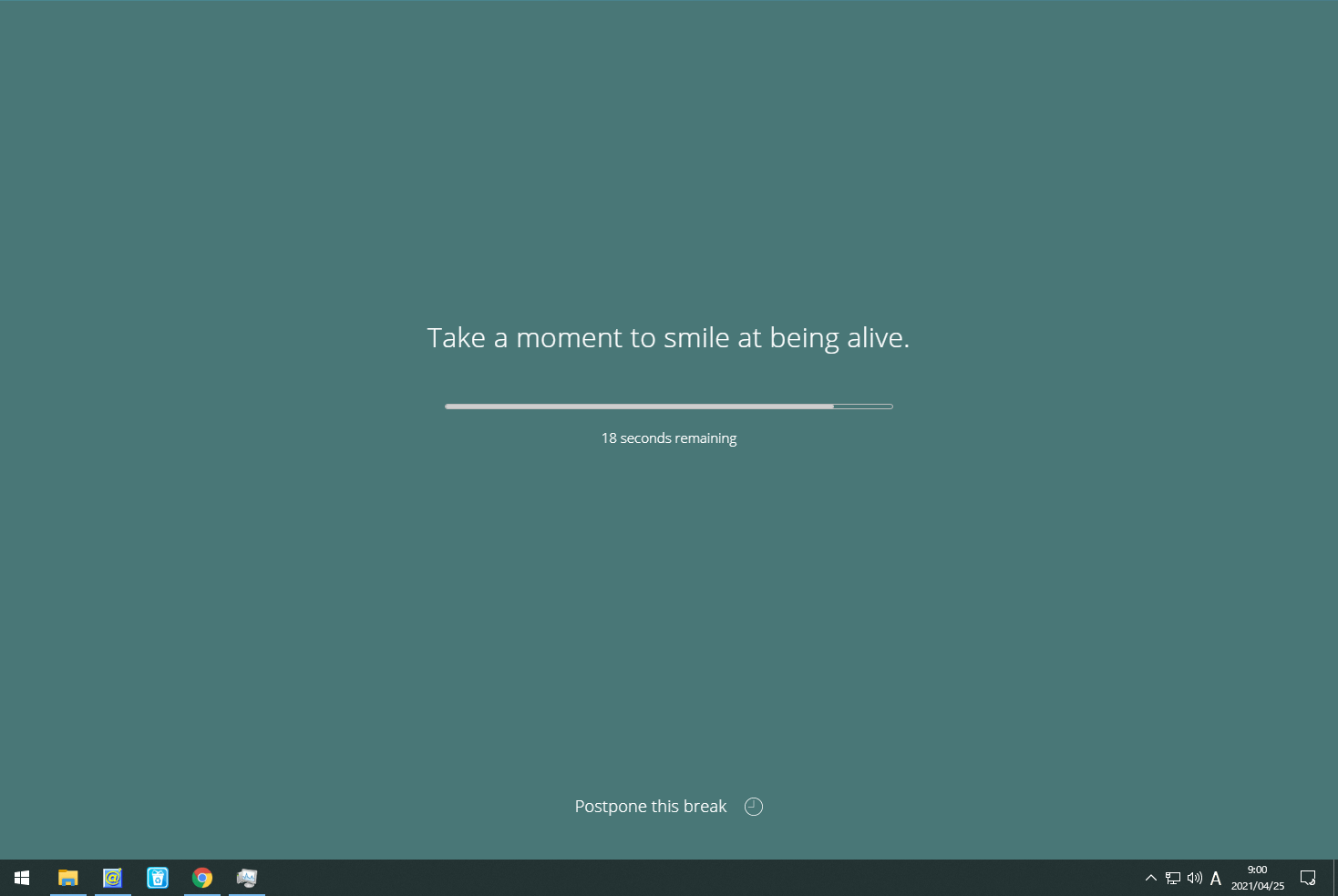
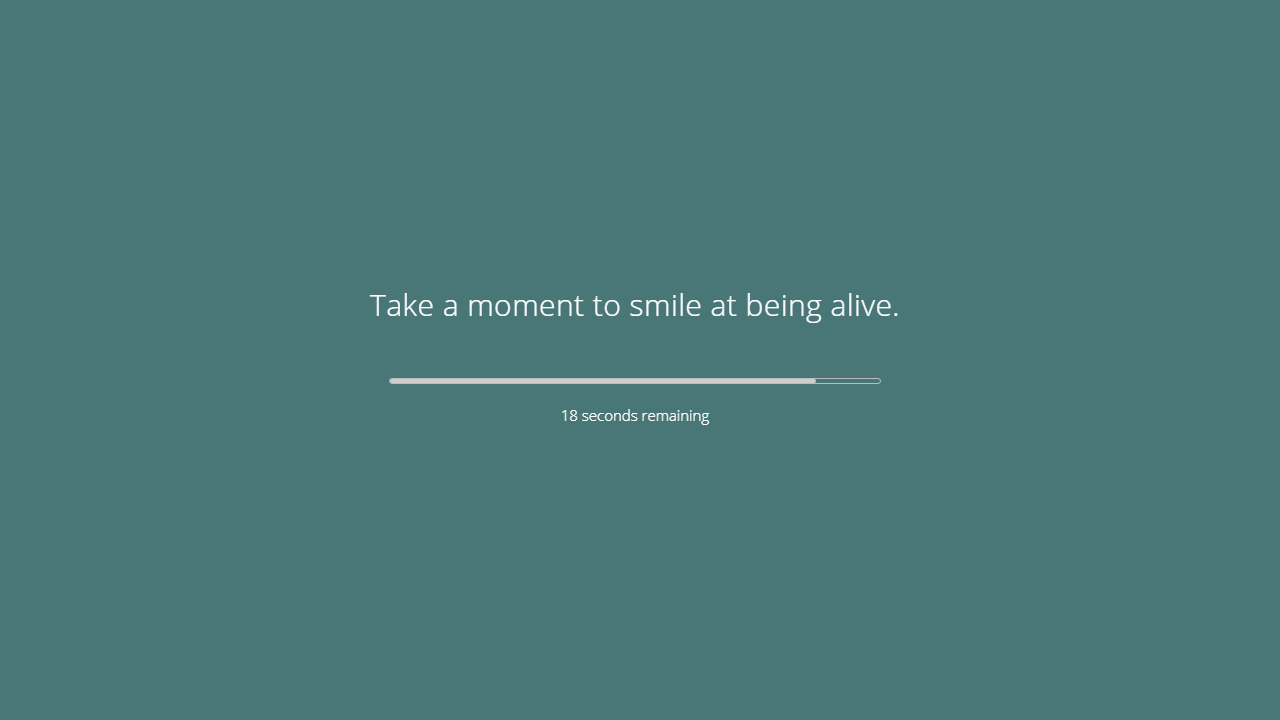
Stretchly は、右の画像のようなブレーク画面を PC の画面に定期的に表示し、ユーザーに休憩を促すことを目的としたアプリケーションです。
Mini と Long の 2 種類の休憩を設定することが可能で、休憩の長さや頻度、画面の色、サウンド、休憩前の通知などは自由に設定できます。
体を休めて作業効率を上げることができます
Stretchly を使用すると、目や体に負担をかけたり、作業効率を落とさないために定期的に休憩を取るようにユーザーに強制することができます。すべての設定はカスタマイズできます。
機能
フルスクリーンまたはウィンドウで定期的に休憩画面を表示
スケジュール(休憩時間と休憩頻度)の設定
休憩画面のテーマの変更
マルチモニター対応
価格: 無料
動作環境: Windows 7|8|8.1|10・Linux・Mac
使用言語: 英語ほか
最終更新日:
4か月前 (2025/12/25)
ダウンロード数: 1555
画像
ブレーク画面
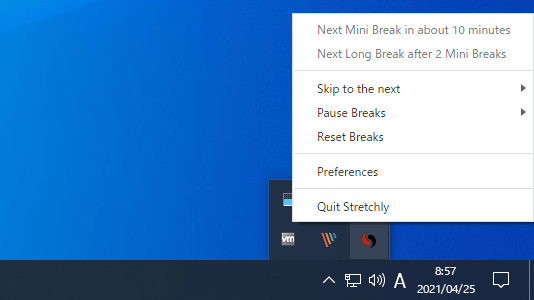
トレイアイコン
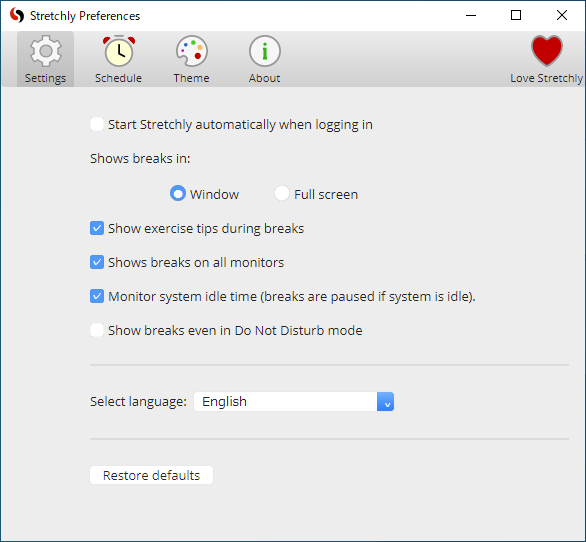
全般設定
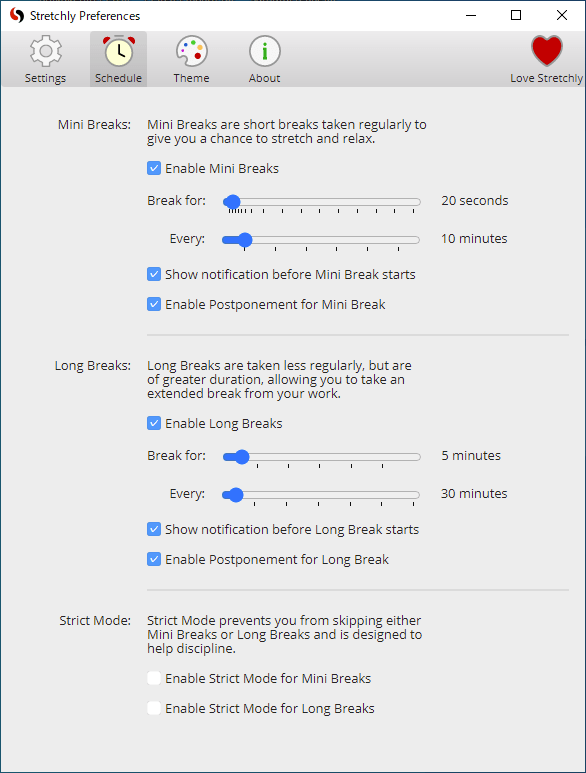
スケジュール設定
使い方
インストール
1.インストール方法
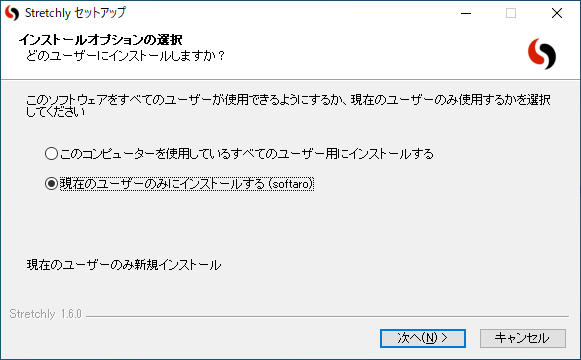
インストーラを実行したら、インストールするユーザーを選択して[次へ ]をクリックします。
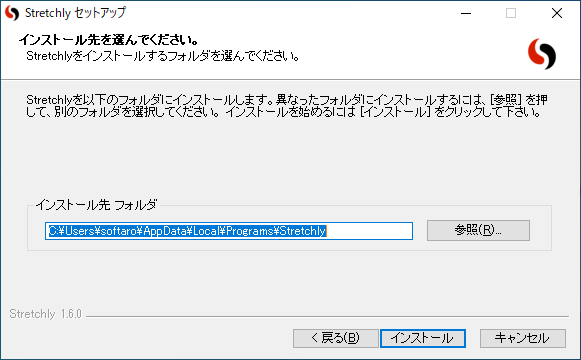
インストール先を指定し、[インストール ]をクリックします。
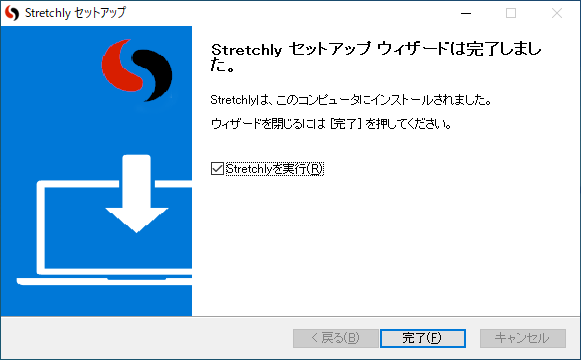
インストールが完了しました。[完了 ]をクリックします。
2.初回起動時
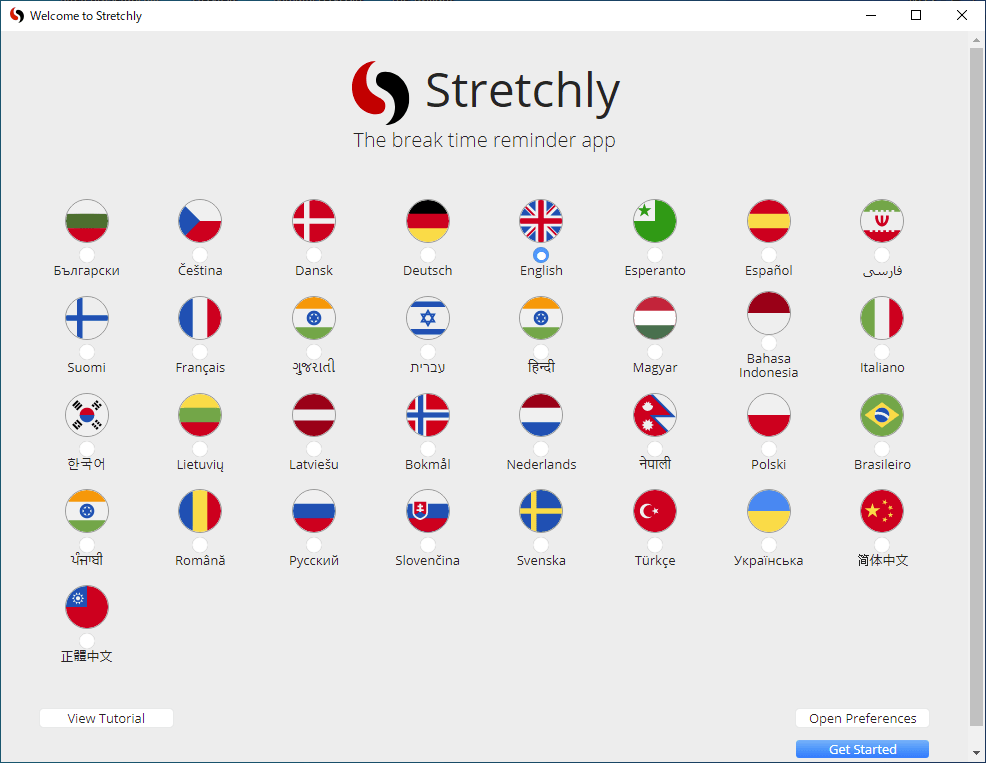
初回起動時は言語の選択画面が表示されます。右下の[Get Started ]をクリックして使用を開始します。
基本的な使い方
1.トレイアイコン
Stretchly を起動するとタスクトレイにアイコンが表示されます。
右クリックメニューから設定やそのほかの操作ができます。
右クリックメニューおよびマウスオーバーで次のブレークまでの時間が表示されます。
・Skip to the next :次へスキップする(ブレークを手動で実行する)
・Pause Breaks :ブレーク(休憩)を一定時間実行しない
・Reset Breaks :ブレークの時間をリセットする
・Preferences :設定
・Quit Stretchly :終了する
設定
1.Settings
「Settings 」では、全般的な設定ができます。
・Start Stretchly automatically when logging in :ログイン時に自動的に Stretchly を開始
Shows breaks in :ブレーク(休憩)画面の表示方法
・Window :ウィンドウで表示する
・Full screen :フルスクリーンで表示する
・Show exercise tips during breaks :ブレーク中に運動のコツを表示する
・Shows breaks on all monitors :すべてのモニターにブレーク画面を表示する
・Monitor system idle time (breaks are paused if system is idle) :システムのアイドル時間を監視する(システムがアイドル状態の場合、休憩は一時停止します)
・Show breaks even in Do Not Disturb mode :サイレントモードでもブレーク画面を表示する
・Select language :言語の選択
2.Schedule
「Schedule 」では、Mini および Long の休憩時間およびインターバルを設定できます。
デフォルトでは、Mini は「10 分ごとに 20 秒の休憩」、Long は「30 分おきに 5 分の休憩」に設定されています。
・Show notification before Mini/Long Break starts :休憩前に通知を表示する
・Enable Postponement for Mini/Long Break :休憩の延長を有効にする
・Enable Strict Mode for Mini Breaks :Mini ブレークで Strict モード(休憩をスキップできないモード)を有効にする
・Enable Strict Mode for Long Breaks :Long ブレークで Strict モード(休憩をスキップできないモード)を有効にする
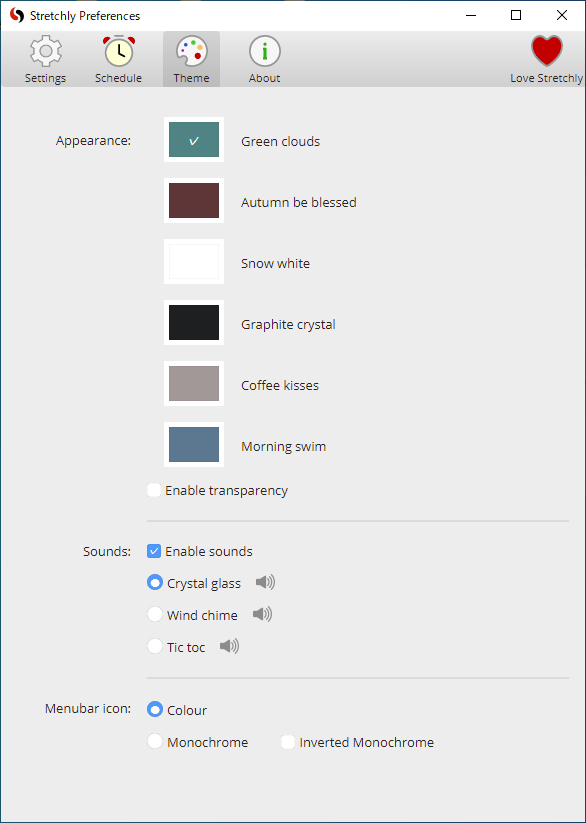
3.Theme
「Theme 」では、ブレーク(休憩)画面の色やサウンドなどを設定できます。
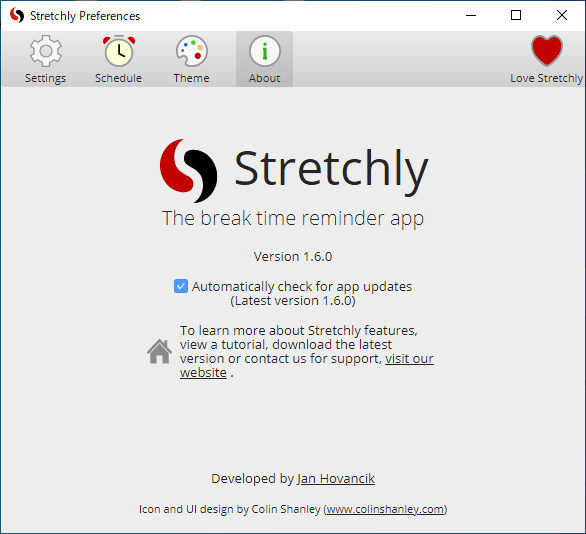
4.About
「About 」画面では、ソフトウェアのバージョン情報などが表示されます。
アプリケーションの更新チェックが有効になっています。
よくある質問と回答
ライセンスについて。
休憩画面に文章が表示される。
ユーザーレビュー
レビューはまだありません、 最初のレビューを投稿してください。コメントは任意です。
Stretchly は、どなたでも無料で使用できます。