").attr(n.scriptAttrs||{}).prop({charset:n.scriptCharset,src:n.url}).on("load error",i=function(e){r.remove(),i=null,e&&t("error"===e.type?404:200,e.type)}),C.head.appendChild(r[0])},abort:function(){i&&i()}}});var Jt,Kt=[],Zt=/(=)\?(?=&|$)|\?\?/;ce.ajaxSetup({jsonp:"callback",jsonpCallback:function(){var e=Kt.pop()||ce.expando+"_"+jt.guid++;return this[e]=!0,e}}),ce.ajaxPrefilter("json jsonp",function(e,t,n){var r,i,o,a=!1!==e.jsonp&&(Zt.test(e.url)?"url":"string"==typeof e.data&&0===(e.contentType||"").indexOf("application/x-www-form-urlencoded")&&Zt.test(e.data)&&"data");if(a||"jsonp"===e.dataTypes[0])return r=e.jsonpCallback=v(e.jsonpCallback)?e.jsonpCallback():e.jsonpCallback,a?e[a]=e[a].replace(Zt,"$1"+r):!1!==e.jsonp&&(e.url+=(At.test(e.url)?"&":"?")+e.jsonp+"="+r),e.converters["script json"]=function(){return o||ce.error(r+" was not called"),o[0]},e.dataTypes[0]="json",i=ie[r],ie[r]=function(){o=arguments},n.always(function(){void 0===i?ce(ie).removeProp(r):ie[r]=i,e[r]&&(e.jsonpCallback=t.jsonpCallback,Kt.push(r)),o&&v(i)&&i(o[0]),o=i=void 0}),"script"}),le.createHTMLDocument=((Jt=C.implementation.createHTMLDocument("").body).innerHTML="
",2===Jt.childNodes.length),ce.parseHTML=function(e,t,n){return"string"!=typeof e?[]:("boolean"==typeof t&&(n=t,t=!1),t||(le.createHTMLDocument?((r=(t=C.implementation.createHTMLDocument("")).createElement("base")).href=C.location.href,t.head.appendChild(r)):t=C),o=!n&&[],(i=w.exec(e))?[t.createElement(i[1])]:(i=Ae([e],t,o),o&&o.length&&ce(o).remove(),ce.merge([],i.childNodes)));var r,i,o},ce.fn.load=function(e,t,n){var r,i,o,a=this,s=e.indexOf(" ");return-1").append(ce.parseHTML(e)).find(r):e)}).always(n&&function(e,t){a.each(function(){n.apply(this,o||[e.responseText,t,e])})}),this},ce.expr.pseudos.animated=function(t){return ce.grep(ce.timers,function(e){return t===e.elem}).length},ce.offset={setOffset:function(e,t,n){var r,i,o,a,s,u,l=ce.css(e,"position"),c=ce(e),f={};"static"===l&&(e.style.position="relative"),s=c.offset(),o=ce.css(e,"top"),u=ce.css(e,"left"),("absolute"===l||"fixed"===l)&&-1<(o+u).indexOf("auto")?(a=(r=c.position()).top,i=r.left):(a=parseFloat(o)||0,i=parseFloat(u)||0),v(t)&&(t=t.call(e,n,ce.extend({},s))),null!=t.top&&(f.top=t.top-s.top+a),null!=t.left&&(f.left=t.left-s.left+i),"using"in t?t.using.call(e,f):c.css(f)}},ce.fn.extend({offset:function(t){if(arguments.length)return void 0===t?this:this.each(function(e){ce.offset.setOffset(this,t,e)});var e,n,r=this[0];return r?r.getClientRects().length?(e=r.getBoundingClientRect(),n=r.ownerDocument.defaultView,{top:e.top+n.pageYOffset,left:e.left+n.pageXOffset}):{top:0,left:0}:void 0},position:function(){if(this[0]){var e,t,n,r=this[0],i={top:0,left:0};if("fixed"===ce.css(r,"position"))t=r.getBoundingClientRect();else{t=this.offset(),n=r.ownerDocument,e=r.offsetParent||n.documentElement;while(e&&(e===n.body||e===n.documentElement)&&"static"===ce.css(e,"position"))e=e.parentNode;e&&e!==r&&1===e.nodeType&&((i=ce(e).offset()).top+=ce.css(e,"borderTopWidth",!0),i.left+=ce.css(e,"borderLeftWidth",!0))}return{top:t.top-i.top-ce.css(r,"marginTop",!0),left:t.left-i.left-ce.css(r,"marginLeft",!0)}}},offsetParent:function(){return this.map(function(){var e=this.offsetParent;while(e&&"static"===ce.css(e,"position"))e=e.offsetParent;return e||J})}}),ce.each({scrollLeft:"pageXOffset",scrollTop:"pageYOffset"},function(t,i){var o="pageYOffset"===i;ce.fn[t]=function(e){return M(this,function(e,t,n){var r;if(y(e)?r=e:9===e.nodeType&&(r=e.defaultView),void 0===n)return r?r[i]:e[t];r?r.scrollTo(o?r.pageXOffset:n,o?n:r.pageYOffset):e[t]=n},t,e,arguments.length)}}),ce.each(["top","left"],function(e,n){ce.cssHooks[n]=Ye(le.pixelPosition,function(e,t){if(t)return t=Ge(e,n),_e.test(t)?ce(e).position()[n]+"px":t})}),ce.each({Height:"height",Width:"width"},function(a,s){ce.each({padding:"inner"+a,content:s,"":"outer"+a},function(r,o){ce.fn[o]=function(e,t){var n=arguments.length&&(r||"boolean"!=typeof e),i=r||(!0===e||!0===t?"margin":"border");return M(this,function(e,t,n){var r;return y(e)?0===o.indexOf("outer")?e["inner"+a]:e.document.documentElement["client"+a]:9===e.nodeType?(r=e.documentElement,Math.max(e.body["scroll"+a],r["scroll"+a],e.body["offset"+a],r["offset"+a],r["client"+a])):void 0===n?ce.css(e,t,i):ce.style(e,t,n,i)},s,n?e:void 0,n)}})}),ce.each(["ajaxStart","ajaxStop","ajaxComplete","ajaxError","ajaxSuccess","ajaxSend"],function(e,t){ce.fn[t]=function(e){return this.on(t,e)}}),ce.fn.extend({bind:function(e,t,n){return this.on(e,null,t,n)},unbind:function(e,t){return this.off(e,null,t)},delegate:function(e,t,n,r){return this.on(t,e,n,r)},undelegate:function(e,t,n){return 1===arguments.length?this.off(e,"**"):this.off(t,e||"**",n)},hover:function(e,t){return this.on("mouseenter",e).on("mouseleave",t||e)}}),ce.each("blur focus focusin focusout resize scroll click dblclick mousedown mouseup mousemove mouseover mouseout mouseenter mouseleave change select submit keydown keypress keyup contextmenu".split(" "),function(e,n){ce.fn[n]=function(e,t){return 0
Free Window Registry Repair 4.7
レジストリ
2021/04/09 10:572026/03/28 08:51
説明 機能 仕様 ダウンロード 画像 使い方
無効なレジストリを検出して修復するレジストリクリーナ
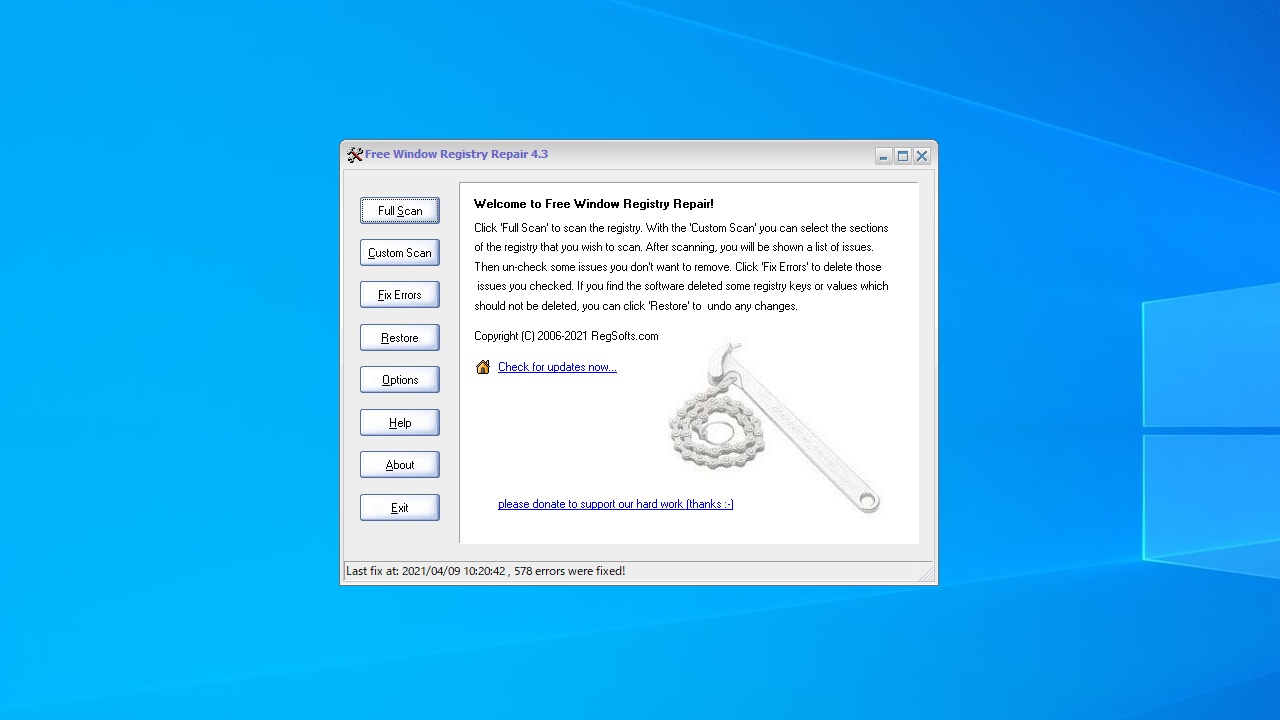
Windows の無効なレジストリエントリをスキャンして修復する、フリーのレジストリクリーナソフト。Windows システムをより安定させ、より高速に実行できるようにすることができます。
Free Window Registry Repair の概要
Free Window Registry Repair は、レジストリを修復することにより、システムをより安定させ、Windows の実行速度を向上させます。
Free Window Registry Repair の機能
Free Window Registry Repair の主な機能です。
機能
概要
メイン機能
レジストリクリーナ
機能詳細
・フルスキャンまたはカスタムスキャン
・レジストリの修復(クリーンアップ)
・レジストリバックアップの復元
無効な不要なレジストリを一括クリーンアップします
ほとんどすべての Windows ユーザーは、PC のパフォーマンスの低下を経験しています。その多くは、Windows レジストリエラーに起因する可能性があります。Free Window Registry Repair を使用すると、それらの レジストリのエラーを効果的に修復できます。
また、修復したレジストリは自動的にバックアップされるため、Windows レジストリをいつでも元の状態に復元できます。
フリーのレジストリクリーナ
Free Window Registry Repair は、Windows のレジストリで見つかったエラーを検出、問題を修正するプログラムです。PC を長い期間使用していたり、PC のパフォーマンス低下を感じているすべてのユーザーにおすすめできます。
機能
Windows のクラッシュとエラーメッセージの一般的な原因である無効なレジストリエントリを修復します
システムの速度と安定性を向上させます
さまざまなレジストリクリーニング設定を設定します
システムパフォーマンスを向上させます
Windows レジストリバックアップを自動作成し、復元します
シンプルでユーザーフレンドリーなインターフェース
価格: 無料
動作環境: Windows 7|8|8.1|10|11
使用言語: 英語
最終更新日:
3週間前 (2026/03/28)
ダウンロード数: 708
使い方
インストール
1.インストール方法
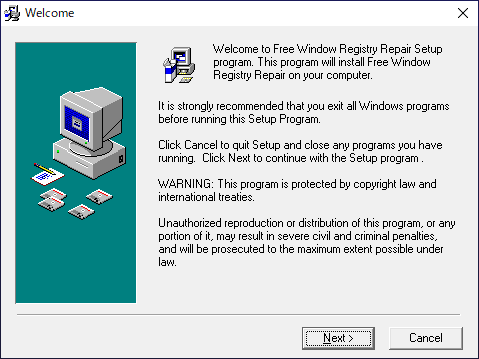
インストーラを実行するとセットアップウィザードが開始します。[Next ]ボタンをクリックします。
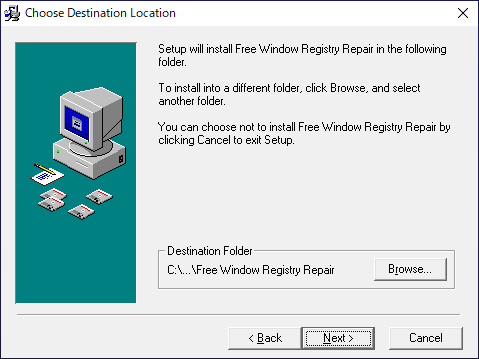
インストール先を指定します。変更しない場合はこのまま[Next ]をクリックします。
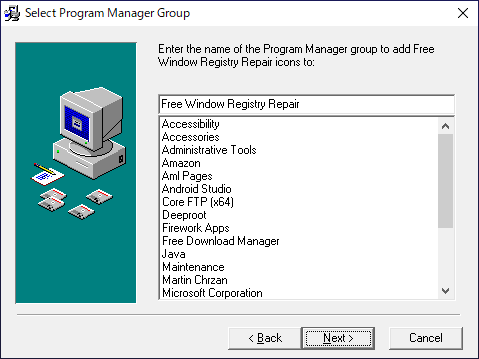
スタートメニューに作成するショートカットの指定です。変更しない場合はこのまま[Next ]をクリックします。
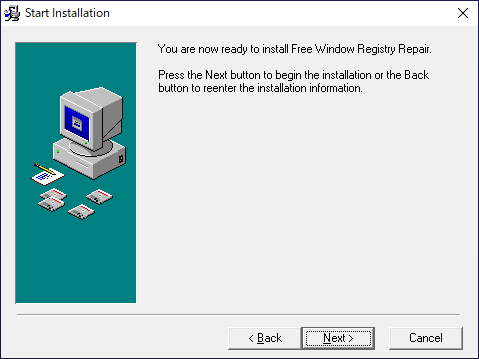
[Next ]をクリックしてインストールを開始します。
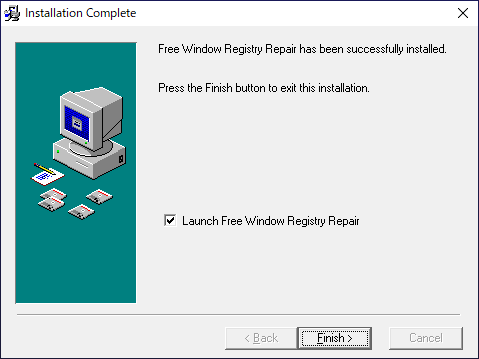
インストールが完了しました。[Finish]をクリックしてセットアップウィザードを閉じます。
レジストリをクリーンアップする
1.基本的な使い方
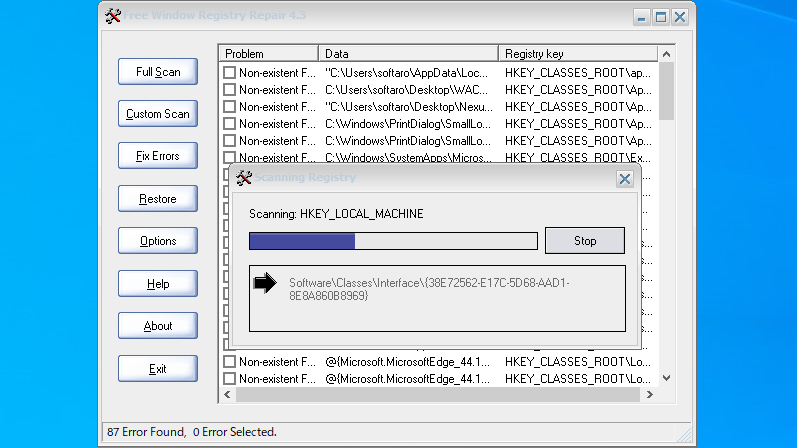
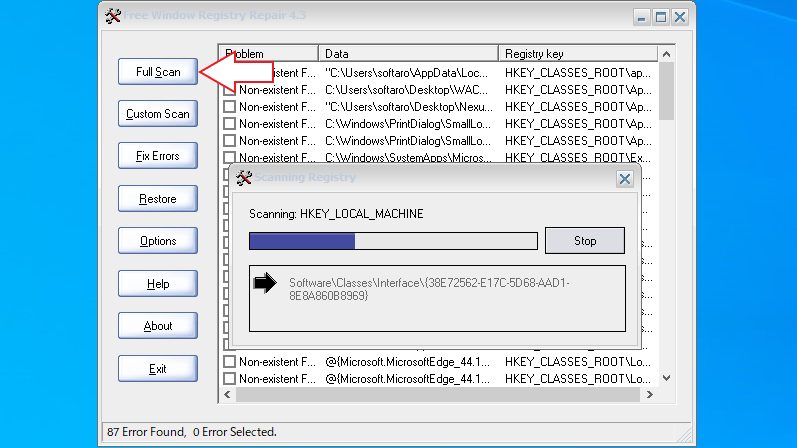
ウィンドウ左上の[Full Scan ]ボタンをクリックして、レジストリのスキャンを開始します。
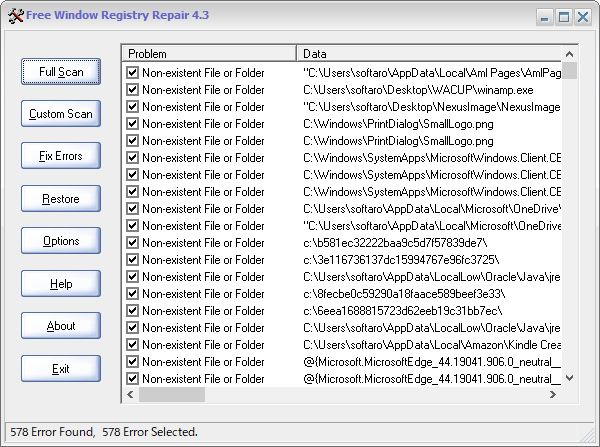
スキャンが完了すると、クリーンアップ可能なレジストリが一覧表示されます。選択を解除して、削除しないようにすることができます。
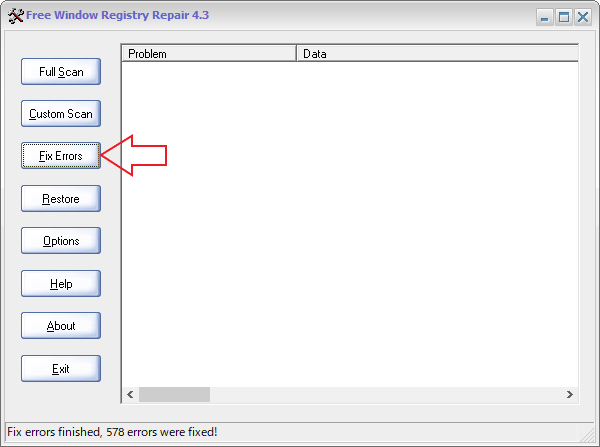
[Fix Errors ]ボタンをクリックして、レジストリのクリーンアップを開始します。
2.バックアップを復元する
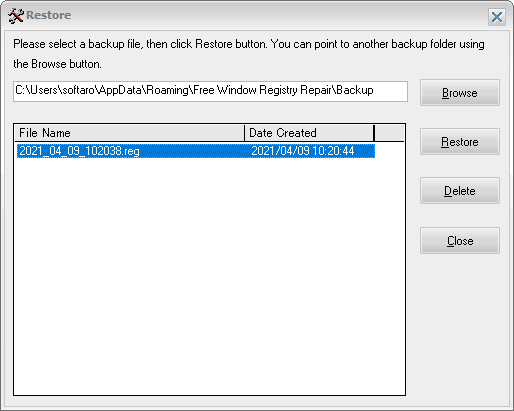
クリーンアップを実行すると、自動的にレジストリのバックアップが作成されます。
[Restore ]ボタンをクリックすると、レジストリをクリーンアップ前の状態に復元することができます。
オプション
1.Options
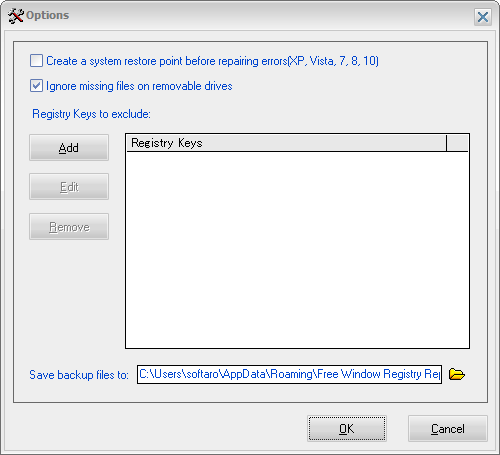
[Options ]ボタンをクリックすると、設定画面を開くことができます。
・Create a system restore point before repairing errors :エラーを修復する前に、システムの復元ポイントを作成する
・Ignore missing files on removable drives :リムーバブルドライブ上の不足しているファイルを無視する
・Registry Keys exclude :以下のレジストリキーをスキャンから除外する
よくある質問と回答
ライセンスについて。
ユーザーレビュー
レビューはまだありません、 最初のレビューを投稿してください。コメントは任意です。
Free Window Registry Repair は、どなたでも無料で利用できます。