").attr(n.scriptAttrs||{}).prop({charset:n.scriptCharset,src:n.url}).on("load error",i=function(e){r.remove(),i=null,e&&t("error"===e.type?404:200,e.type)}),C.head.appendChild(r[0])},abort:function(){i&&i()}}});var Jt,Kt=[],Zt=/(=)\?(?=&|$)|\?\?/;ce.ajaxSetup({jsonp:"callback",jsonpCallback:function(){var e=Kt.pop()||ce.expando+"_"+jt.guid++;return this[e]=!0,e}}),ce.ajaxPrefilter("json jsonp",function(e,t,n){var r,i,o,a=!1!==e.jsonp&&(Zt.test(e.url)?"url":"string"==typeof e.data&&0===(e.contentType||"").indexOf("application/x-www-form-urlencoded")&&Zt.test(e.data)&&"data");if(a||"jsonp"===e.dataTypes[0])return r=e.jsonpCallback=v(e.jsonpCallback)?e.jsonpCallback():e.jsonpCallback,a?e[a]=e[a].replace(Zt,"$1"+r):!1!==e.jsonp&&(e.url+=(At.test(e.url)?"&":"?")+e.jsonp+"="+r),e.converters["script json"]=function(){return o||ce.error(r+" was not called"),o[0]},e.dataTypes[0]="json",i=ie[r],ie[r]=function(){o=arguments},n.always(function(){void 0===i?ce(ie).removeProp(r):ie[r]=i,e[r]&&(e.jsonpCallback=t.jsonpCallback,Kt.push(r)),o&&v(i)&&i(o[0]),o=i=void 0}),"script"}),le.createHTMLDocument=((Jt=C.implementation.createHTMLDocument("").body).innerHTML="
",2===Jt.childNodes.length),ce.parseHTML=function(e,t,n){return"string"!=typeof e?[]:("boolean"==typeof t&&(n=t,t=!1),t||(le.createHTMLDocument?((r=(t=C.implementation.createHTMLDocument("")).createElement("base")).href=C.location.href,t.head.appendChild(r)):t=C),o=!n&&[],(i=w.exec(e))?[t.createElement(i[1])]:(i=Ae([e],t,o),o&&o.length&&ce(o).remove(),ce.merge([],i.childNodes)));var r,i,o},ce.fn.load=function(e,t,n){var r,i,o,a=this,s=e.indexOf(" ");return-1").append(ce.parseHTML(e)).find(r):e)}).always(n&&function(e,t){a.each(function(){n.apply(this,o||[e.responseText,t,e])})}),this},ce.expr.pseudos.animated=function(t){return ce.grep(ce.timers,function(e){return t===e.elem}).length},ce.offset={setOffset:function(e,t,n){var r,i,o,a,s,u,l=ce.css(e,"position"),c=ce(e),f={};"static"===l&&(e.style.position="relative"),s=c.offset(),o=ce.css(e,"top"),u=ce.css(e,"left"),("absolute"===l||"fixed"===l)&&-1<(o+u).indexOf("auto")?(a=(r=c.position()).top,i=r.left):(a=parseFloat(o)||0,i=parseFloat(u)||0),v(t)&&(t=t.call(e,n,ce.extend({},s))),null!=t.top&&(f.top=t.top-s.top+a),null!=t.left&&(f.left=t.left-s.left+i),"using"in t?t.using.call(e,f):c.css(f)}},ce.fn.extend({offset:function(t){if(arguments.length)return void 0===t?this:this.each(function(e){ce.offset.setOffset(this,t,e)});var e,n,r=this[0];return r?r.getClientRects().length?(e=r.getBoundingClientRect(),n=r.ownerDocument.defaultView,{top:e.top+n.pageYOffset,left:e.left+n.pageXOffset}):{top:0,left:0}:void 0},position:function(){if(this[0]){var e,t,n,r=this[0],i={top:0,left:0};if("fixed"===ce.css(r,"position"))t=r.getBoundingClientRect();else{t=this.offset(),n=r.ownerDocument,e=r.offsetParent||n.documentElement;while(e&&(e===n.body||e===n.documentElement)&&"static"===ce.css(e,"position"))e=e.parentNode;e&&e!==r&&1===e.nodeType&&((i=ce(e).offset()).top+=ce.css(e,"borderTopWidth",!0),i.left+=ce.css(e,"borderLeftWidth",!0))}return{top:t.top-i.top-ce.css(r,"marginTop",!0),left:t.left-i.left-ce.css(r,"marginLeft",!0)}}},offsetParent:function(){return this.map(function(){var e=this.offsetParent;while(e&&"static"===ce.css(e,"position"))e=e.offsetParent;return e||J})}}),ce.each({scrollLeft:"pageXOffset",scrollTop:"pageYOffset"},function(t,i){var o="pageYOffset"===i;ce.fn[t]=function(e){return M(this,function(e,t,n){var r;if(y(e)?r=e:9===e.nodeType&&(r=e.defaultView),void 0===n)return r?r[i]:e[t];r?r.scrollTo(o?r.pageXOffset:n,o?n:r.pageYOffset):e[t]=n},t,e,arguments.length)}}),ce.each(["top","left"],function(e,n){ce.cssHooks[n]=Ye(le.pixelPosition,function(e,t){if(t)return t=Ge(e,n),_e.test(t)?ce(e).position()[n]+"px":t})}),ce.each({Height:"height",Width:"width"},function(a,s){ce.each({padding:"inner"+a,content:s,"":"outer"+a},function(r,o){ce.fn[o]=function(e,t){var n=arguments.length&&(r||"boolean"!=typeof e),i=r||(!0===e||!0===t?"margin":"border");return M(this,function(e,t,n){var r;return y(e)?0===o.indexOf("outer")?e["inner"+a]:e.document.documentElement["client"+a]:9===e.nodeType?(r=e.documentElement,Math.max(e.body["scroll"+a],r["scroll"+a],e.body["offset"+a],r["offset"+a],r["client"+a])):void 0===n?ce.css(e,t,i):ce.style(e,t,n,i)},s,n?e:void 0,n)}})}),ce.each(["ajaxStart","ajaxStop","ajaxComplete","ajaxError","ajaxSuccess","ajaxSend"],function(e,t){ce.fn[t]=function(e){return this.on(t,e)}}),ce.fn.extend({bind:function(e,t,n){return this.on(e,null,t,n)},unbind:function(e,t){return this.off(e,null,t)},delegate:function(e,t,n,r){return this.on(t,e,n,r)},undelegate:function(e,t,n){return 1===arguments.length?this.off(e,"**"):this.off(t,e||"**",n)},hover:function(e,t){return this.on("mouseenter",e).on("mouseleave",t||e)}}),ce.each("blur focus focusin focusout resize scroll click dblclick mousedown mouseup mousemove mouseover mouseout mouseenter mouseleave change select submit keydown keypress keyup contextmenu".split(" "),function(e,n){ce.fn[n]=function(e,t){return 0
Eusing Free Registry Defrag 3.0
レジストリ
2021/01/21 14:452026/02/11 09:44
説明 機能 仕様 ダウンロード 画像 使い方
無償で使用できるレジストリデフラグツール
Windows のレジストリをデフラグして最適化することができる、無料のレジストリデフラグソフト。レジストリの断片化を解消して圧縮することで、Windows PC の全体的なパフォーマンスと安定性を向上させることができます。
Eusing Free Registry Defrag の概要
Eusing Free Registry Defrag は、Windows レジストリファイルのギャップ、フラグメント、および無駄なスペースを削除することによってレジストリを最適化する無料のレジストリデフラグソフトウェアです。
Eusing Free Registry Defrag の機能
Eusing Free Registry Defrag の主な機能です。
機能
概要
メイン機能
レジストリをデフラグする
機能詳細
レジストリの断片化を分析/断片化の解消
オプション機能
システム復元ポイントを作成
レジストリの断片化を分析して解消します
Windows のレジストリサイズは、時間の経過とともに、新しいプログラムがインストール、使用、および削除されるにつれて、ますます大きくなります。このデータが削除されても、レジストリのサイズは減少しません、よって、レジストリはどんどん断片化していきます。
Eusing Free Registry Defrag は、そのレジストリの断片化を分析して解消し、レジストリのサイズをコンパクト化することができるアプリケーションです。
安全にレジストリをデフラグできます
Eusing Free Registry Defrag は、レジストリを最適化して圧縮することができるレジストリデフラグツールです。Windows を長年使用している場合、または、レジストリクリーナーを使用したあとはレジストリの断片化が考えられるので、このツールを使ってデフラグすることをおすすめします。
機能
レジストリをデフラグする
Windows PC の全体的なパフォーマンスと安定性を向上させる
システムの起動にかかる時間を短縮する
レジストリを圧縮してメモリを節約する
価格: 無料
動作環境: Windows 7|8|8.1|10|11
使用言語: 英語・日本語ほか
最終更新日:
3か月前 (2026/02/11)
ダウンロード数: 463
使い方
インストール
1.インストール方法
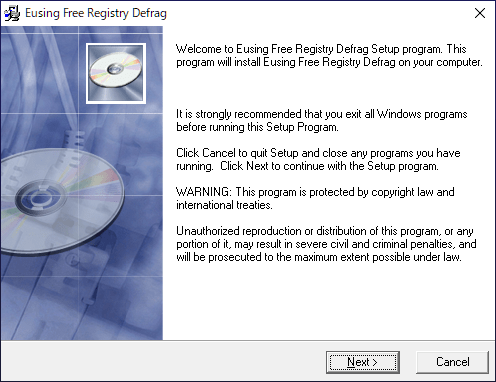
インストーラを実行するとセットアップウィザードが始まります。[Next ]をクリックします。
インストール先を確認または変更して[Next ]をクリックします。
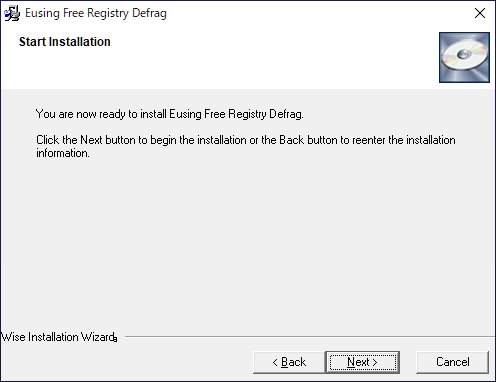
[Next ]をクリックしてインストールを開始します。
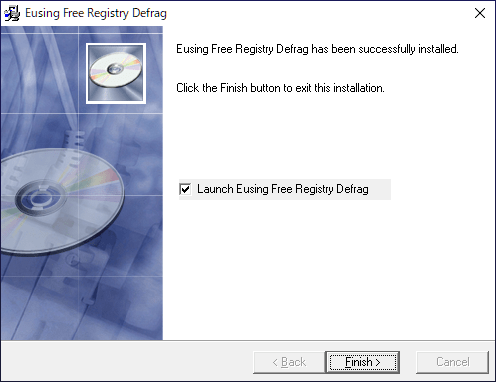
インストールが完了しました。[Finish ]をクリックしてセットアップウィザードを閉じます。
2.起動時の確認画面
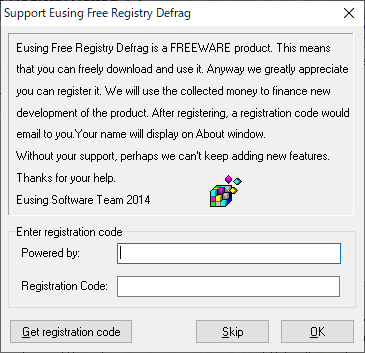
起動時にはレジストレーションコードの確認画面が表示されます。コードを持っていない場合は[Skip ]ボタンをクリックして使用を開始します。
レジストリをデフラグする
1.レジストリをデフラグする
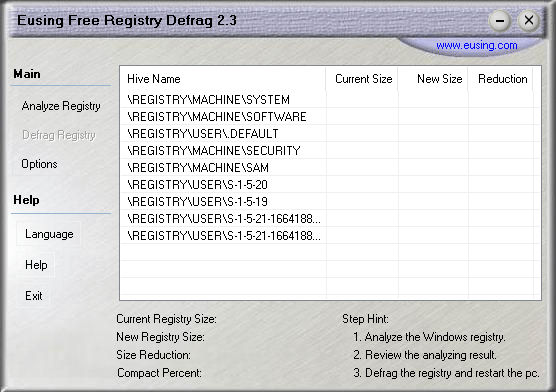
Eusing Free Registry Defrag を起動します。
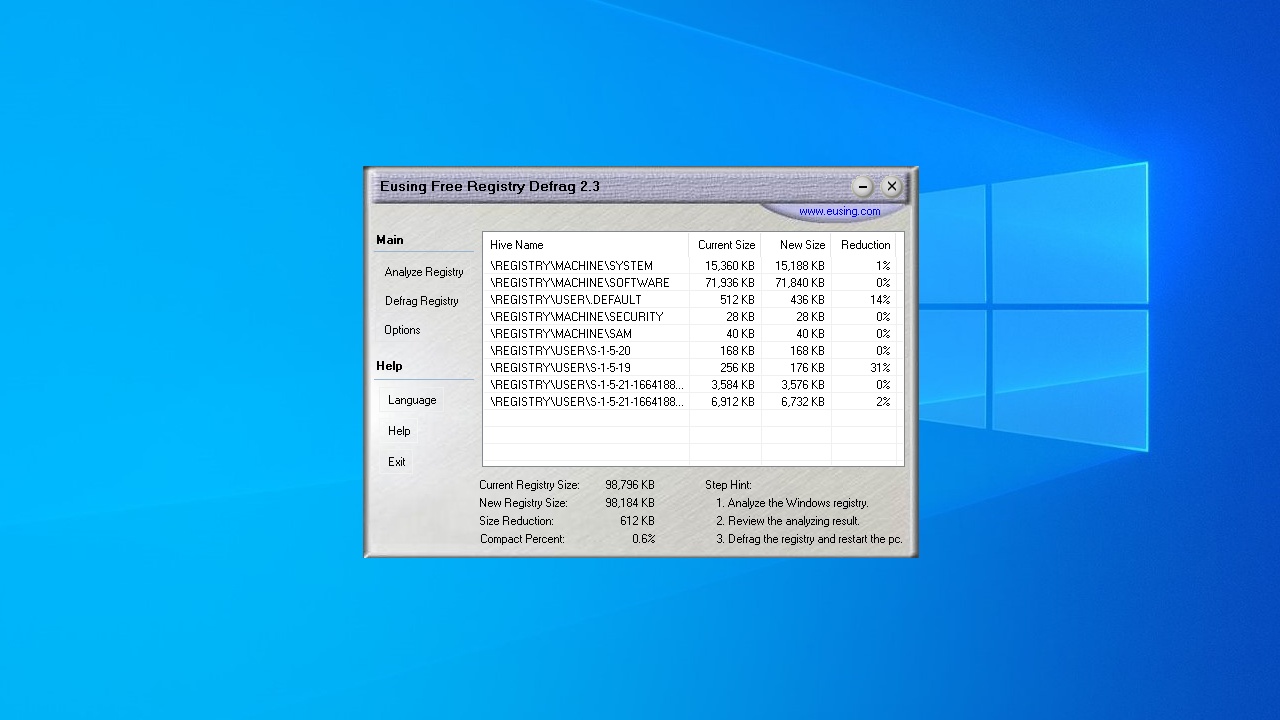
「Analyze Registry」をクリックして、レジストリの分析を行います。
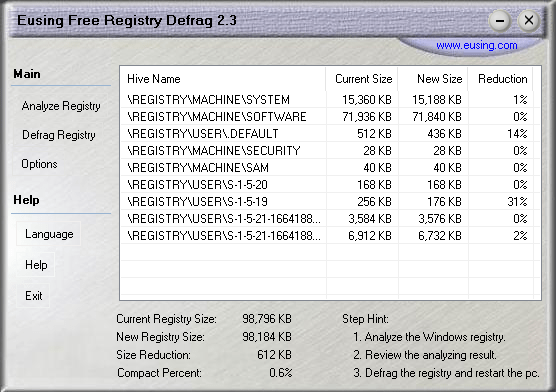
スキャンが完了すると、レジストリの断片化具合(レジストリのサイズがどのくらい縮小可能か)が表示されます。
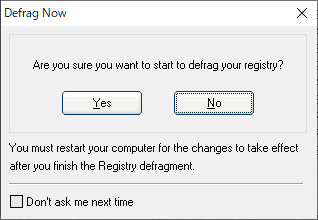
「Defrag Registry」をクリックすると、レジストリのデフラグを開始します。
レジストリをデフラグするにはコンピュータの再起動が必要になります。[OK ]をクリックすると、コンピュータが再起動してレジストリのデフラグが行われます。
2.レジストリのデフラグが必要ない場合
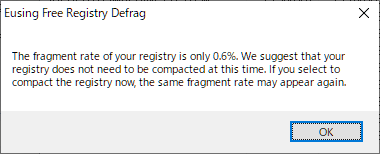
レジストリがそれほど断片化していない場合(デフラグする必要がない場合)は、レジストリの分析後に下のダイアログが表示されます。[OK]をクリックしてダイアログを閉じます。
オプション
1.オプション
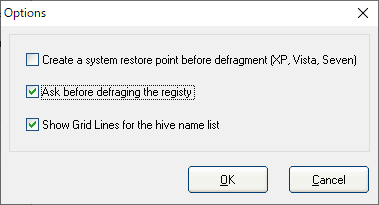
「Options 」をクリックすると、プログラムの設定ができます。
・Create a system restore point before defragment :デフラグ前にシステム復元ポイントを作成する
・Ask before defraging registry :レジストリのデフラグ前に確認画面を表示する
・Show Grid Lines for the hive name list :レジストリハイブのリスト画面にグリッド線を表示する
よくある質問と回答
ライセンスについて。
ユーザーレビュー
レビューはまだありません、 最初のレビューを投稿してください。コメントは任意です。