").attr(n.scriptAttrs||{}).prop({charset:n.scriptCharset,src:n.url}).on("load error",i=function(e){r.remove(),i=null,e&&t("error"===e.type?404:200,e.type)}),C.head.appendChild(r[0])},abort:function(){i&&i()}}});var Jt,Kt=[],Zt=/(=)\?(?=&|$)|\?\?/;ce.ajaxSetup({jsonp:"callback",jsonpCallback:function(){var e=Kt.pop()||ce.expando+"_"+jt.guid++;return this[e]=!0,e}}),ce.ajaxPrefilter("json jsonp",function(e,t,n){var r,i,o,a=!1!==e.jsonp&&(Zt.test(e.url)?"url":"string"==typeof e.data&&0===(e.contentType||"").indexOf("application/x-www-form-urlencoded")&&Zt.test(e.data)&&"data");if(a||"jsonp"===e.dataTypes[0])return r=e.jsonpCallback=v(e.jsonpCallback)?e.jsonpCallback():e.jsonpCallback,a?e[a]=e[a].replace(Zt,"$1"+r):!1!==e.jsonp&&(e.url+=(At.test(e.url)?"&":"?")+e.jsonp+"="+r),e.converters["script json"]=function(){return o||ce.error(r+" was not called"),o[0]},e.dataTypes[0]="json",i=ie[r],ie[r]=function(){o=arguments},n.always(function(){void 0===i?ce(ie).removeProp(r):ie[r]=i,e[r]&&(e.jsonpCallback=t.jsonpCallback,Kt.push(r)),o&&v(i)&&i(o[0]),o=i=void 0}),"script"}),le.createHTMLDocument=((Jt=C.implementation.createHTMLDocument("").body).innerHTML="
",2===Jt.childNodes.length),ce.parseHTML=function(e,t,n){return"string"!=typeof e?[]:("boolean"==typeof t&&(n=t,t=!1),t||(le.createHTMLDocument?((r=(t=C.implementation.createHTMLDocument("")).createElement("base")).href=C.location.href,t.head.appendChild(r)):t=C),o=!n&&[],(i=w.exec(e))?[t.createElement(i[1])]:(i=Ae([e],t,o),o&&o.length&&ce(o).remove(),ce.merge([],i.childNodes)));var r,i,o},ce.fn.load=function(e,t,n){var r,i,o,a=this,s=e.indexOf(" ");return-1").append(ce.parseHTML(e)).find(r):e)}).always(n&&function(e,t){a.each(function(){n.apply(this,o||[e.responseText,t,e])})}),this},ce.expr.pseudos.animated=function(t){return ce.grep(ce.timers,function(e){return t===e.elem}).length},ce.offset={setOffset:function(e,t,n){var r,i,o,a,s,u,l=ce.css(e,"position"),c=ce(e),f={};"static"===l&&(e.style.position="relative"),s=c.offset(),o=ce.css(e,"top"),u=ce.css(e,"left"),("absolute"===l||"fixed"===l)&&-1<(o+u).indexOf("auto")?(a=(r=c.position()).top,i=r.left):(a=parseFloat(o)||0,i=parseFloat(u)||0),v(t)&&(t=t.call(e,n,ce.extend({},s))),null!=t.top&&(f.top=t.top-s.top+a),null!=t.left&&(f.left=t.left-s.left+i),"using"in t?t.using.call(e,f):c.css(f)}},ce.fn.extend({offset:function(t){if(arguments.length)return void 0===t?this:this.each(function(e){ce.offset.setOffset(this,t,e)});var e,n,r=this[0];return r?r.getClientRects().length?(e=r.getBoundingClientRect(),n=r.ownerDocument.defaultView,{top:e.top+n.pageYOffset,left:e.left+n.pageXOffset}):{top:0,left:0}:void 0},position:function(){if(this[0]){var e,t,n,r=this[0],i={top:0,left:0};if("fixed"===ce.css(r,"position"))t=r.getBoundingClientRect();else{t=this.offset(),n=r.ownerDocument,e=r.offsetParent||n.documentElement;while(e&&(e===n.body||e===n.documentElement)&&"static"===ce.css(e,"position"))e=e.parentNode;e&&e!==r&&1===e.nodeType&&((i=ce(e).offset()).top+=ce.css(e,"borderTopWidth",!0),i.left+=ce.css(e,"borderLeftWidth",!0))}return{top:t.top-i.top-ce.css(r,"marginTop",!0),left:t.left-i.left-ce.css(r,"marginLeft",!0)}}},offsetParent:function(){return this.map(function(){var e=this.offsetParent;while(e&&"static"===ce.css(e,"position"))e=e.offsetParent;return e||J})}}),ce.each({scrollLeft:"pageXOffset",scrollTop:"pageYOffset"},function(t,i){var o="pageYOffset"===i;ce.fn[t]=function(e){return M(this,function(e,t,n){var r;if(y(e)?r=e:9===e.nodeType&&(r=e.defaultView),void 0===n)return r?r[i]:e[t];r?r.scrollTo(o?r.pageXOffset:n,o?n:r.pageYOffset):e[t]=n},t,e,arguments.length)}}),ce.each(["top","left"],function(e,n){ce.cssHooks[n]=Ye(le.pixelPosition,function(e,t){if(t)return t=Ge(e,n),_e.test(t)?ce(e).position()[n]+"px":t})}),ce.each({Height:"height",Width:"width"},function(a,s){ce.each({padding:"inner"+a,content:s,"":"outer"+a},function(r,o){ce.fn[o]=function(e,t){var n=arguments.length&&(r||"boolean"!=typeof e),i=r||(!0===e||!0===t?"margin":"border");return M(this,function(e,t,n){var r;return y(e)?0===o.indexOf("outer")?e["inner"+a]:e.document.documentElement["client"+a]:9===e.nodeType?(r=e.documentElement,Math.max(e.body["scroll"+a],r["scroll"+a],e.body["offset"+a],r["offset"+a],r["client"+a])):void 0===n?ce.css(e,t,i):ce.style(e,t,n,i)},s,n?e:void 0,n)}})}),ce.each(["ajaxStart","ajaxStop","ajaxComplete","ajaxError","ajaxSuccess","ajaxSend"],function(e,t){ce.fn[t]=function(e){return this.on(t,e)}}),ce.fn.extend({bind:function(e,t,n){return this.on(e,null,t,n)},unbind:function(e,t){return this.off(e,null,t)},delegate:function(e,t,n,r){return this.on(t,e,n,r)},undelegate:function(e,t,n){return 1===arguments.length?this.off(e,"**"):this.off(t,e||"**",n)},hover:function(e,t){return this.on("mouseenter",e).on("mouseleave",t||e)}}),ce.each("blur focus focusin focusout resize scroll click dblclick mousedown mouseup mousemove mouseover mouseout mouseenter mouseleave change select submit keydown keypress keyup contextmenu".split(" "),function(e,n){ce.fn[n]=function(e,t){return 0
RunBySmartScreen 5.1.0.0
マルウェア診断・駆除支援
2023/07/15 15:10
説明機能仕様ダウンロード画像使い方
SmartScreen でファイルをチェックすることができるエクスプローラの拡張機能

SmartScreen で実行可能ファイルなどのファイルをスキャンして安全性を確かめることができる、Windows エクスプローラの拡張機能。ファイルのコンテキストメニューから SmartScreen でファイルをスキャンできます。
RunBySmartScreen の概要
RunBySmartScreen は、SmartScreen でファイルをスキャンすることができるエクスプローラの拡張機能です。
RunBySmartScreen の機能
RunBySmartScreen で利用できる主な機能の一覧です。
| 機能 |
概要 |
| メイン機能 |
SmartScreen でファイルをスキャンする |
| 機能詳細 |
・SmartScreen を使用して実行可能ファイルを実行/確認します。
・潜在的に危険な拡張子を持つファイルをブロックします。
・警告指示に従って脆弱なファイルを開きます。
・EXE ファイルの DLL ハイジャックを防止します。
・安全なファイルは警告なしで実行/開かれます。 |
SmartScreen ですべてのファイルをチェックできます
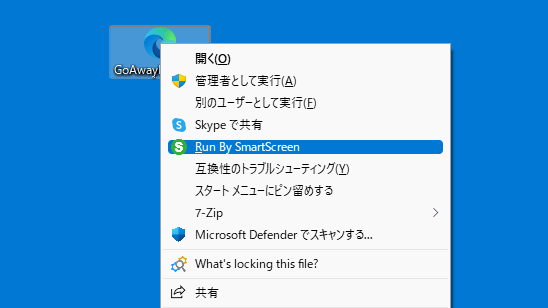
RunBySmartScreen は、SmartScreen で実行可能ファイルなどのファイルをスキャンして安全性を確かめることができる、Windows エクスプローラの拡張機能です。
このアプリをインストールすると、ファイルの右クリックメニュー(コンテキストメニュー)から SmartScreen でファイルをスキャンできるようになります。
ファイルの安全性をチェックできます
SmartScreen は、ウイルス対策ソフトウェアやその他のセキュリティ ツールと連携して、開こうとするファイルをスキャンします。有害な可能性のある実行可能ファイルまたはドキュメントを検出すると、警告が表示され、ファイルが開かないようブロックされます。安全なファイルは警告なしてそのまま開いたり、実行されます。
RunBySmartScreen は、すべての新しいファイルに対して安全性をチェックしたい場合に役に立ちます。
コンテキストメニューからファイルを SmartScreen に送信します
RunBySmartScreen は、ファイルを開いたり実行する前に、ファイルがマルウェアやそのほかの有害なアプリケーションの可能性があるかどうか調べることができる便利なエクスプローラの拡張機能です。このアプリは、経験の浅いユーザーがすべての新しいファイルを開くのを支援しています。
機能
- SmartScreen を使用して実行可能ファイルを実行/確認します。
- 潜在的に危険な拡張子を持つファイルをブロックします。
- 警告指示に従って脆弱なファイルを開きます。
- EXE ファイルの DLL ハイジャックを防止します。
- 安全なファイルは警告なしで実行/開かれます。
価格:無料
動作環境:Windows 8|8.1|10|11
使用言語:英語
最終更新日:
5か月前 (2025/12/12)
ダウンロード数:453
画像

インストール

コンテキストメニュー

アンインストール
使い方
インストール
1.インストール方法
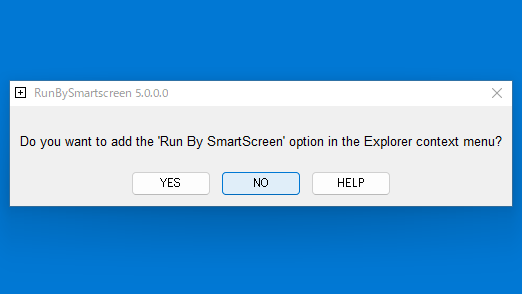
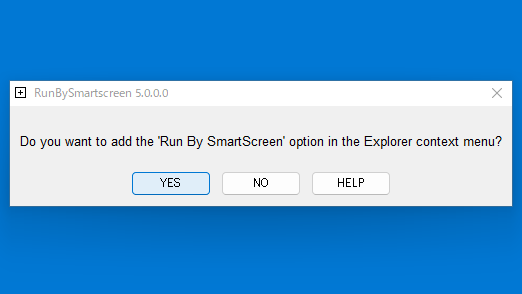
- RunBySmartScreen を実行したら、[YES]をクリックします。
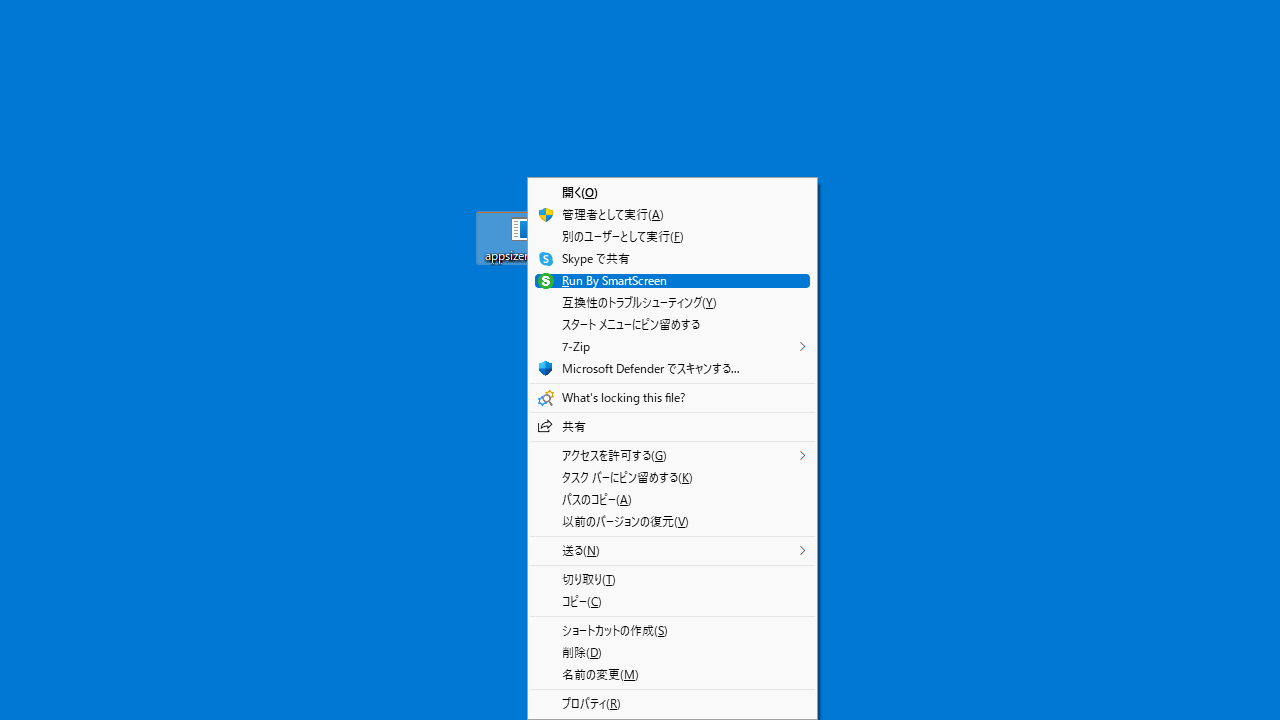
- 「Run By SmartScreen」の項目が、エクスプローラのコンテキストメニューに追加されます。

2.アンインストール方法
- RunBySmartScreen して[NO]をクリックすると、コンテキストメニューから削除されます。

基本的な使い方
1. 基本的な使い方
- ファイルを右クリックして「Run By SmartScreen」を選択すると、ファイルは SmartScreen でスキャンされます。
- 問題がない場合はファイルは開く/実行されます。

2.ソフトウェアについて
ユーザーが「Run By SmartScreen」を使用してファイルを開こうとすると、次のように動作します。
- システム スペース (= %WinDir%、%ProgramFiles%、および %ProgramFiles(x86)% 内) にある実行可能ファイル (COM、EXE、MSI、および SCR ファイル) は、SmartScreen チェックなしで通常どおりに開かれます。
- ユーザー スペース (= %WinDir%、%ProgramFiles%、および %ProgramFiles(x86)% の外側) にある上記の実行可能ファイルは、実行前に SmartScreen によってチェックされます。
- 潜在的に危険な拡張子 (スクリプト、ほとんどの MS Office ファイルなど) を持つユーザー スペースのファイルは (ソフトウェア制限ポリシーと同様に) 開くことを許可されず、プログラムは警告を表示します。
- 「ターゲット」領域のコマンドラインを使用したショートカットは常にブロックされ、プログラムは警告を表示します。
- Windows 組み込みアンパッカーでサポートされていない圧縮アーカイブ (.7z、.arj、.bz、.bzip、.bz2、.bzip2、.fat、.lha、.lzh、.rar、.r00-09、.rev、. xz、.zipx) は開かれません。短い説明のみが表示されます。
- MS Office および Adobe Acrobat Reader に関連する一般的な形式 (DOC、DOCX、XLS、XLSX、PUB、PPT、PPTX、ONE、ACCDB、PDF) は、警告指示とともに開かれ、MOTW がファイルに追加されます。スタンドアロン バージョンを使用する場合、これらのドキュメントは常に「保護されたビュー」の「SmartScreen で実行」を介して開かれます。
- ディスク イメージ ファイル (.img、.iso、.ntfs、.vhd、.vhdx) は開かれません。短い手順のみが表示されます。
- 他のファイル (ZIP アーカイブ、メディア、写真など) は、警告なしで通常どおりに開かれます。
よくある質問と回答
ライセンスについて。