").attr(n.scriptAttrs||{}).prop({charset:n.scriptCharset,src:n.url}).on("load error",i=function(e){r.remove(),i=null,e&&t("error"===e.type?404:200,e.type)}),C.head.appendChild(r[0])},abort:function(){i&&i()}}});var Jt,Kt=[],Zt=/(=)\?(?=&|$)|\?\?/;ce.ajaxSetup({jsonp:"callback",jsonpCallback:function(){var e=Kt.pop()||ce.expando+"_"+jt.guid++;return this[e]=!0,e}}),ce.ajaxPrefilter("json jsonp",function(e,t,n){var r,i,o,a=!1!==e.jsonp&&(Zt.test(e.url)?"url":"string"==typeof e.data&&0===(e.contentType||"").indexOf("application/x-www-form-urlencoded")&&Zt.test(e.data)&&"data");if(a||"jsonp"===e.dataTypes[0])return r=e.jsonpCallback=v(e.jsonpCallback)?e.jsonpCallback():e.jsonpCallback,a?e[a]=e[a].replace(Zt,"$1"+r):!1!==e.jsonp&&(e.url+=(At.test(e.url)?"&":"?")+e.jsonp+"="+r),e.converters["script json"]=function(){return o||ce.error(r+" was not called"),o[0]},e.dataTypes[0]="json",i=ie[r],ie[r]=function(){o=arguments},n.always(function(){void 0===i?ce(ie).removeProp(r):ie[r]=i,e[r]&&(e.jsonpCallback=t.jsonpCallback,Kt.push(r)),o&&v(i)&&i(o[0]),o=i=void 0}),"script"}),le.createHTMLDocument=((Jt=C.implementation.createHTMLDocument("").body).innerHTML="
",2===Jt.childNodes.length),ce.parseHTML=function(e,t,n){return"string"!=typeof e?[]:("boolean"==typeof t&&(n=t,t=!1),t||(le.createHTMLDocument?((r=(t=C.implementation.createHTMLDocument("")).createElement("base")).href=C.location.href,t.head.appendChild(r)):t=C),o=!n&&[],(i=w.exec(e))?[t.createElement(i[1])]:(i=Ae([e],t,o),o&&o.length&&ce(o).remove(),ce.merge([],i.childNodes)));var r,i,o},ce.fn.load=function(e,t,n){var r,i,o,a=this,s=e.indexOf(" ");return-1").append(ce.parseHTML(e)).find(r):e)}).always(n&&function(e,t){a.each(function(){n.apply(this,o||[e.responseText,t,e])})}),this},ce.expr.pseudos.animated=function(t){return ce.grep(ce.timers,function(e){return t===e.elem}).length},ce.offset={setOffset:function(e,t,n){var r,i,o,a,s,u,l=ce.css(e,"position"),c=ce(e),f={};"static"===l&&(e.style.position="relative"),s=c.offset(),o=ce.css(e,"top"),u=ce.css(e,"left"),("absolute"===l||"fixed"===l)&&-1<(o+u).indexOf("auto")?(a=(r=c.position()).top,i=r.left):(a=parseFloat(o)||0,i=parseFloat(u)||0),v(t)&&(t=t.call(e,n,ce.extend({},s))),null!=t.top&&(f.top=t.top-s.top+a),null!=t.left&&(f.left=t.left-s.left+i),"using"in t?t.using.call(e,f):c.css(f)}},ce.fn.extend({offset:function(t){if(arguments.length)return void 0===t?this:this.each(function(e){ce.offset.setOffset(this,t,e)});var e,n,r=this[0];return r?r.getClientRects().length?(e=r.getBoundingClientRect(),n=r.ownerDocument.defaultView,{top:e.top+n.pageYOffset,left:e.left+n.pageXOffset}):{top:0,left:0}:void 0},position:function(){if(this[0]){var e,t,n,r=this[0],i={top:0,left:0};if("fixed"===ce.css(r,"position"))t=r.getBoundingClientRect();else{t=this.offset(),n=r.ownerDocument,e=r.offsetParent||n.documentElement;while(e&&(e===n.body||e===n.documentElement)&&"static"===ce.css(e,"position"))e=e.parentNode;e&&e!==r&&1===e.nodeType&&((i=ce(e).offset()).top+=ce.css(e,"borderTopWidth",!0),i.left+=ce.css(e,"borderLeftWidth",!0))}return{top:t.top-i.top-ce.css(r,"marginTop",!0),left:t.left-i.left-ce.css(r,"marginLeft",!0)}}},offsetParent:function(){return this.map(function(){var e=this.offsetParent;while(e&&"static"===ce.css(e,"position"))e=e.offsetParent;return e||J})}}),ce.each({scrollLeft:"pageXOffset",scrollTop:"pageYOffset"},function(t,i){var o="pageYOffset"===i;ce.fn[t]=function(e){return M(this,function(e,t,n){var r;if(y(e)?r=e:9===e.nodeType&&(r=e.defaultView),void 0===n)return r?r[i]:e[t];r?r.scrollTo(o?r.pageXOffset:n,o?n:r.pageYOffset):e[t]=n},t,e,arguments.length)}}),ce.each(["top","left"],function(e,n){ce.cssHooks[n]=Ye(le.pixelPosition,function(e,t){if(t)return t=Ge(e,n),_e.test(t)?ce(e).position()[n]+"px":t})}),ce.each({Height:"height",Width:"width"},function(a,s){ce.each({padding:"inner"+a,content:s,"":"outer"+a},function(r,o){ce.fn[o]=function(e,t){var n=arguments.length&&(r||"boolean"!=typeof e),i=r||(!0===e||!0===t?"margin":"border");return M(this,function(e,t,n){var r;return y(e)?0===o.indexOf("outer")?e["inner"+a]:e.document.documentElement["client"+a]:9===e.nodeType?(r=e.documentElement,Math.max(e.body["scroll"+a],r["scroll"+a],e.body["offset"+a],r["offset"+a],r["client"+a])):void 0===n?ce.css(e,t,i):ce.style(e,t,n,i)},s,n?e:void 0,n)}})}),ce.each(["ajaxStart","ajaxStop","ajaxComplete","ajaxError","ajaxSuccess","ajaxSend"],function(e,t){ce.fn[t]=function(e){return this.on(t,e)}}),ce.fn.extend({bind:function(e,t,n){return this.on(e,null,t,n)},unbind:function(e,t){return this.off(e,null,t)},delegate:function(e,t,n,r){return this.on(t,e,n,r)},undelegate:function(e,t,n){return 1===arguments.length?this.off(e,"**"):this.off(t,e||"**",n)},hover:function(e,t){return this.on("mouseenter",e).on("mouseleave",t||e)}}),ce.each("blur focus focusin focusout resize scroll click dblclick mousedown mouseup mousemove mouseover mouseout mouseenter mouseleave change select submit keydown keypress keyup contextmenu".split(" "),function(e,n){ce.fn[n]=function(e,t){return 0
Windows Optimization Script 1.0.0
Windows 設定変更
2023/05/22 15:14
説明 機能 仕様 ダウンロード 画像 使い方
Windows の設定と機能をチューニングして PC を最適化するバッチスクリプト

ユーザーのニーズや用途に合わせて、Windows PC のチューニングと最適化を実行することができるバッチスクリプト。あらかじめ用意されているプリセットを利用して、かんたんな操作で Windows を最適化できます。
Windows Optimization Script の概要
Windows Optimization Script は、ユーザーが特定のニーズに合わせて Windows システムを最適化できるように設計されたバッチ スクリプトです。
Windows Optimization Script の機能
Windows Optimization Script で利用できる主な機能の一覧です。
機能
概要
メイン機能
Windows システムの最適化
機能詳細
・ユーザーの用途に合わせて、Windows のチューニングと最適化を実行します
Windows の設定と機能をチューニングして PC を最適化します
Windows Optimization Script は、ユーザーのニーズや用途に合わせて、Windows PC のチューニングと最適化を実行することができるバッチスクリプトです。
このスクリプトは、一般最適化、ゲーム最適化、ネットワーク最適化、ハイパフォーマンス最適化、ローエンド PC 最適化、プライバシー最適化、オフィス生産性最適化、クリエイティブ作業最適化、開発者最適化、省電力最適化など、選択できるさまざまな最適化プリセットを提供します。
使用前に復元ポイントを作成しておいてください
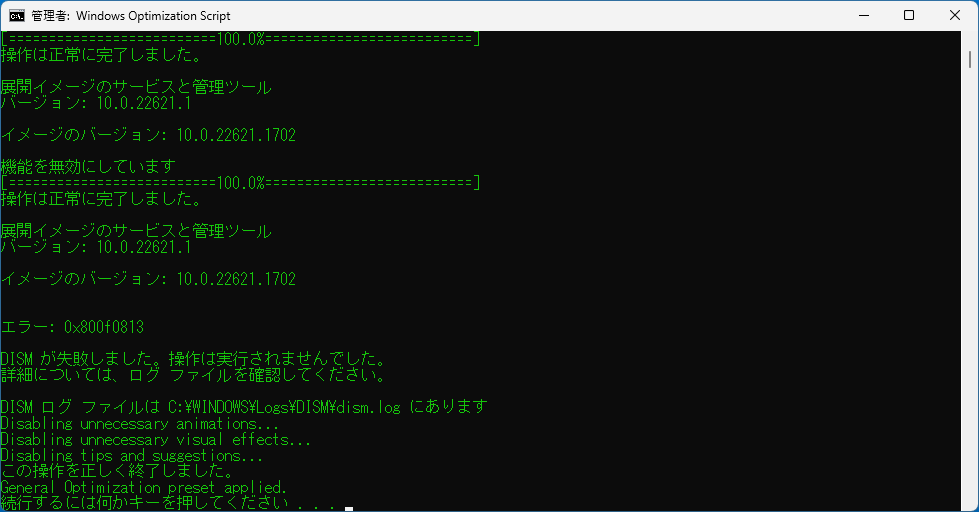
Windows Optimization Script の使用方法はかんたんで、バッチファイルを実行したら、適用したいプリセットを選択するだけで、PC を最適化することができます。
適用したプリセットの使用を元に戻すことはできないので、このスクリプトを使用する前にシステムの復元ポイントを作成しておくことを推奨します。
注意事項をお読みください
Windows Optimization Script は、かんたんな操作で Windows の機能と設定をチューニングして PC を最適化することができる便利なアプリケーション(バッチスクリプト)です。複数のプリセットを適用すると、Windows が起動しなくなったり、データ損失やシステムが不安定になったりする可能性があるので、必ず 1 つのプリセットのみを使用してください。
機能
プリセットの最適化と個別の調整を備えた使いやすいメニュー システム
ゲーム、ローエンドハードウェア、省電力など、さまざまなユースケースに合わせたプリセットの最適化
より上級のユーザーがシステムをさらにカスタマイズするための個別の調整
シンプルで軽量な、理解しやすいバッチ スクリプト
用意されているプリセット :
General Optimization:システムの全体的なパフォーマンスを向上させるために調整します。
Gaming Optimization: ゲーム体験を向上させるための最適化。
Network Optimization:ネットワークのパフォーマンスを向上させるための調整。
High Performance Optimization:システムのパフォーマンスを最大化するための最適化。
Low End PC Optimization:ローエンド ハードウェアを備えたシステムの最適化。
Privacy Optimization:プライバシーとセキュリティを強化するための調整。
Office Productivity Optimization:オフィスでの使用の生産性を向上させるための最適化。
Creative Work Optimization:ビデオ編集や音楽制作などのクリエイティブ作業のパフォーマンスを向上させるための調整。
Developer Optimization:開発作業のパフォーマンスを向上させるための最適化。
Power Saver Optimization:ラップトップのバッテリー寿命を最大化するための最適化。
価格: 無料
動作環境: Windows 10|11
使用言語: 英語
最終更新日:
3年前 (2023/05/22)
ダウンロード数: 489
画像
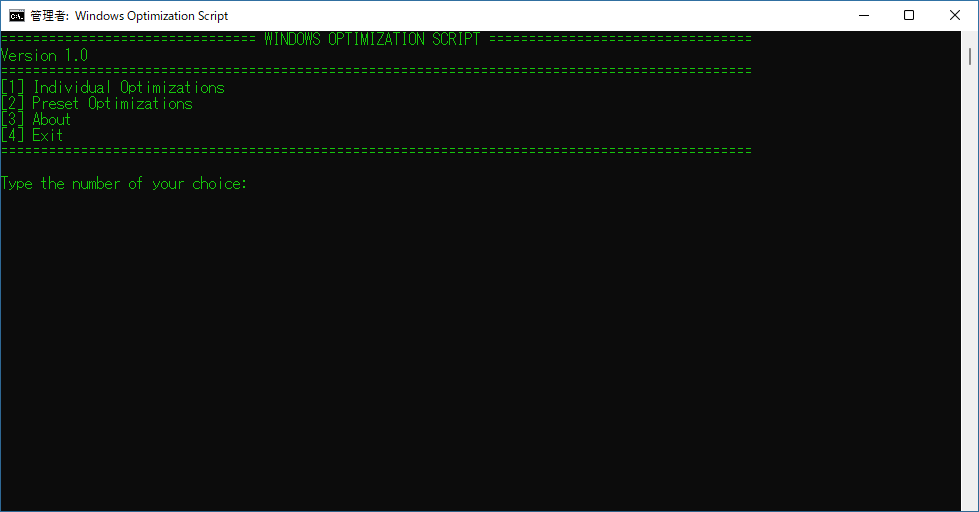
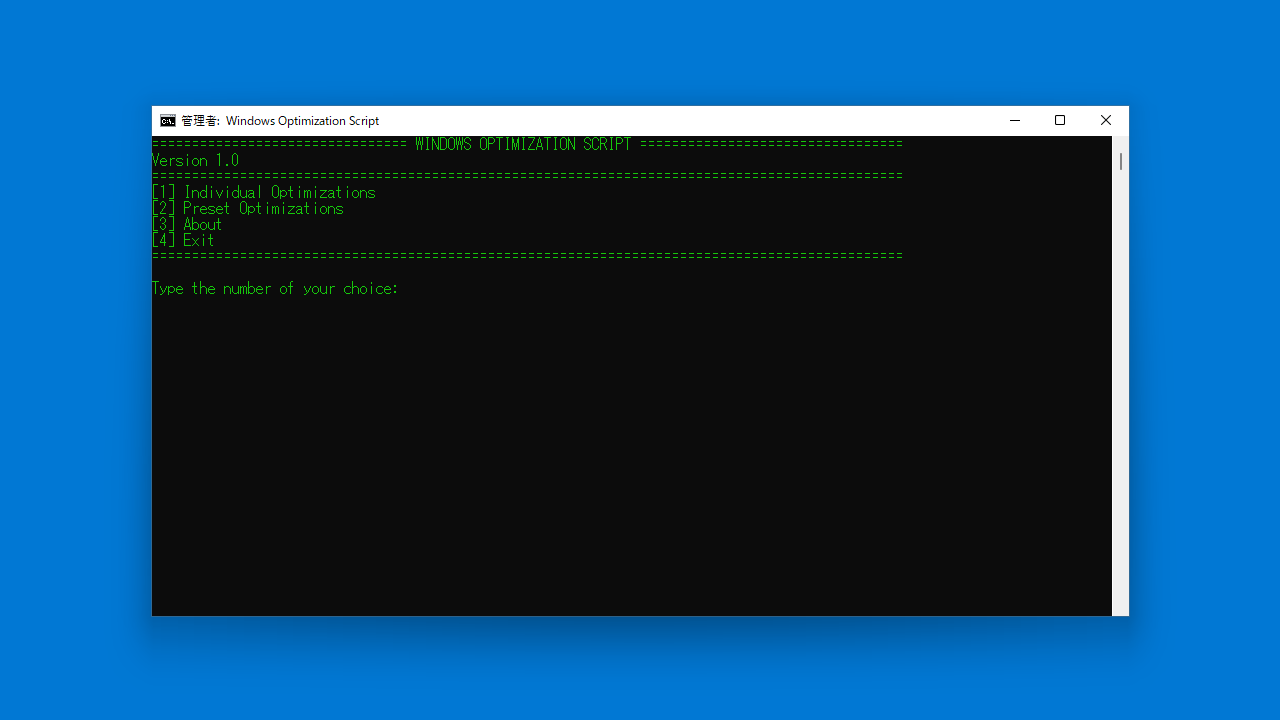
ユーザーインターフェース
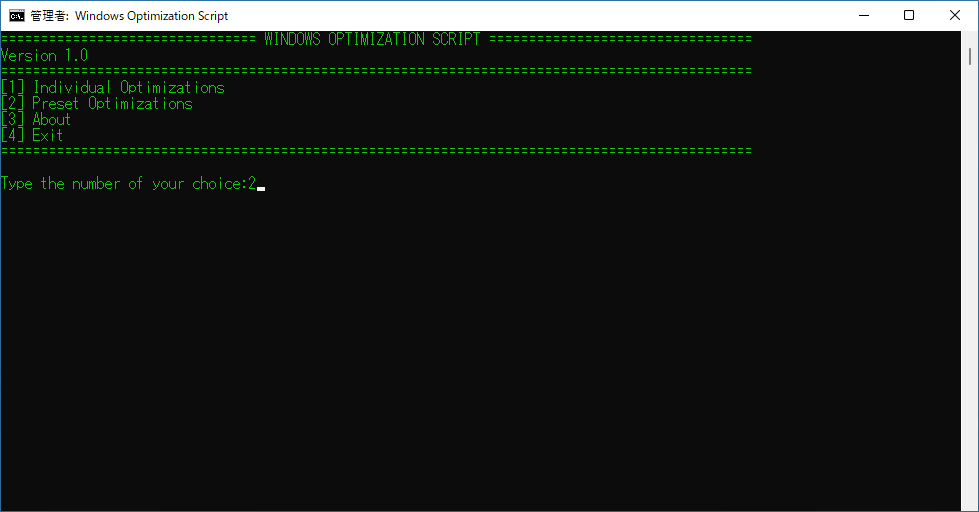
最適化方法の選択
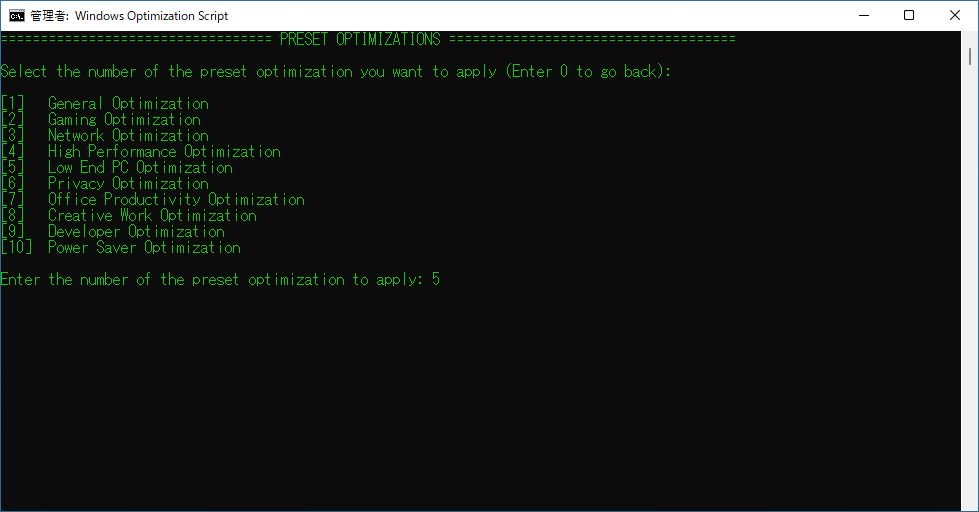
プリセットの選択
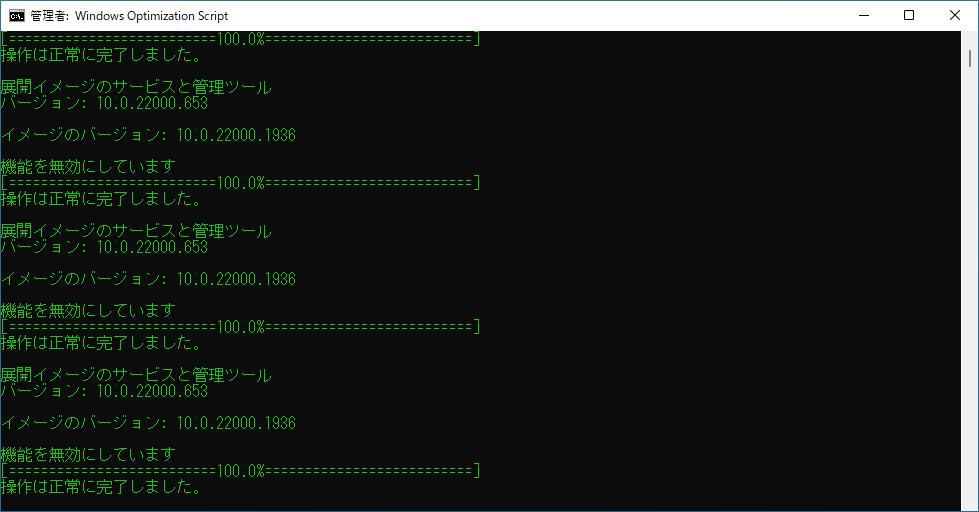
最適化実行中
使い方
インストール
1.インストール方法
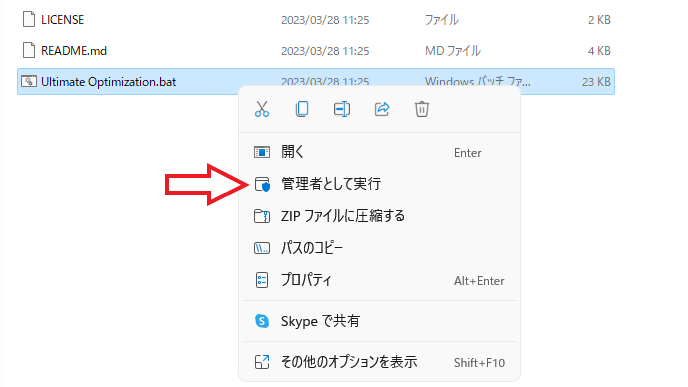
Windows Optimization Script は、インストール不要で使用できます。
ダウンロードした Zip ファイルを解凍し、「Ultimate Optimization.bat 」ファイルを「管理者として実行 」してください。
基本的な使い方
1. 基本的な使い方
はじめに最適化方法を選択します。用意されているプリセットを利用して最適化を行う場合は「2 」を選択します(2 を入力してエンターキーを押します)。
・General Optimization :システムの全体的なパフォーマンスを向上させるために調整します。
・Gaming Optimization : ゲーム体験を向上させるための最適化。
・Network Optimization :ネットワークのパフォーマンスを向上させるための調整。
・High Performance Optimization :システムのパフォーマンスを最大化するための最適化。
・Low End PC Optimization :ローエンド ハードウェアを備えたシステムの最適化。
・Privacy Optimization :プライバシーとセキュリティを強化するための調整。
・Office Productivity Optimization :オフィスでの使用の生産性を向上させるための最適化。
・Creative Work Optimization :ビデオ編集や音楽制作などのクリエイティブ作業のパフォーマンスを向上させるための調整。
・Developer Optimization :開発作業のパフォーマンスを向上させるための最適化。
・Power Saver Optimization :ラップトップのバッテリー寿命を最大化するための最適化。
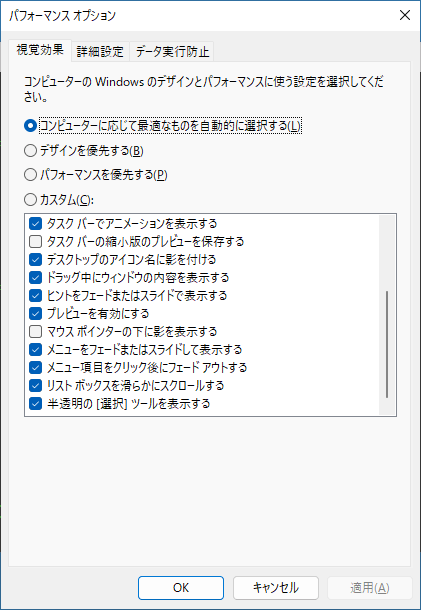
最適化が完了すると「パフォーマンス オプション 」の画面が表示されるので、設定を確認するか好みの設定をして[OK ]をクリックします。
よくある質問と回答
ライセンスについて。
ユーザーレビュー
レビューはまだありません、 最初のレビューを投稿してください。コメントは任意です。