").attr(n.scriptAttrs||{}).prop({charset:n.scriptCharset,src:n.url}).on("load error",i=function(e){r.remove(),i=null,e&&t("error"===e.type?404:200,e.type)}),C.head.appendChild(r[0])},abort:function(){i&&i()}}});var Jt,Kt=[],Zt=/(=)\?(?=&|$)|\?\?/;ce.ajaxSetup({jsonp:"callback",jsonpCallback:function(){var e=Kt.pop()||ce.expando+"_"+jt.guid++;return this[e]=!0,e}}),ce.ajaxPrefilter("json jsonp",function(e,t,n){var r,i,o,a=!1!==e.jsonp&&(Zt.test(e.url)?"url":"string"==typeof e.data&&0===(e.contentType||"").indexOf("application/x-www-form-urlencoded")&&Zt.test(e.data)&&"data");if(a||"jsonp"===e.dataTypes[0])return r=e.jsonpCallback=v(e.jsonpCallback)?e.jsonpCallback():e.jsonpCallback,a?e[a]=e[a].replace(Zt,"$1"+r):!1!==e.jsonp&&(e.url+=(At.test(e.url)?"&":"?")+e.jsonp+"="+r),e.converters["script json"]=function(){return o||ce.error(r+" was not called"),o[0]},e.dataTypes[0]="json",i=ie[r],ie[r]=function(){o=arguments},n.always(function(){void 0===i?ce(ie).removeProp(r):ie[r]=i,e[r]&&(e.jsonpCallback=t.jsonpCallback,Kt.push(r)),o&&v(i)&&i(o[0]),o=i=void 0}),"script"}),le.createHTMLDocument=((Jt=C.implementation.createHTMLDocument("").body).innerHTML="
",2===Jt.childNodes.length),ce.parseHTML=function(e,t,n){return"string"!=typeof e?[]:("boolean"==typeof t&&(n=t,t=!1),t||(le.createHTMLDocument?((r=(t=C.implementation.createHTMLDocument("")).createElement("base")).href=C.location.href,t.head.appendChild(r)):t=C),o=!n&&[],(i=w.exec(e))?[t.createElement(i[1])]:(i=Ae([e],t,o),o&&o.length&&ce(o).remove(),ce.merge([],i.childNodes)));var r,i,o},ce.fn.load=function(e,t,n){var r,i,o,a=this,s=e.indexOf(" ");return-1").append(ce.parseHTML(e)).find(r):e)}).always(n&&function(e,t){a.each(function(){n.apply(this,o||[e.responseText,t,e])})}),this},ce.expr.pseudos.animated=function(t){return ce.grep(ce.timers,function(e){return t===e.elem}).length},ce.offset={setOffset:function(e,t,n){var r,i,o,a,s,u,l=ce.css(e,"position"),c=ce(e),f={};"static"===l&&(e.style.position="relative"),s=c.offset(),o=ce.css(e,"top"),u=ce.css(e,"left"),("absolute"===l||"fixed"===l)&&-1<(o+u).indexOf("auto")?(a=(r=c.position()).top,i=r.left):(a=parseFloat(o)||0,i=parseFloat(u)||0),v(t)&&(t=t.call(e,n,ce.extend({},s))),null!=t.top&&(f.top=t.top-s.top+a),null!=t.left&&(f.left=t.left-s.left+i),"using"in t?t.using.call(e,f):c.css(f)}},ce.fn.extend({offset:function(t){if(arguments.length)return void 0===t?this:this.each(function(e){ce.offset.setOffset(this,t,e)});var e,n,r=this[0];return r?r.getClientRects().length?(e=r.getBoundingClientRect(),n=r.ownerDocument.defaultView,{top:e.top+n.pageYOffset,left:e.left+n.pageXOffset}):{top:0,left:0}:void 0},position:function(){if(this[0]){var e,t,n,r=this[0],i={top:0,left:0};if("fixed"===ce.css(r,"position"))t=r.getBoundingClientRect();else{t=this.offset(),n=r.ownerDocument,e=r.offsetParent||n.documentElement;while(e&&(e===n.body||e===n.documentElement)&&"static"===ce.css(e,"position"))e=e.parentNode;e&&e!==r&&1===e.nodeType&&((i=ce(e).offset()).top+=ce.css(e,"borderTopWidth",!0),i.left+=ce.css(e,"borderLeftWidth",!0))}return{top:t.top-i.top-ce.css(r,"marginTop",!0),left:t.left-i.left-ce.css(r,"marginLeft",!0)}}},offsetParent:function(){return this.map(function(){var e=this.offsetParent;while(e&&"static"===ce.css(e,"position"))e=e.offsetParent;return e||J})}}),ce.each({scrollLeft:"pageXOffset",scrollTop:"pageYOffset"},function(t,i){var o="pageYOffset"===i;ce.fn[t]=function(e){return M(this,function(e,t,n){var r;if(y(e)?r=e:9===e.nodeType&&(r=e.defaultView),void 0===n)return r?r[i]:e[t];r?r.scrollTo(o?r.pageXOffset:n,o?n:r.pageYOffset):e[t]=n},t,e,arguments.length)}}),ce.each(["top","left"],function(e,n){ce.cssHooks[n]=Ye(le.pixelPosition,function(e,t){if(t)return t=Ge(e,n),_e.test(t)?ce(e).position()[n]+"px":t})}),ce.each({Height:"height",Width:"width"},function(a,s){ce.each({padding:"inner"+a,content:s,"":"outer"+a},function(r,o){ce.fn[o]=function(e,t){var n=arguments.length&&(r||"boolean"!=typeof e),i=r||(!0===e||!0===t?"margin":"border");return M(this,function(e,t,n){var r;return y(e)?0===o.indexOf("outer")?e["inner"+a]:e.document.documentElement["client"+a]:9===e.nodeType?(r=e.documentElement,Math.max(e.body["scroll"+a],r["scroll"+a],e.body["offset"+a],r["offset"+a],r["client"+a])):void 0===n?ce.css(e,t,i):ce.style(e,t,n,i)},s,n?e:void 0,n)}})}),ce.each(["ajaxStart","ajaxStop","ajaxComplete","ajaxError","ajaxSuccess","ajaxSend"],function(e,t){ce.fn[t]=function(e){return this.on(t,e)}}),ce.fn.extend({bind:function(e,t,n){return this.on(e,null,t,n)},unbind:function(e,t){return this.off(e,null,t)},delegate:function(e,t,n,r){return this.on(t,e,n,r)},undelegate:function(e,t,n){return 1===arguments.length?this.off(e,"**"):this.off(t,e||"**",n)},hover:function(e,t){return this.on("mouseenter",e).on("mouseleave",t||e)}}),ce.each("blur focus focusin focusout resize scroll click dblclick mousedown mouseup mousemove mouseover mouseout mouseenter mouseleave change select submit keydown keypress keyup contextmenu".split(" "),function(e,n){ce.fn[n]=function(e,t){return 0
Windows 11 Fixer 2.1.0
Windows 設定変更
2021/12/27 14:11
説明機能仕様ダウンロード画像使い方
Windows 11 の各種設定をカスタマイズするアプリケーション

Windows 11 のタスクバーやコンテキストメニュー(右クリックメニュー)、エクスプローラ、ファイルとフォルダのオプション、セキュリティとプライバシーの設定をかんたんにカスタマイズできる Windows 11 カスタマイズツール。
Windows 11 Fixer の概要
Windows 11 Fixer は、Windows 11 のカスタマイズを可能な限りかんたんにするために設計されたプログラムです。
Windows 11 Fixer の機能
Windows 11 Fixer で利用できる主な機能の一覧です。
| 機能 |
概要 |
| メイン機能 |
Windows 11 のカスタマイズ |
| タスクバー |
位置の変更、サイズの変更、ウィジェットボタンの無効化/有効化、チャットボタンの無効化/有効化、ElevenClock のインストール |
| コンテキストメニュー |
スタイルの変更、「所有権の取得」の追加と削除、コントロールパネルのショートカットの追加と削除 |
| エクスプローラ |
コンパクトビューの無効化/有効化、開いたときに表示する場所の設定 |
| フォルダオプション |
隠しフォルダの表示/非表示、既知のファイルタイプの拡張子を表示/非表示、ショートカットアイコンの矢印の表示 |
| そのほか |
Windows の検索でオンライン検索をするかの設定、ウィジェットサービスの無効化/有効化、Cortana のアンインストール |
| Windows |
推奨するセキュリティ設定を有効にする、オプションのプライバシー設定を有効にする、システムテーマの変更、アプリケーションテーマの変更、システムの透明度の無効化/有効化 |
Windows 11 カスタマイズツール
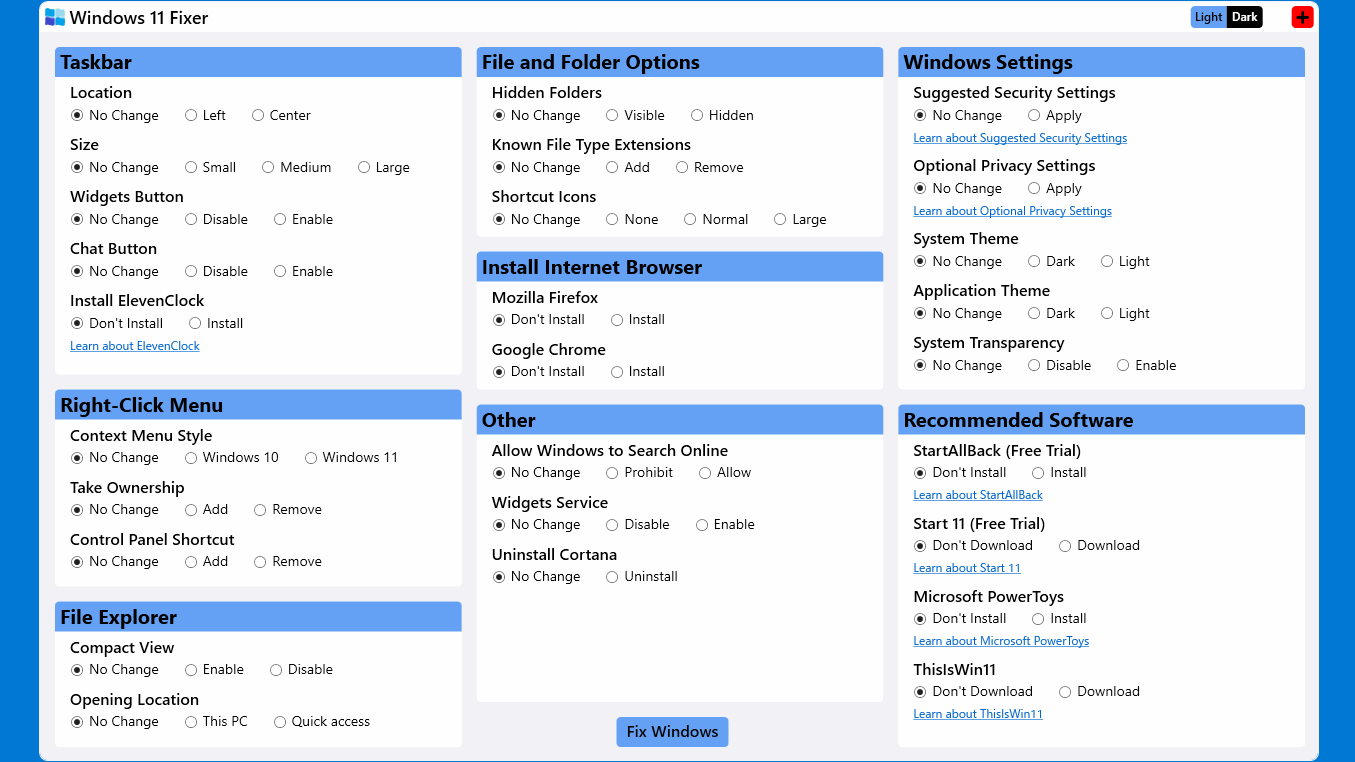
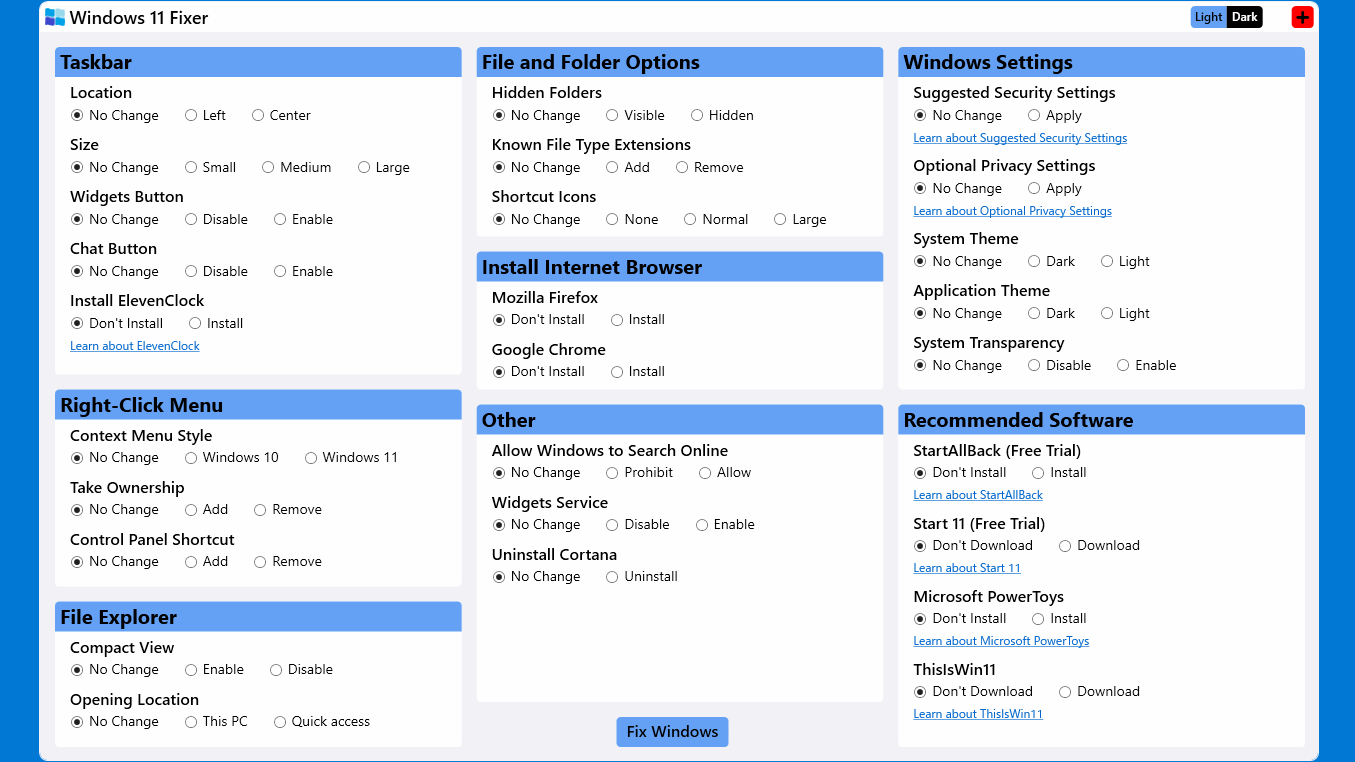
Windows 11 Fixer は、Windows 11 のタスクバーやコンテキストメニュー(右クリックメニュー)、ファイルエクスプローラ、ファイルとフォルダのオプション、セキュリティとプライバシーの設定をかんたんに変更してカスタマイズすることができるアプリケーションです。
Microsoft Power Toys などのよく使用される便利なアプリケーションをダウンロードまたはインストールすることもできます。
使い方はかんたんです
Windows 11 Fixer は、タスクバーのサイズを変更したり、コンテキストメニューのデザインを Windows 10 のように戻したい人にとって役に立つアプリケーションです。
使い方はシンプルで、変更したい項目の設定を選択し、ボタンをクリックするだけです。変更を適用するにはコンピュータを再起動する必要があるので、アプリの指示に従ってください。
Windows 11 の各種設定をカスタマイズできるアプリケーション
Windows 11 Fixer は、Windows のタスクバーやコンテキストメニューの外観を変更したり、フォルダオプションを設定したり、不要な機能やサービスを無効化するなどのカスタマイズをかんたんに行うことができるアプリケーションです。
機能
- Windows 11 のカスタマイズ
- タスクバーのルックアンドフィールをカスタマイズします
- 右クリックのコンテキストメニューを好みに合わせて調整します
- ファイルエクスプローラーを変更し、ファイルとフォルダーのオプションをかんたんに調整します
- 一般的に使用されるインターネットブラウザを含む、さまざまなソフトウェアをインストールします
- Windows 設定を調整します
- Windows11 のエクスペリエンスを向上させるための追加オプション
価格:無料
動作環境:Windows 11
使用言語:英語
最終更新日:
4年前 (2022/03/10)
ダウンロード数:1982
画像

実行ファイル

ユーザーインターフェース

再起動の確認画面
使い方
インストール
1.インストール方法
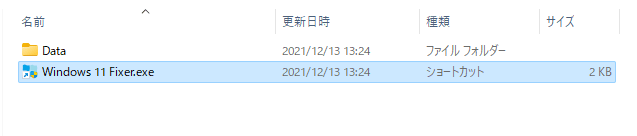
- ダウンロードした ZIP ファイルを解凍し、「Windows 11 Fixer.exe」のショートカットを実行するとアプリケーションを使用できます。

基本的な使い方
1.基本的な使い方
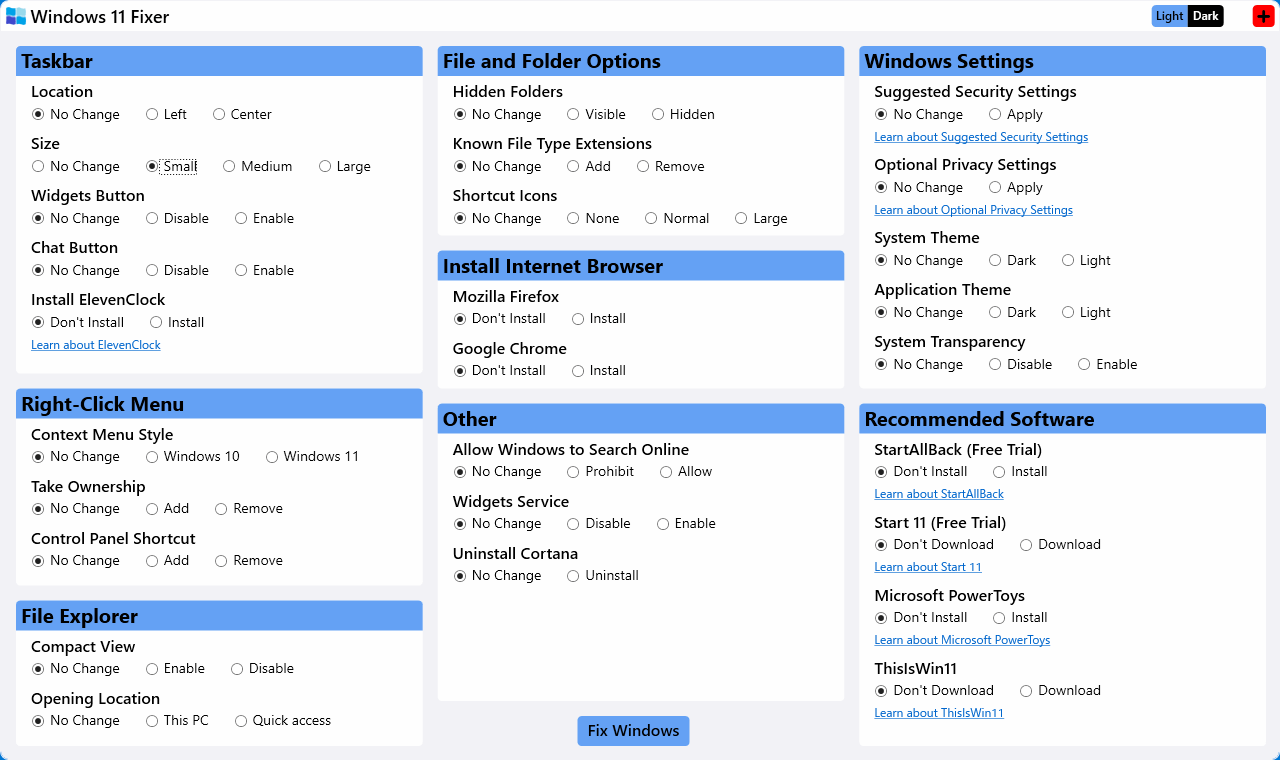
- Windows 11 Fixer を起動したら、変更したい項目の設定を選択します(例えば、タスクバーサイズを小さくしたい場合は、「Taskbar」>「Size」の「Small」を選択します)。
- [Fix Windows]ボタンをクリックします。

Taskbar:タスクバー
・Location:位置の変更
・Size:サイズの変更
・Widgets Button:ウィジェットボタンの無効化/有効化
・Chat Button:チャットボタンの無効化/有効化
・ElevenClock:ElevenClock のインストール
Eight-Click Menu:コンテキストメニュー
・Context Menu Style:スタイルの変更
・Take Ownership:「所有権の取得」の追加と削除
・Control Panel Shortcut:コントロールパネルのショートカットの追加と削除
File Explorer:ファイルエクスプローラ
・Compact View:コンパクトビューの無効化/有効化
・Opaning Location:開いたときに表示する場所
File and Folder Options:フォルダオプション
・Hidden Folders:隠しフォルダの表示/非表示
・Known File Type Extensions:既知のファイルタイプの拡張子を表示/非表示
・Shortcut Icons:ショートカットアイコンの矢印の表示
Install Internet Browser:ブラウザのインストール
・Mozilla Firefox:Firefox のインストール
・Google Chrome:Google Chrome のインストール
Other:そのほか
・Allow Windows to Search Online:Windows の検索でオンライン検索するかの設定
・Widgets Service:ウィジェットサービスの無効化/有効化
・Uninstall Cortana:Cortana のアンインストール
Windows Settings:Windows の設定
・Suggested Security Settongs:推奨するセキュリティ設定を有効にする
・Optional Privacy Settings:オプションのプライバシー設定を有効にする
・System Theme:システムテーマの変更
・Application Theme:アプリケーションテーマの変更
・System Transparency:システムの透明度の無効化/有効化
Recommended Software:おすすめソフトウェアのダウンロード/インストール
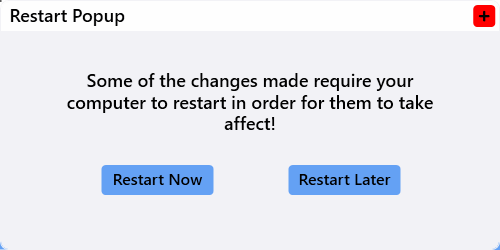
- 設定の変更の適用に PC の再起動が必要な場合はポップアップが表示されます。[Restart Now]ボタンをクリックすると PC が再起動し、変更が適用されます。

よくある質問と回答
ライセンスについて。