").attr(n.scriptAttrs||{}).prop({charset:n.scriptCharset,src:n.url}).on("load error",i=function(e){r.remove(),i=null,e&&t("error"===e.type?404:200,e.type)}),C.head.appendChild(r[0])},abort:function(){i&&i()}}});var Jt,Kt=[],Zt=/(=)\?(?=&|$)|\?\?/;ce.ajaxSetup({jsonp:"callback",jsonpCallback:function(){var e=Kt.pop()||ce.expando+"_"+jt.guid++;return this[e]=!0,e}}),ce.ajaxPrefilter("json jsonp",function(e,t,n){var r,i,o,a=!1!==e.jsonp&&(Zt.test(e.url)?"url":"string"==typeof e.data&&0===(e.contentType||"").indexOf("application/x-www-form-urlencoded")&&Zt.test(e.data)&&"data");if(a||"jsonp"===e.dataTypes[0])return r=e.jsonpCallback=v(e.jsonpCallback)?e.jsonpCallback():e.jsonpCallback,a?e[a]=e[a].replace(Zt,"$1"+r):!1!==e.jsonp&&(e.url+=(At.test(e.url)?"&":"?")+e.jsonp+"="+r),e.converters["script json"]=function(){return o||ce.error(r+" was not called"),o[0]},e.dataTypes[0]="json",i=ie[r],ie[r]=function(){o=arguments},n.always(function(){void 0===i?ce(ie).removeProp(r):ie[r]=i,e[r]&&(e.jsonpCallback=t.jsonpCallback,Kt.push(r)),o&&v(i)&&i(o[0]),o=i=void 0}),"script"}),le.createHTMLDocument=((Jt=C.implementation.createHTMLDocument("").body).innerHTML="
",2===Jt.childNodes.length),ce.parseHTML=function(e,t,n){return"string"!=typeof e?[]:("boolean"==typeof t&&(n=t,t=!1),t||(le.createHTMLDocument?((r=(t=C.implementation.createHTMLDocument("")).createElement("base")).href=C.location.href,t.head.appendChild(r)):t=C),o=!n&&[],(i=w.exec(e))?[t.createElement(i[1])]:(i=Ae([e],t,o),o&&o.length&&ce(o).remove(),ce.merge([],i.childNodes)));var r,i,o},ce.fn.load=function(e,t,n){var r,i,o,a=this,s=e.indexOf(" ");return-1").append(ce.parseHTML(e)).find(r):e)}).always(n&&function(e,t){a.each(function(){n.apply(this,o||[e.responseText,t,e])})}),this},ce.expr.pseudos.animated=function(t){return ce.grep(ce.timers,function(e){return t===e.elem}).length},ce.offset={setOffset:function(e,t,n){var r,i,o,a,s,u,l=ce.css(e,"position"),c=ce(e),f={};"static"===l&&(e.style.position="relative"),s=c.offset(),o=ce.css(e,"top"),u=ce.css(e,"left"),("absolute"===l||"fixed"===l)&&-1<(o+u).indexOf("auto")?(a=(r=c.position()).top,i=r.left):(a=parseFloat(o)||0,i=parseFloat(u)||0),v(t)&&(t=t.call(e,n,ce.extend({},s))),null!=t.top&&(f.top=t.top-s.top+a),null!=t.left&&(f.left=t.left-s.left+i),"using"in t?t.using.call(e,f):c.css(f)}},ce.fn.extend({offset:function(t){if(arguments.length)return void 0===t?this:this.each(function(e){ce.offset.setOffset(this,t,e)});var e,n,r=this[0];return r?r.getClientRects().length?(e=r.getBoundingClientRect(),n=r.ownerDocument.defaultView,{top:e.top+n.pageYOffset,left:e.left+n.pageXOffset}):{top:0,left:0}:void 0},position:function(){if(this[0]){var e,t,n,r=this[0],i={top:0,left:0};if("fixed"===ce.css(r,"position"))t=r.getBoundingClientRect();else{t=this.offset(),n=r.ownerDocument,e=r.offsetParent||n.documentElement;while(e&&(e===n.body||e===n.documentElement)&&"static"===ce.css(e,"position"))e=e.parentNode;e&&e!==r&&1===e.nodeType&&((i=ce(e).offset()).top+=ce.css(e,"borderTopWidth",!0),i.left+=ce.css(e,"borderLeftWidth",!0))}return{top:t.top-i.top-ce.css(r,"marginTop",!0),left:t.left-i.left-ce.css(r,"marginLeft",!0)}}},offsetParent:function(){return this.map(function(){var e=this.offsetParent;while(e&&"static"===ce.css(e,"position"))e=e.offsetParent;return e||J})}}),ce.each({scrollLeft:"pageXOffset",scrollTop:"pageYOffset"},function(t,i){var o="pageYOffset"===i;ce.fn[t]=function(e){return M(this,function(e,t,n){var r;if(y(e)?r=e:9===e.nodeType&&(r=e.defaultView),void 0===n)return r?r[i]:e[t];r?r.scrollTo(o?r.pageXOffset:n,o?n:r.pageYOffset):e[t]=n},t,e,arguments.length)}}),ce.each(["top","left"],function(e,n){ce.cssHooks[n]=Ye(le.pixelPosition,function(e,t){if(t)return t=Ge(e,n),_e.test(t)?ce(e).position()[n]+"px":t})}),ce.each({Height:"height",Width:"width"},function(a,s){ce.each({padding:"inner"+a,content:s,"":"outer"+a},function(r,o){ce.fn[o]=function(e,t){var n=arguments.length&&(r||"boolean"!=typeof e),i=r||(!0===e||!0===t?"margin":"border");return M(this,function(e,t,n){var r;return y(e)?0===o.indexOf("outer")?e["inner"+a]:e.document.documentElement["client"+a]:9===e.nodeType?(r=e.documentElement,Math.max(e.body["scroll"+a],r["scroll"+a],e.body["offset"+a],r["offset"+a],r["client"+a])):void 0===n?ce.css(e,t,i):ce.style(e,t,n,i)},s,n?e:void 0,n)}})}),ce.each(["ajaxStart","ajaxStop","ajaxComplete","ajaxError","ajaxSuccess","ajaxSend"],function(e,t){ce.fn[t]=function(e){return this.on(t,e)}}),ce.fn.extend({bind:function(e,t,n){return this.on(e,null,t,n)},unbind:function(e,t){return this.off(e,null,t)},delegate:function(e,t,n,r){return this.on(t,e,n,r)},undelegate:function(e,t,n){return 1===arguments.length?this.off(e,"**"):this.off(t,e||"**",n)},hover:function(e,t){return this.on("mouseenter",e).on("mouseleave",t||e)}}),ce.each("blur focus focusin focusout resize scroll click dblclick mousedown mouseup mousemove mouseover mouseout mouseenter mouseleave change select submit keydown keypress keyup contextmenu".split(" "),function(e,n){ce.fn[n]=function(e,t){return 0
Trimly 1.0.0
ビデオエンコード
説明機能仕様ダウンロード画像使い方
トリミングやオーディオの抽出などの複数の機能を備えたビデオコンバータ

ビデオのトリミングや、オーディオの抽出、速度や音量の変更、フォーマットの変換などを行うことができる、Windows 向けのフリーソフト。FFmpeg のフロントエンドとして動作します。

Trimly の概要
Trimly は、WPF と FFmpeg をベースにしたシンプルなビデオコンバータです。
Trimly の機能
Trimly の主な機能です。
| 機能 |
概要 |
| メイン機能 |
ビデオエンコード/トリミング |
| 機能詳細 |
・ビデオのトリミング。
・FPS、解像度、ビットレートなどの変更。
・速度と音量を変更します。
・MP4、MKV、MOV、または AVI に変換します。
・ビデオから MP3 または AAC オーディオを抽出します。
・すべてのオーディオ トラックを 1 つに結合します。
・NVIDIA、AMD、Intel GPU 向けの H.264 コーデックのサポート。 |
オープンソースのビデオコンバータです
Trimly は、ビデオのトリミングや、オーディオの抽出、速度や音量の変更、フォーマットの変換などを行うことができる、Windows 向けのフリーソフトです。
Trimly のトリム機能を使用すると、ビデオの特定の部分だけが必要な場合や不要な部分を取り除きたい場合に役に立ちます。また、ビデオから MP3 や AAC オーディオを抽出できます。
FFmpeg のフロントエンドとして動作します
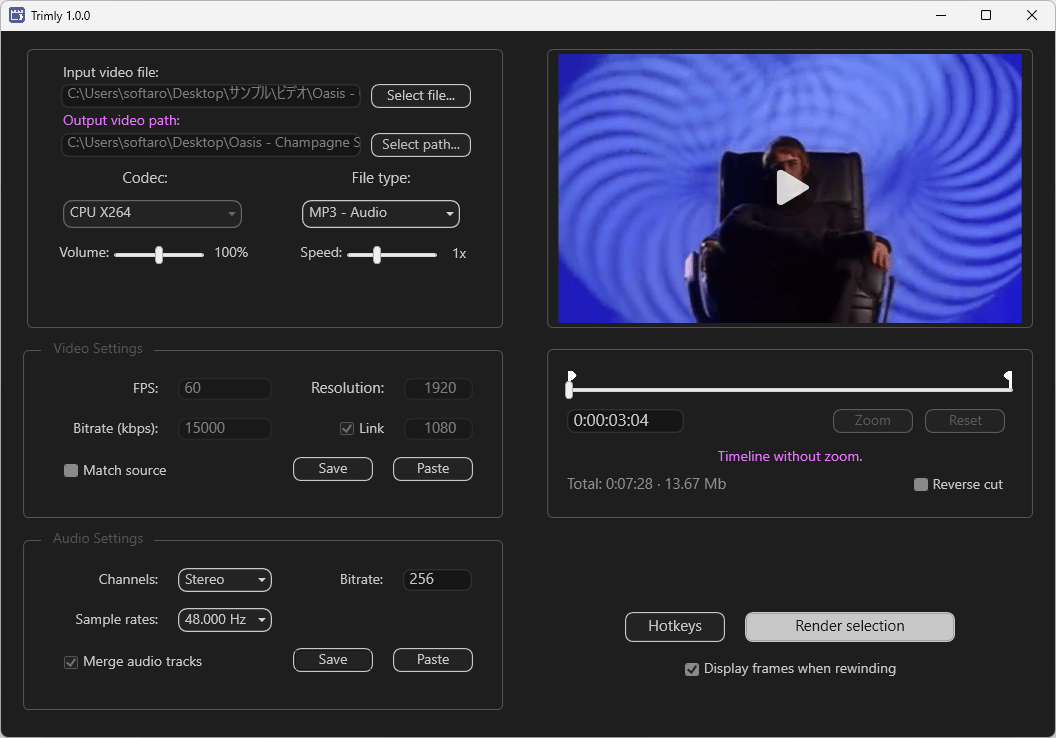
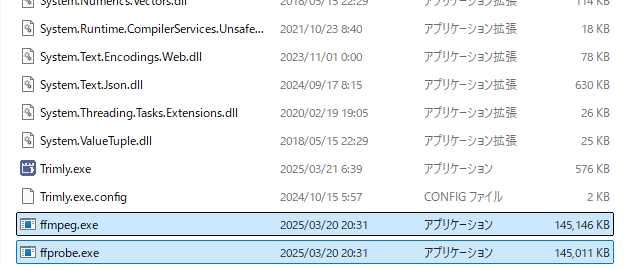
Trimly は、FFmpeg のフロントエンドとして動作するアプリケーションなので、別途「FFmpeg」のダウンロードが必要になります。
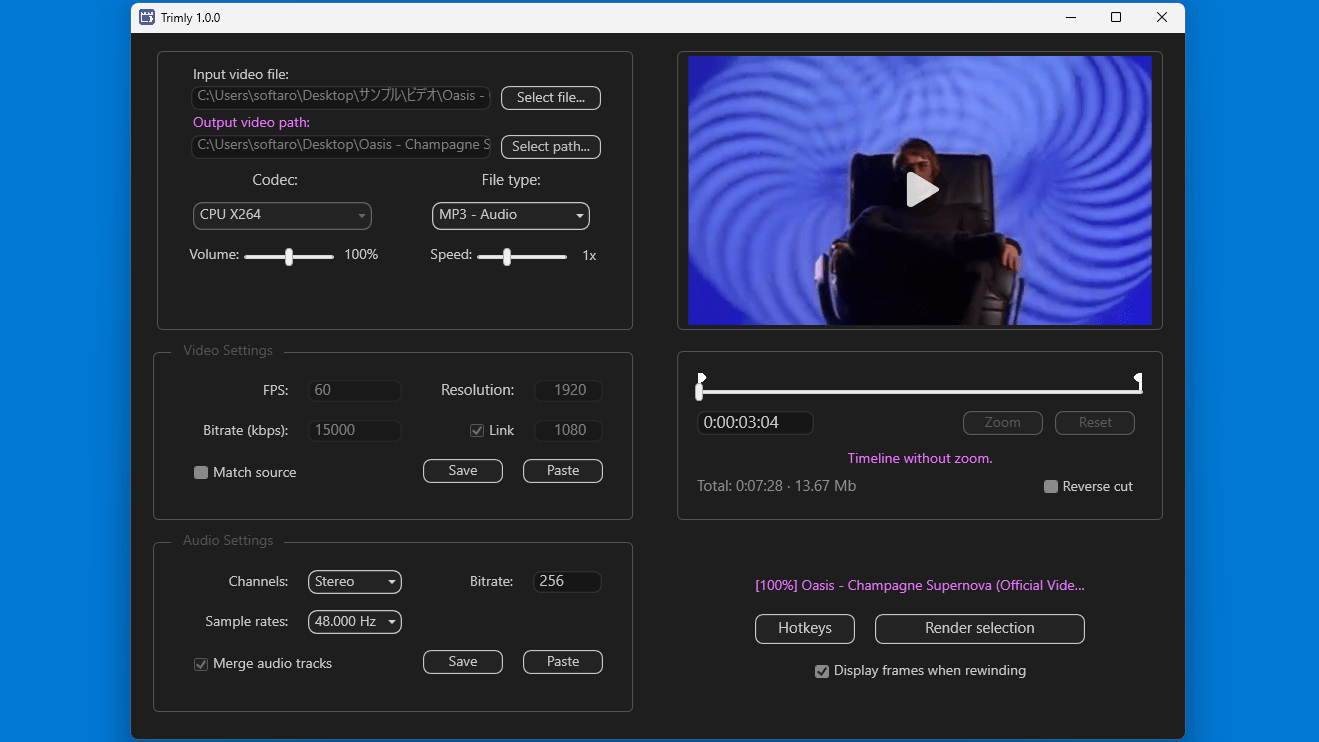
Trimly を使用すると、ビデオをトリミングするほかに、ビデオのコーデック、ファイルの種類、音量、再生速度、FPS、解像度、ビットレートなどを変更してビデオを出力でき、NVIDIA、AMD、Intel GPU 向けの H.264 コーデックに対応しています。
実行中のアプリケーションを監視したい場合に便利です
Trimly は、トリミングなどの複数の機能を備えたビデオコンバータです。ビデオは MP4、MKV、MOV、AVI、オーディオは MP3、AAC 形式で出力することができます。
機能
- ビデオのトリム。
- メタの変更(FPS、解像度、ビットレートなど)。
- 速度と音量を変更します。
- MP4、MKV、MOV、または AVI に変換します。
- ビデオから MP3 または AAC オーディオを抽出します。
- すべてのオーディオ トラックを 1 つに結合します。
- NVIDIA、AMD、Intel GPU 向けの H.264 コーデックのサポート。
価格:無料
動作環境:Windows 7|8|8.1|10|11
使用言語:英語
最終更新日:
1年前 (2025/03/24)
ダウンロード数:256
画像

FFmpeg の追加

ユーザーインターフェース

ファイルの入力

処理開始
使い方
インストール
1.インストール
Trimly は、インストール不要で使用できるアプリケーションです。
- 「FFmpeg」をダウンロードします。
- 「ffmpeg.exe」と「ffprobe.exe」を、「Trimly.exe」と同じ場所に配置します。
- Trimly.exe を実行すると、アプリケーションを起動できます。

基本的な使い方
1. 基本的な使い方
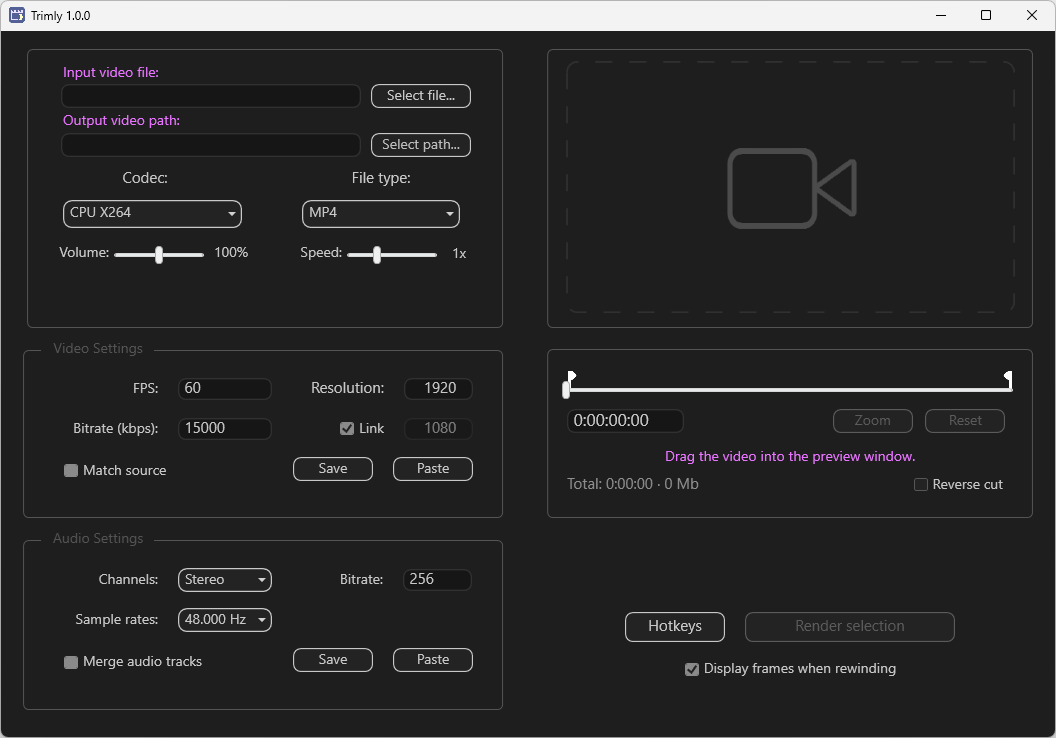
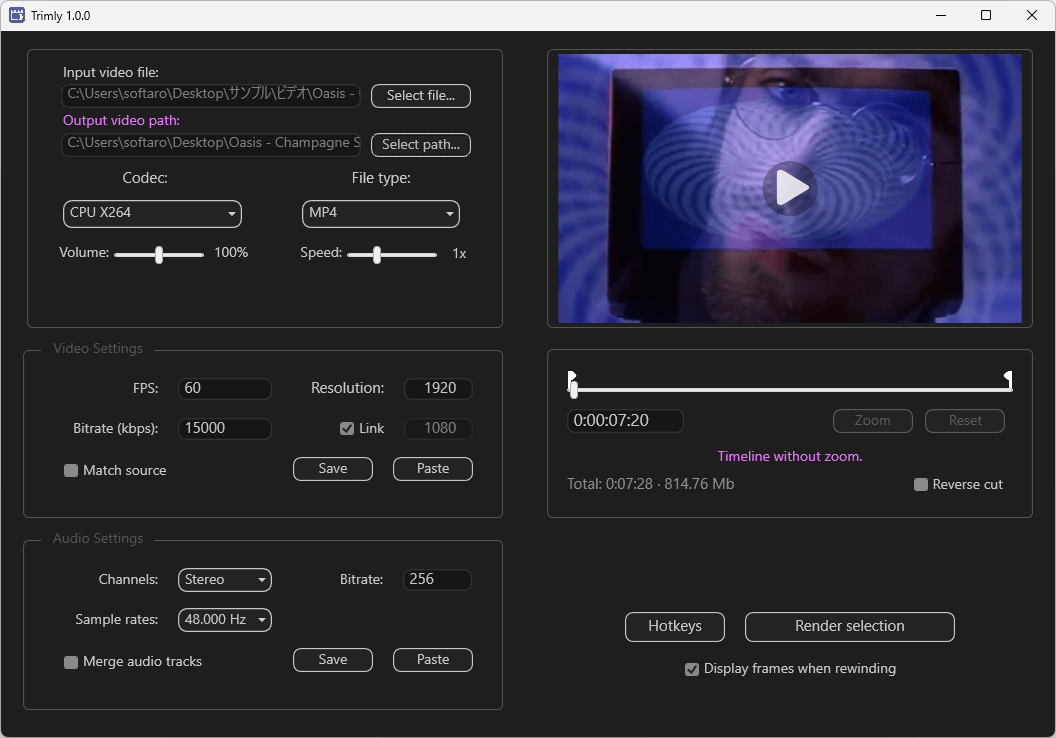
- [Select file]ボタンをクリックして、処理したいビデオファイルを追加します。
- [Select path]ボタンをクリックして、出力先を指定します。

- 必要に応じて、ビデオやオーディオの設定を行います。
- 右下の[Render selection]ボタンをクリックすると、処理が開始します。

よくある質問と回答
ライセンスについて。
Trimly は、どなたでも無料で利用できます。