").attr(n.scriptAttrs||{}).prop({charset:n.scriptCharset,src:n.url}).on("load error",i=function(e){r.remove(),i=null,e&&t("error"===e.type?404:200,e.type)}),C.head.appendChild(r[0])},abort:function(){i&&i()}}});var Jt,Kt=[],Zt=/(=)\?(?=&|$)|\?\?/;ce.ajaxSetup({jsonp:"callback",jsonpCallback:function(){var e=Kt.pop()||ce.expando+"_"+jt.guid++;return this[e]=!0,e}}),ce.ajaxPrefilter("json jsonp",function(e,t,n){var r,i,o,a=!1!==e.jsonp&&(Zt.test(e.url)?"url":"string"==typeof e.data&&0===(e.contentType||"").indexOf("application/x-www-form-urlencoded")&&Zt.test(e.data)&&"data");if(a||"jsonp"===e.dataTypes[0])return r=e.jsonpCallback=v(e.jsonpCallback)?e.jsonpCallback():e.jsonpCallback,a?e[a]=e[a].replace(Zt,"$1"+r):!1!==e.jsonp&&(e.url+=(At.test(e.url)?"&":"?")+e.jsonp+"="+r),e.converters["script json"]=function(){return o||ce.error(r+" was not called"),o[0]},e.dataTypes[0]="json",i=ie[r],ie[r]=function(){o=arguments},n.always(function(){void 0===i?ce(ie).removeProp(r):ie[r]=i,e[r]&&(e.jsonpCallback=t.jsonpCallback,Kt.push(r)),o&&v(i)&&i(o[0]),o=i=void 0}),"script"}),le.createHTMLDocument=((Jt=C.implementation.createHTMLDocument("").body).innerHTML="
",2===Jt.childNodes.length),ce.parseHTML=function(e,t,n){return"string"!=typeof e?[]:("boolean"==typeof t&&(n=t,t=!1),t||(le.createHTMLDocument?((r=(t=C.implementation.createHTMLDocument("")).createElement("base")).href=C.location.href,t.head.appendChild(r)):t=C),o=!n&&[],(i=w.exec(e))?[t.createElement(i[1])]:(i=Ae([e],t,o),o&&o.length&&ce(o).remove(),ce.merge([],i.childNodes)));var r,i,o},ce.fn.load=function(e,t,n){var r,i,o,a=this,s=e.indexOf(" ");return-1").append(ce.parseHTML(e)).find(r):e)}).always(n&&function(e,t){a.each(function(){n.apply(this,o||[e.responseText,t,e])})}),this},ce.expr.pseudos.animated=function(t){return ce.grep(ce.timers,function(e){return t===e.elem}).length},ce.offset={setOffset:function(e,t,n){var r,i,o,a,s,u,l=ce.css(e,"position"),c=ce(e),f={};"static"===l&&(e.style.position="relative"),s=c.offset(),o=ce.css(e,"top"),u=ce.css(e,"left"),("absolute"===l||"fixed"===l)&&-1<(o+u).indexOf("auto")?(a=(r=c.position()).top,i=r.left):(a=parseFloat(o)||0,i=parseFloat(u)||0),v(t)&&(t=t.call(e,n,ce.extend({},s))),null!=t.top&&(f.top=t.top-s.top+a),null!=t.left&&(f.left=t.left-s.left+i),"using"in t?t.using.call(e,f):c.css(f)}},ce.fn.extend({offset:function(t){if(arguments.length)return void 0===t?this:this.each(function(e){ce.offset.setOffset(this,t,e)});var e,n,r=this[0];return r?r.getClientRects().length?(e=r.getBoundingClientRect(),n=r.ownerDocument.defaultView,{top:e.top+n.pageYOffset,left:e.left+n.pageXOffset}):{top:0,left:0}:void 0},position:function(){if(this[0]){var e,t,n,r=this[0],i={top:0,left:0};if("fixed"===ce.css(r,"position"))t=r.getBoundingClientRect();else{t=this.offset(),n=r.ownerDocument,e=r.offsetParent||n.documentElement;while(e&&(e===n.body||e===n.documentElement)&&"static"===ce.css(e,"position"))e=e.parentNode;e&&e!==r&&1===e.nodeType&&((i=ce(e).offset()).top+=ce.css(e,"borderTopWidth",!0),i.left+=ce.css(e,"borderLeftWidth",!0))}return{top:t.top-i.top-ce.css(r,"marginTop",!0),left:t.left-i.left-ce.css(r,"marginLeft",!0)}}},offsetParent:function(){return this.map(function(){var e=this.offsetParent;while(e&&"static"===ce.css(e,"position"))e=e.offsetParent;return e||J})}}),ce.each({scrollLeft:"pageXOffset",scrollTop:"pageYOffset"},function(t,i){var o="pageYOffset"===i;ce.fn[t]=function(e){return M(this,function(e,t,n){var r;if(y(e)?r=e:9===e.nodeType&&(r=e.defaultView),void 0===n)return r?r[i]:e[t];r?r.scrollTo(o?r.pageXOffset:n,o?n:r.pageYOffset):e[t]=n},t,e,arguments.length)}}),ce.each(["top","left"],function(e,n){ce.cssHooks[n]=Ye(le.pixelPosition,function(e,t){if(t)return t=Ge(e,n),_e.test(t)?ce(e).position()[n]+"px":t})}),ce.each({Height:"height",Width:"width"},function(a,s){ce.each({padding:"inner"+a,content:s,"":"outer"+a},function(r,o){ce.fn[o]=function(e,t){var n=arguments.length&&(r||"boolean"!=typeof e),i=r||(!0===e||!0===t?"margin":"border");return M(this,function(e,t,n){var r;return y(e)?0===o.indexOf("outer")?e["inner"+a]:e.document.documentElement["client"+a]:9===e.nodeType?(r=e.documentElement,Math.max(e.body["scroll"+a],r["scroll"+a],e.body["offset"+a],r["offset"+a],r["client"+a])):void 0===n?ce.css(e,t,i):ce.style(e,t,n,i)},s,n?e:void 0,n)}})}),ce.each(["ajaxStart","ajaxStop","ajaxComplete","ajaxError","ajaxSuccess","ajaxSend"],function(e,t){ce.fn[t]=function(e){return this.on(t,e)}}),ce.fn.extend({bind:function(e,t,n){return this.on(e,null,t,n)},unbind:function(e,t){return this.off(e,null,t)},delegate:function(e,t,n,r){return this.on(t,e,n,r)},undelegate:function(e,t,n){return 1===arguments.length?this.off(e,"**"):this.off(t,e||"**",n)},hover:function(e,t){return this.on("mouseenter",e).on("mouseleave",t||e)}}),ce.each("blur focus focusin focusout resize scroll click dblclick mousedown mouseup mousemove mouseover mouseout mouseenter mouseleave change select submit keydown keypress keyup contextmenu".split(" "),function(e,n){ce.fn[n]=function(e,t){return 0
Simple Hasher 1.5.0
ファイル管理
2025/01/31 11:352025/02/14 08:57
説明 機能 仕様 ダウンロード 画像 使い方
複数のファイルのハッシュをすばやく計算できるハッシュツール

MD5、SHA-1、SHA-256、SHA-512、Tiger などの複数のアルゴリズムを使用してハッシュを生成することができる、Windows 向けのアプリケーション。SUM ファイルを開いてハッシュをチェックすることもできます。

Simple Hasher の概要
Simple Hasher は、複数のアルゴリズムを使用してハッシュを生成することができるアプリケーションです。
Simple Hasher の機能
Simple Hasher の主な機能です。
機能
概要
メイン機能
ハッシュの生成およびチェック
機能詳細
・ファイル署名(ハッシュ)を生成およびチェックできます。
・ハッシュをクリップボードにコピー。
・SUM ファイルの作成。
ファイルのハッシュを生成できます
Simple Hasher は、複数のアルゴリズムを使用してハッシュを生成することができる、Windows 向けのアプリケーションです。
Simple Hasher を使用すると、MD5、SHA-1、SHA-224、SHA-256、SHA-384、SHA-512、Tiger のハッシュアルゴリズムを使用してファイルのハッシュを生成できます。マルチスレッドを使用して、複数のファイルの複数の種類のハッシュを同時に計算できます。
便利なオプション機能
Simple Hasher のオプションを使用すると、ハッシュをスペースで区切ったり、ハッシュを一行で表示するようにしたり、ハッシュを大文字で表示することができます。
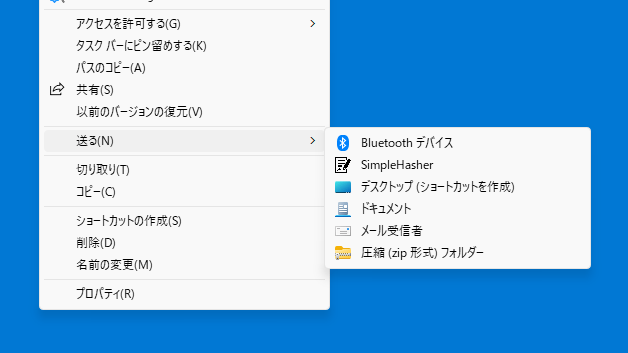
また、Simple Hasher の項目を Windows のコンテキストメニューの「送る」メニューに追加することが可能で、コンテキストメニューから SUM ファイルを開いて同じフォルダ内にあるファイルの整合性をチェックできます。
複数のファイルのハッシュをすばやく計算できます
Simple Hasher は、複数のファイルのハッシュをすばやく計算することができる便利なアプリケーションです。生成したハッシュはクリップボードにコピーしたり、ハッシュを SUM ファイルに保存することができます。
機能
ファイル署名(ハッシュ)を生成およびチェックするツール。
対応ハッシュアルゴリズム:
メッセージダイジェスト5 (MD5)
セキュア ハッシュ アルゴリズム (SHA): SHA-1、SHA-224、SHA-256、SHA-384、および SHA-512 のバリエーション
Tiger
価格: 無料
動作環境: Windows 7|8|8.1|10|11
使用言語: 英語
最終更新日:
1年前 (2025/02/14)
ダウンロード数: 596
画像
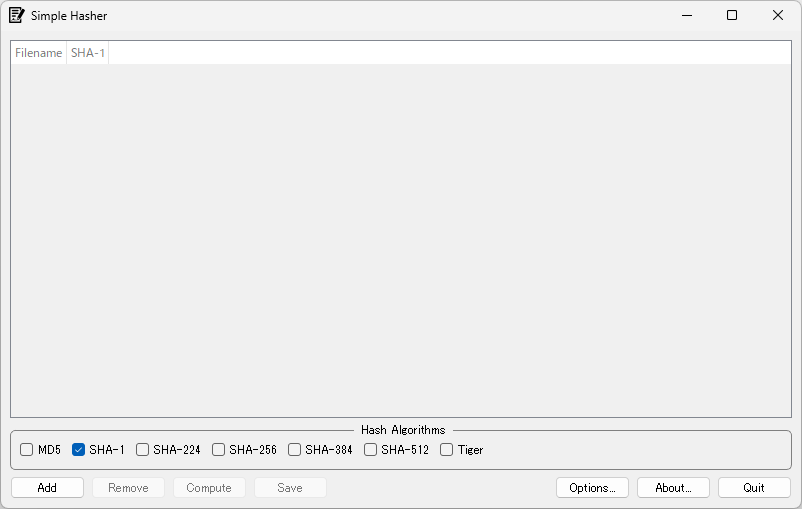
ユーザーインターフェース
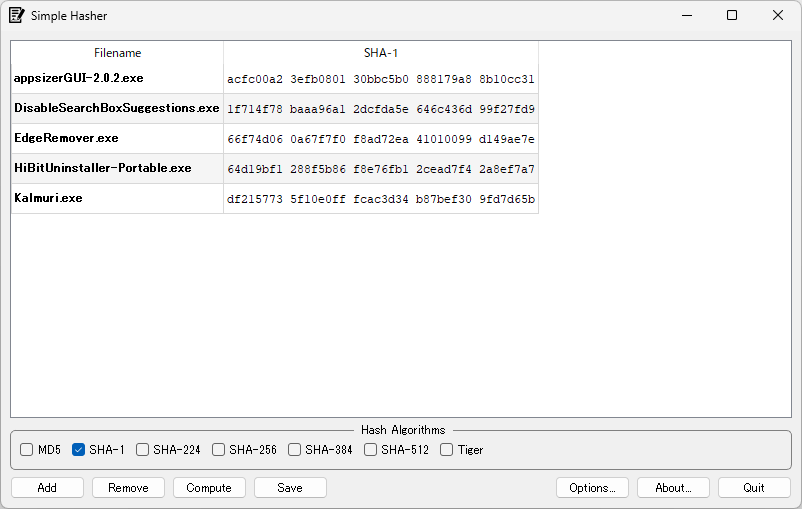
ハッシュの生成
コンテキストメニュー
ファイルの署名のチェック
使い方
インストール
1.インストール
セットアップウィザードが開始したら[Next ]をクリックします。
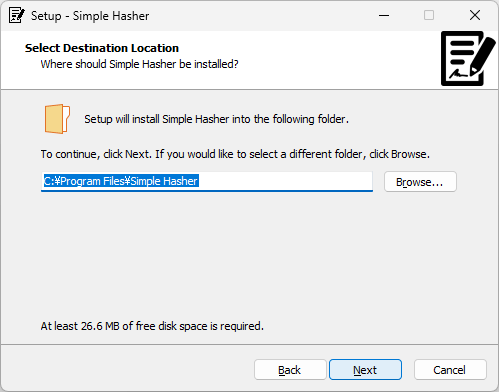
インストール先を確認して[Next ]をクリックします。
[Install ]をクリックしてインストールを開始します。
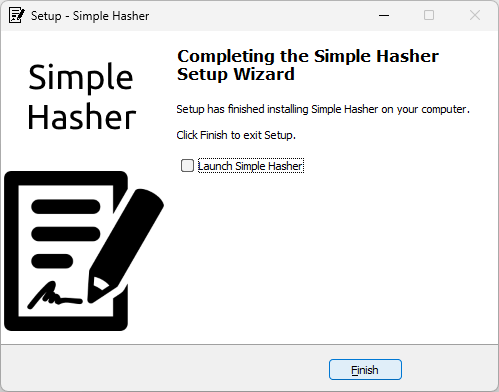
[Finish ]をクリックしてセットアップウィザードを閉じます。
基本的な使い方
1. 基本的な使い方
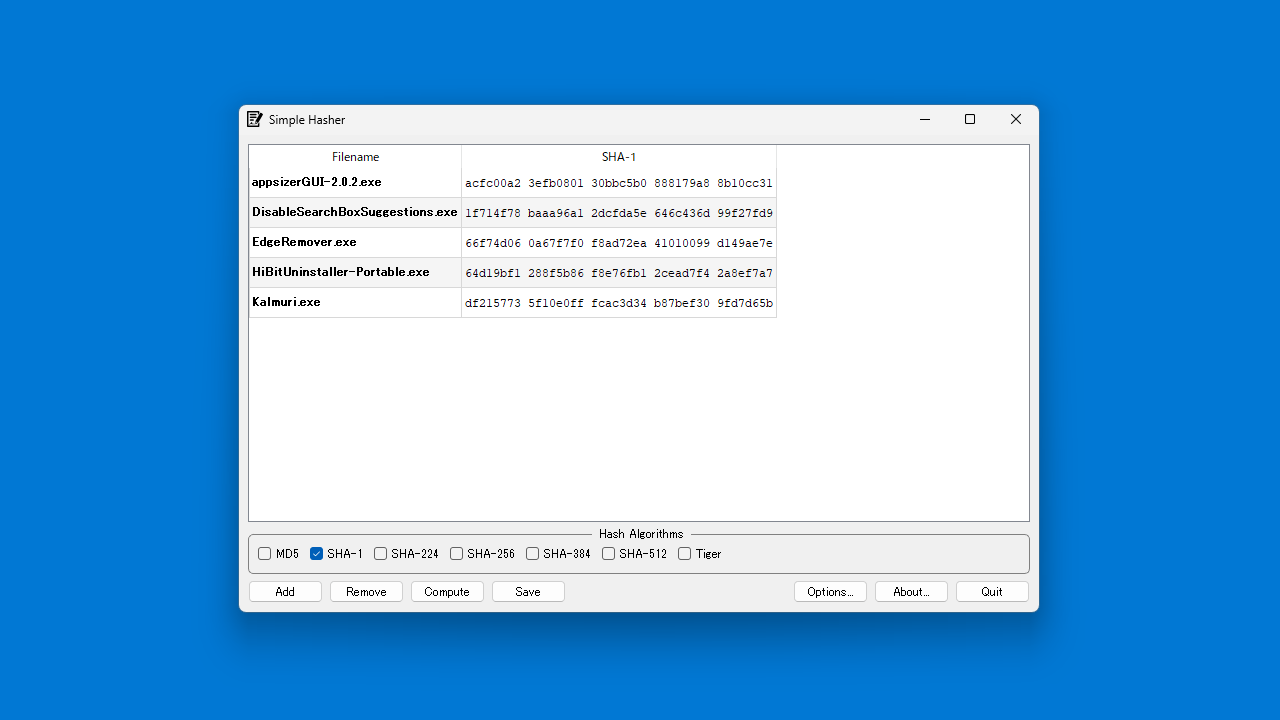
[Add ]ボタンをクリックしてファイルを追加します。
ハッシュアルゴリズムを選択します(複数選択可能)。
[Compute ]ボタンをクリックすると、ハッシュが生成されます。
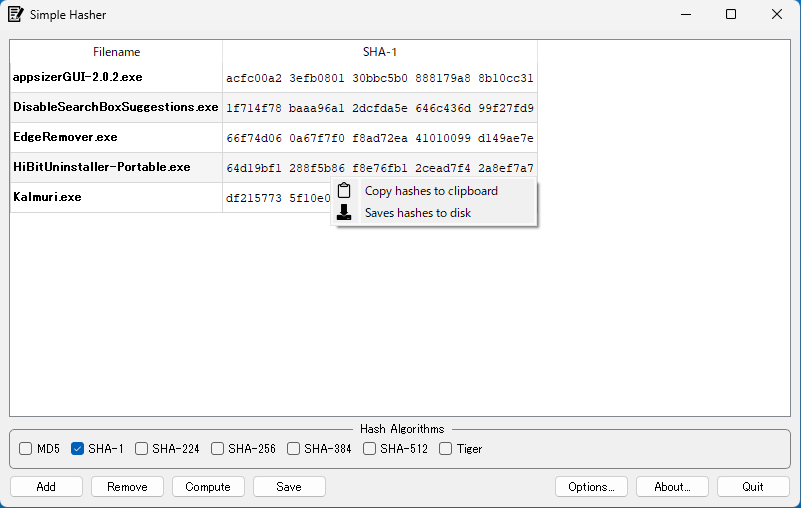
右クリックメニューから、ハッシュをクリップボードにコピーしたり、SUM ファイルを保存したりできます。
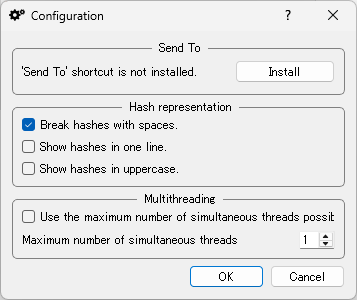
[Options ]を開くと、アプリケーションの設定ができます。
・‘Send To’ shortcut is not installed :[Install]をクリックすると、コンテキストメニューの「送る」に項目を追加できます。
・Break hashes with spaces :ハッシュをスペースで区切る
・Show hashes in one line :ハッシュを1行で表示する
・Show hashes in uppercase :ハッシュを大文字で表示する
・Use the maximum number of simultaneous threads poss it :可能な最大数の同時スレッドを使用する
・maximum number of simultaneous threads :最大同時スレッド数
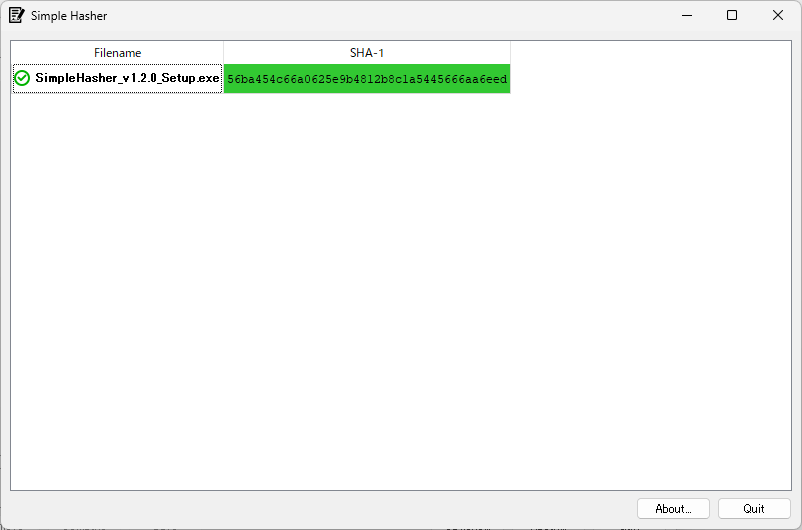
SUM ファイルをコンテキストメニューから開いて、同じフォルダ内にあるファイルの署名をチェックすることができます。緑は成功(ハッシュが一致)、赤はエラー(ハッシュが一致しない)、黄色はファイルが見つからなかったことを示します。

よくある質問と回答
ライセンスについて。
ユーザーレビュー
レビューはまだありません、 最初のレビューを投稿してください。コメントは任意です。
Simple Hasher は、どなたでも無料で利用できます。