").attr(n.scriptAttrs||{}).prop({charset:n.scriptCharset,src:n.url}).on("load error",i=function(e){r.remove(),i=null,e&&t("error"===e.type?404:200,e.type)}),C.head.appendChild(r[0])},abort:function(){i&&i()}}});var Jt,Kt=[],Zt=/(=)\?(?=&|$)|\?\?/;ce.ajaxSetup({jsonp:"callback",jsonpCallback:function(){var e=Kt.pop()||ce.expando+"_"+jt.guid++;return this[e]=!0,e}}),ce.ajaxPrefilter("json jsonp",function(e,t,n){var r,i,o,a=!1!==e.jsonp&&(Zt.test(e.url)?"url":"string"==typeof e.data&&0===(e.contentType||"").indexOf("application/x-www-form-urlencoded")&&Zt.test(e.data)&&"data");if(a||"jsonp"===e.dataTypes[0])return r=e.jsonpCallback=v(e.jsonpCallback)?e.jsonpCallback():e.jsonpCallback,a?e[a]=e[a].replace(Zt,"$1"+r):!1!==e.jsonp&&(e.url+=(At.test(e.url)?"&":"?")+e.jsonp+"="+r),e.converters["script json"]=function(){return o||ce.error(r+" was not called"),o[0]},e.dataTypes[0]="json",i=ie[r],ie[r]=function(){o=arguments},n.always(function(){void 0===i?ce(ie).removeProp(r):ie[r]=i,e[r]&&(e.jsonpCallback=t.jsonpCallback,Kt.push(r)),o&&v(i)&&i(o[0]),o=i=void 0}),"script"}),le.createHTMLDocument=((Jt=C.implementation.createHTMLDocument("").body).innerHTML="
",2===Jt.childNodes.length),ce.parseHTML=function(e,t,n){return"string"!=typeof e?[]:("boolean"==typeof t&&(n=t,t=!1),t||(le.createHTMLDocument?((r=(t=C.implementation.createHTMLDocument("")).createElement("base")).href=C.location.href,t.head.appendChild(r)):t=C),o=!n&&[],(i=w.exec(e))?[t.createElement(i[1])]:(i=Ae([e],t,o),o&&o.length&&ce(o).remove(),ce.merge([],i.childNodes)));var r,i,o},ce.fn.load=function(e,t,n){var r,i,o,a=this,s=e.indexOf(" ");return-1").append(ce.parseHTML(e)).find(r):e)}).always(n&&function(e,t){a.each(function(){n.apply(this,o||[e.responseText,t,e])})}),this},ce.expr.pseudos.animated=function(t){return ce.grep(ce.timers,function(e){return t===e.elem}).length},ce.offset={setOffset:function(e,t,n){var r,i,o,a,s,u,l=ce.css(e,"position"),c=ce(e),f={};"static"===l&&(e.style.position="relative"),s=c.offset(),o=ce.css(e,"top"),u=ce.css(e,"left"),("absolute"===l||"fixed"===l)&&-1<(o+u).indexOf("auto")?(a=(r=c.position()).top,i=r.left):(a=parseFloat(o)||0,i=parseFloat(u)||0),v(t)&&(t=t.call(e,n,ce.extend({},s))),null!=t.top&&(f.top=t.top-s.top+a),null!=t.left&&(f.left=t.left-s.left+i),"using"in t?t.using.call(e,f):c.css(f)}},ce.fn.extend({offset:function(t){if(arguments.length)return void 0===t?this:this.each(function(e){ce.offset.setOffset(this,t,e)});var e,n,r=this[0];return r?r.getClientRects().length?(e=r.getBoundingClientRect(),n=r.ownerDocument.defaultView,{top:e.top+n.pageYOffset,left:e.left+n.pageXOffset}):{top:0,left:0}:void 0},position:function(){if(this[0]){var e,t,n,r=this[0],i={top:0,left:0};if("fixed"===ce.css(r,"position"))t=r.getBoundingClientRect();else{t=this.offset(),n=r.ownerDocument,e=r.offsetParent||n.documentElement;while(e&&(e===n.body||e===n.documentElement)&&"static"===ce.css(e,"position"))e=e.parentNode;e&&e!==r&&1===e.nodeType&&((i=ce(e).offset()).top+=ce.css(e,"borderTopWidth",!0),i.left+=ce.css(e,"borderLeftWidth",!0))}return{top:t.top-i.top-ce.css(r,"marginTop",!0),left:t.left-i.left-ce.css(r,"marginLeft",!0)}}},offsetParent:function(){return this.map(function(){var e=this.offsetParent;while(e&&"static"===ce.css(e,"position"))e=e.offsetParent;return e||J})}}),ce.each({scrollLeft:"pageXOffset",scrollTop:"pageYOffset"},function(t,i){var o="pageYOffset"===i;ce.fn[t]=function(e){return M(this,function(e,t,n){var r;if(y(e)?r=e:9===e.nodeType&&(r=e.defaultView),void 0===n)return r?r[i]:e[t];r?r.scrollTo(o?r.pageXOffset:n,o?n:r.pageYOffset):e[t]=n},t,e,arguments.length)}}),ce.each(["top","left"],function(e,n){ce.cssHooks[n]=Ye(le.pixelPosition,function(e,t){if(t)return t=Ge(e,n),_e.test(t)?ce(e).position()[n]+"px":t})}),ce.each({Height:"height",Width:"width"},function(a,s){ce.each({padding:"inner"+a,content:s,"":"outer"+a},function(r,o){ce.fn[o]=function(e,t){var n=arguments.length&&(r||"boolean"!=typeof e),i=r||(!0===e||!0===t?"margin":"border");return M(this,function(e,t,n){var r;return y(e)?0===o.indexOf("outer")?e["inner"+a]:e.document.documentElement["client"+a]:9===e.nodeType?(r=e.documentElement,Math.max(e.body["scroll"+a],r["scroll"+a],e.body["offset"+a],r["offset"+a],r["client"+a])):void 0===n?ce.css(e,t,i):ce.style(e,t,n,i)},s,n?e:void 0,n)}})}),ce.each(["ajaxStart","ajaxStop","ajaxComplete","ajaxError","ajaxSuccess","ajaxSend"],function(e,t){ce.fn[t]=function(e){return this.on(t,e)}}),ce.fn.extend({bind:function(e,t,n){return this.on(e,null,t,n)},unbind:function(e,t){return this.off(e,null,t)},delegate:function(e,t,n,r){return this.on(t,e,n,r)},undelegate:function(e,t,n){return 1===arguments.length?this.off(e,"**"):this.off(t,e||"**",n)},hover:function(e,t){return this.on("mouseenter",e).on("mouseleave",t||e)}}),ce.each("blur focus focusin focusout resize scroll click dblclick mousedown mouseup mousemove mouseover mouseout mouseenter mouseleave change select submit keydown keypress keyup contextmenu".split(" "),function(e,n){ce.fn[n]=function(e,t){return 0
Inspect Recently Created or Modified Files 2.4.1.0
ファイル検索
2021/07/21 13:46
説明 機能 仕様 ダウンロード 画像 使い方
特定の日付以降に作成または変更されたファイルを検索して表示するツール
最近作成されたファイル、または最近変更されたファイルを検索して表示する Windows 向けのファイル検索アプリ。特定の日付以降に作成または変更(更新)されたファイルを、指定したフォルダから探すことができます。
Inspect Recently Created or Modified Files の概要
Inspect Recently Created or Modified Files は、特定の日付以降に作成または変更されたファイルを検索して表示するアプリケーションです。
Inspect Recently Created or Modified Files の機能
Inspect Recently Created or Modified Files の主な機能です。
機能
概要
メイン機能
特定の日付以降に作成または変更されたファイルを検索
機能詳細
・検索結果を CSV ファイルに保存
・検索結果から文字列を検索
最近作成または変更されたファイルを検索して表示します
Inspect Recently Created or Modified Files は、特定の日付以降に作成されたファイル、または変更(更新)されたファイルを検索して一覧表示するアプリケーションです。
例えば、マルウェアの感染により作成または変更されたファイルを調べたり、特定のシステムの問題の原因を調査したい場合などに役に立ちます。
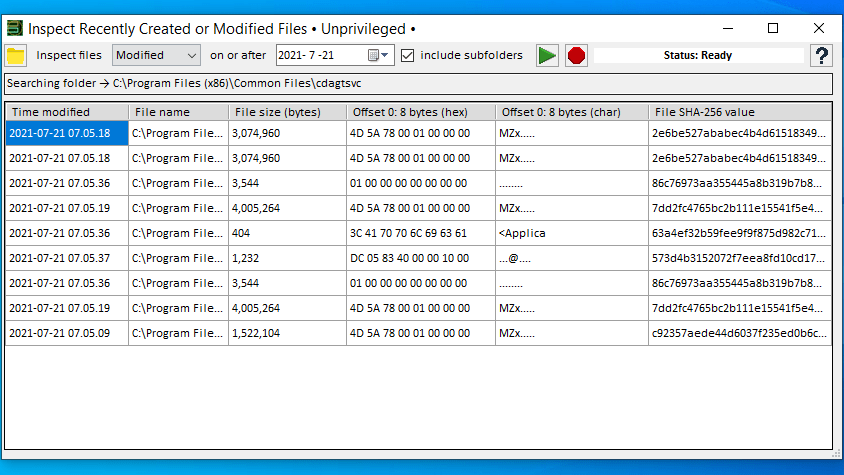
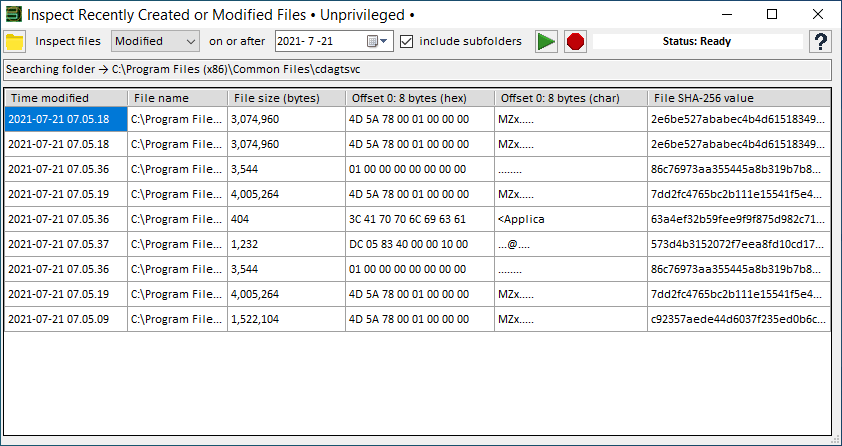
検索されたファイルの詳細情報を表示します
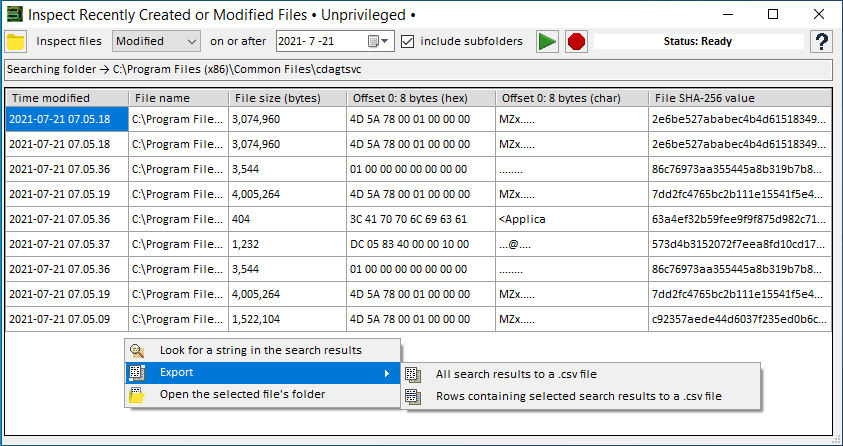
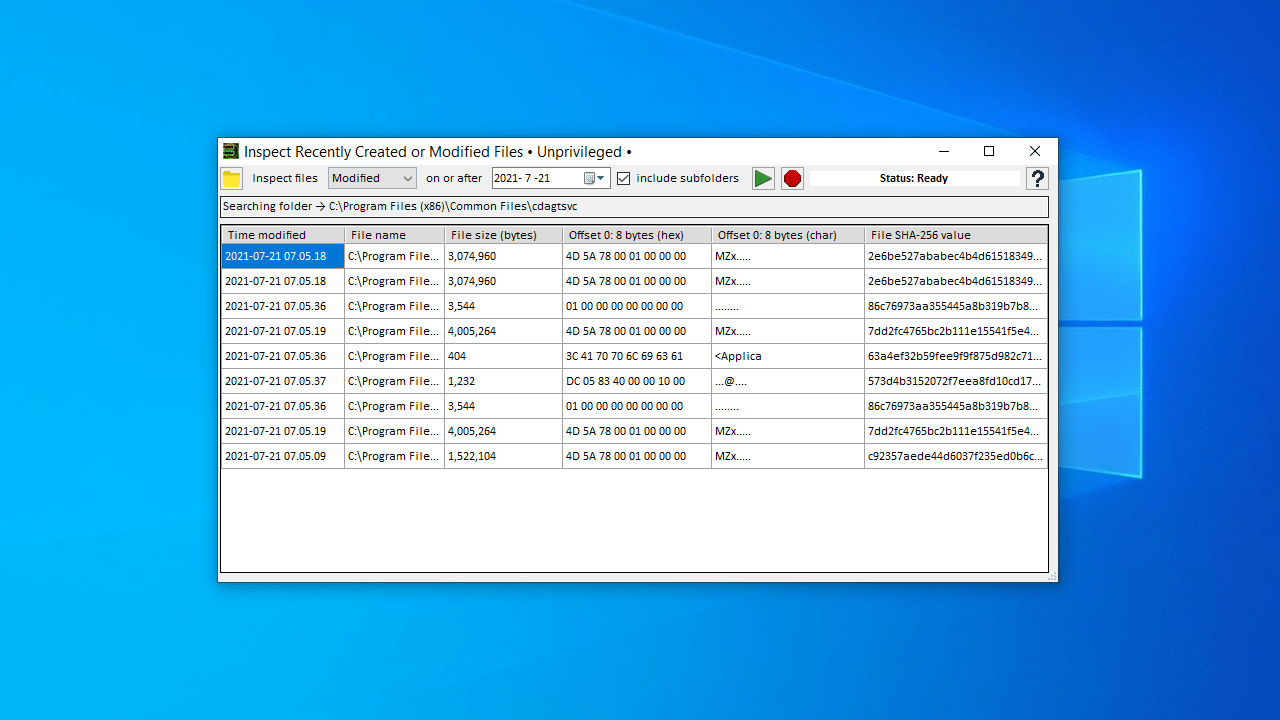
Inspect Recently Created or Modified Files は、選択した日付以降に論理ドライブ上(固定ディスク、USB フラッシュドライブなど)で作成、ドロップされたファイルを一覧表示します。
合わせて、各ファイルのファイルの場所やファイルサイズ、ファイルのバイト文字(HEX / Char)、ハッシュ値(SHA-256)などの詳細情報を表示します。
ユニークなファイル検索アプリ
Inspect Recently Created or Modified Files は、指定したフォルダ内で、特定の日以降に作成/変更されたファイルを検出して表示するファイル検索ツールです。マルウェアなどのインシデント管理やトラブルシューティングに役に立ちます。
機能
特定の日付以降に作成または変更(更新)されたファイルを検索して表示
検索結果を CSV ファイルにエクスポート
検索結果を文字列で検索
システム要件:
価格: 無料
動作環境: Windows 7|8|8.1|10|11
使用言語: 英語
最終更新日:
5年前 (2021/07/21)
ダウンロード数: 389
画像
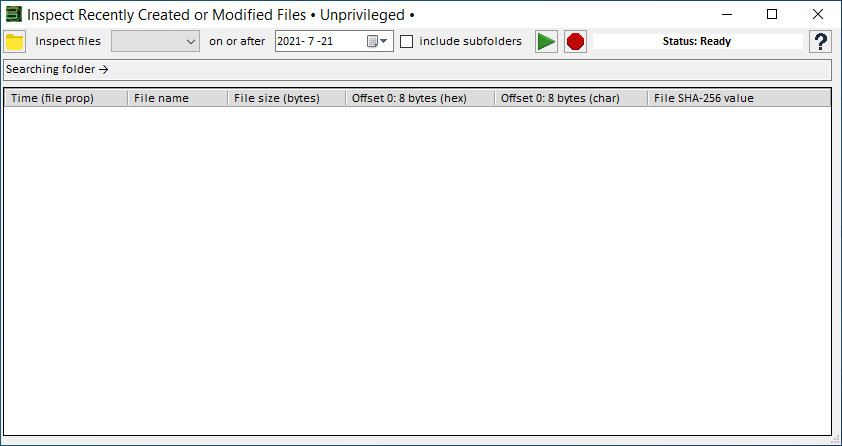
ユーザーインターフェース
検索結果
右クリックメニュー
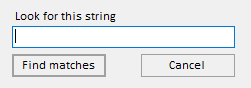
文字列で検索
使い方
インストール
1.インストール方法
Inspect Recently Created or Modified Files はインストール不要で使用できます。
ダウンロードした ZIP ファイルを解凍し「RecentFiles.exe 」ファイルを実行するとアプリケーションを起動できます。
基本的な使い方
1.特定の日付以降に作成または変更されたファイルを検索する
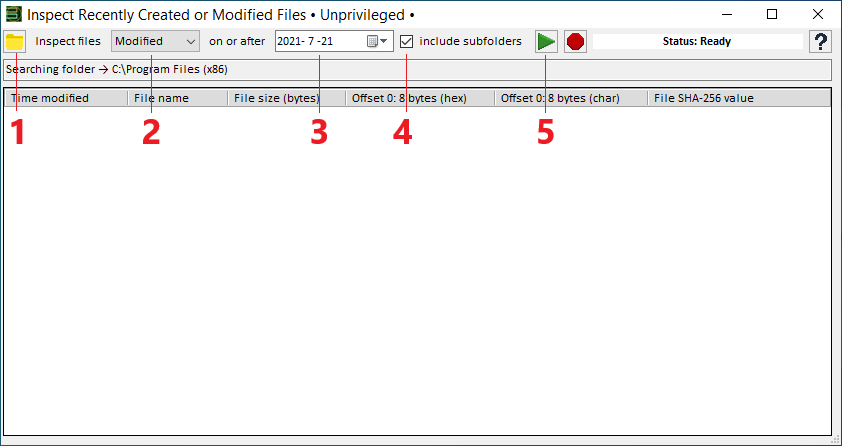
一番左のフォルダのアイコンをクリックして、検索する場所を選択します。
作成したファイルを検索する場合は「Created」、変更したファイルを検索する場合は「Modified」をドロップダウンで選択します。
日付を選択します。
サブフォルダを含める場合は「include subfolders」をチェックします。
[▶]ボタンをクリックして検索を開始します。
2.右クリックメニュー
右クリックメニューから、ファイルの場所を開いたり、リストをエクスポートしたりできます。
・Look for a string in the search results :検索結果から文字列を探す
・Export :
─ All search results to a .csv file :すべての検索結果を .csv ファイルに保存
─ Rows containing selected search results to a .csv file :選択した行を .csv ファイルに保存する
・Open the selected file’s folder :選択したファイルのフォルダを開く
「Look for a string in the search results 」を選択すると、検索結果から文字列を検索できます。
よくある質問と回答
ライセンスについて。
ユーザーレビュー
レビューはまだありません、 最初のレビューを投稿してください。コメントは任意です。
Inspect Recently Created or Modified Files は、どなたでも無料で使用できます。