
").attr(n.scriptAttrs||{}).prop({charset:n.scriptCharset,src:n.url}).on("load error",i=function(e){r.remove(),i=null,e&&t("error"===e.type?404:200,e.type)}),C.head.appendChild(r[0])},abort:function(){i&&i()}}});var Jt,Kt=[],Zt=/(=)\?(?=&|$)|\?\?/;ce.ajaxSetup({jsonp:"callback",jsonpCallback:function(){var e=Kt.pop()||ce.expando+"_"+jt.guid++;return this[e]=!0,e}}),ce.ajaxPrefilter("json jsonp",function(e,t,n){var r,i,o,a=!1!==e.jsonp&&(Zt.test(e.url)?"url":"string"==typeof e.data&&0===(e.contentType||"").indexOf("application/x-www-form-urlencoded")&&Zt.test(e.data)&&"data");if(a||"jsonp"===e.dataTypes[0])return r=e.jsonpCallback=v(e.jsonpCallback)?e.jsonpCallback():e.jsonpCallback,a?e[a]=e[a].replace(Zt,"$1"+r):!1!==e.jsonp&&(e.url+=(At.test(e.url)?"&":"?")+e.jsonp+"="+r),e.converters["script json"]=function(){return o||ce.error(r+" was not called"),o[0]},e.dataTypes[0]="json",i=ie[r],ie[r]=function(){o=arguments},n.always(function(){void 0===i?ce(ie).removeProp(r):ie[r]=i,e[r]&&(e.jsonpCallback=t.jsonpCallback,Kt.push(r)),o&&v(i)&&i(o[0]),o=i=void 0}),"script"}),le.createHTMLDocument=((Jt=C.implementation.createHTMLDocument("").body).innerHTML="
",2===Jt.childNodes.length),ce.parseHTML=function(e,t,n){return"string"!=typeof e?[]:("boolean"==typeof t&&(n=t,t=!1),t||(le.createHTMLDocument?((r=(t=C.implementation.createHTMLDocument("")).createElement("base")).href=C.location.href,t.head.appendChild(r)):t=C),o=!n&&[],(i=w.exec(e))?[t.createElement(i[1])]:(i=Ae([e],t,o),o&&o.length&&ce(o).remove(),ce.merge([],i.childNodes)));var r,i,o},ce.fn.load=function(e,t,n){var r,i,o,a=this,s=e.indexOf(" ");return-1").append(ce.parseHTML(e)).find(r):e)}).always(n&&function(e,t){a.each(function(){n.apply(this,o||[e.responseText,t,e])})}),this},ce.expr.pseudos.animated=function(t){return ce.grep(ce.timers,function(e){return t===e.elem}).length},ce.offset={setOffset:function(e,t,n){var r,i,o,a,s,u,l=ce.css(e,"position"),c=ce(e),f={};"static"===l&&(e.style.position="relative"),s=c.offset(),o=ce.css(e,"top"),u=ce.css(e,"left"),("absolute"===l||"fixed"===l)&&-1<(o+u).indexOf("auto")?(a=(r=c.position()).top,i=r.left):(a=parseFloat(o)||0,i=parseFloat(u)||0),v(t)&&(t=t.call(e,n,ce.extend({},s))),null!=t.top&&(f.top=t.top-s.top+a),null!=t.left&&(f.left=t.left-s.left+i),"using"in t?t.using.call(e,f):c.css(f)}},ce.fn.extend({offset:function(t){if(arguments.length)return void 0===t?this:this.each(function(e){ce.offset.setOffset(this,t,e)});var e,n,r=this[0];return r?r.getClientRects().length?(e=r.getBoundingClientRect(),n=r.ownerDocument.defaultView,{top:e.top+n.pageYOffset,left:e.left+n.pageXOffset}):{top:0,left:0}:void 0},position:function(){if(this[0]){var e,t,n,r=this[0],i={top:0,left:0};if("fixed"===ce.css(r,"position"))t=r.getBoundingClientRect();else{t=this.offset(),n=r.ownerDocument,e=r.offsetParent||n.documentElement;while(e&&(e===n.body||e===n.documentElement)&&"static"===ce.css(e,"position"))e=e.parentNode;e&&e!==r&&1===e.nodeType&&((i=ce(e).offset()).top+=ce.css(e,"borderTopWidth",!0),i.left+=ce.css(e,"borderLeftWidth",!0))}return{top:t.top-i.top-ce.css(r,"marginTop",!0),left:t.left-i.left-ce.css(r,"marginLeft",!0)}}},offsetParent:function(){return this.map(function(){var e=this.offsetParent;while(e&&"static"===ce.css(e,"position"))e=e.offsetParent;return e||J})}}),ce.each({scrollLeft:"pageXOffset",scrollTop:"pageYOffset"},function(t,i){var o="pageYOffset"===i;ce.fn[t]=function(e){return M(this,function(e,t,n){var r;if(y(e)?r=e:9===e.nodeType&&(r=e.defaultView),void 0===n)return r?r[i]:e[t];r?r.scrollTo(o?r.pageXOffset:n,o?n:r.pageYOffset):e[t]=n},t,e,arguments.length)}}),ce.each(["top","left"],function(e,n){ce.cssHooks[n]=Ye(le.pixelPosition,function(e,t){if(t)return t=Ge(e,n),_e.test(t)?ce(e).position()[n]+"px":t})}),ce.each({Height:"height",Width:"width"},function(a,s){ce.each({padding:"inner"+a,content:s,"":"outer"+a},function(r,o){ce.fn[o]=function(e,t){var n=arguments.length&&(r||"boolean"!=typeof e),i=r||(!0===e||!0===t?"margin":"border");return M(this,function(e,t,n){var r;return y(e)?0===o.indexOf("outer")?e["inner"+a]:e.document.documentElement["client"+a]:9===e.nodeType?(r=e.documentElement,Math.max(e.body["scroll"+a],r["scroll"+a],e.body["offset"+a],r["offset"+a],r["client"+a])):void 0===n?ce.css(e,t,i):ce.style(e,t,n,i)},s,n?e:void 0,n)}})}),ce.each(["ajaxStart","ajaxStop","ajaxComplete","ajaxError","ajaxSuccess","ajaxSend"],function(e,t){ce.fn[t]=function(e){return this.on(t,e)}}),ce.fn.extend({bind:function(e,t,n){return this.on(e,null,t,n)},unbind:function(e,t){return this.off(e,null,t)},delegate:function(e,t,n,r){return this.on(t,e,n,r)},undelegate:function(e,t,n){return 1===arguments.length?this.off(e,"**"):this.off(t,e||"**",n)},hover:function(e,t){return this.on("mouseenter",e).on("mouseleave",t||e)}}),ce.each("blur focus focusin focusout resize scroll click dblclick mousedown mouseup mousemove mouseover mouseout mouseenter mouseleave change select submit keydown keypress keyup contextmenu".split(" "),function(e,n){ce.fn[n]=function(e,t){return 0
CapCut 8.3.0
ビデオ編集
2023/06/11 13:27
説明機能仕様ダウンロード画像使い方
完全無料の動画エディタ、動画制作アプリ

Windows、macOS デスクトップおよびモバイル(Android、iOS)で使用できるオールインワンのフリーの動画編集ソフト。Tiktok、YouTube、Facebook、Instagram にアップロードする動画をかんたんに作成できます。
CapCut の概要
CapCut は、無料のオールインワンの動画エディタです。
CapCut の機能
CapCut で利用できる主な機能の一覧です。
| 機能 |
概要 |
| メイン機能 |
動画編集ソフト |
| 機能詳細 |
・シンプルなインターフェイスと直感的なショートカットで生産性を高めます。
・何千もの無料のエフェクト、アニメーション、トランジションを使って動画を編集します。
・豊富で強力なテキスト機能の驚くような方法で、目を引くテキストを作成できます。
・複雑な編集ワークフローのためのプロフェッショナルなアニメーション機能で、滑らかでダイナミックなアニメーションを作成します。
・ワンクリックで AI に字幕を生成させます。複数の言語がサポートされています。
・エクスポートを 4K 60FPS でサポートし、最高の画質を保ちます。 |
誰でも使える動画編集ソフト
CapCut は、無料のオールインワンの動画編集および動画制作アプリケーションです。Windows デスクトップおよびモバイル(Android、iOS)で使用できます。
CapCut は、見事な高品質の動画を作成するために必要なすべてのものを備えています。 初心者は数秒で CapCut を使い始めることができ、上級ユーザーは動画の編集に必要なすべての機能を楽しむことができます。
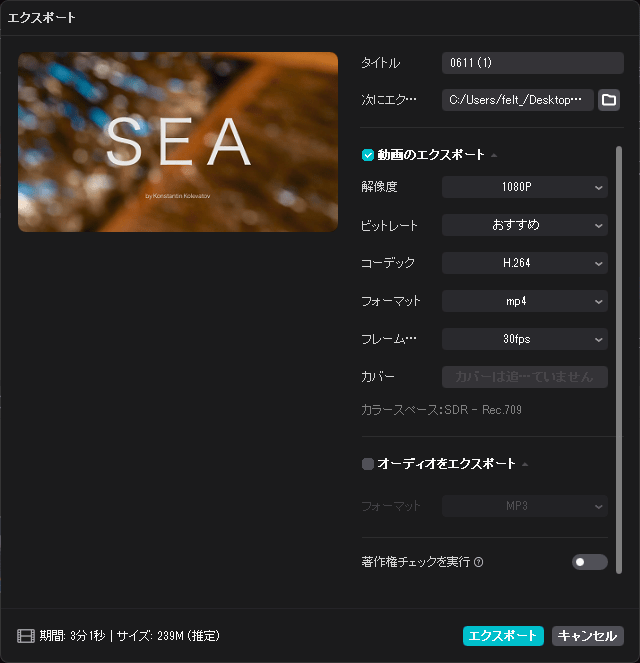
4K 60FPS の高画質で動画をエクスポートできます
CapCut は、動画編集、テキスト、ステッカー、フィルター、色、音楽などの基本的な機能に加えて、CapCut は瞬間をキャプチャして切り抜きするのに役立つキーフレームアニメーション、スムーズなスローモーションエフェクト、クロマキー、ピクチャーインピクチャー(PIP)、スタビライゼーションなどの高度な無料の機能を提供しています。
トレンドスタイル、自動キャプション、テキスト読み上げ、モーショントラッキング、背景除去などのその他のユニークな機能を使用して、個性がある自分だけの動画を作成できます。
完全無料の動画エディタ、動画制作アプリ
CapCut は、汎用性が高く使いやすい、多数の動画編集機能が利用できる動画編集アプリケーションです。Tiktok をはじめ、YouTube、Facebook、Instagram にアップロードする動画をかんたんに作成できます。
機能
- シンプルなインターフェイスと直感的なショートカットで生産性を高めます。
- 何千もの無料のエフェクト、アニメーション、トランジションを使って動画を編集します。
- 豊富で強力なテキスト機能の驚くような方法で、目を引くテキストを作成できます。
- 複雑な編集ワークフローのためのプロフェッショナルなアニメーション機能で、滑らかでダイナミックなアニメーションを作成します。
- ワンクリックで AI に字幕を生成させます。複数の言語がサポートされています。
- エクスポートを 4K 60FPS でサポートし、最高の画質を保ちます。
価格:無料
動作環境:Windows 7|8|8.1|10|11・Mac・Android・iOS
使用言語:日本語ほかマルチ言語
最終更新日:
2か月前 (2026/03/27)
ダウンロード数:1546
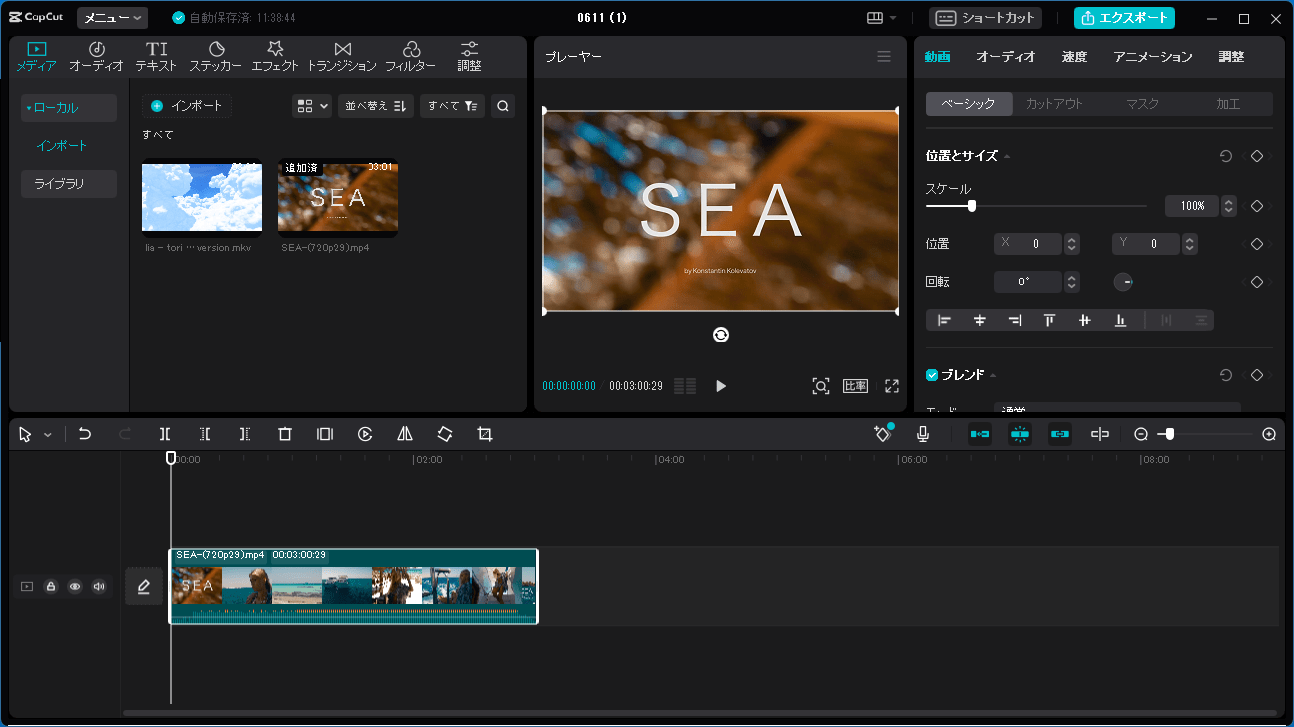
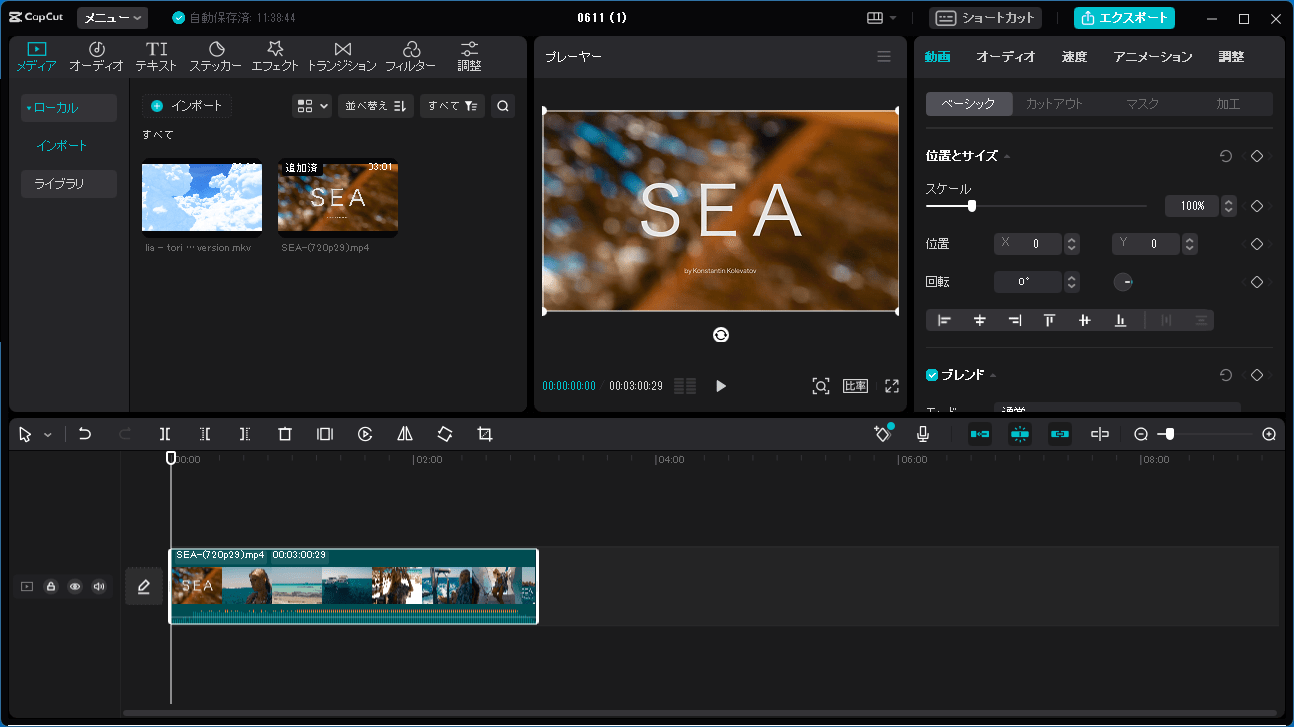
画像

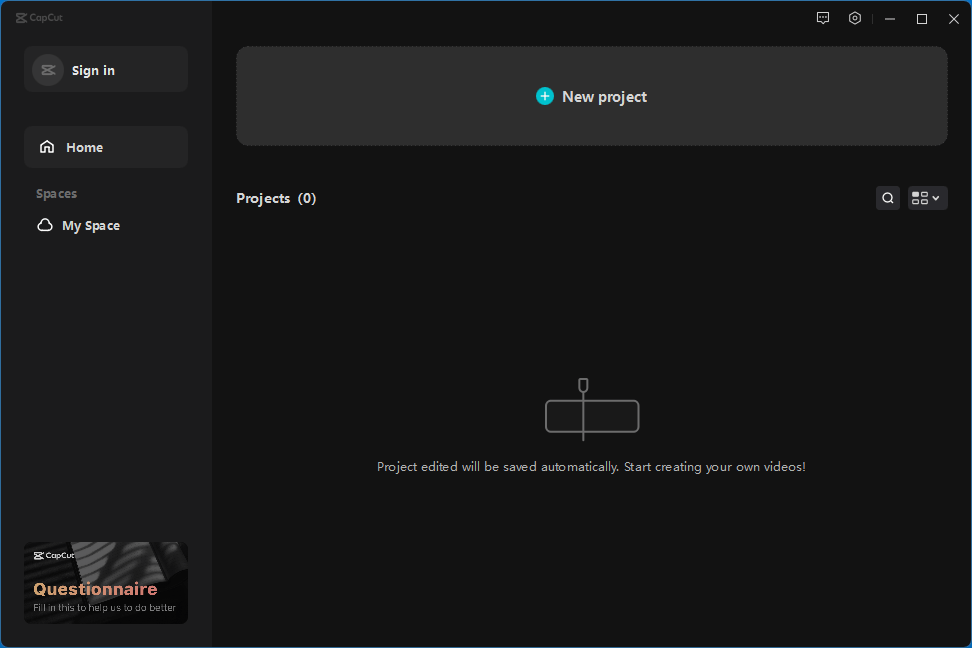
ユーザーインターフェース

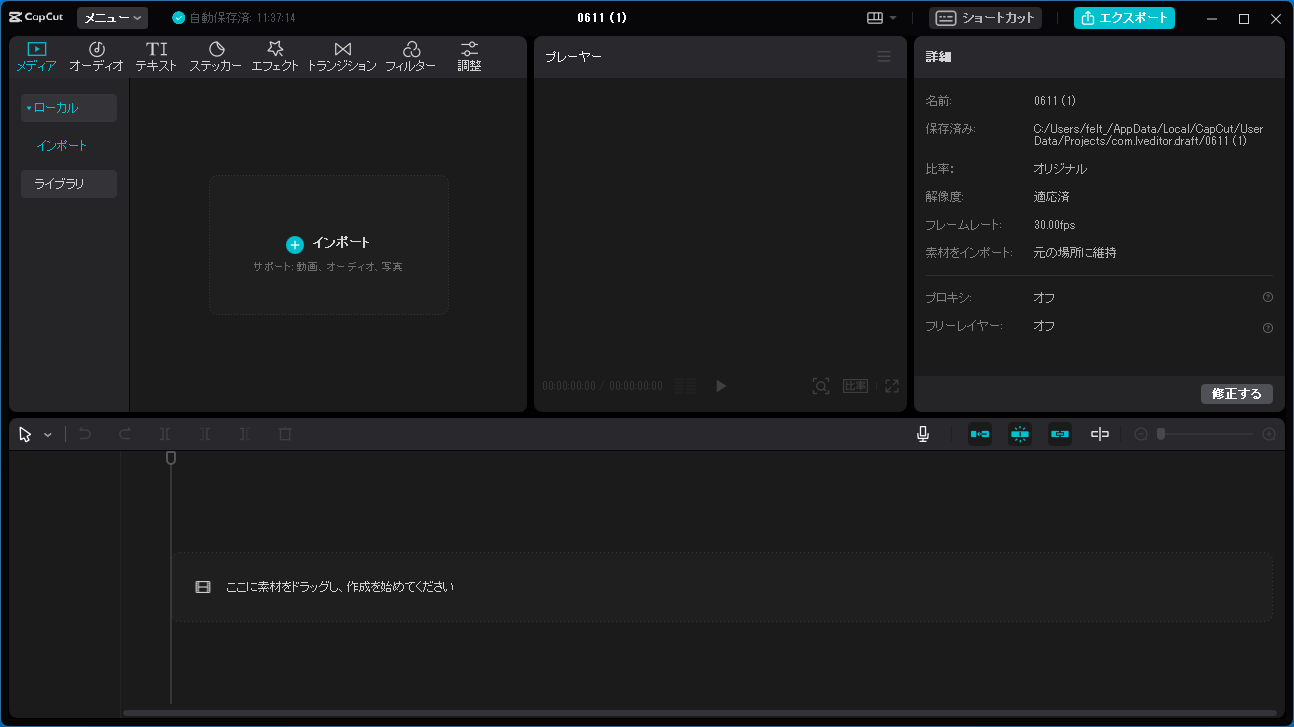
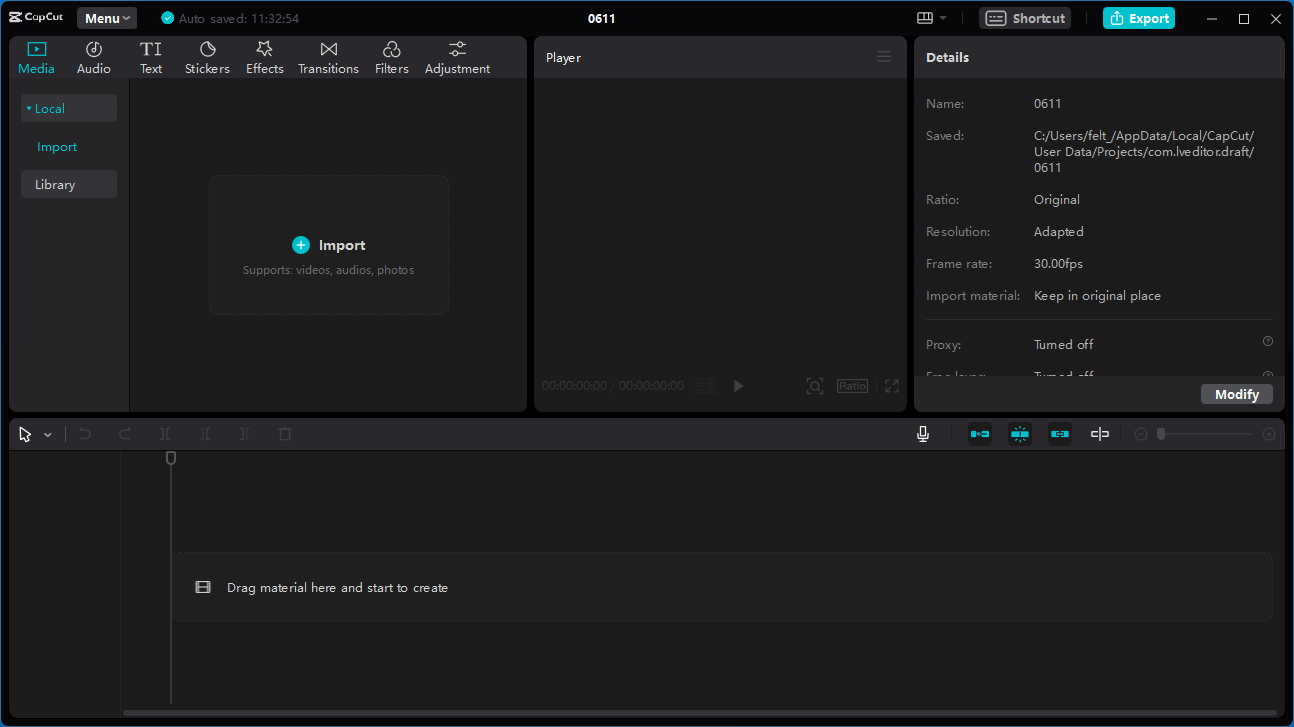
編集画面

エクスポート
使い方
インストール
1.インストール方法(Windows)
- 「Agree with CapCut」を選択して、[Install now]をクリックします。

- インストールが完了しました。[Start now]をクリックしてアプリを起動します。

基本的な使い方
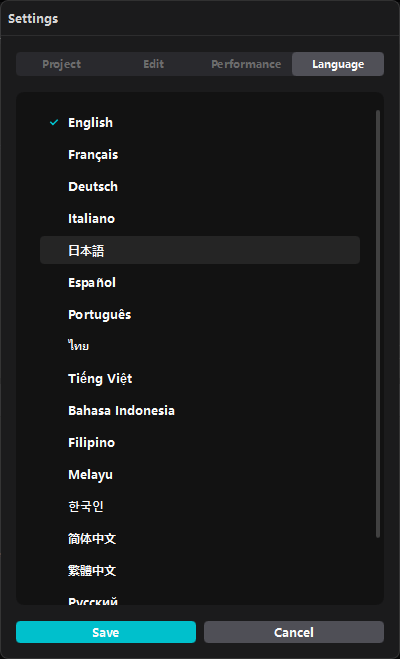
1. 基本的な使い方(言語を日本語に変更する)


よくある質問と回答
ライセンスについて。