").attr(n.scriptAttrs||{}).prop({charset:n.scriptCharset,src:n.url}).on("load error",i=function(e){r.remove(),i=null,e&&t("error"===e.type?404:200,e.type)}),C.head.appendChild(r[0])},abort:function(){i&&i()}}});var Jt,Kt=[],Zt=/(=)\?(?=&|$)|\?\?/;ce.ajaxSetup({jsonp:"callback",jsonpCallback:function(){var e=Kt.pop()||ce.expando+"_"+jt.guid++;return this[e]=!0,e}}),ce.ajaxPrefilter("json jsonp",function(e,t,n){var r,i,o,a=!1!==e.jsonp&&(Zt.test(e.url)?"url":"string"==typeof e.data&&0===(e.contentType||"").indexOf("application/x-www-form-urlencoded")&&Zt.test(e.data)&&"data");if(a||"jsonp"===e.dataTypes[0])return r=e.jsonpCallback=v(e.jsonpCallback)?e.jsonpCallback():e.jsonpCallback,a?e[a]=e[a].replace(Zt,"$1"+r):!1!==e.jsonp&&(e.url+=(At.test(e.url)?"&":"?")+e.jsonp+"="+r),e.converters["script json"]=function(){return o||ce.error(r+" was not called"),o[0]},e.dataTypes[0]="json",i=ie[r],ie[r]=function(){o=arguments},n.always(function(){void 0===i?ce(ie).removeProp(r):ie[r]=i,e[r]&&(e.jsonpCallback=t.jsonpCallback,Kt.push(r)),o&&v(i)&&i(o[0]),o=i=void 0}),"script"}),le.createHTMLDocument=((Jt=C.implementation.createHTMLDocument("").body).innerHTML="
",2===Jt.childNodes.length),ce.parseHTML=function(e,t,n){return"string"!=typeof e?[]:("boolean"==typeof t&&(n=t,t=!1),t||(le.createHTMLDocument?((r=(t=C.implementation.createHTMLDocument("")).createElement("base")).href=C.location.href,t.head.appendChild(r)):t=C),o=!n&&[],(i=w.exec(e))?[t.createElement(i[1])]:(i=Ae([e],t,o),o&&o.length&&ce(o).remove(),ce.merge([],i.childNodes)));var r,i,o},ce.fn.load=function(e,t,n){var r,i,o,a=this,s=e.indexOf(" ");return-1").append(ce.parseHTML(e)).find(r):e)}).always(n&&function(e,t){a.each(function(){n.apply(this,o||[e.responseText,t,e])})}),this},ce.expr.pseudos.animated=function(t){return ce.grep(ce.timers,function(e){return t===e.elem}).length},ce.offset={setOffset:function(e,t,n){var r,i,o,a,s,u,l=ce.css(e,"position"),c=ce(e),f={};"static"===l&&(e.style.position="relative"),s=c.offset(),o=ce.css(e,"top"),u=ce.css(e,"left"),("absolute"===l||"fixed"===l)&&-1<(o+u).indexOf("auto")?(a=(r=c.position()).top,i=r.left):(a=parseFloat(o)||0,i=parseFloat(u)||0),v(t)&&(t=t.call(e,n,ce.extend({},s))),null!=t.top&&(f.top=t.top-s.top+a),null!=t.left&&(f.left=t.left-s.left+i),"using"in t?t.using.call(e,f):c.css(f)}},ce.fn.extend({offset:function(t){if(arguments.length)return void 0===t?this:this.each(function(e){ce.offset.setOffset(this,t,e)});var e,n,r=this[0];return r?r.getClientRects().length?(e=r.getBoundingClientRect(),n=r.ownerDocument.defaultView,{top:e.top+n.pageYOffset,left:e.left+n.pageXOffset}):{top:0,left:0}:void 0},position:function(){if(this[0]){var e,t,n,r=this[0],i={top:0,left:0};if("fixed"===ce.css(r,"position"))t=r.getBoundingClientRect();else{t=this.offset(),n=r.ownerDocument,e=r.offsetParent||n.documentElement;while(e&&(e===n.body||e===n.documentElement)&&"static"===ce.css(e,"position"))e=e.parentNode;e&&e!==r&&1===e.nodeType&&((i=ce(e).offset()).top+=ce.css(e,"borderTopWidth",!0),i.left+=ce.css(e,"borderLeftWidth",!0))}return{top:t.top-i.top-ce.css(r,"marginTop",!0),left:t.left-i.left-ce.css(r,"marginLeft",!0)}}},offsetParent:function(){return this.map(function(){var e=this.offsetParent;while(e&&"static"===ce.css(e,"position"))e=e.offsetParent;return e||J})}}),ce.each({scrollLeft:"pageXOffset",scrollTop:"pageYOffset"},function(t,i){var o="pageYOffset"===i;ce.fn[t]=function(e){return M(this,function(e,t,n){var r;if(y(e)?r=e:9===e.nodeType&&(r=e.defaultView),void 0===n)return r?r[i]:e[t];r?r.scrollTo(o?r.pageXOffset:n,o?n:r.pageYOffset):e[t]=n},t,e,arguments.length)}}),ce.each(["top","left"],function(e,n){ce.cssHooks[n]=Ye(le.pixelPosition,function(e,t){if(t)return t=Ge(e,n),_e.test(t)?ce(e).position()[n]+"px":t})}),ce.each({Height:"height",Width:"width"},function(a,s){ce.each({padding:"inner"+a,content:s,"":"outer"+a},function(r,o){ce.fn[o]=function(e,t){var n=arguments.length&&(r||"boolean"!=typeof e),i=r||(!0===e||!0===t?"margin":"border");return M(this,function(e,t,n){var r;return y(e)?0===o.indexOf("outer")?e["inner"+a]:e.document.documentElement["client"+a]:9===e.nodeType?(r=e.documentElement,Math.max(e.body["scroll"+a],r["scroll"+a],e.body["offset"+a],r["offset"+a],r["client"+a])):void 0===n?ce.css(e,t,i):ce.style(e,t,n,i)},s,n?e:void 0,n)}})}),ce.each(["ajaxStart","ajaxStop","ajaxComplete","ajaxError","ajaxSuccess","ajaxSend"],function(e,t){ce.fn[t]=function(e){return this.on(t,e)}}),ce.fn.extend({bind:function(e,t,n){return this.on(e,null,t,n)},unbind:function(e,t){return this.off(e,null,t)},delegate:function(e,t,n,r){return this.on(t,e,n,r)},undelegate:function(e,t,n){return 1===arguments.length?this.off(e,"**"):this.off(t,e||"**",n)},hover:function(e,t){return this.on("mouseenter",e).on("mouseleave",t||e)}}),ce.each("blur focus focusin focusout resize scroll click dblclick mousedown mouseup mousemove mouseover mouseout mouseenter mouseleave change select submit keydown keypress keyup contextmenu".split(" "),function(e,n){ce.fn[n]=function(e,t){return 0
WSUS Offline Update Community Edition 12.6.1
Windows OS
2022/02/07 14:27
説明 機能 仕様 ダウンロード 画像 使い方
Windows OS および Office をオフラインで更新するためのツール

Windows OS と Microsoft Office をオフラインで更新するための更新プログラムを一括ダウンロードできるアプリケーション。Windows および Office を実行している PC を、インターネットに接続せずにオフラインですばやく更新することができます。

WSUS Offline Update Community Edition の概要
WSUS Offline Update Community Edition を使用すると、以下のソフトウェアのアップデートをダウンロードして、オフラインで更新できます。
・Windows 8.1 / 10(x86 / x64)
・Windows Server 2012 / 2012 R2
・Office 2013・2016
WSUS Offline Update Community Edition の機能
WSUS Offline Update Community Edition の主な機能です。
機能
概要
メイン機能
Windows および Office をオフラインで更新する
機能詳細
・Windows および Office の更新プログラムのダウンロード
・ダウンロードした更新プログラムのインストール
Windows および Office をオフラインで更新できます
WSUS Offline Update Community Edition は、「WSUS Offline Update 」が長い間更新されていないので、新たに開発されたフォークのアプリケーションです。使い方は WSUS Offline Update と同じですが機能(対応する OS や対応する Office のバージョンなど)は若干異なります。
このツールを使用すると、Windows および Office を更新するためのパッケージを作成できます。
誰でもかんたんに使用できます
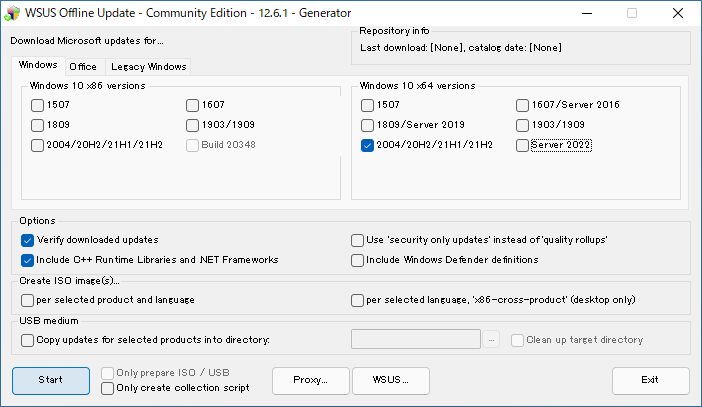
WSUS Offline Update Community Edition では、すべての更新プログラムがダウンロード可能で、追加で C++ ランタイムライブラリや .NET Framework の更新を含めることができます。また、ダウンロードした更新ファイルをベリファイして、整合性をチェックすることもできます。
使い方はかんたんで、アップデートしたい OS や Office のバージョンを選択してボタンをクリックするだけです。必要に応じて、パッケージを ISO ファイルに保存したり、USB ドライブに保存することもできます。
オフラインで Windows PC を更新できます
WSUS Offline Update Community Edition は、Windows PC や Office アプリケーションをオフラインですばやく更新することができる便利なアプリケーションです。複数のパソコンのセットアップをインターネットに接続しないで行いたい場合に特に役に立ちます。
機能
Windows および Office の更新プログラムのダウンロード
ダウンロードした更新プログラムのインストール
ISO ファイルの作成
USB ドライブに保存
インストールスクリプトの作成
価格: 無料
動作環境: Windows 7|8|8.1|10|11
使用言語: 英語
最終更新日:
4年前 (2022/02/07)
ダウンロード数: 1281
画像
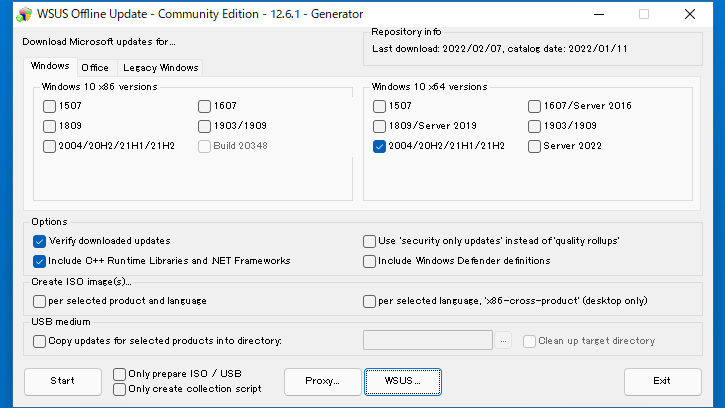
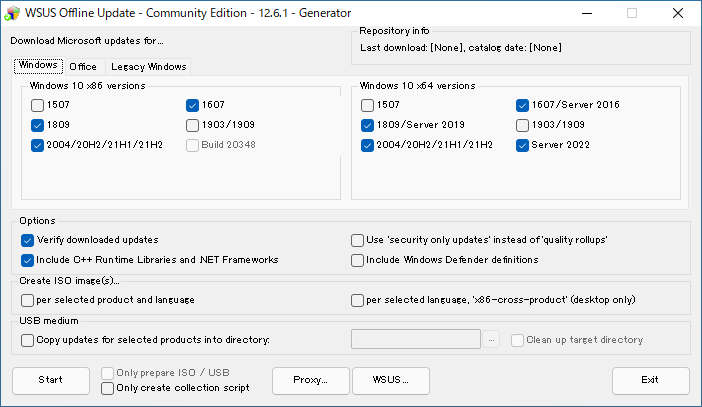
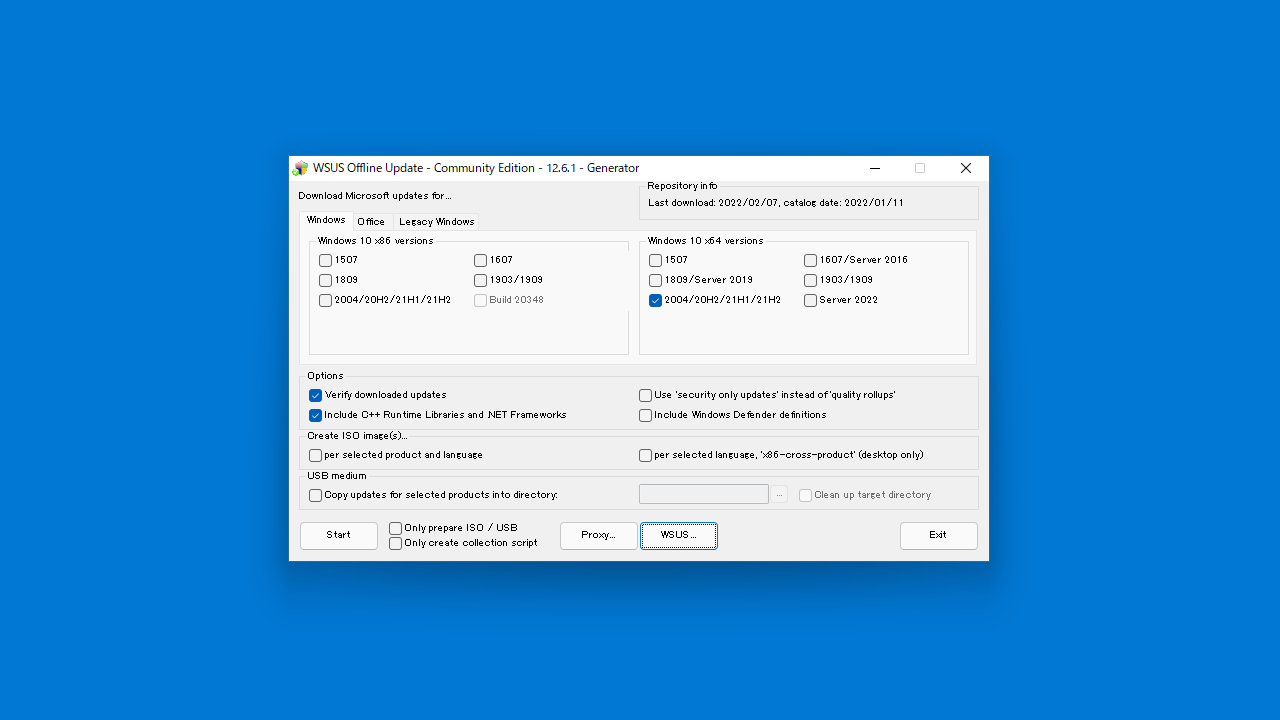
ユーザーインターフェース(Windows)
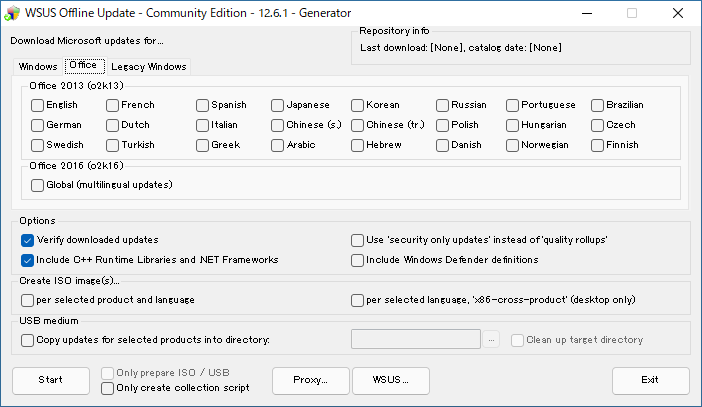
Office
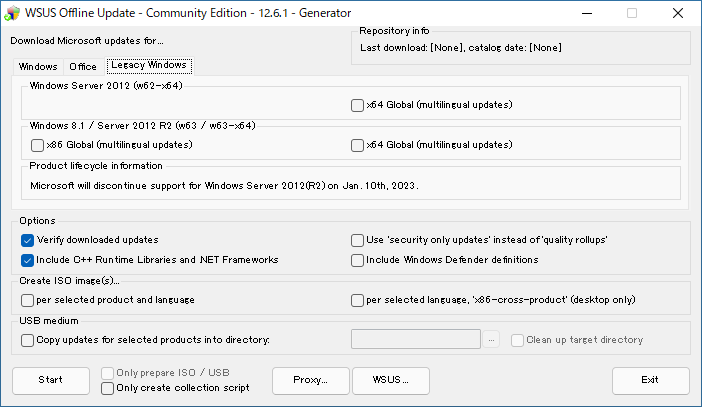
レガシー Windows
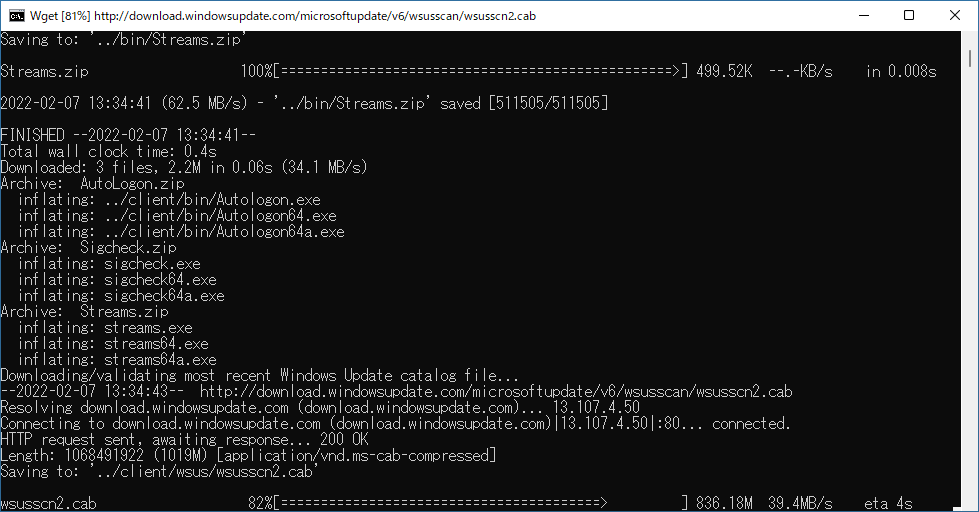
アップデートのダウンロード中
使い方
インストール
1.インストール
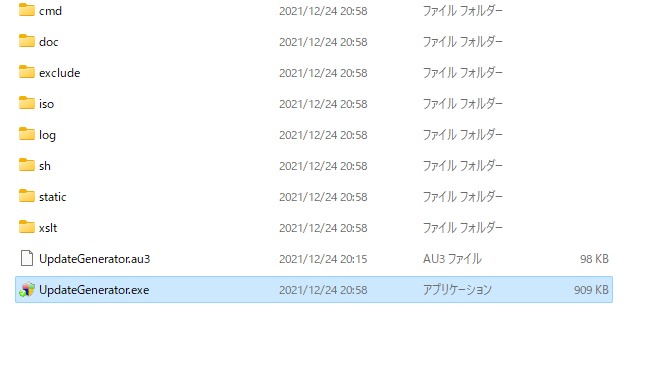
ダウンロードした ZIP ファイルを解凍し、wsusoffline フォルダの「UpdateGenerator.exe 」ファイルを実行するとアプリケーションを使用できます。
基本的な使い方
1. 基本的な使い方
Windows を更新する場合は、「Windows」タブで、更新したい Windows のバージョンを選択します。Office を更新する場合は「Office」タブでバージョンと言語を選択します。
必要に応じてオプション(含める更新プログラムや保存方法など)を選択します。
[Start ]をクリックして更新のダウンロードを開始します。
Options:
・Verify downloaded updates :ダウンロードした更新ファイルの整合性を検証する
・Include C++ Runtime Libraries and .NET Frameworks :C++ ランタイムと .NET Framework の更新を含める
・Use ‘security only updates’ instead of ‘quality rollups’ :「品質ロールアップ」の代わりに「セキュリティのみの更新」を使用する
・Include Windows Defender definitions :Windows Defender の定義の更新を含める
Create ISO Image :ISO を作成する
・per selected product and language :選択した製品および言語ごとに ISO を作成する
・per selected language, ‘x86-cross-product’ (desktop only) :選択した言語ごとに ISO を作成(x86とx64両方ダウンロードする場合に適しています)
・USB medium :USB に作成する
Copy updates for selected products into directory :更新をディレクトリにコピー
Clean up target directory :コピー先ディレクトリにある既存のファイルを削除する
Only prepare ISO / USB :ISO / USB のファイルのみを保存する
Only create collection script :スクリプトのみを作成する
[Start ]をクリックするとコマンドプロンプトが起動し、更新プログラムがダウンロードされます。
ダウンロードが完了するとダイアログが表示されます。[はい ]をクリックするとダウンロードの詳細が記録されているログファイルを見ることができます。
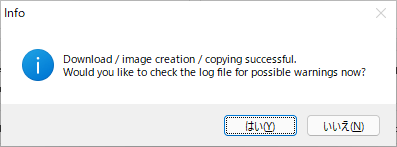
・ログファイルは WSUS Offline Update の「log」フォルダに保存されています。
2.アップデートをインストールする
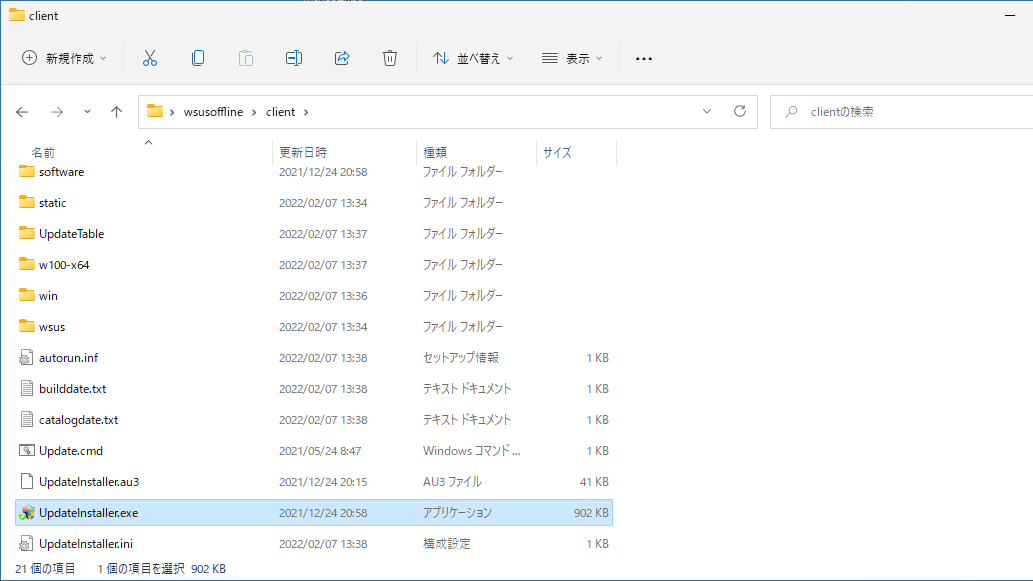
ダウンロードした更新プログラムのファイルは「client 」フォルダに保存されます。ISO を選択した場合は「iso」フォルダに、製品ごとのオプションを選択した場合は製品名のフォルダごとに保存されます。
「client 」フォルダ内の「UpdateInstaller.exe 」ファイルを実行すると、更新をインストールできます。
よくある質問と回答
ライセンスについて。
WSUS Offline Update Community Edition は、どなたでも無料で利用できます。