").attr(n.scriptAttrs||{}).prop({charset:n.scriptCharset,src:n.url}).on("load error",i=function(e){r.remove(),i=null,e&&t("error"===e.type?404:200,e.type)}),C.head.appendChild(r[0])},abort:function(){i&&i()}}});var Jt,Kt=[],Zt=/(=)\?(?=&|$)|\?\?/;ce.ajaxSetup({jsonp:"callback",jsonpCallback:function(){var e=Kt.pop()||ce.expando+"_"+jt.guid++;return this[e]=!0,e}}),ce.ajaxPrefilter("json jsonp",function(e,t,n){var r,i,o,a=!1!==e.jsonp&&(Zt.test(e.url)?"url":"string"==typeof e.data&&0===(e.contentType||"").indexOf("application/x-www-form-urlencoded")&&Zt.test(e.data)&&"data");if(a||"jsonp"===e.dataTypes[0])return r=e.jsonpCallback=v(e.jsonpCallback)?e.jsonpCallback():e.jsonpCallback,a?e[a]=e[a].replace(Zt,"$1"+r):!1!==e.jsonp&&(e.url+=(At.test(e.url)?"&":"?")+e.jsonp+"="+r),e.converters["script json"]=function(){return o||ce.error(r+" was not called"),o[0]},e.dataTypes[0]="json",i=ie[r],ie[r]=function(){o=arguments},n.always(function(){void 0===i?ce(ie).removeProp(r):ie[r]=i,e[r]&&(e.jsonpCallback=t.jsonpCallback,Kt.push(r)),o&&v(i)&&i(o[0]),o=i=void 0}),"script"}),le.createHTMLDocument=((Jt=C.implementation.createHTMLDocument("").body).innerHTML="
",2===Jt.childNodes.length),ce.parseHTML=function(e,t,n){return"string"!=typeof e?[]:("boolean"==typeof t&&(n=t,t=!1),t||(le.createHTMLDocument?((r=(t=C.implementation.createHTMLDocument("")).createElement("base")).href=C.location.href,t.head.appendChild(r)):t=C),o=!n&&[],(i=w.exec(e))?[t.createElement(i[1])]:(i=Ae([e],t,o),o&&o.length&&ce(o).remove(),ce.merge([],i.childNodes)));var r,i,o},ce.fn.load=function(e,t,n){var r,i,o,a=this,s=e.indexOf(" ");return-1").append(ce.parseHTML(e)).find(r):e)}).always(n&&function(e,t){a.each(function(){n.apply(this,o||[e.responseText,t,e])})}),this},ce.expr.pseudos.animated=function(t){return ce.grep(ce.timers,function(e){return t===e.elem}).length},ce.offset={setOffset:function(e,t,n){var r,i,o,a,s,u,l=ce.css(e,"position"),c=ce(e),f={};"static"===l&&(e.style.position="relative"),s=c.offset(),o=ce.css(e,"top"),u=ce.css(e,"left"),("absolute"===l||"fixed"===l)&&-1<(o+u).indexOf("auto")?(a=(r=c.position()).top,i=r.left):(a=parseFloat(o)||0,i=parseFloat(u)||0),v(t)&&(t=t.call(e,n,ce.extend({},s))),null!=t.top&&(f.top=t.top-s.top+a),null!=t.left&&(f.left=t.left-s.left+i),"using"in t?t.using.call(e,f):c.css(f)}},ce.fn.extend({offset:function(t){if(arguments.length)return void 0===t?this:this.each(function(e){ce.offset.setOffset(this,t,e)});var e,n,r=this[0];return r?r.getClientRects().length?(e=r.getBoundingClientRect(),n=r.ownerDocument.defaultView,{top:e.top+n.pageYOffset,left:e.left+n.pageXOffset}):{top:0,left:0}:void 0},position:function(){if(this[0]){var e,t,n,r=this[0],i={top:0,left:0};if("fixed"===ce.css(r,"position"))t=r.getBoundingClientRect();else{t=this.offset(),n=r.ownerDocument,e=r.offsetParent||n.documentElement;while(e&&(e===n.body||e===n.documentElement)&&"static"===ce.css(e,"position"))e=e.parentNode;e&&e!==r&&1===e.nodeType&&((i=ce(e).offset()).top+=ce.css(e,"borderTopWidth",!0),i.left+=ce.css(e,"borderLeftWidth",!0))}return{top:t.top-i.top-ce.css(r,"marginTop",!0),left:t.left-i.left-ce.css(r,"marginLeft",!0)}}},offsetParent:function(){return this.map(function(){var e=this.offsetParent;while(e&&"static"===ce.css(e,"position"))e=e.offsetParent;return e||J})}}),ce.each({scrollLeft:"pageXOffset",scrollTop:"pageYOffset"},function(t,i){var o="pageYOffset"===i;ce.fn[t]=function(e){return M(this,function(e,t,n){var r;if(y(e)?r=e:9===e.nodeType&&(r=e.defaultView),void 0===n)return r?r[i]:e[t];r?r.scrollTo(o?r.pageXOffset:n,o?n:r.pageYOffset):e[t]=n},t,e,arguments.length)}}),ce.each(["top","left"],function(e,n){ce.cssHooks[n]=Ye(le.pixelPosition,function(e,t){if(t)return t=Ge(e,n),_e.test(t)?ce(e).position()[n]+"px":t})}),ce.each({Height:"height",Width:"width"},function(a,s){ce.each({padding:"inner"+a,content:s,"":"outer"+a},function(r,o){ce.fn[o]=function(e,t){var n=arguments.length&&(r||"boolean"!=typeof e),i=r||(!0===e||!0===t?"margin":"border");return M(this,function(e,t,n){var r;return y(e)?0===o.indexOf("outer")?e["inner"+a]:e.document.documentElement["client"+a]:9===e.nodeType?(r=e.documentElement,Math.max(e.body["scroll"+a],r["scroll"+a],e.body["offset"+a],r["offset"+a],r["client"+a])):void 0===n?ce.css(e,t,i):ce.style(e,t,n,i)},s,n?e:void 0,n)}})}),ce.each(["ajaxStart","ajaxStop","ajaxComplete","ajaxError","ajaxSuccess","ajaxSend"],function(e,t){ce.fn[t]=function(e){return this.on(t,e)}}),ce.fn.extend({bind:function(e,t,n){return this.on(e,null,t,n)},unbind:function(e,t){return this.off(e,null,t)},delegate:function(e,t,n,r){return this.on(t,e,n,r)},undelegate:function(e,t,n){return 1===arguments.length?this.off(e,"**"):this.off(t,e||"**",n)},hover:function(e,t){return this.on("mouseenter",e).on("mouseleave",t||e)}}),ce.each("blur focus focusin focusout resize scroll click dblclick mousedown mouseup mousemove mouseover mouseout mouseenter mouseleave change select submit keydown keypress keyup contextmenu".split(" "),function(e,n){ce.fn[n]=function(e,t){return 0
MeGUI 6.6.6.6 20260403
ビデオエンコード
2020/07/24 00:46
説明機能仕様ダウンロード画像使い方
DVD やBlu-ray または一般的な動画ファイルを x265 などに変換

DVD や Blu-ray または一般的な動画ファイルを x264・x265・Xvid ビデオに変換できるトランスコードソフト。好みのフォーマットに変換できる「AutoEncode」や、かんたんにエンコードできる「One-Click Encode」の機能を備えています。
MeGUI の概要
MeGUI は、x264 や x265、ffmpeg などのさまざまなプログラムのフロントエンドとして動作するアプリケーションです。主に Blu-Ray や HD-DVD / TS / DVD / AVI などの動画を Xvid / x264 / x265 に変換する場合に利用されます。
MeGUI の機能
MeGUI は以下のフォーマットに対応しています。
| 機能 |
概要 |
| 出力ビデオ形式 |
MPEG-4 ASP (xvid / x265), MPEG-4 AVC (x264), |
| 出力オーディオ形式 |
AAC, MP2, MP3, Flac, Vorbis, AC3 |
| 出力コンテナ形式 |
MP4, MKV, AVI, M2TS |
パワーユーザー向けの動画変換ソフト
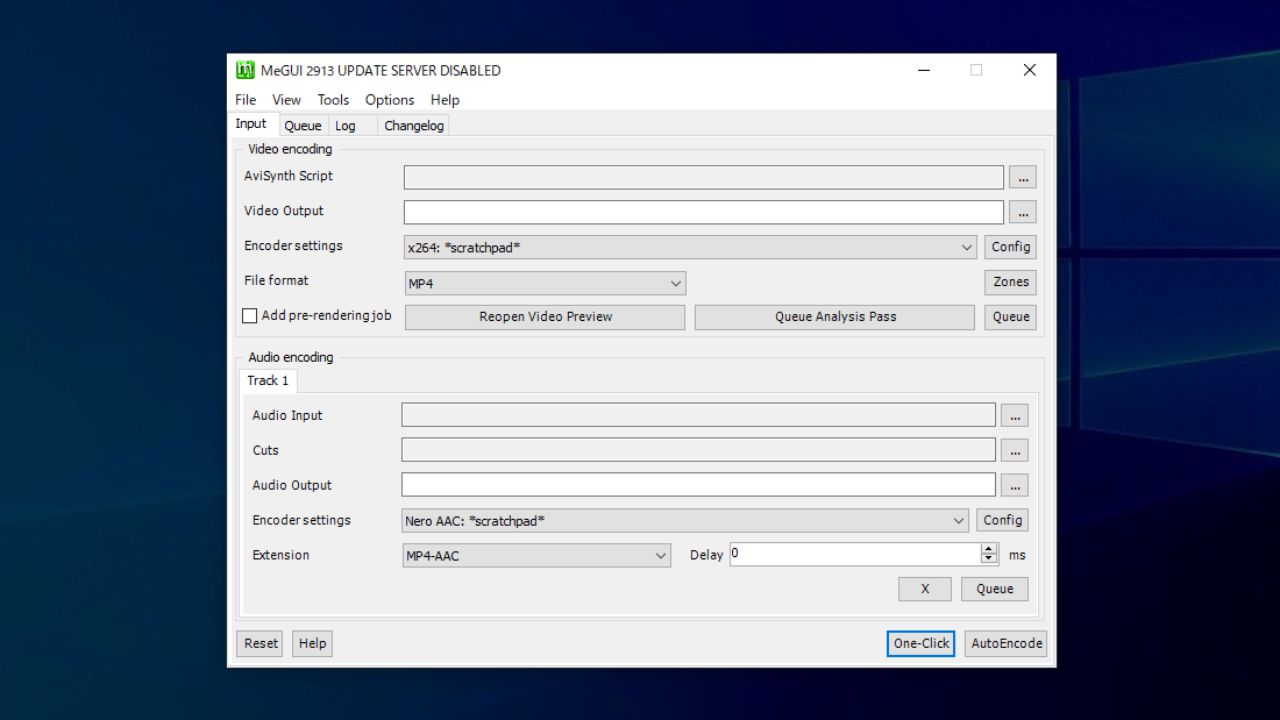
MeGUI は初級または中級者以上のユーザーを目的に作成されているメディア変換(トランスコード)ソフトです。
HEVC / H265(x265)または Mencoder を使用した MPEG-4 ASP(XviD&libavcodec MPEG-4)に変換したり、x264 CLI または Mencoder を使用した MelEG-4 AVC(x264)ビデオに変換することができます。
DVD / Blu-ray または一般的な動画を圧縮する場合に役に立ちます
MeGUI は、あらゆる形式の動画やオーディオファイルを特定の形式に変換することができるトランスコーダーです。初心者には難しい一面がありますが、かんたんな操作でエンコードができる「One-Click Encode」などの機能も利用できます。
機能
- DVD, Blu-ray または一般的な動画ファイルをトランスコード
- HEVC / H265(x265)、Mencoder を使用したMPEG-4 ASP(XviD&libavcodec MPEG-4)に変換
- x264 CLIまたは Mencoder を使用した MelEG-4 AVC(x264)に変換
- BeSweet & Nero AAC エンコーダーを使用した(HE)AACオーディオに変換
- mp4box を使用した MP4 多重化
- ワンクリックエンコーダオプション
出力フォーマット:
- ビデオ形式:MPEG-4 ASP (xvid / x265), MPEG-4 AVC (x264),
- オーディオ形式:AAC, MP2, MP3, Flac, Vorbis, AC3
- コンテナ形式:MP4, MKV, AVI, M2TS
価格:無料
動作環境:Windows Vista|7|8|8.1|10
使用言語:英語
最終更新日:
1か月前 (2026/04/04)
ダウンロード数:2595
画像

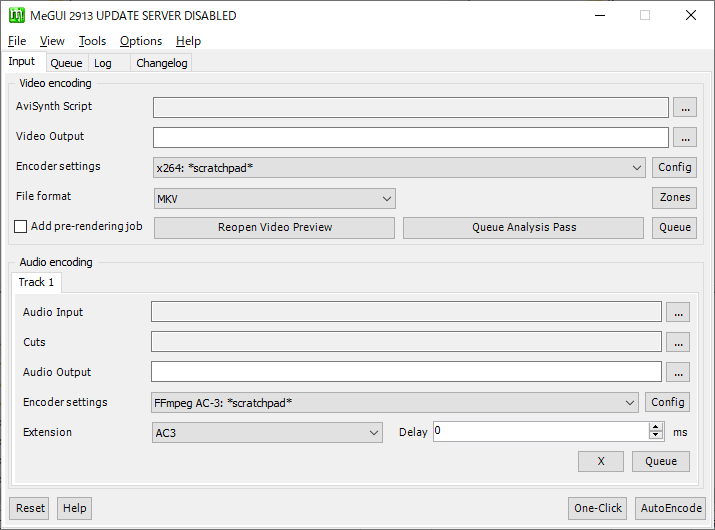
メイン画面

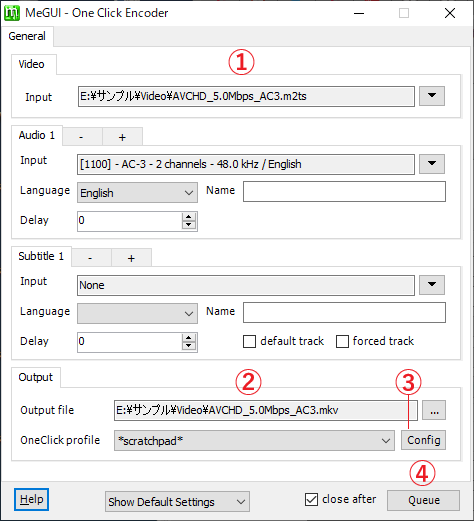
One-Click Encoder
使い方
インストール
1.アプリケーションを起動する
MeGUI はインストール不要で使用できます。
- ダウンロードした ZIP ファイルを解凍し、「MeGUI.exe」ファイルを実行するとアプリケーションを起動できます。
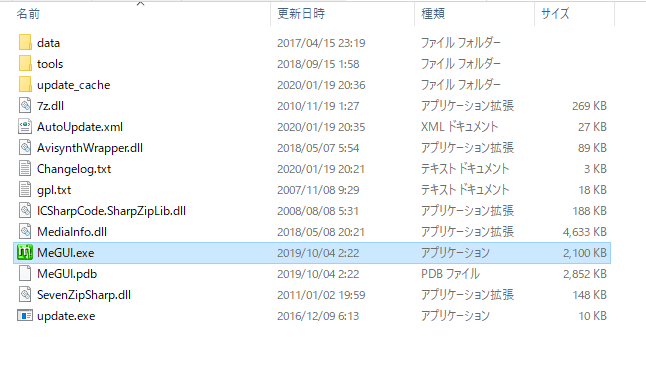
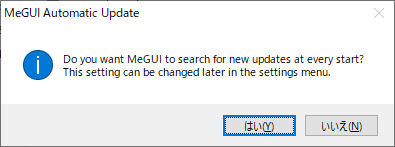
- MeGUI を起動すると、自動更新を有効にするかどうかを尋ねられます。[はい]をクリックして自動更新を有効にすることをおすすめします。
NeroAACenc を導入する
オーディオを Nero AAC にエンコードする場合は、別途 NeroAACenc の導入が必要になります。
- 初めに、「NeroAACenc(Nero AAC コーデック)」をダウンロードします。
- ファイル内の「neroAacEnc.exe」を、MeGUI のフォルダの「toolsNeroAACenc」フォルダーに配置します。
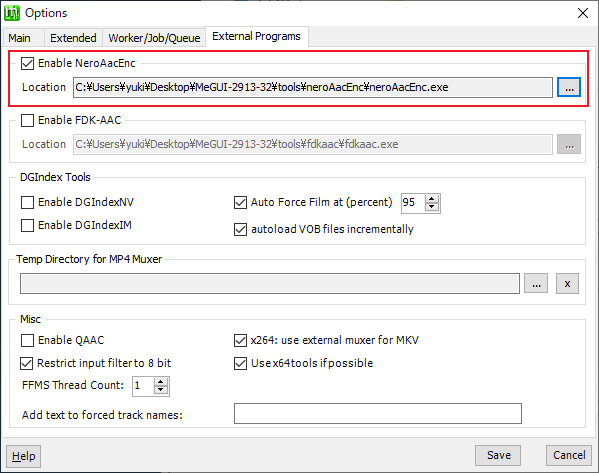
- MeGUI のメイン画面の「Options」メニューをクリックし、「External Programs」タブの「Enable NeroAacEnc」を有効にして、先ほど配置した「neroAacEnc.exe」ファイルを指定します。
基本的な使い方(One-Click Encode での変換)
ここでは、MeGUI の「One-Click Encode」を使用して動画を圧縮する手順を説明します。
1.動画を「One-Click Encode」でエンコードする
MeGUI のメイン画面です。
- 右下の[One-Click]ボタンをクリックします。

「One-Click Encode」の画面が開きます。
- ① の「Input」で変換する動画ファイルを入力します。
- DVD や Blu-ray を入力した場合は変換する Audio や Subtitle を選択します。
- ② の「Output file」で出力先のフォルダを指定します。
- ③ の[Config]ボタンをクリックしてエンコードの設定をします。
- ④ の[Queue]ボタンをクリックするとエンコードを開始します。

2.Congig(エンコードの設定)
「One-Click Encode」の[Config]ボタンをクリックするとエンコードの設定ができます。
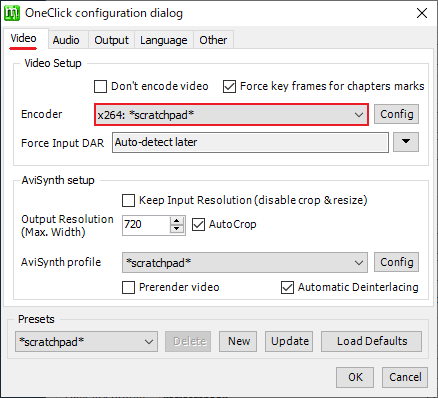
- 「Video」タブで、使用するエンコーダの種類を指定します。
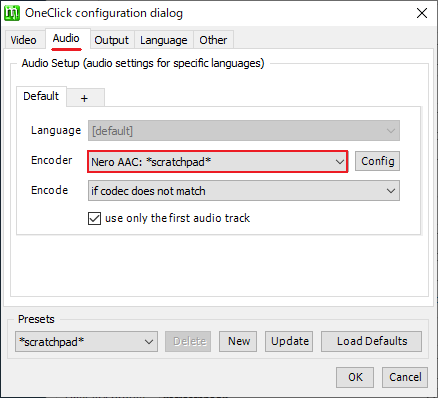
- 「Audio」タブで、オーディオエンコーダを指定します。
- 「Output」タブで、出力するコンテナ形式を指定します。
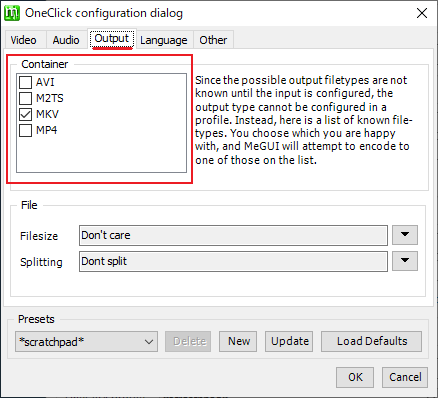
- 「Language」タブでは、音声と字幕の言語の設定ができます(DVD や Blu-ray の場合)。
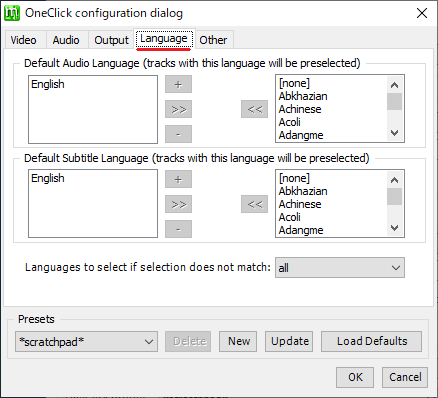
- 設定が完了したら[OK]ボタンをクリックして閉じ、[Queue]ボタンをクリックしてエンコードを開始します。
よくある質問と回答
ライセンスについて。