").attr(n.scriptAttrs||{}).prop({charset:n.scriptCharset,src:n.url}).on("load error",i=function(e){r.remove(),i=null,e&&t("error"===e.type?404:200,e.type)}),C.head.appendChild(r[0])},abort:function(){i&&i()}}});var Jt,Kt=[],Zt=/(=)\?(?=&|$)|\?\?/;ce.ajaxSetup({jsonp:"callback",jsonpCallback:function(){var e=Kt.pop()||ce.expando+"_"+jt.guid++;return this[e]=!0,e}}),ce.ajaxPrefilter("json jsonp",function(e,t,n){var r,i,o,a=!1!==e.jsonp&&(Zt.test(e.url)?"url":"string"==typeof e.data&&0===(e.contentType||"").indexOf("application/x-www-form-urlencoded")&&Zt.test(e.data)&&"data");if(a||"jsonp"===e.dataTypes[0])return r=e.jsonpCallback=v(e.jsonpCallback)?e.jsonpCallback():e.jsonpCallback,a?e[a]=e[a].replace(Zt,"$1"+r):!1!==e.jsonp&&(e.url+=(At.test(e.url)?"&":"?")+e.jsonp+"="+r),e.converters["script json"]=function(){return o||ce.error(r+" was not called"),o[0]},e.dataTypes[0]="json",i=ie[r],ie[r]=function(){o=arguments},n.always(function(){void 0===i?ce(ie).removeProp(r):ie[r]=i,e[r]&&(e.jsonpCallback=t.jsonpCallback,Kt.push(r)),o&&v(i)&&i(o[0]),o=i=void 0}),"script"}),le.createHTMLDocument=((Jt=C.implementation.createHTMLDocument("").body).innerHTML="
",2===Jt.childNodes.length),ce.parseHTML=function(e,t,n){return"string"!=typeof e?[]:("boolean"==typeof t&&(n=t,t=!1),t||(le.createHTMLDocument?((r=(t=C.implementation.createHTMLDocument("")).createElement("base")).href=C.location.href,t.head.appendChild(r)):t=C),o=!n&&[],(i=w.exec(e))?[t.createElement(i[1])]:(i=Ae([e],t,o),o&&o.length&&ce(o).remove(),ce.merge([],i.childNodes)));var r,i,o},ce.fn.load=function(e,t,n){var r,i,o,a=this,s=e.indexOf(" ");return-1").append(ce.parseHTML(e)).find(r):e)}).always(n&&function(e,t){a.each(function(){n.apply(this,o||[e.responseText,t,e])})}),this},ce.expr.pseudos.animated=function(t){return ce.grep(ce.timers,function(e){return t===e.elem}).length},ce.offset={setOffset:function(e,t,n){var r,i,o,a,s,u,l=ce.css(e,"position"),c=ce(e),f={};"static"===l&&(e.style.position="relative"),s=c.offset(),o=ce.css(e,"top"),u=ce.css(e,"left"),("absolute"===l||"fixed"===l)&&-1<(o+u).indexOf("auto")?(a=(r=c.position()).top,i=r.left):(a=parseFloat(o)||0,i=parseFloat(u)||0),v(t)&&(t=t.call(e,n,ce.extend({},s))),null!=t.top&&(f.top=t.top-s.top+a),null!=t.left&&(f.left=t.left-s.left+i),"using"in t?t.using.call(e,f):c.css(f)}},ce.fn.extend({offset:function(t){if(arguments.length)return void 0===t?this:this.each(function(e){ce.offset.setOffset(this,t,e)});var e,n,r=this[0];return r?r.getClientRects().length?(e=r.getBoundingClientRect(),n=r.ownerDocument.defaultView,{top:e.top+n.pageYOffset,left:e.left+n.pageXOffset}):{top:0,left:0}:void 0},position:function(){if(this[0]){var e,t,n,r=this[0],i={top:0,left:0};if("fixed"===ce.css(r,"position"))t=r.getBoundingClientRect();else{t=this.offset(),n=r.ownerDocument,e=r.offsetParent||n.documentElement;while(e&&(e===n.body||e===n.documentElement)&&"static"===ce.css(e,"position"))e=e.parentNode;e&&e!==r&&1===e.nodeType&&((i=ce(e).offset()).top+=ce.css(e,"borderTopWidth",!0),i.left+=ce.css(e,"borderLeftWidth",!0))}return{top:t.top-i.top-ce.css(r,"marginTop",!0),left:t.left-i.left-ce.css(r,"marginLeft",!0)}}},offsetParent:function(){return this.map(function(){var e=this.offsetParent;while(e&&"static"===ce.css(e,"position"))e=e.offsetParent;return e||J})}}),ce.each({scrollLeft:"pageXOffset",scrollTop:"pageYOffset"},function(t,i){var o="pageYOffset"===i;ce.fn[t]=function(e){return M(this,function(e,t,n){var r;if(y(e)?r=e:9===e.nodeType&&(r=e.defaultView),void 0===n)return r?r[i]:e[t];r?r.scrollTo(o?r.pageXOffset:n,o?n:r.pageYOffset):e[t]=n},t,e,arguments.length)}}),ce.each(["top","left"],function(e,n){ce.cssHooks[n]=Ye(le.pixelPosition,function(e,t){if(t)return t=Ge(e,n),_e.test(t)?ce(e).position()[n]+"px":t})}),ce.each({Height:"height",Width:"width"},function(a,s){ce.each({padding:"inner"+a,content:s,"":"outer"+a},function(r,o){ce.fn[o]=function(e,t){var n=arguments.length&&(r||"boolean"!=typeof e),i=r||(!0===e||!0===t?"margin":"border");return M(this,function(e,t,n){var r;return y(e)?0===o.indexOf("outer")?e["inner"+a]:e.document.documentElement["client"+a]:9===e.nodeType?(r=e.documentElement,Math.max(e.body["scroll"+a],r["scroll"+a],e.body["offset"+a],r["offset"+a],r["client"+a])):void 0===n?ce.css(e,t,i):ce.style(e,t,n,i)},s,n?e:void 0,n)}})}),ce.each(["ajaxStart","ajaxStop","ajaxComplete","ajaxError","ajaxSuccess","ajaxSend"],function(e,t){ce.fn[t]=function(e){return this.on(t,e)}}),ce.fn.extend({bind:function(e,t,n){return this.on(e,null,t,n)},unbind:function(e,t){return this.off(e,null,t)},delegate:function(e,t,n,r){return this.on(t,e,n,r)},undelegate:function(e,t,n){return 1===arguments.length?this.off(e,"**"):this.off(t,e||"**",n)},hover:function(e,t){return this.on("mouseenter",e).on("mouseleave",t||e)}}),ce.each("blur focus focusin focusout resize scroll click dblclick mousedown mouseup mousemove mouseover mouseout mouseenter mouseleave change select submit keydown keypress keyup contextmenu".split(" "),function(e,n){ce.fn[n]=function(e,t){return 0
Allow Right-Click 0.6.2
Web ブラウザ
2023/12/12 14:10
説明機能仕様ダウンロード画像使い方
右クリックが禁止されている Web ページで右クリックを有効にすることができるブラウザ拡張機能
右クリックが禁止されている Web ページで右クリック/右クリックメニューを有効にし、ページの保護を回避することができるブラウザ拡張機能/アドオン。Chrome、Firefox 、Edge、Opera ブラウザで使用できます。
Allow Right-Click の概要
Allow Right-Click は、右クリックを有効にするブラウザ拡張機能です。
Allow Right-Click の機能
Allow Right-Click で利用できる主な機能の一覧です。
| 機能 |
概要 |
| メイン機能 |
右クリックを有効にする |
| 機能詳細 |
・右クリックが禁止されているページで右クリック/右クリックメニューを有効にする |
通常の右クリック/右クリックメニューを有効にできます
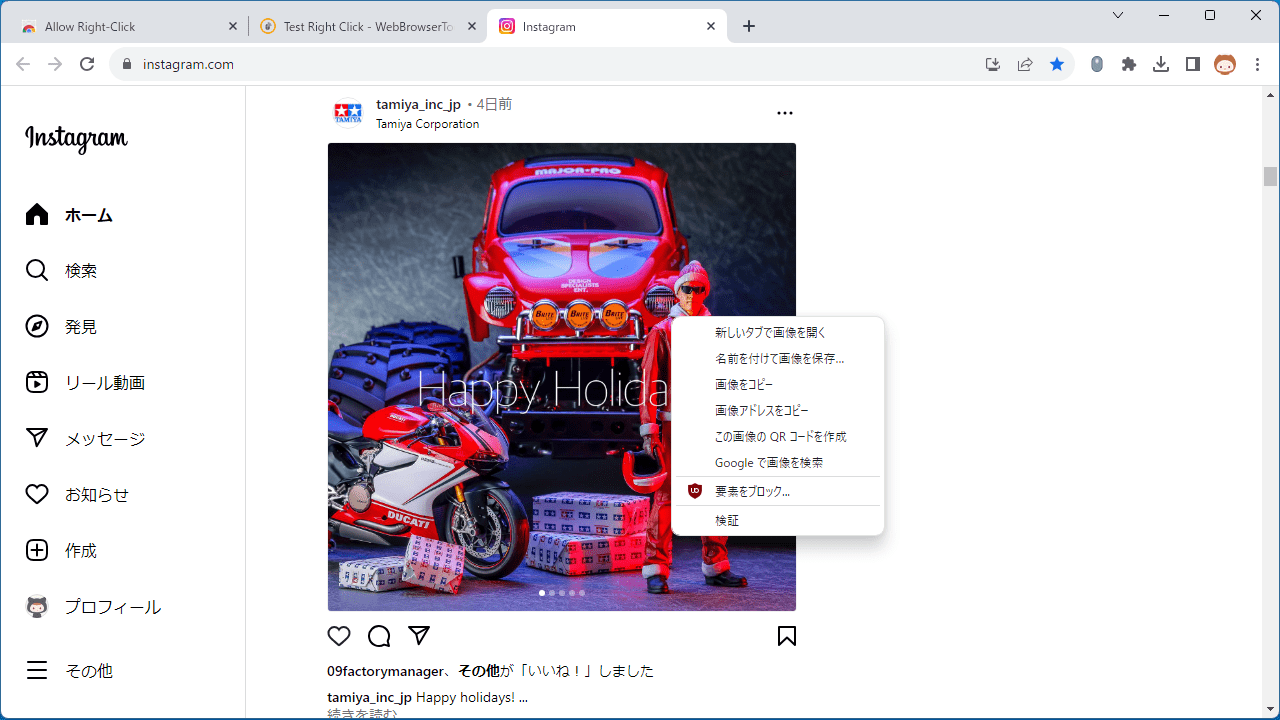
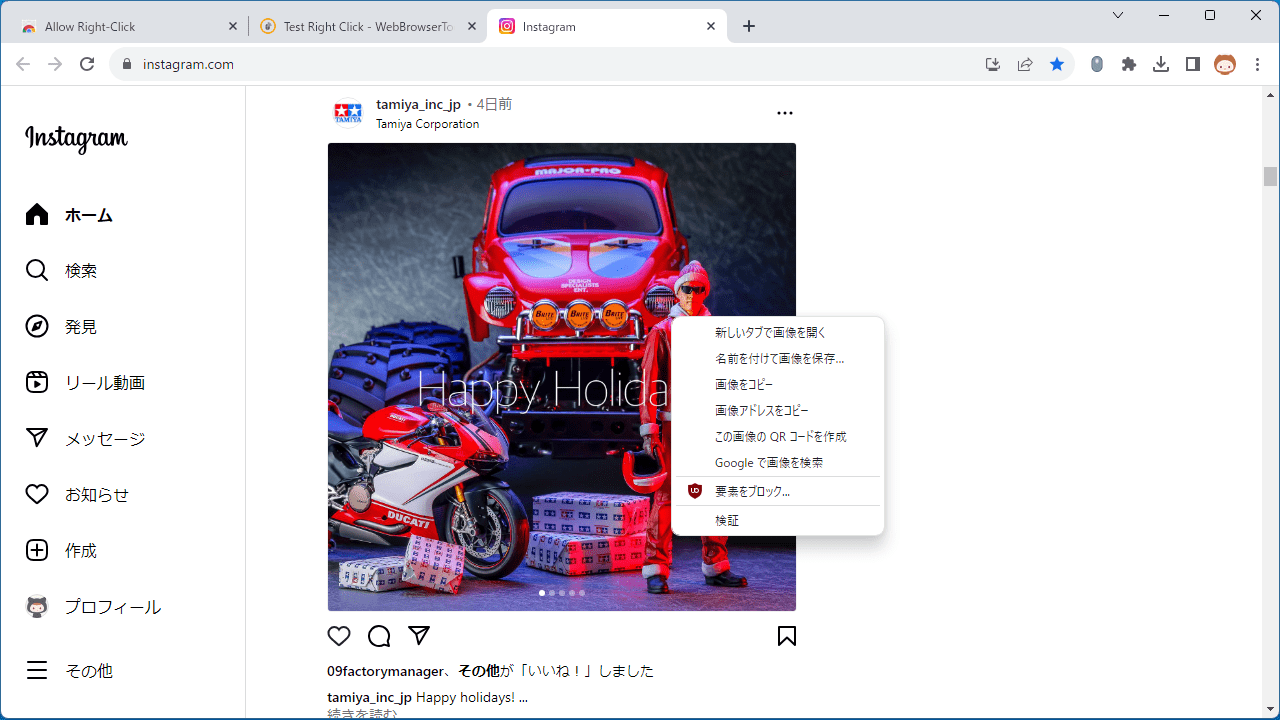
Allow Right-Click は、右クリックや右クリックメニューが禁止されている Web ページで右クリック/右クリックメニューを有効にすることができるブラウザ拡張機能/アドオンです。
Allow Right-Click を使用すると、コンテキスト メニュー、コピー、貼り付け、およびテキスト選択が禁止されているサイトで右クリックを有効にすることができます。
使い方はかんたんです
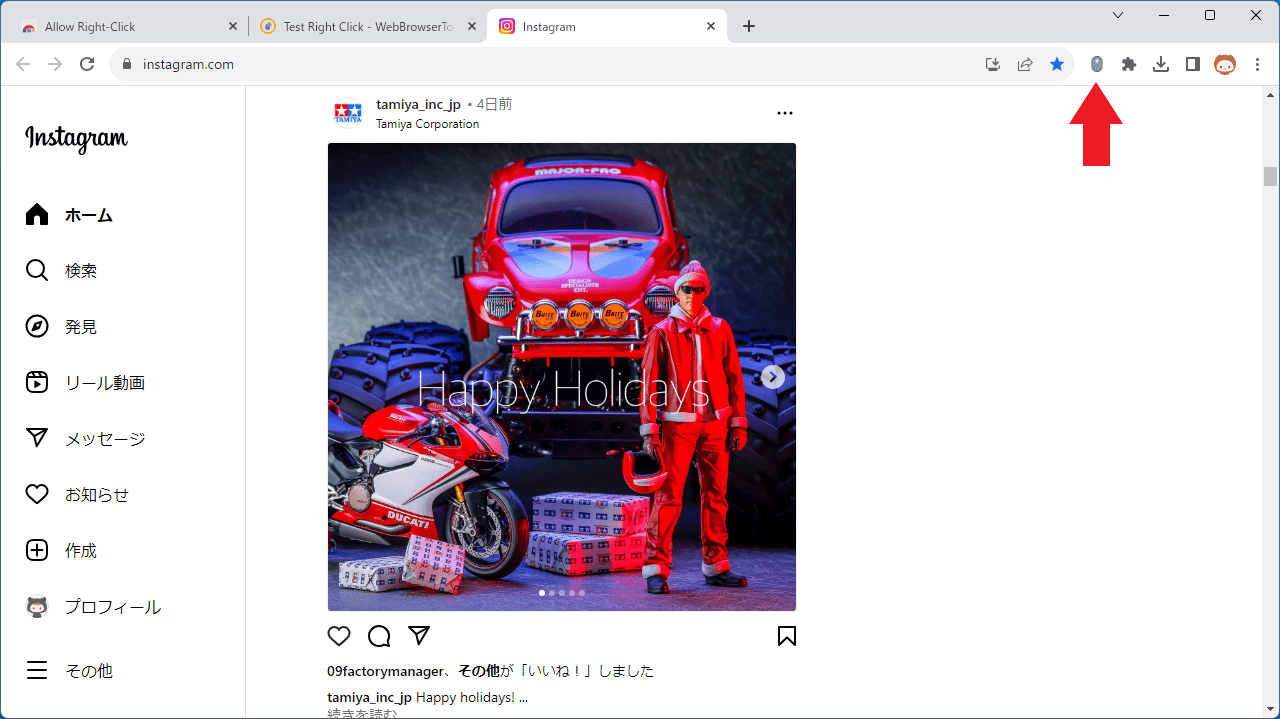
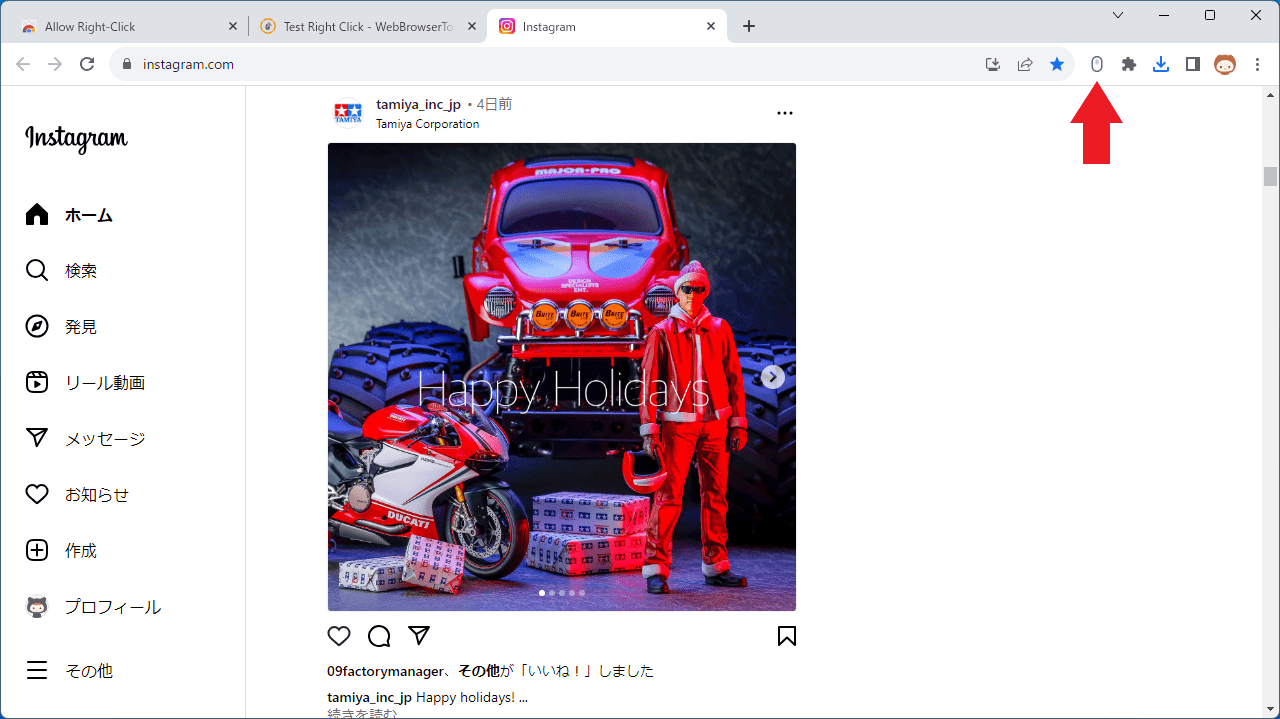
Allow Right-Click は、ユーザーのブラウザのツールバー領域にボタンを追加します。拡張機能のアイコンをクリックすると、現在のページに小さなスクリプトが挿入され、コンテキストメニューのブロックが解除されます。
Web サイトがカスタムコンテキストメニューを提供せずに右クリックコンテキストメニューをブロックしている場合、ユーザーは拡張機能のボタンをクリックして制限を解除できます。
Web ページの保護を解除できます
Allow Right-Click は、右クリックが禁止されているサイト/Web ページで右クリックを有効にすることができる便利なブラウザ拡張機能です。この拡張機能は、Web ページのコンテンツがコピーや貼り付けから保護されている状況で特に役立ちます。
機能
- コンテキストに基づいてデフォルトのコンテキスト メニューを再度有効にします (画像の場合は画像コンテキスト メニューが表示され、ビデオの場合は「名前を付けて保存」コンテキスト メニュー項目を使用してデフォルトのビデオ コンテキスト メニューが表示されます)。
- コピー アンド ペーストを再度有効にします。
- ワンクリックでオンとオフを切り替えます。
- ユーザーが要求した Web サイトで自動的に有効になります。
- 「window.alert」やその他の邪魔な通知をミュートして、Web の邪魔を無効にします。
- テキスト選択のブロックを解除します ( “user-select”、”-moz-user-select”、および “-webkit-user-select”)。
- ポインター イベントのブロックを解除します (“pointer-events”)。
- HTML5 のカスタム要素内の画像アクセスのブロックを解除します。
- 開く- GitHub のソース。
- Android 上のタッチ イベント (タッチスタートとタッチエンド) のブロックを解除します。
価格:無料
動作環境:Windows 7|8|8.1|10|11・Mac・Linux
使用言語:英語
最終更新日:
2年前 (2024/09/19)
ダウンロード数:
画像

拡張機能のアイコン

アイコンのクリックで有効化

右クリックメニュー
使い方
インストール
1.インストール方法(Chrome)
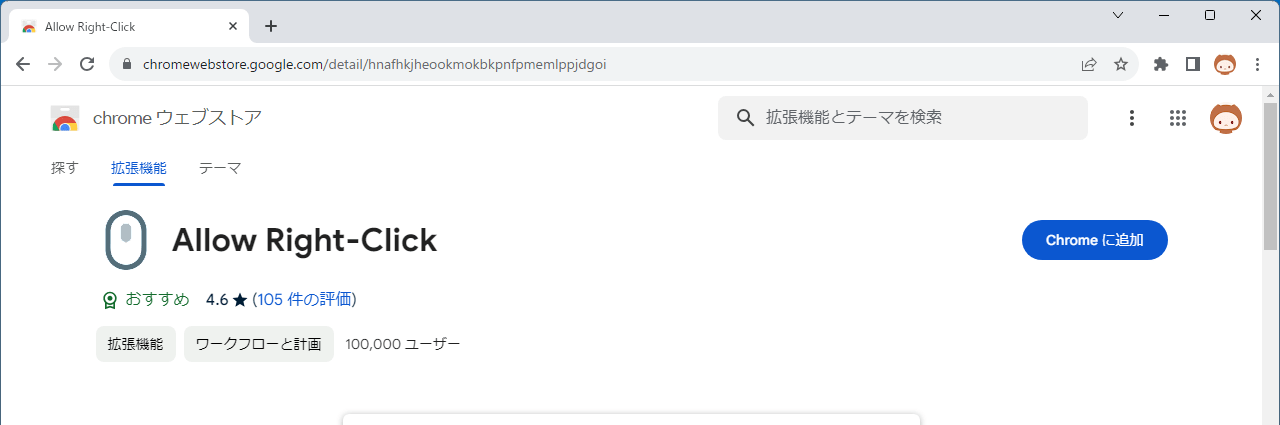
- ダウンロード先のページを開いたら、[Chrome に追加]ボタンをクリックします。
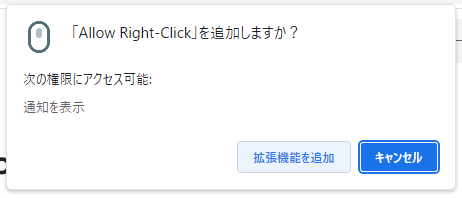
- ポップアップが開いたら、[拡張機能を追加]ボタンをクリックします。
基本的な使い方
1. 基本的な使い方
- 右クリックを有効にしたいページを開いたら、拡張機能のアイコンをクリックします。


よくある質問と回答
ライセンスについて。