").attr(n.scriptAttrs||{}).prop({charset:n.scriptCharset,src:n.url}).on("load error",i=function(e){r.remove(),i=null,e&&t("error"===e.type?404:200,e.type)}),C.head.appendChild(r[0])},abort:function(){i&&i()}}});var Jt,Kt=[],Zt=/(=)\?(?=&|$)|\?\?/;ce.ajaxSetup({jsonp:"callback",jsonpCallback:function(){var e=Kt.pop()||ce.expando+"_"+jt.guid++;return this[e]=!0,e}}),ce.ajaxPrefilter("json jsonp",function(e,t,n){var r,i,o,a=!1!==e.jsonp&&(Zt.test(e.url)?"url":"string"==typeof e.data&&0===(e.contentType||"").indexOf("application/x-www-form-urlencoded")&&Zt.test(e.data)&&"data");if(a||"jsonp"===e.dataTypes[0])return r=e.jsonpCallback=v(e.jsonpCallback)?e.jsonpCallback():e.jsonpCallback,a?e[a]=e[a].replace(Zt,"$1"+r):!1!==e.jsonp&&(e.url+=(At.test(e.url)?"&":"?")+e.jsonp+"="+r),e.converters["script json"]=function(){return o||ce.error(r+" was not called"),o[0]},e.dataTypes[0]="json",i=ie[r],ie[r]=function(){o=arguments},n.always(function(){void 0===i?ce(ie).removeProp(r):ie[r]=i,e[r]&&(e.jsonpCallback=t.jsonpCallback,Kt.push(r)),o&&v(i)&&i(o[0]),o=i=void 0}),"script"}),le.createHTMLDocument=((Jt=C.implementation.createHTMLDocument("").body).innerHTML="
",2===Jt.childNodes.length),ce.parseHTML=function(e,t,n){return"string"!=typeof e?[]:("boolean"==typeof t&&(n=t,t=!1),t||(le.createHTMLDocument?((r=(t=C.implementation.createHTMLDocument("")).createElement("base")).href=C.location.href,t.head.appendChild(r)):t=C),o=!n&&[],(i=w.exec(e))?[t.createElement(i[1])]:(i=Ae([e],t,o),o&&o.length&&ce(o).remove(),ce.merge([],i.childNodes)));var r,i,o},ce.fn.load=function(e,t,n){var r,i,o,a=this,s=e.indexOf(" ");return-1").append(ce.parseHTML(e)).find(r):e)}).always(n&&function(e,t){a.each(function(){n.apply(this,o||[e.responseText,t,e])})}),this},ce.expr.pseudos.animated=function(t){return ce.grep(ce.timers,function(e){return t===e.elem}).length},ce.offset={setOffset:function(e,t,n){var r,i,o,a,s,u,l=ce.css(e,"position"),c=ce(e),f={};"static"===l&&(e.style.position="relative"),s=c.offset(),o=ce.css(e,"top"),u=ce.css(e,"left"),("absolute"===l||"fixed"===l)&&-1<(o+u).indexOf("auto")?(a=(r=c.position()).top,i=r.left):(a=parseFloat(o)||0,i=parseFloat(u)||0),v(t)&&(t=t.call(e,n,ce.extend({},s))),null!=t.top&&(f.top=t.top-s.top+a),null!=t.left&&(f.left=t.left-s.left+i),"using"in t?t.using.call(e,f):c.css(f)}},ce.fn.extend({offset:function(t){if(arguments.length)return void 0===t?this:this.each(function(e){ce.offset.setOffset(this,t,e)});var e,n,r=this[0];return r?r.getClientRects().length?(e=r.getBoundingClientRect(),n=r.ownerDocument.defaultView,{top:e.top+n.pageYOffset,left:e.left+n.pageXOffset}):{top:0,left:0}:void 0},position:function(){if(this[0]){var e,t,n,r=this[0],i={top:0,left:0};if("fixed"===ce.css(r,"position"))t=r.getBoundingClientRect();else{t=this.offset(),n=r.ownerDocument,e=r.offsetParent||n.documentElement;while(e&&(e===n.body||e===n.documentElement)&&"static"===ce.css(e,"position"))e=e.parentNode;e&&e!==r&&1===e.nodeType&&((i=ce(e).offset()).top+=ce.css(e,"borderTopWidth",!0),i.left+=ce.css(e,"borderLeftWidth",!0))}return{top:t.top-i.top-ce.css(r,"marginTop",!0),left:t.left-i.left-ce.css(r,"marginLeft",!0)}}},offsetParent:function(){return this.map(function(){var e=this.offsetParent;while(e&&"static"===ce.css(e,"position"))e=e.offsetParent;return e||J})}}),ce.each({scrollLeft:"pageXOffset",scrollTop:"pageYOffset"},function(t,i){var o="pageYOffset"===i;ce.fn[t]=function(e){return M(this,function(e,t,n){var r;if(y(e)?r=e:9===e.nodeType&&(r=e.defaultView),void 0===n)return r?r[i]:e[t];r?r.scrollTo(o?r.pageXOffset:n,o?n:r.pageYOffset):e[t]=n},t,e,arguments.length)}}),ce.each(["top","left"],function(e,n){ce.cssHooks[n]=Ye(le.pixelPosition,function(e,t){if(t)return t=Ge(e,n),_e.test(t)?ce(e).position()[n]+"px":t})}),ce.each({Height:"height",Width:"width"},function(a,s){ce.each({padding:"inner"+a,content:s,"":"outer"+a},function(r,o){ce.fn[o]=function(e,t){var n=arguments.length&&(r||"boolean"!=typeof e),i=r||(!0===e||!0===t?"margin":"border");return M(this,function(e,t,n){var r;return y(e)?0===o.indexOf("outer")?e["inner"+a]:e.document.documentElement["client"+a]:9===e.nodeType?(r=e.documentElement,Math.max(e.body["scroll"+a],r["scroll"+a],e.body["offset"+a],r["offset"+a],r["client"+a])):void 0===n?ce.css(e,t,i):ce.style(e,t,n,i)},s,n?e:void 0,n)}})}),ce.each(["ajaxStart","ajaxStop","ajaxComplete","ajaxError","ajaxSuccess","ajaxSend"],function(e,t){ce.fn[t]=function(e){return this.on(t,e)}}),ce.fn.extend({bind:function(e,t,n){return this.on(e,null,t,n)},unbind:function(e,t){return this.off(e,null,t)},delegate:function(e,t,n,r){return this.on(t,e,n,r)},undelegate:function(e,t,n){return 1===arguments.length?this.off(e,"**"):this.off(t,e||"**",n)},hover:function(e,t){return this.on("mouseenter",e).on("mouseleave",t||e)}}),ce.each("blur focus focusin focusout resize scroll click dblclick mousedown mouseup mousemove mouseover mouseout mouseenter mouseleave change select submit keydown keypress keyup contextmenu".split(" "),function(e,n){ce.fn[n]=function(e,t){return 0
StressMyPC 5.71
ベンチマーク
2020/03/22 16:42
説明機能仕様ダウンロード画像使い方
CPU/GPU/HD のストレステストを行うツール
PC のストレステストを実行するフリーのストレステストソフト。CPU・GPU(グラフィックカード)・HD(ハードドライブ)に負荷をかけ続けて Windows PC の安定性をテストします。
StressMyPC の概要
StressMyPC は、コンピュータのストレステストを行うソフトウェアです。GPU・CPU・HD のテストをそれぞれまたは同時に行って、高負荷時の Windows PC または Windows Server の安定性や動作、バッテリーの使用時間などを評価できます。
StressMyPC の機能
StressMyPC は、以下の 3 つのストレステストを実行できます。
| テスト項目 |
概要 |
| Aggressive CPU-Stress |
CPU のストレステスト(1 x CPU、2 x CPU、4 x CPU に対応) |
| Paint-Stress(GPU) |
グラフィックカードのストレステスト |
| HD-Stress |
ハードドライブのストレステスト |
好みのテストを実行可能
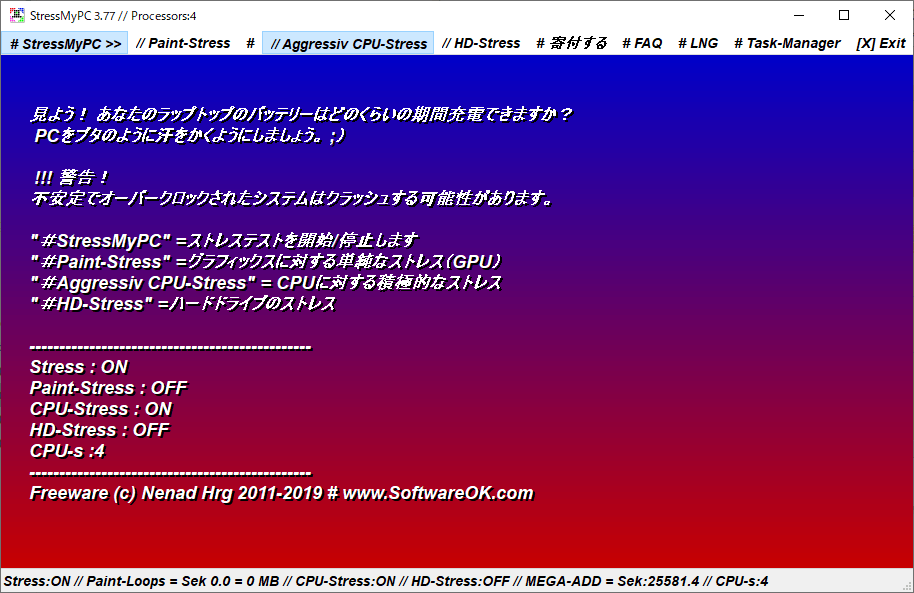
ストレステストの実行方法は簡単で、実行したいテストを選択してテスト開始をクリックするだけです。
テストはいつでも停止可能で、追加でほかのテストを同時実行することもできます。
StressMyPC からタスクマネージャを開いてテスト中の PC のパフォーマンスを監視できます。
簡単に使用できるストレステストツール
StressMyPC は、グラフィックカード/CPU/ハードドライブのストレステストを実行するためのシンプルなプログラムです。自作や中古、オーバークロックした PC などが正常に動作するかをテストするために役に立ちます。
機能
- CPU のストレステスト
- GPU(グラフィックカード)のストレステスト
- HD(ハードディスク)のストレステスト
価格:無料
動作環境:Windows Vista|7|8|8.1|10|11
使用言語:日本語・英語ほか
最終更新日:
4週間前 (2026/03/13)
ダウンロード数:834
画像

インストール済みフォントを表示

インストールされていないフォントの表示とインストール
使い方
インストール・日本語化
1.アプリを起動する
ダウンロードした ZIP ファイルを解凍して、フォルダ内の「StressMyPC (_x64).exe」ファイルを実行すると起動できます。

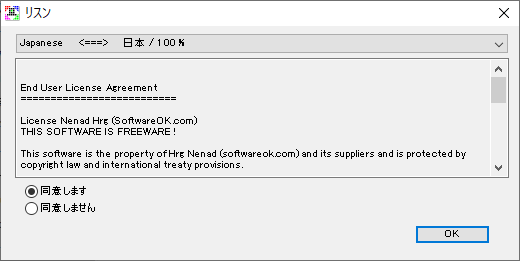
初回起動時はライセンスが表示されます。上のドロップダウンリストから「Japanese」を選択すると日本語で表示します。
- 「同意します」を選択して[OK]をクリックします。
ストレステストを実行する
1.ストレステストの実行方法
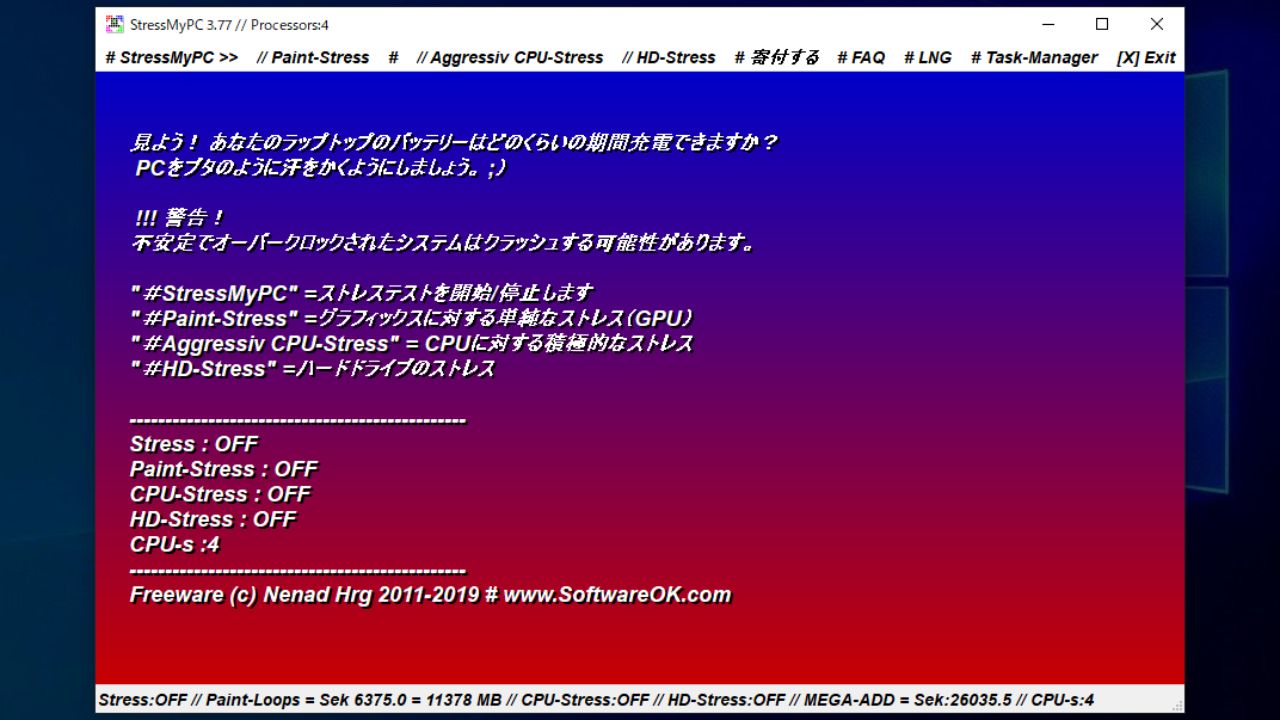
StressMyPC の画面の説明です。
- ① から実行するテストをクリックして有効にします(スクリーンショットでは
- 「# StressMyPC」をクリックするとテストを開始します。
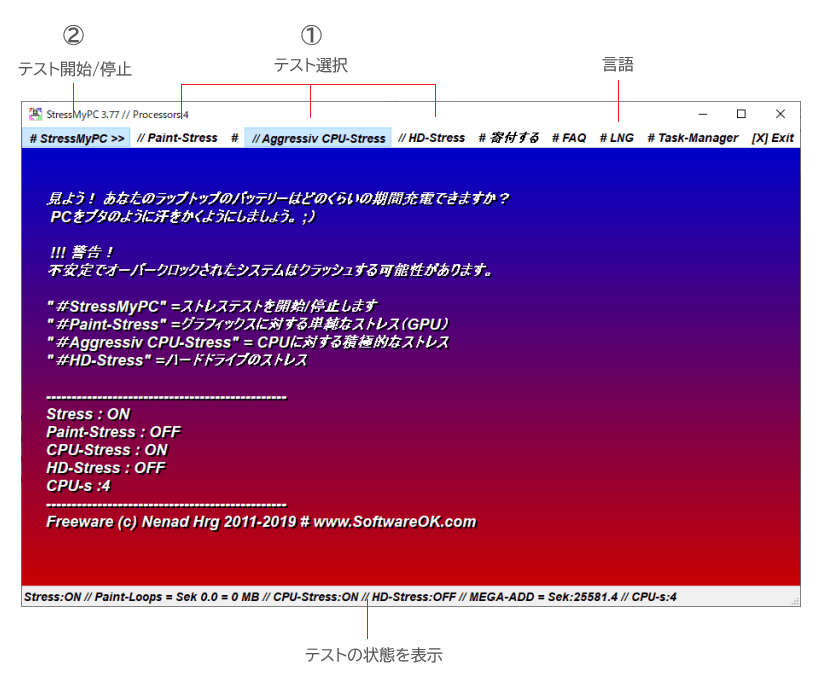
・StressMyPC:テストの開始/停止
・Paint-Stress:グラフィックカードのストレステスト
・Aggressive CPU-Stress:CPU のストレステスト
・HD-Stress :ドライブのストレステスト
2.テストの実行中(CPU)
下は CPU テスト実行中のスクリーンショットです。テスト中は画面と下のステータスバーに「CPU-Stress:ON」と表示されます。
- 「StressMyPC」をクリックするとテストを停止できます。
- ほかのテスト項目をクリックしてテストを追加することもできます。

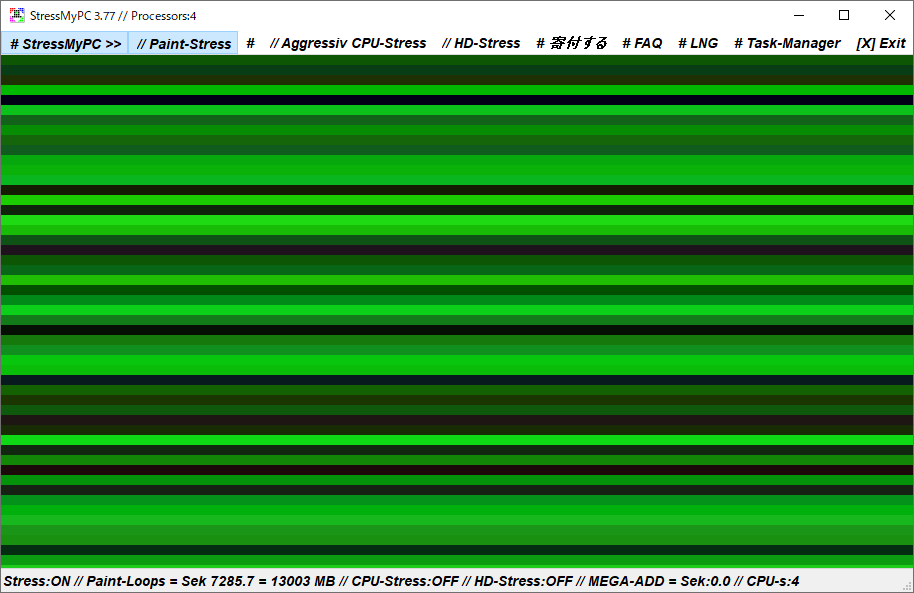
3.テストの実行中(GPU)
グラフィックカードのテスト中のスクリーンショットです。
- 下のステータスバーの「Paint-Loops」に数値が表示されます。
4.テストの実行中(ハードディスク)
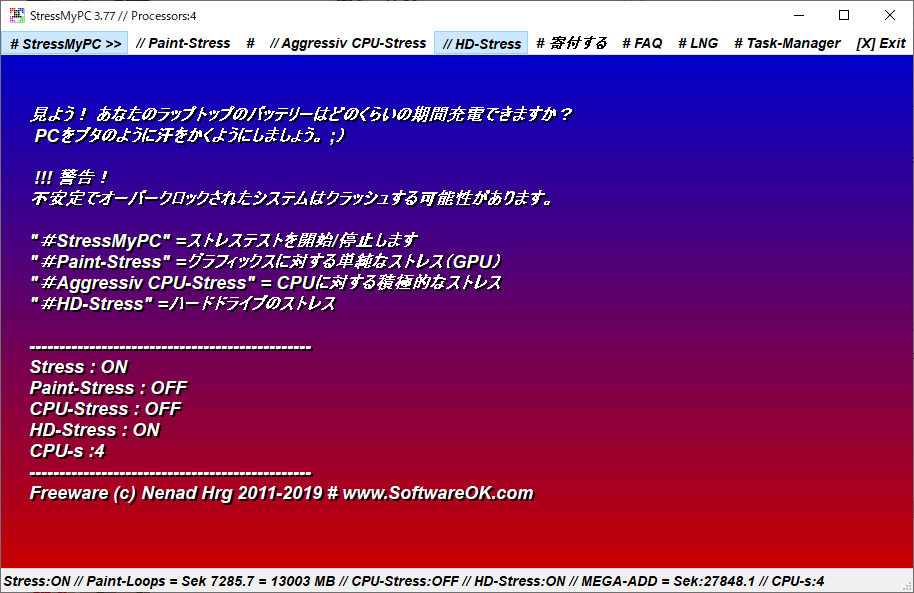
ディスクドライブのテスト中のスクリーンショットです。
- テスト中は画面と下のステータスバーに「HD-Stress:ON」と表示されます。
よくある質問と回答
商用での使用について