").attr(n.scriptAttrs||{}).prop({charset:n.scriptCharset,src:n.url}).on("load error",i=function(e){r.remove(),i=null,e&&t("error"===e.type?404:200,e.type)}),C.head.appendChild(r[0])},abort:function(){i&&i()}}});var Jt,Kt=[],Zt=/(=)\?(?=&|$)|\?\?/;ce.ajaxSetup({jsonp:"callback",jsonpCallback:function(){var e=Kt.pop()||ce.expando+"_"+jt.guid++;return this[e]=!0,e}}),ce.ajaxPrefilter("json jsonp",function(e,t,n){var r,i,o,a=!1!==e.jsonp&&(Zt.test(e.url)?"url":"string"==typeof e.data&&0===(e.contentType||"").indexOf("application/x-www-form-urlencoded")&&Zt.test(e.data)&&"data");if(a||"jsonp"===e.dataTypes[0])return r=e.jsonpCallback=v(e.jsonpCallback)?e.jsonpCallback():e.jsonpCallback,a?e[a]=e[a].replace(Zt,"$1"+r):!1!==e.jsonp&&(e.url+=(At.test(e.url)?"&":"?")+e.jsonp+"="+r),e.converters["script json"]=function(){return o||ce.error(r+" was not called"),o[0]},e.dataTypes[0]="json",i=ie[r],ie[r]=function(){o=arguments},n.always(function(){void 0===i?ce(ie).removeProp(r):ie[r]=i,e[r]&&(e.jsonpCallback=t.jsonpCallback,Kt.push(r)),o&&v(i)&&i(o[0]),o=i=void 0}),"script"}),le.createHTMLDocument=((Jt=C.implementation.createHTMLDocument("").body).innerHTML="
",2===Jt.childNodes.length),ce.parseHTML=function(e,t,n){return"string"!=typeof e?[]:("boolean"==typeof t&&(n=t,t=!1),t||(le.createHTMLDocument?((r=(t=C.implementation.createHTMLDocument("")).createElement("base")).href=C.location.href,t.head.appendChild(r)):t=C),o=!n&&[],(i=w.exec(e))?[t.createElement(i[1])]:(i=Ae([e],t,o),o&&o.length&&ce(o).remove(),ce.merge([],i.childNodes)));var r,i,o},ce.fn.load=function(e,t,n){var r,i,o,a=this,s=e.indexOf(" ");return-1").append(ce.parseHTML(e)).find(r):e)}).always(n&&function(e,t){a.each(function(){n.apply(this,o||[e.responseText,t,e])})}),this},ce.expr.pseudos.animated=function(t){return ce.grep(ce.timers,function(e){return t===e.elem}).length},ce.offset={setOffset:function(e,t,n){var r,i,o,a,s,u,l=ce.css(e,"position"),c=ce(e),f={};"static"===l&&(e.style.position="relative"),s=c.offset(),o=ce.css(e,"top"),u=ce.css(e,"left"),("absolute"===l||"fixed"===l)&&-1<(o+u).indexOf("auto")?(a=(r=c.position()).top,i=r.left):(a=parseFloat(o)||0,i=parseFloat(u)||0),v(t)&&(t=t.call(e,n,ce.extend({},s))),null!=t.top&&(f.top=t.top-s.top+a),null!=t.left&&(f.left=t.left-s.left+i),"using"in t?t.using.call(e,f):c.css(f)}},ce.fn.extend({offset:function(t){if(arguments.length)return void 0===t?this:this.each(function(e){ce.offset.setOffset(this,t,e)});var e,n,r=this[0];return r?r.getClientRects().length?(e=r.getBoundingClientRect(),n=r.ownerDocument.defaultView,{top:e.top+n.pageYOffset,left:e.left+n.pageXOffset}):{top:0,left:0}:void 0},position:function(){if(this[0]){var e,t,n,r=this[0],i={top:0,left:0};if("fixed"===ce.css(r,"position"))t=r.getBoundingClientRect();else{t=this.offset(),n=r.ownerDocument,e=r.offsetParent||n.documentElement;while(e&&(e===n.body||e===n.documentElement)&&"static"===ce.css(e,"position"))e=e.parentNode;e&&e!==r&&1===e.nodeType&&((i=ce(e).offset()).top+=ce.css(e,"borderTopWidth",!0),i.left+=ce.css(e,"borderLeftWidth",!0))}return{top:t.top-i.top-ce.css(r,"marginTop",!0),left:t.left-i.left-ce.css(r,"marginLeft",!0)}}},offsetParent:function(){return this.map(function(){var e=this.offsetParent;while(e&&"static"===ce.css(e,"position"))e=e.offsetParent;return e||J})}}),ce.each({scrollLeft:"pageXOffset",scrollTop:"pageYOffset"},function(t,i){var o="pageYOffset"===i;ce.fn[t]=function(e){return M(this,function(e,t,n){var r;if(y(e)?r=e:9===e.nodeType&&(r=e.defaultView),void 0===n)return r?r[i]:e[t];r?r.scrollTo(o?r.pageXOffset:n,o?n:r.pageYOffset):e[t]=n},t,e,arguments.length)}}),ce.each(["top","left"],function(e,n){ce.cssHooks[n]=Ye(le.pixelPosition,function(e,t){if(t)return t=Ge(e,n),_e.test(t)?ce(e).position()[n]+"px":t})}),ce.each({Height:"height",Width:"width"},function(a,s){ce.each({padding:"inner"+a,content:s,"":"outer"+a},function(r,o){ce.fn[o]=function(e,t){var n=arguments.length&&(r||"boolean"!=typeof e),i=r||(!0===e||!0===t?"margin":"border");return M(this,function(e,t,n){var r;return y(e)?0===o.indexOf("outer")?e["inner"+a]:e.document.documentElement["client"+a]:9===e.nodeType?(r=e.documentElement,Math.max(e.body["scroll"+a],r["scroll"+a],e.body["offset"+a],r["offset"+a],r["client"+a])):void 0===n?ce.css(e,t,i):ce.style(e,t,n,i)},s,n?e:void 0,n)}})}),ce.each(["ajaxStart","ajaxStop","ajaxComplete","ajaxError","ajaxSuccess","ajaxSend"],function(e,t){ce.fn[t]=function(e){return this.on(t,e)}}),ce.fn.extend({bind:function(e,t,n){return this.on(e,null,t,n)},unbind:function(e,t){return this.off(e,null,t)},delegate:function(e,t,n,r){return this.on(t,e,n,r)},undelegate:function(e,t,n){return 1===arguments.length?this.off(e,"**"):this.off(t,e||"**",n)},hover:function(e,t){return this.on("mouseenter",e).on("mouseleave",t||e)}}),ce.each("blur focus focusin focusout resize scroll click dblclick mousedown mouseup mousemove mouseover mouseout mouseenter mouseleave change select submit keydown keypress keyup contextmenu".split(" "),function(e,n){ce.fn[n]=function(e,t){return 0
Online Download Manager 4.2.2.2
ダウンロードマネージャ
2021/11/03 14:092024/11/27 09:29
説明 機能 仕様 ダウンロード 画像 使い方
音楽やビデオをダウンロードできる Chrome 向けダウンロードマネージャ

音楽や動画、画像やドキュメントなどをかんたんにダウンロードし、すべてのダウンロードアイテムを管理できる、Google Chrome ブラウザ用のダウンロードマネージャ。
Online Download Manager の概要
Online Download Manager は、ワンクリックですべてのソーシャルネットワークと動画/音楽サービスから音楽とビデオをダウンロードできるダウンロードマネージャです。
Online Download Manager の機能
Online Download Manager の主な機能です。
機能
概要
メイン機能
Chrome 用ダウンロードマネージャ
機能詳細
・ダウンロードの管理
・ビデオ/音楽/イメージ/ドキュメントのダウンロード
・ダウンロードをサブフォルダに種類で分けて保存する機能(Sorting System)
全てのダウンロードを管理できます
Online Download Manager は、ブラウザのすべてのダウンロードを管理することができる Chrome ブラウザ拡張機能です。
Online Download Manager をインストールすると、ブラウザの下部に表示されるデフォルトのダウンロードバーが無効になり、スムーズにあらゆるファイルをダウンロードできます。外観やダウンロードの通知などの設定を自由に変更できるのが特徴です。
動画や音楽などをストレスフリーでダウンロードできます
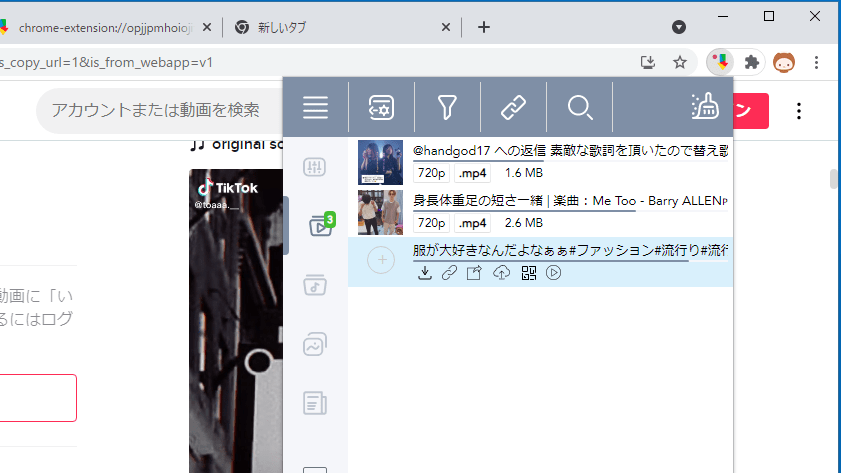
Online Download Manager には、ビデオや音楽、画像やドキュメントをダウンロードできるインターフェースが搭載されており、再生中または再生したメディアをワンクリックでダウンロードできます。
この拡張機能を使用すると、Facebook、VK、Twitter、Instagram、Vimeo、Soundcloud、TikTok などから動画や音楽をダウンロードすることができます。
高速な動作が特徴のテキストエディタ
Online Download Manager は、プログラマーや Web デザイナーのための特別なオプション機能が含まれているテキストエディタです。有料のプロバージョンでは、Dropbox または Googleドライブのストレージにアップロードできる機能が利用できます。
機能
ダウンロードの管理
ビデオのダウンロード
音楽のダウンロード
イメージのダウンロード
ドキュメントのダウンロード
価格: 無料
動作環境: Windows 7|8|8.1|10|11
使用言語: 英語ほか
最終更新日:
1年前 (2024/11/27)
ダウンロード数:
画像
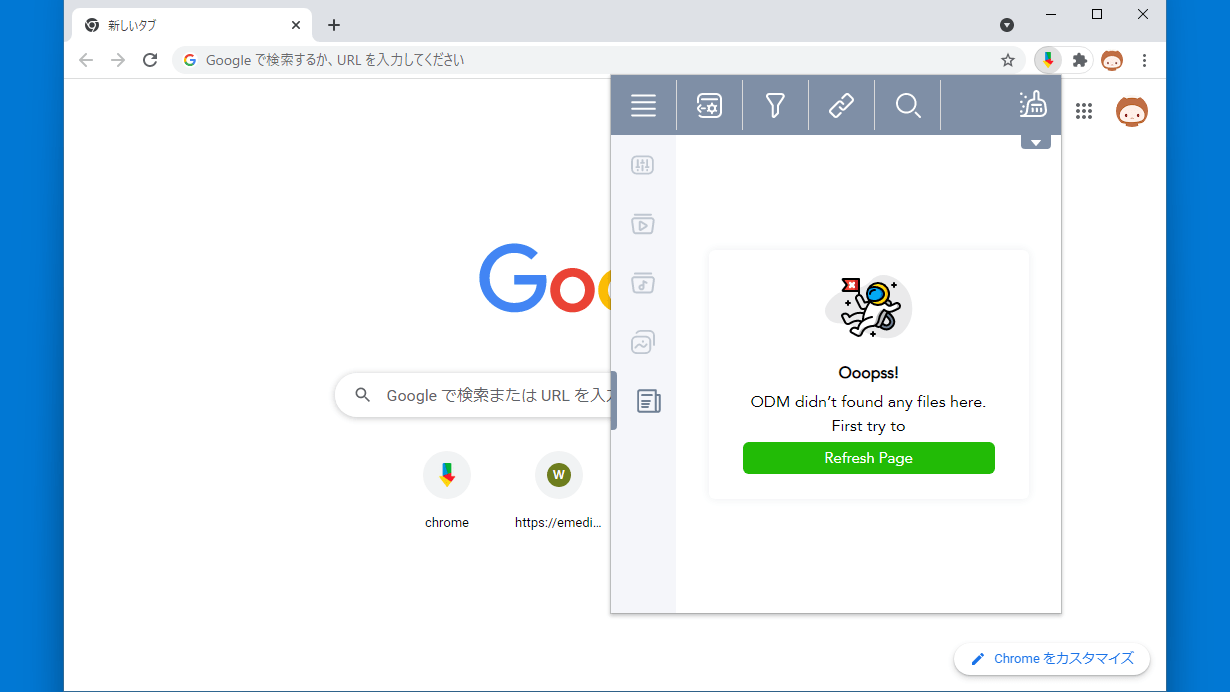
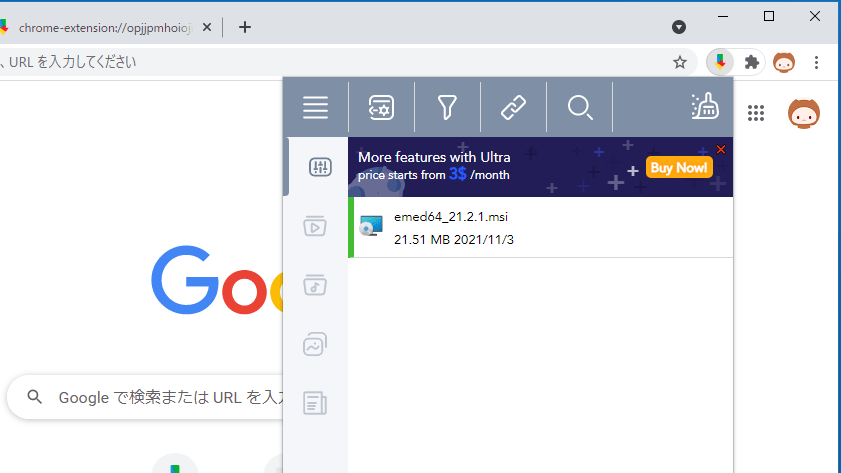
ユーザーインターフェース
動画のダウンロード
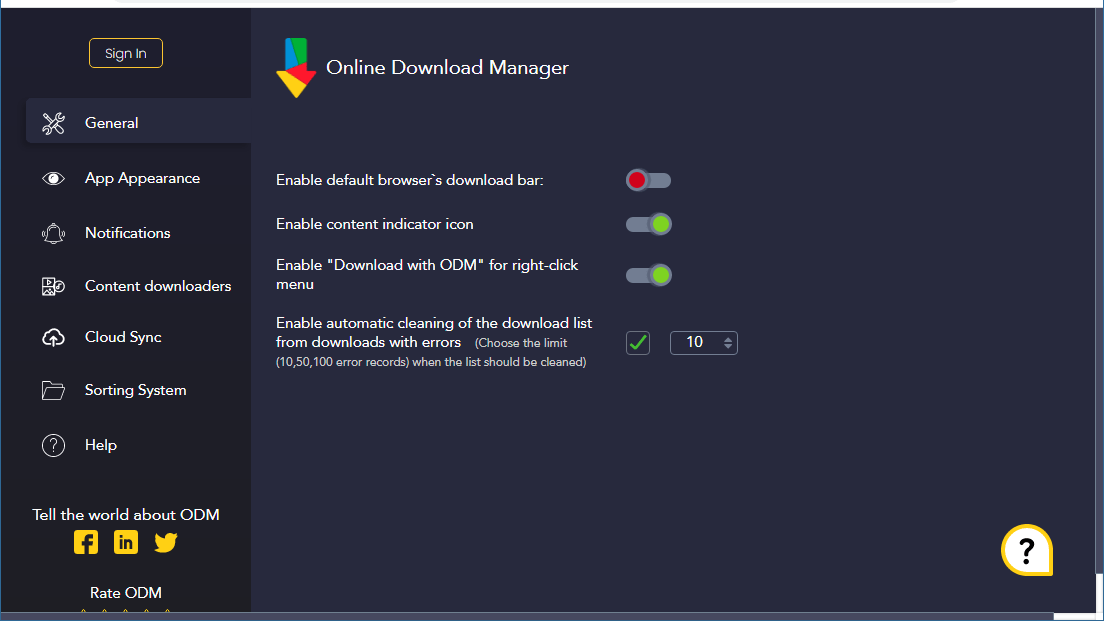
設定(全般)
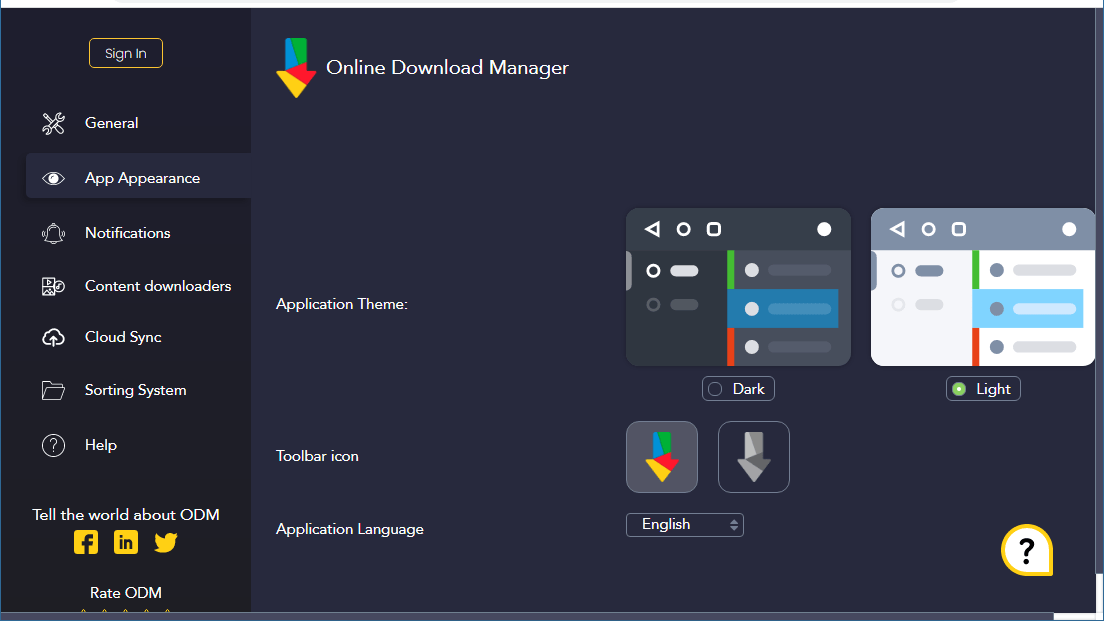
設定(外観)
使い方
インストール
1.インストール方法
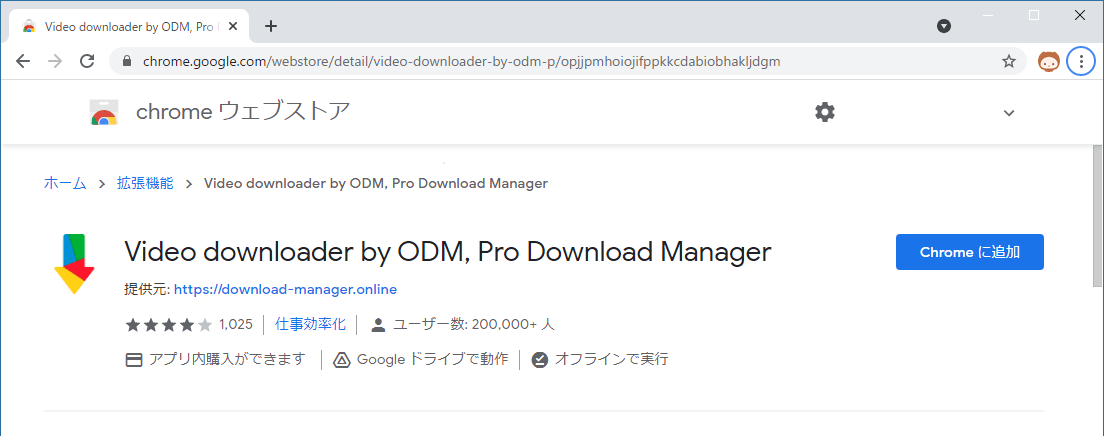
ダウンロードページに移動したら、[Chrome に追加 ]をクリックします。
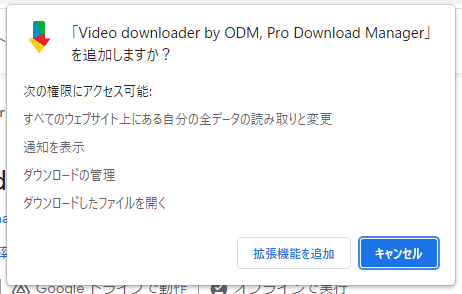
ポップアップが表示されたら[拡張機能を追加 ]をクリックします。
基本的な使い方
1. 基本的な使い方
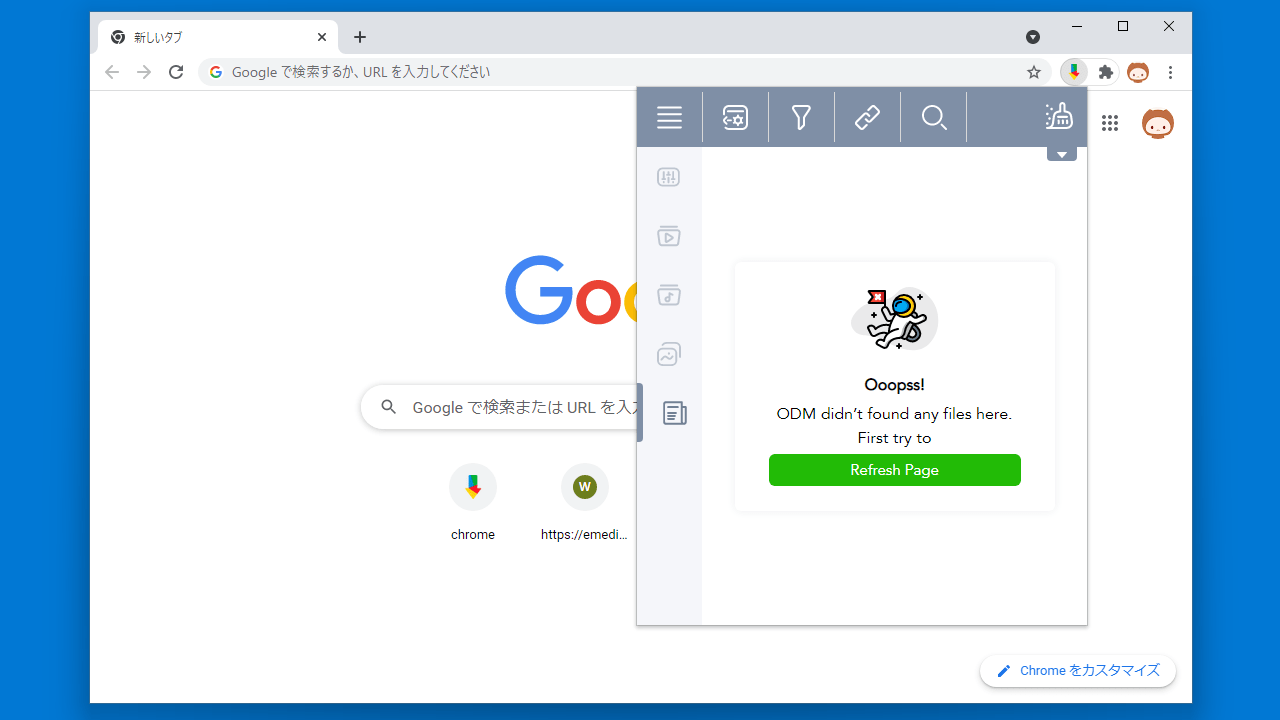
拡張機能をピン留めすると、バーにアイコンが表示されます。アイコンをクリックするとインターフェースが表示されダウンロードを管理できます。
上部(横)のツールバーでは、「設定」「フィルタリング」「複数のリンクのダウンロード」「検索」「リストの消去」を行うことができます。
左側(縦)のツールバーでは、「ダウンロードの管理」「ビデオのダウンロード」「音楽のダウンロード」「イメージのダウンロード」「ドキュメントのダウンロード」を実行できます。
2.設定
「設定 」を開くと、ダウンロードマネージャの設定や外観などを変更できます。
・Enable default browser`s download bar :デフォルトのブラウザのダウンロードバーを有効にする
・Enable content indicator icon :コンテンツインジケーターアイコンを有効にする
・Enable “Download with ODM” for right-click menu :右クリックメニューの項目を追加する
・Enable automatic cleaning of the download list from downloads with errors :エラーのあるダウンロードリストの自動クリーニングを有効にする
「App Apperrances 」では外観のテーマやツールバーアイコンなどを変更できます。
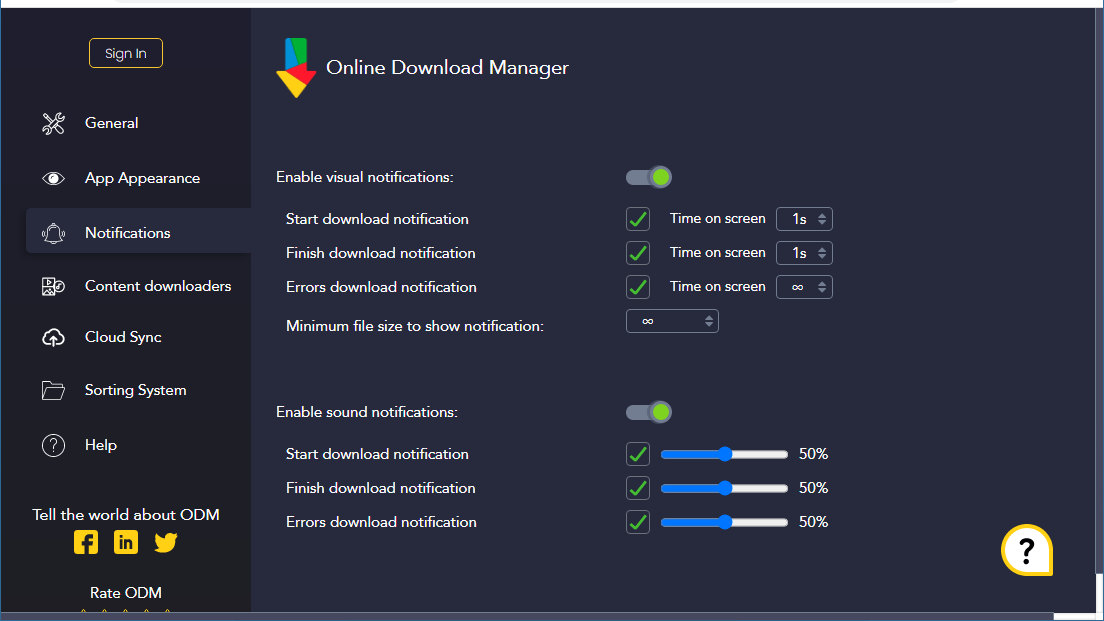
「Notification 」では、通知の設定ができます。
・Enable visual notifications :ビジュアル通知の有効/無効の切り替え
・Start download notification :ダウンロード開始の通知
・Finish download notification :ダウンロード管理の通知
・Errors download notification :ダウンロードエラーの通知
└ Time on screen :通知を表示する時間
・Minimum file size to show notification :通知を表示する最小ファイルサイズ
・Enable sound notifications :サウンド通知の有効/無効の切り替え
・Start download notification :ダウンロード開始の通知
・Finish download notification :ダウンロード管理の通知
・Errors download notification :ダウンロードエラーの通知
「Content downloaders 」では、コンテンツのダウンロードの有効/無効およびブロックリスト/ホワイトリストを設定できます。
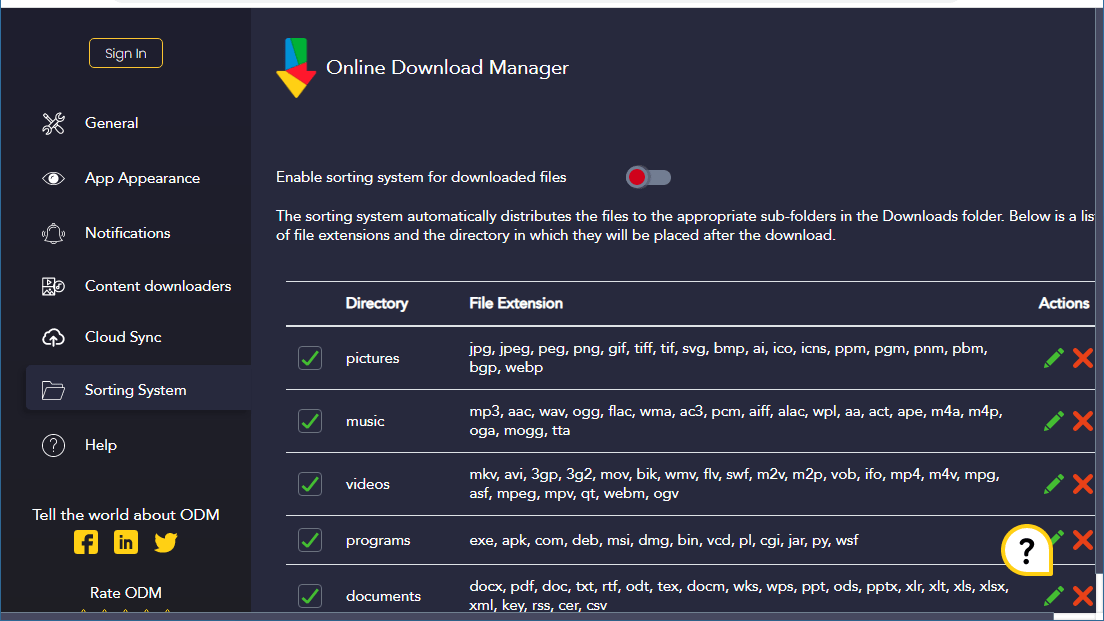
「Sorting System 」では、ファイルをダウンロードフォルダ内の適切なサブフォルダに自動的に整理する機能を有効にできます。ファイル拡張子とダウンロード後にそれらが配置されるディレクトリを設定できます。
よくある質問と回答
ライセンスについて。
ユーザーレビュー
レビューはまだありません、 最初のレビューを投稿してください。コメントは任意です。
Online Download Manager は、どなたでも無料で利用できます。